Cached at:
11/03/26, 11:59 AM
# Introduction - git-loom
Source: [https://narnaud.github.io/git-loom/introduction.html](https://narnaud.github.io/git-loom/introduction.html)
## Keyboard shortcuts
Press←or→to navigate between chapters
PressSor/to search in the book
Press?to show this help
PressEscto hide this help
## git\-loom
## [](https://narnaud.github.io/git-loom/introduction.html#)
*git\-loom*weaves your feature branches into a single integration branch, so you can work on all of them at once — committing, amending, splitting and reordering — without ever switching branches\. It is inspired by[jujutsu](https://github.com/martinvonz/jj)and[GitButler](https://gitbutler.com/)\.
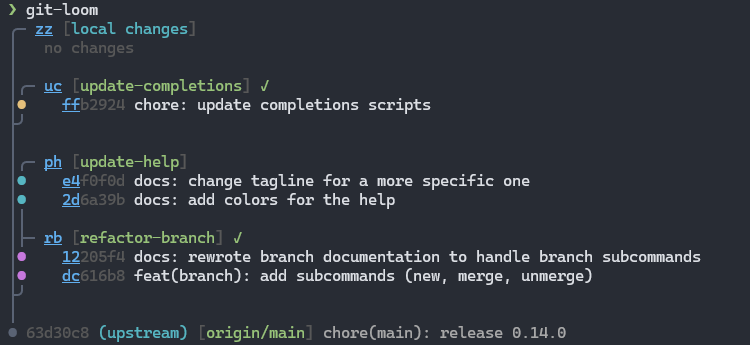
## [See It in Action](https://narnaud.github.io/git-loom/introduction.html#see-it-in-action)
From the command line, with the status pinned on the left:
The same operations from the interactive[`git loom tui`](https://narnaud.github.io/git-loom/commands/tui.html):
## [Core Concepts](https://narnaud.github.io/git-loom/introduction.html#core-concepts)
### [Integration Branch](https://narnaud.github.io/git-loom/introduction.html#integration-branch)
The branch you work on\. It tracks a remote branch \(e\.g\.`origin/main`\) and merges in all your feature branches, so you build and test them together\. Create it with[`git loom init`](https://narnaud.github.io/git-loom/commands/init.html)\.
### [Feature Branches](https://narnaud.github.io/git-loom/introduction.html#feature-branches)
Independent branches woven into the integration branch, each pushed and reviewed on its own\. You manage them from the integration branch:
- [`commit`](https://narnaud.github.io/git-loom/commands/commit.html)commits to a feature branch, creating it if needed
- [`fold`](https://narnaud.github.io/git-loom/commands/fold.html)amends, fixes up, or moves commits and files between branches
- [`push`](https://narnaud.github.io/git-loom/commands/push.html)pushes a branch and opens its pull request
> Tip [`git loom commit \-b <name\>`](https://narnaud.github.io/git-loom/commands/commit.html)is the usual way to start a branch\.[`git loom branch`](https://narnaud.github.io/git-loom/commands/branch.html)is for creating an empty branch ahead of time, or turning existing commits into one\.
### [Weaving](https://narnaud.github.io/git-loom/introduction.html#weaving)
Each feature branch sits on the integration branch as a side branch joined by a merge, which is what`git loom status`draws\. Every loom command rewrites history to keep that shape, so you never rebase by hand\.
A rewrite keeps the modification time of files whose content did not change, so your build tool does not rebuild everything\. Pause watcher\-driven builds \(`cargo watch`, build on save\) while a loom command runs: they may compile half\-rewritten files\.
### [Short IDs](https://narnaud.github.io/git-loom/introduction.html#short-ids)
`git loom status`labels every branch, commit and file with a short ID \(`fa`,`pop`,`ma`\) that you type in other commands instead of hashes, names or paths\.
Commit IDs are persistent: they come from a`Change\-Id`trailer that loom adds to every commit it creates \(see[`loom\.changeId`](https://narnaud.github.io/git-loom/configuration.html#loomchangeid)\), so they survive rewrites and you can chain commands on the same ID\.
## [Quick Start](https://narnaud.github.io/git-loom/introduction.html#quick-start)
```
# Create an integration branch from your main branch
git checkout main
git loom init
# Commit everything to a new feature branch, then add a second commit
git loom commit -b feature-auth -m "add login form" zz
git loom commit -b feature-auth -m "improve login form" zz
# See the branch-aware status
git loom
# Push the branch for review
git loom push feature-auth
```
Next: the[Tutorial](https://narnaud.github.io/git-loom/guides/tutorial.html), or[Working with AI Agents](https://narnaud.github.io/git-loom/guides/agents.html)to let Claude Code drive loom for you\.
[https://narnaud.github.io/git-loom/announcing-1.0.html](https://narnaud.github.io/git-loom/announcing-1.0.html)
[https://narnaud.github.io/git-loom/announcing-1.0.html](https://narnaud.github.io/git-loom/announcing-1.0.html)