Cached at:
05/11/26, 09:02 AM
# Piping terminal output to the browser using systemfd
Source: [https://blog.izissise.net/posts/webdev-livecompile/](https://blog.izissise.net/posts/webdev-livecompile/)
## [An opportunity](https://blog.izissise.net/posts/webdev-livecompile/#an-opportunity)
I use[systemfd](https://github.com/mitsuhiko/systemfd)in combination with[watchexec](https://watchexec.github.io/)to run a web server project with a tight development loop\. While I'm using Rust and Cargo for the examples in this post, this technique works for any compiled backend language\. The compiled program can reuse the already opened listening socket so web clients see no disruption \(the socket is never closed\)\.
systemfd will keep the listening socket open on the specified port while watchexec will recompile the server and run it on source file changes\.
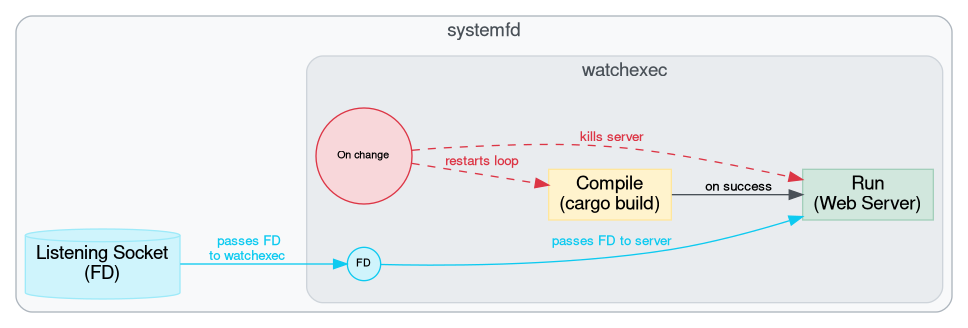While the compilation process is running, nothing is handling requests on the listening socket\! We have three options:
1. Do nothing, the browser will display a blank page during the whole compilation process\.
2. Wait until the compilation is successful before killing the previous web server version\.
3. Stream the compilation process to the web page\. 👈 we're going with this one
TLDR:[Complete script](https://blog.izissise.net/posts/webdev-livecompile/#conclusion)
## [Bash script](https://blog.izissise.net/posts/webdev-livecompile/#bash-script)
The script has two parts, the systemfd/watchexec runner and the compile/run function\.
## [Bash function](https://blog.izissise.net/posts/webdev-livecompile/#bash-function)
First, let's write`compile\_and\_run`, a Bash function that will be re\-run every time watchexec detects a change\.
We can start by declaring variables and saving some environment context\.
```
compile_and_run() {
set -eu # exit on error or undeclared variable
local tty_log_file fdlast socatpid
tty_log_file=target/buildandrun.log # log file path
mkdir -p target # create log file dir if does not exists
...
}
```
## [HTTP response](https://blog.izissise.net/posts/webdev-livecompile/#http-response)
We use a file \(`tty\_log\_file`\) to build the http response that will display the compile logs\. Using bash's`printf`, we can build a minimal html page in the response that uses the[xmp](https://developer.mozilla.org/en-US/docs/Web/HTML/Reference/Elements/xmp)tag, which allows us to put text \(compile logs\) without escaping special characters\.
```
compile_and_run() {
...
printf '%s\r\n' \
"HTTP/1.1 200 OK" \
"Content-Type: text/html; charset=utf-8" \
"Connection: close" \
"" \
"<!doctype html><head><meta charset='utf-8'>" \
"<body><xmp>" \
> "$tty_log_file" # one '>' redirection empty the file and write our minimal http response header
...
}
```
## [Socat](https://blog.izissise.net/posts/webdev-livecompile/#socat)
Let's send this response file to any client that connects to the listening socket\. We're using`socat`because it has an`ACCEPT\-FD`option that works with an already opened listening socket, which is what`systemfd`gives us\.`systemfd`puts these fd numbers in two environment variables`LISTEN\_FDS\_FIRST\_FD`and`LISTEN\_FDS`\.
`socat`is run with the following parameters:
- `ACCEPT\-FD:"$fd",fork`First socat address \(the systemfd listening socket\), a new process will be forked for new clients\.
- `OPEN:"$tty\_log\_file",rdonly,seek=0,ignoreeof`Open the file in readonly mode, seek to beginning, and keep the connection open streaming new bytes written to the file\.
- `\!\!OPEN:/dev/null,wronly`Redirect the client http request to /dev/null\.
- `&`Run as a background process, the function will keep executing while socat stays running in the background\.
We keep the socat pids in a bash array for the next step\.
```
compile_and_run() {
...
socatpid=()
fdlast=$(( $LISTEN_FDS_FIRST_FD + $LISTEN_FDS - 1))
for fd in $(seq "$LISTEN_FDS_FIRST_FD" "$fdlast"); do
socat ACCEPT-FD:"$fd",fork OPEN:"$tty_log_file",seek=0,ignoreeof,rdonly'!!OPEN:/dev/null,wronly' 2>/dev/null &
socatpid+=("$!")
done
...
}
```
## [Cleanup](https://blog.izissise.net/posts/webdev-livecompile/#cleanup)
We declare a cleanup function here and set up a`trap`, bash will execute the function on any`INT`,`TERM`, or`EXIT`events to kill all our`socat`background processes\.
```
compile_and_run() {
...
kill_socat() {
for pid in "${socatpid[@]}"; do
pkill -P "$pid" 2>/dev/null || true # Kill children (active streams)
kill "$pid" 2>/dev/null || true # Kill parent (the listener)
done
}
trap "kill_socat" INT TERM EXIT
...
}
```
## [Compile and run](https://blog.izissise.net/posts/webdev-livecompile/#compile-and-run)
We can now build and run our project\. First, wrap everything in this block:`\{ \.\.\. \} 2\>&1 \| tee \-a "$tty\_log\_file`\. This will display all outputs in both the terminal and the log file\. Inside the block, we build \(`cargo build`\), and on success, we kill the socat processes and run the project \(`exec cargo run`\)\.
```
compile_and_run() {
...
{
{ cargo build || { echo "[build error $?, waiting for modification]"; sleep 999; }; } \
&& {
kill_socat
exec cargo run
};
} 2>&1 | tee -a "$tty_log_file"
}
```
## [Wrappers](https://blog.izissise.net/posts/webdev-livecompile/#wrappers)
Now, we use a classic systemfd \+ watchexec setup\. With the systemfd`\-\-socket`arguments, we can specify the listening socket addresses and ports\. Here, we will declare two localhost sockets for IPv6`\[::1\]`and IPv4`127\.0\.0\.1`\.
This example compiles and runs a Rust project, so we tell watchexec to watch`\.rs`file extensions and the`src/`directory\. Then we make watchexec execute the`compile\_and\_run`bash function using the`declare \-f`trick\. Using a bash subshell`$\(\.\.\.\)`, we copy the function code verbatim into the string argument given to watchexec; we just need to execute the function with`; compile\_and\_run`\.
```
echo 'Launching auto compile and livereload';
LISTENING_PORT=${LISTENING_PORT:-8000}
systemfd \
--no-pid \
--socket http::[::1]:"$LISTENING_PORT" \
--socket http::127.0.0.1:"$LISTENING_PORT" \
-- \
watchexec \
--shell=bash \
--restart --clear --debounce 2s --notify \
--exts rs --watch Cargo.toml --watch build.rs --watch src/ \
-- "$(declare -f compile_and_run); compile_and_run";
```
If a browser connects to the port during compilation, it will now display the compilation output with a never\-ending`HTTP/1\.1`stream\!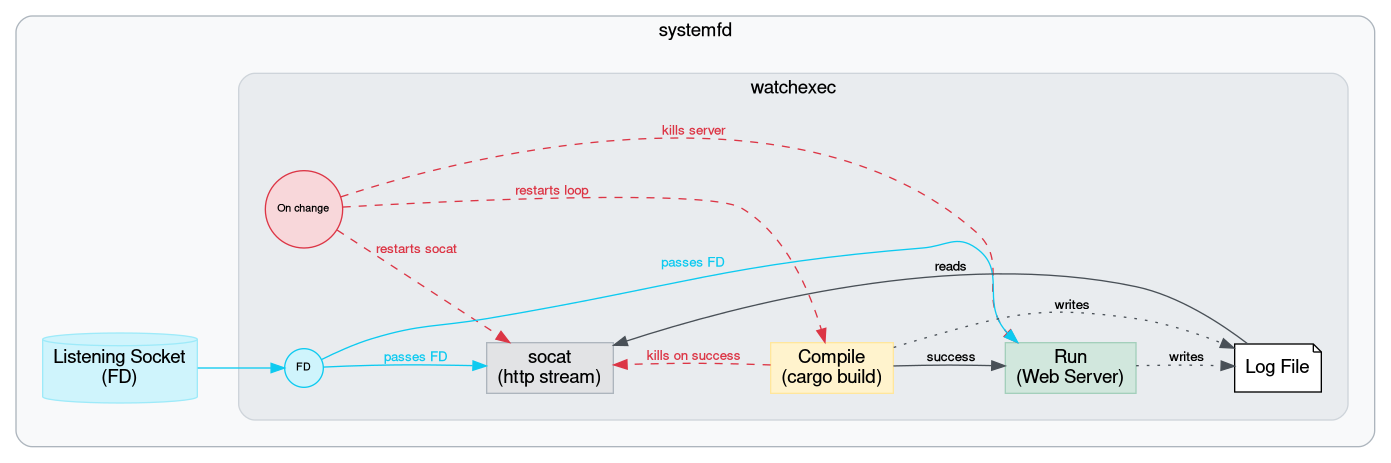
Final script is at the end of the page\.
## [Javascript](https://blog.izissise.net/posts/webdev-livecompile/#javascript)
The previous code works great, but there are some problems when actually using it\.
The browser will display an error page when the http stream is closed \(socat killed\), and there are no colors\.
We need a client support script 🌈
We'll use[xterm\.js](https://xtermjs.org/)to have a full terminal on the page, along with a custom script that will handle reconnecting and pushing the bytes to xterm\.js\.
We can inject a javascript snippet into the page by slightly modifying the response sent by socat:
```
compile_and_run() {
...
printf '%s\r\n' \
"HTTP/1.1 200 OK" \
"Content-Type: text/html; charset=utf-8" \
"Connection: close" \
"" \
"<!doctype html><head><meta charset='utf-8'>" \
"<link rel='stylesheet' href='https://cdn.jsdelivr.net/npm/@xterm/xterm/css/xterm.css' />" \
"<script src='https://cdn.jsdelivr.net/npm/@xterm/xterm/lib/xterm.js'></script>" \
"<script src='https://cdn.jsdelivr.net/gh/izissise/webdevlive@refs/heads/main/livedevtty.js'></script>" \
"<body><xmp>" \
> "$tty_log_file"
...
}
```
You can also vendor the script by downloading it and using this bash syntax:`<script\>$\(<livedevtty\.js\)</script\>`\.
## [Terminal in my html](https://blog.izissise.net/posts/webdev-livecompile/#terminal-in-my-html)
Now we can write the client code\. First, let's make sure that the page stays rendered and doesn't display an error message when the stream closes\.
By calling`window\.stop\(\)`, we tell the browser to abandon its native document loading which would otherwise result in a error page when socat dies\. We then take over with fetch, allowing us to gracefully handle the end of the stream in javascript\.
Then, we open the same URL using`window\.location\.href`with JavaScript's`fetch`, discard all the bytes before the`<body\><xmp\>`marker, and stream the rest to the`xterm\.js`terminal\.
```
async function streamToTerminal(xtermInstance, url, startMarker) {
try {
const response = await fetch(url, { cache: 'no-store' });
if (!response.body) {
throw new Error("ReadableStream not supported in this browser.");
}
const reader = response.body.getReader();
const decoder = new TextDecoder('utf-8');
let isSeeking = true;
let buffer = "";
while (true) {
const { done, value } = await reader.read();
if (done) {
break; // Stream ended normally
}
let chunk = decoder.decode(value, { stream: true });
if (isSeeking) {
buffer += chunk;
const markerIndex = buffer.indexOf(startMarker);
if (markerIndex !== -1) {
isSeeking = false;
// Extract everything AFTER the marker and write it
const contentStart = markerIndex + startMarker.length;
const initialContent = buffer.substring(contentStart);
if (initialContent) {
xtermInstance.write(initialContent);
}
buffer = "";
}
} else {
xtermInstance.write(chunk);
}
}
handleStreamEnd();
} catch (error) {
handleStreamEnd();
}
}
async function activateLive() {
window.stop(); // Stop the browser from continuing to load the main page
const xtermInstance = setupTerminal();
const startMarker = "<body>" + "<xmp>";
await streamToTerminal(xtermInstance, window.location.href, startMarker);
}
```
## [Conclusion](https://blog.izissise.net/posts/webdev-livecompile/#conclusion)
I made an[example repository](https://github.com/izissise/webdevlive)\. The example also shows how to stream the log file when the server is running, so the development terminal is directly shown in the app, further tightening the feedback loop\!
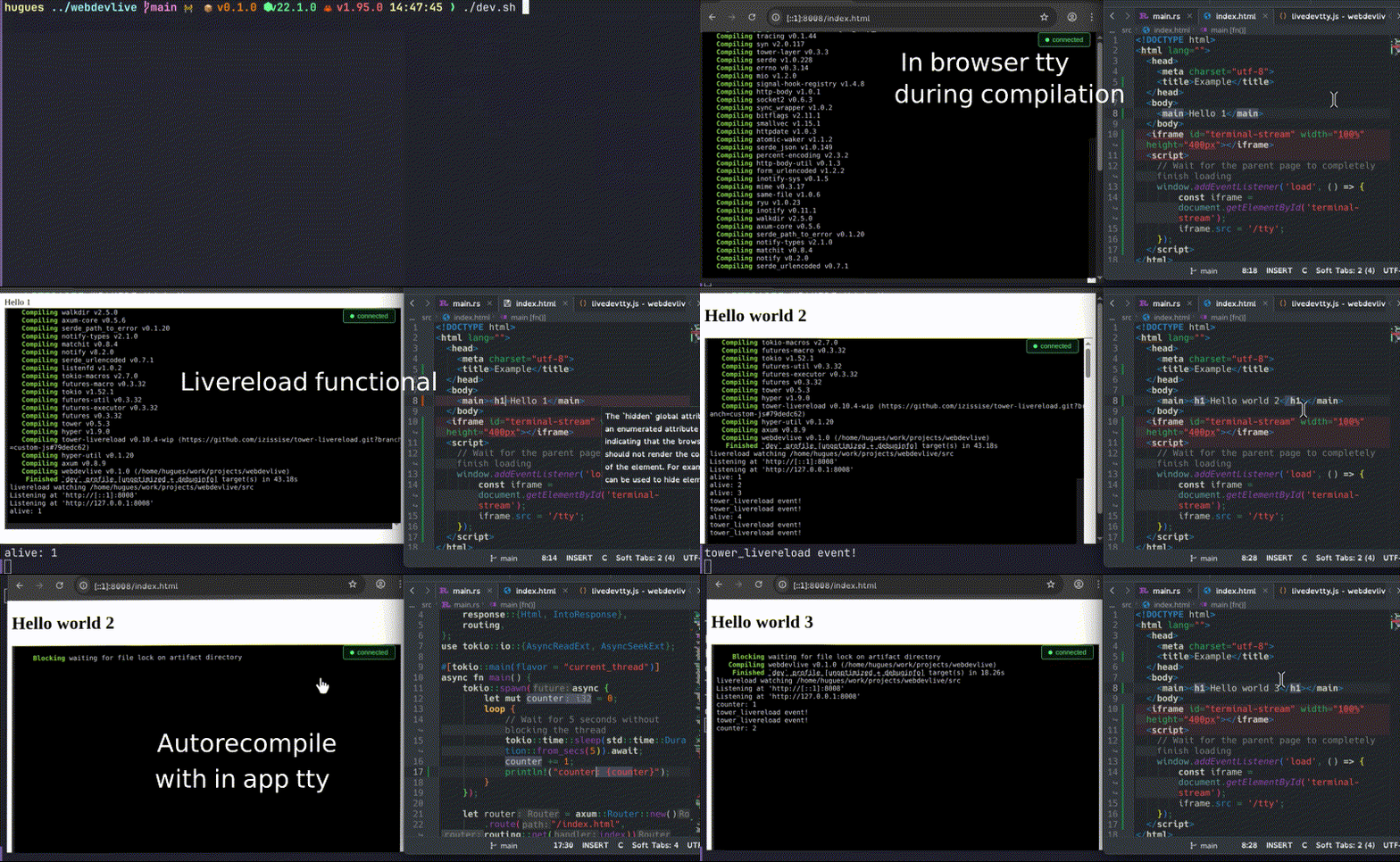This should be adaptable to any programming language if a library like[listenfd](https://github.com/mitsuhiko/listenfd)exists for it\.
Script`dev\.sh````
compile_and_run() {
set -eu
local color tty_log_file fdlast socatpid
tty_log_file=target/buildandrun.log
color=never
if [ -t 1 ]; then color=always; fi
build() { cargo build --color "$color"; } # Change for your build command
run() { exec cargo run; } # Change for your run command
mkdir -p target
printf '%s\r\n' \
"HTTP/1.1 200 OK" \
"Content-Type: text/html; charset=utf-8" \
"Connection: close" \
"" \
"<!doctype html><head><meta charset='utf-8'>" \
"<title>compiling</title>" \
"<script src='https://cdn.jsdelivr.net/gh/izissise/webdevlive@refs/heads/main/livedevtty.js'></script>" \
"<script>activateLive('log')</script>" \
"<body><xmp id='log'>" \
> "$tty_log_file"
socatpid=()
fdlast=$(( LISTEN_FDS_FIRST_FD + LISTEN_FDS - 1))
for fd in $(seq "$LISTEN_FDS_FIRST_FD" "$fdlast"); do
socat ACCEPT-FD:"$fd",fork OPEN:"$tty_log_file",seek=0,ignoreeof,rdonly'!!OPEN:/dev/null,wronly' 2>/dev/null &
socatpid+=("$!")
done
kill_socat() {
for pid in "${socatpid[@]}"; do
pkill -P "$pid" 2>/dev/null || true # Kill children (active streams)
kill "$pid" 2>/dev/null || true # Kill parent (the listener)
done
}
trap "kill_socat" INT TERM EXIT
{
{ build || { echo "[build error $?, waiting for modification]"; sleep 99999; }; } \
&& {
kill_socat
run
};
} 2>&1 | tee -a "$tty_log_file"
}
echo 'Launching auto compile and livereload';
LISTENING_PORT=${LISTENING_PORT:-8008}
systemfd \
--no-pid \
--socket http::'[::1]':"$LISTENING_PORT" \
--socket http::127.0.0.1:"$LISTENING_PORT" \
-- \
watchexec \
--shell=bash --quiet \
--restart --clear --debounce 2s --notify \
--exts rs --watch Cargo.toml --watch build.rs --watch src/ \
-- "$(declare -f compile_and_run); compile_and_run";
```