Cached at:
07/07/26, 08:14 PM
# Herdr: one terminal for the whole herd
Source: [https://herdr.dev/](https://herdr.dev/)
Agent multiplexer · a binary, not an app
Run all your coding agents from one terminal, on any box, even over ssh\. Each runs in its own real terminal, on a server that keeps it alive when you close the laptop\. Seeblocked,working, anddoneat a glance, and reattach from your phone\.
Stable install
$`curl \-fsSL https://herdr\.dev/install\.sh \| sh`
PS\>`irm https://herdr\.dev/install\.ps1 \| iex`
Stable Linux/macOS · Windows preview beta · no Electron, no account, no telemetry
opencodeherdr\+
✻**Claude Code**v2\.1\.168
~/Projects/herdr · master
**❯**the sidebar flickers when an agent flips state fast
●Found it\. The rollup recomputes on every PTY chunk, so a double state flip repaints the dot mid\-frame\.
●Plan:
· src/app/state\.rs — buffer state events per tick
· src/ui/sidebar\.rs — repaint rollups once per frame
**❯**go, and add a regression test
⠋Working…\(13m 36s· esc to interrupt\)
**❯**
~/Projects/herdr \> master \> ctx ─── 3% 34k/1M
\>\> bypass permissions on \(shift\+tab to cycle\)
~/Projects/herdr*master*
**❯**bunrun dev
$ node scripts/prepare\-docs\.mjs && astro dev
02:10:44\[types\]Generated 0ms
02:10:44\[content\]Synced content
astrov5\.18\.1ready in 668 ms
┃ Localhttp://localhost:4321/
Network use \-\-host to expose
02:10:44watching for file changes\.\.\.
\+ Thought: 468ms
→Read src/main\.rs
\+ Thought: 292ms
This issrc/main\.rs— the entry point for**herdr**\. Here's what it does:
1\.Arg parsing —session::configure\_from\_args, then remote args for the SSH bridge\.
2\.Subcommand dispatch —server,client,update— each returns early\.
3\.Session mode —auto\_detect\_launch\(\)connects to a running server or spawns one\.
Build · MiMo V2\.5 Free · 16\.6s
Build· MiMo V2\.5 Free OpenCode Zen
25\.2K \(13%\) ctrl\+p commands
migratelogs\+
✻**Claude Code**v2\.1\.168
~/Projects/llm\-proxy · master
**❯**prep the request\-log migration and run it
●Wrote migrations/0007\_request\_log\.sql — request\_log table, retention index on created\_at, daily rollup view\.
●Local checks pass: sqlx prepare is clean, backfill dry\-run touches 41,209 rows\. Ready to apply\.
**Bash command**
cargosqlx migrate run
Apply pending database migrations
Do you want to proceed?
❯ 1\. Yes
2\. No, and tell Claude what to do differently \(esc\)
~/Projects/llm\-proxy*master*
**❯**tail\-f logs/proxy\.log
02:30:58INFOrequest id=4818 route=/v1/messages 200 312ms
02:31:04INFOrequest id=4819 route=/v1/messages 200 287ms
02:31:09DEBUGcache hit ratio 0\.93
02:31:12INFOrequest id=4820 route=/v1/messages 200 301ms
02:31:15WARNupstream latency p99 1\.8s
02:31:18INFOrequest id=4821 route=/v1/messages 200 295ms
02:31:21WARN429 from upstream, retrying in 2s
02:31:24INFOrequest id=4822 route=/v1/messages 200 1102ms
02:31:30DEBUGcache hit ratio 0\.94
02:31:33INFOrequest id=4823 route=/v1/embeddings 200 88ms
codexserver\+
•**Explored**
└ Read live\_handoff\.rs
•**Ran**
└ cargo nextest run \-E 'test\(live\_handoff\)'
└ 14 passed · 0 failed · 41\.3s
•The handoff suite passes\. Pane PTYs survive server replacement, and long\-lived workloads — including the http\.server in the next tab — keep responding afterward\.
•Next I can wire the soak test into nightly CI and fail on p95 regressions\. Want that?
**›**
gpt\-5\.5 medium · ~/qmp · master · Context 6% used
~/qmp*master*
**❯**python3\-m http\.server 8080
Serving HTTP on 0\.0\.0\.0 port 8080 \.\.\.
02:28:41"GET /runs/latest\.json"200
02:29:03"GET /runs/latest\.json"200
02:29:25"GET /qmp/report\.html"200
02:30:07"GET /runs/latest\.json"200
02:30:18"GET /favicon\.ico"404
02:30:42"GET /qmp/report\.html"200
02:31:09"GET /runs/latest\.json"200
The whole herd in one terminal\. Click the sidebar, it's a real layout\.
\# used in the wild
## Popular with engineers from
Individual engineers, not company endorsements\.
JetBrains
Docker
Vercel
Kimi
Sentry
Google
NVIDIA
AWS
ByteDance
Tencent
Alibaba
Salesforce
IBM
Atlassian
Whop
Automattic
\# why herdr
## Run agents where the work is\. Attach from anywhere\.
Agents run wherever the work is: a server, a Mac Mini, a sandbox VM, anywhere you can ssh\. You attach from any terminal, even a phone\. Desktop agent managers can't leave the machine with the GUI\. Herdr can\.[Why switch from an app →](https://herdr.dev/compare/)
local### Your machine
Split panes, create tabs, and keep agents running while your terminal comes and goes\.
```
$ herdr
```
over ssh### Like tmux, on the server
SSH in and run Herdr on the remote shell\. The session stays after you detach, ideal from a phone SSH client\.
```
$ ssh you@server
$ herdr
```
thin client### Native remote attach
A local client to a remote session\. Installs Herdr on the host for you, bridges your local clipboard \(including image paste\), and keeps your keybindings\.
```
$ herdr --remote workbox
```
\# responsive tui
### Mobile\-first when the terminal gets small\.
Herdr stays usable over SSH from a phone or tablet\. The terminal view remains real, while narrow screens get a switcher built for touch\-sized decisions\.
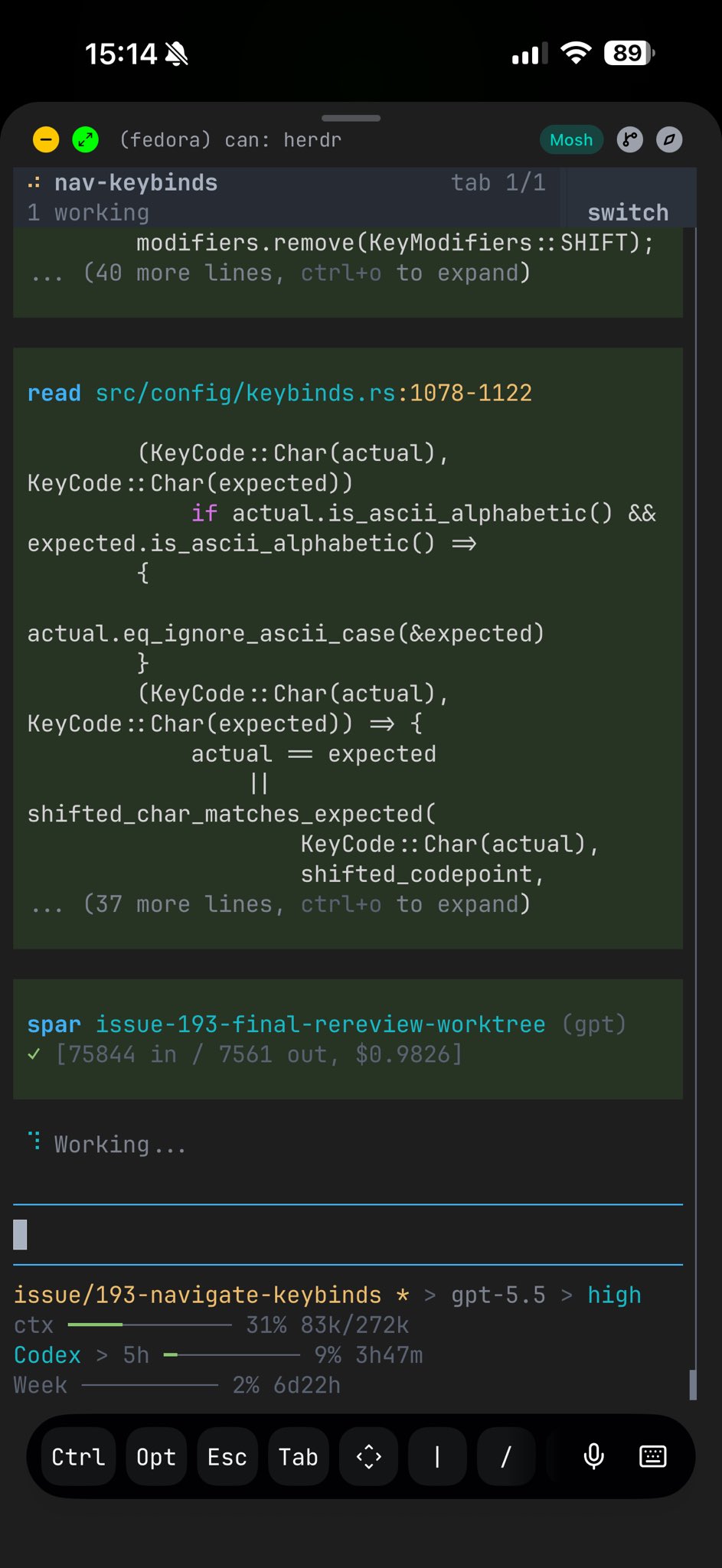agent session over SSH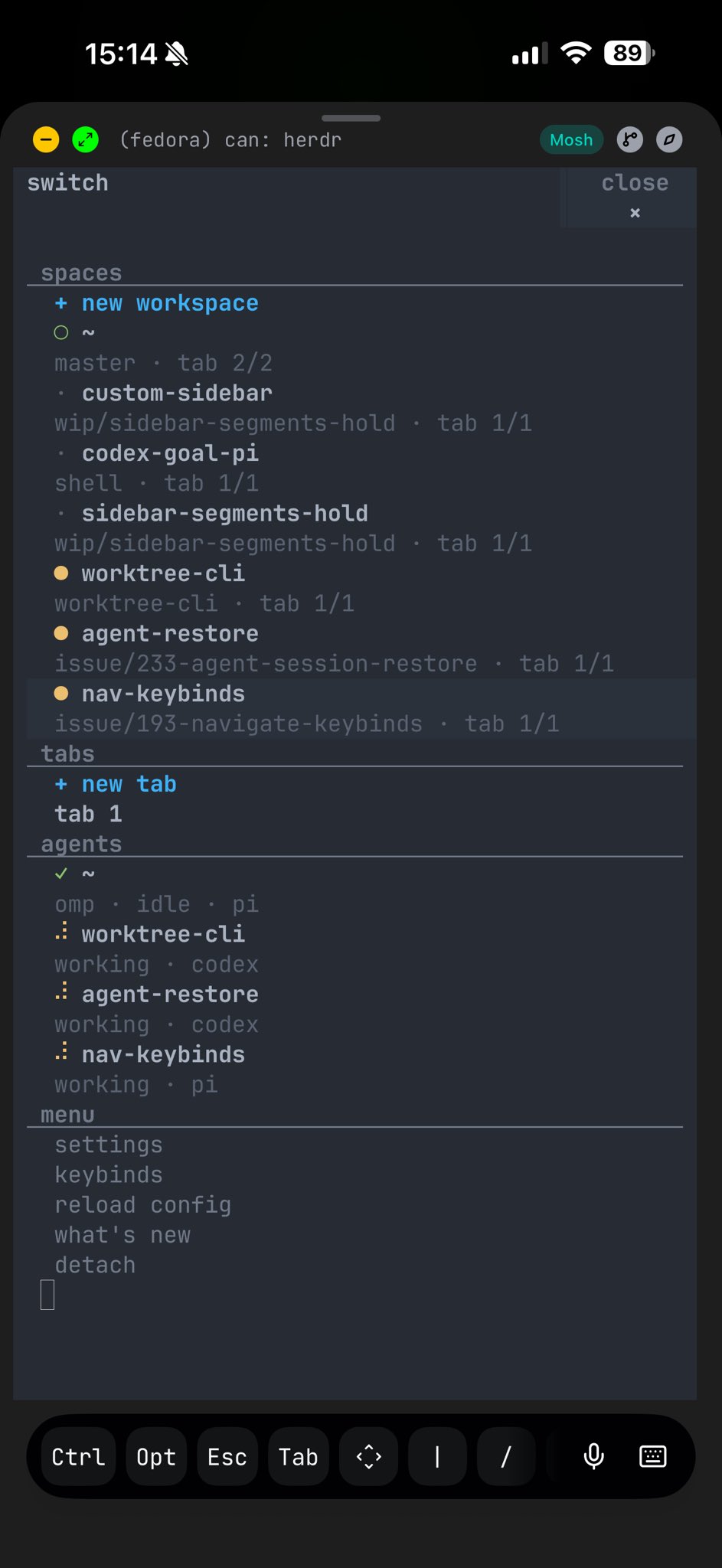responsive switch menuscreenshots taken with[moshi](https://getmoshi.app/)❤️ on iPhone
\# why different
## Most agent managers are apps\. Herdr is a multiplexer\.
tmux and Zellij own persistent terminal sessions but don't understand agents\. Desktop agent apps understand agents but live on one machine\. Herdr keeps the multiplexer in your terminal and makes it agent\-aware\.[See the full comparison →](https://herdr.dev/compare/)
not a terminal emulatorGhostty, Kitty, iTerm, Alacritty: your terminal stays\.
not a browser dashboardNo web view, no account, no hosted control plane\.
more than tmux for agentsPersistence plus clickable panes, agent state, an API\.
Capabilitytmux / Zellijagent appsworktree orchestratorsHerdrRuns inside your terminal✓——✓Persistent PTY sessions✓limitedembedded✓Remote SSH attach✓limitedremote projects✓Semantic agent state—partialworkspace status✓Direct agent attach———✓Agents can orchestrate itscriptablepartialworkflow\-owned✓
### Runs inside your terminal
tmux/Zellij**✓**agent apps**—**worktree apps**—**Herdr**✓**
### Persistent PTY sessions
tmux/Zellij**✓**agent apps**limited**worktree apps**embedded**Herdr**✓**
### Remote SSH attach
tmux/Zellij**✓**agent apps**limited**worktree apps**remote projects**Herdr**✓**
### Semantic agent state
tmux/Zellij**—**agent apps**partial**worktree apps**workspace status**Herdr**✓**
### Direct agent attach
tmux/Zellij**—**agent apps**—**worktree apps**—**Herdr**✓**
### Agents can orchestrate it
tmux/Zellij**scriptable**agent apps**partial**worktree apps**workflow\-owned**Herdr**✓**
\# what you get
## Real panes, agent state, and an API to drive them\.
No rebuilt chat view\. Real processes in real PTYs, with clickable layout, persistent sessions, and a control surface your agents can use themselves\.
### Real panes
Mouse\-first panes, tabs, and workspaces\. Keep your shell, fonts, and keybinds\.
### Agent state
Blocked, working, done, and idle at a glance across the whole session\.
### Persistence
Detach and reattach\. Sessions and agents survive the terminal closing\.
### Control surface
A CLI and JSON socket API expose workspaces, panes, output, and waits\.
```
# create workspace structure
herdr workspace create --cwd ~/project --label api
herdr tab create --label logs
# split a pane and run work
herdr pane split 1-1 --direction right
herdr pane run 1-2 "just test"
# wait, inspect, and continue
herdr wait agent-status 1-1 --status done
herdr pane read 1-2 --source recent-unwrapped
```
\# integrations
## Bring your existing agents into the herd\.
Pi
Claude Code
Codex
Droid
Amp
OpenCode
Grok CLI
Hermes
Cursor
Antigravity
Kimi
Kiro
Copilot
Qoder CLI
MastraCode
[\+ yours](https://herdr.dev/docs/integrations/)
Any terminal agent works out of the box\.[Integrations](https://herdr.dev/docs/integrations/)add richer state and session resume\.
\# marketplace
## Built on, not just with\.
Herdr's CLI and socket API are the plugin surface, so community plugins drive it like an agent does: notifiers, layout presets, link handlers, release checks\. Browse what people built, or publish your own with one GitHub topic\.
\# start the herd
## Install Herdr, run two agents, detach once\.
The value shows up the first time the herd keeps running after your terminal disappears\.