@itsclelia: Do you actually own your document parsing infrastructure? At @llama_index, we wanted to make that easier, so we built �…
Summary
LlamaIndex introduces liteparse-server, an open-source, self-hosted HTTP backend for parsing PDFs, images, and Office documents with spatial layout extraction, OCR, and screenshot generation, designed for AI and data workflows.
View Cached Full Text
Cached at: 05/13/26, 06:25 PM
Do you actually own your document parsing infrastructure? At @llama_index, we wanted to make that easier, so we built 𝗹𝗶𝘁𝗲𝗽𝗮𝗿𝘀𝗲-𝘀𝗲𝗿𝘃𝗲𝗿, a lightweight HTTP backend built on top of LiteParse that can parse and generate page screenshots from PDFs, images, and Office documents It’s 100% open source, fully self-hostable, and your data stays yours Built in TypeScript with @UseExpressJS, liteparse-server can run as a @Docker container or in serverless environments. We also included ready-to-use examples for rate limiting, caching, and OpenTelemetry-compatible traces and metrics collection with tools like @Redisinc, @JaegerTracing, @PrometheusIO, and @grafana Read the blog post I wrote about it: https://llamaindex.ai/blog/liteparse-server-self-hostable-document-parsing… Star the GitHub repo: https://github.com/run-llama/liteparse-server…
Introducing liteparse-server: Self-Hosted Document Parsing and OCR for AI Workflows
Source: https://www.llamaindex.ai/blog/liteparse-server-self-hostable-document-parsing
The document parsing problem
Most AI and data workflows eventually hit the same wall when dealing with documents. Your data lives in PDFs, Word documents, spreadsheets, scanned images, and getting clean text out of them is harder than it looks.
Naive approaches (pypdf, basic extraction libraries) lose spatial layout, whereas cloud parsing APIs solve accuracy, but introduce latency, per-page costs, privacy concerns, and network dependency. At the same time, running a full LLM just to extract text is expensive and slow for anything that aims to scale.
In contrast, LiteParse provides fast, local, accurate document parsing with open-source tooling. It extracts text with precise spatial layout information, producing bounding boxes for every text item, reporting the position where they appear on the page. Even if not immediately apparent, spatial fidelity matters: it is what makes downstream tasks like table extraction, section detection, and citation grounding actually work.
liteparse\-serverwraps LiteParse in an HTTP API, making it usable from any language or service as a dedicated, self-hosted parsing backend.
What it can parse
LiteParse handles the full range of document formats found in real workflows:
-PDFs— native text extraction with spatial layout and bounding boxes; selective OCR for scanned pages and embedded images -Office documents— Word (.docx, .doc, .odt, .rtf), PowerPoint (.pptx, .ppt), spreadsheets (.xlsx, .xls, .csv) via LibreOffice -Images— .jpg, .png, .tiff, .webp, .svg and more via ImageMagick
OCR uses bundled Tesseract.js by default, with plug-in support for EasyOCR, PaddleOCR, or any custom OCR server, which can be a useful addition when you need GPU-accelerated accuracy on large document collections.
Mixed-format batch jobs work out of the box: point the server at a directory of PDFs, Word files, and images and it handles conversion and parsing in one pass.
Two endpoints
POST /parse — parse a single document
Upload any supported file, get back structured page data with text and bounding boxes, or plain text if that is all you need.
# Structured JSON with layout
curl -X POST http://localhost:5000/parse -F "[email protected]"

# Plain text
curl -X POST "http://localhost:5000/parse?text=true" -F "[email protected]"
The JSON response includes a pages array. Each page carries the extracted text items with their positions, ready to feed into a chunking pipeline, a RAG retriever, or a layout analysis model.
POST /screenshots — page images for vision models and citations
Renders document pages as PNG images and sends them back as newline-delimited JSON. Each response line contains the page number, dimensions, and Base64-encoded image data.
This endpoint is designed for vision-capable LLM workflows and apps that require visual citations: screenshot a document, send the images to a model alongside a question, and get answers grounded in the actual visual layout of the page.
curl -X POST "http://localhost:5000/screenshots?pages=1,2,3" \
  -F "[email protected]"
Both endpoints accept aconfigfield for fine-grained control through the optionssupported by the LiteParse configuration.
Two deployment modes
LibreOffice and ImageMagick are already included in theliteparse-server Docker image. However, if you want to run the server directly with Node or Bun (without Docker), you’ll need to install LibreOffice and ImageMagick on your own system first.
Minimal server setup
The slim server has zero infrastructure dependencies and you can run it locally with Bun/Node or as a Docker container:
# with bun
bun run start-slim:bun
# with node
npm run start-slim:node
docker build -f slim.Dockerfile -t liteparse-server-slim .
docker run -p 5000:5000 liteparse-server-slim
Full stack
When you are running liteparse-server as shared infrastructure, thefull Docker Compose setupadds an example with everything a production service needs:
-Redis caching— parse results are cached by SHA-256 hash of the file content(s) and config. Identical documents are never parsed twice (within the expiration range of the cache entry). TTLs: 1 hour for single files, 12 hours for batch, 24 hours for screenshots. -Redis rate limiting— 100 requests per 60 seconds per IP, enforced at the server level before any parsing work is done -Distributed tracingvia OpenTelemetry and Jaeger — every request produces a trace with span attributes for file name, size, MIME type, parse mode, page count…, which are collected and displayed by Jaeger. -Metricsvia Prometheus and Grafana — request throughput, parse durations, page counts, file sizes, cache hit rates, and error counts, all pre-wired and directly pulled by Prometheus while the server is running.
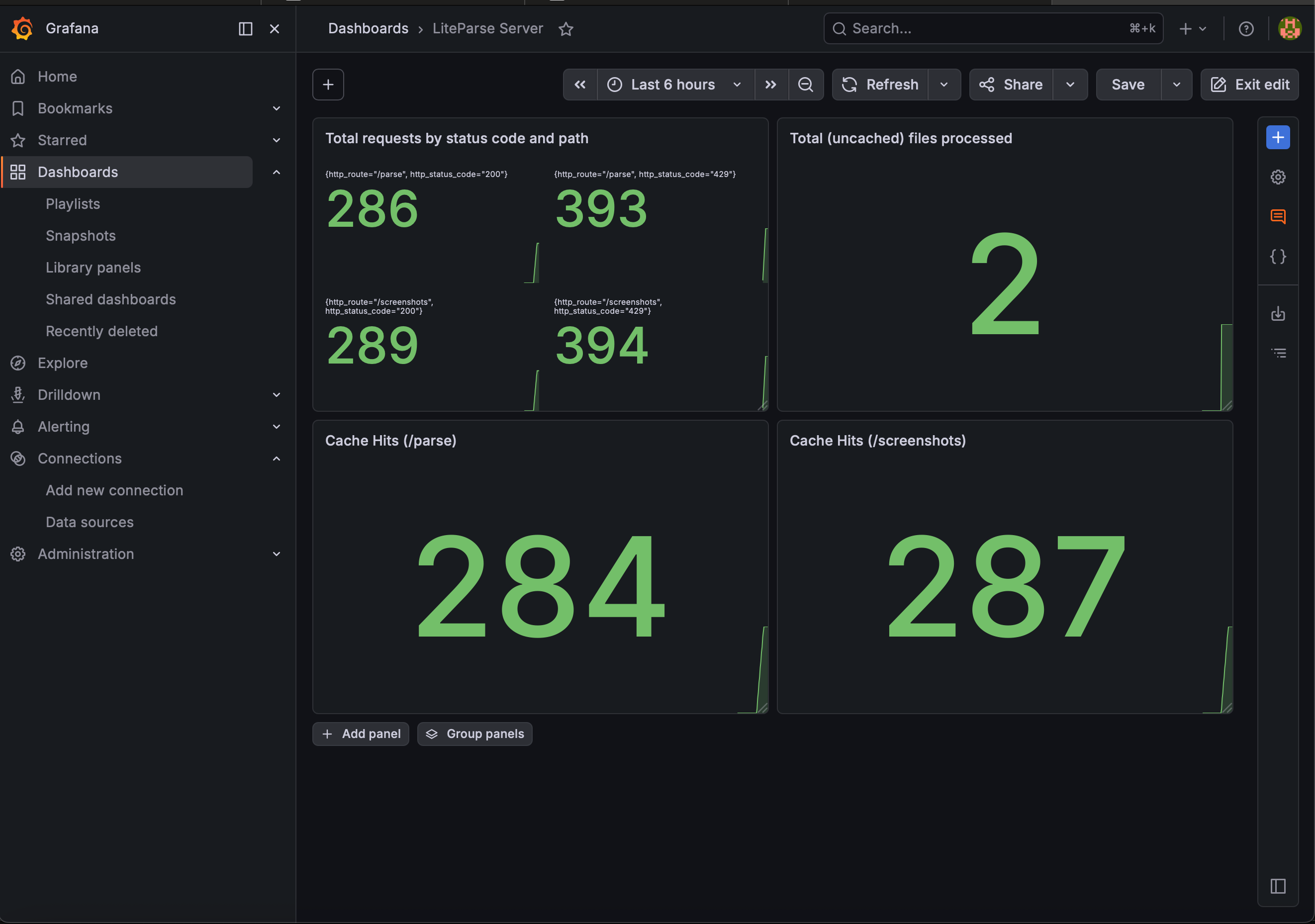 Grafana dashboard with metrics collected by Prometheus from liteparse-server## Get started
The source is on GitHub atgithub.com/run-llama/liteparse-serverand you can get started with the server from there. You can finda full guide in the documentationas well.
You can also pull the pre-built Docker image, which is self-contained and ready to run immediately:
docker pull ghcr.io/run-llama/liteparse-server:main
docker run -p 5000:5000 ghcr.io/run-llama/liteparse-server:main
Once the server is booted, it will be running on `http://localhost:5000`, and you can test it with the following commands:
# Parse
curl -X POST "http://localhost:5000/parse" \
-F "[email protected]"

# Screenshot
curl -X POST "http://localhost:5000/screenshots" \
-F "[email protected]"
The full LiteParse documentation (including OCR configuration, multi-format support, bounding box output, and the TypeScript and Python library APIs) is also available atdevelopers.llamaindex.ai/liteparse.
Similar Articles
@jerryjliu0: Our core mission today is using AI to solve document OCR. All of our product offerings, from commercial (LlamaParse) to…
LlamaIndex has revamped its website and reaffirmed its core mission of AI-powered document OCR, with offerings including commercial product LlamaParse and open-source tools LiteParse and ParseBench. LlamaParse uses VLM-powered agentic document understanding to handle complex layouts, tables, charts, and handwritten text at scale.
@jerryjliu0: LiteParse is the best open-source, model-free document parser for AI agents. Run it over over 50+ document types, and i…
LlamaIndex releases liteparse-server, a self-hosted, model-free HTTP API for parsing diverse document types with high spatial fidelity and privacy preservation.
@llama_index: Most AI pipelines are only as good as the data we provide them with, and that usually means PDFs or other unstructured …
Parse-Flow is an open-source visual workflow designer built by LlamaIndex that chains four document processing primitives—Parse, Classify, Split, and Extract—into a drag-and-drop canvas powered by LlamaAgents workflows, enabling reliable structured data extraction from unstructured enterprise documents like PDFs, contracts, and invoices.
@llama_index: Most agentic retrieval demos assume clean, well-structured documents. Enterprise reality is often different, consisting…
LlamaIndex and LanceDB collaborated on a pipeline using LiteParse for PDF parsing and LanceDB for multimodal storage, enabling better retrieval from complex enterprise PDFs for agentic workflows.
@itsafiz: Built a super fast PDF parsing service with LiteParse! LiteParse is a standalone OSS PDF parsing tool by @llama_index f…
Built a fast PDF parsing service using LiteParse, an open-source tool by LlamaIndex, with help from Cursor AI.