@anyscalecompute: Most agent frameworks solve orchestration and leave infrastructure completely unresolved. New blog: production-ready AI…
Summary
Anyscale published a technical guide on deploying production-ready AI agents using Ray Serve, MCP, and A2A protocols. The article addresses common infrastructure bottlenecks by proposing a decoupled microservices architecture that enables independent scaling of LLMs, tools, and agents.
View Cached Full Text
Cached at: 05/09/26, 03:40 AM
Most agent frameworks solve orchestration and leave infrastructure completely unresolved.
New blog: production-ready AI agents on Ray Serve with MCP and A2A, where the LLM, tools, and agents each scale independently. Nine services, one command to deploy.
https://t.co/8iEpdp8bTj
AI agents on Ray Serve: Single to multi-agent architecture | Anyscale
Source: https://www.anyscale.com/blog/ai-agents-on-ray-serve-single-to-multi-agent-architecture Most agent frameworks solve orchestration — prompt chaining, tool calling, memory — but leave infrastructure management unresolved. Transitioning beyond a single-process prototype immediately exposes three problems: the GPU-heavy LLM and the lightweight agent logic cannot scale independently, every new tool requires redeploying the agent, and composing agents means tight coupling through shared imports. The result is fragile monoliths that break under production traffic.
That challenge sits one layer below what we covered in our April 22 announcement ofAnyscale Agent Skills. While Agent Skills focuses on packaging and reusing agent capabilities, this post focuses on the production infrastructure needed to run them reliably at scale.
This post describes a microservices approach to AI agents built on Ray Serve, MCP (Model Context Protocol), and the A2A (Agent-to-Agent) protocol. It details two reference implementations — a single tool-using agent and a multi-agent system — where each component (LLM, tools, agents) runs as an independently autoscaling Ray Serve application.
LinkWhy Agent Infrastructure Is Hard Todayhttps://www.anyscale.com/blog/ai-agents-on-ray-serve-single-to-multi-agent-architecture#why-agent-infrastructure-is-hard-today
Building a prototype agent takes minutes. Deploying it to production means confronting a layer of infrastructure complexity underneath — compute orchestration, state management, observability, fault tolerance, security, and LLM-specific concerns like rate limiting and token budgets — that cuts across every component. Most of these concerns are table stakes for any distributed system, but three bottlenecks are unique to how agents are built today:
**Scaling is all-or-nothing.**In a monolithic deployment, GPU-intensive LLM inference and lightweight CPU orchestration scale as a single unit. During a traffic spike, you either over-provision expensive L4 GPUs just to handle simple agent logic (driving up costs) or starve the LLM of compute. In multi-agent systems this compounds: three agents sharing one process means a slow research query blocks weather responses.
**Tool integration is tightly coupled.**Hard-coding tool functions into the agent means every new tool requires code changes and redeployment. When the Weather API adds a get_air_quality endpoint, you want the agent to discover it at runtime — not wait for a release cycle.
**Agent composition is fragile.**When one agent delegates to another via direct function imports, any change to the downstream agent’s interface breaks the upstream caller. There’s no standard for agent discovery, versioning, or traceable inter-agent communication.
LinkWhat Production Agent Infrastructure Requireshttps://www.anyscale.com/blog/ai-agents-on-ray-serve-single-to-multi-agent-architecture#what-production-agent-infrastructure-requires
These three bottlenecks are symptoms of a broader gap: agent frameworks handle orchestration, but production deployments demand a full infrastructure layer. The table below maps out the core requirements — spanning compute, operations, security, and connectivity — that any production agent platform must address.
Requirement
Description
Why It Matters
Framework Independence
Support for diverse LLM frameworks (LangChain, LlamaIndex, CrewAI, AutoGPT)
Prevents vendor lock-in; allows teams to use the best tool for the job
Developer Velocity
Streamlined CI/CD pipelines for rapid iteration, testing, and deployment
Reduces time-to-market for complex agentic workflows
Elastic Scalability
Dynamic resource allocation based on real-time traffic and compute demands
Handles bursty agent workloads without over-provisioning costs
Resilience & Availability
Self-healing systems that recover from hardware or framework-level failures
Ensures agents remain active and responsive 24/7 in production
Secure Access Control
Centralized IAM for managing deployment permissions and agent interaction
Critical for enterprise compliance and data security
Full-Stack Observability
Integrated telemetry including distributed logs, traces, and performance metrics
Enables rapid debugging of complex, multi-step agent reasoning loops
Memory & Persistence
Managed storage for short-term (contextual) and long-term (episodic) memory
Allows agents to maintain state across sessions and complex tasks
Granular Connectivity
Policy-based network access to internal and external environments (VPC/Internet)
Securely connects agents to enterprise data and external tools
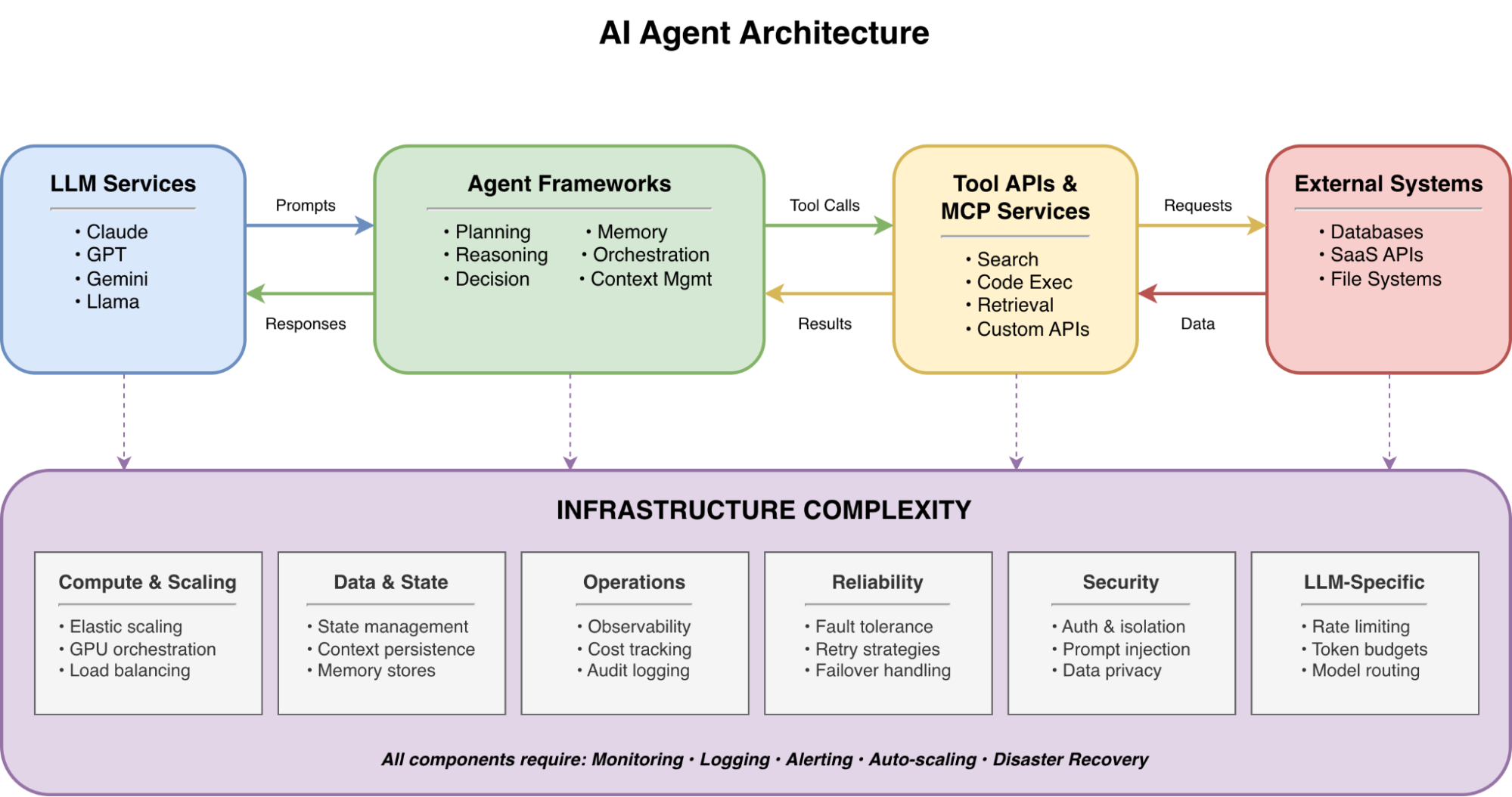
Al Agent Architecture The architectures that follow address several of these requirements directly — elastic scalability through independent autoscaling, framework independence via OpenAI-compatible APIs, observability through Ray Dashboard metrics, and resilience through fault-isolated services — while the Anyscale platform completes the picture with secure access control, managed connectivity, and production-grade availability.
LinkArchitecture 1: Single Agent with MCP Toolshttps://www.anyscale.com/blog/ai-agents-on-ray-serve-single-to-multi-agent-architecture#architecture-1:-single-agent-with-mcp-tools
The single-agent deployment (available as thelangchain-agent-ray-servetemplate) consists of three Ray Serve applications.
The architecture splits every component into its own Ray Serve application with independent scaling, routing, and fault domains:
Component
Role
Interface
Resources
Scaling
LLM Service
Qwen3\-4B\-Instruct\-2507\-FP8inference
OpenAI-compatible API
1× L4 GPU (24 GB)
Request-based autoscaling
MCP Tool Server
Weather API
MCP streamable HTTP
0.2 CPU each
1–20 replicas, target 5 in-flight req/replica
Agent Service
LangChain orchestration
SSE streaming
1 CPU each
Request-based autoscaling
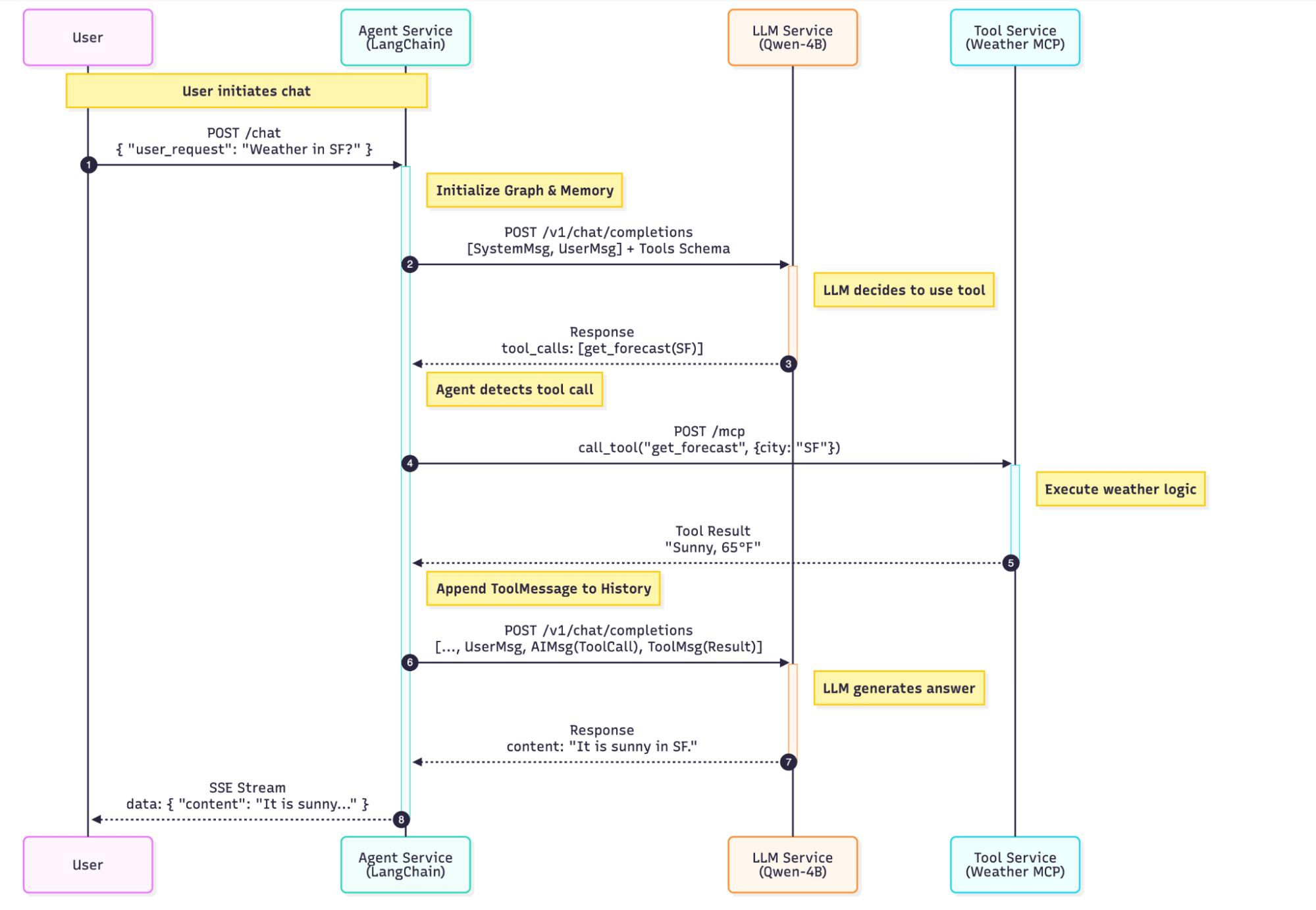
LLM Tool Calling Workflow with Agent, MCP, and Weather Service Integration
LinkLLM as a Servicehttps://www.anyscale.com/blog/ai-agents-on-ray-serve-single-to-multi-agent-architecture#llm-as-a-service
The LLM runs as a dedicated Ray Serve application using Ray Serve LLM’sbuild\_openai\_app, which wraps vLLM behind an OpenAI-compatible API:
from ray.serve.llm import LLMConfig, build_openai_app

llm_config = LLMConfig(
    model_loading_config=dict(
        model_id="Qwen/Qwen3-4B-Instruct-2507-FP8",
        model_source="Qwen/Qwen3-4B-Instruct-2507-FP8",
    ),
    accelerator_type="L4",
    engine_kwargs=dict(
        max_model_len=65536,
        trust_remote_code=True,
        gpu_memory_utilization=0.9,
        enable_auto_tool_choice=True,
        tool_call_parser="hermes",
    ),
)

app = build_openai_app({"llm_configs": [llm_config]})
Two flags are critical for agent workloads:enable\_auto\_tool\_choice=Truelets the model decide autonomously when to invoke tools, andtool\_call\_parser="hermes"parses Qwen’s native function-calling format (Qwen3 Instruct emits Hermes-style tool calls). The 64K context window (max\_model\_len=65536) provides headroom for multi-turn conversations with several tool-call rounds.
LinkTools as MCP Servershttps://www.anyscale.com/blog/ai-agents-on-ray-serve-single-to-multi-agent-architecture#tools-as-mcp-servers
Instead of hard-coding tools into the agent, we expose them as MCP servers — the open standard for runtime tool discovery. Each tool server is a stateless, horizontally scalable Ray Serve deployment:
from mcp.server.fastmcp import FastMCP
from ray import serve

mcp = FastMCP("weather", stateless_http=True)

@mcp.tool()
async def get_forecast(latitude: float, longitude: float) -> str:
    """Fetch a multi-period weather forecast for given coordinates."""
    # Calls the National Weather Service API
    ...

fastapi_app = mcp.streamable_http_app()

@serve.deployment(
    autoscaling_config={
        "min_replicas": 1,
        "max_replicas": 20,
        "target_ongoing_requests": 5,
    },
    ray_actor_options={"num_cpus": 0.2},
)
@serve.ingress(fastapi_app)
class WeatherMCP:
    pass
Theautoscaling\_configscales the deployment between 1 and 20 replicas, targeting 5 concurrent in-flight requests per replica. Fractional CPU resources (num\_cpus=0\.2) let the scheduler pack many MCP replicas onto a single node, since the work is I/O-bound rather than CPU-bound.
LinkThe Agent: LangChain + Dynamic Tool Discoveryhttps://www.anyscale.com/blog/ai-agents-on-ray-serve-single-to-multi-agent-architecture#the-agent:-langchain-+-dynamic-tool-discovery
The agent uses LangChain v1’screate\_agentwith tools discovered at runtime from the MCP server viaMultiServerMCPClient:
from langchain.agents import create_agent
from langchain_mcp_adapters.client import MultiServerMCPClient
from langgraph.checkpoint.memory import MemorySaver

async def build_agent():
    mcp_client = MultiServerMCPClient({
        "weather": {
            "url": urljoin(WEATHER_MCP_BASE_URL, "mcp"),
            "transport": "streamable_http",
        }
    })
    tools = await mcp_client.get_tools()
    memory = MemorySaver()
    return create_agent(llm, tools, system_prompt=PROMPT, checkpointer=memory)
**Note:**This example uses LangGraph’s in-memoryMemorySaverfor simplicity. A production deployment should swap it for a persistent LangGraph checkpointer such asPostgresSaverorSqliteSaver(or a Redis-backed equivalent) so conversation state survives Ray Serve replica restarts.
Add a newget\_air\_qualitytool to the MCP server and the agent picks it up the nexttime build\_agent\(\)runs (e.g., on replica startup) — no agent code changes. The agent itself is wrapped in a Ray Serve deployment with a/chatSSE streaming endpoint.
LinkArchitecture 2: Multi-Agent System with A2A Protocolhttps://www.anyscale.com/blog/ai-agents-on-ray-serve-single-to-multi-agent-architecture#architecture-2:-multi-agent-system-with-a2a-protocol
The multi-agent system (available as themulti_agent_a2atemplate) extends the single-agent pattern with three specialized agents communicating through the A2A protocol:
- **Weather Agent:**Answers weather questions via Weather MCP tools
- **Research Agent:**Performs web research via Web Search MCP tools (
brave\_search,fetch\_url) - **Travel Agent:**Orchestrates both agents through A2A to create weather-aware travel plans
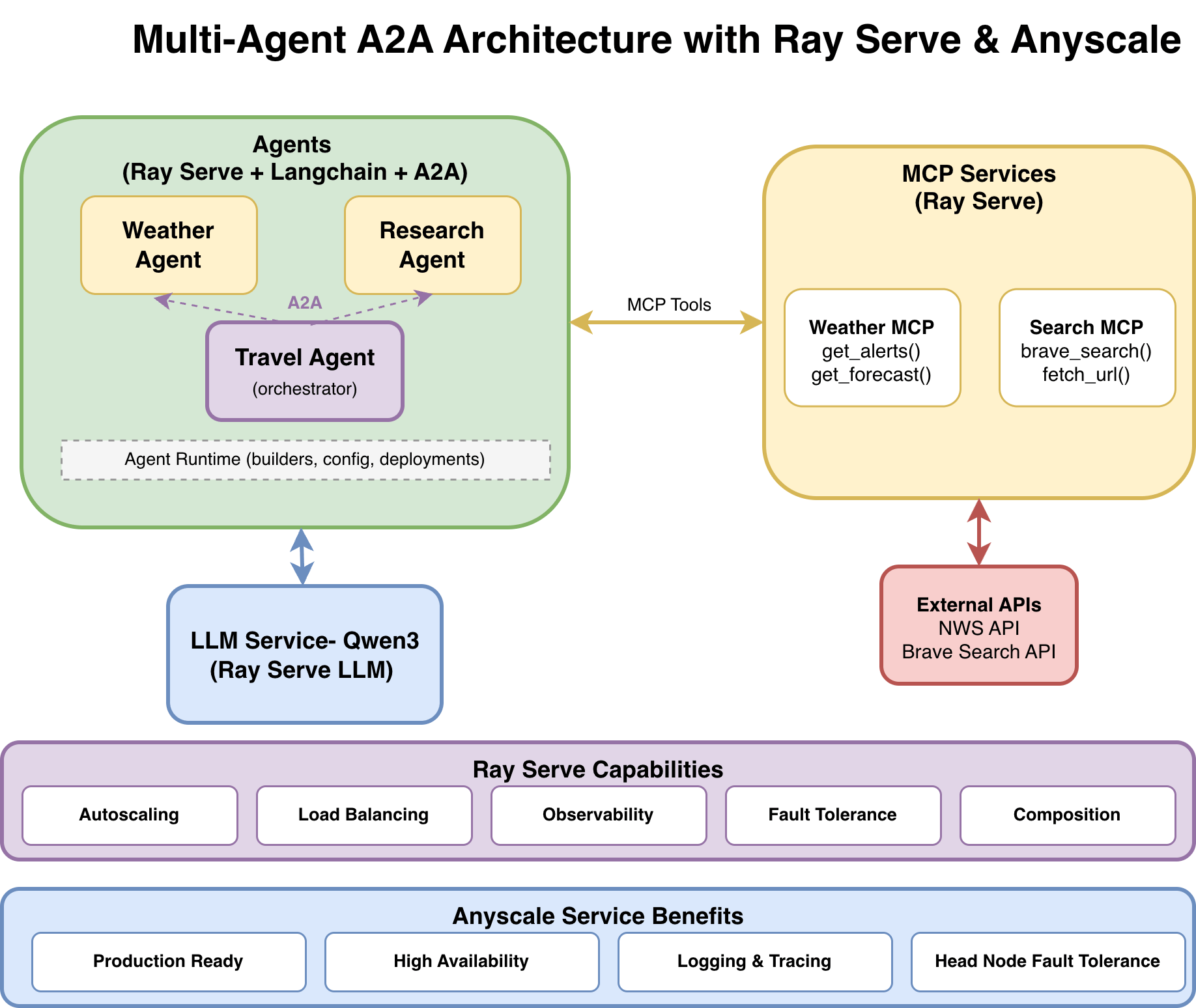
Multi-Agent A2A Architecture with Ray Serve & Anyscale
LinkWhy A2A Instead of Direct Importshttps://www.anyscale.com/blog/ai-agents-on-ray-serve-single-to-multi-agent-architecture#why-a2a-instead-of-direct-imports
When the Travel Agent needs weather data, it could import the Weather Agent directly. But direct imports create tight coupling. A2A solves this with HTTP boundaries and standardized discovery:
Aspect
Direct Integration
A2A Protocol
Coupling
Tight — shared imports
Loose — HTTP + JSON boundaries
Discovery
Hard-coded endpoints
Dynamic via/\.well\-known/agent\-card\.json
Versioning
Code changes
Protocol-level, backward-compatible
Debugging
Complex call stacks
Traceable per-task with unique task IDs
Failure handling
Cascading failures
Independent — partial results possible
Each A2A-enabled agent advertises its capabilities through an AgentCard (served at GET /.well-known/agent-card.json) and accepts work through the REST transport’s POST /v1/message:send endpoint (the JSON-RPC transport exposes the equivalent message/send method on the root endpoint). The Travel Agent discovers what the Weather Agent can do, then delegates — all over standard HTTP.
LinkData Flow: A Travel Planning Requesthttps://www.anyscale.com/blog/ai-agents-on-ray-serve-single-to-multi-agent-architecture#data-flow:-a-travel-planning-request
Here’s what happens when a user asks “Plan a 2-day trip to Seattle”:
User → POST /travel-agent/chat
       "Plan a 2-day trip to Seattle"
         │
         ▼
    Travel Agent (LLM reasoning)
    ├─ "I need weather data and local info"
    │
    ├──→ a2a_research("Seattle attractions, restaurants")
    │         │
    │         ▼
    │    Research Agent (via A2A POST /a2a-research/v1/message:send)
    │    ├──→ brave_search("Seattle top attractions")  [Web Search MCP]
    │    ├──→ fetch_url("https://...")                  [Web Search MCP]
    │    └──→ Returns: summarized results + source URLs
    │
    ├──→ a2a_weather("Seattle weather forecast this week")
    │         │
    │         ▼
    │    Weather Agent (via A2A POST /a2a-weather/v1/message:send)
    │    ├──→ get_forecast(47.6062, -122.3321)         [Weather MCP]
    │    └──→ Returns: forecast data
    │
    └──→ Travel Agent synthesizes both responses
         Returns: structured itinerary with weather-aware suggestions + sources
When the LLM emits both tool calls in a single assistant turn (parallel tool-calling, supported by Qwen3 Instruct and most modern function-calling models),create\_agentdispatches them concurrently withasyncio\.gather. Each downstream agent independently calls its MCP tools, which in turn call external APIs. The Travel Agent has no knowledge of MCP, weather APIs, or Brave Search — it only knows it has two tools:a2a\_researchanda2a\_weather.
LinkA2A Tools: Agents as Tool Callshttps://www.anyscale.com/blog/ai-agents-on-ray-serve-single-to-multi-agent-architecture#a2a-tools:-agents-as-tool-calls
From the LLM’s perspective, calling another agent is just another tool. The Travel Agent defines two A2A-backed tools:
from langchain_core.tools import tool
from protocols.a2a_client import a2a_execute_text

@tool
async def a2a_research(query: str) -> str:
    """Call the Research agent over A2A to gather up-to-date info and sources."""
    return await a2a_execute_text(RESEARCH_A2A_BASE_URL, query, timeout_s=360)

@tool
async def a2a_weather(query: str) -> str:
    """Call the Weather agent over A2A to get weather/forecast guidance."""
    return await a2a_execute_text(WEATHER_A2A_BASE_URL, query, timeout_s=360)
Thea2a\_execute\_texthelper uses the officiala2a\-sdkREST transport to send a blocking message and extract the text response. The 360-second timeout provides headroom for downstream agents that may need multiple tool calls (research queries, API lookups) before responding.
LinkThe Agent Runtime: Factory Pattern for Multi-Agenthttps://www.anyscale.com/blog/ai-agents-on-ray-serve-single-to-multi-agent-architecture#the-agent-runtime:-factory-pattern-for-multi-agent
With three agents sharing the same boilerplate (LLM config, MCP discovery,MemorySaver, Ray Serve deployment), the multi-agent codebase uses a shared agent runtime with factory functions:
# Weather agent: a few lines of unique code
async def build_agent():
    return await build_mcp_agent(
        system_prompt=PROMPT,
        mcp_endpoints=[_weather_mcp_endpoint()],
    )
Thebuild\_mcp\_agentandbuild\_tool\_agentfactories inagent\_runtime/agent\_builder\.pycentralize LLM construction, MCP tool discovery, and agent creation. Thecreate\_serve\_deploymentandcreate\_a2a\_deploymentfactories in the deployment modules handle Ray Serve wrapping. Individual agents focus solely on what’s unique: system prompt and tool source.
LinkDeployment: One YAML, Nine Serviceshttps://www.anyscale.com/blog/ai-agents-on-ray-serve-single-to-multi-agent-architecture#deployment:-one-yaml,-nine-services
A singleserve\_multi\_config\.yamldeploys all nine services — 1 LLM, 2 MCP servers, 3 SSE agents, 3 A2A agents — each with its own route prefix, environment variables, and scaling configuration:
applications:
- name: llm
  route_prefix: /llm
  import_path: llm.llm_deploy_qwen:app
- name: mcp_weather
  route_prefix: /mcp-weather
  import_path: ray_serve_all_deployments:weather_mcp_app
  deployments:
  - name: WeatherMCP
    autoscaling_config:
      min_replicas: 1
      max_replicas: 20
      target_ongoing_requests: 5.0
    ray_actor_options:
      num_cpus: 0.2
- name: travel_agent
  route_prefix: /travel-agent
  import_path: ray_serve_all_deployments:travel_agent_app
  runtime_env:
    env_vars:
      OPENAI_COMPAT_BASE_URL: http://127.0.0.1:8000/llm
      RESEARCH_A2A_BASE_URL: http://127.0.0.1:8000/a2a-research
      WEATHER_A2A_BASE_URL: http://127.0.0.1:8000/a2a-weather
Inter-service communication uses the local Ray Serve HTTP proxy (127\.0\.0\.1:8000), keeping traffic within the Ray cluster and avoiding external network hops.
LinkWhy Ray Serve for Agent Workloadshttps://www.anyscale.com/blog/ai-agents-on-ray-serve-single-to-multi-agent-architecture#why-ray-serve-for-agent-workloads
Four Ray Serve capabilities are particularly relevant to agent architectures:
**Independent autoscaling for cost efficiency.**The LLM service scales expensive GPU replicas based on request load (target\_ongoing\_requests), while MCP tool servers and agents scale on cheap CPUs based on the same signal at different thresholds. You don’t pay for idle GPUs while an agent waits for a weather API response. Each component has its ownautoscaling\_config, optimizing both performance and cost.
**Fault isolation.**Consider a concrete scenario: the Research Agent’s Brave Search API key expires. In a monolithic deployment, this can ripple through the entire system. With Ray Serve, only the Research Agent returns errors. The Weather Agent continues operating, and the Travel Agent can return partial results (weather data without research) instead of failing completely — provided the orchestration prompt and tool wrappers handle downstream errors gracefully.
**Zero-downtime updates.**Upgrading the LLM fromQwen3\-4B\-Instruct\-2507\-FP8to a larger model means updating only the LLM service config. Agents continue serving requests through the rolling update. Adding abrave\_search\_newstool to the Web Search MCP server requires zero changes to the Research Agent — it discovers the new tool the next timebuild\_agent\(\)runs.
**Unified observability.**Ray Serve provides built-in metrics (request latency, replica count, queue depth) across all nine services via the Ray Dashboard. On the Anyscale platform, this extends to distributed tracing: you can follow a single request ID from the user’s input through the Travel Agent, to the Weather Agent, and down to the specific MCP tool call, making debugging distributed errors trivial.
**Performance trade-off.**A microservices architecture introduces network hops between agents and tools. In practice, loopback HTTP through the local Ray Serve proxy adds a few milliseconds per hop — negligible compared to LLM inference time, which is typically two to three orders of magnitude larger. The gains in scalability, fault isolation, and developer velocity far outweigh this overhead.
LinkDeveloper Experience: From Idea to Running Agent in Productionhttps://www.anyscale.com/blog/ai-agents-on-ray-serve-single-to-multi-agent-architecture#developer-experience:-from-idea-to-running-agent-in-production
The architectures above look like distributed systems — multiple services, autoscaling configs, inter-service routing — but the developer experience feels like writing a single Python application. An ML engineer iterating on an agent never writes a Dockerfile, edits a Helm chart, or files a ticket with the platform team. The entire develop-test-deploy loop stays in Python and YAML.
LinkLocal Development:serve runIs All You Needhttps://www.anyscale.com/blog/ai-agents-on-ray-serve-single-to-multi-agent-architecture#local-development:-
Starting the full single-agent stack — LLM, MCP tool server, and agent — takes one command:
serve run serve_config.yaml
That’s it. Ray Serve launches all three applications in a local Ray cluster, wires up the routes, and starts serving onlocalhost:8000. The multi-agent system with nine services is identical:
serve run serve_multi_config.yaml
No container builds. Nokubectl apply. No waiting for pods to schedule. The feedback loop is measured in seconds: change the agent’s system prompt, add a tool to the MCP server, or swap the LLM model — then re-runserve runand test withcurlor the included Gradio UI.
LinkWhat the ML Engineer Owns vs. What the Platform Handleshttps://www.anyscale.com/blog/ai-agents-on-ray-serve-single-to-multi-agent-architecture#what-the-ml-engineer-owns-vs.-what-the-platform-handles
The key design principle is a clean separation: ML engineers own the agent logic and configuration, while Ray Serve and Anyscale handle everything below.
ML Engineer Writes
Platform Handles
Agent system prompts and orchestration logic
Process management and health checks
MCP tool implementations (Python functions)
Service discovery and request routing
LLM model selection and engine parameters
GPU scheduling and memory management
autoscaling\_config(min/max replicas, target concurrency)
Autoscaler implementation, replica placement
YAML config declaring applications and routes
Load balancing, rolling updates, fault recovery
This means the iteration cycle stays entirely within the ML engineer’s domain. Tuning the Research Agent’s prompt doesn’t require a DevOps review. Changing the LLM from a 4B model to a 70B model means editing two lines inLLMConfigand updatingaccelerator\_type— not rearchitecting the deployment pipeline.
LinkCloud Development with Anyscale Workspaceshttps://www.anyscale.com/blog/ai-agents-on-ray-serve-single-to-multi-agent-architecture#cloud-development-with-anyscale-workspaces
Local development works for CPU-only components, but LLM inference requires GPUs. Anyscale Workspaces provide cloud development environments with GPU access — essentially a remote machine with your code, a Ray cluster, and an IDE, all pre-configured.
The workflow mirrors local development exactly:
# In an Anyscale Workspace with an L4 GPU
serve run serve_config.yaml
# Test against localhost:8000, iterate on agent logic
# When ready, deploy to production:
anyscale service deploy -f anyscale_service_config.yaml
There’s no translation step between development and production. The same Python code and the same YAML config run in both environments. The Anyscale service config is a superset of the Ray Serve config — it adds cloud-specific settings (instance types, availability zones, authentication) without changing the application code.
LinkContrast: The Kubernetes Alternativehttps://www.anyscale.com/blog/ai-agents-on-ray-serve-single-to-multi-agent-architecture#contrast:-the-kubernetes-alternative
To appreciate what this workflow eliminates, consider what the same multi-agent deployment requires on raw Kubernetes:
- Write Dockerfiles for the LLM, each MCP server, and each agent (5+ containers)
- Configure GPU node pools with the NVIDIA device plugin
- Author Kubernetes Deployments, Services, and Ingress resources for each component
- Set up Horizontal Pod Autoscalers with custom metrics for GPU utilization and request throughput
- Configure service mesh or network policies for inter-service communication
- Build a CI/CD pipeline to build, push, and roll out container images
- Debug scheduling failures when GPU nodes aren’t available
Each step requires Kubernetes expertise that most ML engineers don’t have — and shouldn’t need. The result is a hard dependency on the platform team for every change, turning what should be a 10-minute iteration into a multi-day cross-team workflow.
With Ray Serve on Anyscale, the ML engineer who wrote the agent is the same person who deploys it to production. The infrastructure complexity doesn’t disappear — it’s handled by the platform so that agent developers can focus on what matters: the prompts, tools, and orchestration logic that make agents useful.
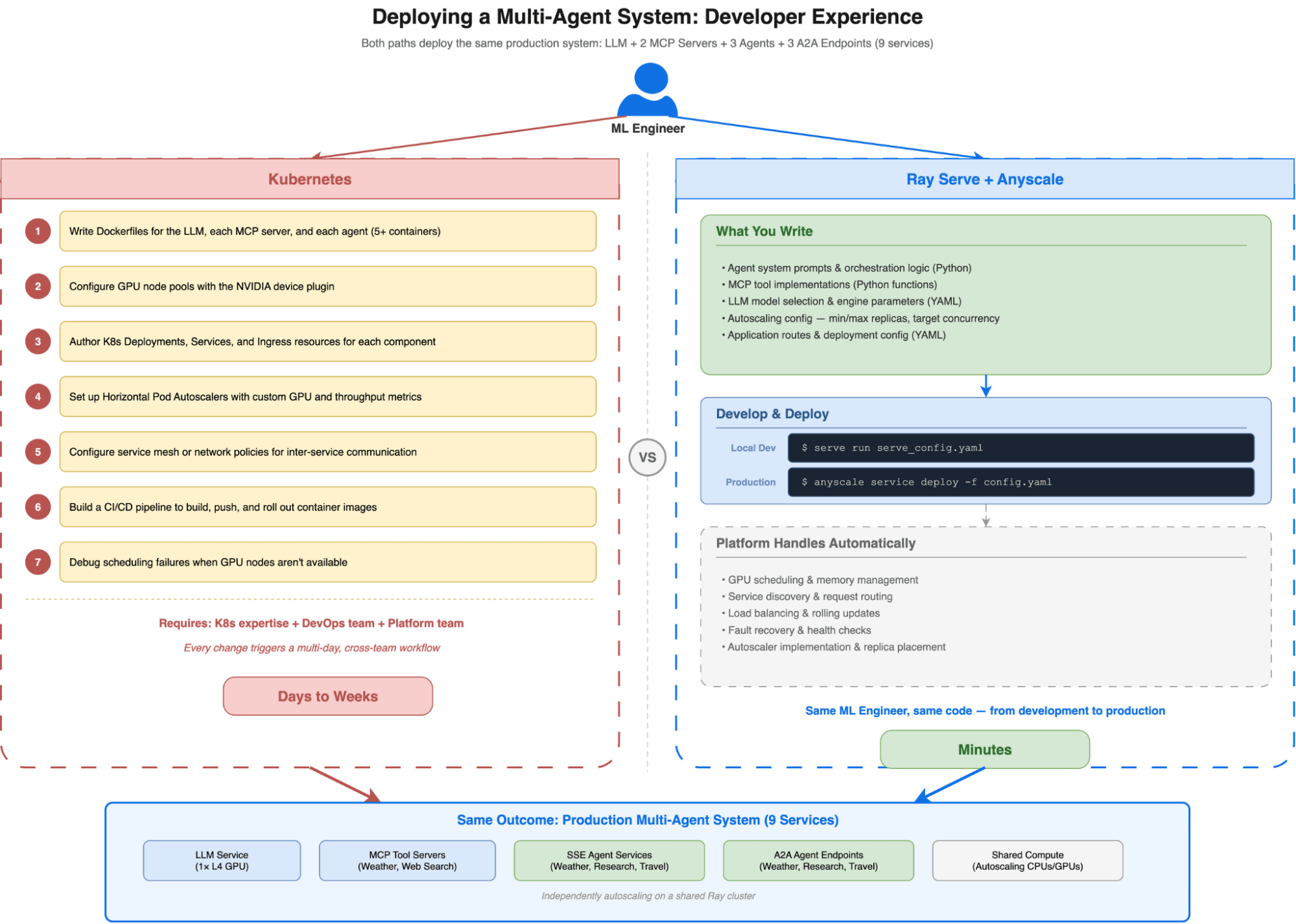
Deploying a Multi-Agent System- Developer Experience
LinkFrom Local to Production on Anyscalehttps://www.anyscale.com/blog/ai-agents-on-ray-serve-single-to-multi-agent-architecture#from-local-to-production-on-anyscale
The same architecture deploys to Anyscale with a configuration superset — the Anyscale service config extends the Ray Serve config with production-grade infrastructure:
anyscale service deploy -f anyscale_service_multi_config.yaml
After deployment, your service is available at a URL likehttps://<service\-name\>\-<id\>\.cld\-<cluster\-id\>\.s\.anyscaleuserdata\.comwith an authentication token for secure access. All nine services (LLM, MCP servers, agents, A2A endpoints) are accessible behind this single authenticated endpoint.
Anyscale transforms Ray Serve from a powerful engine into a complete managed platform. Beyond the raw compute, it handles the critical “Day 2” operations that slow down enterprise adoption: secure authentication (SSO/IAM), private networking (VPC peering), and operational reliability (availability-zone-aware scheduling, head-node fault tolerance). You get zero-downtime rolling updates and comprehensive logging with distributed tracing out of the box, drastically reducing the time-to-value for production agent systems. See theAnyscale Services documentationfor the full feature set.
LinkGet Startedhttps://www.anyscale.com/blog/ai-agents-on-ray-serve-single-to-multi-agent-architecture#get-started
Both reference implementations are available as Anyscale templates you can launch immediately, and as open-source code on GitHub:
- Single Agent Template:Anyscale Template|GitHub
- Multi-Agent (A2A) Template:Anyscale Template|GitHub
To go deeper:
- Anyscale Agent Skills announcement
- Ray Serve Documentation— Core serving framework
- Anyscale LLM Serving— GPU-optimized LLM deployment
- Anyscale MCP Documentation— Scalable MCP server deployment
- LangChain Agent Documentation— Agent orchestration framework
Similar Articles
@hwchase17: https://x.com/hwchase17/status/2053157547985834227
The article outlines a systematic 'Agent Development Lifecycle' (Build, Test, Deploy, Monitor) for creating and managing AI agents effectively, highlighting key frameworks like LangChain, LangGraph, and CrewAI.
@LangChain: What does it take to move from isolated agent experiments to production AI at enterprise scale? Our latest guide brings…
LangChain published a new guide on scaling AI agents from isolated experiments to enterprise production, featuring lessons from Schneider Electric, Vodafone, and monday.com across shared agent platforms, LLMOps, observability, multi-agent architectures, security, and data residency.
@gp_pulipaka: Comprehensive Production Ready AI Agent Architecture! #BigData #Analytics #DataScience #AI #MachineLearning #NLProc #LL…
Most AI agent failures in production are due to architecture problems, not model issues. The article explains how to fix context window management, monolithic instruction sets, and missing governance layers for production-grade agents.
@_avichawla: https://x.com/_avichawla/status/2071897559287955680
The article discusses that the real challenge in AI agents is not building them but running them in production, and proposes the need for an operating system layer to manage fleets of agents, akin to how an OS manages software processes.
Infrastructure frameworks for agents
A discussion post comparing Kubernetes-style infrastructure primitives (pod, deployment, service) to what AI agents would need (agent, model, MCP server, sandbox), asking whether any mature frameworks exist for defining and abstracting agent infrastructure primitives, noting kagent as an early effort.