Cached at:
06/16/26, 11:34 AM
# Plasma 6.7
Source: [https://kde.org/announcements/plasma/6/6.7.0/](https://kde.org/announcements/plasma/6/6.7.0/)
Plasma 6\.7 brings powerful new features to KDE’s classic desktop, and refines its user experience to new levels\.
Enjoy thoughtfully\-designed improvements that solve real problems, a sneak peak of future theming bliss, better performance, and more\.
Read on to learn all about it\!
## Highlights
### Per\-screen virtual desktops
After 21 years, hopefully it will have been worth the wait… per\-screen virtual desktops have finally arrived\!
### Test your microphone volume
No more being told your audio is too loud or quiet, or wondering if it’s your microphone or an app that’s misbehaving\.
### Press\-and\-hold for special characters
With Plasma’s virtual keyboard enabled, press and hold a key to type special characters related to it\.
### Light/dark mode toggle
In Plasma 6\.6, we introduced the ability to create your own Global Themes, and switch between them as part of the day\-night cycle\. Plasma 6\.7 puts you even more in control with a quick toggle to switch between light and dark Global Themes immediately\.
### Vietnamese lunar calendar
Plasma 6\.7 adds the Vietnamese lunar calendar to its available set of non\-Gregorian calendars\. Now you can keep up with dates and events using both calendar systems with more ease than ever\!
### “Background Apps” in the*System Tray*
The*System Tray*is already the place for monitoring apps running in the background using traditional methods\. Plasma 6\.7 extends this support by also showing apps using the newer “Background Apps” system, which is more common for apps using the Flatpak package format\.
## Printing
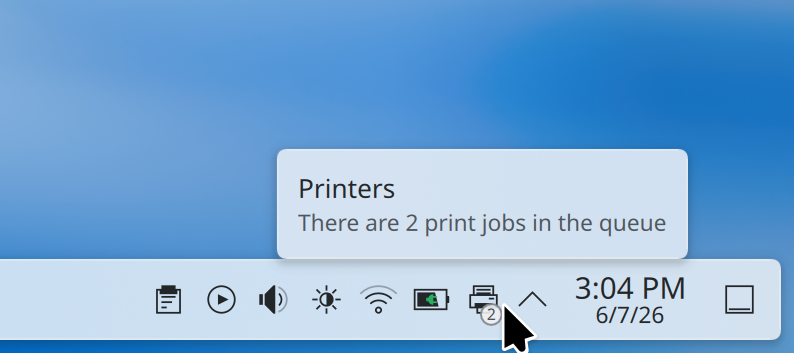
Plasma’s printing support continues to mature\. Now the*System Tray*icon for printers shows the number of active jobs in a little badge\.
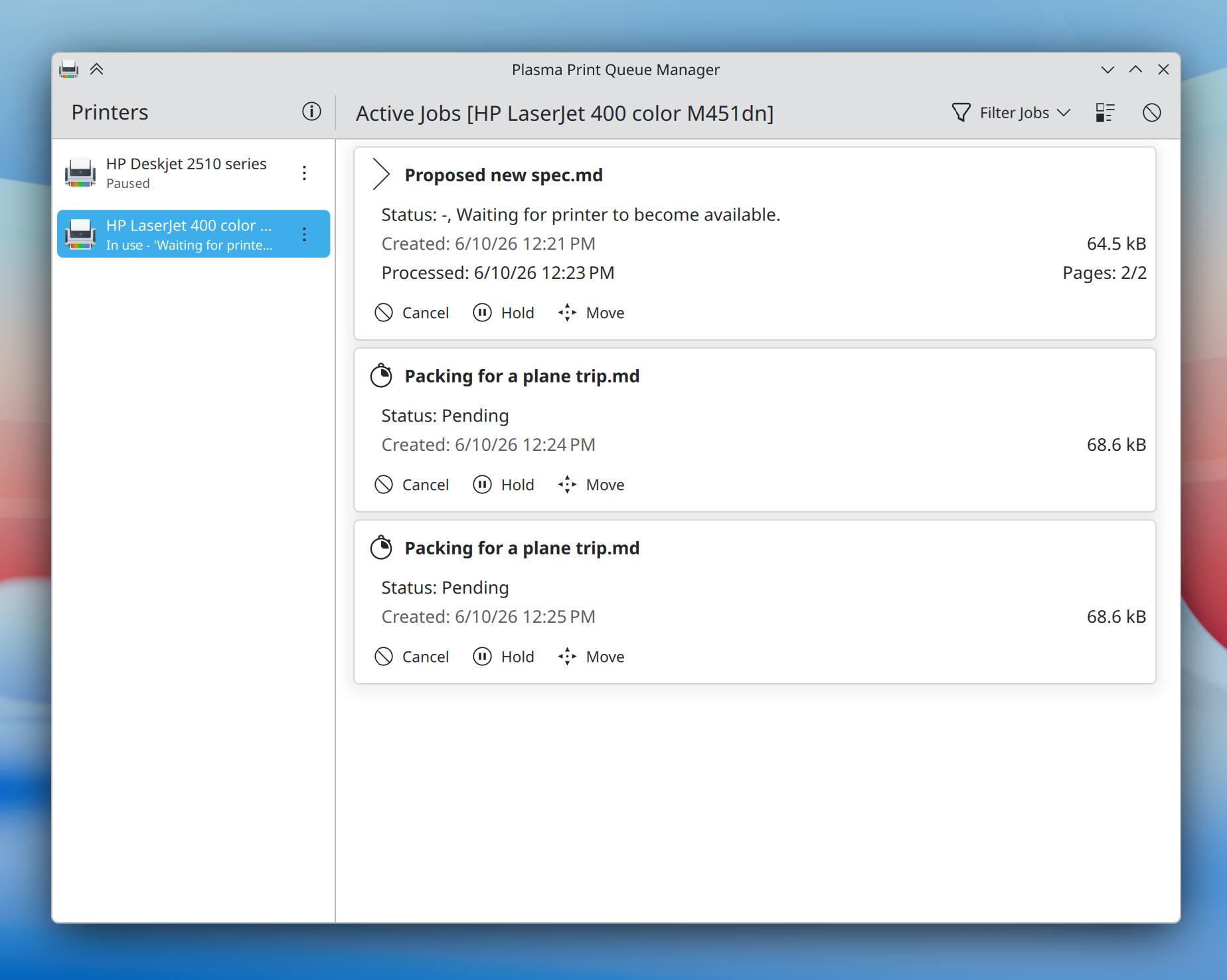
On the enterprise side, Plasma 6\.7 makes it substantially easier to connect to shared printers on Windows networks, and a new print queue management tool offers more power than ever before to those administering multiple frequently\-used printers — while remaining simple and comprehensible enough for home use, too\.
## Usability
Plasma 6\.7 puts a particular focus on refining the desktop experience to make common tasks faster than ever\. Here’s just a small assortment:
### Faster virtual desktop switching in the*Overview*
When you pressMeta\+Wto open the*Overview*screen, Plasma 6\.7 lets you switch virtual desktops simply by scrolling or pressing thePage UporPage Downkeys\.
### Drag and drop to add and remove favorites
It’s now easier than ever to add or remove favorite apps in the*Application Launcher*,*Application Menu*, and*Application Dashboard*widgets: just drag and drop\!
### More intuitive software management
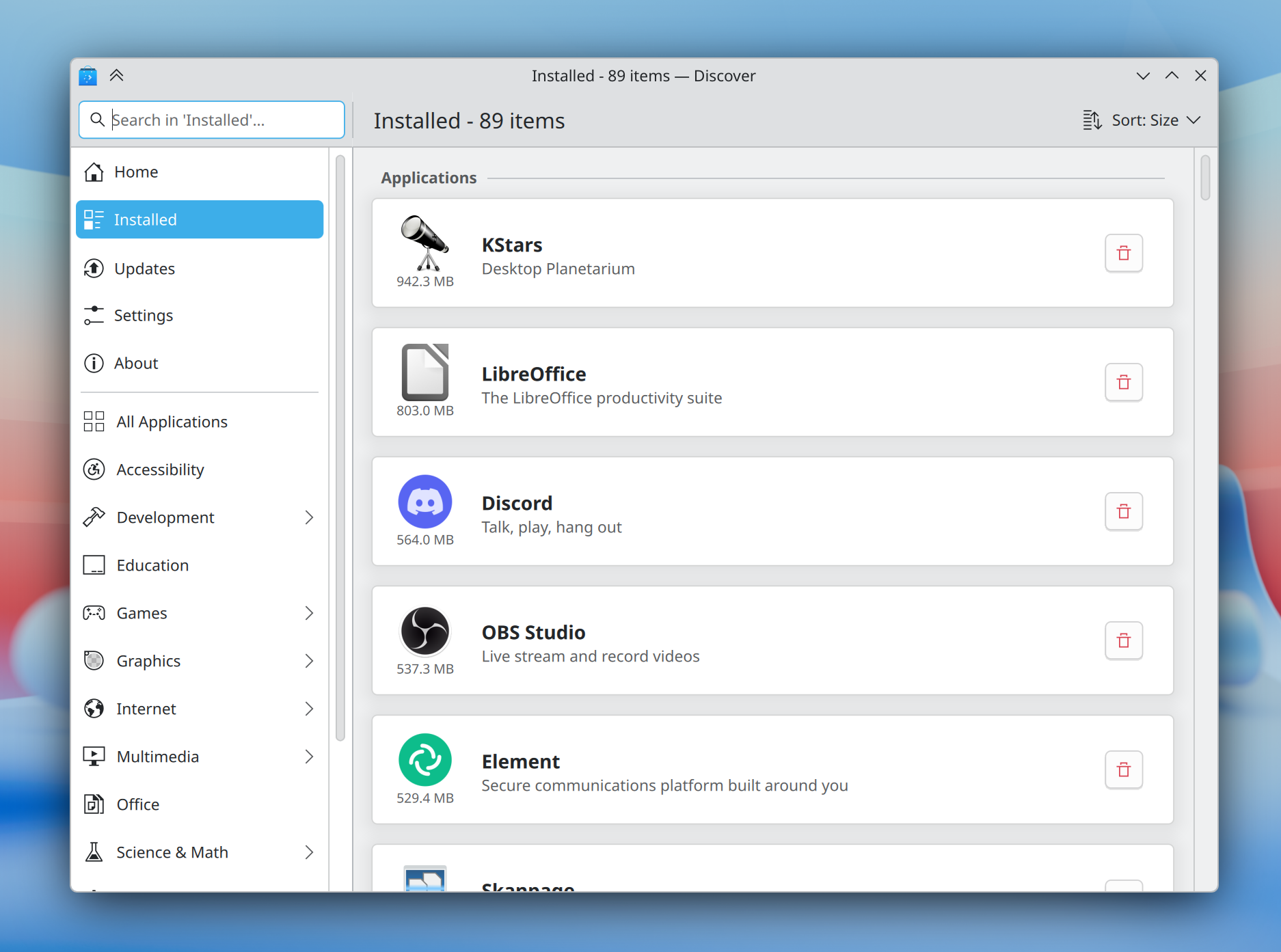
The*Discover*software center now features a more obvious “Install” button and redesigned app cards with more information, plus a more intuitive sorting order\.
In addition, installed software is now grouped by type, making it easier than ever to find what you’re looking for\.
### Easier to compare different time zones
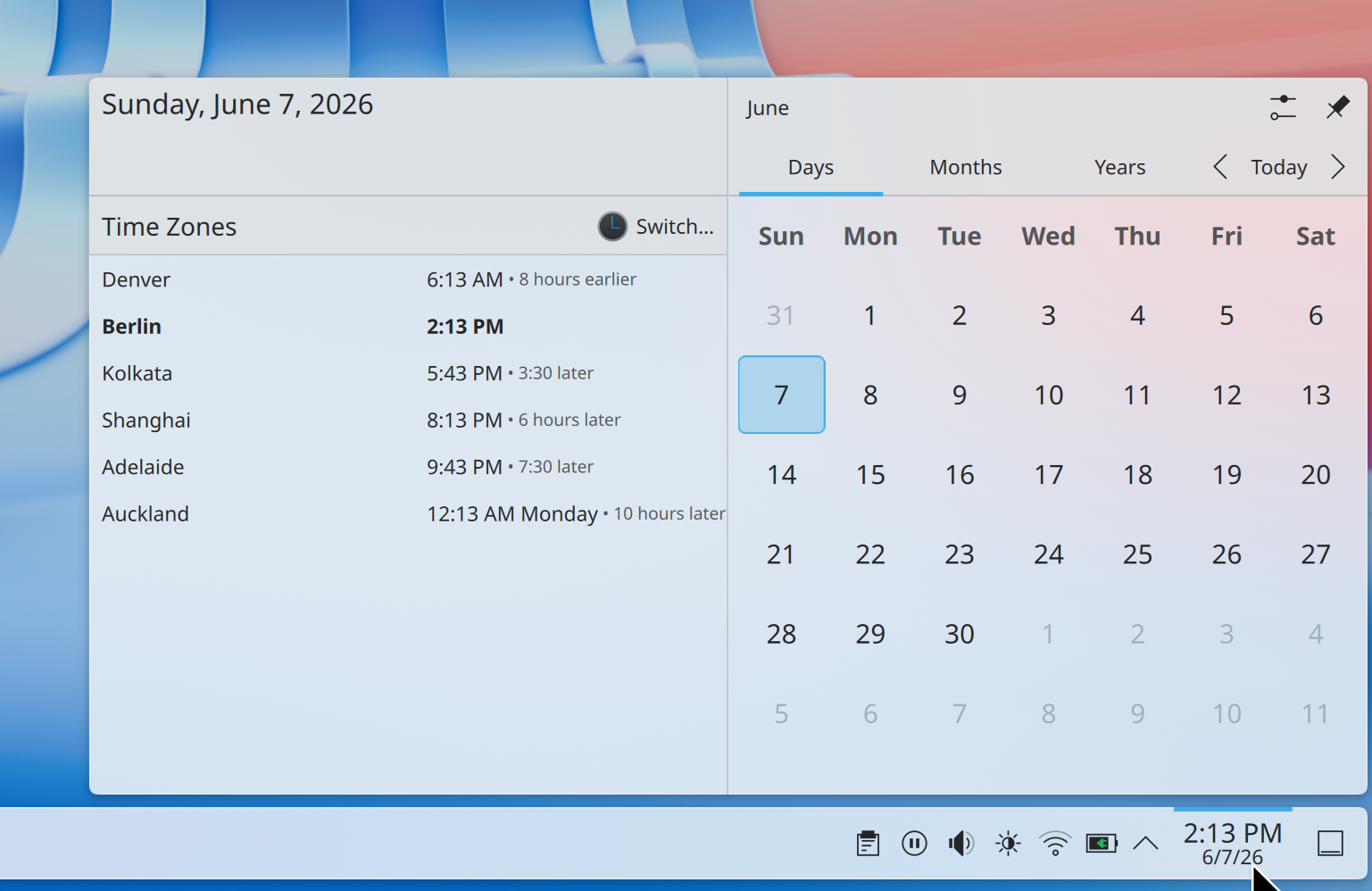
How much earlier is it in Denver if you’re in Berlin? No longer will a question like this require mental gymnastics; Plasma 6\.7 makes it easy to see how many hours earlier or later it is in each time zone shown in the*Digital Clock*widget compared to your local time zone\.
### “Type\-ahead” on the desktop
For power users, the desktop layout now supports switching to “type\-ahead” mode for quickly selecting files when typing on the desktop\. You can change this back to activating*KRunner*if you prefer by*Right\-clicking on desktop*and selecting*Desktop and Wallpaper*\>*Icons*\>*Typing on the desktop*from the pop\-up menu\.
## Theming and styling: Something old, something new
### Oxygen
In preparation for KDE’s 30th anniversary later this year, we’ve brought the Oxygen theme — used by default in KDE 4 — back up to par with the current Breeze theme\.
Air, the Plasma Style providing a light version of Oxygen, has also returned, and we’ve reworked our Global Themes to feature light, dark, and twilight versions\. Both Air and Oxygen benefit from a multitude of fixes, improvements, and restorations, including support for adaptive opacity, different panel positions, and more\.
The classic KDE 4 Air and Horos wallpapers also make a return\.
### Breeze
The default Breeze theme also continues to evolve, now featuring rounded list and grid view highlights for many applications, and visible click effects for menu items\.
Plasma’s Notifications have been given a fancier animation: they now slide in from the nearest screen edge\. This makes them more visually prominent and less likely to be missed, while at the same time avoiding being*too*attention\-grabbing\.
### Union
Though Plasma’s theming capabilities are second to none, for years creating those themes has been a difficult and fragmented experience\.
Plasma’s all\-new*Union*theming system intends to streamline theming by making it possible to style Plasma, QtQuick apps, and QtWidgets apps all with a single set of easy\-to\-write CSS — the world’s most popular and documented open standard for this purpose\.
Plasma 6\.7 marks the inaugural release of Union, here with a tech preview of the QtQuick style\.
You can find out more about the current state and future plans for Union[on its developer’s blog](https://quantumproductions.info/articles/2026-05/union-spring-2026-update)\.
## Colors, graphics, and performance
Plasma has always offered a superb graphical experience, and 6\.7 piles on further improvements\.
No longer do you have to choose between color management using an ICC profile or enjoying HDR content; now both are possible at the same time\!
In addition, you can now control whether the colors on the screen turn redder at extremely low brightness levels on many AMD laptops\.
Finally, the team put a great deal of work into optimization, resulting in better performance and lower power usage for CPU\-rendered apps, many full\-screen windows, and integrated Intel GPUs\.
## But that’s not all…
Plasma 6\.7 has even more to offer, including:
- The ability to duplicate network connections, so you can quickly create several with only small differences between them — which can be useful in an enterprise or school setting
- An option to sync mouse and stylus pointers
- An option to set and change preferred calendar app
- An option to assign keyboard shortcuts for toggling the global “push\-to\-talk” microphone mute mode and clearing the notification history, making these actions faster to trigger
- An easy way of selecting mixed skin tone emojis in*Emoji Selector*app
- A*System Monitor*app that respects your preference regarding storage units \(e\.g\. “GiB” vs “GB”\)
- A*Global Menu*widget that shows menus for apps on other screens by default
- A “Recent Locations” item in the*Application Menu*widget
- Customizable sorting and grouping in the*Window List*widget
- Support for many more Wayland protocols and portals
To see a high\-level overview of all user\-facing changes,[see the Plasma 6\.7 wiki page](https://community.kde.org/Plasma/Plasma_6#Plasma_6.7)\.
To see the full list of*all*changes, read the[complete changelog](https://kde.org/announcements/changelogs/plasma/6/6.6.5-6.7.0/)\.
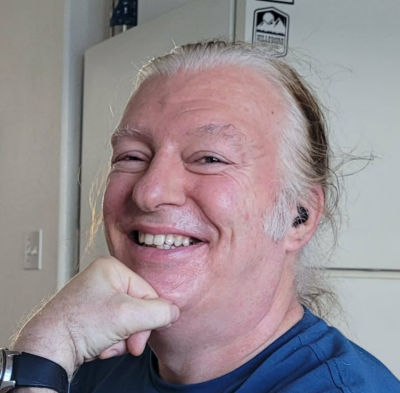
## In memory of Eric Laffoon
Plasma 6\.7 is dedicated to Eric Laffoon, who passed away in May\.
Eric was a longtime supporter of KDE going back decades, offering up his time, money, bug reports, and advocacy\.
Eric is sorely missed, and we dedicate this release to him\.
## Feedback
Discuss KDE on the[KDE Forums](https://discuss.kde.org/)\.
You can provide feedback direct to the developers via the[\#Plasma Matrix channel](https://go.kde.org/matrix/#/%23plasma:kde.org),[Plasma\-devel mailing list](https://mail.kde.org/mailman/listinfo/plasma-devel)or report issues via[Bugzilla](https://bugs.kde.org/enter_bug.cgi?product=plasmashell&format=guided)\. If you like what the team is doing, please let them know\!
Your feedback is greatly appreciated\.
## Supporting KDE
KDE is a[Free Software](https://www.gnu.org/philosophy/free-sw.html)community that exists and grows only because of the help of many volunteers that donate their time and effort\. KDE is always looking for new volunteers and contributions, whether it is help with coding, bug fixing or reporting, writing documentation, translations, promotion, money, etc\. All contributions are gratefully appreciated and eagerly accepted\. Please read through the[Supporting KDE page](https://kde.org/community/donations/)for further information or become a KDE e\.V\. supporting member through our[Join the Game](https://kde.org/community/donations/)initiative\.
## About KDE
KDE is an international technology team that creates free and open source software for desktop and portable computing\. Among KDE’s products are a modern desktop system for Linux and UNIX platforms, comprehensive office productivity and groupware suites and hundreds of software titles in many categories including Internet and web applications, multimedia, entertainment, educational, graphics and software development\. KDE software is translated into more than 60 languages and is built with ease of use and modern accessibility principles in mind\. KDE’s full\-featured applications run natively on Linux, BSD, Windows, Haiku, and macOS\.
---
*Trademark Notices\.*
KDE®and the K Desktop Environment®logo are registered trademarks of KDE e\.V\.\. Linux is a registered trademark of Linus Torvalds\. UNIX is a registered trademark of The Open Group in the United States and other countries\. All other trademarks and copyrights referred to in this announcement are the property of their respective owners\.
---
#### Press Contacts
For more information send us an email:[press@kde\.org](mailto:
[email protected])