@xiaoying_eth: 睡着也能帮你干活的 GitHub 仓库,10 个值得收藏: 1. OpenHands AI 自己写代码、自己跑测试。SWE-bench 得分 77.6%,目前最强自主编程代理之一。 https://github.com/OpenHands…
摘要
这篇推文整理了10个值得收藏的GitHub仓库,涵盖AI编程代理、自动化工具和协作框架,包括OpenHands、CrewAI、n8n等。
查看缓存全文
缓存时间: 2026/06/18 08:11
睡着也能帮你干活的 GitHub 仓库,10 个值得收藏:
-
OpenHands AI 自己写代码、自己跑测试。SWE-bench 得分 77.6%,目前最强自主编程代理之一。 https://github.com/OpenHands/OpenHands…
-
Hermes Agent “自己训练自己“的个人 AI 代理。技能生成 + 记忆检索 + 多平台支持。19 万 https://github.com/nousresearch/hermes-agent…
-
CrewAI 给多个 AI 分配角色,像团队一样协作。调研、写作、审核可以并行跑,不用排队。 https://github.com/crewaiinc/crewai…
-
Aider 终端里的 AI 结对程序员。改完代码直接帮你提交 Git,全程不用动手。 https://github.com/Aider-AI/aider
-
n8n 连接 400+ 服务的自动化工具,开源可自托管,不用付月费。 https://github.com/n8n-io/n8n
-
LangGraph 生产环境里 AI 代理背后的调度基础架构。用“状态图“管理复杂任务流程。 https://github.com/langchain-ai/langgraph…
-
Cloudflare Agentic Inbox AI 自动读邮件、生成回复草稿的邮件客户端,部署在 Cloudflare Workers 上。 https://github.com/cloudflare/agentic-inbox…
-
Browser Use 让 AI 直接操控浏览器。填表单、抓数据、约日程,统统自动化。9.9 万 https://github.com/browser-use/browser-use…
-
awesome-mcp-servers AI 代理可接入的工具大目录。GitHub、Slack、Notion、Stripe、Postgres……一网打尽。 https://github.com/punkpeye/awesome-mcp-servers…
-
claude-task-master 在 Claude Code 上统管多个代理的协调器。一句 prompt 进去,完整功能交付出来。
OpenHands/OpenHands
Source: https://github.com/OpenHands/OpenHands

The self-hosted developer control center for coding agents and automations.
Run OpenHands, Claude Code, Codex, Gemini, or any ACP-compatible agent across local, remote, and cloud backends.





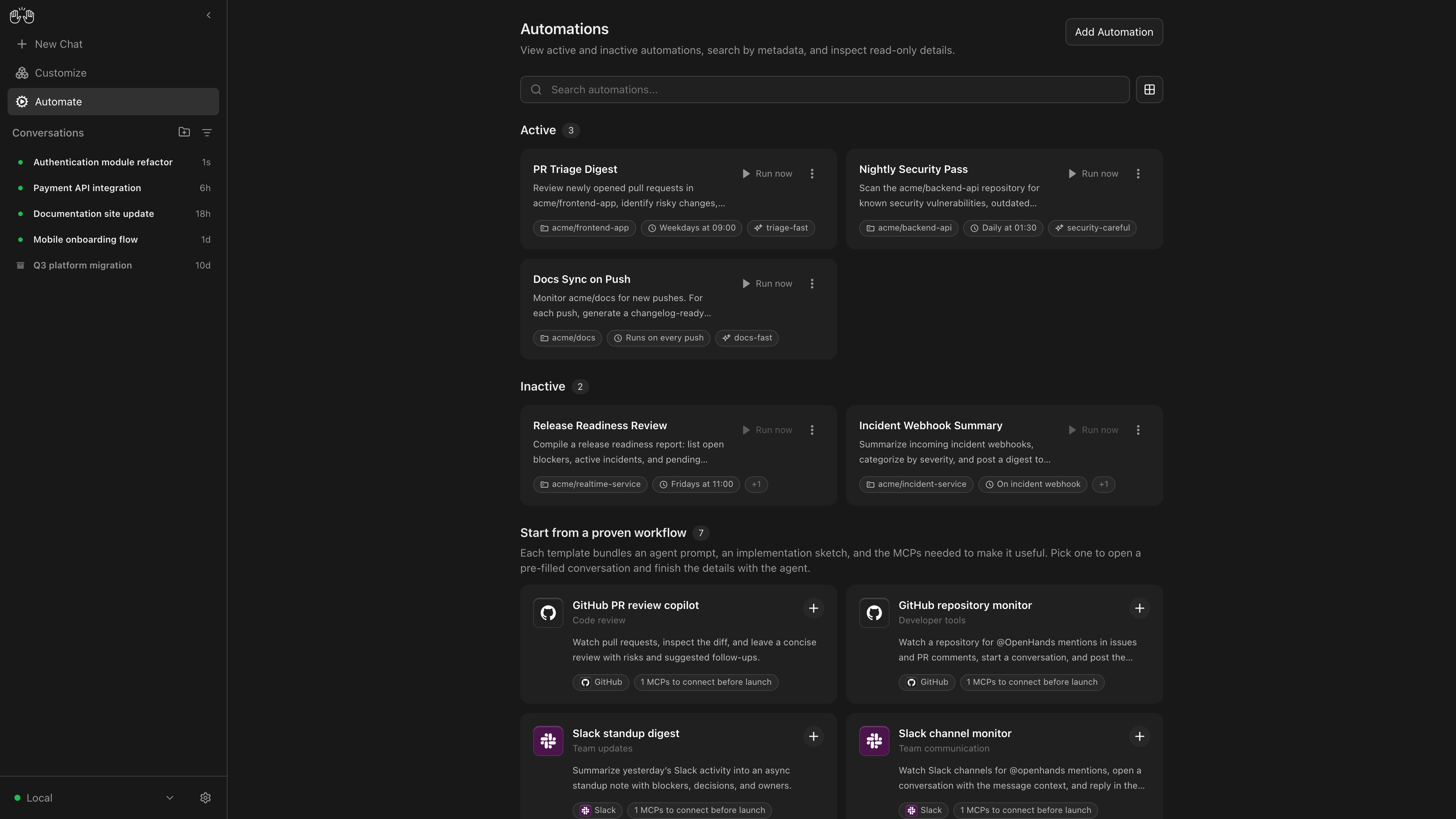
OpenHands Agent Canvas turns your coding agents into a self-hosted, always-on engineering team. It’s a developer control center for starting conversations and automating everyday tasks — like generating reports that publish to Slack or automatically decomposing GitHub issues into tasks.
It runs locally on your machine by default, but can connect to multiple “agent backends”, e.g. running agents in Docker containers, on VMs, or within your company infrastructure. You can optionally choose to run agents on OpenHands Cloud or OpenHands Enterprise infrastructure.
Agent Canvas runs the open source OpenHands agent out-of-the-box, but can use any third-party agent like Claude Code and Codex.
| Self-host your way | Run agents locally, in Docker, on VMs, or anywhere you can run an agent server backend |
| Switch between different backends | Switch between local, remote, and cloud agents without losing focus |
| Create automations | Create automations and workflows that integrate with Slack, GitHub, Linear, and more. Run on a schedule or in response to webhook events |
| Integrate with the tools you use | Connect your automations with third-party services like Slack, GitHub, Notion, and more to automate workflows |
| Bring your own model | Use with any LLM |
| Use with any agent | Use with OpenHands, Claude Code, Codex, Gemini, or any agent with Agent-Client Protocol (ACP). |
If you have questions or feedback, please open a GitHub issue or join the #proj-agent-canvas channel in Slack.
The code in this repo is moving! See Agent Canvas transition FAQ
The source code for OpenHands Agent and Agent Server lives in OpenHands/software-agent-sdk.
The source code for Agent Canvas lives in OpenHands/agent-canvas.
Quickstart
You can install OpenHands to run agents on any machine: on your laptop, on a dedicated computer like a Mac Mini, or on a server in the cloud.
The most powerful way to run OpenHands is on a server in the cloud. This allows your agents to continue running even when your laptop is shut, and makes it easier to trigger your agents through third-party services like Slack, GitHub, and Datadog. See SELF_HOSTING.md for details, especially with respect to security hardening.
Notably, you can run the backend in multiple different environments, and switch between them from the same Agent Canvas frontend. E.g. you can share an Agent Server with your team for agents doing code review and dependency updates, then have your personal agents running on your laptop.
Option 1: Without a Sandbox
This runs the agent-server directly on the machine you’re installing on — the agent will have full access to your filesystem!
Prerequisites: Node.js 22.12.x or later, uv
npm install -g @openhands/agent-canvas
agent-canvas
The agent-canvas command starts the full local stack by default. You can also split it when you want to run pieces separately:
agent-canvas --frontend-only  # static frontend + ingress only
agent-canvas --backend-only   # agent server + automation backend + ingress only
Option 2: With a Docker Sandbox
Prerequisites:
- Docker: Docker Desktop on macOS/Windows, or Docker Engine/Docker Desktop on Linux.
- A host directory for
PROJECTS_PATHcontaining the project folders you want the agent to access. Create it before starting the container.
macOS / Linux:
export PROJECTS_PATH="$HOME/projects"  # directory containing your project folders
mkdir -p "$PROJECTS_PATH" "$HOME/.openhands"

docker run -it --rm \
  -p 8000:8000 \
  -v "$HOME/.openhands:/home/openhands/.openhands" \
  -v "${PROJECTS_PATH}:/projects" \
  ghcr.io/openhands/agent-canvas:1.0.0-rc.11
Windows (PowerShell / Windows Terminal): See README.windows.md for the equivalent commands.
The agent will be able to access any project under PROJECTS_PATH.
Option 3: From Source
This runs the agent-server directly on the machine you’re installing on — the agent will have full access to your filesystem!
Prerequisites: Node.js 22.12.x or later, npm, uv (for running the agent server via uvx)
git clone https://github.com/OpenHands/agent-canvas.git
cd agent-canvas
npm install
npm run dev
Access the UI at http://localhost:8000. You can add additional backends directly from the UI.
Architecture
Agent Canvas is powered by the OpenHands Agent Server, a REST API for running multiple agents on a single machine. Each Agent Server runs on a single host/port; the Agent Canvas can connect to multiple Agent Servers and easily flip between them.
You can run an Agent Server anywhere:
- Directly on your laptop (be careful!)
- On a dedicated machine like a Mac Mini
- On a virtual machine in the cloud
- Inside OpenHands Cloud (our commercial offering)
The Agent Server is often paired with an Automation Server, which lets you set up agents that run on a schedule or in response to events.
More documentation
相似文章
@xiaoying_eth: 这 10 个 GitHub 仓库,不该只被程序员知道。 1. TradingAgents 一个 AI 投资分析师团队。 基本面、情绪、新闻、技术 4 个分析师一起讨论策略,后面还有风险经理和执行代理。 相当于把一个迷你华尔街团队,塞进你的…
推荐了10个实用的GitHub开源项目,涵盖AI投资分析、多模型聊天客户端、视频生成引擎、金融终端、短视频自动生成、AI邮件客户端、语音克隆、域名信息收集、Claude技能集和API集成等。
@ChrisSlacker: 50个超实用的GitHub仓库 1. iFixAi — AI对齐测试 → https://t.co/70ZaaoerS3 2. public-apis — 免费API合集 → https://t.co/x0Lqj0ww9B 3. buil…
一份整理了50个实用的GitHub仓库的精选列表,涵盖AI对齐测试、API合集、学习资源、AI Agent框架、大模型推理工具等,适合开发者和AI从业者收藏。
@Bitcoin188: 卧槽!互联网顶尖那批人,直接把脑子开源了! 这11个GitHub仓库,真的能让你少走三年弯路,白嫖党直接起飞! 兄弟们赶紧码住,慢慢啃,别手动找资料了! PilotDeck(OpenBMB) 几分钟部署一个能自己干活的AI Agent,真…
推荐11个GitHub上优质开源项目,涵盖AI智能体框架、AI编程、记忆系统、科研自动化和量化投资工具,旨在帮助开发者快速上手和提升效率。
@heynavtoor: 2026年让你睡觉时自动完成实际工作的10个GitHub仓库,收藏这个列表。
精选10个开源GitHub仓库,能在2026年自动化开发和实际任务,涵盖OpenHands、CrewAI、n8n等流行工具。
@heynavtoor:10个GitHub仓库,助你构建AI代理,在你睡觉时自动提交PR。收藏此文,在老板发现前保存这份清单……
一份精心整理的10个开源GitHub仓库清单,用于构建能够自动处理拉取请求、修复Bug和开发功能的AI代理,涵盖OpenHands、SWE-agent和Aider等工具。