A detailed report on stability issues with Intel Core Ultra 9 285K CPU on ASUS Z890 motherboard, including crashes and debugging steps, warning potential buyers.
<aside class="admonition note">
<div class="note-container">
<div class="note-icon" style="width: 20px; height: 20px">
<svg id="exclamation-icon" width="100%" height="100%" viewBox="0 0 24 24" version="1.1" xmlns="http://www.w3.org/2000/svg" xmlns:xlink="http://www.w3.org/1999/xlink" xml:space="preserve" style="fill-rule:evenodd;clip-rule:evenodd;stroke-linejoin:round;stroke-miterlimit:1.41421;">
<path d="M0,0L24,0L24,24L0,24L0,0Z" style="fill:none;"/>
<g transform="matrix(1.2,0,0,1.2,-2.4,-2.4)">
<path d="M12,2C6.48,2 2,6.48 2,12C2,17.52 6.48,22 12,22C17.52,22 22,17.52 22,12C22,6.48 17.52,2 12,2ZM13,17L11,17L11,15L13,15L13,17ZM13,13L11,13L11,7L13,7L13,13Z" style="fill-rule:nonzero;"/>
</g>
</svg>
</div>
<div class="admonition-content"><strong>Update (2025-05-15):</strong> Turns out the CPU was faulty! See <a href="/posts/2025-05-15-my-2025-high-end-linux-pc/">My 2025 high-end
Linux PC</a> for a new article on
this build, now with a working CPU.</div>
</div>
</aside>
<aside class="admonition note">
<div class="note-container">
<div class="note-icon" style="width: 20px; height: 20px">
<svg id="exclamation-icon" width="100%" height="100%" viewBox="0 0 24 24" version="1.1" xmlns="http://www.w3.org/2000/svg" xmlns:xlink="http://www.w3.org/1999/xlink" xml:space="preserve" style="fill-rule:evenodd;clip-rule:evenodd;stroke-linejoin:round;stroke-miterlimit:1.41421;">
<path d="M0,0L24,0L24,24L0,24L0,0Z" style="fill:none;"/>
<g transform="matrix(1.2,0,0,1.2,-2.4,-2.4)">
<path d="M12,2C6.48,2 2,6.48 2,12C2,17.52 6.48,22 12,22C17.52,22 22,17.52 22,12C22,6.48 17.52,2 12,2ZM13,17L11,17L11,15L13,15L13,17ZM13,13L11,13L11,7L13,7L13,13Z" style="fill-rule:nonzero;"/>
</g>
</svg>
</div>
<div class="admonition-content"><strong>Update (2025-09-07):</strong> The replacement CPU also died and I have given up on
Intel. See <a href="/posts/2025-09-07-bye-intel-hi-amd-9950x3d/">Bye Intel, hi AMD!</a> for
more details on the AMD 9950X3D.</div>
</div>
</aside>
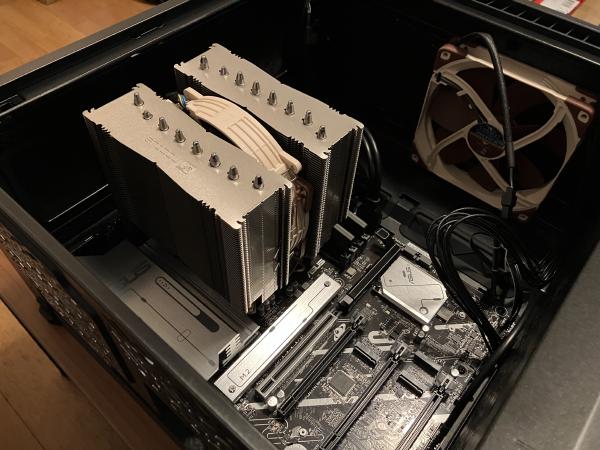
<p>In January I ordered the components for a new PC and expected that I would
publish a successor to my <a href="/posts/2022-01-15-high-end-linux-pc/">2022 high-end Linux PC
🐧</a> article. Instead, I am now sitting on
a PC which regularly encounters crashes of the worst-to-debug kind, so I am
publishing this article as a warning for others in case you wanted to buy the
same hardware.</p>
<a href="https://michael.stapelberg.ch/posts/2025-03-19-intel-core-ultra-9-285k-on-asus-z890-not-stable/IMG_4799.jpg"><img
srcset="https://michael.stapelberg.ch/posts/2025-03-19-intel-core-ultra-9-285k-on-asus-z890-not-stable/IMG_4799_hu_7aa96d59a8a9f316.jpg 2x,https://michael.stapelberg.ch/posts/2025-03-19-intel-core-ultra-9-285k-on-asus-z890-not-stable/IMG_4799_hu_db2dc0cc8ca1d4af.jpg 3x"
src="https://michael.stapelberg.ch/posts/2025-03-19-intel-core-ultra-9-285k-on-asus-z890-not-stable/IMG_4799_hu_25f81b95203a769b.jpg"
width="600"
height="450"
style="
border: 1px solid #000;
"
loading="lazy"></a>
<h2 id="components">Components</h2>
<p>Which components did I pick for this build? Here’s the full list:</p>
<table>
<thead>
<tr>
<th>Price</th>
<th>Type</th>
<th>Article</th>
</tr>
</thead>
<tbody>
<tr>
<td>140 CHF</td>
<td>Case</td>
<td><a href="https://www.digitec.ch/de/s1/product/fractal-define-7-compact-black-solid-atx-matx-mini-itx-pc-gehaeuse-13220301">Fractal Define 7 Compact Black Solid</a></td>
</tr>
<tr>
<td>155 CHF</td>
<td>Power Supply</td>
<td><a href="https://www.digitec.ch/de/s1/product/corsair-rm850x-850-w-pc-netzteil-47356173?supplier=8560040">Corsair RM850x</a></td>
</tr>
<tr>
<td>233 CHF</td>
<td>Mainboard</td>
<td><a href="https://www.digitec.ch/de/s1/product/asus-prime-z890-p-lga-1851-intel-z890-atx-mainboard-50252296">ASUS PRIME Z890-P</a></td>
</tr>
<tr>
<td>620 CHF</td>
<td>CPU</td>
<td><a href="https://www.digitec.ch/de/s1/product/intel-core-ultra-9-285k-lga-1851-370-ghz-24-core-prozessor-49734792">Intel Core Ultra 9 285k</a></td>
</tr>
<tr>
<td>120 CHF</td>
<td>CPU fan</td>
<td><a href="https://www.digitec.ch/de/s1/product/noctua-nh-d15-g2-168-mm-cpu-kuehler-46985628">Noctua NH-D15 G2</a></td>
</tr>
<tr>
<td>39 CHF</td>
<td>Case fan</td>
<td><a href="https://www.digitec.ch/de/s1/product/noctua-nf-a14-pwm-140-mm-1-x-pc-luefter-657800?supplier=3204073">Noctua NF-A14 PWM (140 mm)</a></td>
</tr>
<tr>
<td>209 CHF</td>
<td>RAM</td>
<td><a href="https://www.digitec.ch/de/s1/product/corsair-vengeance-2-x-32gb-6400-mhz-ddr5-ram-dimm-ram-24473300">64 GB DDR5-6400 Corsair Vengeance (2 x 32GB)</a></td>
</tr>
<tr>
<td>280 CHF</td>
<td>Disk</td>
<td><a href="https://www.digitec.ch/de/s1/product/samsung-990-pro-4000-gb-m2-2280-ssd-37073751?supplier=406802">4000 GB Samsung 990 Pro</a></td>
</tr>
<tr>
<td>940 CHF</td>
<td>GPU</td>
<td><a href="https://www.digitec.ch/de/s1/product/inno3d-geforce-rtx-4070-ti-x3-oc-12-gb-gddr6x-1-x-hdmi-3-x-dp-12-gb-grafikkarte-23664346?supplier=406802">Inno3D GeForce RTX4070 Ti</a></td>
</tr>
</tbody>
</table>
<p>Total: ≈1800 CHF, excluding the Graphics Card I re-used from a previous build.</p>
<p>…and the next couple of sections go into detail on how I selected these components.</p>
<h3 id="case">Case</h3>
<p>I have been a fan of Fractal cases for a couple of generations. In particular, I
realized that the “Compact” series offers plenty of space even for large
graphics cards and CPU coolers, so that’s now my go-to case: the Fractal Define
7 Compact (Black Solid).</p>
<p>I really like building components into the case and working with the case. There
are no sharp edges, the mechanisms are a pleasure to use and the
cable-management is well thought-out.</p>
<p>The only thing that wasn’t top-notch is that Fractal ships the case screws in
sealed plastic packages that you need to cut open. I would have wished for a
re-sealable plastic baggie so that one can keep the unused screws instead of
losing them.</p>
<h3 id="power-supply">Power Supply</h3>
<p>I wanted to keep my options open regarding upgrading to an nVidia 50xx series
graphics card at a later point. Those models have a TGP (“Total Graphics Power”)
of 575 watts, so I needed a power supply that delivers enough power for the
whole system even at peak power usage in all dimensions.</p>
<p>I ended up selecting the Corsair RM850x, which <a href="https://www.tomshardware.com/reviews/corsair-rm850x-2021-power-supply-review">reviews favoribly (“leader in
the 850W gold
category”)</a>
and was available at my electronics store of choice.</p>
<p>This was a good choice: the PSU indeed runs quiet, and I really like the power
cables (e.g. the GPU cable) that they include: they are very flexible, which
makes them easy to cable-manage.</p>
<h3 id="ssd-disk">SSD disk</h3>
<p>I have been avoiding PCIe 5 SSDs so far because they consume a lot more power
compared to PCIe 4 SSDs. While bulk streaming data transfer rates are higher on
PCIe 5 SSDs, random transfers are not significantly faster. Most of my compute
workload are random transfers, not large bulk transfers.</p>
<p>The power draw situation with PCIe 5 SSDs seems to be getting better lately,
with the Phison E31T being the first controller that implements power saving. A
disk that uses the E31T controller is the Corsair Force Series MP700
Elite. Unfortunately, said disk was unavailable when I ordered.</p>
<p>Instead, I picked the Samsung 990 Pro with 4 TB. I made good experiences with
the Samsung Pro series over the years (never had one die or degrade
performance), and my previous 2 TB disk is starting to fill up, so the extra
storage space is appreciated.</p>
<h3 id="mainboard">Mainboard</h3>
<p>One annoying realization is that most mainboard vendors seem to have moved to
2.5 GbE (= 2.5 Gbit/s ethernet) onboard network cards. I would have been
perfectly happy to play it safe and buy another Intel I225 1 GbE network card,
as long as it <em>just works</em> with Linux.</p>
<p>In the 2.5 GbE space, the main players seem to be Realtek and Intel. Most
mainboard vendors opted for Realtek as far as I could see.</p>
<p>Linux includes the <code>r8169</code> driver for Realtek network cards, but you need a
recent-enough Linux version (6.13+) that includes commit “<a href="https://github.com/torvalds/linux/commit/f75d1fbe7809bc5ed134204b920fd9e2fc5db1df">r8169: add support
for
RTL8125D</a>”,
accompanied by a recent-enough linux-firmware package. Even then, there is some
concern around stability and ASPM support. See for example <a href="https://serverfault.com/a/1169558">this ServerFault
post</a> by someone working on the <code>r8169</code>
driver.</p>
<p>Despite the Intel 1 GbE options being well-supported at this point, Intel’s 2.5
GbE options might not fare any better than the Realtek ones: I found <a href="https://www.reddit.com/r/HomeServer/comments/1cc0yuq/are_intel_25_gbe_nics_i225v_i226v_stable_now/">reports of
instability with Intel’s 2.5 GbE network
cards</a>.</p>
<p>Aside from the network cards, I decided to stick to the ASUS prime series of
mainboards, as I made good experiences with those in my past few builds. Here
are a couple of thoughts on the ASUS PRIME Z890-P mainboard I went with:</p>
<ul>
<li>I like the quick-release PCIe mechanism: ASUS understood that people had
trouble unlocking large graphics cards from their PCIe slot, so they added a
lever-like mechanism that is easily reachable. In my couple of usages, this
worked pretty well!</li>
<li>I wrote about <a href="/posts/2022-01-15-high-end-linux-pc/#slow-boot">slow boot times with my 2022 PC
build</a> that were caused by
time-consuming memory training. On this ASUS board, I noticed that they blink
the Power LED to signal that memory training is in progress. Very nice! It
hadn’t occurred to me previously that the various phases of the boot could be
signaled by different Power LED blinking patterns :)
<ul>
<li>The downside of this feature is: While the machine is in suspend-to-RAM, the
Power LED also blinks! This is annoying, so I might just disconnect the
Power LED entirely.</li>
</ul>
</li>
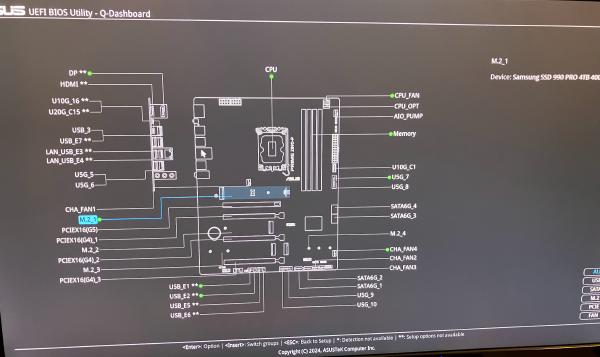
<li>The UEFI firmware includes what they call a Q-Dashboard: An overview of what
is installed/connected in which slot. Quite nice:</li>
</ul>
<a href="https://michael.stapelberg.ch/posts/2025-03-19-intel-core-ultra-9-285k-on-asus-z890-not-stable/IMG_4809.jpg"><img
srcset="https://michael.stapelberg.ch/posts/2025-03-19-intel-core-ultra-9-285k-on-asus-z890-not-stable/IMG_4809_hu_9cc794b41e61aa66.jpg 2x,https://michael.stapelberg.ch/posts/2025-03-19-intel-core-ultra-9-285k-on-asus-z890-not-stable/IMG_4809_hu_2e30747227d38ee6.jpg 3x"
src="https://michael.stapelberg.ch/posts/2025-03-19-intel-core-ultra-9-285k-on-asus-z890-not-stable/IMG_4809_hu_2bc1c1ff7fd21242.jpg"
width="600"
height="357"
style="
border: 1px solid #000;
"
loading="lazy"></a>
<h3 id="cpu-fan">CPU fan</h3>
<p>I am a long-time fan of Noctua’s products: This company makes silent fans with
great cooling capacity that work reliably! For many years, I have swapped out
every of my PC’s fans with Noctua fans, and it was always an upgrade. Highly
recommended.</p>
<p>Hence, it is no question that I picked the latest and greatest Noctua CPU cooler
for this build: the Noctua NH-D15 G2. There are a couple of things to pay
attention to with this cooler:</p>
<ul>
<li>I decided to configure it with one fan instead of two fans: Using only one fan
will be the quietest setup, yet still have plenty of cooling capacity for this
setup.</li>
<li>There are 3 different versions that differ in how their base plate is
shaped. Noctua recommends: “For LGA1851, we generally recommend the regular
standard version with medium base convexity”
(<a href="https://noctua.at/en/intel-lga1851-all-you-need-to-know">https://noctua.at/en/intel-lga1851-all-you-need-to-know</a>)</li>
<li>The height of this cooler is 168 mm. This fits well into the Fractal Define 7
Compact Black.</li>
</ul>
<h3 id="cpu">CPU</h3>
<p>Probably the point that raises most questions about this build is why I selected
an Intel CPU over an AMD CPU. The primary reason is that Intel CPUs are so much
better at power saving!</p>
<p>Let me explain: Most benchmarks online are for gamers and hence measure a usage
curve that goes “start game, run PC at 100% resources for hours”. Of course,
when you never let the machine idle, you would care about <em>power efficiency</em>:
how much power do you need to use to achive the desired result?</p>
<p>My use-case is software development, not gaming. My usage curve oscillates
between “barely any usage because Michael is reading text” to “complete this
compilation as quickly as possible with all the power available”. For me, I need
both absolute power consumption at idle, and absolute performance to be
best-of-class.</p>
<p>AMD’s CPUs offer great performance (the recently released <a href="https://www.phoronix.com/review/amd-ryzen-9-9950x3d-linux">Ryzen 9 9950X3D is
even faster</a> than the
Intel 9 285K), and have great <em>power efficiency</em>, but poor <em>power consumption</em>
at idle: With ≈35W of idle power draw, Zen 5 CPUs consume ≈3x as much power as
Intel CPUs!</p>
<p>Intel’s CPUs offer great performance (like AMD), but excellent power consumption
at idle.</p>
<p>Therefore, I can’t in good conscience buy an AMD CPU, but if you want a fast
gaming-only PC or run an always-loaded HPC cluster with those CPUs, definitely
go ahead :)</p>
<h3 id="graphics-card">Graphics card</h3>
<p>I don’t necessarily recommend any particular nVidia graphics card, but I have
had to stick to nVidia cards because they are the only option that work with my
picky <a href="/posts/2017-12-11-dell-up3218k/">Dell UP3218K monitor</a>.</p>
<p>From time to time, I try out different graphics cards. Recently, I got myself an
AMD Radeon RX 9070 because I read that it works well with open source drivers.</p>
<p>While the Radeon RX 9070 works with my monitor (great!), it seems to consume 45W
in idle, which is much higher than my nVidia cards, which idle at ≈ 20W. This is
unacceptable to me: Aside from high power costs and wasting precious resources,
the high power draw also means that my room will be hotter in summer and the
fans need to spin faster and therefore louder.</p>
<p>Maybe I’ll write a separate article about the Radeon RX 9070.</p>
<h2 id="installation">Installation</h2>
<h3 id="uefi-setup">UEFI setup</h3>
<p>On the internet, I read that there was some issue related to the Power Limits
that mainboards come with by default. Therefore, I did a <a href="https://www.asus.com/motherboards-components/motherboards/prime/prime-z890-p/helpdesk_bios?model2Name=PRIME-Z890-P">UEFI firmware
update</a>
first thing after getting the mainboard. I upgraded to version 1404 (2025/01/10)
using the provided ZIP file (<code>PRIME-Z890-P-ASUS-1404.zip</code>) on an MS-DOS
FAT-formatted USB stick with the EZ Flash tool in the UEFI firmware
interface. Tip: do not extract the ZIP file, otherwise the EZ Flash tool cannot
update the Intel ME firmware. Just put the ZIP file onto the USB disk as-is.</p>
<p>I verified that with this UEFI version, the <code>Power Limit 1 (PL1)</code> is 250W, and
<code>ICCMAX=347A</code>, which are exactly the values that Intel recommends. Great!</p>
<p>I also enabled XMP and verified that memtest86 reported no errors.</p>
<h3 id="software-setup-early-adopter-pains">Software setup: early adopter pains</h3>
<p>To copy over the data from the old disk to the new disk, I wanted to boot a live
linux distribution (specifically, <a href="https://grml.org/">grml.org</a>) and follow my
usual procedure: boot with the old disk and the new (empty) disk, then use <code>dd</code>
to copy the data. It’s nice and simple, hard to screw up.</p>
<p>Unfortunately, while grml 2024.12 technically does boot up, there are two big
problems:</p>
<ol>
<li>
<p>There is no network connectivity because the kernel and linux-firmware
versions are too old.</p>
<ul>
<li><a href="https://github.com/torvalds/linux/commit/f75d1fbe7809bc5ed134204b920fd9e2fc5db1df">r8169: add support for RTL8125D</a></li>
</ul>
</li>
<li>
<p>I could not get Xorg to work at all. Not with the Intel integrated GPU, nor
with the nVidia dedicated GPU. Not with <code>nomodeset</code> or any of the other
options in the grml menu. This wasn’t merely a convenience problem: I needed
to use <code>gparted</code> (the graphical version) for its partition moving/resizing
support.</p>
</li>
</ol>
<p>Ultimately, it was easier to upgrade my old PC to Linux 6.13 and linux-firmware
20250109, then put in the new disk and copy over the installation.</p>
<h2 id="stability-issues">Stability issues</h2>
<p>At this point (early February), I switched to this new machine as my main PC.</p>
<p>Unfortunately, I could never get it to run stable! This journal shows you some
of the issues I faced and what I tried to troubleshoot them.</p>
<h3 id="xorg-dying-after-resume-from-suspend">Xorg dying after resume-from-suspend</h3>
<p>One of the first issues I encountered with this system was that after resuming
from suspend-to-RAM, I was greeted with a login window instead of my X11
session. The logs say:</p>
<pre tabindex="0"><code>(EE) NVIDIA(GPU-0): Failed to acquire modesetting permission.
(EE) Fatal server error:
(EE) EnterVT failed for screen 0
(EE)
(EE)
(EE) Please also check the log file at "/var/log/Xorg.0.log" for additional information.
(EE)
(WW) NVIDIA(0): Failed to set the display configuration
(WW) NVIDIA(0): - Setting a mode on head 0 failed: Insufficient permissions
(WW) NVIDIA(0): - Setting a mode on head 1 failed: Insufficient permissions
(WW) NVIDIA(0): - Setting a mode on head 2 failed: Insufficient permissions
(WW) NVIDIA(0): - Setting a mode on head 3 failed: Insufficient permissions
(EE) Server terminated with error (1). Closing log file.
</code></pre><p>I couldn’t find any good tips online for this error message, so I figured I’d
wait and see how frequently this happens before investigating further.</p>
<h3 id="feb-18-xhci-host-controller-dying">Feb 18: xHCI host controller dying</h3>
<p>On Feb 18th, after resume-from-suspend, none of my USB peripherals would work
anymore! This affected <em>all USB ports</em> of the machine and could not be fixed,
not even by a reboot, until I fully killed power to the machine! In the kernel
log, I saw the following messages:</p>
<pre tabindex="0"><code>xhci_hcd 0000:80:14.0: xHCI host not responding to stop endpoint command
xhci_hcd 0000:80:14.0: xHCI host controller not responding, assume dead
xhci_hcd 0000:80:14.0: HC died; cleaning up
</code></pre><h3 id="feb-24-xhci-host-controller-dying">Feb 24: xHCI host controller dying</h3>
<p>The HC dying issue happened again when I was writing an SD card in my USB card
reader:</p>
<pre tabindex="0"><code>xhci_hcd 0000:80:14.0: HC died; cleaning up
</code></pre><h3 id="feb-24--uefi-update-disable-xmpp">Feb 24: → UEFI update, disable XMPP</h3>
<p>To try and fix the host controller dying issue, I updated the UEFI firmware to
version <code>1601</code> and disabled the XMPP RAM profile.</p>
<h3 id="feb-26--switch-back-from-geforce-4070-ti-to-3060-ti">Feb 26: → switch back from GeForce 4070 Ti to 3060 Ti</h3>
<p>To rule out any GPU-specific issues, I decided to switch back from the Inno3D
GeForce RTX4070 Ti to my older MSI GeForce RTX 3060 Ti.</p>
<h3 id="feb-28-pc-dying-on-suspend-to-ram">Feb 28: PC dying on suspend-to-RAM</h3>
<p>On Feb 28th, my PC did not resume from suspend-to-RAM. It would not even react
to a ping, I had to hard-reset the machine. When checking the syslog afterwards,
there are no entries.</p>
<p>I checked my power monitoring and saw that the machine consumed 50W (well above
idle power, and far above suspend-to-RAM power) throughout the entire
night. Hence, I suspect that the suspend-to-RAM did not work correctly and the
machine never actually suspended.</p>
<h3 id="mar-4th-pc-dying-when-running-django-tests">Mar 4th: PC dying when running django tests</h3>
<p>On March 4th, I was running the test suite for a medium-sized Django project (=
100% CPU usage) when I encountered a really hard crash: The machine stopped
working entirely, meaning all peripherals like keyboard and mouse stopped
responding, and the machine even did not respond to a network ping anymore.</p>
<p>At this point, I had enough and switched back to my 2022 PC.</p>
<h2 id="conclusion">Conclusion</h2>
<p>What use is a computer that doesn’t work? My hierarchy of needs contains
stability as the foundation, then speed and convenience. This machine exhausted
my tolerance for frustration with its frequent crashes.</p>
<p>Manawyrm <a href="https://chaos.social/@manawyrm/113772325172878092">actually warned me about the ASUS board</a>:</p>
<blockquote>
<p>ASUS boards are a typical gamble as always – they fired their firmware
engineers about 10 years ago, so you might get a nightmare of ACPI
troubleshooting hell now (or it’ll just work). ASRock is worth a look as a
replacement if that happens. Electronics are usually solid, though…</p>
</blockquote>
<p>I didn’t expect that this PC would crash so hard, though. Like, if it couldn’t
suspend/resume that would be one thing (a dealbreaker, but somewhat expected and
understandable, probably fixable), but a machine that runs into a hard-lockup
when compiling/testing software? No thanks.</p>
<p>I will buy a different mainboard to see if that helps, likely the ASRock Z890
Pro-A. If you have any recommendations for a Z890 mainboard that actually works
reliably, please let me know!</p>
<p><strong>Update 2025-04-17:</strong> I have received the ASRock Z890 Pro-A, but the machine
shows exactly the same symptoms! I also swapped the power supply, which also did
not help. Running Prime95 crashed almost immediately. At this point, I have to
assume the CPU itself is defective and have started an RMA. I will post another
update once (if?) I get a replaced CPU.</p>
<p><strong>Update 2025-05-11:</strong> The CPU was faulty indeed! See <a href="/posts/2025-05-15-my-2025-high-end-linux-pc/">My 2025 high-end Linux
PC</a> for a new article on this
build, now with a working CPU.</p>
# Intel 9 285K on ASUS Z890: not stable!
Source: [https://michael.stapelberg.ch/posts/2025-03-19-intel-core-ultra-9-285k-on-asus-z890-not-stable/](https://michael.stapelberg.ch/posts/2025-03-19-intel-core-ultra-9-285k-on-asus-z890-not-stable/)
Table of contents- [Components](https://michael.stapelberg.ch/posts/2025-03-19-intel-core-ultra-9-285k-on-asus-z890-not-stable/#components)- [Case](https://michael.stapelberg.ch/posts/2025-03-19-intel-core-ultra-9-285k-on-asus-z890-not-stable/#case) - [Power Supply](https://michael.stapelberg.ch/posts/2025-03-19-intel-core-ultra-9-285k-on-asus-z890-not-stable/#power-supply) - [SSD disk](https://michael.stapelberg.ch/posts/2025-03-19-intel-core-ultra-9-285k-on-asus-z890-not-stable/#ssd-disk) - [Mainboard](https://michael.stapelberg.ch/posts/2025-03-19-intel-core-ultra-9-285k-on-asus-z890-not-stable/#mainboard) - [CPU fan](https://michael.stapelberg.ch/posts/2025-03-19-intel-core-ultra-9-285k-on-asus-z890-not-stable/#cpu-fan) - [CPU](https://michael.stapelberg.ch/posts/2025-03-19-intel-core-ultra-9-285k-on-asus-z890-not-stable/#cpu) - [Graphics card](https://michael.stapelberg.ch/posts/2025-03-19-intel-core-ultra-9-285k-on-asus-z890-not-stable/#graphics-card)
- [Installation](https://michael.stapelberg.ch/posts/2025-03-19-intel-core-ultra-9-285k-on-asus-z890-not-stable/#installation)- [UEFI setup](https://michael.stapelberg.ch/posts/2025-03-19-intel-core-ultra-9-285k-on-asus-z890-not-stable/#uefi-setup) - [Software setup: early adopter pains](https://michael.stapelberg.ch/posts/2025-03-19-intel-core-ultra-9-285k-on-asus-z890-not-stable/#software-setup-early-adopter-pains)
- [Stability issues](https://michael.stapelberg.ch/posts/2025-03-19-intel-core-ultra-9-285k-on-asus-z890-not-stable/#stability-issues)- [Xorg dying after resume\-from\-suspend](https://michael.stapelberg.ch/posts/2025-03-19-intel-core-ultra-9-285k-on-asus-z890-not-stable/#xorg-dying-after-resume-from-suspend) - [Feb 18: xHCI host controller dying](https://michael.stapelberg.ch/posts/2025-03-19-intel-core-ultra-9-285k-on-asus-z890-not-stable/#feb-18-xhci-host-controller-dying) - [Feb 24: xHCI host controller dying](https://michael.stapelberg.ch/posts/2025-03-19-intel-core-ultra-9-285k-on-asus-z890-not-stable/#feb-24-xhci-host-controller-dying) - [Feb 24: → UEFI update, disable XMPP](https://michael.stapelberg.ch/posts/2025-03-19-intel-core-ultra-9-285k-on-asus-z890-not-stable/#feb-24--uefi-update-disable-xmpp) - [Feb 26: → switch back from GeForce 4070 Ti to 3060 Ti](https://michael.stapelberg.ch/posts/2025-03-19-intel-core-ultra-9-285k-on-asus-z890-not-stable/#feb-26--switch-back-from-geforce-4070-ti-to-3060-ti) - [Feb 28: PC dying on suspend\-to\-RAM](https://michael.stapelberg.ch/posts/2025-03-19-intel-core-ultra-9-285k-on-asus-z890-not-stable/#feb-28-pc-dying-on-suspend-to-ram) - [Mar 4th: PC dying when running django tests](https://michael.stapelberg.ch/posts/2025-03-19-intel-core-ultra-9-285k-on-asus-z890-not-stable/#mar-4th-pc-dying-when-running-django-tests)
- [Conclusion](https://michael.stapelberg.ch/posts/2025-03-19-intel-core-ultra-9-285k-on-asus-z890-not-stable/#conclusion)
In January I ordered the components for a new PC and expected that I would publish a successor to my[2022 high\-end Linux PC 🐧](https://michael.stapelberg.ch/posts/2022-01-15-high-end-linux-pc/)article\. Instead, I am now sitting on a PC which regularly encounters crashes of the worst\-to\-debug kind, so I am publishing this article as a warning for others in case you wanted to buy the same hardware\.
[](https://michael.stapelberg.ch/posts/2025-03-19-intel-core-ultra-9-285k-on-asus-z890-not-stable/IMG_4799.jpg)
## Components
Which components did I pick for this build? Here’s the full list:
PriceTypeArticle140 CHFCase[Fractal Define 7 Compact Black Solid](https://www.digitec.ch/de/s1/product/fractal-define-7-compact-black-solid-atx-matx-mini-itx-pc-gehaeuse-13220301)155 CHFPower Supply[Corsair RM850x](https://www.digitec.ch/de/s1/product/corsair-rm850x-850-w-pc-netzteil-47356173?supplier=8560040)233 CHFMainboard[ASUS PRIME Z890\-P](https://www.digitec.ch/de/s1/product/asus-prime-z890-p-lga-1851-intel-z890-atx-mainboard-50252296)620 CHFCPU[Intel Core Ultra 9 285k](https://www.digitec.ch/de/s1/product/intel-core-ultra-9-285k-lga-1851-370-ghz-24-core-prozessor-49734792)120 CHFCPU fan[Noctua NH\-D15 G2](https://www.digitec.ch/de/s1/product/noctua-nh-d15-g2-168-mm-cpu-kuehler-46985628)39 CHFCase fan[Noctua NF\-A14 PWM \(140 mm\)](https://www.digitec.ch/de/s1/product/noctua-nf-a14-pwm-140-mm-1-x-pc-luefter-657800?supplier=3204073)209 CHFRAM[64 GB DDR5\-6400 Corsair Vengeance \(2 x 32GB\)](https://www.digitec.ch/de/s1/product/corsair-vengeance-2-x-32gb-6400-mhz-ddr5-ram-dimm-ram-24473300)280 CHFDisk[4000 GB Samsung 990 Pro](https://www.digitec.ch/de/s1/product/samsung-990-pro-4000-gb-m2-2280-ssd-37073751?supplier=406802)940 CHFGPU[Inno3D GeForce RTX4070 Ti](https://www.digitec.ch/de/s1/product/inno3d-geforce-rtx-4070-ti-x3-oc-12-gb-gddr6x-1-x-hdmi-3-x-dp-12-gb-grafikkarte-23664346?supplier=406802)Total: ≈1800 CHF, excluding the Graphics Card I re\-used from a previous build\.
…and the next couple of sections go into detail on how I selected these components\.
### Case
I have been a fan of Fractal cases for a couple of generations\. In particular, I realized that the “Compact” series offers plenty of space even for large graphics cards and CPU coolers, so that’s now my go\-to case: the Fractal Define 7 Compact \(Black Solid\)\.
I really like building components into the case and working with the case\. There are no sharp edges, the mechanisms are a pleasure to use and the cable\-management is well thought\-out\.
The only thing that wasn’t top\-notch is that Fractal ships the case screws in sealed plastic packages that you need to cut open\. I would have wished for a re\-sealable plastic baggie so that one can keep the unused screws instead of losing them\.
### Power Supply
I wanted to keep my options open regarding upgrading to an nVidia 50xx series graphics card at a later point\. Those models have a TGP \(“Total Graphics Power”\) of 575 watts, so I needed a power supply that delivers enough power for the whole system even at peak power usage in all dimensions\.
I ended up selecting the Corsair RM850x, which[reviews favoribly \(“leader in the 850W gold category”\)](https://www.tomshardware.com/reviews/corsair-rm850x-2021-power-supply-review)and was available at my electronics store of choice\.
This was a good choice: the PSU indeed runs quiet, and I really like the power cables \(e\.g\. the GPU cable\) that they include: they are very flexible, which makes them easy to cable\-manage\.
### SSD disk
I have been avoiding PCIe 5 SSDs so far because they consume a lot more power compared to PCIe 4 SSDs\. While bulk streaming data transfer rates are higher on PCIe 5 SSDs, random transfers are not significantly faster\. Most of my compute workload are random transfers, not large bulk transfers\.
The power draw situation with PCIe 5 SSDs seems to be getting better lately, with the Phison E31T being the first controller that implements power saving\. A disk that uses the E31T controller is the Corsair Force Series MP700 Elite\. Unfortunately, said disk was unavailable when I ordered\.
Instead, I picked the Samsung 990 Pro with 4 TB\. I made good experiences with the Samsung Pro series over the years \(never had one die or degrade performance\), and my previous 2 TB disk is starting to fill up, so the extra storage space is appreciated\.
### Mainboard
One annoying realization is that most mainboard vendors seem to have moved to 2\.5 GbE \(= 2\.5 Gbit/s ethernet\) onboard network cards\. I would have been perfectly happy to play it safe and buy another Intel I225 1 GbE network card, as long as it*just works*with Linux\.
In the 2\.5 GbE space, the main players seem to be Realtek and Intel\. Most mainboard vendors opted for Realtek as far as I could see\.
Linux includes the`r8169`driver for Realtek network cards, but you need a recent\-enough Linux version \(6\.13\+\) that includes commit “[r8169: add support for RTL8125D](https://github.com/torvalds/linux/commit/f75d1fbe7809bc5ed134204b920fd9e2fc5db1df)”, accompanied by a recent\-enough linux\-firmware package\. Even then, there is some concern around stability and ASPM support\. See for example[this ServerFault post](https://serverfault.com/a/1169558)by someone working on the`r8169`driver\.
Despite the Intel 1 GbE options being well\-supported at this point, Intel’s 2\.5 GbE options might not fare any better than the Realtek ones: I found[reports of instability with Intel’s 2\.5 GbE network cards](https://www.reddit.com/r/HomeServer/comments/1cc0yuq/are_intel_25_gbe_nics_i225v_i226v_stable_now/)\.
Aside from the network cards, I decided to stick to the ASUS prime series of mainboards, as I made good experiences with those in my past few builds\. Here are a couple of thoughts on the ASUS PRIME Z890\-P mainboard I went with:
- I like the quick\-release PCIe mechanism: ASUS understood that people had trouble unlocking large graphics cards from their PCIe slot, so they added a lever\-like mechanism that is easily reachable\. In my couple of usages, this worked pretty well\!
- I wrote about[slow boot times with my 2022 PC build](https://michael.stapelberg.ch/posts/2022-01-15-high-end-linux-pc/#slow-boot)that were caused by time\-consuming memory training\. On this ASUS board, I noticed that they blink the Power LED to signal that memory training is in progress\. Very nice\! It hadn’t occurred to me previously that the various phases of the boot could be signaled by different Power LED blinking patterns :\)- The downside of this feature is: While the machine is in suspend\-to\-RAM, the Power LED also blinks\! This is annoying, so I might just disconnect the Power LED entirely\.
- The UEFI firmware includes what they call a Q\-Dashboard: An overview of what is installed/connected in which slot\. Quite nice:
[](https://michael.stapelberg.ch/posts/2025-03-19-intel-core-ultra-9-285k-on-asus-z890-not-stable/IMG_4809.jpg)
### CPU fan
I am a long\-time fan of Noctua’s products: This company makes silent fans with great cooling capacity that work reliably\! For many years, I have swapped out every of my PC’s fans with Noctua fans, and it was always an upgrade\. Highly recommended\.
Hence, it is no question that I picked the latest and greatest Noctua CPU cooler for this build: the Noctua NH\-D15 G2\. There are a couple of things to pay attention to with this cooler:
- I decided to configure it with one fan instead of two fans: Using only one fan will be the quietest setup, yet still have plenty of cooling capacity for this setup\.
- There are 3 different versions that differ in how their base plate is shaped\. Noctua recommends: “For LGA1851, we generally recommend the regular standard version with medium base convexity” \([https://noctua\.at/en/intel\-lga1851\-all\-you\-need\-to\-know](https://noctua.at/en/intel-lga1851-all-you-need-to-know)\)
- The height of this cooler is 168 mm\. This fits well into the Fractal Define 7 Compact Black\.
### CPU
Probably the point that raises most questions about this build is why I selected an Intel CPU over an AMD CPU\. The primary reason is that Intel CPUs are so much better at power saving\!
Let me explain: Most benchmarks online are for gamers and hence measure a usage curve that goes “start game, run PC at 100% resources for hours”\. Of course, when you never let the machine idle, you would care about*power efficiency*: how much power do you need to use to achive the desired result?
My use\-case is software development, not gaming\. My usage curve oscillates between “barely any usage because Michael is reading text” to “complete this compilation as quickly as possible with all the power available”\. For me, I need both absolute power consumption at idle, and absolute performance to be best\-of\-class\.
AMD’s CPUs offer great performance \(the recently released[Ryzen 9 9950X3D is even faster](https://www.phoronix.com/review/amd-ryzen-9-9950x3d-linux)than the Intel 9 285K\), and have great*power efficiency*, but poor*power consumption*at idle: With ≈35W of idle power draw, Zen 5 CPUs consume ≈3x as much power as Intel CPUs\!
Intel’s CPUs offer great performance \(like AMD\), but excellent power consumption at idle\.
Therefore, I can’t in good conscience buy an AMD CPU, but if you want a fast gaming\-only PC or run an always\-loaded HPC cluster with those CPUs, definitely go ahead :\)
### Graphics card
I don’t necessarily recommend any particular nVidia graphics card, but I have had to stick to nVidia cards because they are the only option that work with my picky[Dell UP3218K monitor](https://michael.stapelberg.ch/posts/2017-12-11-dell-up3218k/)\.
From time to time, I try out different graphics cards\. Recently, I got myself an AMD Radeon RX 9070 because I read that it works well with open source drivers\.
While the Radeon RX 9070 works with my monitor \(great\!\), it seems to consume 45W in idle, which is much higher than my nVidia cards, which idle at ≈ 20W\. This is unacceptable to me: Aside from high power costs and wasting precious resources, the high power draw also means that my room will be hotter in summer and the fans need to spin faster and therefore louder\.
Maybe I’ll write a separate article about the Radeon RX 9070\.
## Installation
### UEFI setup
On the internet, I read that there was some issue related to the Power Limits that mainboards come with by default\. Therefore, I did a[UEFI firmware update](https://www.asus.com/motherboards-components/motherboards/prime/prime-z890-p/helpdesk_bios?model2Name=PRIME-Z890-P)first thing after getting the mainboard\. I upgraded to version 1404 \(2025/01/10\) using the provided ZIP file \(`PRIME\-Z890\-P\-ASUS\-1404\.zip`\) on an MS\-DOS FAT\-formatted USB stick with the EZ Flash tool in the UEFI firmware interface\. Tip: do not extract the ZIP file, otherwise the EZ Flash tool cannot update the Intel ME firmware\. Just put the ZIP file onto the USB disk as\-is\.
I verified that with this UEFI version, the`Power Limit 1 \(PL1\)`is 250W, and`ICCMAX=347A`, which are exactly the values that Intel recommends\. Great\!
I also enabled XMP and verified that memtest86 reported no errors\.
### Software setup: early adopter pains
To copy over the data from the old disk to the new disk, I wanted to boot a live linux distribution \(specifically,[grml\.org](https://grml.org/)\) and follow my usual procedure: boot with the old disk and the new \(empty\) disk, then use`dd`to copy the data\. It’s nice and simple, hard to screw up\.
Unfortunately, while grml 2024\.12 technically does boot up, there are two big problems:
1. There is no network connectivity because the kernel and linux\-firmware versions are too old\. - [r8169: add support for RTL8125D](https://github.com/torvalds/linux/commit/f75d1fbe7809bc5ed134204b920fd9e2fc5db1df)
2. I could not get Xorg to work at all\. Not with the Intel integrated GPU, nor with the nVidia dedicated GPU\. Not with`nomodeset`or any of the other options in the grml menu\. This wasn’t merely a convenience problem: I needed to use`gparted`\(the graphical version\) for its partition moving/resizing support\.
Ultimately, it was easier to upgrade my old PC to Linux 6\.13 and linux\-firmware 20250109, then put in the new disk and copy over the installation\.
## Stability issues
At this point \(early February\), I switched to this new machine as my main PC\.
Unfortunately, I could never get it to run stable\! This journal shows you some of the issues I faced and what I tried to troubleshoot them\.
### Xorg dying after resume\-from\-suspend
One of the first issues I encountered with this system was that after resuming from suspend\-to\-RAM, I was greeted with a login window instead of my X11 session\. The logs say:
```
(EE) NVIDIA(GPU-0): Failed to acquire modesetting permission.
(EE) Fatal server error:
(EE) EnterVT failed for screen 0
(EE)
(EE)
(EE) Please also check the log file at "/var/log/Xorg.0.log" for additional information.
(EE)
(WW) NVIDIA(0): Failed to set the display configuration
(WW) NVIDIA(0): - Setting a mode on head 0 failed: Insufficient permissions
(WW) NVIDIA(0): - Setting a mode on head 1 failed: Insufficient permissions
(WW) NVIDIA(0): - Setting a mode on head 2 failed: Insufficient permissions
(WW) NVIDIA(0): - Setting a mode on head 3 failed: Insufficient permissions
(EE) Server terminated with error (1). Closing log file.
```
I couldn’t find any good tips online for this error message, so I figured I’d wait and see how frequently this happens before investigating further\.
### Feb 18: xHCI host controller dying
On Feb 18th, after resume\-from\-suspend, none of my USB peripherals would work anymore\! This affected*all USB ports*of the machine and could not be fixed, not even by a reboot, until I fully killed power to the machine\! In the kernel log, I saw the following messages:
```
xhci_hcd 0000:80:14.0: xHCI host not responding to stop endpoint command
xhci_hcd 0000:80:14.0: xHCI host controller not responding, assume dead
xhci_hcd 0000:80:14.0: HC died; cleaning up
```
### Feb 24: xHCI host controller dying
The HC dying issue happened again when I was writing an SD card in my USB card reader:
```
xhci_hcd 0000:80:14.0: HC died; cleaning up
```
### Feb 24: → UEFI update, disable XMPP
To try and fix the host controller dying issue, I updated the UEFI firmware to version`1601`and disabled the XMPP RAM profile\.
### Feb 26: → switch back from GeForce 4070 Ti to 3060 Ti
To rule out any GPU\-specific issues, I decided to switch back from the Inno3D GeForce RTX4070 Ti to my older MSI GeForce RTX 3060 Ti\.
### Feb 28: PC dying on suspend\-to\-RAM
On Feb 28th, my PC did not resume from suspend\-to\-RAM\. It would not even react to a ping, I had to hard\-reset the machine\. When checking the syslog afterwards, there are no entries\.
I checked my power monitoring and saw that the machine consumed 50W \(well above idle power, and far above suspend\-to\-RAM power\) throughout the entire night\. Hence, I suspect that the suspend\-to\-RAM did not work correctly and the machine never actually suspended\.
### Mar 4th: PC dying when running django tests
On March 4th, I was running the test suite for a medium\-sized Django project \(= 100% CPU usage\) when I encountered a really hard crash: The machine stopped working entirely, meaning all peripherals like keyboard and mouse stopped responding, and the machine even did not respond to a network ping anymore\.
At this point, I had enough and switched back to my 2022 PC\.
## Conclusion
What use is a computer that doesn’t work? My hierarchy of needs contains stability as the foundation, then speed and convenience\. This machine exhausted my tolerance for frustration with its frequent crashes\.
Manawyrm[actually warned me about the ASUS board](https://chaos.social/@manawyrm/113772325172878092):
> ASUS boards are a typical gamble as always – they fired their firmware engineers about 10 years ago, so you might get a nightmare of ACPI troubleshooting hell now \(or it’ll just work\)\. ASRock is worth a look as a replacement if that happens\. Electronics are usually solid, though…
I didn’t expect that this PC would crash so hard, though\. Like, if it couldn’t suspend/resume that would be one thing \(a dealbreaker, but somewhat expected and understandable, probably fixable\), but a machine that runs into a hard\-lockup when compiling/testing software? No thanks\.
I will buy a different mainboard to see if that helps, likely the ASRock Z890 Pro\-A\. If you have any recommendations for a Z890 mainboard that actually works reliably, please let me know\!
**Update 2025\-04\-17:**I have received the ASRock Z890 Pro\-A, but the machine shows exactly the same symptoms\! I also swapped the power supply, which also did not help\. Running Prime95 crashed almost immediately\. At this point, I have to assume the CPU itself is defective and have started an RMA\. I will post another update once \(if?\) I get a replaced CPU\.
**Update 2025\-05\-11:**The CPU was faulty indeed\! See[My 2025 high\-end Linux PC](https://michael.stapelberg.ch/posts/2025-05-15-my-2025-high-end-linux-pc/)for a new article on this build, now with a working CPU\.
Did you like this post?[Subscribe to this blog’s RSS feed](https://michael.stapelberg.ch/feed.xml)to not miss any new posts\!
I run a blog since 2005, spreading knowledge and experience for over 20 years\! :\)
After two Intel Core Ultra 9 285K CPUs failed within months, the author switches to an AMD Ryzen 9950X3D, citing widespread stability issues with Intel's current CPUs.
Testing reveals that Intel consumer platforms like Z890 with Arrow Lake CPUs have hardware/firmware limitations that prevent proper PCIe Peer-to-Peer (P2P) communication between multiple GPUs, making them unsuitable for multi-GPU AI workloads despite adequate lane counts.
A detailed reverse-engineering analysis of the Intel 386 processor's I/O circuitry, explaining how it handles static electricity, latchup, and metastability to protect the chip.
Intel's Core Ultra 7 270K Plus desktop CPU, touted as one of its fastest gaming processors, is available at an all-time low price of $279.99 on Amazon, about $45 off the normal price.