Show HN: Self-hosted voice AI agent for Asterisk/FreePBX
Summary
AVA is an open-source AI voice agent for Asterisk/FreePBX with a modular pipeline architecture supporting mix-and-match STT, LLM, and TTS providers, validated for enterprise deployment.
View Cached Full Text
Cached at: 07/14/26, 10:19 PM
hkjarral/AVA-AI-Voice-Agent-for-Asterisk
Source: https://github.com/hkjarral/AVA-AI-Voice-Agent-for-Asterisk






The most powerful, flexible open-source AI voice agent for Asterisk/FreePBX. Featuring a modular pipeline architecture that lets you mix and match STT, LLM, and TTS providers, plus 6 production-ready golden baselines validated for enterprise deployment.
📖 Table of Contents
- 🚀 Quick Start
- 🎉 What’s New
- 🌟 Why Asterisk AI Voice Agent?
- ✨ Features
- 🎥 Demo
- 🛠️ AI-Powered Actions
- 🩺 Agent CLI Tools
- ⚙️ Configuration
- 🏗️ Project Architecture
- 📊 Requirements
- 🗺️ Documentation
- 🤝 Contributing
- 💬 Community
- 📝 License
🚀 Quick Start
Get the Admin UI running in 2 minutes.
For a complete first successful call walkthrough (dialplan + transport selection + verification), see:
1. Run Pre-flight Check (Required)
# Clone repository
git clone https://github.com/hkjarral/AVA-AI-Voice-Agent-for-Asterisk.git
cd AVA-AI-Voice-Agent-for-Asterisk

# Run preflight with auto-fix (creates .env, generates JWT_SECRET)
sudo ./preflight.sh --apply-fixes
Important: Preflight creates your
.envfile and generates a secureJWT_SECRET. Always run this first!
2. Start the Admin UI
# Start the Admin UI container
docker compose -p asterisk-ai-voice-agent up -d --build --force-recreate admin_ui
3. Access the Dashboard
Open in your browser:
- Local:
http://localhost:3003 - Remote server:
http://<server-ip>:3003
Default Login: On first start, a one-time admin password is printed to the container logs. Retrieve it with:
docker compose -p asterisk-ai-voice-agent logs admin_ui | grep -i password
You must change it at first login. Restrict port 3003 via firewall, VPN, or reverse proxy for production use.
Follow the Setup Wizard to configure your providers and make a test call.
⚠️ Security: The Admin UI is accessible on the network. Restrict port 3003 via firewall, VPN, or reverse proxy for production use.
4. Verify Installation
GPU users: If you have an NVIDIA GPU for local AI inference, see docs/LOCAL_ONLY_SETUP.md for the GPU compose overlay (
docker-compose.gpu.yml) before building.
# Start ai_engine (required for health checks)
docker compose -p asterisk-ai-voice-agent up -d --build ai_engine

# Check ai_engine health
curl http://localhost:15000/health
# Expected: {"status":"healthy"} ("degraded" is also possible if a subsystem is unhealthy)

# View logs for any errors
docker compose -p asterisk-ai-voice-agent logs ai_engine | tail -20
5. Connect Asterisk
The wizard will generate the necessary dialplan configuration for your Asterisk server.
Transport selection is configuration-dependent (not strictly “pipelines vs full agents”). Use the validated matrix in:
🔧 Advanced Setup (CLI)
For users who prefer the command line or need headless setup.
Option A: Interactive CLI
./install.sh
agent setup
Note: Legacy commands
agent init,agent quickstart,agent doctor,agent troubleshoot, andagent demoremain as hidden compatibility aliases. New workflows should use the visible commands documented indocs/CLI_TOOLS_GUIDE.md.
Option B: Manual Setup
# Configure environment
cp .env.example .env
# Edit .env with your API keys

# Start services
docker compose -p asterisk-ai-voice-agent up -d
Configure Asterisk Dialplan
Add this to your FreePBX (extensions_custom.conf):
[from-ai-agent]
exten => s,1,NoOp(Asterisk AI Voice Agent)
 ; AI_AGENT selects an operator-managed agent by slug.
 same => n,Set(AI_AGENT=sales-agent)
 ; Optional: override that agent's configured provider/pipeline for this call.
 ; same => n,Set(AI_PROVIDER=google_live)
 same => n,Stasis(asterisk-ai-voice-agent)
 same => n,Hangup()
Notes:
- Use
AI_AGENTto select an operator-managed agent. Its configured target is authoritative unlessAI_PROVIDERis intentionally set as a per-call override. - Generate a current snippet with
agent dialplan --agent <slug>. - See
docs/FreePBX-Integration-Guide.mdfor channel variable precedence and examples.
Test Your Agent
Health check:
agent check
View logs:
docker compose -p asterisk-ai-voice-agent logs -f ai_engine
🎉 What’s New
v7.3.3 — Local AI stabilization 🧠
v7.3.3 is a Local-AI-only stabilization release. It adds no providers and keeps the cloud-provider call paths unchanged.
- Calls are isolated by session — agent prompts and conversation state no longer mutate shared Local AI Server configuration or leak across reused WebSocket connections. AI Engine and Local AI Server should be upgraded together; the legacy unscoped switch remains temporarily compatible.
- Barge-in abandons interrupted output — late LLM/TTS work is quarantined, the interrupted exchange is removed from weak-model history, and the replacement turn stays focused on what the caller just said.
- Farewells finish exactly once — Local
hangup_callspeaks the selected Kokoro/Piper/etc. farewell without a second LLM rewrite, drains partial AudioSocket or RTP tails, recordsagent_hangup, and then disconnects. - CPU/GPU deployment is safer — dependency pins, CUDA/cuDNN validation, optional llama.cpp architecture targeting, and idempotent preflight checks reduce first-build and rerun failures.
- Community GPU evidence — Tesla V100S testing passed Faster-Whisper CUDA float16, Llama 3.1 8B Q4_K_M, Kokoro, AudioSocket, ExternalMedia, barge-in, terminal hangup, concurrent session isolation, and restart recovery.
See the Local AI community test matrix and the Unreleased changelog for the complete scope.
v7.3.2 — stabilization release 🛡️
v7.3.2 is a stabilization-only patch release built from the supervised AudioSocket and ExternalMedia validation cycle.
- No new providers — scope is limited to reliability, deployment safety, documentation, and contributor-facing CI.
- Grok ExternalMedia repaired — clean barge-in, cancelled-output quarantine,
named-instance runtime inheritance, complete replacement turns, and exact
inactivity announcements through xAI
force_message. - AudioSocket and modular pipelines hardened — terminal playback, pipeline producer ownership, talk-detect echo, and inactivity-grace regressions are covered by focused tests and supervised calls.
- Updater and provider-failure recovery hardened — safer ownership, rollback/stash handling, readiness validation, and an opt-in dialplan redirect.
- PR quality gates expanded — Admin backend/frontend checks and CLI cross-compilation now run before merge.
Release evidence and remaining gates are tracked in the v7.3.2 validation matrix.
v7.3.1 — Silence watchdog & safe call endings ☎️
AVA now protects silent calls and finishes every terminal message before disconnecting.
- 30-second inbound inactivity protection by default — AVA asks “Are you still there?”, waits 15 seconds for a reply, then speaks a configurable final warning and ends the call. Outbound agents remain opt-in.
- The agent keeps its configured voice — check-ins and final warnings are synthesized by the active Google Live, OpenAI Realtime, Grok, Deepgram, ElevenLabs, local full-agent, or pipeline voice.
- Transport-safe hangup — watchdog and
hangup_callfarewells drain AudioSocket or ExternalMedia/RTP streaming buffers and ARI file playback before ARI disconnects the caller. Fixed sleeps no longer clip long final sentences. - Deepgram and ElevenLabs lifecycle fixes — Deepgram control frames no longer split greetings, and ElevenLabs response-completion plus hosted-silence handling keeps AVA’s watchdog authoritative.
- Global and per-agent controls — configure defaults under Advanced Settings → Voice Activity Detection → Caller Inactivity, then optionally override them per agent. Call History labels watchdog endings as No input timeout.
See Caller inactivity configuration, ElevenLabs setup, and the full v7.3.1 changelog.
v7.3.0 — Per-agent voices 🎙️
Voice now belongs to agents. Configure one provider, create multiple agents that share it — each with its own voice.
- Provider-aware voice picker in the Agent form: a dropdown of OpenAI’s 10 GA voices, suggestions + custom clone IDs for Grok, Google Live’s 30 prebuilt voices, Deepgram’s Aura models — the control adapts to the agent’s selected AI Engine.
- Safe by default — the provider-level voice becomes the default voice; agents without one behave exactly as before. Unrecognized values (OpenAI/Google/Deepgram catalogs are validated) log a warning and fall back — a bad voice value never fails a call.
- Observable — every call logs the resolved voice and its source, and Call History shows “Voice: marin (from agent)” per call.
- Agent voice changes apply instantly — no engine restart.
Thanks @foytech for seeding this feature (#497). Full guide: docs/VOICE_SELECTION.md.
v7.2.0 — Live-status dashboard 📡
Real-time system status for the Admin UI — pushed, not polled.
- Live-status hub — a single
/api/live-statussnapshot endpoint plus an SSE stream (/api/live-status/stream) aggregates AI Engine health, Local AI connectivity, active sessions, audio directories, platform checks, and Asterisk ARI into one normalized status feed. - Push-first —
ai_engineandlocal_ai_serverpush their own readiness to the Admin UI (POST /api/live-status/publish, authenticated withLIVE_STATUS_PUSH_TOKEN), so the dashboard converges in sub-second time after a restart instead of waiting on staggered polls. Legacy/api/system/*probes remain as fallback/enrichment. - Configurable —
LIVE_STATUS_POLL_INTERVAL_SECONDS(default 30 s, min 2 s) andLIVE_STATUS_INITIAL_PROBE_TIMEOUT_SECONDS(default 2 s), read live from.env.
Full notes in CHANGELOG.md.
v7.1.1 — Dashboard reliability & Admin UI polish 🛠️
A focused quality release across the Admin UI — no call-path changes.
- Dashboard reliability — the Asterisk status pill no longer flaps on a transient ARI blip: it reads the engine’s authoritative, reconnect-supervised ARI state and applies hysteresis. The system endpoints the Dashboard polls every 5s no longer block the admin event loop, the heaviest is TTL-cached, polling backs off on errors, failed polls surface in the error banner, and a single bad poll no longer flashes cards to “Loading…”.
- No more “Loading configuration…” flash — ~11 config pages now seed from a shared stale-while-revalidate cache of the config document, so revisiting a settings page is instant.
- Accessibility (WCAG AA) — form labels programmatically associated with inputs, a focus-trapping modal, a navigation landmark + “skip to content” link, accessible names on icon-only buttons, non-colour status cues on the topology, a visible dark-mode toggle on-state, and light-mode contrast fixes. Debug
console.logs (including one that leaked the auth token to the browser console) were removed. - Prompt editor — configured tool names are colour-coded by their in-call status (enabled / global / not-enabled) as you type.
- Fix (#436) — a canonical
google_live: { type: full }provider can be edited and saved again.
Full notes in CHANGELOG.md.
v7.0.0 — the Agents release 🎯
The biggest release yet: manage your AI agents from the Admin UI, not a config file.
- 🤖 Agents tab — create, edit, and manage agents in the UI. Start from a template (receptionist, after-hours, appointment booker, and more), set the prompt and provider, and copy a ready-to-paste dialplan snippet. (Voice is configured on the provider, not per agent.)
- 📊 Multi-agent dashboard — live KPIs (active agents, active calls, calls routed, transfers), per-agent stats, and routing breakdowns at a glance.
- ☎️ New
AI_AGENTdialplan variable — route a call to an agent by name. Your existingAI_CONTEXTdialplans keep working unchanged. - 🔄 Automatic migration — your existing contexts move into a local agents database on first start. Nothing to do, and rollback is one command.
- 🔒 Security hardening — no more
admin/admin: a one-time admin password is generated and must be changed at first login. Config exports no longer bundle your.envby default.
⚠️ Major release — please read the Upgrade Notes before upgrading from 6.x.
v6.5.4 (2026-05-25) — OpenAI Realtime GA cleanup across every code path
Follow-up to the v6.5.3 hotfix. v6.5.3 only flipped config/ai-agent.yaml; v6.5.4 brings the rest of the codebase in line:
- Pydantic defaults in
src/config.pynow default toapi_version: ga+model: gpt-realtime(so fresh wizard installs are correct). - Admin UI “Add Provider” template for OpenAI Realtime no longer seeds the sunset preview model.
- Model dropdown removes the 5 sunset preview options and adds 3 new GA models —
gpt-realtime-1.5(best audio-in/audio-out quality),gpt-realtime-2(reasoning voice model, GPT-5-class), andgpt-realtime-mini(cost-optimized) — alongside the existinggpt-realtime. - Legacy preview values in operator YAML now render in a “Custom (legacy — will not connect)” optgroup with a yellow warning banner above the form so the broken state is visible without silently swapping the operator’s config.
- Engine emits a one-shot warning when
api_version: betais detected in config (exactly once per provider lifetime, not per reconnect attempt). - Docs: full rewrite of
docs/Provider-OpenAI-Setup.mdmodel section + fix todocs/TROUBLESHOOTING_GUIDE.md.
v6.5.3 hotfix (2026-05-25) — OpenAI Realtime restored
OpenAI sunset the Realtime Beta API on 2026-05-12 and removed the gpt-4o-realtime-preview-2024-12-17 model on 2026-05-07. Shipped config/ai-agent.yaml still pinned api_version: beta + that preview model, so every operator using OpenAI Realtime hit error.code: beta_api_shape_disabled and the WebSocket closed immediately. Two-line config flip — no code change required. The provider’s GA wire-protocol path has shipped since v6.0.0; v6.5.3 just makes it the default everyone gets:
api_version: ga(wasbeta)model: gpt-realtime(wasgpt-4o-realtime-preview-2024-12-17)
If you have an ai-agent.local.yaml that explicitly pins api_version: beta, remove the override or change it to ga. Refs: OpenAI deprecations, gpt-realtime.
v6.5.2 (2026-05-24) — xAI Grok + multi-instance full-agent providers
🆕 xAI Grok Voice Agent realtime provider (NEW, v6.5.2)
- Fifth full-agent realtime provider — structurally parallel to OpenAI Realtime and Google Live, built on a multi-instance foundation from day one
- μ-law @ 8 kHz caller input with no input resampling; observed xAI output is PCM16 @ 24 kHz and AAVA converts it to the configured Asterisk transport format
- Five named voices (
eve,ara,rex,sal,leo) plus custom voice ID free-text for cloned voices - Custom function-tools identical to OpenAI Realtime; xAI-native tools (
web_search,x_search,file_search,mcp) accepted via YAMLextra_toolsescape hatch - Conservative long-session warning at 28 minutes for compatibility with older xAI limits; xAI’s current Voice Agent model page lists a 120-minute maximum session
- Setup guide: docs/Provider-Grok-Setup.md
🏢 Multi-instance full-agent providers (NEW, v6.5.2)
- Run multiple instances of the same full-agent provider type with isolated credentials (e.g.
acme_google_live+globex_google_liveboth usingtype: google_live) - Per-instance credential files at
/app/project/secrets/providers/<provider_key>/{api-key,agent-id,vertex-json}— the new per-provider Vertex upload path does NOT mutate.env - Route via
AI_PROVIDERchannel var,contexts.<name>.provider:YAML, or DID-based dispatch with AsteriskGosub - Setup guide: docs/Multi-Instance-Full-Agent-Providers.md
- Breaking for multi-instance setups: short aliases
AI_PROVIDER=openai,AI_PROVIDER=google,provider: deepgram_agentnow fail validation — use exact provider instance keys instead. Single-instance setups using the canonical block names are unaffected.
🎛 Admin UI polish (v6.5.2)
- Uniform per-instance credentials paste-style uploader across all full-agent provider forms (Grok, OpenAI Realtime, Deepgram, Google Live, ElevenLabs Agent)
- EnvPage adds a new “Per-Instance Provider Credentials” status section so operators can audit credential file presence without SSH
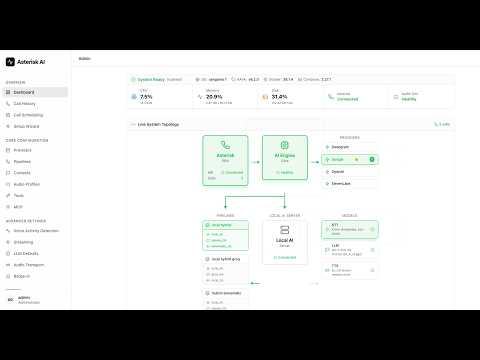
- Dashboard System Topology rebuilt: tri-state per-component health with 2-strike debounce (transient probe blips no longer flip dots red), responsive provider grid, multi-instance sub-rows grouped by provider type, Asterisk + AI Engine cards stretched to match Providers height
- Backend probe timeouts bumped (ai_engine 1.5s → 5s; local_ai_server 2.5s → 5s) to stop legitimate localhost probes timing out under load
- ~260 inline help tooltips backfilled across provider forms, Setup Wizard, and System pages — new
HelpTooltipis viewport-aware (flips placement to keep popovers visible in scrolled modals)
📞 Call recordings (v6.5.2)
- Browser playback for compact
.ulawrecordings (Asterisk’s 8 kHz μ-law output, ~10× smaller than PCM WAV) via server-sideaudioop.ulaw2linWAV wrapping — no transcode dependency - Uppercase
.WAV, compressed WAV, and.gsmrecordings transcode viasox;AAVA_RECORDING_TRANSCODE_TIMEOUT_SECenv var (default 120s) governs the timeout
Previously in v6.5.1
- 💻 CPU-demo profile end-to-end — Faster-Whisper
tiny.en+ Piper + Qwen 0.5B wired through the Admin UI; runtime Device/Compute selectors with CPU/float16gating; Filler Audio and LLM/TTS Overlap runtime toggles - 🛡️ Local provider hot-path hardening —
send_audio()no longer blocks on per-frame reconnect;asyncio.Lockserializes_reconnect()against_send_loop’s on-ConnectionClosedpath - 🎨 Faster-Whisper verify path tolerates the runtime CUDA→CPU fallback so working CPU/int8 configurations no longer get rolled back as “verification failed”
Previously in v6.5.0
- 🔧 Local LLM tool-gated response (#368) — new WS protocol message types
tool_context/tool_resultv2; per-WebSocket fail-closed sync prevents cross-call ACL/policy/prompt leakage on reused connections - ☁️ Gemini 3.1 Flash Live verified compatible (no engine changes); Vertex AI mode is the production answer for #351 barge-in
- 🎤 Deepgram Flux v2 + nova-3 default flip; Admin UI surfaces “Flux Turn-Detection Tuning” panel for flux-* models
- 🩺 Admin UI HTTP-tool-test guard now reads
.envfirst so Environment-page edits toAAVA_HTTP_TOOL_TEST_*take effect without a container restart (#370)
For older releases, expand Previous Versions below. Full release notes in CHANGELOG.md.
Previous Versions
v6.4.2 - Microsoft Calendar V1 + Google Calendar overhaul
- 🗓️ Microsoft Calendar — Outlook / Microsoft 365 integration via device-code OAuth, Graph free/busy, per-context account binding, Tools UI Connect/Verify/Disconnect
- 📅 Google Calendar — multi-account / per-context binding (#338), JSON upload + auto-discover, Domain-Wide Delegation, native free/busy mode
- 🎯 Reschedule reliability — server-side
event_idresolution + 400/404 fallback eliminates LLM-id-hallucination duplicate bookings - 🔧 Date/time prompt placeholders (
{today},{current_date}, etc.) so models stop reasoning with stale years - OpenAI Realtime duplicate-events fix (per-
response_idasync-event gating); per-contexttool_overridesnow actually take effect on OpenAI Realtime / Deepgram / Google Live; Google Live 30-voice catalog (#349)
v6.4.1 - CPU Latency Optimization
- ⚡ Streaming LLM→TTS overlap — sentence-boundary token streaming, sub-2s perceived latency on pipelines
- Pipeline filler audio (instant “One moment please” acknowledgment) configurable via Admin UI
- Qwen 2.5-1.5B Instruct recommended for CPU; ~15-30 tok/s vs Phi-3’s ~0.8 tok/s
- Direct PCM→µ-law conversion in all 5 TTS backends (10-50ms saved per response)
- Preflight hardening — Buildx detection, RAM/disk/network checks, GPU install gated behind
--apply-fixes
v6.4.0 - Attended Transfer & Russian Speech
- 📞 Attended transfer with three screening modes:
basic_tts,ai_briefing,caller_recording - ExternalMedia RTP streaming delivery; provider-agnostic transfer-target tool guidance
- 🗣️ Russian speech backends: Sherpa Offline STT (VAD-gated), T-one STT, Silero TTS (multi-language)
- 🎧 Admin UI: fullscreen dashboard panels, per-message conversation timestamps, JSONPath
[*]HTTP-tool wildcards
v6.3.2 - Azure Speech & MiniMax LLM
- Microsoft Azure Speech Service STT & TTS pipeline adapters (REST batch, WebSocket streaming, SSML)
- MiniMax LLM M2.7 via OpenAI-compatible API with tool-calling
- Call Recording Playback in Admin UI Call Details modal
- Azure SSRF prevention, PII logging discipline, input validation hardening
v6.3.1 - Local AI Server & Guardrails
- Backend enable/rebuild flow, model lifecycle UX, GPU ergonomics, CPU-first onboarding
- Structured local tool gateway, hangup guardrails, tool-call parsing robustness
agent check --local/--remoteCLI verification
v6.1.1 - Operator Config & Live Agent Transfer
- Operator config overrides (
ai-agent.local.yaml), live agent transfer tool - Experimental ViciDial community-tested configuration notes, Asterisk config discovery in Admin UI
- OpenAI Realtime GA API, Email system overhaul, NAT/GPU support
v5.3.1 - Phase Tools & Stability
- Pre-call HTTP lookups, in-call HTTP tools, and post-call webhooks (Milestone 24)
- Deepgram Voice Agent language configuration
- ExternalMedia RTP greeting cutoff fix
v4.4.3 - Cross-Platform Support
- 🌍 Pre-flight Script: System compatibility checker with auto-fix mode.
- 🔧 Admin UI Fixes: Models page, providers page, dashboard improvements.
- 🛠️ Developer Experience: Code splitting, ESLint + Prettier.
v4.4.2 - Local AI Enhancements
- 🎤 New STT Backends: Kroko ASR, Sherpa-ONNX.
- 🔊 Kokoro TTS: High-quality neural TTS.
- 🔄 Model Management: Dynamic backend switching from Dashboard.
- 📚 Documentation: LOCAL_ONLY_SETUP.md guide.
v4.4.1 - Admin UI
- 🖥️ Admin UI: Modern web interface (http://localhost:3003).
- 🎙️ ElevenLabs Conversational AI: Premium voice quality provider.
- 🎵 Background Music: Ambient music during AI calls.
v4.3 - Complete Tool Support & Documentation
- 🔧 Complete Tool Support: Works across ALL pipeline types.
- 📚 Documentation Overhaul: Reorganized structure.
- 💬 Discord Community: Official server integration.
v4.2 - Google Live API & Enhanced Setup
- 🤖 Google Live API: Gemini 2.0 Flash integration.
- 🚀 Interactive Setup:
agent initwizard (agent quickstartremains available for backward compatibility).
v4.1 - Tool Calling & Agent CLI
- 🔧 Tool Calling System: Transfer calls, send emails.
- 🩺 Agent CLI Tools:
doctor,troubleshoot,demo.
🌟 Why Asterisk AI Voice Agent?
| Feature | Benefit |
|---|---|
| Asterisk-Native | Works directly with your existing Asterisk/FreePBX - no external telephony providers required. |
| Truly Open Source | MIT licensed with complete transparency and control. |
| Modular Architecture | Choose cloud, local, or hybrid - mix providers as needed. |
| Production-Ready | Battle-tested baselines with Call History-first debugging. |
| Cost-Effective | Local Hybrid costs ~$0.001-0.003/minute (LLM only). |
| Privacy-First | Keep audio local while using cloud intelligence. |
✨ Features
7 Golden Baseline Configurations
-
OpenAI Realtime (Recommended for Quick Start)
- Modern cloud AI with natural conversations (<2s response).
- Config:
config/ai-agent.golden-openai.yaml - Best for: Enterprise deployments, quick setup.
-
Deepgram Voice Agent (Enterprise Cloud)
- Advanced Think stage for complex reasoning (<3s response).
- Config:
config/ai-agent.golden-deepgram.yaml - Best for: Deepgram ecosystem, advanced features.
-
Google Live API (Multimodal AI)
- Gemini Live (Flash) with multimodal capabilities (<2s response).
- Config:
config/ai-agent.golden-google-live.yaml - Best for: Google ecosystem, advanced AI features.
-
ElevenLabs Agent (Premium Voice Quality)
- ElevenLabs Conversational AI with premium voices (<2s response).
- Config:
config/ai-agent.golden-elevenlabs.yaml - Best for: Voice quality priority, natural conversations.
-
Local Hybrid (Privacy-Focused)
- Local STT/TTS + Cloud LLM (OpenAI). Audio stays on-premises.
- Config:
config/ai-agent.golden-local-hybrid.yaml - Best for: Audio privacy, cost control, compliance.
-
Telnyx AI Inference (Cost-Effective Multi-Model)
- Local STT/TTS + Telnyx LLM with 53+ models (GPT-4o, Claude, Llama).
- OpenAI-compatible API with competitive pricing.
- Config:
config/ai-agent.golden-telnyx.yaml - Best for: Model flexibility, cost optimization, multi-provider access.
-
xAI Grok Voice Agent (Realtime Voice)
- xAI realtime voice with five named voices (
eve/ara/rex/sal/leo) or a custom cloned voice; μ-law @ 8 kHz caller input and observed PCM16 @ 24 kHz output converted for Asterisk. - Config:
config/ai-agent.golden-grok.yaml - Best for: xAI ecosystem, telephony-native low-latency audio.
- xAI realtime voice with five named voices (
Additional LLM Providers
- MiniMax LLM (High-Performance Cost-Effective)
- Local STT/TTS + MiniMax M3 LLM with enhanced reasoning and coding.
- OpenAI-compatible API with tool-calling support.
- Models:
MiniMax-M3(default, latest flagship),MiniMax-M2.7(previous flagship),MiniMax-M2.7-highspeed(low-latency). - Activate: set
MINIMAX_API_KEYin.env, then configureproviders.minimax_llminconfig/ai-agent.yaml(see theminimax_llmsection withenabled: true). - Best for: Long-context conversations, cost-effective high-performance LLM.
Fully Local (Optional)
AVA also supports a Fully Local mode (100% on-premises, no cloud APIs). Three topologies are supported:
| Topology | Latency | Best For |
|---|---|---|
| CPU-Only | 5-15s/turn | Privacy, testing |
| GPU (same box) | 0.5-2s/turn | Production local |
| Split-Server (remote GPU) | 1-3s/turn | PBX on VPS + GPU box |
GPU setup uses docker-compose.gpu.yml overlay with CUDA-enabled llama.cpp. Community-validated: RTX 4090 achieves ~1.0s E2E.
- See: docs/LOCAL_ONLY_SETUP.md (canonical guide for all local topologies)
- Hardware guidance: docs/HARDWARE_REQUIREMENTS.md
🏠 Self-Hosted LLM with Ollama (No API Key Required)
Run your own local LLM using Ollama - perfect for privacy-focused deployments:
# In ai-agent.yaml
active_pipeline: local_hybrid
pipelines:
  local_hybrid:
    stt: local_stt
    llm: ollama_llm
    tts: local_tts
Features:
- No API key required - fully self-hosted on your network
- Tool calling support with compatible models (Llama 3.2, Mistral, Qwen)
- Local Vosk STT + Your Ollama LLM + Local Piper TTS
- Complete privacy - all processing stays on-premises
Requirements:
- Mac Mini, gaming PC, or server with Ollama installed
- 8GB+ RAM (16GB+ recommended for larger models)
- See docs/OLLAMA_SETUP.md for setup guide
Recommended Models:
| Model | Size | Tool Calling |
|---|---|---|
llama3.2 | 2GB | ✅ Yes |
mistral | 4GB | ✅ Yes |
qwen2.5 | 4.7GB | ✅ Yes |
Technical Features
- Tool Calling System: AI-powered actions (transfers, emails) work with any provider.
- Agent CLI Tools:
setup,check,rca,update,versioncommands (legacy aliases:init,doctor,troubleshoot). - Modular Pipeline System: Independent STT, LLM, and TTS provider selection.
- Dual Transport Support: AudioSocket (default in
config/ai-agent.yaml) and ExternalMedia RTP (both supported — see the transport matrix). - Streaming-First Downstream: Streaming playback when possible, with automatic fallback to file playback for robustness.
- High-Performance Architecture: Separate
ai_engineandlocal_ai_servercontainers. - Observability: Built-in Call History for per-call debugging + optional
/metricsscraping. - State Management: SessionStore for centralized, typed call state.
- Barge-In Support: Interrupt handling with configurable gating.
🖥️ Admin UI
Modern web interface for configuration and system management.
Quick Start:
docker compose -p asterisk-ai-voice-agent up -d --build --force-recreate admin_ui
# Access at: http://localhost:3003
# Retrieve one-time password: docker compose -p asterisk-ai-voice-agent logs admin_ui | grep -i password
Key Features:
- Setup Wizard: Visual provider configuration.
- Dashboard: Real-time system metrics, container status, and Asterisk connection indicator.
- Asterisk Setup: Live ARI status, module checklist, config audit with guided fix commands.
- Live Logs: WebSocket-based log streaming.
- YAML Editor: Monaco-based editor with validation.
🎥 Demo
📞 Try it Live! (US Only)
Experience our production-ready configurations with a single phone call:
Dial: (925) 736-6718
- Press 4 → xAI Grok Realtime (NEW in v6.5.2)
- Press 5 → Google Live API (Multimodal AI with Gemini 2.0)
- Press 6 → Deepgram Voice Agent (Enterprise cloud with Think stage)
- Press 7 → OpenAI Realtime API (Modern cloud AI, most natural)
- Press 8 → Local Hybrid Pipeline (Privacy-focused, audio stays local)
- Press 9 → ElevenLabs Agent (Santa voice with background music)
- Press 10 → Fully Local Pipeline (100% on-premises, CPU-based)
🛠️ AI-Powered Actions
Your AI agent can perform real-world telephony actions through tool calling.
Unified Call Transfers
Caller: "Transfer me to the sales team"
Agent: "I'll connect you to our sales team right away."
[Transfer to sales queue with queue music]
Supported Destinations:
- Extensions: Direct SIP/PJSIP endpoint transfers.
- Queues: ACD queue transfers with position announcements.
- Ring Groups: Multiple agents ring simultaneously.
Call Control & Voicemail
- Cancel Transfer: “Actually, cancel that” (during ring).
- Hangup Call: Ends call gracefully with farewell.
- Voicemail: Routes to voicemail box.
Email Integration
- Automatic Call Summaries: Admins receive full transcripts and metadata.
- Caller-Requested Transcripts: “Email me a transcript of this call.”
| Tool | Description | Status |
|---|---|---|
transfer | Transfer to extensions, queues, or ring groups | ✅ |
cancel_transfer | Cancel in-progress transfer (during ring) | ✅ |
hangup_call | End call gracefully with farewell message | ✅ |
leave_voicemail | Route caller to voicemail extension | ✅ |
send_email_summary | Auto-send call summaries to admins | ⚙️ Disabled by default |
request_transcript | Caller-initiated email transcripts | ⚙️ Disabled by default |
HTTP Tools (Pre/In/Post-Call) Example
# In ai-agent.yaml
tools:
  pre_call_lookup:
    kind: generic_http_lookup
    phase: pre_call
    enabled: true
    is_global: false
  post_call_webhook:
    kind: generic_webhook
    phase: post_call
    enabled: true
    is_global: false

in_call_tools:
  intent_router:
    kind: in_call_http_lookup
    enabled: true
    is_global: false

contexts:
  default:
    pre_call_tools:
      - pre_call_lookup
    tools:
      - intent_router
      - hangup_call
    post_call_tools:
      - post_call_webhook
🩺 Agent CLI Tools
Production-ready CLI for operations and setup.
Installation:
curl -sSL https://raw.githubusercontent.com/hkjarral/Asterisk-AI-Voice-Agent/main/scripts/install-cli.sh | bash
Commands:
agent setup               # Interactive setup wizard (recommended)
agent setup --list-targets # List configured providers and pipelines without changes
agent check               # Standard diagnostics report (share this output when asking for help)
agent check --local       # Verify local AI server (STT, LLM, TTS) on this host
agent check --remote <ip> # Verify local AI server on a remote GPU machine
agent update              # Pull latest code + rebuild/restart as needed
agent rca --call <call_id> --no-llm # Deterministic post-call RCA
agent config validate     # Validate provider, pipeline, transport, and audio configuration
agent dialplan --agent default # Generate an AI_AGENT dialplan snippet
agent version             # Version information
⚙ Configuration
Three-File Configuration
config/ai-agent.yaml- Golden baseline configs (git-tracked, upstream-managed).config/ai-agent.local.yaml- Operator overrides (git-ignored). Any keys here are deep-merged on top of the base file at startup; all Admin UI and CLI writes go here so upstream updates never conflict..env- Secrets and API keys (git-ignored).
Example .env:
OPENAI_API_KEY=sk-your-key-here
DEEPGRAM_API_KEY=your-key-here
ASTERISK_ARI_USERNAME=asterisk
ASTERISK_ARI_PASSWORD=your-password
Optional: Metrics (Bring Your Own Prometheus)
The engine exposes Prometheus-format metrics on its health/metrics HTTP endpoint at
/metrics (port 15000). This endpoint binds to 127.0.0.1 by default, so it is only
reachable from the engine host — scrape it locally, or set the health endpoint host to
0.0.0.0 (and firewall it) to expose it to an external Prometheus.
Per-call debugging is handled via Admin UI → Call History.
🏗 Project Architecture
Two-container architecture for performance and scalability:
ai_engine(Lightweight orchestrator): Connects to Asterisk via ARI, manages call lifecycle.local_ai_server(Optional): Runs local STT/LLM/TTS models (Vosk, Faster Whisper, Whisper.cpp, Sherpa, Kroko, Piper, Kokoro, MeloTTS, llama.cpp).
graph LR
    A[Asterisk Server] <-->|ARI, RTP| B[ai_engine]
    B <-->|API| C[AI Provider]
    B <-->|WS| D[local_ai_server]

    style A fill:#f9f,stroke:#333,stroke-width:2px
    style B fill:#bbf,stroke:#333,stroke-width:2px
    style C fill:#bfb,stroke:#333,stroke-width:2px
    style D fill:#fbf,stroke:#333,stroke-width:2px
📊 Requirements
Platform Requirements
| Requirement | Details |
|---|---|
| Architecture | x86_64 (AMD64) only |
| OS | Linux with systemd |
| Supported Distros | Ubuntu 20.04+, Debian 11+, RHEL/Rocky/Alma 8+, Fedora 38+, Sangoma Linux |
Note: ARM64 (Apple Silicon, Raspberry Pi) is not currently supported. See Supported Platforms for the full compatibility matrix.
Minimum System Requirements
| Type | CPU | RAM | GPU | Disk |
|---|---|---|---|---|
| Cloud (OpenAI/Deepgram) | 2+ cores | 4GB | None | 1GB |
| Local Hybrid (cloud LLM) | 4+ cores | 8GB+ | None | 2GB |
| Fully Local (CPU) | 4+ cores (2020+) | 8-16GB | None | 5GB |
| Fully Local (GPU) | 4+ cores | 8-16GB | RTX 3060+ | 10GB |
Software Requirements
- Docker + Docker Compose v2
- Asterisk 18+ with ARI enabled
- FreePBX (recommended) or vanilla Asterisk
Preflight Automation
The preflight.sh script handles initial setup:
- Seeds
.envfrom.env.examplewith your settings - Prompts for Asterisk config directory location
- Sets
ASTERISK_UID/ASTERISK_GIDto match host permissions (fixes media access issues) - Re-running preflight often resolves permission problems
🗺 Documentation
Getting Started
Configuration & Operations
- Configuration Reference
- Transport Compatibility
- Tuning Recipes
- Supported Platforms
- Local Profiles
- Monitoring Guide
Integrations & Early-Stage Features
- Outbound Calling —
Alpha— scheduled campaigns, voicemail drop, consent gate - FreeSWITCH (FS-PBX) Setup —
Community— community-maintained guide - ViciDial Setup —
Community— community-tested configuration notes
Alpha = usable but still hardening. Community = contributed and community-validated, not maintainer-tested on every release. Features without a label are stable.
Development & Community
- Roadmap - What’s next, planned milestones, and how to get involved
- Developer Documentation
- Architecture Deep Dive
- Contributing Guide
- Milestone History - Completed milestones 1-24
🤝 Contributing
You don’t need to be a developer to contribute. File feature ideas, report bugs with logs attached, improve documentation, or share your dialplan recipes — these are as valuable as code. If you do want to write code, see the Contributing Guide below.
🚀 Get Started in 3 Steps
git clone https://github.com/hkjarral/AVA-AI-Voice-Agent-for-Asterisk.git
cd AVA-AI-Voice-Agent-for-Asterisk
Then load AVA.mdc into your AI coding assistant (Claude, Cursor, Windsurf, Codex, Copilot, …) — it carries the project map, engineering guardrails, and contribution workflow — and tell it what you want to build or fix.
📖 Guides
| Guide | For |
|---|---|
| Contributing Guide | Full contribution guidelines and workflow |
| Developer Quickstart | Dev environment setup in ~15 minutes |
| Code Style | Code standards for all contributions |
| Roadmap | What to work on next |
🔧 Build Something New
| Area | Guide | Reference |
|---|---|---|
| Full-Agent Provider | Provider Development | Implementation deep-dives |
| Pipeline Adapter (STT/LLM/TTS) | Pipeline Development | Example pipelines |
| Tools & Call Hooks (pre/in/post-call) | Tool Development | Tool Calling Guide |
👩💻 For Developers
- Developer Onboarding - Project overview and first tasks
- Developer Quickstart - Set up your dev environment
- Developer Documentation - Full contributor docs
Contributors
 hkjarral Architecture, Code |
 Abhishek Telnyx LLM Provider |
 turgutguvercin NumPy Resampler |
 Scarjit Code |
 egorky Azure STT/TTS Provider |
 alemstrom Docs — PBX Setup |
 gcsuri Code — Google Calendar |
 octo-patch MiniMax LLM Provider |
 neilruaro-camb CAMB AI TTS Provider |
 aoi-dev-0411 Transcript Search, Health Badges |
 exaland Outbound .ULAW Compatibility |
 YosefAdPro Agents API/OpenAPI |
See CONTRIBUTORS.md for the full list — contributions are recognized there, in release notes, and on Discord.
💬 Community
- Discord Server - Support and discussions
- GitHub Issues - Bug reports
- GitHub Discussions - General chat
📝 License
This project is licensed under the MIT License. See the LICENSE file for details.
💖 Support This Project
Asterisk AI Voice Agent is free and open source. If it’s saving you money, consider supporting development:



Your support funds:
- 🐛 Faster bug fixes and issue responses
- ✨ New provider integrations and features
- 📚 Better documentation and tutorials
If you find this project useful, please also give it a ⭐️!
Star History
Similar Articles
AnovaX: A Local, Multi-Agent Voice Assistant with LLM Planning, Typed Executors, and Adaptive Recovery
AnovaX is a local-first desktop voice assistant that uses an LLM planner and multi-agent orchestrator to execute tasks on the user's computer. It features a safety layer, adaptive recovery, and a phone-friendly remote interface.
Self-hosted voice for any agent/harness of your choice (open-source)
The Cicero project enables self-hosted, bidirectional voice conversation with AI agents, supporting local TTS/STT and integration with various agent protocols and tools like Claude Code and Hermes Agent.
Ava 2.0
Ava 2.0 is an AI BDR that autonomously runs outbound sales.
jamiepine/voicebox
Voicebox is an open-source, local-first AI voice studio for voice cloning, speech generation, dictation, and AI agent integration, offering privacy and multi-engine TTS support.
Ava Studio
Ava Studio is an AI-powered tool that acts as a creative team for producing video advertisements.