Cached at:
06/03/26, 03:40 PM
# 5 ways Google Search can level up your thrift and vintage shopping
Source: [https://blog.google/products-and-platforms/products/search/thrifting-tips/](https://blog.google/products-and-platforms/products/search/thrifting-tips/)
Uncover second\-hand scores with AI tools in Search\.

Your browser does not support the audio element\.
Listen to article
This content is generated by Google AI\. Generative AI is experimental
\[\[duration\]\] minutes
With search interest in “vintage” and “how to thrift” hitting all\-time highs this year, 2026 is proving that old is new again\. Check out a few thrifting trends below for inspiration, then learn how Google tools can help you score the best finds, from a "vintage jersey" to "thrifted heels" \(both trending on Search\!\)\. Your next favorite find is just a search, snap or circle away\.
## 1\. Plan your thrift adventure with AI Mode in Search\.
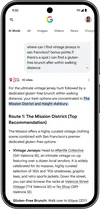
With[AI Mode in Search](https://g.ai/), you can ask the questions that are on your mind, no matter how specific or nuanced they are — helping you plan the perfect outing hunting for second\-hand treasures\. Let’s say you really want to find a jersey from the ‘90s and are spending the day shopping with a friend who has specific food needs\. Simply ask AI Mode something like, “Where can I find vintage jerseys in San Francisco? Bonus points if there’s a spot I can find a gluten\-free brunch after within walking distance\.” AI Mode will highlight a few options with key details to help you determine where to spend your day, along with links to learn more\.
## 2\. Uncover hidden gems with Google Lens\.
If you’re shopping at a thrift store or vintage market,[Lens](https://lens.google/)is your secret weapon for uncovering hidden treasures\. To learn more about an item that caught your eye, just open the Google app for[Android](https://play.google.com/store/apps/details?id=com.google.android.googlequicksearchbox)or[iOS](https://apps.apple.com/us/app/google/id284815942), tap the Lens icon and snap a photo\. You'll be able to browse visual matches and ask for more information about the piece, like its designer or what era it’s from\. You can also use Lens to see if something is a rare gem or a dime a dozen by browsing what it sells for online and how many similar offers are out there\.

## 3\. See it, circle it and shop it with Circle to Search\.
If you find a vintage designer handbag you love or are feeling inspired by the vintage jersey trend while scrolling online, just hold down your Android phone's home button or navigation bar and circle it\.[Circle to Search](https://blog.google/products-and-platforms/products/search/circle-to-search-february-2026/)will quickly find similar items, prices and where to buy them\. From there, you can ask more detailed follow\-up questions like, “What are similar styles with a ‘90s vibe?" to expand your search\.
## 4\. Bring the dressing room home with Virtual Try\-On\.
Instead of trying to guess if that funky vintage jacket is your vibe,[Virtual Try\-On](https://support.google.com/googleshopping/answer/16253678?hl=en)can be your digital dressing room\. Just snap a pic, use Lens to find a similar item and look for the “try it on” button\. Then simply upload a full\-body photo of yourself to see what you would look like in the style\.
## 5\. Use Lens to see what you can sell from your closet\.
Thrifting isn't just about buying; it's also about giving items a second life\. If you're looking to clear out your own closet or home, use Lens to get an idea of what your items are worth\. Snap a photo and ask something like, "Could I resell this?" or "What kind of stores buy items like this?" to help your pre\-loved goods find a new home and make room in your closet for more\.
### Related stories