merman: Mermaid.js, but headless, in Rust
Summary
Merman is a headless Rust implementation of Mermaid.js that parses, lays out, and renders diagrams (SVG, raster, ASCII) without a browser or JavaScript runtime, targeting parity with Mermaid.js v11.15.0.
View Cached Full Text
Cached at: 06/11/26, 05:35 PM
Latias94/merman
Source: https://github.com/Latias94/merman
merman
Mermaid.js, but headless, in Rust.







Mermaid.js is a JavaScript diagramming tool that turns text such as
flowchart TD; A-->B; into diagrams for Markdown, docs, and web apps.
Merman is a parity-focused, headless Rust implementation of Mermaid.js for parsing, layout, and
browserless rendering. It targets [email protected], produces semantic JSON, layout JSON, SVG,
raster formats, and ASCII/Unicode output, and does not launch a browser or JavaScript runtime to
render diagrams.
Try it in the browser: Merman Playground.
Parity is enforced with golden semantic/layout snapshots and upstream SVG DOM baselines, so changes that affect semantics, layout, or rendering are caught and reviewed.
Project note: Merman is not affiliated with, endorsed by, or sponsored by the
Mermaid project or its maintainers. It is an independent
compatibility implementation by Mermaid users. Many examples and fixtures in this repository are
extracted from Mermaid documentation or tests, either verbatim or with small updates for local
context; see
THIRD_PARTY_NOTICES.md for
Mermaid license and provenance notes.
Choose Your Entry Point
| You want to… | Start with | Notes |
|---|---|---|
| Try or share Mermaid diagrams in the browser | Merman Playground | Static live editor powered by the wasm web package. |
| Render Mermaid from Rust | merman | Enable render for SVG, ascii for terminal text, raster for PNG/JPG/PDF. |
| Use a command-line tool | merman-cli | Detect, parse, layout, render SVG, render raster formats, and render ASCII/Unicode text. |
| Render diagrams in Rust API docs | merman-rustdoc | Proc-macro integration for rustdoc that turns Mermaid fences into inline headless SVG. |
| Embed in a browser or TypeScript app | @mermanjs/web | wasm-bindgen output plus TypeScript helpers for SVG, JSON, validation, metadata, and DOM rendering. |
| Build a Typst plugin/package | merman-typst-plugin | Experimental wasm-minimal-protocol transport for Typst-compatible WASM hosts. |
| Parse Mermaid or produce semantic JSON | merman-core | Parser, metadata, semantic JSON, and typed render models without layout/render dependencies. |
| Embed from C, C++, Swift, Kotlin, Dart, Python, or another native host | merman-ffi | Stable C ABI plus platform wrappers. See FFI protocol, Android, Apple, Flutter/Dart, and Python UniFFI. |
| Work on layout/rendering internals | merman-render | Low-level layout and SVG stack used by the public merman facade. |
What Merman Outputs
- Semantic JSON for Mermaid diagrams.
- Layout JSON with computed geometry and routes.
- Mermaid-like SVG from a fully headless Rust renderer.
- ASCII/Unicode diagrams for terminals, logs, and documentation snippets.
- PNG, JPG, and PDF via SVG rasterization/conversion.
Diagram coverage and current parity status live in docs/alignment/STATUS.md.
Sample output
| Architecture | Mindmap | Sankey |
|---|---|---|
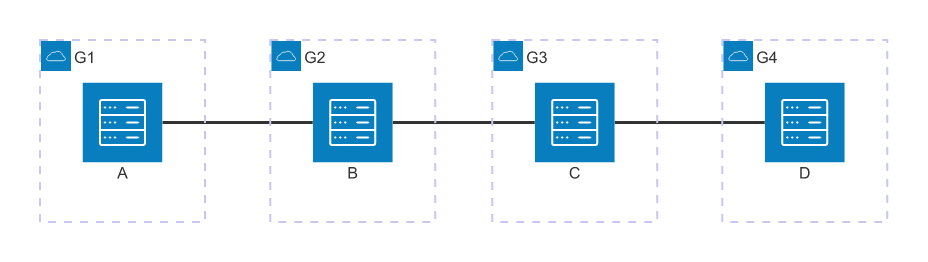 | 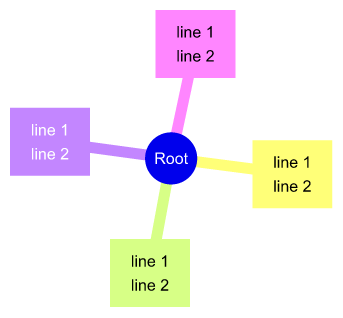 | 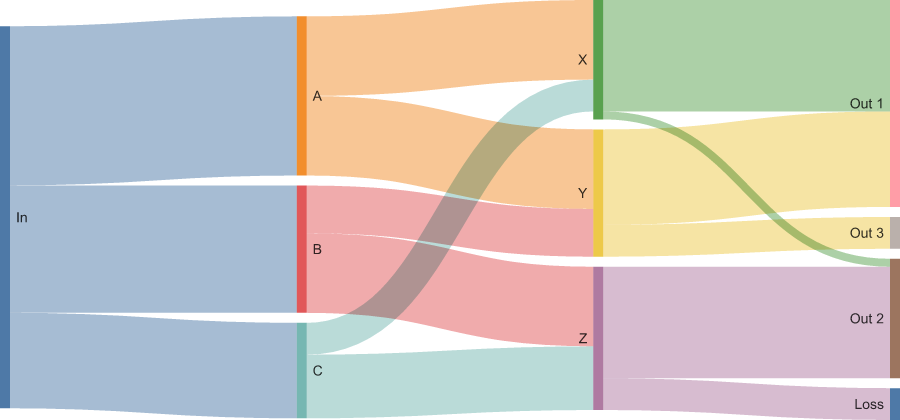 |
These images were rendered headlessly by merman-cli from Mermaid fixtures. See
Showcase for source diagrams and more rendered examples.
Performance
merman includes a corpus-driven benchmark harness for comparing native merman,
mermaid-rs-renderer, and upstream Mermaid JS v11.15.0. In a local warm-render standard suite
run on Apple M4, merman measured all 34 requested fixtures and used about 1.8% to 23.0% of
Mermaid JS render time across successful Mermaid JS cases, roughly 4.3x to 56.4x faster, with a
median speedup around 15.8x.
Performance numbers are not a substitute for SVG parity. Missing, skipped, errored, and quality
comparison results are reported separately by the benchmark harness. See
docs/performance/BENCHMARKING.md
for methodology and commands.
Install
# Command-line tool
cargo install merman-cli --version 0.8.0-alpha.1

# Rust library: SVG rendering
cargo add [email protected] --features render

# Rust library: ASCII/Unicode text output
cargo add [email protected] --features ascii

# Rust library: SVG + PNG/JPG/PDF
cargo add [email protected] --features raster

# Rustdoc integration
cargo add [email protected] --optional

# Browser / TypeScript package
npm install @mermanjs/web

# Flutter package
flutter pub add merman

# Python package (experimental UniFFI wheels)
pip install merman
For rustdoc feature setup and examples, see
crates/merman-rustdoc/README.md.
From a local checkout:
cargo install --path crates/merman-cli
cargo build -p merman-ffi --release
Use crates/merman-ffi/include/merman.h and link the
platform-specific library artifact from target/release for native embedding.
MSRV is rust-version = 1.95.
Contents
- Choose Your Entry Point
- What Merman Outputs
- Sample output
- Performance
- Install
- Quickstart (library)
- Rust examples
- Quickstart (CLI)
- Library API details
- Quickstart (FFI and native hosts)
- Math Labels
- ASCII/Unicode text output
- Developing
- Showcase
- Parity and coverage
- Quality gates
- Limitations
- Feature surfaces
- Architecture notes
- Workspace crates
- Star History
- Links
Quickstart (library)
For most Rust applications, start with merman::render::HeadlessRenderer:
use merman::render::HeadlessRenderer;

fn main() -> Result<(), Box<dyn std::error::Error>> {
    let renderer = HeadlessRenderer::new().with_diagram_id("readme-example");
    let svg = renderer
        .render_svg_sync("flowchart TD\nA[Start] --> B[Done]")?
        .unwrap();

    println!("{svg}");
    Ok(())
}
Use render_svg_sync() when you want Mermaid-parity SVG. Use
render_svg_resvg_safe_sync() when the result will be rasterized or shown by an SVG engine that
does not support <foreignObject> well. Use the ascii feature and
merman::ascii::HeadlessAsciiRenderer for terminal text output.
Rust examples
The crates/merman/examples programs are ordered as a progressive Rust integration path. Each
example reads Mermaid source from stdin when provided and falls back to a small built-in diagram.
When stdin is an interactive terminal, examples 01 through 08 and 11 do not wait for input;
they print a short note to stderr and render their built-in example. See the
crates/merman/examples directory and its
README.md for copyable commands with custom stdin and output
files.
| Step | Goal | Feature | Command |
|---|---|---|---|
| 01 | Render SVG with the high-level facade | render | cargo run -p merman --features render --example example_01_svg_basic > out.svg |
| 02 | Parse Mermaid to semantic JSON | none | cargo run -p merman --example example_02_semantic_json |
| 03 | Produce layout JSON | render | cargo run -p merman --features render --example example_03_layout_json |
| 04 | Render terminal text | ascii | cargo run -p merman --features ascii --example example_04_ascii_output |
| 05 | Render PNG from Rust | raster | cargo run -p merman --features raster --example example_05_raster_output -- target/example.png |
| 06 | Apply an SVG output pipeline | render | cargo run -p merman --features render --example example_06_svg_pipeline > pipeline.svg |
| 07 | Use Mermaid theme variables and themeCSS | render | cargo run -p merman --features render --example example_07_theme_css > themed.svg |
| 08 | Make time-sensitive Gantt parsing deterministic | none | cargo run -p merman --example example_08_deterministic_gantt |
| 09 | Inline multiple diagrams without SVG id collisions | render | cargo run -p merman --features render --example example_09_multiple_diagrams |
| 10 | Integrate with a desktop GUI host via egui | egui-example | cargo run -p merman --features egui-example --example example_10_integration_egui |
| 11 | Build a custom host output environment | render | cargo run -p merman --features render --example example_11_custom_output_environment > host-preview.svg |
The egui example is intentionally a host-integration skeleton rather than a full playground: it keeps a long-lived renderer, edits Mermaid source, previews a raster texture, reports render errors, and saves SVG/PNG outputs.
Quickstart (CLI)
# Detect diagram type
merman-cli detect path/to/diagram.mmd

# Parse -> semantic JSON
merman-cli parse path/to/diagram.mmd --pretty

# Layout -> layout JSON
merman-cli layout path/to/diagram.mmd --pretty

# Render SVG
merman-cli render path/to/diagram.mmd --out out.svg

# Render terminal text output
merman-cli render --format unicode path/to/diagram.mmd
merman-cli render --format ascii path/to/diagram.mmd

# Terminal text supports common flowchart directions, labels, shapes, and simple subgraphs
printf "flowchart TB\nsubgraph one\nA((Start)) -- go --> B[(DB)]\nend\n" |
  merman-cli render --format ascii -

# Render raster formats
merman-cli render --format png --out out.png path/to/diagram.mmd
merman-cli render --format jpg --out out.jpg path/to/diagram.mmd
merman-cli render --format pdf --out out.pdf path/to/diagram.mmd
Minimal end-to-end example:
cat > example.mmd <<'EOF'
flowchart TD
  A[Start] --> B{Decision}
  B -->|Yes| C[Do thing]
  B -->|No| D[Do other thing]
EOF

merman-cli render example.mmd --out example.svg
merman-cli render --format ascii example.mmd
@'
flowchart TD
  A[Start] --> B{Decision}
  B -->|Yes| C[Do thing]
  B -->|No| D[Do other thing]
'@ | Set-Content -Encoding utf8 example.mmd

merman-cli render example.mmd --out example.svg
Library API details
The merman crate is a convenience wrapper around merman-core (parsing)
and output crates such as merman-render (layout + SVG) and
merman-ascii (ASCII/Unicode text). Enable the render feature when you
want layout + SVG, ascii when you want text output, and raster when you also need PNG/JPG/PDF
from Rust (no CLI required).
use merman_core::{Engine, ParseOptions};
use merman::render::{
    headless_layout_options, render_svg_sync, sanitize_svg_id, SvgRenderOptions,
};

fn main() -> Result<(), Box<dyn std::error::Error>> {
    let engine = Engine::new();

    let layout = headless_layout_options();

    // For UIs that inline multiple diagrams, set a per-diagram SVG id to avoid internal `<defs>`
    // and accessibility id collisions.
    let svg_opts = SvgRenderOptions {
        diagram_id: Some(sanitize_svg_id("example-diagram")),
        ..SvgRenderOptions::default()
    };

    // Executor-free synchronous entrypoint (the work is CPU-bound and does not perform I/O).
    let svg = render_svg_sync(
        &engine,
        "flowchart TD; A-->B;",
        ParseOptions::default(),
        &layout,
        &svg_opts,
    )?
    .unwrap();

    println!("{svg}");
    Ok(())
}
If you prefer a bundled “pipeline” instead of passing multiple option structs per call, use
merman::render::HeadlessRenderer.
If you already know the diagram type (e.g. from a Markdown fence info string), prefer
Engine::parse_diagram_with_type_sync(...) to skip type detection.
If your downstream renderer does not support SVG <foreignObject> (common for rasterizers),
prefer HeadlessRenderer::render_svg_resvg_safe_sync(). Use
HeadlessRenderer::render_svg_readable_sync() when you want to keep the original
<foreignObject> nodes and add best-effort <text>/<tspan> fallback overlays.
When you enable the raster feature, PNG/JPG conversion is target-aware and budgeted. A Mermaid
SVG can legitimately have a very large viewBox; browser previews usually draw that vector SVG
inside a smaller container, while a headless PNG/JPG path must allocate a concrete pixmap. Use
RasterOptions::with_fit_to(...) for preview-sized output, scale for device-pixel ratio, and
RasterSizeLimit for the final pixmap budget. The default PNG/JPG budget caps output at 8192px
per side and 8192*8192 pixels; trusted oversized exports can call
RasterOptions::with_unbounded_size().
Runnable raster example:
cargo run -p merman --features raster --example example_05_raster_output
printf "flowchart LR\nA --> B\n" | \
  cargo run -p merman --features raster --example example_05_raster_output -- target/example.png
The split is intentional:
render_svg_syncis for Mermaid-parity snapshots and callers that want the raw SVG contract.render_svg_readable_syncis for inline previews that can keep<foreignObject>but still want readable fallback text.render_svg_resvg_safe_syncorSvgPipeline::resvg_safe()is for PNG/JPG/PDF export and tools built onresvg/usvg.SvgPostprocessorandScopedCssPostprocessorare for host applications that need product-specific theme or cleanup passes after a built-in preset.
render_svg_sync intentionally stays Mermaid-parity by default. For consumer-oriented output,
use an explicit SVG pipeline:
use merman::render::{
    CssOverridePolicy, HeadlessRenderer, ScopedCssPostprocessor, SvgPipeline,
};

let renderer = HeadlessRenderer::new().with_diagram_id("readme-diagram");
let pipeline = SvgPipeline::resvg_safe().with_postprocessor(
    ScopedCssPostprocessor::new(
        r#"
.node rect {
  stroke: #2563eb;
  stroke-width: 2px;
}
.merman-foreignobject-fallback-text {
  fill: #111827;
}
"#,
    )
    .with_override_policy(CssOverridePolicy::StripExistingImportant),
);
let svg = renderer
    .render_svg_with_pipeline_sync("flowchart TD; A[Layer 7\\nHTTP]-->B;", &pipeline)?
    .unwrap();
# Ok::<(), Box<dyn std::error::Error>>(())
See docs/rendering/SVG_OUTPUT_PIPELINE.md for preset
behavior, custom postprocessors that can read diagram type/title/svg id, and scoped CSS examples.
Runnable example:
cargo run -p merman --features render --example example_06_svg_pipeline < fixtures/flowchart/basic.mmd > out.svg
cargo run -p merman --features render --example example_11_custom_output_environment > host-preview.svg
Quickstart (FFI and native hosts)
The merman-ffi crate exposes a stable C ABI for non-Rust hosts. The current
FFI surface supports SVG rendering, ASCII text rendering, semantic JSON, layout JSON, validation
JSON, binding metadata, and explicit Rust-owned buffer release.
#include "merman.h"

static const uint8_t source[] = "flowchart TD\nA[Hello] --> B[World]";

MermanResult result = merman_render_svg(source, sizeof(source) - 1, NULL, 0);
if (result.code == MERMAN_OK) {
    /* result.data contains UTF-8 SVG bytes. */
}
merman_buffer_free(result.data);
Every non-empty MermanResult.data buffer must be released with merman_buffer_free. See
docs/bindings/FFI_PROTOCOL.md for result codes, options JSON,
threading, and compatibility rules.
Higher-level wrappers build on the same ABI:
- Android/Kotlin:
docs/bindings/ANDROID_JNI.md - Apple Swift Package:
docs/bindings/APPLE_SWIFT.md - Flutter/Dart FFI:
docs/bindings/FLUTTER_DART_FFI.md - Python UniFFI package:
docs/bindings/PYTHON_UNIFFI.md
Binary size
The FFI and wasm packages carry the full parser, layout, and headless renderer stack. Treat them as application/runtime dependencies rather than tiny scripting shims: current release artifacts are roughly 9-17 MB per native dynamic-library slice before app-store or package compression, while the browser wasm artifact is about 9.8 MB uncompressed and 3.6 MB with gzip. Universal Apple XCFrameworks and static archives can be larger because they bundle multiple architectures. Use normal platform controls such as release builds, stripping/LTO, package compression, lazy loading, and long-lived caching for versioned artifacts.
Math Labels
merman-cli enables the pure-Rust RaTeX backend by default. Use --math-renderer ratex
to render supported $$...$$ labels. Flowchart and Sequence support math-only labels and
single-formula prose/math labels such as Solve: $$x^2$$:
printf "flowchart LR\nA[\"$$x^2$$\"] --> B\n" |
  cargo run -p merman-cli -- render --math-renderer ratex -
Build merman-cli with --no-default-features only when you intentionally want to exclude
default binary capabilities such as RaTeX and ASCII/Unicode. In that mode ratex remains
unavailable unless ratex-math is enabled explicitly, and ASCII/Unicode CLI output remains
unavailable unless ascii is enabled explicitly.
ASCII/Unicode text output
Library users enable the ascii feature when they want terminal-friendly text instead of SVG.
merman-cli enables ASCII/Unicode output by default:
Current public text support covers flowchart/graph, sequenceDiagram, classDiagram, erDiagram, and
xychart through merman::ascii::render_ascii_sync, typed merman::ascii::render_model, the direct
typed helpers (render_flowchart, render_sequence, render_class, render_er,
render_xychart), and merman-cli render --format ascii|unicode.
Flowchart text output covers LR/TD/TB/BT/RL root directions, boxed nodes, common terminal shape approximations, labels, open/dotted/thick edges, length spacing, and titled/nested subgraphs with multiline and wrapped title rows.
Sequence text output covers common messages, notes, lifecycle rows, participant boxes, and the
primary Mermaid control-block subset: loop, opt, break, rect, par_over, alt, par,
and critical. Mermaid-compatible output keeps bottom participant boxes disabled by default;
AsciiRenderOptions::with_sequence_mirror_actors(true) and
merman-cli render --format ascii|unicode --sequence-mirror-actors enable mirrored participant
boxes for terminal output.
Class, ER, and XYChart text output intentionally ship bounded terminal-native subsets: class and ER support boxes, labels, single relationships, layered chain/star multi-relationship layouts, and adjacent-layer crossing layouts resolved by layer reordering. Same-endpoint and simple mixed-parallel relationships render as distinct lanes, simple spanning-level relationships route through side lanes, and isolated unrelated classes/entities render as standalone components beside the relationship layout. Cyclic and denser graph shapes still return clear diagnostics. XYChart renders deterministic compact bars, lines, mixed plots, titles, and axes instead of SVG coordinates.
use merman::ascii::{AsciiRenderOptions, HeadlessAsciiRenderer};

fn main() -> Result<(), Box<dyn std::error::Error>> {
    let renderer = HeadlessAsciiRenderer::new()
        .with_strict_parsing()
        .with_ascii_options(AsciiRenderOptions::unicode());
    let text = renderer
        .render_ascii_sync("sequenceDiagram\nparticipant A\nparticipant B\nA->>B: Hello")?
        .unwrap();

    println!("{text}");
    Ok(())
}
Runnable examples:
cargo run -p merman --features ascii --example example_04_ascii_output
cargo run -p merman --features ascii --example example_04_ascii_output -- --ascii
cargo run -p merman --features raster --example example_05_raster_output
printf "flowchart LR\nA --> B\n" | cargo run -p merman-cli -- render --format ascii -
Developing
For local Rust changes, start with the fast formatting and test loop:
cargo fmt --all --check
cargo nextest run --workspace
cargo run -p xtask -- verify
Use cargo run -p xtask -- verify --strict before release-level parser, layout, render, or
platform binding changes. Platform-specific build and packaging notes live with the binding docs
linked in Quickstart (FFI and native hosts).
Showcase
All screenshots below are produced by merman-cli (headless) and committed under
docs/assets/showcase/.
Each example links to an existing fixture so the README stays honest and reproducible.
Architecture (many groups + sparse services)
Fixture: fixtures/architecture/stress_architecture_batch4_many_groups_sparse_services_069.mmd
Mermaid source
architecture-beta
%% Authored stress fixture: many groups with sparse services (group rect bounds).

group g1(cloud)[G1]
group g2(cloud)[G2]
group g3(cloud)[G3]
group g4(cloud)[G4]

service a(server)[A] in g1
service b(server)[B] in g2
service c(server)[C] in g3
service d(server)[D] in g4

a:R -- L:b
b:R -- L:c
c:R -- L:d
Mindmap (line breaks in labels)
Fixture: fixtures/mindmap/stress_mindmap_br_variants_031.mmd
Mermaid source
mindmap
  %% Authored stress fixture: <br> variants inside labels.
  root((Root))
    n1["line 1<br>line 2"]
    n2["line 1<br/>line 2"]
    n3["line 1<br />line 2"]
    n4["line 1<br \t/>line 2"]
    %% plus whitespace variants (see the fixture for the full set)
Sankey (dense shared nodes)
Fixture: fixtures/sankey/stress_sankey_batch1_dense_shared_nodes_007.mmd
Mermaid source
%%{init: {"sankey": {"width": 900, "height": 420, "useMaxWidth": true, "showValues": false, "linkColor": "source", "nodeAlignment": "justify"}}}%%
sankey

%% Source: repo-ref/mermaid/packages/mermaid/src/docs/syntax/sankey.md (dense graphs) + authored stress
In,A,10
In,B,8
In,C,6
A,X,5
A,Y,5
B,Y,3
B,Z,5
C,X,2
C,Z,4
X,Out 1,7
X,Out 2,0.5
Y,Out 1,6
Y,Out 3,2
Z,Out 2,7
Z,Loss,2
Gantt (date math + excludes)
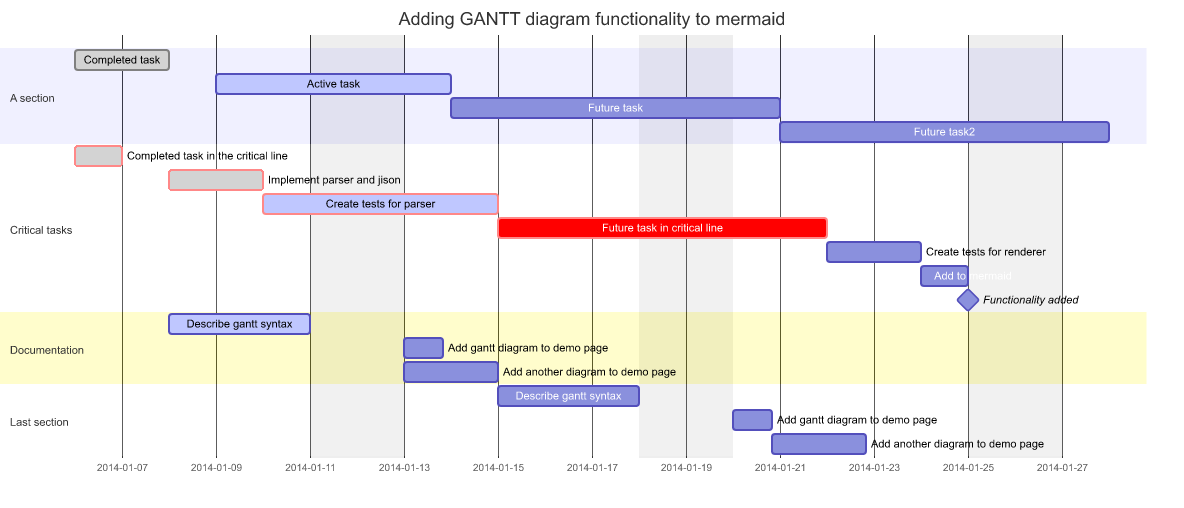
Fixture: fixtures/gantt/upstream_docs_gantt_syntax_002.mmd
Mermaid source
gantt
    dateFormat  YYYY-MM-DD
    title       Adding GANTT diagram functionality to mermaid
    excludes    weekends
    %% (`excludes` accepts specific dates in YYYY-MM-DD format, days of the week ("sunday") or "weekends", but not the word "weekdays".)

    section A section
    Completed task            :done,    des1, 2014-01-06,2014-01-08
    Active task               :active,  des2, 2014-01-09, 3d
    Future task               :         des3, after des2, 5d
    Future task2              :         des4, after des3, 5d

    section Critical tasks
    Completed task in the critical line :crit, done, 2014-01-06,24h
    Implement parser and jison          :crit, done, after des1, 2d
    Create tests for parser             :crit, active, 3d
    Future task in critical line        :crit, 5d
    Create tests for renderer           :2d
    Add to mermaid                      :until isadded
    Functionality added                 :milestone, isadded, 2014-01-25, 0d

    section Documentation
    Describe gantt syntax               :active, a1, after des1, 3d
    Add gantt diagram to demo page      :after a1  , 20h
    Add another diagram to demo page    :doc1, after a1  , 48h

    section Last section
    Describe gantt syntax               :after doc1, 3d
    Add gantt diagram to demo page      :20h
    Add another diagram to demo page    :48h
Stress gallery (more fixtures)
| Architecture (ports + routing) | Mindmap (deep + wide) |
|---|---|
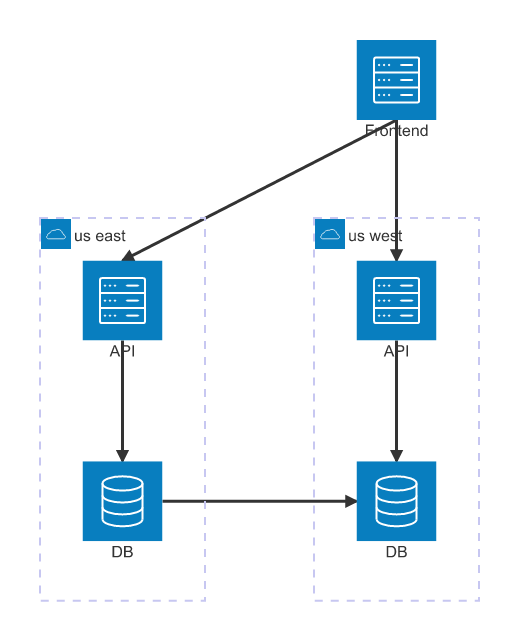 Fixture: fixtures/architecture/stress_architecture_batch5_services_outside_groups_crosslinks_078.mmdNote: Architecture diagonal arrowheads are oriented from the rendered edge segment; DOM parity still normalizes geometry against upstream Mermaid. | 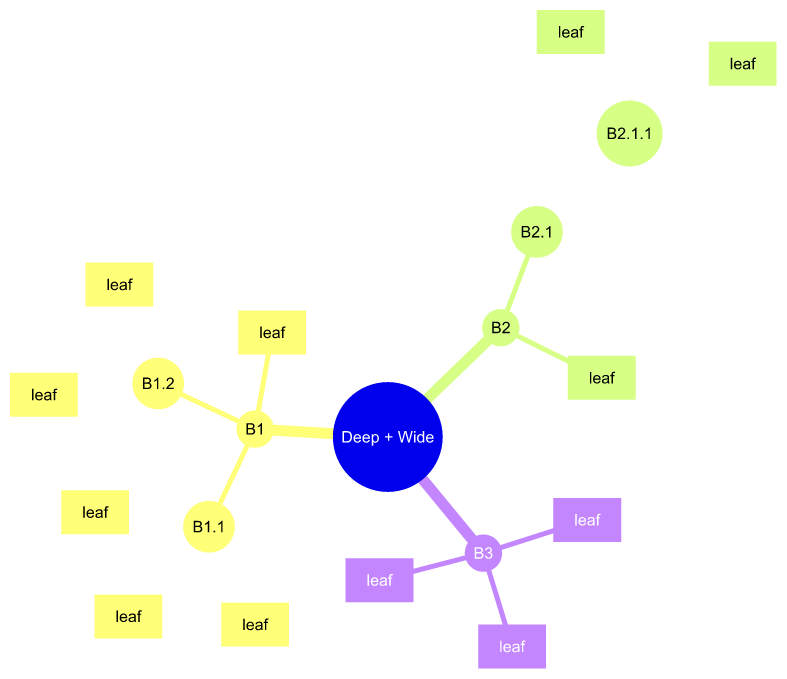 Fixture: fixtures/mindmap/stress_deep_wide_combo_011.mmd |
Parity and coverage
- Baseline: Mermaid
@11.15.0. - Merman treats Mermaid as the specification, not just inspiration: surprising upstream behavior is matched and documented instead of being replaced with a Rust-specific interpretation.
- Parsing and semantic output are locked with
fixtures/**/*.golden.json; layout geometry is locked separately withfixtures/**/*.layout.golden.jsonso regressions can be traced to parsing, geometry, or final SVG emission. - Upstream SVG baselines under
fixtures/upstream-svgs/**are generated from the pinned official Mermaid CLI/browser rendering pipeline and used as the end-to-end source of truth. - Core layout dependencies are rewritten as headless Rust ports where parity requires matching
upstream algorithms:
dugong/dugong-graphlibfor Dagre + Graphlib behavior, andmanateefor Cytoscape/FCoSE/COSE-style compound layouts used by diagrams such as Architecture and Mindmap. - Fixture imports are traceable to upstream docs, tests, Cypress rendering samples, and selected stress cases. When an upstream browser sample is not directly renderable by the pinned Mermaid CLI, the raw input is kept as parser-only and a documented normalized variant is used for layout and SVG parity.
- Alignment is enforced via upstream SVG DOM baselines plus semantic/layout golden snapshots.
- DOM parity checks normalize geometry numeric tokens to 3 decimals (
--dom-decimals 3) and compare the canonicalized DOM, not byte-identical SVG text. - Corpus size: 3500+ upstream SVG baselines across 23 diagrams.
- Mermaid diagram families that are present upstream but not implemented here are listed in docs/alignment/STATUS.md.
- Current coverage and gates: docs/alignment/STATUS.md.
- ZenUML is supported in a headless compatibility mode (subset; not parity-gated). See docs/adr/0061-external-diagrams-zenuml.md.
Quality gates
This repo is built around reproducible alignment layers and CI-friendly gates:
- Semantic snapshots:
fixtures/**/*.golden.json - Layout snapshots:
fixtures/**/*.layout.golden.json - Upstream SVG baselines:
fixtures/upstream-svgs/** - DOM parity gates:
xtask compare-all-svgs --check-dom(see docs/adr/0050-release-quality-gates.md)
The goal is not “it looks similar”, but “it stays aligned”.
Quick confidence check:
cargo run -p xtask -- verify
Release-level check:
cargo run -p xtask -- verify --strict
--strict adds all-features compilation, the public feature matrix
(merman no-default/render/raster and merman-core no-default), workspace clippy, override
no-growth, nextest, SVG DOM parity, and full SVG root parity.
For a quick “does raster output look sane?” sweep across fixtures (dev-only):
pwsh -NoProfile -ExecutionPolicy Bypass -File tools/preview/export-fixtures-png.ps1 -BuildReleaseCli -CleanOutDir
Limitations
- SVG
<foreignObject>HTML labels are not universally supported (especially in rasterizers). If you need a more compatible output, preferrender_svg_resvg_safe_sync()or the explicitSvgPipeline::resvg_safe()preset. - PNG/JPG export is constrained by a default pixmap budget. This protects headless hosts from oversized allocations, but it also means extremely large diagrams are downscaled unless callers choose a target fit box or explicitly opt into unbounded raster output.
- Architecture compound layout and root viewport parity are still geometry-normalized against upstream Cytoscape/FCoSE output; dense compound graphs can still have layout-level differences (see
docs/alignment/STATUS.md). - Determinism is a goal: output is stabilized via goldens, DOM canonicalization, and vendored/forked dependencies where needed (see
roughr-merman).
Feature surfaces
Cargo feature meanings and host profile expectations are documented in
docs/FEATURES.md. In short:
merman-wasm is the browser/wasm-bindgen package, while pure-WASM and Typst-style hosts start from
merman-core --no-default-features or merman --no-default-features and must avoid full core
config/sanitization, host-clock, host-random, host-timing, JS, and WASI imports.
@mermanjs/web publishes the full browser artifact by default. The source tree also has browser
source-build presets for core, render, ASCII, full, and RaTeX math artifacts, but those presets are
not separate npm entry points. Browser callers can inspect the active artifact with
bindingCapabilities().
Typst-compatible WASM uses merman-typst-plugin, not merman-wasm. The plugin crate exports
wasm-minimal-protocol functions and is gated so package artifacts import only Typst’s typst_env
protocol functions.
Use the defaults for normal Rust applications. Defaults keep Mermaid-compatible full configuration/sanitization and host behavior enabled, which is what you want for CLIs, servers, desktop apps, and tests that should accept Mermaid-style frontmatter, JSON5/YAML config, and broad HTML sanitization.
Disable defaults for constrained hosts. For example, a Typst package, plugin sandbox, or no-import
WASM runtime usually does not want local wall-clock time, host randomness, wasm-bindgen, WASI, URL
parsing, YAML/JSON5 parsing, or DOMPurify-like sanitizer dependencies. In those cases, start from
default-features = false, then opt into only the output family you need.
Enable render when you need layout and SVG output. Add raster only when you also need PNG/JPG/PDF
conversion. Add ascii only for terminal text output. Enable core-full when you need Mermaid’s
full config/frontmatter behavior or full sanitizer parity; leave it off for size-oriented Typst-like
rendering where inputs and options are already controlled. Enable host when local clock/randomness
is a feature, such as live previews that should use today’s date; leave it off for deterministic
WASM output.
The pure core profile keeps common inline metadata such as @{ shape: rounded }, but does not apply
YAML frontmatter title/config and uses conservative HTML escaping instead of DOMPurify-like
sanitization.
Architecture notes
merman-coreowns detection, parsing, stable semantic JSON, and typed render models for the render-optimized path.merman-renderowns layout and SVG emission. The default SVG helper usesparse_diagram_for_render_model_sync->layout_parsed_render_layout_only->render_layout_svg_parts_for_render_model_with_config, so typed diagrams avoid rebuilding the owned semantic JSON payload.layout_diagram_syncandrender_layouted_svgremain compatibility paths for callers that need owned semantic/layout JSON between steps.- Parity renderers live under
svg/parity/*; large renderers are split by diagram responsibility and generated overrides are treated as compatibility data, not as default model fixes.
Workspace crates
| Crate | Role |
|---|---|
merman | Public Rust facade. Enable render, ascii, and/or raster depending on output needs. |
merman-cli | Command-line interface for detect/parse/layout/render workflows. |
merman-rustdoc | Proc-macro integration for rendering Mermaid fences in rustdoc as inline headless SVG. |
merman-core | Detection, parsing, metadata, semantic JSON, and typed render models. |
merman-render | Headless layout, SVG rendering, SVG pipelines, and raster-friendly postprocessing. |
merman-ascii | ASCII/Unicode terminal rendering for typed models. |
merman-ffi | Stable C ABI for native hosts and platform wrappers. |
merman-bindings-core | Shared safe facade behind C ABI and UniFFI bindings. |
merman-uniffi | UniFFI-generated binding surface, currently used for Python packaging. |
merman-wasm | wasm-bindgen transport crate behind the @mermanjs/web TypeScript package. |
merman-typst-plugin | Experimental wasm-minimal-protocol transport crate for Typst-compatible plugin hosts. |
dugong | Dagre-compatible layout port. |
dugong-graphlib | Graph container APIs ported from dagrejs/graphlib. |
manatee | COSE/FCoSE-style compound graph layout ports. |
roughr-merman | Forked Rough.js-style renderer dependency stabilized for Mermaid parity. |
Star History
Links
- Alignment status: docs/alignment/STATUS.md
- Merman Playground: frankorz.com/merman
- Parity policy: docs/adr/0014-upstream-parity-policy.md
- Release quality gates: docs/adr/0050-release-quality-gates.md
- WASM package surface semantics: docs/adr/0069-wasm-package-surface-semantics.md
- Upstream Mermaid: mermaid-js/mermaid (MIT)
- Related: 1jehuang/mermaid-rs-renderer
- ASCII reference: AlexanderGrooff/mermaid-ascii
(MIT; grid/routing/fixture reference for
merman-ascii) - ASCII reference: lukilabs/beautiful-mermaid (MIT; reference for future class, ER, xychart, color, and multiline terminal output)
- Changelog: CHANGELOG.md
- License: dual MIT or Apache-2.0; see
LICENSE,LICENSE-MIT, andLICENSE-APACHE - Upstream attribution: THIRD_PARTY_NOTICES.md
Similar Articles
Mermaid to Unicode box art (grok-mermaid)
Simon Willison built a browser-based tool using WebAssembly to convert Mermaid diagrams into Unicode box art, inspired by an open-sourced Rust component from the Grok CLI coding agent.
Mermaid to ASCII art (mermaid-ascii)
A web tool that converts Mermaid diagram syntax into ASCII and Unicode box-drawing art, rendered entirely in the browser using a Go library compiled to WebAssembly. Supports flowcharts, sequence diagrams, colors, and customizable output.
@wsl8297: Mermaid makes drawing flowcharts and sequence diagrams really easy, but the default rendering is far from beautiful, let alone usable in the terminal. I found a new open-source project on GitHub: beautiful-mermaid, which is specifically designed to make Mermaid rendering both beautiful and practical — it can export exquisite…
beautiful-mermaid is an open-source tool implemented in pure TypeScript that renders Mermaid diagrams as beautiful SVGs or terminal-friendly ASCII art. It supports 15 built-in themes and has zero DOM dependencies, making it suitable for use in AI-assisted programming.
Show HN: Free Mermaid Diagram Editor
A free, no-signup Mermaid diagram editor with live preview, instant SVG/PNG export, and shareable links that run entirely in the browser. Optionally connects to GitHub to auto-generate architecture diagrams from source code.
Show HN: Line9 – A Mermaid rendering engine with its own layout
Line9 is a new Mermaid rendering engine with its own layout algorithm, available as a CLI and diagram editor.