Cached at:
09/16/26, 03:27 PM
# Put the fun back into computing. Use Linux, BSD.
Source: [https://distrowatch.com/weekly.php?issue=20260914](https://distrowatch.com/weekly.php?issue=20260914)
[](https://distrowatch.com/news/dww.xml)DistroWatch WeeklyDistroWatch Weekly, Issue 1190, 14 September 2026**Welcome to this year's 37th issue of DistroWatch Weekly\!**Linux distributions are often presented as lightweight, efficient alternatives to commercial operating systems such as Windows\. How small and how efficient can Linux get? In this week's Questions and Answers column we explore the topic of the world's smallest Linux distributions\. How big was the smallest Linux distribution you have used? Let us know in the Opinion Poll\. In our News section we talk about Asahi Linux running on M3\-powered Apple computers while the FreeBSD project tests a new service manager\. We talk about a new package comparison tool for openSUSE users and share a call for volunteers from the Arch Linux team\. The Linux Mint team have been working on their XApps project, which provides cross\-desktop applications for common tasks, and we share highlights below\. Before we dive into those stories we share a look at Vanilla OS 3\. The Vanilla OS distribution provides an immutable, Debian\-based operating system with some custom tools\. Jesse Smith took Vanilla OS for a spin and reports on the experience in this week's Feature Story\. Plus we are pleased to share a summary of last week's releases and list the torrents we are seeding\. We wish you all a fantastic week and happy reading\!
---
**This week's DistroWatch Weekly is presented by[TUXEDO Computers](https://distrowatch.com/k/tuxedo.php)**\.**Content:**
- [Review: Vanilla OS 3 "Reunion"](https://distrowatch.com/weekly.php?issue=20260914#vanilla)
- [News: Asahi Linux works on M3\-powered Apple computers, FreeBSD tests new service manager, Arch seeks help triaging bugs, openSUSE introduces tool to compare package versions, Linux Mint updates XApp, Debian publishes media update](https://distrowatch.com/weekly.php?issue=20260914#news)
- [Questions and answers: The smallest possible Linux](https://distrowatch.com/weekly.php?issue=20260914#qa)
- [Released last week: FreeBSD 14\.5, Spaced Linux 9\.26, Ubuntu 24\.04\.5](https://distrowatch.com/weekly.php?issue=20260914#released)
- [Torrent corner: TUXEDO OS, Ubuntu](https://distrowatch.com/weekly.php?issue=20260914#torrent)
- [Upcoming releases: Fedora 45 Beta](https://distrowatch.com/weekly.php?issue=20260914#upcoming)
- [Opinion poll: How small was the smallest Linux you have used?](https://distrowatch.com/weekly.php?issue=20260914#poll)
- [Reader comments](https://distrowatch.com/weekly.php?issue=20260914#comments)
Feature Story \(By Jesse Smith\)**Vanilla OS 3 "Reunion"**[](https://distrowatch.com/vanilla)[Vanilla OS](https://distrowatch.com/vanilla), a fixed\-release distribution based on[Debian](https://distrowatch.com/debian)\(formerly[Ubuntu](https://distrowatch.com/ubuntu)\) with the GNOME desktop, is an immutable operating system\. The new Vanilla OS 3 release introduces support for generic ARM \(aarch64\) machines, adding these devices to its existing support for x86\_64 computers\. The[release announcement](https://vanillaos.org/blog/article/2026-08-24/vanilla-os-3-reunion---stable-release)also mentions Vanilla OS 3 ships with GNOME 50 as its only desktop environment which runs Wayland sessions only\. Work has also gone into making reproducible builds:> Most images \(except NVIDIA images due to kernel modules\) are now fully reproducible, meaning the build process always produces bit\-for\-bit identical images from the same sources\.
There have been some changes to the update process too:> With so many changes to default apps since Vanilla OS 2 Orchid, we've introduced a new update mode in First Setup\. It runs automatically after an upgrade, allowing you to install new apps and uninstall old ones\. Just a few clicks to confirm the changes, and you're ready to enjoy the latest Vanilla OS experience\.While immutability protects the system, your data is a whole different story\. That's why in Reunion we introduced Vanilla Continuity, a new snapshot\-based backup and restore tool that is now part of the image and works together with ABRoot\. It saves your home directories, the list of installed Flatpak apps and ABRoot metadata, then restores them when needed\.
I downloaded the x86\_64 build of Vanilla which is 1\.8GB in size\. I soon found that the distribution runs in UEFI mode only\. Trying to boot in Legacy BIOS mode will start a graphical environment and display a message saying the system will install in UEFI mode only\. Then the system will reboot before it reaches the GNOME desktop\.When running in UEFI mode the distribution launches a graphical environment and displays a welcome window\. We are given the choice of installing Vanilla OS, installing a custom image, running a recovery mode, or powering off the computer\. The system reportedly requires 4GB of RAM and over 50GB of disk space in order to install the distribution, though both of these numbers \(as I will point out later in this review\) are inflated\.
**Installing**
Vanilla uses a custom, graphical system installer\. We are first asked to pick our preferred language from a list, then choose our keyboard from another list, and our timezone from a third list\. We can then select which hard drive to use for storing Vanilla OS\. The distribution offers guided partitioning which will take over an entire disk or manual partitioning\. The manual option offers to launch the GParted application to help us organize the disk\.
The installer offers to enable encryption on our partition and, if we accept, it will get us to make up a password to unlock the disk\. The installer copies its files to the drive and then, in my case, it reported success\. The system then reboots\.
The first time Vanilla OS boots it launches a first\-run welcome wizard\. We are asked to name our computer, make up a username and password combination, and then we are shown a graphical login screen\. The login page has accessibility options for displaying larger text, using an on\-screen keyboard, running a screen reader, and displaying fonts in a high contrast\.
Once we login we are presented with the GNOME 50 desktop\. Another first\-run wizard then launches and offers to enable accessibility options and choose between a light and dark theme \(the light theme is selected by default\)\. The next screen asks us to select the applications we want to run, with the categories labelled Core, Browsers, Common, and Office\. We can click a button next to each category to see which applications it includes\. We can then further customize the selection by toggling specific applications\. For example, clicking on the Browsers category reveals Firefox is selected by default\. However, there are several other options we can choose to install, including Chrome, Chromium, Brave, Floorp, LibreWolf, Zen, Edge, and Vivaldi\. The Office category offers LibreOffice and OnlyOffice\. Once we have made our selections the welcome window displays progress while our new applications are fetched and installed\.
[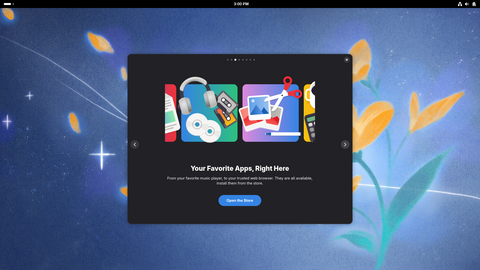](https://distrowatch.com/images/screenshots/vanilla-3-tour.png) **Vanilla OS 3 \-\- Taking the tour** \(full image size: 2\.5MB, resolution: 1920x1080 pixels\)
Once we have our applications installed the welcome window offers to return us to the GNOME desktop or start a tour, by running GNOME Tour\. The Tour application offers to configure the frequency of update checks\. It also offers to open the software centre so we can install yet more applications\. We're told APX is installed to assist us with development and that the "super key" will display an overview of the desktop\. The Tour then offers to open the settings panel to help us customize the desktop\.There are a few more screens to navigate\. The Tour window will offer to configure cloud accounts and suggests we can visit the Vanilla OS blog to see news updates\. I clicked the blog button and this opened the web browser which had its own five configuration screens to walk through\. For those keeping track at home, this was welcome/configure process number five in my journey\.
[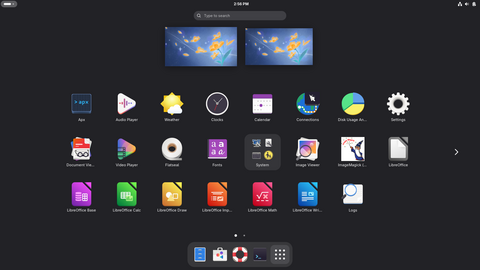](https://distrowatch.com/images/screenshots/vanilla-3-apps.png) **Vanilla OS 3 \-\- The application menu** \(full image size: 298kB, resolution: 1920x1080 pixels\)
Eventually, I got through all the first\-run items and was presented with the GNOME desktop\. GNOME places a thin panel across the top of the screen where we can find the overview button, a clock, and the system tray\. Pressing the super/meta key or clicking the overview button causes a dock to appear at the bottom of the display where we can launch commonly used programs or open a full screen application menu\.**Hardware**
The distribution worked smoothly when I ran it in VirtualBox\. The system integrated well with the virtual environment and I didn't have any problems with Vanilla\. When I ran the distribution on my laptop the experience was also fairly good\. Audio, networking, and keyboard shortcut keys were all detected and worked\. My touchpad translated taps into mouse clicks\. By default the screen was quite dim, set at about 25% brightness, but this could be fixed by using the keyboard shortcut keys\. As I mentioned above, the distribution installs in UEFI mode only\.
[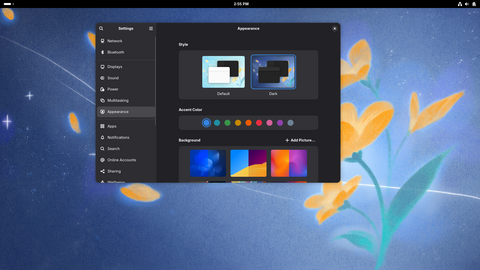](https://distrowatch.com/images/screenshots/vanilla-3-settings.png) **Vanilla OS 3 \-\- The GNOME settings panel** \(full image size: 2\.5MB, resolution: 1920x1080 pixels\)
Measuring disk usage is a bit strange\. Vanilla OS sets up several Btrfs volumes, temporary filesystems, overlays, and containers\. The output from the[mount](https://distrowatch.com/dwres.php?resource=man-pages&page=mount.html#content)command lists 201 mounted filesystems\! As best as I could tell, Vanilla OS requires about 14GB of disk space when it is first installed, a far cry short of the 50GB the installer demands\. However, with the update images, Btrfs snapshots, and Flatpak bundles Vanilla requires, disk space will be consumed quickly\.When signed into GNOME, Vanilla uses about 1\.4GB of RAM\. This is on the heavy side, though it is not unusual for GNOME running a Wayland session\. The distribution does not enable a swap file or partition by default, but it does create a zRAM virtual device in RAM\. This allows the operating system to compress unused memory in a corner of RAM for quick access\.
**Applications**
The applications which will be available on Vanilla OS will vary depending on our choices at install time\. We could have virtually no applications, apart from a terminal, file manager, and the GNOME settings panel if we opted for a light setup\. However, mostly sticking with the default options gave me a web browser \(Vivaldi, in my case\), the GNOME Files file manager, a calendar, clock, weather application, audio player, weather app, and video player\. Both media players worked for me and were able to handle the video and audio files I threw at them\. I decided to install LibreOffice which was available alongside an image viewer, text editor, and resource monitor\.
Vanilla ships with manual pages, the GNU command line tools, and the GNU Compiler Collection\. The distribution uses systemd for init and service management functions and runs version 7\.1 of the Linux kernel\.
The distribution runs the*bash*shell by default for interactive work and there are virtually no aliases enabled, apart from one to add colour to the output of the[ls](https://distrowatch.com/dwres.php?resource=man-pages&page=ls.html#content)command\.
**Software management**
The desktop software included in Vanilla is mostly supplied by Flatpak bundles, pulled from the Flathub repository\. By default about two dozen of these bundles are installed\. We can fetch additional software using the GNOME Software application\. This software centre uses a three\-tab approach\. The first tab allows us to explore available applications and download them\. The second tab shows installed programs and assists us in removing them\. The third tab displays any updates and assists us with installing new versions\.
I found GNOME Software worked well for me and without errors\. The interface is pleasantly arranged and fetching new programs requires just a few clicks\. The software centre is a touch slow compared to some other software managers, such as Discover and[Linux Mint](https://distrowatch.com/mint)'s equivalent, but I had no problems while using it\.
[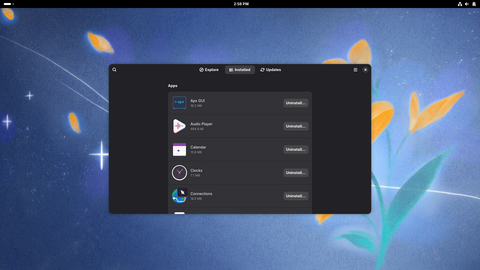](https://distrowatch.com/images/screenshots/vanilla-3-software.png) **Vanilla OS 3 \-\- The software centre** \(full image size: 2\.4MB, resolution: 1920x1080 pixels\)
I'd like to note that each user appears to have their own copy of Flatpak packages, which means each user can have their own version of a program and install or remove applications for their account without affecting the programs available to other users\.I was curious about managing low\-level software\. On immutable distributions it is often common to supply portable packages \(Flatpak or Snap bundles\) as add\-ons while keeping the base system fixed\. Other distributions provide some sort of low\-level tool for layering on extra packages\. Vanilla OS tries to make adding and managing low\-level packages seamless\. When we open a virtual terminal the terminal appears to run inside a container\. This means we can install software in the terminal using Debian's APT package manager and run command line tools\. Since we can access our home directory from inside the container, this makes it seem as though we are installing new programs on Vanilla OS while really we're placing them in an add\-on environment and the system is handling the situation transparently\.
**APX**
One of the key features of Vanilla OS which gets mentioned on the website and in one of the welcome windows that first greets us, is APX\. The project devotes[several documentation pages](https://docs.vanillaos.org/collections/apx)to APX\. The[Getting Started](https://docs.vanillaos.org/apx/en/getting-started)page talks about how to install APX on other distributions\. We don't need this since it is bundled with Vanilla OS\.
The[Introduction](https://docs.vanillaos.org/apx/en/introduction)page gives a quick overview of APX: "APX is a versatile command\-line interface \(CLI\) tool designed to simplify the management of operating system containers\. With a focus on efficiency and user\-friendliness, APX empowers users to create, manage, and customize containers for a variety of applications and services\." This is a decent big\-picture description, but I still wasn't sure what APX actually does in practical terms\.
There is another page for[working with package managers](https://docs.vanillaos.org/apx/en/working-w-pkgms)which tells us how to teach APX about package managers it might not already know\. Apparently APX knows something about how certain popular package managers work\. However, the documentation doesn't explain what to do with this information once we teach APX or what to do with the package manager information already baked into the application\. There is yet another page about[working with types of containers](https://docs.vanillaos.org/apx/en/understanding-pmss), but again no practical information about what APX does in these situations or why we would use it\. There are no practical, hands on examples or goals mentioned\.
The package managers APX knows about \(*dnf*,*apk*,*pacman*, etc\) are not on the system\. I thought maybe APX could be used to manage these package managers inside containers\. However, after reading five sections of the handbook and browsing the APX built\-in help screens I could not find any examples of this or how APX is meant to be used\.
[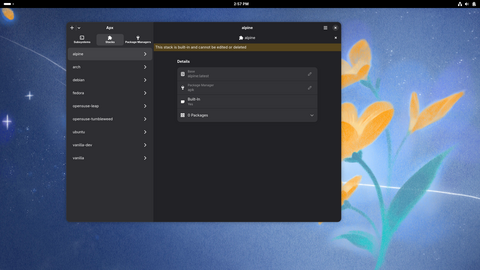](https://distrowatch.com/images/screenshots/vanilla-3-apx.png) **Vanilla OS 3 \-\- The graphical APX utility** \(full image size: 2\.0MB, resolution: 1920x1080 pixels\)
There is a graphical tool for APX\. I launched it and found it just provides the same list of supported package managers and containers as the command line tool\. Using the graphical interface I could not find any hints as to what it was meant to be used for or why it is considered a key component of Vanilla OS\. All of this is to say that APX might be useful and it might be interesting, but I could not find any information about why people would use it or practical steps for doing so\. The documentation throws around buzzwords, such as "simplify" and "efficiency", but not what is being simplified or how or why people would benefit from using it\.**Other observations**
At one point during my trial I created a second user account\. With this new account I could sign into GNOME and the system ran me through the same welcome experience, asking me to select which applications I wanted\. \(Each user has their own set of Flatpak bundles\.\) For the most part, running this second user account worked and I could fetch and run applications\. The exception was the virtual terminal\. When the second user tried to open a terminal window a message would appear indicating it was setting up a container\. Then a brief message would appear saying setting up the environment failed and the terminal window would close\.
This feels like an odd limitation or oversight: not allowing any users apart from the first one run a terminal window\. It makes me wonder if anyone on the Vanilla team has tried running a system with more than one user\.
[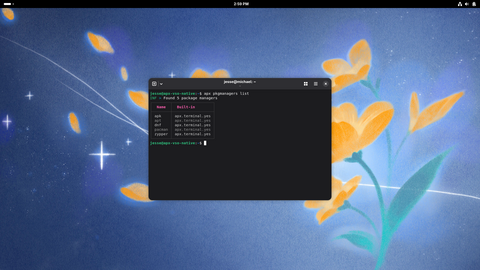](https://distrowatch.com/images/screenshots/vanilla-3-terminal.png) **Vanilla OS 3 \-\- Running the command line APX tool** \(full image size: 2\.9MB, resolution: 1920x1080 pixels\)
**Conclusions**What I found intriguing, and sometimes frustrating, during my trial with Vanilla OS was that the distribution seems to be implementing some interesting concepts \- even some complex and technically challenging concepts \- and mostly doing it well, but none of it benefited*me*as a user\. The distribution adds the complexity of immutability, but that's not helpful for me, that's something I need to work around\. It's not as though the system being immutable is going to make the Debian base, of all things,*more*stable\. Instead all it does is gum up the works when I try to run a terminal as the second user\.
The website and documentation talk a bit about APX, but none of it is useful information or provides any hint as to how it will make my computing experience better\. In a similar vein, I went through five welcome screens and first\-run configuration guides which, I'm sure, could be helpful for beginners, but it just meant I spent an extra five or ten minutes setting up my system\. Since Vanilla isn't targeting beginners \(their focus is on developer tools and containers\) gearing their welcoming processes toward newcomers feels off brand\.
Ultimately, Vanilla OS experiments with some technologies well, it makes running Debian with a layer of containers work \(mostly\) smoothly\. As a proof of concept, it's a solid demonstration\. Vanilla does a good job of layering tools like Flatpak on top of a Debian base\. The question I kept asking myself throughout my trial though was: how does this help me use my computer? For me, the complexities added by Vanilla just impeded what I was doing, in ways Debian would not\. Vanilla is heavier, it is more complex, it layers tools like Btrfs, zRAM, and Flatpaks which use up more resources\. Vanilla sets up more mount points, runs more wizards, includes more container technology\. All of this is interesting, but it doesn't make my computing experience or development processes faster or smoother or better in any practical way that I can find\. Mostly, it made me want to switch to running the distribution's parent, Debian, to get the same underlying benefits without the extra layers and resource consumption\.
\* \* \* \* \*
**Hardware used in this review**My physical test equipment for this review was an HP DY2048CA laptop with the following specifications:
- Processor: 11th Gen Intel\(R\) Core\(TM\) i5\-1135G7 @ 2\.40GHz
- Display: Intel integrated video
- Storage: Western Digital 512GB solid state drive
- Memory: 8GB of RAM
- Wireless network device: Intel Wi\-Fi 6 AX201 \+ BT Wireless network card
\* \* \* \* \*
**Visitor supplied rating**Vanilla OS has a visitor supplied average rating of:**6\.5/10**from**37**review\(s\)\. Have you used Vanilla OS? You can leave your own review of the project on our[ratings page](https://distrowatch.com/dwres.php?resource=ratings&distro=vanilla)\.
Miscellaneous News \(by Jesse Smith\)**Asahi Linux works on M3\-powered Apple computers, FreeBSD tests new service manager, Arch seeks help triaging bugs, openSUSE introduces tool to compare package versions, Linux Mint updates XApp, Debian publishes media update**[](https://distrowatch.com/asahi)The[Asahi Linux](https://distrowatch.com/asahi)project has published good news for people running Apple's M\-series hardware\. The Asahi project now supports installing Linux on M3\-powered devices: "It's been a while since we did a blog post outside of the progress reports, and today's as good an occasion for one as any; support for M3 series machines has now been merged into the installer\. In other words, Asahi Linux now officially supports Macs with an M3 series SoC\! Linux support for M3 series SoCs and the machines powered by them is now in a state where almost everything supported on the M1 and M2 series machines just works\. This includes the webcam, internal microphones, USB \(up to the hardware limit of USB 3 10Gb/s\), hardware accelerated video decoding including support for AV1, WiFi, Bluetooth, and much more\! The only major exceptions remain full DCP support and the GPU, which we will have more news on in the coming months\. Do not expect performant or power\-efficient 3D acceleration right now\." Details on how to test M3 support, along with a list of limitations, are provided in the project's[announcement](https://asahilinux.org/2026/09/m2-episode-1/)\.\* \* \* \* \*
[](https://distrowatch.com/freebsd)Over the years there have been a number of discussions in the[FreeBSD](https://distrowatch.com/freebsd)community regarding service management and possible alternatives to the current*rc*tools for launching services\. Some alternatives have been tested over the years, including running OpenRC in the[GhostBSD](https://distrowatch.com/ghostbsd)desktop offshoot of FreeBSD\. Baptiste Daroussin has another option which is ready to test\. The new tool, called*rcd*, imports a lot of the beneficial ideas from systemd while avoiding the pain points systemd has inflicted\. "rcd\(8\) is a service manager daemon called by init\(8\) \(in place of*/etc/rc*\)\. It reads service definitions from UCL unit files \(*/etc/rcd\.d/\*\.ucl*\), builds a dependency DAG, and starts services in parallel\. After boot completes, it forks to background and stays running as a supervision daemon \(automatically restarting failed services and accepting control commands via a UNIX socket\)\." The[post from Daroussin](https://lists.freebsd.org/archives/freebsd-hackers/2026-June/006427.html)goes on to share information on how to install and run*rcd*, list key features, and the message points out*rcd*is 100% compatible with the existing*rc*service manager, making switching between the two seamless\.\* \* \* \* \*
[](https://distrowatch.com/arch)Frederik Schwan of the[Arch Linux](https://distrowatch.com/arch)project has put out a call for volunteers to help Arch deal with bug reports\. Many projects have seen a surge in bug tickets in recent months, due to LLM\-created reports, and Arch is hoping to get help triaging bugs submitted to their GitLab account\. "We are searching for additional helping hands on our GitLab\. Offering sources for thousands of packages requires triaging \(and sometimes closing\) the many issues that users report over time\. As a bug wrangler you would be helping the distribution with triaging tickets across all package source repositories and assigning them to relevant package maintainers, as well as closing invalid ones and/or investigating the topics at hand \(if applicable\)\." The[post](https://lists.archlinux.org/archives/list/
[email protected]/thread/CTRMX4IOOYLO3LGLZ3LFA4SW3X6CNS7W/)includes contact information where people can reach out to volunteer\.\* \* \* \* \*
[](https://distrowatch.com/opensuse)If you have ever wanted to compare the package versions between[openSUSE](https://distrowatch.com/opensuse)'s Leap and Tumbleweed branches and didn't want to manually compare the versions yourself, we have the DistroWatch[package comparison page](https://distrowatch.com/dwres.php?firstlist=opensuse&secondlist=opensuse&firstversions=0&resource=compare-packages&secondversions=1)\. This page will display the upstream stable version of a package as well as provide the package versions for any two distributions, or any two versions of a distribution\. Now, alternatively, the openSUSE project[provides its own implementation](https://news.opensuse.org/2026/09/09/one-page-every-package/)of this feature to compare packages between openSUSE Leap and openSUSE Tumbleweed\. "The tool pulls the archive indexes straight from download\.opensuse\.org; this is for open\-source software \(oss\) and non\-oss, x86\_64 and noarch and it's done for Tumbleweed, Leap 16\.1, and Leap 16\.0; then it compares the upstream version of every source package it finds\. The result is a single sortable, filterable table with a timestamp on it\." The new[osdiff](https://opensuse.github.io/osdiff/)tool is now live and provides a filter for narrowing down the list of compared packages\.\* \* \* \* \*
[](https://distrowatch.com/mint)The[Linux Mint](https://distrowatch.com/mint)project maintains a collection of applications, called XApp, which are desktop\-neutral forks of GNOME applications\. The XApps now have their own website to make it easier to discover and learn about the applications\. "The XApp project started within Linux Mint but it has grown a lot since then\. Its libraries, tools and applications are used in many desktops and distributions\. It was given a[new website](https://xapp-project.org/)to make it easier to discover all its components\. Thingy, known as the 'Library' in the desktop, was redesigned\. Until now, documents were grouped by application\. For instance, PDF files and all the other document types supported by XReader were grouped together under 'Document Viewer'\. The library now organizes documents by type instead\. It no longer matters which applications are installed or which formats they support\." Further information is provided in the Linux Mint[monthly newsletter](https://blog.linuxmint.com/?p=5067)\.\* \* \* \* \*
[](https://distrowatch.com/debian)The[Debian](https://distrowatch.com/debian)project has[published](https://www.debian.org/News/2026/20260912)updated install media for Debian 13 "Trixie"\. "The Debian project is pleased to announce the seventh update of its stable distribution Debian 13 \(codename Trixie\)\. This point release mainly adds corrections for security issues, along with a few adjustments for serious problems\. Security advisories have already been published separately and are referenced where available\. Please note that the point release does not constitute a new version of Debian 13 but only updates some of the packages included\. There is no need to throw away old Trixie media\. After installation, packages can be upgraded to the current versions using an up\-to\-date Debian mirror\."\* \* \* \* \*
These and other news stories can be found on our[Headlines](https://distrowatch.com/dwres.php?resource=headlines)page\.Questions and Answers \(by Jesse Smith\)**The smallest possible Linux****Honey\-I\-shrank\-the\-distro asks:**Some people say Linux is smaller and lighter than other operating systems, but how small can Linux get compared to others?**DistroWatch answers:**For the sake of comparison, Microsoft says the[minimal system requirements](https://www.microsoft.com/en-us/windows/windows-11-specifications)for Windows 11 are: a dual\-core, 64\-bit x86\_64 processor, 4GB of RAM, and 64GB of storage\. Even the heavier Linux distributions require about half those resources to perform a full install and then run a desktop and a web browser\.
Linux distributions can get really small\! The smallest Linux distribution I've run on my own machines was about 1\.4MB in size \(that's megabytes, not gigabytes\)\. It was called Tom's Root Boot and ran from a 3\.5\-inch floppy disk\. It was quite minimal\. It included the Linux kernel with minimal features enabled and a handful of command line tools only\. It could be used for basic system rescue operations\.
Granted, that was about 20 years ago and modern versions of the Linux kernel are a bit too big to run from a floppy disk\. In recent memory, one of the smallest Linux distributions I have tried was[Minimal Linux Live](https://distrowatch.com/mml), which was about a 7MB download\. That's just enough for the kernel, a shell, and a few userland utilities, again mostly for system rescue purposes\.
There are a few other distributions which are in the same range\.[Tiny Core](https://distrowatch.com/tinycore)'s most compact edition is about 17MB and[SliTaz](https://distrowatch.com/slitaz)has an edition which is under 50MB\.
These distributions are probably as small as you will be able to get, realistically, and still have an operating system which can boot on a personal computer\. There are some smaller, embedded Linux distributions that are not meant for use by the general public\. Linux can power all sorts of small devices and I've heard of people booting a Linux kernel on anything from home appliances to[vape pens](https://bogdanthegeek.github.io/blog/projects/vapeserver/)\.
Whenever we talk about how small Linux can get or how few resources it can be made to consume, I think it is important to include context\. Specifically, what do we want to accomplish with this miniature distribution? We can distill the Linux kernel and userland down to a few megabytes, but it won't be useful for many things\. As soon as we start to add functionality, the size will need to creep upward\. If we want a command line experience, we will need at least 10MB of disk space and around 25MB of RAM, if we want to add a graphical environment then the requirements go upward\. Tiny Core Linux manages to provide a desktop and package manager with about 24MB of disk space and a little under 100MB of RAM\. This is probably as small as we can get and provide any degree of practical personal computing\.
In short, on the heavier end, big Linux distros can get by with about half the resources of Windows 11\. On the lighter end, there are some Linux distributions which can run a small desktop and a few applications with about 1% of the resources Microsoft says Windows 11 requires\.
\* \* \* \* \*
Additional answers can be found in our[Questions and Answers archive](https://distrowatch.com/qanda.php)\.Released Last Week**[FreeBSD 14\.5](https://distrowatch.com/12949)**The[FreeBSD](https://distrowatch.com/freebsd)project has published an update to FreeBSD's 14\.x series\. The new version, 14\.5, provides several fixes and introduces some changes to the userland utilities\. "The rc\.firewall script now supports reading IP addresses or subnets from on\-disk files for the firewall\_allowservices and firewall\_trusted list variables\. Elements that look like absolute paths are read line by line, skipping comments and blank lines, and the first word on each line is treated as an address or subnet\. The default history size in sh\(1\) has been increased from 100 to 128, complying with the POSIX\.1\-2024 minimum requirement\. LTO\-10 and LTO\-10P density codes and cartridge specifications have been added to mt\(1\) and libmt, enabling detection and reporting of the new tape formats\. The default behaviour of pwd\(1\) has changed from \-P to \-L, aligning with POSIX semantics\. The ipfw\(8\) binary now includes a fallback mechanism to support the new kernel interface introduced in FreeBSD 15\.0\. When running with a 15\.0\+ kernel, ipfw\(8\) automatically invokes a bundled ipfw15 binary to load firewall rules, ensuring compatibility during upgrade procedures\. The daemon\(8\) utility now supports the \-m option to specify the output file mode, allowing non\-root log collectors to access log files\." Additional information can be found in the[release announcement](https://www.freebsd.org/releases/14.5R/announce/)and in the[release notes](https://www.freebsd.org/releases/14.5R/relnotes/)\.
**[Spaced Linux 9\.26](https://distrowatch.com/12950)**
[Spaced](https://distrowatch.com/spaced)Linux 9\.26 has been released\. Spaced Linux is a desktop Linux distribution based on Devuan's "Unstable" branch and featuring the MATE desktop environment with the Compiz compositing window manager\. "Spaced Linux 9\.26 is a major production release focused on upgrade reliability, graphics\-driver recovery, desktop startup resilience, signed package delivery, and substantially stronger automated release validation\. System updates and upgrade reliability: reworked Spaced Update to handle complete operating system upgrades more safely and predictably; added a dedicated APT transaction guard so package changes are protected during the actual locked package\-management operation rather than only during preliminary checks; improved handling of package refreshes, native package upgrades, Flatpak updates, release\-marker changes, and error reporting; added explicit testing for upgrades from earlier Spaced Linux installations to reduce the chance of regressions affecting existing users; added package\-payload validation to confirm that the packages delivered by the production repository match the expected release; added release\-identity checks so the built ISO, installed release metadata, package repository, and release version cannot silently drift apart\.\.\.\." Continue to the detailed[release notes](https://github.com/crhy/spaced/releases/tag/v9.26)for further information\.
[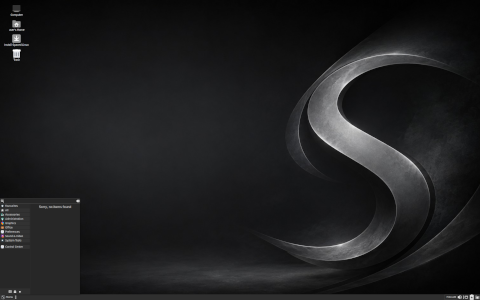](https://distrowatch.com/images/screenshots/spaced-9.26-mate.png) **Spaced Linux 9\.26 \-\- Running the MATE desktop** \(full image size: 985kB, resolution: 2560x1600 pixels\)
**[Ubuntu 24\.04\.5](https://distrowatch.com/12951)**Utkarsh Gupta has announced an update to the[Ubuntu](https://distrowatch.com/ubuntu)24\.04 long\-term support \(LTS\) branch of Canonical's operating system\. The new update, version 24\.04\.5, introduces fixes and improvements: "Ubuntu 24\.04\.5 LTS, code\-named 'Noble Numbat', is here\. The team has been hard at work through this cycle, together with the community and our partners, to introduce new features and fix bugs\. As usual, this point release includes many updates and updated installation media has been provided, so that fewer updates will need to be downloaded after installation\. These include security updates and corrections for other high\-severity bugs, with a focus on maintaining stability and compatibility with Ubuntu 24\.04 LTS\." The[release announcement](https://lists.ubuntu.com/archives/ubuntu-announce/2026-September/000327.html)and[release notes](https://documentation.ubuntu.com/release-notes/24.04/)provide additional information for both Ubuntu and its community editions\.
\* \* \* \* \*
**Development, unannounced and minor bug\-fix releases**
- [Soplos](https://distrowatch.com/soplos)2026\.09
- [Margine](https://distrowatch.com/margine)20260906
- [Shadowfetch](https://distrowatch.com/shadowfetch)4\.0\.0
- [openKylin](https://distrowatch.com/openkylin)3\.0\-20260905
- [LinuxConsole](https://distrowatch.com/linuxconsole)2026\-09\-07
- [Slimbook OS](https://distrowatch.com/slimbookos)26\-r4
- [Berserk Arch](https://distrowatch.com/berserkarch)2026\.09\.07
- [4MLinux](https://distrowatch.com/4mlinux)52\.1
- [Security Onion](https://distrowatch.com/securityonion)3\.3\.0\-20260908
- [MocaccinoOS](https://distrowatch.com/mocaccinoos)26\.09
- [Q4OS](https://distrowatch.com/q4os)7\.0\-r7\-testing
- [StormOS](https://distrowatch.com/stormos)2026\.09
- [DESERT](https://distrowatch.com/desert)5\.5\.2\_26\.04
- [NawaOS](https://distrowatch.com/nawaos)2\.1\.0
- [Deblinux](https://distrowatch.com/deblinux)6\.2\.1
- [SolydXK](https://distrowatch.com/solydxk)202609
- [Vuu\-do](https://distrowatch.com/vuudo)20260908
- [HAOS](https://distrowatch.com/haos)18\.3\-rc1
- [starkOS](https://distrowatch.com/starkos)20260909
- [Pulsar](https://distrowatch.com/pulsar)1\.0
- [Genuen](https://distrowatch.com/genuen)2026\.09\.10
- [Xray\_OS](https://distrowatch.com/xray)26\.02\.16\.01
- [Manjaro](https://distrowatch.com/manjaro)26\.1\.2
- [GLF OS](https://distrowatch.com/glf)26\.09
- [TUXEDO](https://distrowatch.com/tuxedo)20260910
- [Linux Q83](https://distrowatch.com/q83)13\.16
- [Ubuntu](https://distrowatch.com/ubuntu)24\.04\.5
- [Kubuntu](https://distrowatch.com/kubuntu)24\.04\.5 \([Announcement](https://distrowatch.com/12951)\)
- [Lubuntu](https://distrowatch.com/lubuntu)24\.04\.5 \([Announcement](https://distrowatch.com/12951)\)
- [Ubuntu Kylin](https://distrowatch.com/ubuntukylin)24\.04\.5 \([Announcement](https://distrowatch.com/12951)\)
- [Ubuntu MATE](https://distrowatch.com/ubuntumate)24\.04\.5 \([Announcement](https://distrowatch.com/12951)\)
- [Ubuntu Budgie](https://distrowatch.com/ubuntubudgie)24\.04\.5 \([Announcement](https://distrowatch.com/12951)\)
- [Ubuntu Cinnamon](https://distrowatch.com/ubuntucinnamon)24\.04\.5 \([Announcement](https://distrowatch.com/12951)\)
- [Edubuntu](https://distrowatch.com/edubuntu)24\.04\.5 \([Announcement](https://distrowatch.com/12951)\)
- [Ubuntu Unity](https://distrowatch.com/ubuntuunity)24\.04\.5 \([Announcement](https://distrowatch.com/12951)\)
- [Xubuntu](https://distrowatch.com/xubuntu)24\.04\.5 \([Announcement](https://distrowatch.com/12951)\)
- [Mabox](https://distrowatch.com/mabox)26\.09
- [TROMjaro](https://distrowatch.com/tromjaro)2026\.09\.11
- [FLinux](https://distrowatch.com/flinux)17\.1
- [Netdeep](https://distrowatch.com/netdeep)4\.10358
- [Exton](https://distrowatch.com/exton)260912 "OpSuS"
- [Debian](https://distrowatch.com/debian)13\.7\.0
- [Debian Edu](https://distrowatch.com/debianedu)13\.7\.0
- [KaOS](https://distrowatch.com/kaos)2026\.09
- [Ditana](https://distrowatch.com/ditana)0\.9\.4\-beta
- [nakeDeb](https://distrowatch.com/nakedeb)1\.6\-202609
- [ArchBANG](https://distrowatch.com/archbang)130926
- [LankeOS](https://distrowatch.com/lankeos)0\.20
- [SkillFishOS](https://distrowatch.com/skillfishos)26\.06\.5
Torrent Corner**Weekly Torrents**The table below provides a list of[torrents](https://en.wikipedia.org/wiki/Bittorrent)DistroWatch is currently seeding\. If you do not have a bittorrent client capable of handling the linked files, we suggest installing either the[Transmission](https://www.transmissionbt.com/)or[KTorrent](https://www.kde.org/applications/internet/ktorrent/)bittorrent clients\.
**Operating System****Torrent****SHA256 checksum**[TUXEDO OS 20260910](https://distrowatch.com/tuxedo)[TUXEDO\-OS\-202609101011\.iso](https://distrowatch.com/dwres/torrents/TUXEDO-OS-202609101011.iso.torrent)cd5d3c5b602ad2c5415a624855f611a0d075f2a83f75aa4a24d83d35a2f61531[Ubuntu 24\.04\.5 "Desktop"](https://distrowatch.com/ubuntu)[ubuntu\-24\.04\.5\-desktop\-amd64\.iso](https://distrowatch.com/dwres/torrents/ubuntu-24.04.5-desktop-amd64.iso.torrent)63bed7c60c252d5563742b19204ff228ef9f7f10ac0a060159897ab423b6c398[Ubuntu 24\.04\.5 "Server"](https://distrowatch.com/ubuntu)[ubuntu\-24\.04\.5\-live\-server\-amd64\.iso](https://distrowatch.com/dwres/torrents/ubuntu-24.04.5-live-server-amd64.iso.torrent)97f3d7ffb032c3eb3b23d2c8be9cc76e60c2c1f2c0146ba5ba9fe01cafae0fd8Archives of our previously seeded torrents may be found in our[Torrent Archive](https://distrowatch.com/dwres.php?resource=bittorrent)\. We also maintain a[Torrents RSS feed](https://distrowatch.com/news/torrents.xml)for people who wish to have open source torrents delivered to them\. To share your own open source torrents of Linux and BSD projects, please visit our[Upload Torrents](https://distrowatch.com/dwres.php?resource=upload-torrent)page\.
**Torrent Corner statistics:**
- Total torrents seeded: 3,496
- Total data uploaded: 51\.0TB
Upcoming Releases and Announcements**Summary of expected upcoming releases**- 2026\-09\-15:[Fedora](https://distrowatch.com/fedora)45 Beta
- 2026\-09\-24:[Ubuntu](https://distrowatch.com/ubuntu)26\.10 Beta
- **2026\-10\-15:[Ubuntu](https://distrowatch.com/ubuntu)26\.10**\(see[release schedule](https://documentation.ubuntu.com/release-notes/26.10/schedule/)\)
- **2026\-10\-20:[Fedora](https://distrowatch.com/fedora)45**\(see[release calendar](https://fedorapeople.org/groups/schedule/f-45/f-45-all-tasks.html)\)
Opinion Poll \(by Jesse Smith\)**How small was the smallest Linux you have used?**In this week's[Questions and Answers](https://distrowatch.com/weekly.php?issue=20260914#qa)column we talked about some of the world's smallest Linux distributions\. What is the smallest Linux ISO \(or IMG\) file you have downloaded and booted? Let us know about your favourite mini\-distributions in the[comments](https://distrowatch.com/weekly.php?issue=20260914#comments)\.You can see the results of our previous poll on Debian's vote concerning large language model use in our[previous edition](https://distrowatch.com/weekly.php?myaction=SeeVote&issue=20260907#poll)\. All previous poll results can be found in our[poll archives](https://distrowatch.com/polls.php)\.
**How big was the smallest Linux image you have booted?**
Less than 5MB5\-10MB11\-25MB26\-50MB51\-100MBLarger than 100MB
Website News \(by Jesse Smith\)**DistroWatch database summary**
- Number of[all distributions](https://distrowatch.com/search.php?status=All)in the database: 1,239
- Number of[active distributions](https://distrowatch.com/search.php?status=Active)in the database: 511
- Number of[dormant distributions](https://distrowatch.com/search.php?status=Dormant): 41
- Number of[discontinued distributions](https://distrowatch.com/search.php?status=Discontinued): 685
- Number of distributions on the[waiting list](https://distrowatch.com/new): 235
- Number of distributions waiting for[evaluation](https://distrowatch.com/new#new): 199
\* \* \* \* \*
This concludes this week's issue of DistroWatch Weekly\. The next instalment will be published on Monday, 21 September 2026\. Past articles and reviews can be found through our[Weekly Archive](https://distrowatch.com/weekly.php)and[Article Search](https://distrowatch.com/dwres.php?resource=article-search)pages\. To contact the authors please send e\-mail to:- **[Jesse Smith](mailto:
[email protected])**\(feedback, questions and suggestions: distribution reviews/submissions, questions and answers, tips and tricks\)
- **[Ladislav Bodnar](mailto:
[email protected])**\(feedback, questions, donations, comments\)
Tip JarIf you've enjoyed this week's issue of DistroWatch Weekly, please consider sending us a tip\. \(Tips this week:**0**, value:**US$0\.00**\)


bc1qxes3k2wq3uqzr074tkwwjmwfe63z70gwzfu4lx lnurl1dp68gurn8ghj7ampd3kx2ar0veekzar0wd5xjtnrdakj7tnhv4kxctttdehhwm30d3h82unvwqhhxarpw3jkc7tzw4ex6cfexyfua2nr 86fA3qPTeQtNb2k1vLwEQaAp3XxkvvvXt69gSG5LGunXXikK9koPWZaRQgfFPBPWhMgXjPjccy9LA9xRFchPWQAnPvxh5Le [paypal\.me/distrowatchweekly](https://www.paypal.me/distrowatchweekly)•[patreon\.com/distrowatch](https://www.patreon.com/distrowatch)
Extended Lifecycle Support by TuxCare
Reader Comments •[Jump to last comment](https://distrowatch.com/weekly.php?issue=20260914#comment-43)**1**•**immutable \(by vmc on 2026\-09\-14 00:25:01 GMT fromUnited States\)**
"It's not as though the system being immutable is going to make the Debian base, of all things, more stable\. " This\!As soon as I see "immutable", I pass it by\.
---
**2**•**Poll Results \(by Nantangitan on 2026\-09\-14 01:42:09 GMT fromAustralia\)**
Something odd appears to be happening to the poll results on this one, \>2600 responses for "Under 5mb" producing a 98% share seems\.\.\. not correct\.
---
**3**•**Immutable \(by Steve K on 2026\-09\-14 01:42:33 GMT fromUnited States\)**
"As soon as I see "immutable", I pass it by\. "Me, too\!
Always\!
---
**4**•**Smallest linux\. \(by jay coeli on 2026\-09\-14 01:44:32 GMT fromUnited States\)**
DSL\. SliTaz\. And, of course, Mitrax\.
---
**5**•**@2 \(by Jerry M\. on 2026\-09\-14 01:44:53 GMT fromUnited States\)**
The numbers are correct and accurate, just like the page hit rankings are accurate and correct\.
---
**6**•**Shrinking Linux \(by Wedge009 on 2026\-09\-14 01:51:49 GMT fromAustralia\)**
I remember playing around with SliTaz back in the day, as well as Damn Small Linux and Puppy Linux\. In all cases it was fun to see how small one could go and still have something reasonably functional, but in terms of something I could feel comfortable using day\-to\-day, none of them were something I ever seriously considered in that regard\.
---
**7**•**How small was the smallest Linux you have used? \(by Devlin7 on 2026\-09\-14 02:23:44 GMT fromNew Zealand\)**
Late 90s, used a linux router on a floppy
---
**8**•**Poll Results \(by Much Derper on 2026\-09\-14 02:41:52 GMT fromUnited States\)**
My earliest experiences with Linux were running Grey Cat Linux, which could be booted off something like three floppies, and used MS\-DOS as a bootstrap \(loadlin\.exe, anyone?\)Essentially, anyone who started their Linux journey early enough that floppies were still a thing \(up to mid\-to\-late 2000s?\) probably falls under "Less than 5MB" category, as well as anyone into vintage computing\.
---
**9**•**Small Linux \(by Dave on 2026\-09\-14 02:46:07 GMT fromAustralia\)**
I belive Alpine Linux is only 5 MB, excluding the kernel
---
**10**•**Immutable \(by Much Derper on 2026\-09\-14 02:57:31 GMT fromUnited States\)**
IMHO Immutable distros are only great if you a\) have extra RAM to forgo the benefits of sharing the same libraries across every process in the entire system, b\) want something so brain\-dead simple to upgrade it's just rebooting once, like with SteamOS\.
---
**11**•**Dinky Distros \(by[Irving Schwartz](mailto:
[email protected])on 2026\-09\-14 05:32:33 GMT fromGermany\)**
Well\.\. I‘m afraid I have always worried about the really tiny Linux distros as not being capable of carrying out my various needs without a lot more downloading, so I stick with antiX, and various others from time to time on other machines for fooling around\. AntiX is not huge but not dinky\.Side note/question: What does „excluding the kernel“ mean when considering the size of a distro? Why do that? Just curious\.[@9](https://distrowatch.com/weekly.php?issue=20260914#comment-9)
---
**12**•**Smallest distro \(by pndy on 2026\-09\-14 06:57:07 GMT fromPoland\)**
ByzantineOS, somewhere around 2005 \- it was based around Mozilla Suite before Google even was thinking about going for browser business
---
**13**•**Small linux \(by Zid on 2026\-09\-14 07:14:50 GMT fromSweden\)**
Was using "FREESCO Single Floppy Router" cause my ADSL ISP was using PPPoE and provided a Windows client, but I wanted to run a little LAN
[https://www\.freesco\.org/](https://www.freesco.org/)It was i fact a single floppy, but could be installed to HD\. Was using a 486dx2\-66 MHz with two 3COM nics, and a 40 MB HD\. I even ran the web and ftp server plugins on it\.
---
**14**•**Smallest distro \(by Rene on 2026\-09\-14 08:11:11 GMT fromThe Netherlands\)**
Can not quiet remember the name of the distro\.
It was 256 mb with a full desktop\.
Currently i have Arch in Virtualbox wich takes only 5,1 gb of disk space and i only use Pekwm,no desktop\.
Further it has anything i need\.\(Browser,e\-mail,pictureviewer,terminalemulator,filemanager,mediaplayer,text,pdf and a dash with a clock\)
---
**15**•**OpenWRT, one of the smallest generally available \(by We all float down on 2026\-09\-14 09:31:38 GMT fromThe Netherlands\)**
On MIPS\. Tried it on i386 as well\. Had to install lots of tiny packages for USB and the kernel was \_still\_ missing the HP USB mouse patch\. Didn't try installing the petabyte ball and toolchain\. The End\.
---
**16**•**Smolinux \(by Klaas on 2026\-09\-14 09:51:52 GMT fromThe Netherlands\)**
The smallest Linux distro I've ever run is probably FatDog64\. Not that small\. Fatter than Puppy, at any rate\. But a lot closer to small than to big\.[@5](https://distrowatch.com/weekly.php?issue=20260914#comment-5)True\. In all these years of MX supposedly dominating DistroWatch, I have yet to meet anyone who runs it unironically\. Much like Hannah Montana Linux\.
---
**17**•**small distros \(by MikeOh Shark on 2026\-09\-14 10:18:08 GMT fromUnited States\)**
I tried all of the small distros that Jesse mentioned and I am sure that I became aware of them from reading Distrowatch\.The small distros really became useful for me when Puppy Linux and Slax fit on the small 3" CDRs\. I used Puppy and a personally remastered version of Slax on small CDRs that fit in my shirt pocket so I had useful tools to fix or backup Windows PCs that had software issues such as viruses\. BartPE allowed me to use Windows on a small CDR as well\.
---
**18**•**Excluding kernel \(by Jesse on 2026\-09\-14 10:22:12 GMT fromCanada\)**
[@11](https://distrowatch.com/weekly.php?issue=20260914#comment-11): Alpine is often run in containers where you only need userland files\. The container shares a kernel with the host OS\.
---
**19**•**\(by on 2026\-09\-14 03:10:09 GMT fromUnited States\)**
I always had issues with Immutable distros in managing fonts and icons\. Bash scripts often didn't work either without workarounds\. I probably could have persevered but I too realized the benefits of immutability didn't match me personally\.
---
**20**•**Freesco \(by Mr B on 2026\-09\-14 10:31:35 GMT fromUnited Kingdom\)**
[@13](https://distrowatch.com/weekly.php?issue=20260914#comment-13)
I used Freesco too and I thought it was marvellous back in the days of ADSL\. I swear it made my web browsing faster than my normal ISP modem setup\. Happy days\!Later, I used Damn Small Linux a bit and Puppy too\. I am intrigued by Alpine but I can't seem to get my head around it\. Oh well\.
---
**21**•**Linux on less than 100 M \(by eb on 2026\-09\-14 08:10:42 GMT fromFrance\)**
20 years ago at my office, I added to each of my 4 thin clients a small hard disk, for automatically backing\-up the important data of my server \(running on Suse\) ; and on a small separate partition \(150 or 200 M\), I installed the core of Slackware 10\.1 \('a' folder\) plus midnight\-commander, and may be rsync\. Theese installations filled 90 M, were bootable from Lilo on small floppy, and worked perfectly\.
---
**22**•**Small and basic OSes \(by The Mekon on 2026\-09\-14 10:55:13 GMT fromUnited Kingdom\)**
In the 'good old days' there were quite a few small options, Puppy probably being 'best'/most reliable\. It was \(and still is\) being expanded, improved by followers, albeit under different badges\. Meanwhile Barry Kauler, originator of Puppy, now offers us EASY running off a~10Gb \(possibly smaller depending on usage\) go\-anywhere stick\.This is a great option for portability, testing, repairing '\-doze' and most other bent hard/software\. Wouldn't be without it \- and upgradalbe too\.9
---
**23**•**Ubuntu requirement \(by Hyus on 2026\-09\-14 11:15:33 GMT fromFrance\)**
Ubuntu \(Desktop\) requires a 2 GHz dual\-core processor, 6 GB RAM and 25 GB of disk space "for a comfortable experience" \(not a sluggish desktop\)\.
Xubuntu, using the same base, only requires 64 bit AMD/Intel processor, 1 GB RAM and 8\.6 GB of disk space \(and recommend 1\.5Ghz Dual Core, 2 GB of memory and 20 GB of disk space\)\.Now sure, you certainly can install on even lower spec without any failure during the installation \(when W11 won't let you run the installer if you don't have the requirements or the good exact CPU model\) but the overall experience will suffer \(like browsers quitting when five tabs are opened\), when W11 would disable arbitrary functionalities \(like changing the background image, like it would in some W7 versions\) to try to save some resources\.
At the end of the day, Linux may be lighter than Windows \(which is known to be more bloated, depending of the services actually running\) but most softwares behave the same resources\-wise\.
---
**24**•**That Poll on ISO sizes \(by Jupiter on 2026\-09\-14 13:44:32 GMT fromUnited States\)**
You know, more than 6000 people all saying they've booted an ISO image less than 5MB seems a little\.\.\. wrong? Personally I think the smallest ISO image I've ever actually booted is probably the standard Debian Image, which itself is around 750MB\. Maybe if the comments reflected the poll results more I might consider it legit, but as of right now I do not\.PS: At least the Haiku poll \(which its results seemed a tad odd\) had the logical explanation that their users came on DW just to vote on that Haiku poll when they normally don't\. Last week's poll really doesn't line up with this weeks in terms of numbers either\. I suspect botting or someone really trying to mess with it\.
---
**25**•**RequirKements\.\.\. \(by PCfire on 2026\-09\-14 13:59:45 GMT fromCanada\)**
An 'old PC' is not the same as an old PC \(as well as 'new'\), and an old PC can be more powerful than the new one\. Same so, 'high RAM usage' isn't the same as high RAM usage\. The naked numbers don't tell much, or even nothing at all, to someone who doesn't understand more than 'higher number'/'lower number'\. And then we get the applications\.\.\.If you have a 'snail CPU' and 1 ~ 2 GB RAM, then there's little point to 'revive' it with Linux, because, yes, you can install the OS, but there's still no use for a PC that can't manage a dozen of tabs in a web browser\. Applications don't care of religion\.
If you have a powerful but old PC, there's again no point in installing Linux, as it will run worse and make more issues than if you install Windows 11\. It might be officially unsupported by MS, but it's also officially unsupported if you install Linux\.
---
**26**•**@Jupiter \- Smallest ISO image \(by PCfire on 2026\-09\-14 14:06:08 GMT fromCanada\)**
Look at Tiny Core, as a fully functional, tiny distro\. But there are also some others, like Porteus & Porteux, much bigger than Tiny Core, but much smaller than 750 MB \-\- including the complete Gnome or KDE Plasma GUI\.
---
**27**•**Small Linux distros and Windows vs\. Linux resource requirements \(by Joe on 2026\-09\-14 15:02:09 GMT fromUnited States\)**
[@14](https://distrowatch.com/weekly.php?issue=20260914#comment-14)Are you thinking of Slax? That was/is a very cool project indeed\.Regarding Linux vs\. Windows resource usage, Windows RAM requirements are usually overstated, and Linux requirements are usually understated\. For work I run a de\-bloated Windows 11 installation in a VM with only 2GB of RAM allotted to it, and it runs just fine for what I need\. Nowadays most modern Linux systems would be swapping and freezing like crazy just to boot to a desktop with so little RAM available\. \(I also find it strange that Linux's handling of low memory situations is still so embarrassingly bad, even to the point that userspace hacks like systemd\-oomd and earlyoom are often used to work around those situations that should really be handled by the kernel\.\)
As for Windows disk space requirements and overall bloat and corporate/AI/marketing/antivirus nonsense, yeah, there's no excuse for it there\. ;\-\) It can be de\-bloated as I mentioned, but it takes a lot of work that shouldn't be necessary\.
---
**28**•**small distros and mx \(by a Drangleic hobbit on 2026\-09\-14 15:13:20 GMT fromChile\)**
Small distros were a lot more important when specs and storage were more of a hurdle that they are today\. I remember fondly both puppy linux and lubuntu 14\.04 with lxde, but those are on the fatter side of light\. I also remember running some obscure distro with joe's window manager only but my memory ain't what it used to\.[@16](https://distrowatch.com/weekly.php?issue=20260914#comment-16)I do use mx linux unironically\. It's the "I want devuan/debian but can't be arsed with setting it up post install"\. Same thing with peppermint which I also enjoy using\. The default settings/looks just work for me\. Now, a similar distro but with a dedicated lxqt \(default lxqt is too tedious to tinker with and lubuntu is regretfully ubuntu\) would be my white whale\.
---
**29**•**Booting smol \(by Kingneutron on 2026\-09\-14 15:36:19 GMT fromUnited States\)**
[@24](https://distrowatch.com/weekly.php?issue=20260914#comment-24), a LOT of us remember TomsRtBt\. Granted it fell out of style when 64\-bit became common and the floppy drive went the way of the dodo, but back in the day it was useful\.
---
**30**•**@27 \(Joe\) \(by PCfire on 2026\-09\-14 15:40:04 GMT fromCanada\)**
"Bloatware" and "de\-bloated" are relative terms\. Most people I know would agree that average Linux distributions have much more bloatware on a fresh install than Windows\. Office? Printer support? Nobody is printing anymore, since years, except companies\. One letter every couple of years, one can easily write in some online "office"\. I wouldn't want to use something that comes without AI, or I'd have to install it myself\. That takes a lot of work\.\.\.
---
**31**•**ISO size \(by Jesse on 2026\-09\-14 16:23:01 GMT fromCanada\)**
[@24](https://distrowatch.com/weekly.php?issue=20260914#comment-24): "You know, more than 6000 people all saying they've booted an ISO image less than 5MB seems a little\.\.\. wrong? Personally I think the smallest ISO image I've ever actually booted is probably the standard Debian Image, which itself is around 750MB\."Maybe you haven't been in the community very long? A lot of our readers are probably people that have been running Linux for over a decade\. Prior to around 2012 it was common for ISO images to be under 700MB \(on the heavy end of the spectrum\)\. If you were downloading a lightweight distro it would be under 100MB\.
Or maybe you've just never used a container? Most technical folks do use containers, particularly developers and system admins\. One of the most common distributions for containers is Alpine Linux and its download size for containers and chroot environments is 3MB\. That's well under the 5MB cutoff\.
Basically anyone who has used a container in the Linux community would probably answer the poll with "under 5MB"\. So having the majority of our readers, who lean toward the technical side, answer "under 5MB" makes perfect sense\.
---
**32**•**Immutables and Image sizes \(by JKL on 2026\-09\-14 16:45:46 GMT fromUnited States\)**
Remember those mini\.iso's that Ubuntu used to have? I used to boot those a lot to install them\. I do not know if you would count them as "images" as they were netboot images, but they were tiny though\!As for immutable systems, I think they are neat\! I like using Fedora atomic and Universal Blue images and even built some custom images with my customizations\. Nice thing about Fedora Atomic in particular is that it uses bootc which means that you can boot standard container defined in container files \(e\.g\. Docker containers\)\. Another nice thing is that when updating the system, everything is atomic, which means that there isn't a botched update\. If there is a bad update, you can easily roll back\. If your system gets borked, you can redeploy the image onto your system\. Good for repairing and such\. If you get sick of your desktop environment, you can rebase to a new base image with a different desktop\. Simple to do\. On traditional systems, I only know how to do that properly on Arch without breaking everything\.
At the same time, immutable image systems do add to the complexity of a system, and a good share of folks probably would rather have full reign on their system than fiddle with layers or create custom images\. It's their right of choice, after all\! On some of my machines, a traditional system is better for the workflow I am using\.
Anyway, I wholeheartedly agree with VanillaOS's complexity\. I keep having issues with getting it working right with my specific setup that I have no problem with on Fedora Atomic\.
---
**33**•**@30 "Bloat" \(by Mr\. Peabody on 2026\-09\-14 17:09:26 GMT fromUnited States\)**
See, we're all different\. I routinely print at home \(it's easier for me to read and deal with, 'cause OLD\), as well as use spreadsheets and word processor there\. And I'm still stuck on Windows simply because I can't get Quicken 13 to absolutely reliably run under Wine or other \(I'm not giving up 34 years of my financial data, nor recreating it in another application\)\. Never intend to use any online office, and refuse to deal with links to Google docs, et al\. And AI is a valuable tool, but only when I need to chat with my AI girlfriends\. :\-\)
---
**34**•**Small distributions \(by[Bob McConnell](mailto:
[email protected])on 2026\-09\-14 18:18:42 GMT fromUnited States\)**
In spring of 1992, I downloaded Soft Landing Systems Linux release 1\.02\. It contained Kernel version 0\.98PL12\. The core system and utilities fit on a single 5" floppy \(1\.44MB\) with the sources on a second diskette\. I installed it on an Everex Step386, replacing the Minix system I had been playing with\. Unfortunately, SLS folded their tent later that same year\. The next summer I replaced it with Slackware and have been using that almost exclusively ever since\. I last saw those diskettes while packing to move in late 2024\. If I still have them, they are likely stored in one of the boxes I have not yet unpacked\.
---
**35**•**smoler than smol \(by qiki on 2026\-09\-14 18:29:46 GMT fromCanada\)**
I've run QNX on an 1\.44MB floppy as a curiosity, but the smallest Linux I've played with is Tiny Core \(<10MB at the time\) and I've run SliTaz \(~50MB\) as a daily driver some time ago\. The tiny stuff was fun and I still prefer as minimal a distro as I can put together\.
---
**36**•**Smallest distro \(by[Tony Agudo](mailto:
[email protected])on 2026\-09\-14 19:23:55 GMT fromUnited States\)**
Look up Floppinux\. It runs a brutally cut down fairly recent Linux kernel with an equally stripped Busybox that fits on a 1\.44MB floppy with just over 200KB to spare\. It's an educational distro rather than a daily driver\.
---
**37**•**Printing and stuff \(by Friar Tux on 2026\-09\-15 00:08:58 GMT fromCanada\)**
[@33](https://distrowatch.com/weekly.php?issue=20260914#comment-33)I agree\. I also still print stuff\. I also don't use, or have use for, those big complicated office suites\. Most documents I've ever had to send and receive were in the PDF format\. I use a smallish PIM/note taking app that exports in PDF \(Cherrytree by Giuseppe Penone\)\. I also don't care about how small a distro I can use\. My laptop has 500 GB of memory, and 4 GB of RAM \(plus a variable swap file\)\. While a tiny distro may be nice for toying around with, in this day and age, I prefer something substantial in a distro\. If that means a "fatter" distro, so be it\.
This does spark a question, though\. What is the "fattest" sensible distro available? By sensible, I mean that it's not fat because the ISO contains all the available DEs, or every possible WM\. Just that the distro has all the checks and balances to run no matter the situation\. That one I would love to test\. Say\.\.\. an ISO of 5 GB or more, perhaps\.
---
**38**•**Influx of Arch's Bug Reports \(by RoestVrijStaal on 2026\-09\-15 00:41:58 GMT fromThe Netherlands\)**
Another measure to reduce the amount of bug reports would be 10\-year\-lasting bans on people using AI or not reading the HOWTO of posting bug reports\.
---
**39**•**@28 • small distros and mx \(LXQT\) \(by El Pingo on 2026\-09\-15 02:47:35 GMT fromUnited States\)**
[@28](https://distrowatch.com/weekly.php?issue=20260914#comment-28), Ahoy, Captain Ahab\! You might want to try Senpai Linux\. It's an MX 25\.2 respin with LXQT\.[https://sourceforge\.net/projects/senpai\-respin\-mx\-lxqt/](https://sourceforge.net/projects/senpai-respin-mx-lxqt/)
May be a black whale painted white, but it looks good\.
---
**40**•**Small distros \(by Tom on 2026\-09\-15 16:19:54 GMT fromPoland\)**
GeeXboX \(2003 year\)
---
**41**•**Immutable RAM hog \(by Jamal Johnson on 2026\-09\-15 21:17:20 GMT fromAustralia\)**
VanillaOSNice idea, but, the execution is not thought out well\.
Immutable OS's already use more RAM than normal\. Then Vanilla uses of Gnome on top of that, and what you end up with is an RAM hog\. :\-\(
These days when there is a RAM shortage \(any RAM is expensive\) why is Vanilla using Gnome of all things? Would it not make more sense to at the very least use KDE, but better would be XFCE or LXQT?
So many people really have an intense adverse reaction to all things Gnome, for obvious reasons; bad UI design, non\-removable packages, and high RAM usage being probably the primary ones\.
So does it make sense to use Gnome for immutable OS's? I don't think so\.
I would consider an immutable but it can't be running Gnome\. Give me a lean immutable Linux OS for my old crusty computer with 8GB of DDR3\.
---
**42**•**Requirements \(by Xander on 2026\-09\-16 00:06:21 GMT fromUnited States\)**
I'm a little puzzled by a comment by[@25](https://distrowatch.com/weekly.php?issue=20260914#comment-25)where they say it's not realistic to try to run Linux on an powerful but old computer\. Assuming that I read it right\. Really? Next to me is my backup laptop, an old Dell with an original I7 with 10GB of RAM that is running Mint 22\.1 with Xfce\. I still use it on a regular basis with very few problems\. As someone who ran Winblows 11 on another laptop for a few years, it's going to be a tough sell with me that I'd be better off running W11 on the Dell rather than Linux\. The W7 that came with the Dell was a dream OS compared to W11\. And I still occasionally run Puppy on a stick on the Dell\. I can't remember which was the first Puppy I used, but I know I ran 3 at one time\. I was surprised someone mentioned QNX in the comments\. I remember trying that\. And BeOS, Syllable, various BASICs, various pre\-Mac OSes including the Apple /// SOS, and who knows what else\. I'm not a geek, I just like to tinker\. Best wishes to all\.
---
**43**•**"Requirements" vs\. Requirements \(by Maud on 2026\-09\-16 13:42:01 GMT fromThe Netherlands\)**
[@42](https://distrowatch.com/weekly.php?issue=20260914#comment-42): That's because you lack critical thinking skills, general knowledge, and an understanding of operating systems\. Not to mention the fact that you belong to the '1% of very special sort of people'\.The average user \(99 %\) expects things to 'just work', usually doesn't even know what OS it is running, but cares for the applications \(and knows why those and not some others\!\), and does not want to fiddle\.
Now, let's say, we have an Intel i7\-860 \(12 GB RAM\) and Nvidia GTX 1050 Ti, and we need a new OS for it\. Windows 11 is 'unsupported', but, you take Rufus, copy Win11 on the USB stick and install it, and you are ready to go \-\- MS Office runs, Adobe Suite runs, and Steam and NON\-Steam games 'just run'\.
And then we try installing Linux\.\.\. Bazzite won't run at all, because MB has no UEFI\. Something 'rolling' we don't want, as it regularly falls apart\. Something 'semi\-rolling' \(Fedora\) will replace your perfectly working drivers on the next upgrade \(43 \-\-\> 44\), without asking, and your system will fall apart\. Yes, it's fixable \-\- by fiddling\.
Something 'stable', like Ubuntu LTS? Well, application bugs are also 'stable', and you are free to keep them for years\. Not to mention, you must also be scared each time there is some new update, and especially upgrade \-\- just go and read Zorin forums\.
And now, the simple fact: Nothing is ever 'just working' in Linux \-\- it's always 'fight to get it work', and 'fight to keep it work', and all that for a half\-functioning OS\.
Applications you want don't run\. Games you want to play don't run, and if, again with '1001 Proton versions' fiddling, and often without cut\-scene videos in games, because 'codecs'\.\.\.
Linux is the exact opposite of freedom, and 'free' you pay with your 'life time'\. Yes, you'd be better \-\- much better \-\- with Windows, except in case that 'playing with your OS' is your main goal\.
---
**[Number of Comments: 43](http://distrowatch.com/weekly.php?issue=20260914&mode=67)**
**• Name**\(mandatory\)
**• Email address or homepage URL**\(optional, will be published\)
**• Subject**\(mandatory\)
**• Comment*****The right word may be effective, but no word was ever as effective as a rightly timed pause\.***\(Mark Twain\)
NovaCustom[](https://distrowatch.com/k/novacustom.php)**NovaCustom PrivacyGuard Laptops \- Escape from Big Tech**
The[NovaCustom PrivacyGuard Laptop](https://distrowatch.com/k/novacustom.php)is ideal for anyone who prioritizes privacy\. Comes with Dasharo coreboot open source firmware and Zorin OS Pro, free from influence of Big Tech\.
TUXEDO[](https://distrowatch.com/k/tuxedo.php)**TUXEDO Computers \- Linux Hardware in a tailor made suite** Choose from a wide range of laptops and PCs in various sizes and shapes at[TUXEDOComputers\.com](https://distrowatch.com/k/tuxedo.php)\. Every machine comes pre\-installed and ready\-to\-run with[Linux](https://distrowatch.com/k/tuxedo.php)\. Full**24 months of warranty**and lifetime support included\!
Learn more about our[full service package](https://distrowatch.com/k/why-tuxedo.php)and all benefits from buying at TUXEDO\.
[](https://distrowatch.com/news/dww.xml)Archives•[Issue 1190 \(2026\-09\-14\): Vanilla OS 3, the smallest possible Linux, Asahi Linux working on M3\-powered Apple computers, FreeBSD testing a new service manager, Arch seeks help triaging bugs, openSUSE introduces tool to compare package versions, Linux Mint updates XApp, Debian publishes media update](https://distrowatch.com/weekly.php?issue=20260914)•[Issue 1189 \(2026\-09\-07\): Genuen 6\.0\.0, avoiding LLM\-crafted code, Multikernel Linux, bots swarm the kernel repository, Debian being deployed at CERN, Debian 11 reaches its end of life](https://distrowatch.com/weekly.php?issue=20260907)•[Issue 1188 \(2026\-08\-31\): The littlest web server, distros which do not work in virtual machines, a new version of COSMIC, Debian decides LLM issue, Asahi Linux makes progress, Linux turns 35](https://distrowatch.com/weekly.php?issue=20260831)•[Issue 1187 \(2026\-08\-24\): umbrelOS 1\.7\.4, follow\-up questions about open source, Fairphone 6 being sold in the USA, Bazzite updates Deck images, performance improvements in Linux 7\.2, RPM fixes lock issue](https://distrowatch.com/weekly.php?issue=20260824)•[Issue 1186 \(2026\-08\-17\): Helwan Linux 5\.0, why most distros use bash, Mint developing a new kernel manager, NetBSD getting an updated Enlightenment port, Redox OS updates its system installer, KDE Plasma 6\.6 to gain long\-term support](https://distrowatch.com/weekly.php?issue=20260817)•[Issue 1185 \(2026\-08\-10\): Battle of the Children of Void, why Linux is free, Commits to the AUR paused, Mageia highlights useful applications, Proxmox introduces ARM support](https://distrowatch.com/weekly.php?issue=20260810)•[Issue 1184 \(2026\-08\-03\): Mageia 10, questions from beginners, FreeBSD to get Dockerbox, Haiku can redistribute Firefox port, Garuda revamps FireDragon, Ubuntu plans virtualization upgrades](https://distrowatch.com/weekly.php?issue=20260803)•[Issue 1183 \(2026\-07\-27\): Package Forge and soar, games which teach Linux skills, GNOME OS on smart phones, openSUSE fixes expired repository key, Ubuntu Pro users get new Enterprise Store, Debian begins Perl upgrade and votes on LLM use, FreeBSD freezes port tree](https://distrowatch.com/weekly.php?issue=20260727)•[Issue 1182 \(2026\-07\-20\): Small community solutions, installing software when root is full, Hauku ports virtual machine monitor from NetBSD, GNOME OS makes it easier to test features, FreeBSD purges GPL code from its base](https://distrowatch.com/weekly.php?issue=20260720)•[Issue 1181 \(2026\-07\-13\): Artix 20260419, making migrating to Linux easier, Google locking down Android, TUXEDO switches to Debian base, Mint improves Cinnamon on Wayland, OpenMandriva recovers from repository deletion, OSNews compares Windows and Linux](https://distrowatch.com/weekly.php?issue=20260713)•[Issue 1180 \(2026\-07\-06\): FreeBSD 15\.1 and rumours of its installer capabilities, tools for running admin commands, Asahi fixes boot issue, reasons to run Gentoo, Ubuntu reverts Rust\-based copy command, Astral gets WINE port](https://distrowatch.com/weekly.php?issue=20260706)•[Issue 1179 \(2026\-06\-29\): PCLinuxOS 2026\.05, tips for switching distros, COSMIC gets a new system monitor, Xfce tests new Wayland compositor, FreeBSD developers invite questions](https://distrowatch.com/weekly.php?issue=20260629)•[Issue 1178 \(2026\-06\-22\): TBLock reviewed, the AUR compromised, Fedora's growing community, reasons to avoid immutable desktop distributions, Ubuntu to get speech\-to\-text, Canonical updates its beta policy, highlights in Plasma 6\.7](https://distrowatch.com/weekly.php?issue=20260622)•[Issue 1177 \(2026\-06\-15\): TROMjaro 2026\.05\.08, Ubuntu MATE updates, Asahi fixes dual\-boot issue with macOS 27, AUR infected with malware, setting variables across shells](https://distrowatch.com/weekly.php?issue=20260615)•[Issue 1176 \(2026\-06\-08\): Redcore Linux 2601, the problem with minimal system requirements, Red Hat account linked to compromised npm repositories, COSMIC to get frosted glass effect, openSUSE shows off system extension manager, Origami merges with RakuOS](https://distrowatch.com/weekly.php?issue=20260608)•[Issue 1175 \(2026\-06\-01\): PineTab2 with various distros, less common words of wisdom, Canonical shutting down Ubuntu's Pastebin, Murena nears 100k users, DistroWatch turns 25](https://distrowatch.com/weekly.php?issue=20260601)•[Issue 1174 \(2026\-05\-25\): Solus 4\.9, Linux tablets, Haiku boots on Apple M1 machines, Fedora drops Deepin packages, Mint improves Nemo performance](https://distrowatch.com/weekly.php?issue=20260525)•[Issue 1173 \(2026\-05\-18\): Sylve on FreeBSD, the benefit of BleachBit, Debian commits to reproducible builds, Debian publishes updated install media, Haiku introduces SMP support on ARM64 processors, Rocky Linux creates opt\-in security repository, Fedora reconsiders AI tools, KDE receives generous donation](https://distrowatch.com/weekly.php?issue=20260518)•[Issue 1172 \(2026\-05\-11\): Fedora 44, dealing with extra fonts, Fedora plans to provide AI tools, problems with Ubuntu's new coreutils, TrueNAS extends its development cycle, postmarktetOS improves the boot splash screen, Redox ports tmux](https://distrowatch.com/weekly.php?issue=20260511)•[Issue 1171 \(2026\-05\-04\): Xubuntu 26\.04, extending memory with VRAM, Ubuntu plans AI features, Devuan developer forks GTK2, Mint introduces hardware enablement builds, Linux running on a PlayStation 5, local kernel exploit found in Linux](https://distrowatch.com/weekly.php?issue=20260504)•[Issue 1170 \(2026\-04\-27\): ENux 5\.2\.1, picking a second distro, AlmaLinux expands CPU support, FreeBSD publishes Status Report, Ubuntu MATE skips 26\.04 release](https://distrowatch.com/weekly.php?issue=20260427)•[Issue 1169 \(2026\-04\-20\): Lakka 6\.1, free software and source\-based distributions, FreeBSD Foundation publishes compatible laptop list, Debian holds Project Leader election, Haiku progresses ARM64 port, Mint to extend development cycle, Linux 7\.0 released](https://distrowatch.com/weekly.php?issue=20260420)•[Issue 1168 \(2026\-04\-13\): pearOS 2026\.03, EndeavourOS 2026\.03\.06, which distros are adopting age verification, Arch adjusts its firewall packages, Linux dropping i486 support, Red Hat extends its release cycle, Debian's APT introduces rollbacks, Redox improves its scheduler](https://distrowatch.com/weekly.php?issue=20260413)•[Issue 1167 \(2026\-04\-06\): Origami Linux 2026\.03, answering questions for Linux newcomers, Ubuntu MATE seeking new contributors, Ubuntu software centre is expanding Deb support, FreeBSD fixes forum exploit, openSUSE 15 Leap nears its end of life](https://distrowatch.com/weekly.php?issue=20260406)•[Issue 1166 \(2026\-03\-30\): NetBSD jails, publishing software for Linux, Ubuntu joins Rust Foundation, Canonical plans to trim GRUB features, Peppermint works on new utilities, PINE64 shows off open hardware capabilities](https://distrowatch.com/weekly.php?issue=20260330)•[Issue 1165 \(2026\-03\-23\): Argent Linux 1\.5\.3, disk space required by Linux, Manjaro team goes on strike, AlmaLinux improves NVIDIA driver support and builds RISC\-V packages, systemd introduces age tracking](https://distrowatch.com/weekly.php?issue=20260323)•[Issue 1164 \(2026\-03\-16\): d77void, age verification laws and Linux, SUSE may be for sale, TrueNAS takes its build system private, Debian publishes updated Trixie media, MidnightBSD and System76 respond to age verification laws](https://distrowatch.com/weekly.php?issue=20260316)•[Issue 1163 \(2026\-03\-09\): KaOS 2026\.02, TinyCore 17\.0, NuTyX 26\.02\.2, Would one big collection of packages help?, Guix offers 64\-bit Hurd options, Linux communities discuss age delcaration laws, Mint unveils new screensaver for Cinnamon, Redox ports new COSMIC features](https://distrowatch.com/weekly.php?issue=20260309)•[Issue 1162 \(2026\-03\-02\): AerynOS 2026\.01, anti\-virus and firewall tools, Manjaro fixes website certificate, Ubuntu splits firmware package, jails for NetBSD, extended support for some Linux kernel releases, Murena creating a map app](https://distrowatch.com/weekly.php?issue=20260302)•[Issue 1161 \(2026\-02\-23\): The Guix package manager, quick Q&As, Gentoo migrating its mirrors, Fedora considers more informative kernel panic screens, GhostBSD testing alternative X11 implementation, Asahi makes progress with Apple M3, NetBSD userland ported, FreeBSD improves web\-based system management](https://distrowatch.com/weekly.php?issue=20260223)•[Issue 1160 \(2026\-02\-16\): Noid and AgarimOS, command line tips, KDE Linux introduces delta updates, Redox OS hits development milestone, Linux Mint develops a desktop\-neutral account manager, sudo developer seeks sponsorship](https://distrowatch.com/weekly.php?issue=20260216)•[Issue 1159 \(2026\-02\-09\): Sharing files on a network, isolating processes on Linux, LFS to focus on systemd, openSUSE polishes atomic updates, NetBSD not likely to adopt Rust code, COSMIC roadmap](https://distrowatch.com/weekly.php?issue=20260209)•[Issue 1158 \(2026\-02\-02\): Manjaro 26\.0, fastest filesystem, postmarketOS progress report, Xfce begins developing its own Wayland window manager, Bazzite founder interviewed](https://distrowatch.com/weekly.php?issue=20260202)•[Issue 1157 \(2026\-01\-26\): Setting up a home server, what happened to convergence, malicious software entering the Snap store, postmarketOS automates hardware tests, KDE's login manager works with systemd only](https://distrowatch.com/weekly.php?issue=20260126)•[Issue 1156 \(2026\-01\-19\): Chimera Linux's new installer, using the DistroWatch Torrent Corner, new package tools for Arch, Haiku improves EFI support, Redcore streamlines branches, Synex introduces install\-time ZFS options](https://distrowatch.com/weekly.php?issue=20260119)•[Issue 1155 \(2026\-01\-12\): MenuetOS, CDE on Sparky, iDeal OS 2025\.12\.07, recommended flavour of BSD, Debian seeks new Data Protection Team, Ubuntu 25\.04 nears its end of life, Google limits Android source code releases, Fedora plans to replace SDDM, Budgie migrates to Wayland](https://distrowatch.com/weekly.php?issue=20260112)•[Issue 1154 \(2026\-01\-05\): postmarketOS 25\.06/25\.12, switching to Linux and educational resources, FreeBSD improving laptop support, Unix v4 available for download, new X11 server in development, CachyOS team plans server edtion](https://distrowatch.com/weekly.php?issue=20260105)•[Issue 1153 \(2025\-12\-22\): Best projects of 2025, is software ever truly finished?, Firefox to adopt AI components, Asahi works on improving the install experience, Mageia presents plans for version 10](https://distrowatch.com/weekly.php?issue=20251222)•[Issue 1152 \(2025\-12\-15\): OpenBSD 7\.8, filtering websites, Jolla working on a Linux phone, Germany saves money with Linux, Ubuntu to package AMD tools, Fedora demonstrates AI troubleshooting, Haiku packages Go language](https://distrowatch.com/weekly.php?issue=20251215)•[Issue 1151 \(2025\-12\-08\): FreeBSD 15\.0, fun command line tricks, Canonical presents plans for Ubutnu 26\.04, SparkyLinux updates CDE packages, Redox OS gets modesetting driver](https://distrowatch.com/weekly.php?issue=20251208)•[Issue 1150 \(2025\-12\-01\): Gnoppix 25\_10, exploring if distributions matter, openSUSE updates tumbleweed's boot loader, Fedora plans better handling of broken packages, Plasma to become Wayland\-only, FreeBSD publishes status report](https://distrowatch.com/weekly.php?issue=20251201)•[Issue 1149 \(2025\-11\-24\): MX Linux 25, why are video drivers special, systemd experiments with musl, Debian Libre Live publishes new media, Xubuntu reviews website hack](https://distrowatch.com/weekly.php?issue=20251124)•[Issue 1148 \(2025\-11\-17\): Zorin OS 18, deleting a file with an unusual name, NetBSD experiments with sandboxing, postmarketOS unifies its documentation, OpenBSD refines upgrades, Canonical offers 15 years of support for Ubuntu](https://distrowatch.com/weekly.php?issue=20251117)•[Issue 1147 \(2025\-11\-10\): Fedora 43, the size and stability of the Linux kernel, Debian introducing Rust to APT, Redox ports web engine, Kubuntu website off\-line, Mint creates new troubleshooting tools, FreeBSD improves reproducible builds, Flatpak development resumes](https://distrowatch.com/weekly.php?issue=20251110)•[Issue 1146 \(2025\-11\-03\): StartOS 0\.4\.0, testing piped commands, Ubuntu Unity seeks help, Canonical offers Ubuntu credentials, Red Hat partners with NVIDIA, SUSE to bundle AI agent with SLE 16](https://distrowatch.com/weekly.php?issue=20251103)•[Issue 1145 \(2025\-10\-27\): Linux Mint 7 "LMDE", advice for new Linux users, AlmaLinux to offer Btrfs, KDE launches Plasma 6\.5, Fedora accepts contributions written by AI, Ubuntu 25\.10 fails to install automatic updates](https://distrowatch.com/weekly.php?issue=20251027)•[Issue 1144 \(2025\-10\-20\): Kubuntu 25\.10, creating and restoring encrypted backups, Fedora team debates AI, FSF plans free software for phones, ReactOS addresses newer drivers, Xubuntu reacts to website attack](https://distrowatch.com/weekly.php?issue=20251020)•[Issue 1143 \(2025\-10\-13\): openSUSE 16\.0 Leap, safest source for new applications, Redox introduces performance improvements, TrueNAS Connect available for testing, Flatpaks do not work on Ubuntu 25\.10, Kamarada plans to switch its base, Solus enters new epoch, Frugalware discontinued](https://distrowatch.com/weekly.php?issue=20251013)•[Issue 1142 \(2025\-10\-06\): Linux Kamarada 15\.6, managing ZIP files with SQLite, F\-Droid warns of impact of Android lockdown, Alpine moves ahead with merged /usr, Cinnamon gets a redesigned application menu](https://distrowatch.com/weekly.php?issue=20251006)•[Issue 1141 \(2025\-09\-29\): KDE Linux and GNOME OS, finding mobile flavours of Linux, Murena to offer phones with kill switches, Redox OS running on a smartphone, Artix drops GNOME](https://distrowatch.com/weekly.php?issue=20250929)•[Issue 1140 \(2025\-09\-22\): NetBSD 10\.1, avoiding AI services, AlmaLinux enables CRB repository, Haiku improves disk access performance, Mageia addresses service outage, GNOME 49 released, Linux introduces multikernel support](https://distrowatch.com/weekly.php?issue=20250922)•[Issue 1139 \(2025\-09\-15\): EasyOS 7\.0, Linux and central authority, FreeBSD running Plasma 6 on Wayland, GNOME restores X11 support temporarily, openSUSE dropping BCacheFS in new kernels](https://distrowatch.com/weekly.php?issue=20250915)•[Issue 1138 \(2025\-09\-08\): Shebang 25\.8, LibreELEC 12\.2\.0, Debian GNU/Hurd 2025, the importance of software updates, AerynOS introduces package sets, postmarketOS encourages patching upstream, openSUSE extends Leap support, Debian refreshes Trixie media](https://distrowatch.com/weekly.php?issue=20250908)•[**Full list of all issues**](https://distrowatch.com/weekly.php)
Advertisement
Star Labs
[](https://starlabs.systems/)**Star Labs \- Laptops built for Linux\.** View our range including the highly anticipated[StarFighter](https://starlabs.systems/pages/starfighter)\. Available with coreboot open\-source firmware and a choice of Ubuntu, elementary, Manjaro and more\. Visit[Star Labs](https://starlabs.systems/)for information, to buy and get support\.
Random Distribution[](https://distrowatch.com/grafpup)Grafpup Linux
Grafpup Linux was a desktop Linux operating system based closely on Puppy Linux\. Its goal was to be as useful to graphic designers and other imaging professionals as possible while still remaining extremely small and fast\. Grafpup was a live CD of only 75MB with current versions of GIMP, Cinepaint, Inkscape, and Scribus\. Grafpup was also very user\-friendly, with wizards for doing most system tasks like connecting to the internet and installing to hard disk or USB drive\. There was also a powerful package management system, "pupget", with a very extensive and ever increasing list of additional packages available for easy installation\.[](https://distrowatch.com/images/slinks/grafpup.png)
**Status:Discontinued**
Tips, Tricks, Q&As[Myths and misunderstandings: Wayland, Xorg and Mir](https://distrowatch.com/weekly.php?issue=20180205#myth)[Tips and tricks: Using the Secure Shell](https://distrowatch.com/weekly.php?issue=20110307#tips)[Questions and answers: File systems for SSDs](https://distrowatch.com/weekly.php?issue=20101011#qa)[Tips and tricks: Changing init software after a distribution has been installed](https://distrowatch.com/weekly.php?issue=20240708#init)[Tips and tricks: Using SQLite to manage ZIP files](https://distrowatch.com/weekly.php?issue=20251006#tips)[Questions and answers: Positioning new windows on the desktop](https://distrowatch.com/weekly.php?issue=20230814#qa)[Tips and tricks: Navigating multiple shells](https://distrowatch.com/weekly.php?issue=20210712#tips)[Tips and tricks: Creating a SOCKS proxy for web browsing](https://distrowatch.com/weekly.php?issue=20190429#tips)[Questions and answers: Finding a good phone for Linux\-based operating systems](https://distrowatch.com/weekly.php?issue=20220516#qa)More**[Tips & Tricks](https://distrowatch.com/tips.php)**and**[Questions & Answers](https://distrowatch.com/qanda.php)**
TUXEDO[](https://distrowatch.com/k/tuxedo.php)**TUXEDO Computers \- Linux Hardware in a tailor made suite** Choose from a wide range of laptops and PCs in various sizes and shapes at[TUXEDOComputers\.com](https://distrowatch.com/k/tuxedo.php)\. Every machine comes pre\-installed and ready\-to\-run with[Linux](https://distrowatch.com/k/tuxedo.php)\. Full**24 months of warranty**and lifetime support included\!
Learn more about our[full service package](https://distrowatch.com/k/why-tuxedo.php)and all benefits from buying at TUXEDO\.
Star Labs
[](https://starlabs.systems/)**Star Labs \- Laptops built for Linux\.** View our range including the highly anticipated[StarFighter](https://starlabs.systems/pages/starfighter)\. Available with coreboot open\-source firmware and a choice of Ubuntu, elementary, Manjaro and more\. Visit[Star Labs](https://starlabs.systems/)for information, to buy and get support\.