@LuBtc888: 说真的,多终端管理tmux我现在基本不碰了。 http://herdr.dev 和 http://muxy.app 这俩工具一用,直接把tmux那套繁琐配置踢出局。 不用记复杂快捷键,不用折腾配置文件,开箱即用,懒人福音。 效率工具这东西…
摘要
介绍 Herdr 和 Muxy 两款终端多窗口管理工具,Herdr 是一款基于 Rust 的终端原生代理运行时,支持持久化、鼠标操作和代理状态管理,可替代 tmux。
查看缓存全文
缓存时间: 2026/05/20 18:36
说真的,多终端管理tmux我现在基本不碰了。
🔗https://t.co/MYr14yc5dI 和 🔗https://t.co/n7Ng4B45ld 这俩工具一用,直接把tmux那套繁琐配置踢出局。
不用记复杂快捷键,不用折腾配置文件,开箱即用,懒人福音。
效率工具这东西,越简单越好用才是真的好用,折腾本身不是生产力。 https://t.co/3fwtxqgteB
Herdr — one terminal for the whole herd
Source: https://herdr.dev/ Terminal-native agent runtime
Herdr is an agent runtime that runs inside your terminal. Keep your shell, SSH setup, fonts, and keybinds; add tmux-style persistence, mouse-native panes,blocked,working, anddoneagent state, and an API agents can drive.
$curl \-fsSL https://herdr\.dev/install\.sh \| sh
Real terminal panes · mouse and keyboard native · single Rust binary · Linux and macOS · no Electron
doccustom-rowherdr+
~/Projects/herdrmaster
**❯**printf“one terminal. the whole herd.\n“|cowsay
-------------------------------
< one terminal. the whole herd. >
-------------------------------
        \   ^__^
         \  (oo)\_______
            (__)\       )\/\
                ||----w |
                ||     ||
~/Projects/herdrmaster
❯
~/Projects/herdr-worktrees/docs-site/websitedocs-site*
**❯**bunrun dev
$ node scripts/prepare-docs.mjs && astro dev
02:10:44[types]Generated 0ms
02:10:44[content]Synced content
astrov5.18.1ready in 668 ms
┃ Localhttp://localhost:4321/
Network use --host to expose
02:10:44watching for file changes...
The whole herd in one terminal.
Community signal
Used by engineers from
 Google
 AWS
AWS
 NVIDIA
 ByteDance
 Tencent
 Alibaba
 Salesforce
 IBM
IBM
 Atlassian
 JetBrains
 Docker
 Vercel
 Whop
Whop
 Sentry
 Automattic
The missing layer
Keep your terminal. Add the control surface.
Desktop agent terminals give you app UI. tmux gives you persistence. Herdr sits between them: a lightweight TUI process with real terminal panes, clickable layout, agent state, detach/reattach, remote attach, and a runtime API.
not a terminal emulatorUse Ghostty, Kitty, iTerm, Alacritty, or any terminal you already trust.
not a browser dashboardNo web view, hosted control plane, account, or reconstructed chat surface.
more than tmux for agentsPersistence plus mouse-native panes, state rollups, and commands agents can call.
Positioning
tmux persistence, agent awareness, no terminal replacement.
tmux and Zellij own persistent terminal sessions. Desktop agent apps own dashboards, editors, or worktree flows. Herdr keeps the multiplexer inside your terminal and makes it agent-aware.See the full comparison →
Capabilitytmux / Zellijagent appsworktree orchestratorsHerdrRuns inside your terminal✓——✓Persistent PTY sessions✓limitedembedded✓Remote SSH attach✓limitedremote projects✓Semantic agent state—partialworkspace status✓Direct agent attach———✓Agents can orchestrate itscriptablepartialworkflow-owned✓
Runs inside your terminal
tmux/Zellij**✓agent apps—worktree apps—Herdr✓**
Persistent PTY sessions
tmux/Zellij**✓agent appslimitedworktree appsembeddedHerdr✓**
Remote SSH attach
tmux/Zellij**✓agent appslimitedworktree appsremote projectsHerdr✓**
Semantic agent state
tmux/Zellij**—agent appspartialworktree appsworkspace statusHerdr✓**
Direct agent attach
tmux/Zellij**—agent apps—worktree apps—Herdr✓**
Agents can orchestrate it
tmux/Zellijscriptableagent appspartialworktree appsworkflow-ownedHerdr**✓**
Your terminal
Same shell, same keybinds, real panes.
Herdr does not replace your terminal or wrap agents in a reconstructed chat view. It runs real processes in PTYs, then adds layout, click targets, state, persistence, and automation around them.
- Use the mouse for panes, tabs, workspaces, and menus.
- Keep your terminal fonts, shortcuts, SSH, and shell setup.
- Stay keyboard-first, or disable mouse input entirely.
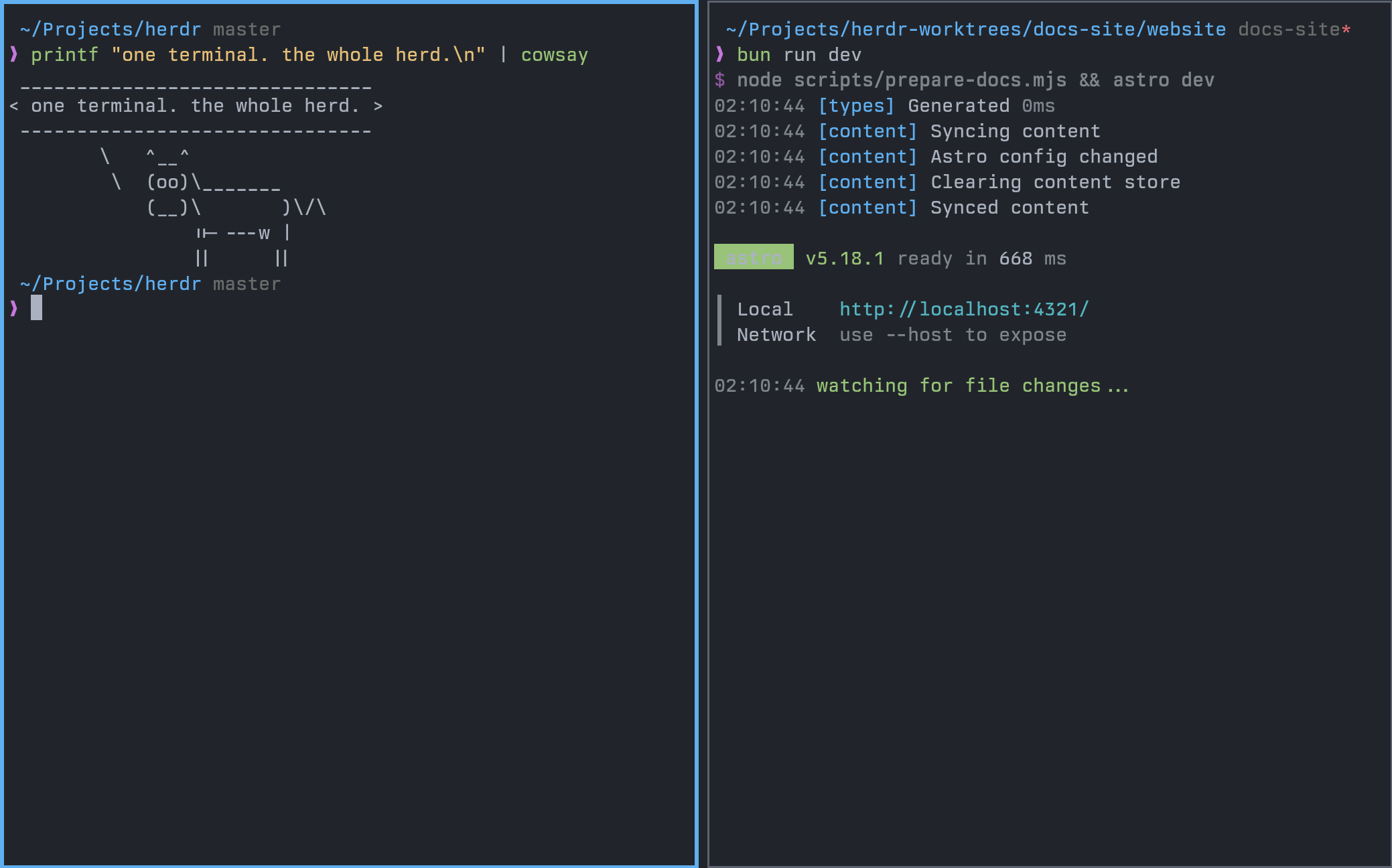 Core pillars
Why terminal users switch.
01### Survives disconnects
Panes keep running in a background session server. Close the terminal, lose SSH, or detach on purpose; come back to the same herd later.
02### Runs where code lives
Use Herdr locally, inside any SSH session, or as a thin client to a remote host. Keep credentials and repos on the machine doing the work.
03### Mouse-native TUI
Click panes, tabs, workspaces, and agents. Drag borders, select text, use right-click menus, then stay on the keyboard whenever that is faster.
04### Agents can drive it
The CLI and socket API let agents create panes, run commands, read output, wait for changes, and operate their workspace without hand-shuffled terminals.
Local or remote
Run Herdr where the work lives.
local### Your machine
Start a local session, split panes, create tabs, and keep agents running while your terminal comes and goes.
$ herdr
ssh### Any SSH client
Use Herdr like tmux on a remote box. The session stays on the server after you detach.
$ ssh you@server
$ herdr
thin client### Remote attach
Point your local Herdr client at an SSH config host and stream the remote TUI back to your terminal.
$ herdr --remote workbox
Responsive TUI
Mobile-first when the terminal gets small.
Herdr stays usable over SSH from a phone or tablet. The terminal view remains real, while narrow screens get a switcher built for touch-sized decisions.
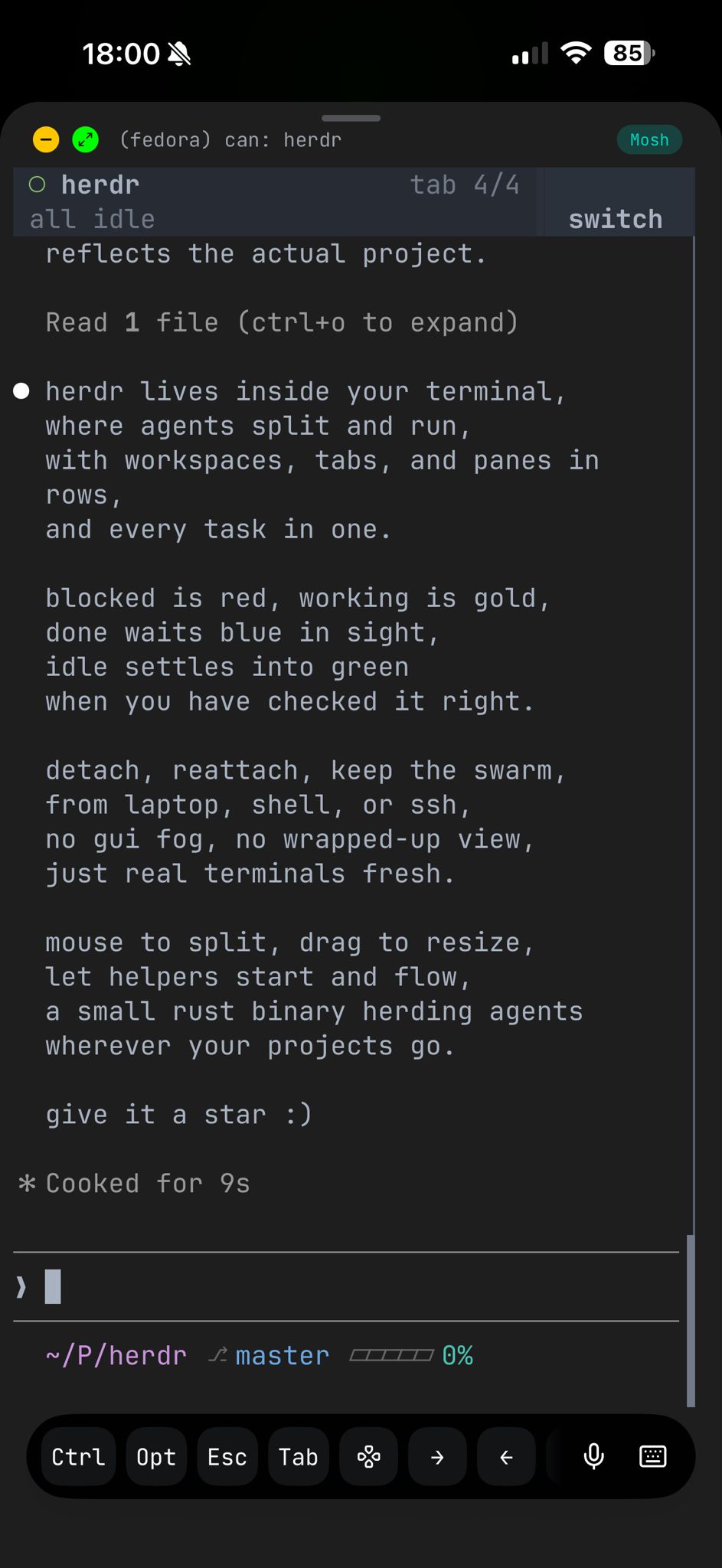 terminal over SSH
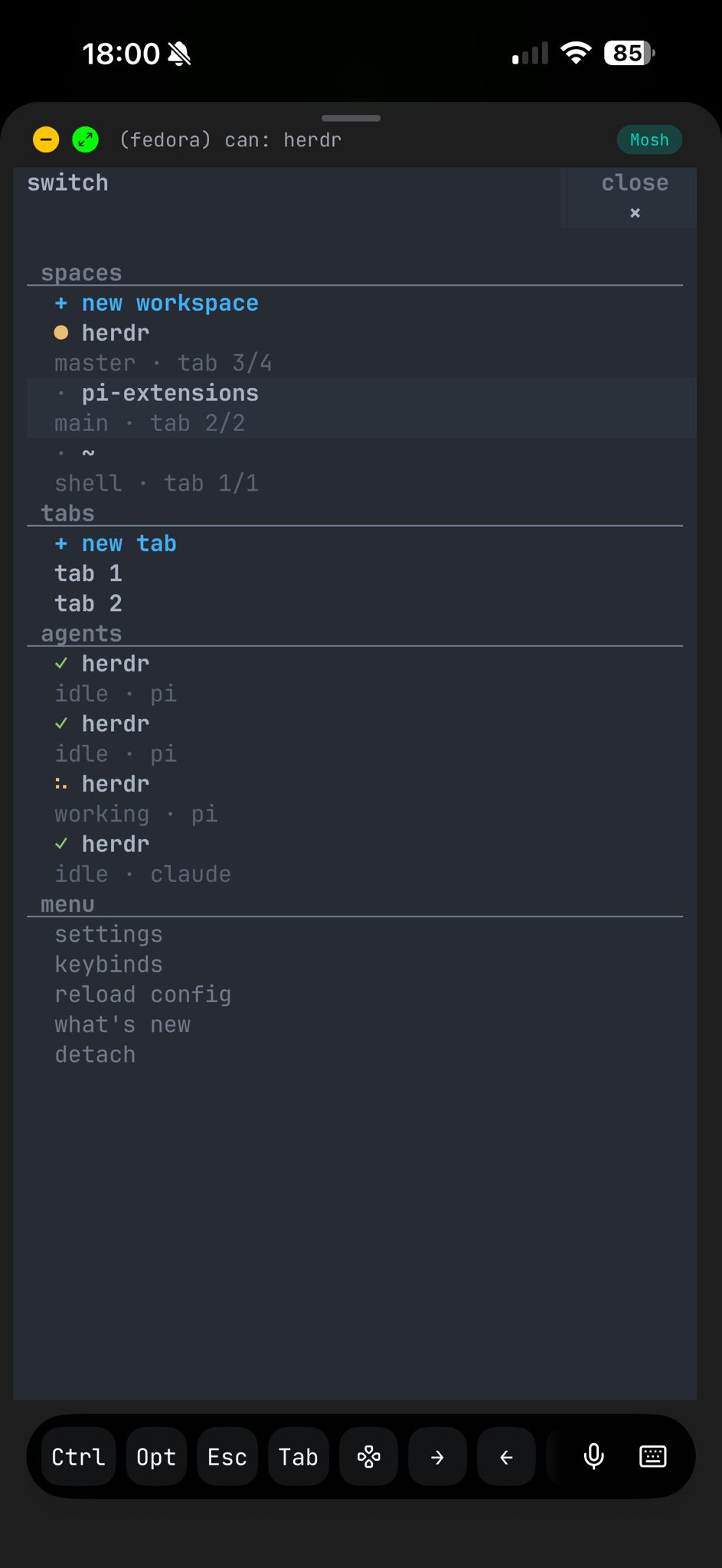 responsive switcherscreenshots taken withmoshi❤️ on iphone
Runtime surface
The UI is also a control surface.
Herdr exposes workspace, tab, pane, output, and wait operations through a CLI and newline-delimited JSON socket API. Agents can operate their own workspace instead of asking you to shuffle terminals by hand.
# create workspace structure
herdr workspace create --cwd ~/project --label api
herdr tab create --label logs

# split a pane and run work
herdr pane split 1-1 --direction right
herdr pane run 1-2 "just test"

# wait, inspect, and continue
herdr wait agent-status 1-1 --status done
herdr pane read 1-2 --source recent-unwrapped
Agent awareness
Keep the herd in sight.
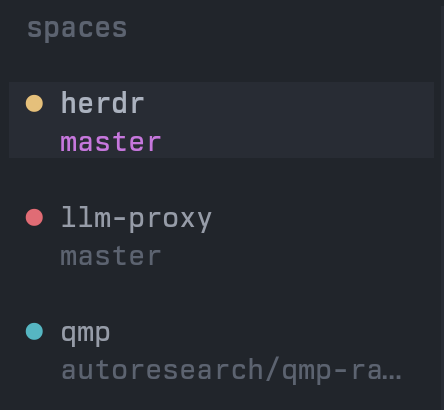 ### Workspace rollups
Each workspace rolls up to its most urgent agent state, so the whole session is scannable.
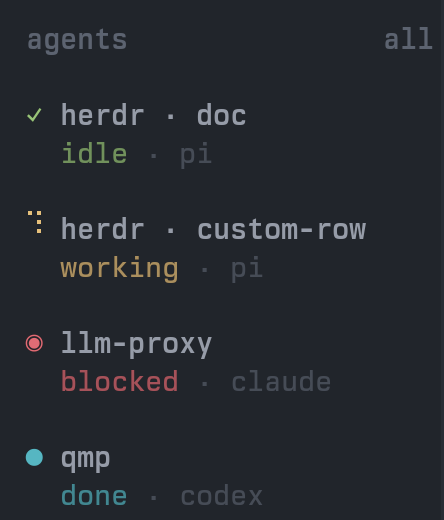 ### Agent list
See which agents are blocked, working, done, idle, or unknown without opening every pane.
blockedworkingdoneidle
Integrations
Bring your existing agents into the herd.
PiClaude CodeCodexOpenCodeDroidAmpGrok CLIGemini CLI
Any terminal agent works in Herdr. Use the Herdr API to add richer state, orchestration, and custom workflows;see example integrationsor build your own for anything.
Start the herd
Install Herdr, run two agents, detach once.
The value shows up the first time the herd keeps running after your terminal disappears.
相似文章
@dingyi: 我现在都懒得用 tmux 了,直接用 https://herdr.dev 或 https://muxy.app 更方便,适合懒人。
Herdr 是一款基于终端的代理多路复用器,提供持久会话、代理感知以及原生的鼠标 TUI,定位为 tmux 的便捷替代方案。该推文还推荐了 muxy.app,适用于寻求更简单终端会话管理的用户。
@GitHub_Daily: 用 tmux 管理终端会话,可以在终端里打开多个对话窗口,即便关掉还能在后台继续。 但现在,经常同时开好几个 Agent 干活,想用 tmux 做终端自动化,得写一堆脚本很麻烦。 于是有位开发者用 Rust 从零写了 rmux,专为 Ag…
介绍 rmux,一个用 Rust 编写的现代终端复用器,专为 AI Agent 和自动化场景设计,可协调多个 Agent 同时运行,兼容 90 多条 tmux 命令,并提供 Python SDK 和浏览器共享会话功能。
@vintcessun: 这个终端工具的拆法有点漂亮。核心服务全放在不依赖Electron的层,桌面和浏览器共用同一套renderer。 https://github.com/eneskirca/nodeterm… nodeterm把多个tmux会话以节点铺在无限…
nodeterm 是一个基于节点的终端管理器,将多个tmux会话以可拖拽节点形式放置在无限画布上,支持持久化和跨平台使用,包括桌面、浏览器和iOS应用。
@Saccc_c: cmux终端—能让你的 cc 如 codex app 般丝滑 相比普通终端,cmux体验下来主要有4个优势: 1、多窗口、分屏管理方便。垂直标签用于任务分组,组内窗口支持拖拽排列。标签和窗口都支持重命名,你可以很清楚的知道每个页面正在跑什…
cmux终端工具提供多窗口分屏管理、任务进度通知、内置浏览器和快速恢复工作区等功能,提升终端使用体验。
@realfxw: 谁说终端文件管理器只能靠全键盘死磕?今天在 GitHub 发现了一个非常惊艳的开源项目:tfm-tui —— 一款主打以鼠标交互为核心(Mouse-First)的现代终端文件管理器。 它不仅保留了终端轻量、高效的特性,还把现代 GUI 文…
介绍开源项目tfm-tui,一款以鼠标交互为核心的现代终端文件管理器,结合了终端的高效性和图形界面的直观操作。