@anyscalecompute: GPUs in Mumbai, training data in Iowa? Cross-region reads tax every epoch. We put @Alluxio NVMe caching in front of the…
Summary
Anyscale demonstrates a 20x speedup in cross-region training data reads by using Alluxio NVMe caching with Ray Data, showing warm cache reads drop from 4,241 to 208 seconds for 1TB.
View Cached Full Text
Cached at: 06/05/26, 11:21 PM
GPUs in Mumbai, training data in Iowa? Cross-region reads tax every epoch.
We put @Alluxio NVMe caching in front of the bucket with Ray Data on Anyscale: 1TB warm reads went 20x faster.
https://t.co/FqomwsoqpS https://t.co/e6Yfi9124s
20x Faster Training Data Reads with Alluxio and Ray Data: A Cross-Region Benchmark | Anyscale
Source: https://www.anyscale.com/blog/20-times-faster-cross-region-training-data-reads-alluxio-ray-on-anyscale When training data lives in one cloud region and your GPUs live in another, every epoch pays the cross-region tax on every read. We deployedAlluxio— a compute-side NVMe layer that acts as adistributed cache forRay on Anyscale— in front of a cross-region GCS bucket and ran a 1TB Ray Data benchmark: warm cache reads dropped from 4,241 seconds to 208 seconds — a20x speedup.
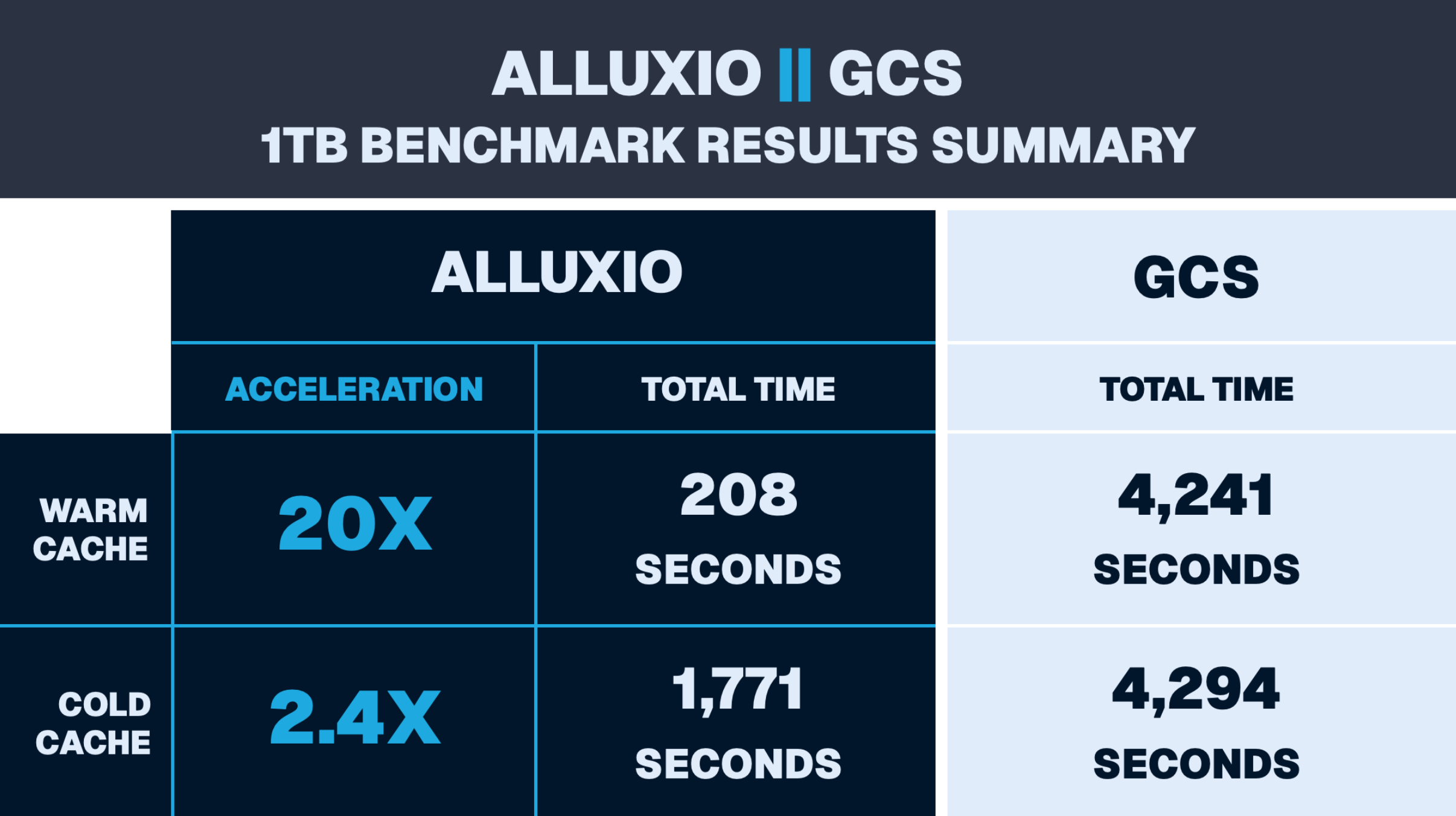
ALLUXIO -- GCS - 1TB BENCHMARK RESULTS SUMMARY
LinkThe Problemhttps://www.anyscale.com/blog/20-times-faster-cross-region-training-data-reads-alluxio-ray-on-anyscale#the-problem
Cross-region reads are one of the most common — and most painful and expensive — bottlenecks in theGPU data pipelinefor distributed AI training. In our benchmark setup, the Ray cluster runs inasia\-south1(Mumbai) while training data lives in a GCS bucket inus\-central1. Every read crosses an ocean.
WithRay Data, an open-source library for distributed multimodal data processing, reading 1TB of Parquet files directly from GCS, a single pass takes over 4,200 seconds. For a training job repeating the same dataset across many epochs, that latency compounds fast. GPUs sit idle, blocked on the data pipeline. The standard Ray Data call looks straightforward enough:
ds = ray.data.read_parquet("gs://us-central1-bucket/dataset/")
ds.map_batches(train_step).count()
# 4,294 seconds. Every epoch.
The problem isn’t Ray — it’s that the data is 10,000 miles away and you’re fetching it fresh every time.
LinkThe Solutionhttps://www.anyscale.com/blog/20-times-faster-cross-region-training-data-reads-alluxio-ray-on-anyscale#the-solution
Anyscale is a multi-cloud AI platform that enables teams to build and scale the complete, GPU-accelerated AI lifecycle with Ray. Anyscale provides teams with Python APIs that abstract deployment of Kubernetes clusters or having to manage Ray distributed compute running on the K8s cluster. To support a multi-cloud experience, Anyscale acts as a single pane to connect with cloud resources in your AWS account, Google Cloud project, or Kubernetes cluster in another cloud. Beyond a unified management experience, you can configure multiple cloud resource configurations so that Anyscale jobs can fall back to using resources in another region or cloud provider when resources in your primary configuration aren’t available for your Anyscale clusters.
Alluxio is a compute-side NVMe-based distributed cache colocated with the Ray cluster. On the first read, data is pulled from the underlying storage and written to local NVMe SSDs. Every subsequent read — every epoch, every trial, every repeat pass — is served entirely from cache. No cross-region hop.
Alluxio isstorage-agnostic: the same caching layer works against Amazon S3, Google Cloud Storage, Azure Blob Storage, any S3-compatible object store, and POSIX-compliant filesystems including on-prem NAS and HDFS.
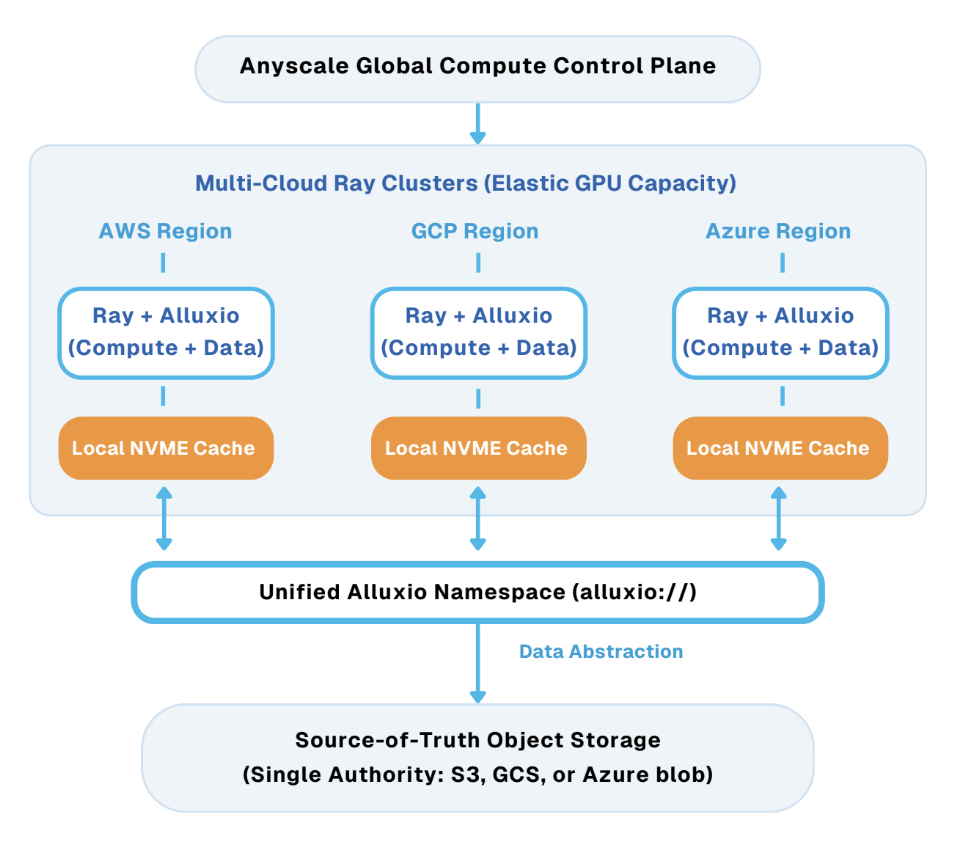
Multi-cloud architecture showing Anyscale managing Ray + Alluxio clusters across AWS, GCP, and Azure. Each region uses local NVMe caching and connects through a unified Alluxio namespace to centralized object storage (S3, GCS, or Azure Blob). We deployed Anyscale Kubernetes cloud resources with Anyscale’s Kubernetes operator, alongside Alluxio’s Kubernetes operator, and attached file store. We leveraged Alluxio for data access.
In this benchmark, the underlying bucket happens to live in GCS us-central1 — but the architecture, access patterns, and performance characteristics are identical regardless of where the data lives. If your training data is in S3 and your GPUs are elsewhere, or if you’re pulling from on-prem storage into a cloud Ray cluster, the same approach applies. This is what makescaching Ray Datawith Alluxio practical across clouds — not just optimized for one cloud.
[ Ray Cluster · asia-south1 (Mumbai) ]
5 × n2-standard-8 · ray.data.read_parquet()
        ↕ S3 API (port 29998) or FUSE mount ↕
[ Alluxio Workers · NVMe Cache ]
3 × n2-standard-16 · 8× NVMe SSDs each · 6TB total pagestore
        ↕ first read only ↕
[ GCS · us-central1 ]
Cross-region object storage · never touched again after cache warm
Ray Data connects to Alluxio via two access modes: an S3-compatible API (port 29998, using s3fs) or a FUSE mount (local POSIX path at /mnt/alluxio). Both are fully transparent to training code — no changes to your model, pipeline, or Ray job definition.
For iterative training workloads — multiple epochs, Ray Tune hyperparameter sweeps, repeated dataset passes — the economics are compelling: pay the cross-region network cost exactly once, then read at local NVMe speed for every subsequent iteration.
LinkThe Traps We Fell Intohttps://www.anyscale.com/blog/20-times-faster-cross-region-training-data-reads-alluxio-ray-on-anyscale#the-traps-we-fell-into
Getting to 20x wasn’t linear. We ran five iterations of the benchmark script and hit two significant traps that are directly relevant to Ray users. We’re documenting them here because they’re easy to fall into — and because one of them briefly produced a number we nearly published.
LinkTrap #1 —\.materialize\(\)was killing our numbers at scalehttps://www.anyscale.com/blog/20-times-faster-cross-region-training-data-reads-alluxio-ray-on-anyscale#trap-#1-%E2%80%94-
Our first runs usedray\.data\.read\_parquet\(paths\)\.materialize\(\)— a natural choice to force a complete data load. At 1.2GB, we got an exciting 18x warm cache speedup. But as we scaled up, the numbers fell apart:
Dataset
Config
Ray Workers
Warm Speedup
1.2 GB (1 file)
1 Alluxio worker, RAM pagestore
1
18x ✓
20 GB (17 files)
1 Alluxio worker, RAM pagestore
5
2x
120 GB (153 files)
1 Alluxio worker, RAM pagestore
5
0.41x ⚠ slower
500 GB (12 dirs)
3 workers, 2Ti NVMe each
18
1.63x
0.41x — WE MADE THINGS WORSEAt 120GB, Alluxio was slower than direct GCS reads. The culprit:\.materialize\(\)writes all deserialized data into Ray’s object store. At scale, this triggers massive disk spilling that completely masks any benefit from the local NVMe cache. You end up measuring spill throughput, not data access speed.
The fix: switch to\.map\_batches\(lambda x: x\)\.count\(\). This forces complete row-level deserialization — every byte gets read and decoded — but discards results rather than writing them into the Ray object store. No spilling, no hidden bottleneck.
# ❌ Before — triggers disk spilling at scale, masks cache benefit
ray.data.read_parquet(paths).materialize()

# ✓ After — full data read without object store pressure
ray.data.read_parquet(paths, filesystem=fs).map_batches(lambda x: x).count()
This is a Ray-specific pitfall.\.materialize\(\)is the right call when you want data in the object store for downstream tasks. But if you’re benchmarking data loading throughput, it introduces a write bottleneck that will make any caching layer look worse than it is. After switching, we immediately saw a 3x improvement on the same hardware.
LinkFull script evolutionhttps://www.anyscale.com/blog/20-times-faster-cross-region-training-data-reads-alluxio-ray-on-anyscale#full-script-evolution
v1 / v2 —materialize\(\)— valid at small scale, collapses at large scaleUses\.materialize\(\). Produced the original 18x at 1.2GB. At 120GB with 5 Ray workers, causes object store spilling that inverts the result to 0.41x. v2 extended v1 to support multi-dataset configs via environment variables.
v3 —map\_batches\(\)\.count\(\)— first valid large-scale version, S3 APIForces full row deserialization via\.map\_batches\(lambda x: x\)\.count\(\)without writing to the object store. Eliminates both traps. S3 API access path only.
v4 — FUSE + S3 API switchable — final version, all headline resultsAddsACCESS\_MODEenv var to switch between S3 API and FUSE without code changes. All 1TB results, including the headline 20.35x warm cache speedup, were produced with this version in FUSE mode.
LinkThe Resultshttps://www.anyscale.com/blog/20-times-faster-cross-region-training-data-reads-alluxio-ray-on-anyscale#the-results
Using v4 withACCESS\_MODE=fuse, we ran a clean 3-pass 1TB benchmark: first pass cold, subsequent passes warm. Dataset: FineWeb-Edu Parquet from GCSus\-central1; compute inasia\-south1.
Link1TB FUSE benchmark — final numbershttps://www.anyscale.com/blog/20-times-faster-cross-region-training-data-reads-alluxio-ray-on-anyscale#1tb-fuse-benchmark-%E2%80%94-final-numbers
Run
GCS Direct
Alluxio (FUSE)
Speedup
1 — cold cache
4,294s
1,771s
2.43x
2 — warm cache
4,161s
207s
20.10x
3 — warm cache
4,321s
210s
20.58x
Average (all runs)
4,259s
729s
5.84x overall
Warm cache speedup: 20.35x. On the second and third reads, Alluxio served 1TB of Parquet from local NVMe in ~208 seconds. GCS direct took 4,200+ seconds. The data was already local; no cross-region network, no variance.
The cold cache result (~2.4x) is honest and expected: the first read still pulls from GCS, but Alluxio’s parallel prefetch pipeline is more efficient than naive direct reads. You’re paying the cross-region cost exactly once.
WHY WE REPORT WARM SPEEDUP, NOT OVERALLThe overall 5.84x averages in the cold first pass. In real training, epoch 1 populates the cache. Epochs 2 through N — which is most of your wall-clock time — all run at warm cache speed. 20.35x is what your training job actually experiences.
Link60GB S3 API benchmark — supporting datahttps://www.anyscale.com/blog/20-times-faster-cross-region-training-data-reads-alluxio-ray-on-anyscale#60gb-s3-api-benchmark-%E2%80%94-supporting-data
Run
GCS Direct
Alluxio (S3 API)
Speedup
1 — cold cache
1,142s
735s
1.55x
2 — warm cache
1,057s
204s
5.18x
3 — warm cache
1,059s
205s
5.17x
At 60GB via S3 API, warm cache speedup was 5.17x. FUSE outperforms S3 API at large scale because it eliminates the s3fs protocol translation layer — Ray Data reads directly from a local POSIX path, which maps more cleanly to Ray’s parallel prefetch worker model. For large datasets (>100GB), FUSE is the recommended access mode.
LinkWhen This Helps Mosthttps://www.anyscale.com/blog/20-times-faster-cross-region-training-data-reads-alluxio-ray-on-anyscale#when-this-helps-most
Distributed cache for Rayworkloads delivers the most value in four scenarios:
MULTI-EPOCH TRAININGAny job that reads the same dataset more than once. The cache amortizes the cross-region cost across all epochs — the more iterations, the better the return.
RAY TUNE HYPERPARAMETER SEARCHMultiple concurrent trials reading the same dataset. Alluxio serves all trials from local NVMe rather than firing parallel cross-region requests at GCS.
CROSS-REGION / MULTI-CLOUDCompute in one region, data in another. Intelligently fall back across regions and cloud providers to maximize availability and minimize cost. Works across GCS, S3, and Azure Blob. One ingestion pass, then local speed for everything after.
LinkGetting Startedhttps://www.anyscale.com/blog/20-times-faster-cross-region-training-data-reads-alluxio-ray-on-anyscale#getting-started
Alluxio deploys as a Kubernetes operator alongside your Ray cluster. This operator does not interact with the Anyscale operator deployed on your Anyscale Kubernetes cloud resources. Integration with Ray Data requires one of two setups:
import s3fs, ray

# Option 1 — S3 API (works out of the box)
alluxio_fs = s3fs.S3FileSystem(
    key="alluxio", secret="alluxio",
    endpoint_url="http://alluxio-worker.alluxio.svc:29998",
    client_kwargs={"region_name": "us-east-1"},
    config_kwargs={"s3": {"addressing_style": "path"}},
)
ds = ray.data.read_parquet("s3://gcs/your-dataset/", filesystem=alluxio_fs)

# Option 2 — FUSE (recommended for large-scale reads)
ds = ray.data.read_parquet("/mnt/alluxio/gcs/your-dataset/")

# Either way — use this for benchmarking, not .materialize()
ds.map_batches(lambda x: x).count()
LinkTry Alluxio with Your Ray on Anyscale Workloadshttps://www.anyscale.com/blog/20-times-faster-cross-region-training-data-reads-alluxio-ray-on-anyscale#try-alluxio-with-your-ray-on-anyscale-workloads
If you’re running Ray Data against cloud object storage — especially across regions or clouds — Alluxio’s distributed cache can deliver similar speedups on your own datasets without changes to your training code.
Get started with Anyscale with $100 in free creditsto build your AI app of choice whether it is a multimodal data pipeline processing videos at scale with a VLM, fine-tuning a VLA for physical AI or running LLM inference at scale. This and more starting templates here.
Get started with Alluxio AI for freeto benchmark it against your own workloads, or explore theFireworks AI case studyto see how a production AI platform uses Alluxio to accelerate model serving and training data delivery at scale.
Similar Articles
GPU cluster sitting idle waiting on storage, more common than I expected
At an AI infrastructure meetup, multiple people reported that GPU clusters often sit idle because storage systems can't feed data fast enough during training, especially with large unstructured datasets on older NAS. Attendees mentioned moving to high-throughput S3-optimized platforms like Cloudian HyperStore and VAST Data to address the bottleneck.
@eladgil: https://x.com/eladgil/status/2099916017510047788
Liam Fedus describes the setup of high-throughput materials labs in Menlo Park that create a loop between experiments and AI models, using 1,300 H200 GPUs and experimental data to mid-train models for next-step decisions.
@anyscalecompute: In this session, you'll learn: - Build and scale data pipelines with Ray - What is video data curation - Stream large d…
Anyscale is hosting a hands-on virtual lab session teaching developers how to build and scale data pipelines with Ray, covering video data curation, distributed GPU inference, and CPU/GPU streaming pipelines.
@superalesha: https://x.com/superalesha/status/2077437741915312221
The author shares six months of measurements on a four-RTX 3090 local setup, revealing that data parallelism often outperforms tensor parallelism for models fitting on fewer cards, with up to 3.4x throughput difference.
The 'storage tax' on cloud GPUs for short LLM runs is brutal. What's your workflow?
User seeks advice on cost-effective cloud GPU workflows for short LLM testing sessions, highlighting storage fees as a key pain point when preserving environments between runs.