@thedelost: I don't understand why everyone isn't doing this yet. Anthropic's own Claude Code docs show how to run a whole team of …
Summary
A dev share explaining Anthropic's Claude Code 'agent teams' feature, showing how to run a lead (Opus 5.5) plus separate builder teammates (Sonnet 5.5) and a read-only adversary reviewer (Fable 5.1) with a shared task list and direct messaging, along with a paste-ready setup prompt.
View Cached Full Text
Cached at: 10/05/26, 05:37 PM
I don’t understand why everyone isn’t doing this yet.
Anthropic’s own Claude Code docs show how to run a whole team of Claudes, while Opus 5.5 only touches the plan and the merge
the whole idea: agent teams in Claude Code
one lead, separate teammates in their own context windows, one shared task list, and they message each other directly
the lead: Opus 5.5 on high, splits the work, writes the tasks, merges at the end the builders: Sonnet 5.5, one owns client/, one owns api/, never the same file the adversary: Fable 5.1, never writes code, only shows up at three points:
→ before an interface locks: do both sides agree on the contract? → when a test fails twice: is it fixed or just hidden? → before a task is marked done: what breaks it?
Sonnet 5.5 builds. Fable 5.1 attacks. Opus 5.5 merges
Jev engineering is the same move one layer down: the forks that need no thinker (which file, which tool, retry or stop) go to Jev in under half a second, and the team only argues about the ones that split
turn it on, then start the team in plain English:
“Spawn three teammates: ux and backend on Sonnet, an adversary on Fable”
- the full team
Opus 5.5 on high leads the session ux on Sonnet 5.5, owns client/ backend on Sonnet 5.5, owns api/ adversary on Fable 5.1, owns nothing, reviews everything shared task list with file locking, direct messages, no lead in the middle
paste the team and this prompt into Claude Code ↓
“Set up agent teams for this repo:
-
In ~/.claude/settings.json add CLAUDE_CODE_EXPERIMENTAL_AGENT_TEAMS=1 under env and set effortLevel to high
-
In ~/.claude/agents, draft three subagent definitions for the teammates
ux and backend with model: sonnet, each limited to its own folder adversary with model: fable and read-only tools, whose only job is attacking contracts, repeated test failures and done claims Skip any that already exist and list them
-
Add a TaskCompleted hook that blocks completion until the adversary signs off, and one rule to CLAUDE.md: no two teammates edit the same file
-
Find anything that would override this (CLAUDE_CODE_SUBAGENT_MODEL, CLAUDE_CODE_SUBAGENT_MODEL_FORCE, CLAUDE_CODE_EFFORT_LEVEL). Report it, change nothing
Show me every change as a diff first. No edits until I say go.“
↳ https://code.claude.com/docs/en/agent-teams…
Orchestrate teams of Claude Code sessions - Claude Code Docs
Source: https://code.claude.com/docs/en/agent-teams Agent teams let you coordinate multiple Claude Code instances working together. One session acts as the team lead, coordinating work, assigning tasks, and synthesizing results. Teammates work independently, each in its own context window, and communicate directly with each other. You can also talk to any teammate directly without going through the lead.Before you set up a team, check whether a lighter option does the job.Subagentswork within a single session, and withcross-session messagingClaude can pass findings between the sessions you run yourself.
When to use agent teams
Agent teams are most effective for tasks where parallel exploration adds real value. Seeuse case examplesfor full scenarios. The strongest use cases are:
- Research and review: multiple teammates can investigate different aspects of a problem simultaneously, then share and challenge each other’s findings
- New modules or features: teammates can each own a separate piece without stepping on each other
- Debugging with competing hypotheses: teammates test different theories in parallel and converge on the answer faster
- Cross-layer coordination: changes that span frontend, backend, and tests, each owned by a different teammate
Agent teams add coordination overhead and use significantly more tokens than a single session. They work best when teammates can operate independently. For sequential tasks, same-file edits, or work with many dependencies, a single session orsubagentsare more effective.
Compare with subagents
Both agent teams andsubagentslet you parallelize work, but they operate differently. For separate sessions that pass messages to each other without a team, seecross-session messaging.
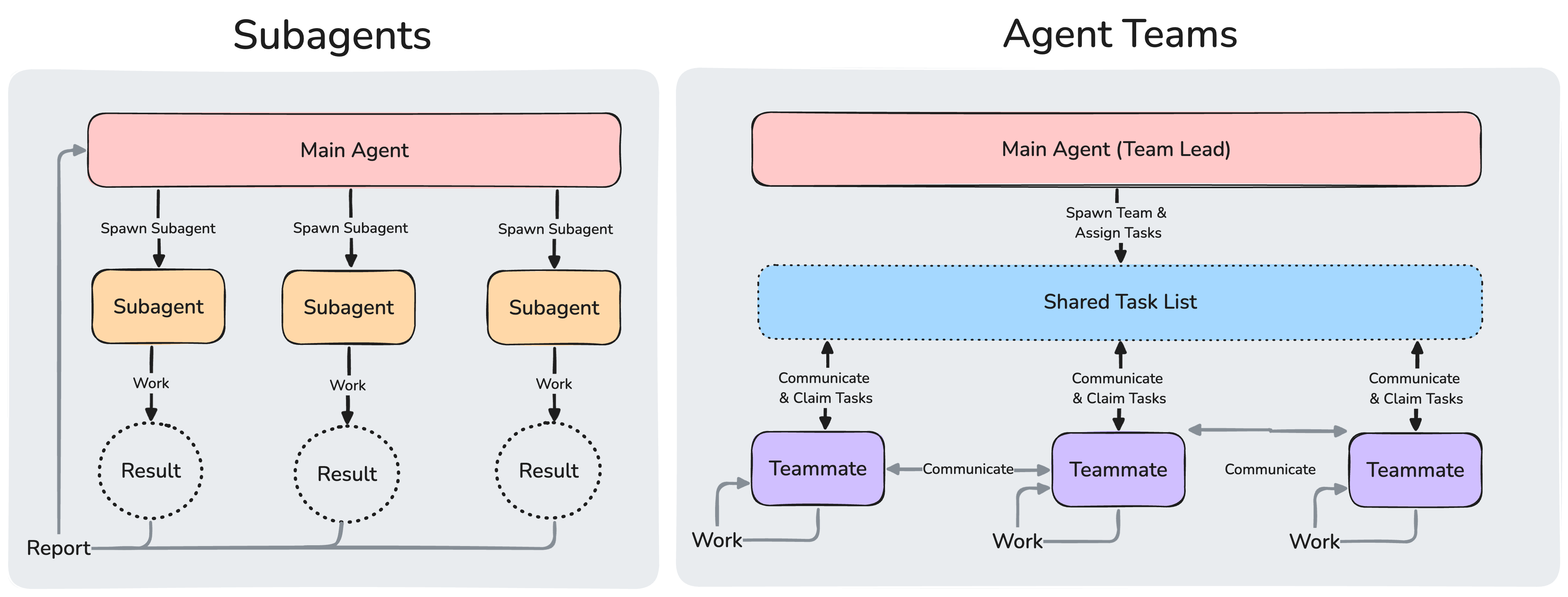
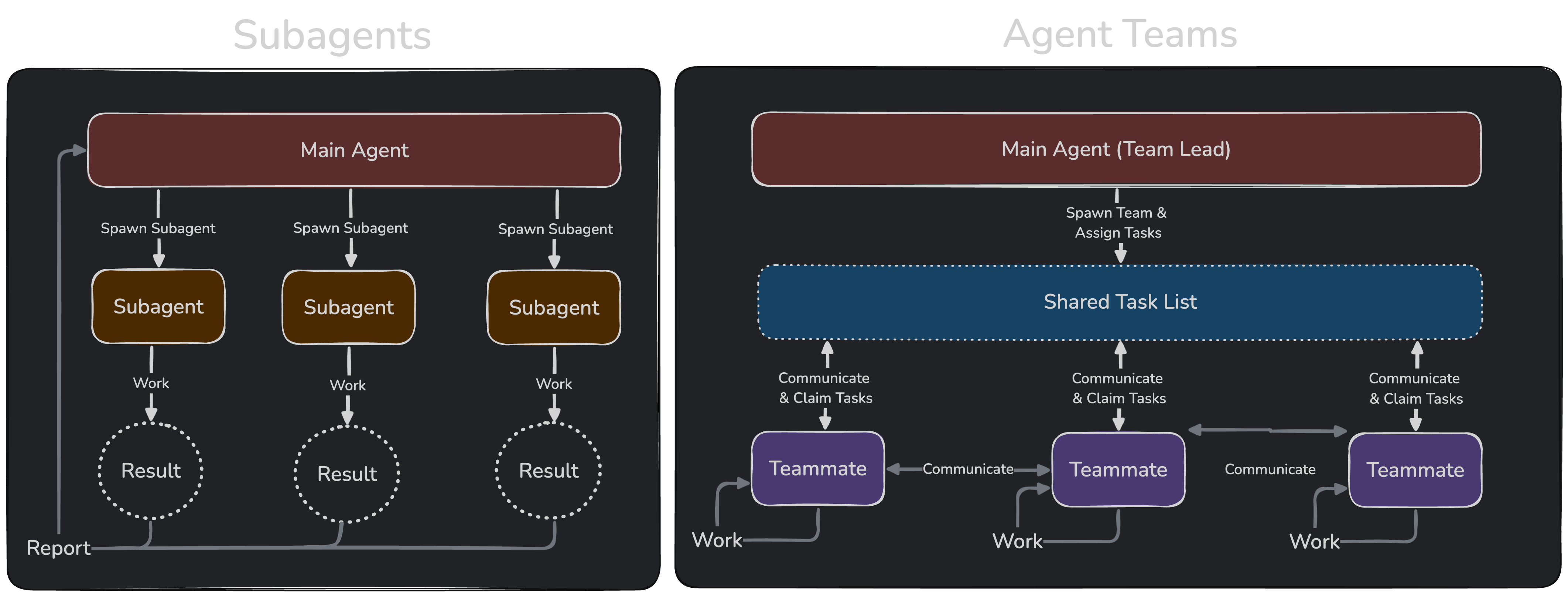
Subagents report results back to the main agent. In agent teams, teammates share a task list, claim work, and communicate directly with each other.
Use subagents when you need quick, focused workers that report back. Use agent teams when teammates need to share findings, challenge each other, and coordinate on their own.
Enable agent teams
Agent teams are disabled by default. Enable them by setting theCLAUDE\_CODE\_EXPERIMENTAL\_AGENT\_TEAMSenvironment variable to1, either in your shell environment or throughsettings.json:
Enabling agent teams also changes ordinary delegation. Claude mayname a subagenton its own, and while agent teams are enabled, a subagent that Claude names launches as a teammate, so teams can form even when you didn’t ask for one. For more, seeHow Claude starts agent teams; to turn the behavior off, seeClaude spawns teammates instead of subagents.Spawning teammates also requires an interactive session. Innon-interactive modewith the\-pflag, including Agent SDK sessions, Claude doesn’t spawn teammates, and a subagent that Claude names runs as an ordinarysubagenteven with agent teams enabled.
Start your first agent team
After enabling agent teams, describe the task and the teammates you want in natural language. Claude spawns them and coordinates work based on your prompt.This example works well because the three roles are independent and can explore the problem without waiting on each other:
From there, Claude populates ashared task listin asession that has the Task tools, spawns teammates for each perspective, has them explore the problem, and synthesizes findings when finished.Claude may sometimes usesubagentsinstead of creating a team. Subagents appear in the same agent panel as teammates, so the panel alone doesn’t confirm a team formed. If Claude spawned subagents instead, ask again and explicitly request an agent team.The lead’s terminal lists teammates in the agent panel below the prompt input. From the panel:
- Up and down arrows: select a teammate
- Enter: open the selected teammate’s transcript and message it directly
- Escape: clear the selection. While you’re viewing a teammate’s transcript, Escape interrupts that teammate’s current turn
An idle teammate’s row stays in the panel while any teammate or subagent is still working, so you can select it to review its transcript or send it more work. Once every agent in the panel is idle, idle rows hide after 30 seconds and reappear on the teammate’s next turn; the teammate stays running and addressable while hidden.When more than three teammates are idle at once, the rows beyond the first three collapse into a single row that counts the collapsed teammates, such as2 idle agentswhen five are idle. Select it and press Enter to expand the collapsed rows, or press Esc to collapse them again. Working teammates, failed teammates, and the teammate you’re viewing always keep their own rows.If you want each teammate in its own split pane, seeChoose a display mode.
Control your agent team
Tell the lead what you want in natural language. It handles team coordination, task assignment, and delegation based on your instructions.
Choose a display mode
Agent teams support two display modes:
- In-process: all teammates run inside your main terminal. Use the up and down arrow keys in the agent panel to select a teammate, then press Enter to view it and type to message it directly. Works in any terminal, no extra setup required.
- Split panes: each teammate gets its own pane. You can see everyone’s output at once and click into a pane to interact directly. Requires tmux, or iTerm2.
The default is"in\-process". Set"auto"to enable split panes when you’re already running inside a tmux session, or when your terminal is iTerm2 with theit2CLI installed, falling back to in-process otherwise. The"tmux"setting enables split-pane mode and auto-detects whether to use tmux or iTerm2 based on your terminal.Set"iterm2"to use iTerm2 native split panes explicitly. This mode requires theit2CLIand shows an error with the install command ifit2is missing. The setup prompt that offers to installit2or switch to tmux appears under"auto"or"tmux"when your terminal is iTerm2 and tmux is available as a fallback.To override the default, setteammateModein~/\.claude/settings\.json:
To set the mode for a single session, pass it as a flag:
The\-\-teammate\-modeflag is experimental and doesn’t appear inclaude \-\-help.Split-pane mode requires eithertmuxor iTerm2 with theit2CLI. To install manually:
- tmux: install through your system’s package manager. See thetmux wikifor platform-specific instructions.
- iTerm2: install the
it2CLI, then enable the Python API iniTerm2 → Settings → General → Magic → Enable Python API.
Specify teammates and models
Claude decides the number of teammates to spawn based on your task, or you can specify exactly what you want:
Claude Code picks each teammate’s model from the first of these that applies:
- The model your spawn prompt names for that teammate.
- For a teammate spawned from asubagent definition, the definition’s
model, whereinheritselects the lead’s model. CLAUDE\_CODE\_SUBAGENT\_MODEL, when it’s set to anything other thaninherit.- The lead’s current model.
If you setCLAUDE\_CODE\_SUBAGENT\_MODEL\_FORCE=1, the first two sources don’t apply. Claude Code picks every teammate’s model fromCLAUDE\_CODE\_SUBAGENT\_MODELwhen it’s set to anything other thaninherit, and from the lead’s current model otherwise. Requires Claude Code v2.1.257 or later.Before v2.1.251,CLAUDE\_CODE\_SUBAGENT\_MODELcame first in this order.
Claude Code checks the model it selects for a teammate against your organization’savailableModelsallowlist. When the allowlist blocks a value, Claude Code substitutes another model:
- Family alias such as
opus: On the Anthropic API and Claude Platform on AWS, Claude Code runs the teammate on the newest version of that family the allowlist permits. On providers with provider-specific model IDs, where thesubstitution doesn’t operate, a blocked alias falls back like any other blocked value per the next bullet - Any other blocked value, including a family alias on providers where the substitution doesn’t operate, or one whose family has no permitted version: Claude Code runs the teammate on the lead’s model instead. If you set
CLAUDE\_CODE\_SUBAGENT\_MODEL, Claude Code tries that model first, under these same rules
By default, teammates inherit the lead’seffort level. In split-pane mode this applies from v2.1.186; earlier versions did not pass the lead’s session effort to split-pane teammates.
Have teammates plan before implementing
For complex or risky tasks, you can have teammates plan before implementing. A teammate that Claude spawns while the lead is inplan modeworks in read-only plan mode until its plan is ready. Switch the lead into plan mode first, then ask for the teammate:
When a teammate finishes planning, it sends a plan approval request to the lead. Claude Code approves the plan in the lead’s session as soon as the request arrives, without the lead reviewing it. The teammate’s edits and commands still go through the permission prompts described inPermissions. Once approved, the teammate exits plan mode and begins implementation.
Talk to teammates directly
Each teammate is a full, independent Claude Code session. You can message any teammate directly to give additional instructions, ask follow-up questions, or redirect their approach.
- In-process mode: use the up and down arrow keys in the agent panel to select a teammate, then press Enter to view its session and type to send it a message. Press
xon a selected teammate to stop it. Press Ctrl+T to toggle the task list. - Split-pane mode: click into a teammate’s pane to interact with their session directly. Each teammate has a full view of their own terminal.
While you’re viewing an in-process teammate, plain text andskillsgo to that teammate, and built-in commands go to the lead’s session, with these safeguards:
/compact,/clear, and/rewindact on the lead’s conversation, so Claude Code asks you to confirm before running one of them from this view./modeland/fastset the lead’s model and fast mode, not the teammate’s, so they don’t run from this view. A notice tells you why.
A teammate’s model and fast mode are fixed when it spawns.
Assign and claim tasks
The shared task list coordinates work across the team. The lead creates tasks and teammates work through them. Tasks have three states: pending, in progress, and completed. Tasks can also depend on other tasks: a pending task with unresolved dependencies cannot be claimed until those dependencies are completed.Agentswithout the Task toolscoordinate through messages instead of the shared task list.The lead can assign tasks explicitly, or teammates can self-claim:
- Lead assigns: tell the lead which task to give to which teammate
- Self-claim: after finishing a task, a teammate picks up the next unassigned, unblocked task on its own
Task claiming uses file locking to prevent race conditions when multiple teammates try to claim the same task simultaneously.
Shut down teammates
To gracefully end a teammate’s session, refer to it by name. For example, with a teammate named researcher:
The lead sends a shutdown request. The teammate can approve, exiting gracefully, or reject with an explanation.The team’s shared directories are cleaned up automatically when the session ends, so there’s no separate cleanup step. SeeArchitecturefor which directories are removed and which persist for resumed sessions.
Enforce quality gates with hooks
Usehooksto enforce rules when teammates finish work or tasks are created or completed:
TeammateIdle: runs when a teammate is about to go idle. Exit with code 2 to send feedback and keep the teammate working.TaskCreated: runs when a task is being created. Exit with code 2 to prevent creation and send feedback.TaskCompleted: runs when a task is being marked complete. Exit with code 2 to prevent completion and send feedback.
How agent teams work
This section covers the architecture and mechanics behind agent teams. If you want to start using them, seeControl your agent teamabove.
How Claude starts agent teams
To start a team, ask Claude for teammates. Claude launches a teammate when it calls theAgent toolwith anamewhile agent teams are enabled, unless the call is aforkor passesisolationon the call itself. Claude Code doesn’t ask you to confirm the launch.Claude also names ordinary subagents on its own so it can message them later. Those calls follow the same rule, so teams can form even when you didn’t ask for one. If you want subagents instead,turn agent teams off.
Architecture
An agent team consists of:
Each agent’s mailbox is a JSON file at~/\.claude/teams/\{team\-name\}/inboxes/\{agent\-name\}\.json. Claude Code validates every entry when it reads a mailbox file. Entries that don’t match the message format are reported as errors and removed from the file; the valid messages are still delivered. Before v2.1.207, a single malformed mailbox entry caused a repeated error every second and blocked delivery for that mailbox until you deleted the file manually.Claude Code reports a message as sent only when the write to the recipient’s mailbox file succeeds, whether the message is plain text or a structured protocol message such as a plan approval or shutdown request. When the write fails, for example because the disk is full or the mailbox directory isn’t writable, the sending agent receives an error and nothing is sent. SeeFailed to write to a teammate’s inboxfor the error messages and recovery steps.Claude Code manages task dependencies automatically: when a teammate completes a task that other tasks depend on, it unblocks the dependent tasks without any action from you.Teams and tasks are stored locally under a session-derived name. The name issession\-followed by the first eight characters of the session ID:
- Team config:
~/\.claude/teams/\{team\-name\}/config\.json - Task list:
~/\.claude/tasks/\{team\-name\}/
Claude Code generates both of these automatically at session startup and updates them as teammates join, go idle, or leave. The team config directory is removed when the session ends. The task list directory persists locally and is never uploaded, so resumed sessions keep their tasks. Retention is governed by the samecleanupPeriodDaysyou already control for session transcripts, following theretention sweep rules.The team config holds runtime state such as session IDs and tmux pane IDs, so don’t edit it by hand or pre-author it: your changes are overwritten on the next state update.To define reusable teammate roles, usesubagent definitionsinstead.The team config contains amembersarray with each member’s name and agent ID. The lead’s entry always carries the agent typeteam\-lead. A teammate’s entry carries whatever agent type the lead named when spawning it, whether abuilt-in typeor asubagent definition, and omits the field when the lead named none. Teammates can read this file to discover other team members.There is no project-level equivalent of the team config. A file like\.claude/teams/teams\.jsonin your project directory is not recognized as configuration; Claude treats it as an ordinary file.
Use subagent definitions for teammates
When spawning a teammate in either display mode, you can reference asubagenttype from the project, user, managed, or pluginsubagent scope. This lets you define a role once, such as a security-reviewer or test-runner, and reuse it both as a delegated subagent and as an agent team teammate.To use a subagent definition, name it when you ask Claude to spawn the teammate:
Claude Code reads the subagent definition you named and applies these parts of it to the teammate. Where a part depends on the teammate’sdisplay mode, the entry says so:
tools: Claude Code limits the teammate to the tools in the definition’stoolslist. For an in-process teammate, Claude Code addsSendMessageto that list, and in asession that has the Task toolsit addsTaskCreate,TaskGet,TaskList, andTaskUpdatetoo.model: Claude Code uses the definition’smodelin either display mode when your spawn prompt doesn’t name one. Seehow Claude Code picks a teammate’s model.disallowedTools: for an in-process teammate, Claude Code removes the tools in the definition’sdisallowedToolsfrom the teammate’s set.SendMessageand the Task tools it adds stay available even when the list names them.effort: for an in-process teammate, Claude Code applies the definition’seffortunder thefrontmatter effort rules.- Body: for an in-process teammate, Claude Code appends the definition’s body to its default system prompt as additional instructions. For a split-pane teammate, Claude Code uses the body in place of its default system prompt.
skills: Claude Code doesn’t apply the definition’sskillsto a teammate in either display mode. The teammate loads skills from your project and user settings.mcpServers: for a split-pane teammate, Claude Code applies the definition’smcpServersunder therules for that field, which cover a session started with\-\-agentas well. An in-process teammate ignores the field and loads MCP servers from your project and user settings.
When Claude messages an in-process teammate that is no longer running, Claude Code brings it back in the same session, restores any conversation saved for it, and gives it the message as its next prompt. After you resume a session, teammates aren’t brought back this way, perthe resume limitation.For a teammate it brings back, Claude Code re-applies a definition that came from a project’s\.claude/agents/directory or an\-\-add\-dirdirectory only if you’vetrusted the folder the agent file is in. Trusting a parent folder doesn’t count. Until then, the teammate comes back with none of the definition’s tools or instructions, keeping only the tools Claude Code adds to every in-process teammate. Seethe teammate’s agent definition was not restoredfor the notice text.
Permissions
Teammates start with the lead’s permission mode, exceptdontAskmode, which they don’t inherit. If the lead runs with\-\-dangerously\-skip\-permissions, all teammates do too. After spawning, you can change an individual teammate’s permission mode, but you can’t set per-teammate permission modes at spawn time.Teammate permission prompts appear in the lead session, so approve them there yourself.Plan approvalis the designed exception: the lead session grants teammate plan approvals without a separate prompt to you.
Messages between agents
When one agent sends another a message overSendMessage, Claude Code tells the receiving agent the message came from another Claude session, not from you. A teammate can’t approve a permission prompt or supply consent on your behalf, and a teammate that was denied an action can’t relay it to another teammate to bypass the check. The same rules apply to a message that arrives fromone of your other Claude Code sessions, outside the team entirely.Inauto mode, the classifier applies two checks to messages between agents:
- It treats an approval claim relayed from another agent as untrusted input rather than confirmation from you.
- It reviews each message before Claude Code delivers it, whether a plain message or a structured protocol message such as a shutdown request or plan approval response. A message it blocks never reaches the recipient.
Context and communication
Each teammate has its own context window. When spawned, a teammate loads the same project context as a regular session: CLAUDE.md, MCP servers, and skills. If you start the lead with\-\-setting\-sources, teammates load from the same restricted list of sources. Before v2.1.281,split-paneteammates loaded every settings source.A teammate also receives the spawn prompt from the lead. The lead’s conversation history does not carry over.How teammates share information:
- Automatic message delivery: when teammates send messages, they’re delivered automatically to recipients. The lead doesn’t need to poll for updates.
- Idle notifications: when a teammate finishes and stops, it automatically notifies the lead and includes its final answer in the notification. A teammate whose turn ends on an API error notifies the lead that it failed and includes the error text.
- Shared task list:agents that have the Task toolscan see task status and claim available work.
- Teammate messaging: send a message to one specific teammate by name. To reach everyone, send one message per recipient.
The lead assigns every teammate a name when it spawns them, and any teammate can message any other by that name. To get predictable names you can reference in later prompts, tell the lead what to call each teammate in your spawn instruction.
Token usage
Agent teams use significantly more tokens than a single session. Each teammate has its own context window, and token usage scales with the number of active teammates. For research, review, and new feature work, the extra tokens are usually worthwhile. For routine tasks, a single session is more cost-effective. Seeagent team token costsfor usage guidance.An in-process teammate’s requests fall outside the main conversation’scache TTL bucket, so its cache holds for five minutes by default, including on a Claude subscription. To keep it for an hour, setsubagentPromptCacheTtlto1h. The API bills 1-hour cache writes at a higher rate.
Use case examples
These examples show how agent teams handle tasks where parallel exploration adds value.
Run a parallel code review
A single reviewer tends to gravitate toward one type of issue at a time. Splitting review criteria into independent domains means security, performance, and test coverage all get thorough attention simultaneously. The prompt assigns each teammate a distinct lens so they don’t overlap:
Each reviewer works from the same PR but applies a different filter. The lead synthesizes findings across all three after they finish.
Investigate with competing hypotheses
When the root cause is unclear, a single agent tends to find one plausible explanation and stop looking. The prompt fights this by making teammates explicitly adversarial: each one’s job is not only to investigate its own theory but to challenge the others’.
The debate structure is the key mechanism here. Sequential investigation suffers from anchoring: once one theory is explored, subsequent investigation is biased toward it.With multiple independent investigators actively trying to disprove each other, the theory that survives is much more likely to be the actual root cause.
Best practices
Give teammates enough context
Teammates load project context automatically, including CLAUDE.md, MCP servers, and skills, but they don’t inherit the lead’s conversation history. SeeContext and communicationfor details. Include task-specific details in the spawn prompt:
Choose an appropriate team size
There’s no hard limit on the number of teammates, but practical constraints apply:
- Token costs scale linearly: each teammate has its own context window and consumes tokens independently. Seeagent team token costsfor details.
- Coordination overhead increases: more teammates means more communication, task coordination, and potential for conflicts
- Diminishing returns: beyond a certain point, additional teammates don’t speed up work proportionally
Start with 3-5 teammates for most workflows. This balances parallel work with manageable coordination. If you have 15 independent tasks, 3 teammates is a good starting point.Scale up only when the work benefits from having teammates work simultaneously. Three focused teammates often outperform five scattered ones.
Size tasks appropriately
- Too small: coordination overhead exceeds the benefit
- Too large: teammates work too long without check-ins, increasing risk of wasted effort
- Just right: self-contained units that produce a clear deliverable, such as a function, a test file, or a review
Wait for teammates to finish
Sometimes the lead starts implementing tasks itself instead of waiting for teammates. If you notice this:
Start with research and review
If you’re new to agent teams, start with tasks that have clear boundaries and don’t require writing code: reviewing a PR, researching a library, or investigating a bug. These tasks show the value of parallel exploration without the coordination challenges that come with parallel implementation.
Avoid file conflicts
Two teammates editing the same file leads to overwrites. Break the work so each teammate owns a different set of files.
Monitor and steer
Check in on teammates’ progress, redirect approaches that aren’t working, and synthesize findings as they come in. Letting a team run unattended for too long increases the risk of wasted effort.
Troubleshooting
Teammates not appearing
If teammates aren’t appearing after you ask Claude to spawn them:
- In in-process mode, teammates appear in the agent panel below the prompt input. Use the up and down arrow keys to select one, then press Enter to view it.
- A teammate row that disappeared after sitting idle has been hidden, not stopped. Idle rows hide 30 seconds after the whole panel goes idle and reappear on the teammate’s next turn. When more than three teammates are idle, their surplus rows collapse into a single
N idle agentsrow that Enter expands. Send the teammate a message by name to bring a hidden row back. - Check that the task you gave Claude was complex enough to warrant a team. Claude decides whether to spawn teammates based on the task.
- If you explicitly requested split panes, ensure tmux is installed and available in your PATH:
- For iTerm2, verify the
it2CLI is installed and the Python API is enabled in iTerm2 preferences.
Claude spawns teammates instead of subagents
While agent teams are enabled, a subagent that Claude names in the lead’s session launches as a teammate. Claudecan name subagents on its own, so this can happen during delegation you never framed as team work.To make named subagents launch as subagents again, turn agent teams off by settingCLAUDE\_CODE\_EXPERIMENTAL\_AGENT\_TEAMSto0:
You don’t need to start a new session: Claude Code reapplies settings-fileenvvalues to the running session when you save, and rereads the variable each time Claude spawns a subagent, so the next subagent Claude names launches as a subagent.Setting the variable to0in your usersettings\.jsonoverrides a shell export. Other settings sources can still enable agent teams:
- Higher-precedence settings files: project settings, local settings, and a
\-\-settingspayload apply after user settings, so anenventry that sets the variable to1in any of them wins. SeeSettings precedence. - Managed settings:managed settingsapply after every other source. If your organization enables agent teams there, ask your administrator to change the managed value.
After the change, Claude may still name subagents, and the name keeps working as aSendMessageaddress. Claude receives each subagent’s result when it completes.
Too many permission prompts
Teammate permission requests bubble up to the lead, which can create friction. Pre-approve common operations in yourpermission settingsbefore spawning teammates to reduce interruptions.
Agents stopping early
Teammates may stop after encountering errors instead of recovering. Check their output by selecting the teammate in the agent panel and pressing Enter in in-process mode, or by clicking the pane in split mode, then either:
- Give them additional instructions directly
- Spawn a replacement teammate to continue the work
A message from the lead or another teammate wakes an in-process teammate that is waiting to retry a failed API request, so it retries immediately instead of waiting for the full retry delay.The lead can stop early too, deciding the team is finished before all tasks are actually complete. If that happens, tell it to keep going.
Orphaned tmux sessions
If a tmux session persists after the Claude Code session ends, it may not have been fully cleaned up. List sessions and end the one created by the team:
Limitations
Agent teams are experimental. Current limitations to be aware of:
- No session resumption with in-process teammates:
/resumeand/rewinddo not restore in-process teammates. After resuming a session, the lead may attempt to message teammates that no longer exist. If this happens, tell the lead to spawn new teammates. - Task status can lag: teammates sometimes fail to mark tasks as completed, which blocks dependent tasks. If a task appears stuck, check whether the work is actually done and update the task status manually or tell the lead to nudge the teammate.
- Shutdown can be slow: teammates finish their current request or tool call before shutting down, which can take time.
- One team per session: a session has exactly one team, scoped to that session. You can’t create additional named teams or share a team across sessions.
- No nested teams: teammates cannot spawn their own teammates. Only the lead can manage the team.
- No background subagents from in-process teammates: an in-process teammate’s own subagents run in the foreground, because a teammate’s background work can’t outlive the lead’s process. Claude Code returns an error when a teammate spawns a subagent whose definition sets
background: true. A teammate’srun\_in\_background: truerequest also fails, either with an error or by running silently in the foreground, as described inhow Claude Code picks foreground or background. Subagents launched from the main conversation follow thebackground default. - Lead is fixed: the main session is the lead for its lifetime. You can’t promote a teammate to lead or transfer leadership.
- Permissions set at spawn: teammates start with the permission mode described underPermissions. You can change an individual teammate’s permission mode after spawning, but you can’t set per-teammate permission modes at spawn time.
- Split panes require tmux or iTerm2: the default in-process mode works in any terminal. Split-pane mode isn’t supported in VS Code’s integrated terminal, Windows Terminal, or Ghostty.
Next steps
Explore related approaches for parallel work and delegation:
- Lightweight delegation:subagentsspawn helper agents for research or verification within your session, better for tasks that don’t need inter-agent coordination
- Messaging between your own sessions:cross-session messaginglets Claude pass findings between the sessions you run yourself
- Manual parallel sessions:Git worktreeslet you run multiple Claude Code sessions yourself without automated team coordination
Similar Articles
An article detailing the exact configuration and workflows that Anthropic's own engineers use with Claude Code, including parallel instances, CLAUDE.md patterns, writer/reviewer separation, skills fol
An article detailing the exact configuration and workflows that Anthropic's own engineers use with Claude Code, including parallel instances, CLAUDE.md patterns, writer/reviewer separation, skills folders, plugins, hooks, and batch operations.
@thedelost: THIS IS PURE F*CKING GOLD Anthropic just shared one of the best tricks for Claude Code. The idea: run Sonnet, Haiku and…
A thread sharing Anthropic's Claude Code 'advisor' trick: run Sonnet for coding, Haiku for parallel exploration, and Opus as an on-call advisor to get better results with far fewer tokens, along with a paste-ready configuration prompt.
@0xCodez: https://x.com/0xCodez/status/2058513716509913581
A comprehensive walkthrough on building multi-agent teams with Claude Managed Agents, covering role design, model mixing, and parallel execution to scale from one to 20 agents.
@PrajwalTomar_: You don't understand how BIG this is. Anthropic just published the 4 ways to make Claude Code work without you. Everyon…
Anthropic published four types of loops for Claude Code to operate autonomously: turn-based, goal-based, time-based, and proactive, allowing different levels of task handoff.
@eng_khairallah1: Claude Opus 5.5 isn't just for chatting. Builders are using it to run teams of AI agents, write content, review and mak…
The article provides a guide on building coordinated AI agent teams using Claude Opus 5.5, emphasizing the model's cost-efficiency and architectural advantages for multi-agent systems.