Cached at:
06/09/26, 02:43 PM
# Corrupting a ZFS File on Purpose
Source: [https://oshogbo.com/blog/90/](https://oshogbo.com/blog/90/)
Most of the time, the whole point of ZFS is that your data does not get corrupted\. But during development you sometimes need the opposite: a controlled, reproducible corruption, so you can watch self\-healing kick in, see what a scrub reports, or just understand how a file maps onto the physical disk\. There is no better exercise than breaking one byte on purpose and seeing ZFS struggling\.
The safe rule is simple: do this only on throwaway pools backed by throwaway files\. Pointing these commands at a real disk would be less of a lesson and more of a confession\.
This is the story of doing exactly that on Linux, the lazy way and the educational way\.
## The lazy way
If you just want a corrupted file and you do not care how it happened, ZFS has a tool for that\. After creating a file on a ZFS filesystem,`zinject`will cause for data blocks to come back with a checksum error:
```
# zinject -t data -e checksum -a /tmp/zfs-blog-flow/single-mnt/file.bin
Added handler 1 with the following properties:
pool: zblog1
objset: 54
object: 3
type: 0
level: 0
range: all
dvas: 0x0
```
You can list the active handlers:
```
# zinject
ID POOL OBJSET OBJECT TYPE LVL DVAs RANGE
--- --------------- ------ ------ -------- --- ---- ---------------
1 zblog1 54 3 - 0 0x00 all
```
And clear them again when you are done:
```
# zinject -c all
removed all registered handlers
# zinject
No handlers registered.
Run 'zinject -h' for usage information.
```
That is it\.`zinject`injects simulated corruption into a live pool It is a great tool, heavily used in the ZFS test suite\.
It is also completely unsatisfying if what you actually want is to understand*where*the bytes live\. For that, we have to do it by hand\.
## A pool made of files
I do not want to corrupt a real disk\. Not for moral reasons\. I just don't have one lying around\. Yes, I could use a VM with a virtual drive, but plain files are simply easier for demonstrating the idea\. So the first step is to build pools out of plain files under`/tmp/zfs\-blog\-flow`\. Every "disk" is then a file I can open with`dd`and a hex editor, which is the entire trick\.
```
$ mkdir -p /tmp/zfs-blog-flow/single-mnt /tmp/zfs-blog-flow/raidz-mnt
$ cd /tmp/zfs-blog-flow
$ truncate -s 512M single.img
$ truncate -s 512M r1.img
$ truncate -s 512M r2.img
$ truncate -s 512M r3.img
$ truncate -s 512M r4.img
```
From here on I work from inside`/tmp/zfs\-blog\-flow`, so the backing files are just`single\.img`,`r1\.img`, and so on\.
I will build two pools, because they fail in different ways\. First a single\-vdev pool, with no redundancy at all:
```
# zpool create -f -O atime=off \
-O mountpoint=/tmp/zfs-blog-flow/single-mnt \
zblog1 /tmp/zfs-blog-flow/single.img
```
And then a four\-file RAIDZ2 pool, with parity:
```
# zpool create -f -O atime=off \
-O mountpoint=/tmp/zfs-blog-flow/raidz-mnt \
zblogR raidz2 \
/tmp/zfs-blog-flow/r1.img \
/tmp/zfs-blog-flow/r2.img \
/tmp/zfs-blog-flow/r3.img \
/tmp/zfs-blog-flow/r4.img
```
Both come up online:
```
# zpool status zblog1 zblogR
pool: zblog1
state: ONLINE
config:
NAME STATE READ WRITE CKSUM
zblog1 ONLINE 0 0 0
/tmp/zfs-blog-flow/single.img ONLINE 0 0 0
errors: No known data errors
pool: zblogR
state: ONLINE
config:
NAME STATE READ WRITE CKSUM
zblogR ONLINE 0 0 0
raidz2-0 ONLINE 0 0 0
/tmp/zfs-blog-flow/r1.img ONLINE 0 0 0
/tmp/zfs-blog-flow/r2.img ONLINE 0 0 0
/tmp/zfs-blog-flow/r3.img ONLINE 0 0 0
/tmp/zfs-blog-flow/r4.img ONLINE 0 0 0
errors: No known data errors
```
One habit is worth remembering, because file\-backed pools are not where`zpool`looks by default\. To let an import find a pool sitting in a plain directory, point it at that directory:
We will need that later, when the pool is exported and we are corrupting its backing files behind its back\.
## Following one file down to the hardware
Start with the single\-vdev pool\. Write a file with an easy\-to\-recognize pattern, and let us go find it:
```
$ yes 'SINGLE-ZFS-CORRUPTION-DEMO-BLOCK' | head -c 1M > single-mnt/file.bin
$ sync
```
Get its inode, size, and block usage:
```
$ stat -c 'path=%n inode=%i size=%s blocks512=%b' single-mnt/file.bin
path=single-mnt/file.bin inode=2 size=1048576 blocks512=21
```
A 1 MiB file, 21 sectors on disk\. Noted\.
Now hand that object number to`zdb`and ask it to describe the object in detail:
```
# zdb -ddddd zblog1/ 2
Dataset zblog1 [ZPL], ID 54, cr_txg 1, 34K, 7 objects, rootbp
DVA[0]=<0:1d400:200> [L0 DMU objset] fletcher4 lz4 ...
size=1000L/200P birth=14L/14P fill=7 cksum=...
Object lvl iblk dblk dsize dnsize lsize %full type
2 2 128K 128K 10K 512 1M 100.00 ZFS plain file
176 bonus System attributes
dnode flags: USED_BYTES USERUSED_ACCOUNTED USEROBJUSED_ACCOUNTED
dnode maxblkid: 7
path /file.bin
uid 0
gid 0
atime Thu Jun 4 23:46:26 2026
mtime Thu Jun 4 23:46:34 2026
ctime Thu Jun 4 23:46:34 2026
crtime Thu Jun 4 23:46:26 2026
gen 12
mode 100664
size 1048576
parent 34
links 1
pflags 840800000004
projid 0
Indirect blocks:
0 L1 0:1ba00:400 20000L/400P F=8 B=14/14 cksum=...
0 L0 0:19a00:400 20000L/400P F=1 B=14/14 cksum=...
20000 L0 0:19e00:400 20000L/400P F=1 B=14/14 cksum=...
40000 L0 0:1a200:400 20000L/400P F=1 B=14/14 cksum=...
```
A warning that cost me some confusion: that argument is a**dataset**, not a pool\. If you pass just the pool name \-`zblog1`\- you are inspecting the object inside the pool's top\-level object set, not inside your filesystem, and you will happily read the wrong numbers for a while\. To look inside the root dataset of the`zblog1`pool, use`zblog1/`\.
There is a shortcut that does the dataset bookkeeping for you and looks the file up by path:
```
$ zdb -O zblog1 file.bin -vvvv
```
Either way, what we are hunting for is the block pointer, and inside it, the DVA\.
## What a DVA actually says
DVA stands for**D**ata**V**irtual**A**ddress, and it is ZFS's way of saying "this block lives*here*"\. Each DVA carries a vdev ID and an offset into that vdev\. The first level\-0 block from the dump above is:
```
0 L0 0:19a00:400 20000L/400P F=1 B=14/14 cksum=...
```
Decoded, that line says:
- `0`before`L0`\- the offset of this block within the file\.
- `L0`\- a level\-0 block, meaning actual data and not more metadata\.
- `0:19a00:400`\- the DVA: vdev`0`, byte offset`0x19a00`into that vdev, and`0x400`bytes on disk\.
- `20000L/400P`\- the logical size, then the physical size \(in hex, so 0x20000 = 128 KiB\)\.
- `F=1`\- there is real data here\.
- `B=14`\- the transaction group that created it\.
The offset is the interesting part, and it has a catch\. The DVA offset does not count from the very start of the disk\. ZFS keeps the first 4 MiB of every disk for itself: two copies of the vdev label and a boot block\. The offset is measured*after*that reserved area, so to find the real byte on the file you add`0x400000`and convert to sectors:
```
physical byte offset = 0x400000 + DVA offset
sector = physical byte offset / 512
```
For this block:
```
0x400000 + 0x19a00 = 0x419a00
0x419a00 / 512 = 8397
```
So sector 8397 of`single\.img`should hold the start of my block\. Let us check, straight off the backing file:
```
$ dd if=single.img bs=512 skip=8397 count=2 status=none | hexdump -C | head
00000000 00 00 02 2d ff 12 53 49 4e 47 4c 45 2d 5a 46 53 |...-..SINGLE-ZFS|
00000010 2d 43 4f 52 52 55 50 54 49 4f 4e 2d 44 45 4d 4f |-CORRUPTION-DEMO|
00000020 2d 42 4c 4f 43 4b 0a 21 00 ff ff ff ff ff ff ff |-BLOCK.!........|
00000030 ff ff ff ff ff ff ff ff ff ff ff ff ff ff ff ff |................|
*
00000220 ff ff ff ff ff ff ff ff ff ff c8 50 4d 4f 2d 42 |...........PMO-B|
00000230 4c 00 00 00 00 00 00 00 00 00 00 00 00 00 00 00 |L...............|
00000240 00 00 00 00 00 00 00 00 00 00 00 00 00 00 00 00 |................|
*
00000400
```
My pattern is in there \-`SINGLE\-ZFS\-CORRUPTION\-DEMO\-BLOCK`\- so the address arithmetic is right\. But it is wrapped in junk, the text breaks off after one line, and the block is`0x400`bytes instead of the clean 128 KiB I was picturing\. The DVA was correct, the sector math was correct, the`dd`command was correct\. The right place, the wrong mental model\.
## The compression trap
The block count had been trying to tell me this the whole time\. A 1 MiB file does not fit in 21 sectors unless something is squeezing it, and`zdb`had been saying so in plain sight:`20000L/400P`means 128 KiB logical, 1 KiB physical\. The block is compressed\. What is on the disk is the*compressed*image, so of course it does not look like my repeated string\.
I forgot to turn compression off, and then I blamed ZFS for playing with my data\. Compression off, then, before any of this offset arithmetic \- and note that changing the property does not rewrite existing blocks, so the file has to be written again afterwards:
```
# zfs set compression=off zblog1
# zfs get -H -o name,property,value compression zblog1
zblog1 compression off
```
Recreate the file:
```
$ rm single-mnt/file.bin
$ yes 'SINGLE-ZFS-CORRUPTION-DEMO-BLOCK' | head -c 1M > single-mnt/file.bin
$ sync
```
The path form of`zdb`is convenient here, because it reports the new object number for us:
```
# zdb -O zblog1 file.bin -vvvv
obj=3 dataset=zblog1 path=/file.bin type=19 bonustype=44
Object lvl iblk dblk dsize dnsize lsize %full type
3 2 128K 128K 1.00M 512 1M 100.00 ZFS plain file
176 bonus System attributes
dnode flags: USED_BYTES USERUSED_ACCOUNTED USEROBJUSED_ACCOUNTED
dnode maxblkid: 7
uid 0
gid 0
atime Thu Jun 4 23:47:09 2026
mtime Thu Jun 4 23:47:09 2026
ctime Thu Jun 4 23:47:09 2026
crtime Thu Jun 4 23:47:09 2026
gen 22
mode 100664
size 1048576
parent 34
links 1
pflags 840800000004
projid 0
Indirect blocks:
0 L1 0:469e00:400 20000L/400P F=8 B=22/22 cksum=...
0 L0 0:369e00:20000 20000L/20000P F=1 B=22/22 cksum=...
20000 L0 0:389e00:20000 20000L/20000P F=1 B=22/22 cksum=...
40000 L0 0:3a9e00:20000 20000L/20000P F=1 B=22/22 cksum=...
```
Look at the physical size now:`20000L/20000P`\. Logical equals physical, nothing is compressed, and the first data block sits at DVA`0:369e00:20000`\. Same math as before:
```
0x400000 + 0x369e00 = 0x769e00
0x769e00 / 512 = 15183
```
And read the backing file again:
```
$ dd if=single.img bs=512 skip=15183 count=1 status=none | hexdump -C | head
00000000 53 49 4e 47 4c 45 2d 5a 46 53 2d 43 4f 52 52 55 |SINGLE-ZFS-CORRU|
00000010 50 54 49 4f 4e 2d 44 45 4d 4f 2d 42 4c 4f 43 4b |PTION-DEMO-BLOCK|
00000020 0a 53 49 4e 47 4c 45 2d 5a 46 53 2d 43 4f 52 52 |.SINGLE-ZFS-CORR|
00000030 55 50 54 49 4f 4e 2d 44 45 4d 4f 2d 42 4c 4f 43 |UPTION-DEMO-BLOC|
00000040 4b 0a 53 49 4e 47 4c 45 2d 5a 46 53 2d 43 4f 52 |K.SINGLE-ZFS-COR|
00000050 52 55 50 54 49 4f 4e 2d 44 45 4d 4f 2d 42 4c 4f |RUPTION-DEMO-BLO|
00000060 43 4b 0a 53 49 4e 47 4c 45 2d 5a 46 53 2d 43 4f |CK.SINGLE-ZFS-CO|
00000070 52 52 55 50 54 49 4f 4e 2d 44 45 4d 4f 2d 42 4c |RRUPTION-DEMO-BL|
00000080 4f 43 4b 0a 53 49 4e 47 4c 45 2d 5a 46 53 2d 43 |OCK.SINGLE-ZFS-C|
00000090 4f 52 52 55 50 54 49 4f 4e 2d 44 45 4d 4f 2d 42 |ORRUPTION-DEMO-B|
```
That was a long journey:
- file path to object
- object to block pointer
- block pointer to DVA
- DVA to a sector in a file pretending to be a disk
`zdb`can also read the block for you and save the manual conversion, if you trust it more than`dd`:
```
# zdb -R zblog1 0:369e00:20000:r
```
The suffix flags pick what`zdb`does with the block \-`r`dumps it raw,`d`decompresses,`c`checksums,`i`follows it as an indirect block, and so on\. It is the faster path, but for learning the layout I still prefer the`dd`step: it forces you to know which address space you are standing in\.
## The actual corruption
Everything above was reconnaissance\. The corruption itself is one line\. Exporting the pool first keeps us from fighting the live ARC; importing from the directory afterward is why we learned that`\-d`flag earlier:
```
# zpool export zblog1
$ printf 'BAD-SINGLE\n' |
dd of=single.img bs=512 seek=15183 count=1 conv=notrunc status=none
# zpool import -d . zblog1
# zpool scrub zblog1
```
`conv=notrunc`is the important flag \- without it`dd`would cheerfully truncate the whole image file instead of overwriting one sector in place\. The checksum ZFS stored no longer matches the bytes on disk, and a scrub finds it immediately:
```
# zpool status -v zblog1
pool: zblog1
state: ONLINE
status: One or more devices has experienced an error resulting in data
corruption. Applications may be affected.
action: Restore the file in question if possible. Otherwise restore the
entire pool from backup.
see: https://openzfs.github.io/openzfs-docs/msg/ZFS-8000-8A
scan: scrub repaired 0B in 00:00:00 with 1 errors on Thu Jun 4 23:48:37 2026
config:
NAME STATE READ WRITE CKSUM
zblog1 ONLINE 0 0 0
/tmp/zfs-blog-flow/single.img ONLINE 0 0 2
errors: Permanent errors have been detected in the following files:
/tmp/zfs-blog-flow/single-mnt/file.bin
```
This is the unrecoverable case\. ZFS knows the device stores a broken data, but with only one copy it cannot reconstruct the data\. It can detect, but it cannot heal\. To watch the healing, we need parity\.
## Doing the same thing on RAIDZ2
Now repeat the whole exercise on the RAIDZ2 pool\. This time I disable compression*before*writing the file, because we have already been bitten once:
```
# zfs set compression=off zblogR
$ yes 'RAIDZ2-ZFS-CORRUPTION-DEMO-BLOCK' | head -c 1M > raidz-mnt/file.bin
$ sync
$ stat -c 'path=%n inode=%i size=%s blocks512=%b' raidz-mnt/file.bin
path=raidz-mnt/file.bin inode=2 size=1048576 blocks512=2051
```
`zdb`shows the first level\-0 data block:
```
# zdb -O zblogR file.bin -vvvv | sed -n '1,40p'
obj=2 dataset=zblogR path=/file.bin type=19 bonustype=44
Object lvl iblk dblk dsize dnsize lsize %full type
2 2 128K 128K 1.00M 512 1M 100.00 ZFS plain file
176 bonus System attributes
dnode maxblkid: 7
size 1048576
parent 34
links 1
Indirect blocks:
0 L1 0:23c400:c00 20000L/400P F=8 B=31/31 cksum=...
0 L0 0:3b400:40200 20000L/20000P F=1 B=31/31 cksum=...
20000 L0 0:7b600:40200 20000L/20000P F=1 B=31/31 cksum=...
40000 L0 0:bb800:40200 20000L/20000P F=1 B=31/31 cksum=...
```
Here the simple`0x400000 \+ offset`trick is not enough\. That DVA offset,`0x3b400`, is an offset into the*top\-level*raidz vdev, not a byte offset into any one child file\. raidz chops each block into sectors and lays them across the children as a stripe of data and parity columns, so to find a byte on a real disk we have to replay that mapping by hand\.
The mapping lives in[`vdev\_raidz\_map\_alloc\(\)`](https://github.com/openzfs/zfs/blob/33839166fd39b1632ab7f9ce7e366598766064b3/module/zfs/vdev_raidz.c#L611)in`module/zfs/vdev\_raidz\.c`, and it is only a handful of integer operations\. These are its inputs for our pool:
```
ashift = 9 # log2(512); a sector is 512 bytes
dcols = 4 # children in the raidz vdev (r1..r4)
nparity = 2 # RAIDZ2 -> 2 parity columns per stripe
dva_off = 0x3b400 # DVA offset, in bytes, into the raidz vdev
psize = 0x20000 # physical block size, from 20000L/20000P
```
Everything inside raidz is counted in sectors, so the first step is to turn those byte counts into sector counts\.`b`is the sector the block starts at inside the raidz vdev, and`s`is how many sectors long it is:
```
b = dva_off >> ashift = 0x3b400 >> 9 = 474 # start sector in raidz
s = psize >> ashift = 0x20000 >> 9 = 256 # block length, in sectors
```
A stripe does not have to start on the first child\.`f`is the column it starts on, and`o`is the byte offset every child is read from; both come from dividing that start sector by the number of children:
```
f = b % dcols = 474 % 4 = 2 # first column, 0-based
o = (b / dcols) << ashift = 118 << 9 = 0xec00 # base offset per child
```
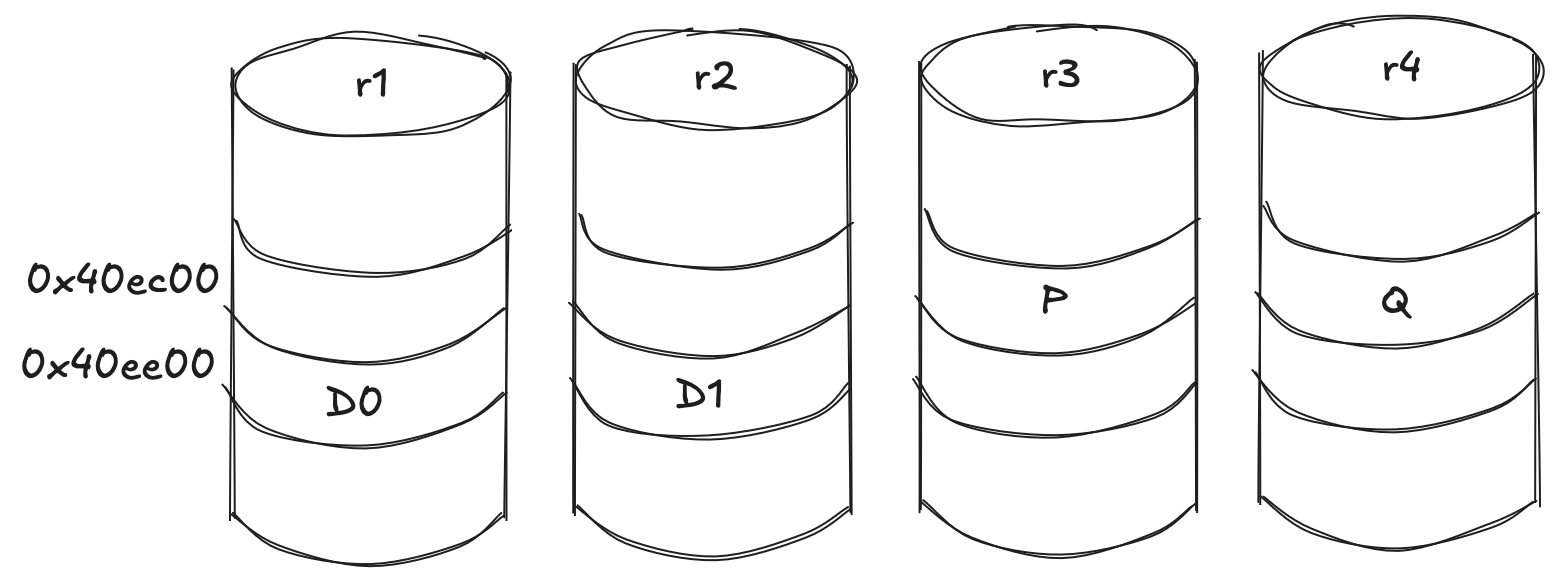
\(`b`,`s`,`f`, and`o`are the actual variable names in the source, so you can read along with the code\.\) Children are numbered from zero in creation order \- r1=0, r2=1, r3=2, r4=3 \- so`f = 2`means this stripe starts on`r3\.img`\. Of the four columns, the first`nparity`are parity and the rest are data, so the stripe runs P, Q, data, data, starting at column`f`and wrapping around the end of the row:
```
column role child idx file placement
0 parity (P) 2 r3.img f
1 parity (Q) 3 r4.img f+1
2 data 0 r1.img f+2, wraps r4 -> r1
3 data 1 r2.img f+3, wraps -> r2
```
The wrap is the one subtlety, and it is exactly what I got wrong the first time\. When a column runs off the end of the children, it continues on the first child but one sector further in \- the source does`coff \+= 1 << ashift`for exactly those wrapped columns\. So the two parity columns stay at`o = 0xec00`, while the two data columns, which wrapped, land one sector later at`0xee00`\. Add the 4 MiB of front matter to each child offset and convert to sectors:
```
column file child off byte off sector
P r3.img 0xec00 0x400000+0xec00 8310
Q r4.img 0xec00 0x400000+0xec00 8310
data 0 r1.img 0xee00 0x400000+0xee00 8311
data 1 r2.img 0xee00 0x400000+0xee00 8311
```
Each data column is`q = s / \(dcols \- nparity\) = 256 / 2 = 128`sectors long\. So the block's 128 KiB of data is split into two 64 KiB chunks: 128 sectors on`r1`starting at 8311, then 128 sectors on`r2`, with the two parity columns guarding them\.
The data columns hold recognizable file bytes:
```
$ dd if=r1.img bs=512 skip=8311 count=1 status=none | hexdump -C | head
00000000 52 41 49 44 5a 32 2d 5a 46 53 2d 43 4f 52 52 55 |RAIDZ2-ZFS-CORRU|
00000010 50 54 49 4f 4e 2d 44 45 4d 4f 2d 42 4c 4f 43 4b |PTION-DEMO-BLOCK|
00000020 0a 52 41 49 44 5a 32 2d 5a 46 53 2d 43 4f 52 52 |.RAIDZ2-ZFS-CORR|
00000030 55 50 54 49 4f 4e 2d 44 45 4d 4f 2d 42 4c 4f 43 |UPTION-DEMO-BLOC|
$ dd if=r2.img bs=512 skip=8311 count=1 status=none | hexdump -C | head
00000000 4b 0a 52 41 49 44 5a 32 2d 5a 46 53 2d 43 4f 52 |K.RAIDZ2-ZFS-COR|
00000010 52 55 50 54 49 4f 4e 2d 44 45 4d 4f 2d 42 4c 4f |RUPTION-DEMO-BLO|
00000020 43 4b 0a 52 41 49 44 5a 32 2d 5a 46 53 2d 43 4f |CK.RAIDZ2-ZFS-CO|
00000030 52 52 55 50 54 49 4f 4e 2d 44 45 4d 4f 2d 42 4c |RRUPTION-DEMO-BL|
```
The parity columns do not have to look like anything, because they are parity\. Read the P column on`r3`at its sector, 8310, and there is nothing recognizable \- just noise:
```
$ dd if=r3.img bs=512 skip=8310 count=1 status=none | hexdump -C | head
00000000 19 4b 1b 05 13 76 77 68 6b 09 6b 10 62 11 1d 07 |.K...vwhk.k.b...|
00000010 02 01 19 1b 07 62 0a 68 09 0a 60 0d 61 0d 0f 04 |.....b.h..`.a...|
```
The Q column on`r4`sits at the same sector, 8310, and looks just as random\.
Now corrupt exactly one data column, again with the pool exported:
```
# zpool export zblogR
$ printf 'BAD-RAIDZ2\n' | \
dd of=r1.img bs=512 seek=8311 count=1 conv=notrunc status=none
# zpool import -d . zblogR
# zpool scrub zblogR
```
And this time, redundancy earns its keep:
```
# zpool status zblogR
pool: zblogR
state: ONLINE
status: One or more devices has experienced an unrecoverable error. An
attempt was made to correct the error. Applications are unaffected.
action: Determine if the device needs to be replaced, and clear the errors
using 'zpool clear' or replace the device with 'zpool replace'.
see: https://openzfs.github.io/openzfs-docs/msg/ZFS-8000-9P
scan: scrub repaired 64K in 00:00:00 with 0 errors on Thu Jun 4 23:48:48 2026
config:
NAME STATE READ WRITE CKSUM
zblogR ONLINE 0 0 0
raidz2-0 ONLINE 0 0 0
/tmp/zfs-blog-flow/r1.img ONLINE 0 0 1
/tmp/zfs-blog-flow/r2.img ONLINE 0 0 0
/tmp/zfs-blog-flow/r3.img ONLINE 0 0 0
/tmp/zfs-blog-flow/r4.img ONLINE 0 0 0
errors: No known data errors
```
One checksum error, all on`r1\.img`and no one else\. The data is still good, ZFS rewrote the bad sector from parity, and`zpool status`shows exactly which disk was wrong\. This is the whole point of the exercise: not to break the file, but to give ZFS something to catch\.
## Why bother
`zinject`would have produced a corrupted file in one command, and most days that is exactly what you want\. But it tells you nothing about the road from a file to a byte on a platter\. Doing it the long way \- inode, dnode, block pointer, DVA, the 4 MiB of reserved front matter, the compression you forgot to turn off, the raidz columns you had to unmap \- is how that road stops being abstract\. That road matters when the bug is in the place where abstractions meet hardware\.
And there is a small, petty satisfaction in corrupting a file so precisely that ZFS knows the exact moment to be unhappy about it\.