@CycleDecoded: Olares(来自 beclab 团队),一个专为“全天候 7x24 小时在线 AI Agent”设计的开源个人云操作系统。基于 Kubernetes 底层,把你家里淘汰的旧电脑、N1 盒子或者 NAS 闲置算力,直接改造成属于你自己的“…
摘要
Olares 是一个来自 beclab 团队的开源个人云操作系统,基于 Kubernetes,专为全天候 7x24 小时在线的 AI Agent 设计,可将旧电脑或 NAS 改装成自托管 AI 平台,支持本地数据存储和自然语言操作。
查看缓存全文
缓存时间: 2026/08/06 12:37
Olares(来自 beclab 团队),一个专为“全天候 7x24 小时在线 AI Agent”设计的开源个人云操作系统。基于 Kubernetes 底层,把你家里淘汰的旧电脑、N1 盒子或者 NAS 闲置算力,直接改造成属于你自己的“自托管 AI 智能体基地”。5.1k+ Star,开源协议 AGPL-3.0。
核心狠点: • 自然语言操纵一切:不用搞懂 K8s 或复杂代码,直接打字就能给 OS 派活。 • 数据全留本地:聊天记录、个人文档、隐私代码不上云,私有化 RAG 天花板。 • Agent 永远在线:跑代码、抓信息、搞自动化工作流,挂在旧设备上日夜不停。 • 应用市场开箱即用:自带 Olares Market,一键部署本地开源大模型、图像/语音生成工具。
传送门: https://github.com/beclab/Olares
beclab/Olares
Source: https://github.com/beclab/Olares
Olares
Your AI Agent. Your Data. Your Hardware.
Install Olares · Manage Olares with AI · Contribute






Olares is an open-source personal cloud OS you operate in plain language, built to run AI agents and LLMs on hardware you own.
Powered by Kubernetes, it turns your machines into a self-hosted AI platform accessible from any browser, giving everyone from individual users to small teams a unified place for compute, storage, networking, and apps.
https://github.com/user-attachments/assets/01490c33-41ce-46fe-8450-6939b40db98e
🌟 If Olares is useful to you, consider giving the project a star. Your support encourages us to keep improving it.
Why Olares
Great AI needs to know you. That requires access to your files, messages, and history. Many cloud AI services store this sensitive data on third-party servers and charge based on usage.
Olares brings AI home, so you can run agents like OpenClaw with local LLMs on hardware you own while still enjoying the access and convenience of the cloud.
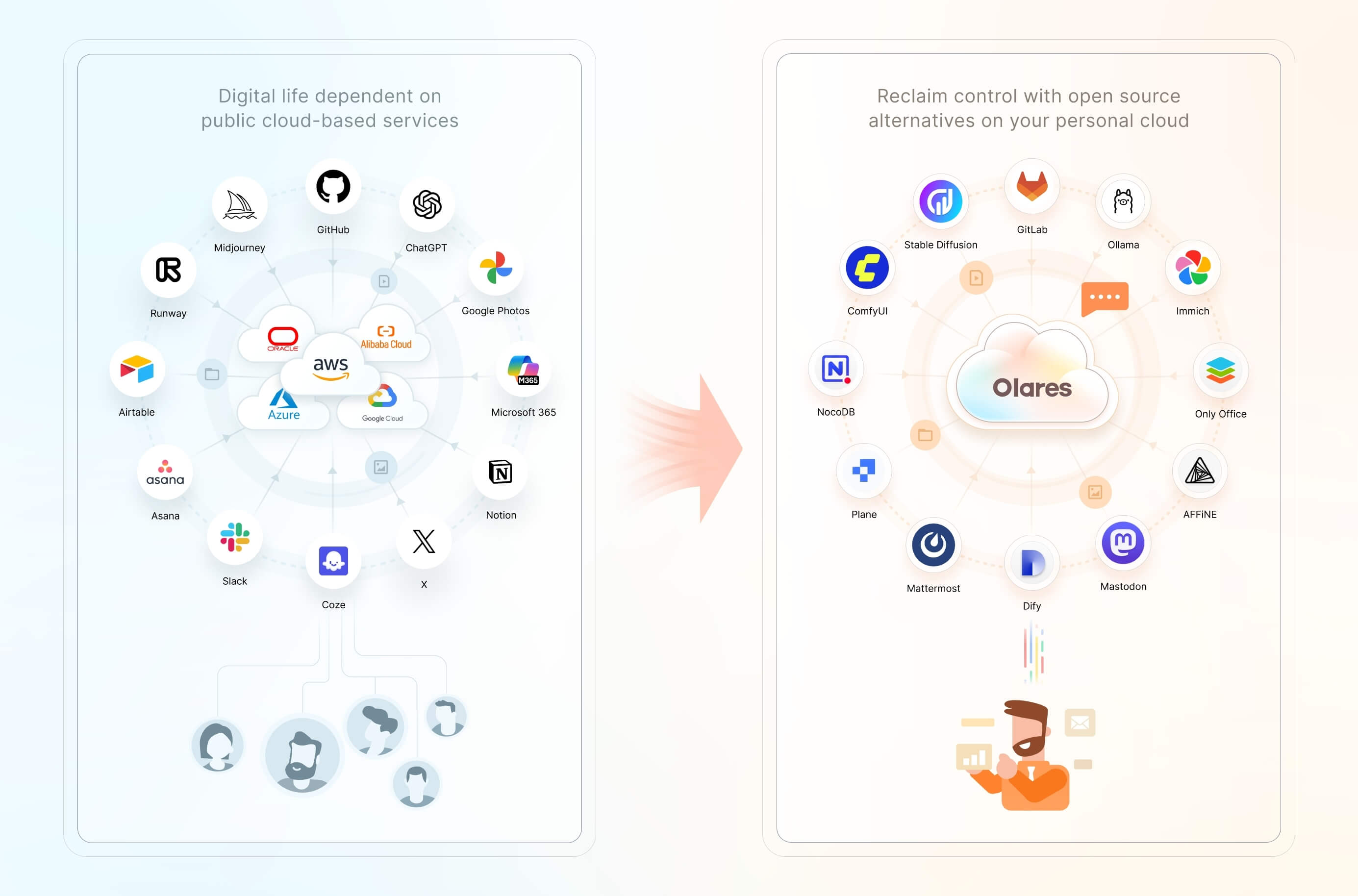
Features include:
- One-click local AI: Install open-source AI apps and models from Olares Market with one click.
- Accelerated computing management: Pool GPUs and other accelerators across nodes, with time-slicing, memory-slicing, and exclusive GPU modes for AI, media, and gaming workloads.
- Files and storage management: Access local files, synced data, connected cloud storage, and external SMB/NFS shares through the built-in Files app, with configurable backups.
- Private networking and access controls: Use a private VPN, reverse proxy, and public, private, or internal entrances to give apps HTTPS endpoints without manually exposing individual ports.
- Anytime, anywhere access: Use your Olares ID and LarePass to access all your services from a phone, desktop, or browser.
- A suite of system apps: Files, Vault, Market, Dashboard, Control Hub, and more, ready the moment you log in.
Get started
Linux script requirements
Olares installs on a Linux host (bare metal or VM), with dedicated installation methods for Windows, macOS, and Raspberry Pi. Requirements vary by platform and installation method. The Linux script used below requires:
- CPU: At least 4 cores
- RAM: At least 8 GB of available memory
- Storage: At least 150 GB of available SSD storage; installation will fail on an HDD
- OS: Ubuntu 22.04 to 25.04, or Debian 12 or 13
A dedicated GPU is optional and enables local AI acceleration.
Install and activate
-
Create your Olares ID in LarePass, the client app that adds secure login, a built-in VPN, and file sync.
-
On your Linux host, run:
curl -fsSL https://olares.sh | bash -This command downloads the official installer from
olares.shand runs it with Bash. For complete requirements, platform-specific instructions, and troubleshooting, see the Linux script installation guide.For Windows, macOS, Raspberry Pi, or a VM, choose your platform in the installation guide.
-
Follow the guided web wizard, or do it entirely from the terminal with the Activate using the Olares CLI tutorial.
Once activated, you can access Olares from any browser at an address based on your Olares ID. For example, if your Olares ID is marvin123, your desktop is at https://desktop.marvin123.olares.com.
Key use cases
- Use a personal AI agent. Delegate research, coding, file management, and routine automation through plain language.
- Run generative AI locally. Chat with open models, generate images and video, and connect local models to other apps, all from your own hardware.
- Manage smart home devices and media. Connect home automation tools and stream your personal music and video libraries.
- Build and host agentic apps. Develop, test, and run apps and workflows in isolated environments on Olares.
- Process audio locally. Transcribe meetings, translate recordings, and generate speech without uploading audio to a third-party service.
- Create a self-hosted workspace. Give your family or team tools for documents, automation, project management, and communication.
- Manage your personal data. Store, sync, back up, and access files, photos, and documents across your devices.
System architecture
Just as public clouds offer IaaS, PaaS, and SaaS layers, Olares provides open-source alternatives to each of these layers.
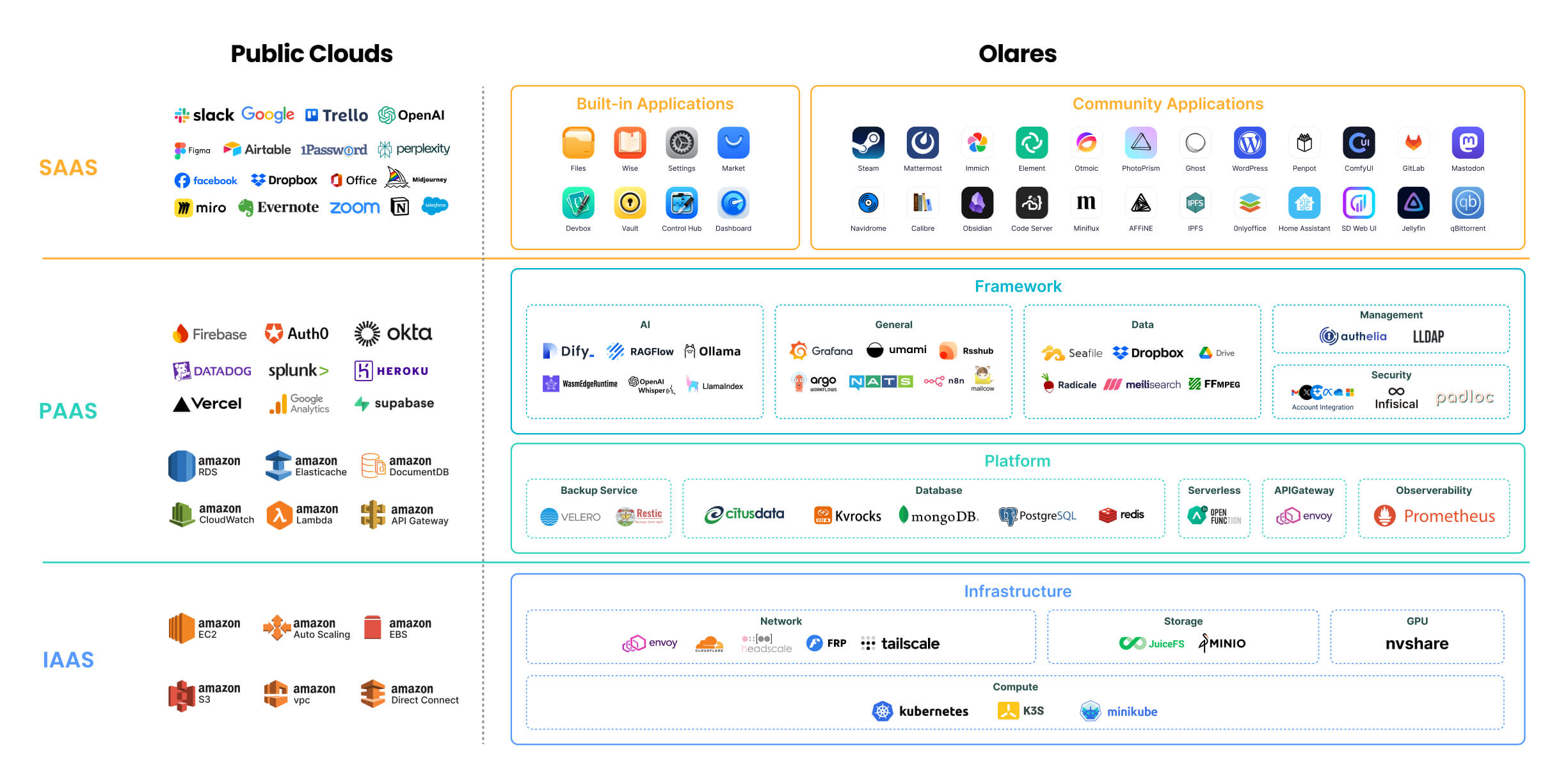
For a detailed description of each component, refer to Olares architecture.
🔍 How is Olares different from traditional NAS?
Olares focuses on building an all-in-one self-hosted personal cloud experience. Its core features and target users differ significantly from Network Attached Storage (NAS) systems, which primarily focus on network storage. For more details, see Compare Olares and NAS.
Project navigation
The main directories in the Olares repository:
Olares/
├── apps/            # Built-in Olares system applications
├── cli/             # olares-cli: agent-native CLI with Agent Skills to install and operate Olares
├── daemon/          # olaresd, the system daemon process
├── docs/            # Project documentation
├── framework/       # Olares system services
├── infrastructure/  # Computing, storage, networking, and GPU components
├── platform/        # Cloud-native components like databases and message queues
└── vendor/          # Hardware-specific code for Olares devices
Contributing
Olares welcomes contributions across the project. Choose the path that best matches what you want to improve:
- Core development: Browse open issues, or open an issue to discuss your proposal before starting a substantial change.
- Documentation: Improve the guides in
docs/. See the documentation contributor guide and content and style guide. - App distribution: Package and submit an app to Olares Market.
- Bug reports and feature requests: Open a GitHub issue with enough context for the team to investigate or evaluate it.
- Security reporting: Follow our security policy. Please do not report vulnerabilities through public issues, discussions, or community channels.
Learn more
- Installation guide: Choose an installation method and activate Olares.
- Use cases: Explore local AI, media, productivity, and self-hosted workflows.
- CLI guide: Install, manage, and diagnose Olares from the command line.
- Agent Skills: Let AI agents operate Olares through
olares-cli. - Advanced tutorials: Configure GPUs, multi-node deployments, custom domains, and storage expansion.
Community
- Discord: Get community support and discuss deployments and agent workflows.
- Olares Forum: Share product feedback and join longer-form discussions.
- Follow Olares on X and YouTube.
Acknowledgements
The Olares project has incorporated numerous third-party open-source projects, including: Kubernetes, Kubesphere, Padloc, K3S, JuiceFS, MinIO, Envoy, Authelia, Infisical, Dify, Seafile, HeadScale, Tailscale, Redis Operator, Nitro, RSSHub, predixy, nvshare, LangChain, Quasar, TrustWallet, Restic, ZincSearch, filebrowser, lego, Velero, s3rver, Citusdata.
相似文章
@geekbb: 开源的 AI Agent 元编排框架,为 Claude Code、Codex、Cursor、OpenCode、Hermes、Pi 等多种 Agent 提供统一的编排层。用户可以在不同设备(终端、浏览器、手机、桌面应用)间无缝切换会话,让多…
Omnigent is an open-source meta-orchestration framework that provides a unified orchestration layer over multiple AI agents like Claude Code, Codex, and Cursor. It enables seamless cross-device session switching, multi-agent collaboration, policy enforcement, and cloud sandbox execution.
@QingQ77: 用自然语言描述需求,AI Agent 自动拆解步骤、调用工具完成开发、文件操作、浏览器操控等任务,同时提供完整的编辑器与终端功能。 https://github.com/Liuchun-oss/codelf-agent… Codelf 是…
Codelf 是一个开源的桌面 AI 助理,可用自然语言描述需求,自动拆解步骤并调用工具完成开发、文件操作、浏览器操控等任务,同时提供完整的编辑器与终端功能,支持 DeepSeek、Claude、ChatGPT 等模型,对国内网络友好,具备本地 RAG 知识库能力。
stablyai/orca
Orca 是一个开源桌面应用,让开发者能够在并行隔离的工作树中运行多个 AI 编程代理(如 Codex、ClaudeCode),并通过移动端伴侣进行管理。
@VincentLogic: 还在一个个开黑窗口跑 AI 工具?太折磨了。 发现个开源免费的“智能体操作系统”—— AionUi。 以前用 Claude Code, OpenClaw, Hermes 都是各跑各的,现在它能像 Windows 承载 App 一样,把 G…
AionUi 是一个开源免费的 AI 智能体操作系统,旨在统一管理 Claude Code、Gemini 等顶尖 AI 模型,支持多智能体协同工作、数据集中管理及远程联动挂机。
@geekbb: Cloudflare 出品,给 AI agent 配了一台"电脑" 给 Agent 一个永不消失的工作区。SQLite 存文件,三种环境(完整容器 / shell / JS)随时开,换环境不换文件。
Cloudflare Computer is a virtual filesystem inside a Durable Object that gives AI agents a persistent workspace, using SQLite for storage and pluggable runtimes (container, shell, JavaScript). It's a preview-only open-source package.