@paulmillr: Stunned by https://getmoshi.app by @odd_joel Most phone terminal emulators are garbage. This one provides a thoughtful,…
Summary
Moshi is a polished phone terminal emulator app that integrates with AI agents like Claude Code, offering features such as chat mode, gesture controls, and remote monitoring of AI tasks from mobile devices.
View Cached Full Text
Cached at: 08/18/26, 08:39 AM
Stunned by https://t.co/l6nn2ZISpb by @odd_joel
Most phone terminal emulators are garbage. This one provides a thoughtful, polished UI - fun to use.
It also has a chat mode that replaces the “remote control” of GPT/Claude. Highly recommend! Esp. when paired with @herdrdev
Moshi — SSH & MOSH Terminal for Claude Code & AI Agents
Source: https://getmoshi.app/
Terminals weren’t made for phones.Moshi is.
4.8 on the App StoreFree to start — no account, no card
Get Moshi updates.
New features, AI-coding workflows, behind-the-scenes notes. About once a month. No spam — unsubscribe anytime.
Works with the agents you already run
Claude CodeCodexOpenCodePiGrok BuildCursorKimi Code
Real demo — moshi editing itself, live reload
why moshi
Moshi 🐱is thebaby monitorfor your AI agents —a terminal built for phones,not shrunken from desktops.
Check on your agentfrom the couch 🛋️, the beach 🏖️, the coffee shop ☕, the bed 🛏️ —anywhere.
moshi corenothing extra to install
A local-first terminal that already does the work.
Moshi connects directly to your own Mac, Linux machine, WSL box, or VPS over SSH, Mosh, or ET. There’s no session relay: your shell, repositories, files, and agent processes stay on machines you control.
You don’t need a wrapper command or host daemon. Open the same shell you use at your desk, then use the controls a terminal needs when it lives on a phone.
Stays alive across sleep, network switches, even app kills.
Pickers, panels, gestures — deep multiplexer integration.
Crop, scribble, drop screenshots straight into your agent prompt.
On-device voice-to-terminal. Parakeet, Whisper, Apple, or cloud.
Customizable panels for tmux, zellij, and agent commands.
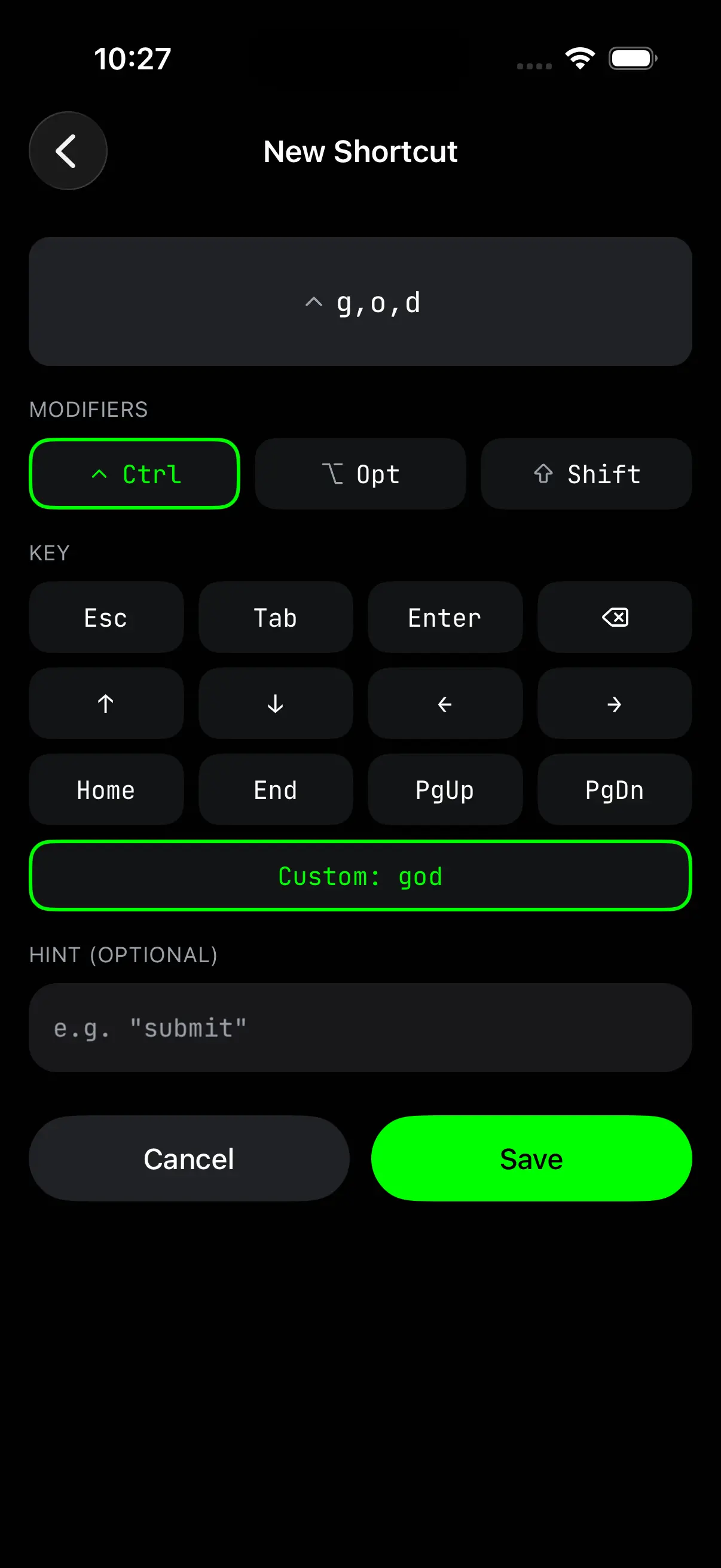
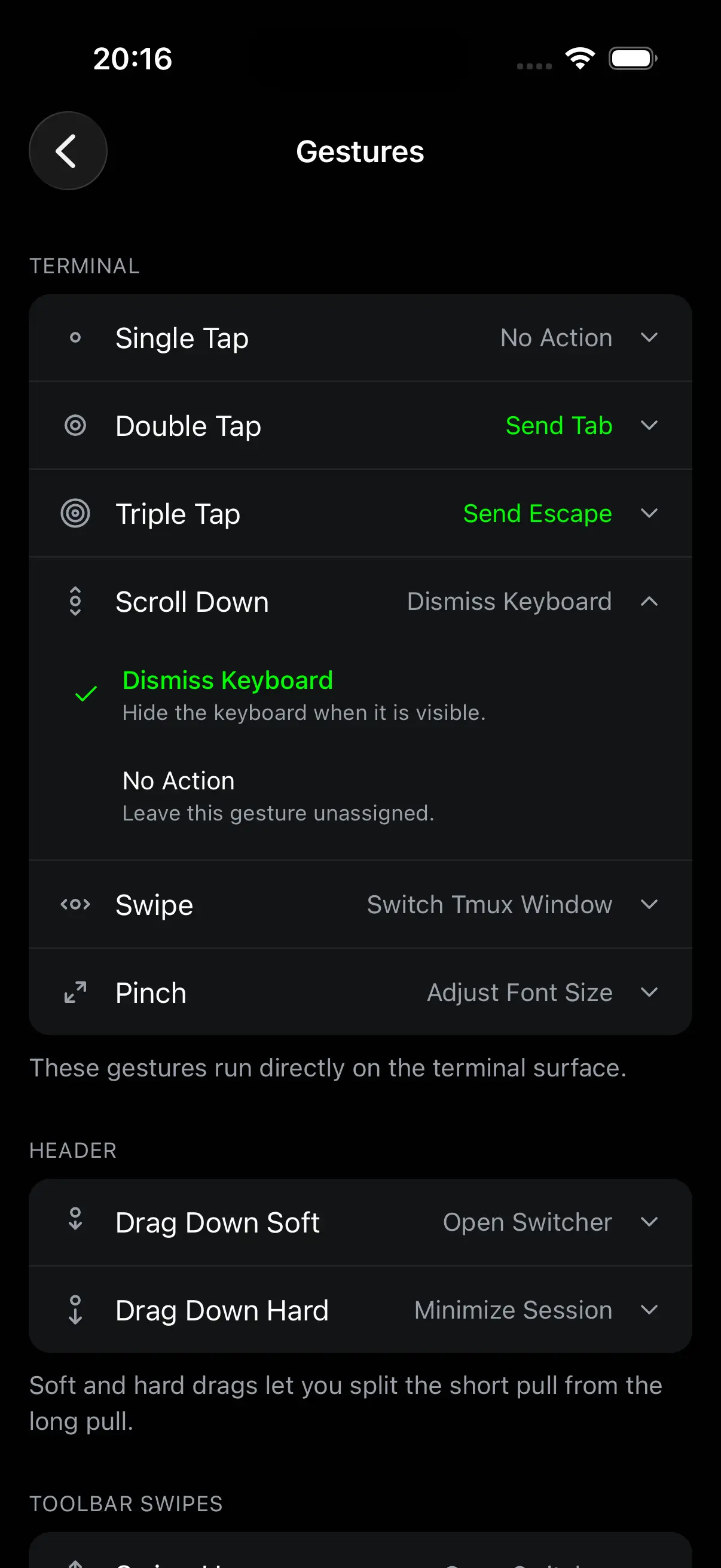
Swipe windows, pinch zoom, double-tap Tab.
How Moshi handles keys & sync moshi-hookgo further with coding agents
Now make the terminal agent-aware.
Install moshi-hook on your machine to add structured agent context to the same live terminal session. It doesn’t replace Claude Code, Codex, or your shell.
Terminal, diff, file, and preview traffic still travels directly between your phone and your machine. The hook adds the native surfaces that make it easier to step away and stay in the loop.
The agent TUI, rendered as a phone-native conversation.
A live kanban of every agent’s tasks, asks, and context budget.
Live Activity, Dynamic Island, Apple Watch — approve from anywhere.
Review the agent’s working tree from the terminal header.
Browse the repo tree at any commit — syntax-highlighted source.
Open the host’s local dev servers in Moshi’s in-app browser.
See supported agentsInstall moshi-hook
supported agents
Whatever agent you run, Moshi speaks it.
moshi-hook plugs into the coding agents you already use, so approvals, notifications, and session status land in one inbox — no matter which CLI is doing the work.
Claude Code
Codex
OpenCode
Antigravity
Cursor
Kimi Code
Qwen Code
Grok Build
Pi
OMP
Hermes
See what each agent gets guides and docs
Build the workflow, then tune the details
Start with the updated long-form guides, then jump into the docs for the exact feature settings.
 ### Moshi Agent Hooks: Inbox, Live Activities, Usage, and Apple Watch How moshi-hook turns Claude Code, Codex, OpenCode, Cursor, Kimi, and Qwen into scannable phone and watch workflows Jul 30, 20268 min read
 ### Terminal on iPhone: What You Can Actually Run iOS has no built-in Terminal. What a local shell (a-Shell, iSH) can and can’t do, when a remote SSH/Mosh terminal is the real answer, and how to choose. Aug 10, 20268 min read
 ### Best Android Terminal App for AI Coding Agents (2026) Termux, JuiceSSH, ConnectBot, Termius, and Moshi on Android for Claude Code: where local packages win, where the remote agent loop wins, and how to choose. Aug 6, 202611 min read
View all guides and articles
### Best Android Terminal App for AI Coding Agents (2026) Termux, JuiceSSH, ConnectBot, Termius, and Moshi on Android for Claude Code: where local packages win, where the remote agent loop wins, and how to choose. Aug 6, 202611 min read
View all guides and articles
hooksHooksInstall moshi-hook so supported coding agents can talk to Moshi — and see which integrations include inbox events, approvals, and the native Chat View.featureImage and file pasteOne-tap paste from the phone to a coding agent — screenshots, photos, PDFs, logs, anything iOS can hand off.inputVoice and dictationChoose a speech engine, download local models, set languages, use chat mode, and review transcription history.networkTailscaleReach Macs, Linux hosts, and WSL on Windows with no public IP through your tailnet — addresses, mosh over Tailscale, sleep behavior, and common connection failures.
fair questions
“Can’t I already do this?”
Why Moshi instead of Claude Code Remote Control?
Remote Control continues a Claude conversation. Moshi gives you the whole machine: every agent — Claude Code, Codex, OpenCode, and more — with a real shell underneath. Run commands, tail logs, drive tmux or Zellij, browse the repo, review diffs, and preview dev servers, all in the same live session you sit back down to at your desk.
Why Moshi instead of a free agent client?
Agent clients relay a chat through a wrapper CLI. Moshi connects straight to your machine over SSH, Mosh, or ET and keeps a real terminal under the agent — no replacement command, no session relay. Then it adds what a native app should: Live Activities, Apple Watch approvals, terminal gestures, and on-device dictation.
stay in the loop
Get Moshi updates
New features, AI-coding workflows, the occasional behind-the-scenes. ~Once a month. No spam.
the name
mosh
mobile shell
The resilient protocol that survives network changes
もしもし
moshi moshi
Hello — the start of every conversation
もし
moshi
If — all the possibilities your phone unlocks
IndiJo (@odd_joel): same tui, same Claude session and same herdr, now you can see the images your agent sees😽
Similar Articles
@steipete: I'm late to the party, but cmux is great. https://github.com/manaflow-ai/cmux… current split: codex mac app: knowledege…
cmux is a Ghostty-based macOS terminal with vertical tabs and notifications designed for AI coding agents, featuring SSH support, in-app browser, and Claude Code Teams integration.
manaflow-ai/cmux
cmux is a Ghostty-based macOS terminal with vertical tabs and notifications designed for AI coding agents, featuring SSH support, in-app browser, and Claude Code Teams integration.
Show HN: Yorishiro – a macOS terminal where AI agents live
Yorishiro is a macOS terminal that gives AI agents a visual body and presence, allowing them to react to errors, express emotions, and share the environment with the user. It is self-modifiable and works with Claude Code or Codex.
@seclink: mimofan v0.0.17 released — a Rust terminal AI coding assistant with native MiMo & DeepSeek support. Highlights this rel…
mimofan v0.0.17 is a Rust terminal AI coding assistant released with native support for MiMo and DeepSeek models, featuring security audit gates, memory enhancements, protocol improvements, and subagent orchestration.
@MinLiBuilds: Suddenly realized that all the previous tinkering with Tailscale + tmux, Claude Remotion, Codex remote was a complete waste of time. This is the ultimate mobile AI remote—the most comfortable product I've experienced so far. 100% identical to your local computer.
Recommends a mobile AI remote product, claiming it offers the best experience and is identical to a local computer, replacing Tailscale+tmux, Claude Remotion, and other solutions.