npm introduces staged publishing, allowing package updates to be reviewed and approved with 2FA before going live on the registry, enhancing security for package maintainers.
# Staged publishing for npm packages | npm Docs
Source: [https://docs.npmjs.com/staged-publishing/](https://docs.npmjs.com/staged-publishing/)
Table of contents- [How staged publishing works](https://docs.npmjs.com/staged-publishing/#how-staged-publishing-works)
- [Prerequisites](https://docs.npmjs.com/staged-publishing/#prerequisites)
- [Stage a package](https://docs.npmjs.com/staged-publishing/#stage-a-package)
- - - [Using the CLI](https://docs.npmjs.com/staged-publishing/#using-the-cli) - [Using npmjs\.com](https://docs.npmjs.com/staged-publishing/#using-npmjscom)
- - - [Using the CLI](https://docs.npmjs.com/staged-publishing/#using-the-cli-1) - [Using npmjs\.com](https://docs.npmjs.com/staged-publishing/#using-npmjscom-1)
- [Using staged publishing with trusted publishers](https://docs.npmjs.com/staged-publishing/#using-staged-publishing-with-trusted-publishers)
- [Learn more](https://docs.npmjs.com/staged-publishing/#learn-more)
Staged publishing adds an approval step before packages go live on the npm registry\. Instead of publishing directly with`npm publish`, you can submit packages to a staging area with`npm stage publish`\. A maintainer must then review and explicitly approve the staged package — with two\-factor authentication \(2FA\) via the CLI or[npmjs\.com](https://www.npmjs.com/)— before it becomes publicly available\.
Staged publishing is useful when you want an extra review step before a package version becomes available on the registry\.
**Note:**Staged publishing requires[npm CLI](https://docs.npmjs.com/cli/v11)version 11\.15\.0 or later and Node version 22\.14\.0 or higher\.
## [How staged publishing works](https://docs.npmjs.com/staged-publishing/#how-staged-publishing-works)
Staged publishing has three steps:
1. [Stage a package](https://docs.npmjs.com/staged-publishing/#stage-a-package)
2. [Review a staged package](https://docs.npmjs.com/staged-publishing/#review-a-staged-package)
3. [Approve a staged package](https://docs.npmjs.com/staged-publishing/#approve-a-staged-package)
## [Prerequisites](https://docs.npmjs.com/staged-publishing/#prerequisites)
Before using staged publishing, ensure the following:
- You have**publish access**to the package
- The package**already exists**on the npm registry — you cannot stage a brand\-new package
- **2FA is enabled**on your npm account
## [Stage a package](https://docs.npmjs.com/staged-publishing/#stage-a-package)
1. On the command line, navigate to the root directory of your package\. `cd /path/to/package`
2. To stage your package, run: `npm stage publish`This submits your package to a staging area\.
**Note:**`npm stage publish`does not require 2FA\.
## [Review a staged package](https://docs.npmjs.com/staged-publishing/#review-a-staged-package)
After you stage a package, you can inspect it in the CLI or on[npmjs\.com](https://www.npmjs.com/)\.
### [Using the CLI](https://docs.npmjs.com/staged-publishing/#using-the-cli)
To list staged packages you have access to:
`npm stage list \[<package\-spec\>\]`
To view details for a specific staged package:
`npm stage view <stage\-id\>`
To download the staged package tarball for inspection:
`npm stage download <stage\-id\>`
### [Using npmjs\.com](https://docs.npmjs.com/staged-publishing/#using-npmjscom)
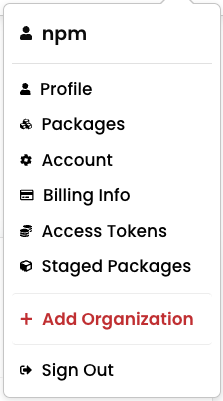
Open the**Staged Packages**tab to review staged packages and find the package you want to approve\.
## [Approve a staged package](https://docs.npmjs.com/staged-publishing/#approve-a-staged-package)
To publish a staged package to the registry, approve it with 2FA\.
### [Using the CLI](https://docs.npmjs.com/staged-publishing/#using-the-cli-1)
To approve a staged package and publish it to the live registry:
`npm stage approve <stage\-id\>`
### [Using npmjs\.com](https://docs.npmjs.com/staged-publishing/#using-npmjscom-1)
On[npmjs\.com](https://www.npmjs.com/), review the staged package in the**Staged Packages**tab, then click**Approve**\.

**Note:**You will be prompted for 2FA verification whether you approve the package in the CLI or on[npmjs\.com](https://www.npmjs.com/)\.
## [Using staged publishing with trusted publishers](https://docs.npmjs.com/staged-publishing/#using-staged-publishing-with-trusted-publishers)
If you use[trusted publishing \(OIDC\)](https://docs.npmjs.com/trusted-publishers)from CI/CD, you can use staged publishing to submit a package for review before it goes live\. A maintainer must still review and approve the staged package with 2FA\.
For more information on configuring trusted publisher permissions, see "[Trusted publishing for npm packages](https://docs.npmjs.com/trusted-publishers#configuring-allowed-actions)\."
## [Learn more](https://docs.npmjs.com/staged-publishing/#learn-more)
- [Trusted publishing for npm packages](https://docs.npmjs.com/trusted-publishers)
- [Generating provenance statements](https://docs.npmjs.com/generating-provenance-statements)
## Table of contents
- [How staged publishing works](https://docs.npmjs.com/staged-publishing/#how-staged-publishing-works)
- [Prerequisites](https://docs.npmjs.com/staged-publishing/#prerequisites)
- [Stage a package](https://docs.npmjs.com/staged-publishing/#stage-a-package)
- - - [Using the CLI](https://docs.npmjs.com/staged-publishing/#using-the-cli) - [Using npmjs\.com](https://docs.npmjs.com/staged-publishing/#using-npmjscom)
- - - [Using the CLI](https://docs.npmjs.com/staged-publishing/#using-the-cli-1) - [Using npmjs\.com](https://docs.npmjs.com/staged-publishing/#using-npmjscom-1)
- [Using staged publishing with trusted publishers](https://docs.npmjs.com/staged-publishing/#using-staged-publishing-with-trusted-publishers)
- [Learn more](https://docs.npmjs.com/staged-publishing/#learn-more)
npm introduces staged publishing, requiring human approval via 2FA for package releases, and new `--allow-*` flags (file, remote, directory) to control install sources, improving supply-chain security in npm CLI 11.15.0.
A new npm package called safe-install is introduced to enhance supply chain security by allowing developers to disable install scripts by default and block exotic sub-dependencies, addressing ongoing vulnerabilities.
npmx is an MIT-licensed alternative web frontend for the npm registry that adds security and usability features—like transitive install sizes, install-script disclosure, and outdated/vulnerable-dependency trees—spurring npmjs.com to finally ship dark mode.
Satirical article highlighting the recurring supply chain attacks in the npm registry, contrasting with more secure ecosystems like Go and Rust, and mocking the JavaScript community's acceptance of such vulnerabilities.