Cached at:
05/21/26, 06:17 PM
# A Private pkg Repo Behind Mutual TLS
Source: [https://oshogbo.com/blog/88/](https://oshogbo.com/blog/88/)

I am a big fan of mutual TLS \("mTLS" if you prefer the shorter spelling, "client certificates" if you are describing the half a user actually touches\)\. Strangely, I rarely see it used in the wild\. That probably says something worrying about how I choose to spend free time, but they are a neat fit for small private infrastructure\.
Most people reach for HTTP Basic, an API token, or a VPN, and call it a day\. A private pkg repository is one of those quiet little places where mutual TLS fits perfectly: a well established mechanisms, no humans typing passwords, and a server that should only answer questions from boxes I actually have access to\.
This is the story of putting a FreeBSD repository over HTTPS, and make nginx accept only clients with certificates signed by my own tiny certificate authority\. This can be usefull if you want to for example build a "enterprise repo" where only subscribed user can have access, or test repo that only friends can access\.
## Start with plain HTTPS
First things first \- port 80's only job is to redirect to 443\. There is no prize for serving packages over cleartext in 2026\. A tiny declaration in`/usr/local/etc/nginx/sites\-available/`is enough:
```
server {
listen 80;
server_name pkg.example.com;
return 301 https://$server_name$request_uri;
}
```
## The server side of TLS
Next, the actual HTTPS server\. This is still the "regular" half of TLS \- the server proves who it is to clients\. I am using a Let's Encrypt certificate for`pkg\.example\.com`, which is free and renews itself if you ask it nicely\. The mutual half comes later \- first we need a working one\-sided handshake to build on top of\. The configuration is well known for all of us:
```
server {
listen 443 ssl;
listen [::]:443 ssl;
ssl_certificate /usr/local/etc/nginx/ssl/example.com.crt;
ssl_certificate_key /usr/local/etc/nginx/ssl/example.com.key;
ssl_protocols TLSv1.2 TLSv1.3;
root /var/www-private-pkg/html;
server_name pkg.example.com;
location / {
try_files $uri $uri/ =404;
}
}
```
The`root`is where the pkg repo will eventually live, but for the moment all it needs is something to serve so we can confirm the configuration is correct:
```
mkdir -p /var/www-private-pkg/html
echo "Welcome!" > /var/www-private-pkg/html/index.html
```
Enable the site the usual way by creating a symlink and reload nginx:
If everything is wired up correctly, hitting the domain in a browser returns a cheerful "Welcome\!"\. That is the boring half done\.
## Becoming a tiny CA
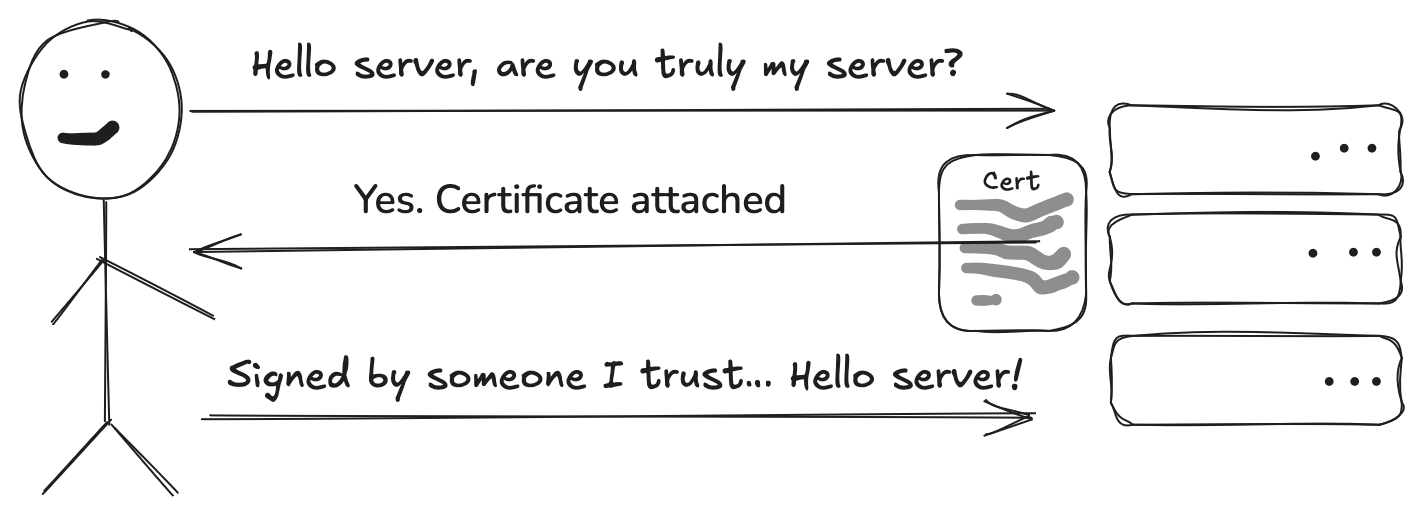
Now the mutual\-TLS part\. In a regular TLS handshake, only the server presents a certificate; the client stays anonymous\.
With mTLS, the client also presents one, and the server checks it against a list of signers it trusts\.
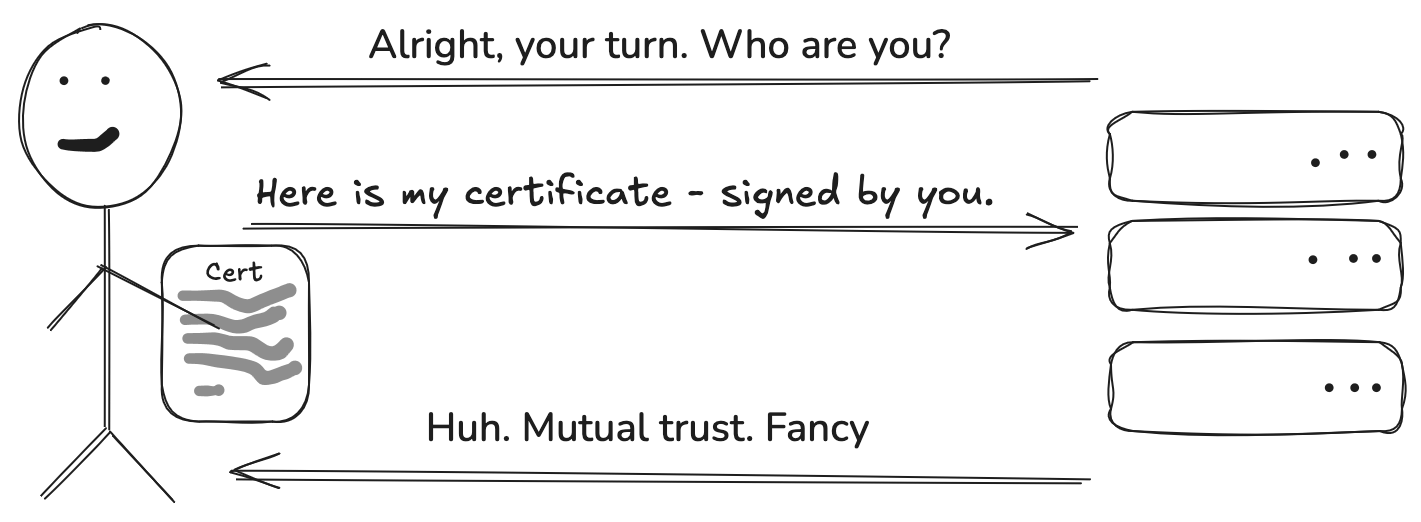
We want this repository to only respond to clients holding a certificate that we have signed ourselves\. That means we need our own little certificate authority \- nothing fancy, just enough to sign a handful of client certs\.
A 4096\-bit private key for the CA:
```
openssl genrsa -out server.key 4096
```
And a self\-signed root certificate good for ten years\. The defaults are mostly fine; the only field that really matters is the Common Name, which I set to the repository's hostname:
```
$ openssl req -x509 -new -nodes -key server.key -sha256 -days 3650 -out server.crt
You are about to be asked to enter information that will be incorporated
into your certificate request.
[...]
Country Name (2 letter code) [AU]:FR
State or Province Name (full name) [Some-State]:
Locality Name (eg, city) []:
Organization Name (eg, company) [Internet Widgits Pty Ltd]:Example
Organizational Unit Name (eg, section) []:
Common Name (e.g. server FQDN or YOUR name) []:pkg.example.com
Email Address []:
```
That`server\.crt`is now the trust anchor for every client certificate I will hand out\. Keep`server\.key`somewhere safe; anyone with that file can create certificates that the server will accept\.
## Minting a client certificate
A client certificate is the same dance, except this time the request gets signed by the CA we just built, instead of being self\-signed like the root was\.
Generate the client's private key:
```
openssl genrsa -out oshogbo.key 4096
```
Build a certificate signing request\. Again, the only field doing real work is the Common Name \- that becomes the "identity" of this client:
```
$ openssl req -new -key oshogbo.key -out oshogbo.csr
[...]
Country Name (2 letter code) [AU]:PL
Organization Name (eg, company) [Internet Widgits Pty Ltd]:oshogbo
Common Name (e.g. server FQDN or YOUR name) []:oshogbo
```
And sign it with the CA:
```
$ openssl x509 -req -days 365 -in oshogbo.csr \
-CA ../../server.crt -CAkey ../../server.key -CAcreateserial \
-out oshogbo.crt
Certificate request self-signature ok
subject=C = PL, ST = Some-State, O = oshogbo, CN = oshogbo
```
One year of validity feels about right for a client cert\. Long enough that I am not rotating them every weekend, short enough that a forgotten laptop eventually stops being a problem\.
If a laptop gets lost before then, you do not have to wait for expiry \- a certificate revocation list \(CRL\) handles the rest\. The proper`openssl ca`workflow keeps an`index\.txt`and lets you do`openssl ca \-revoke oshogbo\.crt`followed by`openssl ca \-gencrl \-out ca\.crl`, and nginx picks the list up with a single`ssl\_crl /usr/local/etc/nginx/ssl/ca\.crl;`line in the server block\. A reload later, the revoked cert no longer gets in\.
## Flipping nginx into mTLS mode
Back in the HTTPS server block, two lines promote the connection from regular TLS to mutual TLS:
```
ssl_client_certificate /path/to/ca.crt;
ssl_verify_client on;
```
The`ssl\_client\_certificate`points at the CA certificate \- that is the list of signers nginx will trust during the mTLS handshake\.`ssl\_verify\_client on`means the server hangs up on anyone who cannot prove they hold a private key matching a cert signed by that CA\.
Reload nginx, and the repository now requires a client certificate to talk to it at all\.
## Did it actually work?
The quickest check is to make a request without presenting a client certificate:
```
$ curl https://pkg.example.com/
<html>
<head><title>400 No required SSL certificate was sent</title></head>
<body>
<center><h1>400 Bad Request</h1></center>
<center>No required SSL certificate was sent</center>
<hr><center>nginx/1.26.2</center>
</body>
</html>
```
"No required SSL certificate was sent" is exactly the response we wanted\. Retrying the same request with the client cert attached:
```
$ curl --cert clientcert/www-private-pkg/users/oshogbo/oshogbo.crt \
--key clientcert/www-private-pkg/users/oshogbo/oshogbo.key \
https://pkg.example.com/
Welcome!
```
That is the whole trick \- both sides of the handshake now have something to prove\. The server still has a perfectly normal Let's Encrypt certificate, so any browser or`pkg`client knows it is talking to the right host\. That is the "regular TLS" half\. The "mutual" half is that the server also knows it is talking to a machine we have authorized, because the client had to present a certificate signed by our private CA\. No passwords, no tokens, no VPN \- just a key file on each machine that needs access\.
## Filling the repo with Poudriere
So far the repository serves only a`Welcome\!`page, but a pkg client expects`\.pkg`files arranged in a specific directory layout\. Poudriere is the FreeBSD\-native way to produce that layout: it builds every port in a clean jail at the exact ABI our consumers are running on, and drops the results into a tree that`pkg`already knows how to consume\.
I run Poudriere on a separate build host, not the nginx box\. There is no reason the build host has to be reachable from the internet \- its only output is a directory of packages that the public host serves afterwards\. That is a nice property: the thing doing the heavy lifting never has to listen on a public port\.
The jail has to match the ABI of the machines pulling from the repo, otherwise nothing will install\. Whenever consumers move to a new branch, I rebuild the jail so the userland and kernel headers used at build time match the ones used at install time\.
```
sudo poudriere jail -c -j 15-stable -b -m src=/usr/src -v 15-stable
```
I also keep a ports tree updated on the build host:
```
sudo poudriere ports -u -p default
```
The actual build is one command, fed a flat text file with one port origin per line:
```
sudo poudriere bulk -j 15-stable -p default -f PORTS_LIST
```
`\-j`picks the jail so the resulting packages target the right ABI,`\-p`is the ports tree, and`\-f`is the list of ports to actually build\. When the bulk finishes, the packages live under`/usr/local/poudriere/data/packages/15\-stable\-default/\.latest/`\. The`\.latest`symlink is the bit that matters \- it always points at the most recent successful build\.
Whatever lives under`\.latest/`is what the nginx box needs to expose under`/var/www\-private\-pkg/html/packages\-dev/FreeBSD:15:amd64/`\. That path is not arbitrary \- it is exactly the URL the client config will point at, once`$\{ABI\}`is expanded\. How the files get there is taste: a sync command, a deploy pipeline, a shared filesystem\. The important part is that the layout on the web root matches what`pkg\(8\)`expects to fetch\.
## Teaching pkg to bring its cert
With the repo now full of packages, the real consumer of this repository is`pkg\(8\)`\. The good news is that`pkg`speaks the same TLS as everything else on the system, and its repository config has an`env`block that gets exported to the underlying fetch library\. Two environment variables are all it needs:`SSL\_CLIENT\_CERT\_FILE`and`SSL\_CLIENT\_KEY\_FILE`\.
Drop a repo file under`/usr/local/etc/pkg/repos/`\- for example`enterprise\.conf`:
```
enterprise: {
url: "https://pkg.example.com/packages-dev/${ABI}",
signature_type: "fingerprints",
fingerprints: "/usr/share/Example/keys/pkg",
priority: 11,
enabled: yes,
env: {
SSL_CLIENT_CERT_FILE: "/usr/local/etc/pkg/keys/enterprise.crt",
SSL_CLIENT_KEY_FILE: "/usr/local/etc/pkg/keys/enterprise.key"
}
}
```
The`$\{ABI\}`placeholder expands at runtime to something like`FreeBSD:15:amd64`, so the same config works across releases\.`signature\_type: fingerprints`is`pkg`'s own check on the package signing key \- separate from the transport mTLS, and both layers are worth keeping\. Setting`priority: 11`puts this repo above the default FreeBSD one when names collide\. The`env`block is the actual mTLS hookup:`pkg`has no first\-class client\-cert option, but its underlying fetcher honors these two variables\. Stash the files under`/usr/local/etc/pkg/keys/`,`chmod 0600`the key, and`pkg update`should just work:
```
# pkg update -f
Updating enterprise repository catalogue...
Fetching meta.conf: . done
Fetching data: ... done
Processing entries: ...... done
enterprise repository update completed. 60 packages processed.
All repositories are up to date.
```
For peace of mind, the same check that worked with`curl`works through`pkg`\. Comment out the`env`block, run`pkg update \-f`again, and the catalog fetch falls over before it gets anywhere:
```
# pkg update -f
Updating enterprise repository catalogue...
pkg: https://pkg.example.com/packages-dev/FreeBSD:15:amd64/meta.txz: Bad Request
pkg: https://pkg.example.com/packages-dev/FreeBSD:15:amd64/data.pkg: Bad Request
pkg: https://pkg.example.com/packages-dev/FreeBSD:15:amd64/packagesite.pkg: Bad Request
Unable to update repository enterprise
Error updating repositories!
```
"Bad Request" is nginx's`400 No required SSL certificate was sent`\.
After that,`pkg install`behaves exactly like it does against the FreeBSD mirrors \- except every byte travels over a connection that the server has already authorized us to open:
```
# pkg install -y acme-agent
Updating enterprise repository catalogue...
enterprise repository is up to date.
All repositories are up to date.
The following 1 package(s) will be affected (of 0 checked):
New packages to be INSTALLED:
acme-agent: 1.4.2 [enterprise]
Number of packages to be installed: 1
The process will require 3 MiB more space.
3 MiB to be downloaded.
[1/1] Fetching acme-agent-1.4.2: .......... done
Checking integrity... done (0 conflicting)
[1/1] Installing acme-agent-1.4.2...
[1/1] Extracting acme-agent-1.4.2: ... done
```
## Closing the loop
Putting it all together: Poudriere builds the packages, the build host hands them off to the public host, nginx serves them, mutual TLS gates access, and`pkg\(8\)`installs from a repository that only authorized machines can reach\. No passwords, no tokens, no VPN \- and a TLS layer that is doing real work in both directions for once\.