The article explains how to monitor systemd services by integrating Healthchecks.io using OnSuccess and OnFailure hooks to ping the service on status changes, with code examples and updates for improved logging.
# Monitoring SystemD services with Healthchecks.io
Source: [https://passbe.com/2022/healthchecks-io-systemd-checks/](https://passbe.com/2022/healthchecks-io-systemd-checks/)
**Note: I’m now using an updated SystemD service file at the bottom of this post\.**
Things go wrong with technology, it’s bound to happen\. I needed a simple way to monitor scheduled jobs\. The majority of these jobs are spawned systemd services via systemd timers\.
While researching for a system I found[healthchecks\.io](https://healthchecks.io/)which allow you to host your own instance\. The next step was to trigger a ping when a systemd service status changed\. For this I leveraged OnSuccess/OnFailure hooks with a few custom services\.
An example of a service file I’m monitoring:
```
[Unit]
Description=Example service
OnFailure=[email protected]
OnSuccess=[email protected]
[Service]
ExecStart=/bin/bash -c 'exit 0'
Type=oneshot
[Install]
WantedBy=multi-user.target
```
We pass the ping UUID for both`\[email protected\]`and`\[email protected\]`as an argument\. These services simply run`curl`to ping the healthchecks\.io instance:
```
/etc/systemd/system/[email protected]:
[Unit]
Description=Pings healthchecks (%i)
[Service]
ExecStart=/bin/bash -c 'curl -s "https://localhost:8000/ping/%i/fail"'
Type=oneshot
[Install]
WantedBy=multi-user.target
/etc/systemd/system/[email protected]:
[Unit]
Description=Pings healthchecks (%i)
[Service]
ExecStart=/bin/bash -c 'curl -vv "https://localhost:8000/ping/%i"'
Type=oneshot
[Install]
WantedBy=multi-user.target
```
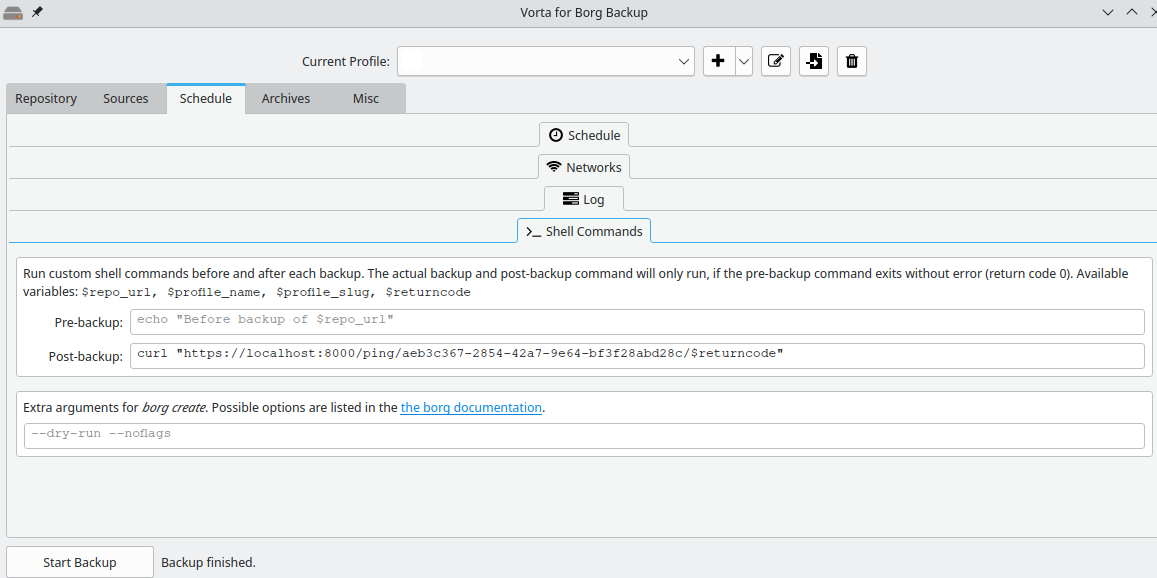
Combined with the integration’s healthchecks\.io offer I’m now notified when something goes wrong\. I prefer the simplicity of this setup because it can be integrated with other tooling, for example[Vorta](https://vorta.borgbase.com/)/[borg](https://www.borgbackup.org/)which I use for machine backups:
In future I may look at attaching logs and/or trying to migrate to a single healthcheck service\.
### Updated 2023\-01\-18
Based on a colleagues feedback I’m now using this updated SystemD template service file\.
```
[Unit]
Description=Pings healthchecks (%i)
[Service]
ExecStart=/bin/bash -c 'IFS=: read -r UUID ACTION <<< "%i"; if [ "$ACTION" = "start" ]; then LOGS="" && EXIT_CODE="start"; else LOGS=$(journalctl --no-pager -n 50 -u $MONITOR_UNIT) && EXIT_CODE=$MONITOR_EXIT_STATUS; fi && curl -fSs -m 10 --retry 3 --data-raw "$LOGS" "https://localhost:8000/ping/$UUID/$EXIT_CODE"'
Type=oneshot
[Install]
WantedBy=multi-user.target
```
This allows me to use the same template file, whilst supporting the start and logging options of Healthchecks\.io:
```
[Unit]
Description=Important service
OnFailure=healthcheck@deda567a-21e0-4744-ba9e-603c51e258b0:failure.service
OnSuccess=healthcheck@deda567a-21e0-4744-ba9e-603c51e258b0:success.service
Wants=healthcheck@deda567a-21e0-4744-ba9e-603c51e258b0:start.service
```
The`:failure`,`:success`and`:start`are important as without them the`$MONITOR\_\*`environmental variables are not passed through to the service\. See this quote from the[manual](https://www.freedesktop.org/software/systemd/man/systemd.exec.html):
> $MONITOR\_SERVICE\_RESULT, $MONITOR\_EXIT\_CODE, $MONITOR\_EXIT\_STATUS, $MONITOR\_INVOCATION\_ID, $MONITOR\_UNIT Only defined for the service unit type\. Those environment variables are passed to all ExecStart= and ExecStartPre= processes which run in services triggered by OnFailure= or OnSuccess= dependencies\. Variables $MONITOR\_SERVICE\_RESULT, $MONITOR\_EXIT\_CODE and $MONITOR\_EXIT\_STATUS take the same values as for ExecStop= and ExecStopPost= processes\. Variables $MONITOR\_INVOCATION\_ID and $MONITOR\_UNIT are set to the invocation id and unit name of the service which triggered the dependency\. Note that when multiple services trigger the same unit, those variables will be not be passed\. Consider using a template handler unit for that case instead: “OnFailure=handler@%n\.service” for non\-templated units, or “OnFailure=handler@%p\-%i\.service” for templated units\.
This article advocates for using systemd timers over traditional cron jobs for scheduled tasks on Linux, highlighting their better integration, logging, and clearer syntax.
A developer recounts how a monitoring agent caught a silent failure in an autonomous social media posting tool that returned success without verifying the post went live, leading to a fix using URL change and toast detection.
vpsmon is a lightweight system monitor for Linux VPS, written in Go, offering a web UI for real-time monitoring of CPU, memory, swap, disk, network, uptime, and process count.