@yibie: 推荐这篇 Geoffrey Litt(Notion 设计工程师)的 AI 产品设计文章。他从 Mark Weiser 1992 年的一次演讲中挖出了一个惊人的论断:33 年前就有人在骂"copilot"作为 AI 的隐喻是最差的界面设计。…
摘要
推荐 Geoffrey Litt 的文章,批评 AI 'copilot' 隐喻,主张采用 HUD(平视显示器)设计理念,让 AI 成为背景感知工具而非对话助手。
查看缓存全文
缓存时间: 2026/07/13 15:57
推荐这篇 Geoffrey Litt(Notion 设计工程师)的 AI 产品设计文章。他从 Mark Weiser 1992 年的一次演讲中挖出了一个惊人的论断:33 年前就有人在骂“copilot“作为 AI 的隐喻是最差的界面设计。Weiser 没有说 AI 不应该帮助人——他说 AI 不应该是一个“助手“的角色。它应该是一个 HUD——让你自然感知到你需要知道的,而不是一个你需要在对话中请求帮助的虚拟人。Geoffrey 把拼写检查器和自定义调试器作为“HUD“的例子——这些工具不是在看和你对话,而是让你有了新的感官。
够了 AI copilot!我们需要 AI HUD
我认为对现代 AI 设计最好的批评之一来自研究者 Mark Weiser 在 1992 年的一次演讲——他当时就在骂“copilot“作为 AI 的隐喻。
那是他参加 MIT Media Lab 一个关于“界面 agent“的活动。他们在努力解决和 2025 年我们讨论的相同的问题:如何做一个个人助手,为你自动化任务,知道你的全部上下文。他们甚至让一个人类“管家“上台代表 AI agent。所有人都非常兴奋……
除了 Weiser。他反对这个 agent 的整体概念。他举了飞机驾驶的例子——计算机应该如何帮助飞行员避免碰撞?
“Agent“选项是一个“副驾驶”——一个你可以对话来获得帮助的虚拟人。 如果快要撞上另一架飞机,它可能对你吼叫“碰撞,向右向下!“
Weiser 提供了另一种答案:设计驾驶舱,让人工飞行员自然地感知周围环境。 用他的话说:“你不会撞上另一架飞机——就像你不会试图穿过一堵墙一样。”
Weiser 的目标是“不可见的计算机“——不是一个抓住你注意力的助手,而是一个融入背景、成为“你身体的延伸“的计算机。
那么 HUD 是什么
有了 Weiser 的方向,我们有了一个词汇:HUD(Heads-Up Display)。 在游戏中,HUD 让你感知到关键的游戏状态——血量、地图、弹药——而不需要暂停去研究某个菜单。好的 HUD 让你作为玩家更强大,而不打断你的行动。
这和今天的 AI copilot 形成了鲜明对比:停止你在做的事,打开侧边栏,打一些话,等待响应。
今天 HUD 长什么样
一个熟悉的例子是拼写检查器。仔细想:拼写检查器没有被设计成一个“虚拟合作者“跟你讨论拼写。它只是在拼错时立刻划一条红色波浪线——你现在有了一种新感官,之前没有。这就是 HUD。
另一个 AI 编码的例子。一个明显的“copilot“方式是打开一个 agent 聊天,让它修 bug。但我发现了另一种有时候更强大的方式:用 AI 构建一个自定义调试器 UI,可视化我的程序的行为! 在调试器中,我有一个 HUD——我有了新感官,我能看到我的程序如何运行。
HUD 和 Agent 并不矛盾
Weiser 1992 年的演讲是反对 agent 本身的。但我不认为需要走到那一步。Chatbot 界面对于很多用例其实很好——当你真的想要对话。问题是:我们只有 chatbot。
这就是 Weiser 的批评仍然刺痛的原因——它指出了主流 AI 设计想象力的贫乏。我们花了几乎所有精力去完善一件事——和一个 AI 搭子对话——而没有问过“这是最好的吗?“
原文:https://geoffreylitt.com/2025/07/27/enough-ai-copilots-we-need-ai-huds.html…
#AI产品设计 #交互设计 #HUD
Enough AI copilots! We need AI HUDs
Source: https://www.geoffreylitt.com/2025/07/27/enough-ai-copilots-we-need-ai-huds.html In my opinion, one of the best critiques of modern AI design comes froma 1992 talkby the researcherMark Weiserwhere he ranted against “copilot” as a metaphor for AI.
This was 33 years ago, but it’s still incredibly relevant for anyone designing with AI.
Weiser’s rant
Weiser was speaking at anMIT Media Lab eventon “interface agents”. They were grappling with many of the same issues we’re discussing in 2025: how to make a personal assistant that automates tasks for you and knows your full context. They even had a human “butler” on stage representing an AI agent.
Everyone was super excited about this… except Weiser. He was opposed to the whole idea of agents! He gave this example: how should a computer help you fly a plane and avoid collisions?
**The agentic option is a “copilot” — a virtual human who you talk with to get help flying the plane.**If you’re about to run into another plane it might yell at you “collision, go right and down!”
Weiser offered a different option:**design the cockpit so that the human pilot is naturally aware of their surroundings.**In his words: “You’ll no more run into another airplane than you would try to walk through a wall.”
Weiser’s goal was an “invisible computer“—not an assistant that grabs your attention, but a computer that fades into the background and becomes “an extension of [your] body”.
 Weiser’s 1992 slide on airplane interfaces## HUDs
There’s a tool in modern planes that I think nicely illustrates Weiser’s philosophy:the Head-Up Display (HUD), which overlays flight info like the horizon and altitude on a transparent display directly in the pilot’s field of view.
A HUD feels completely different from a copilot! You don’t talk to it. It’s literally part invisible—you just become naturally aware of more things, as if you had magic eyes.
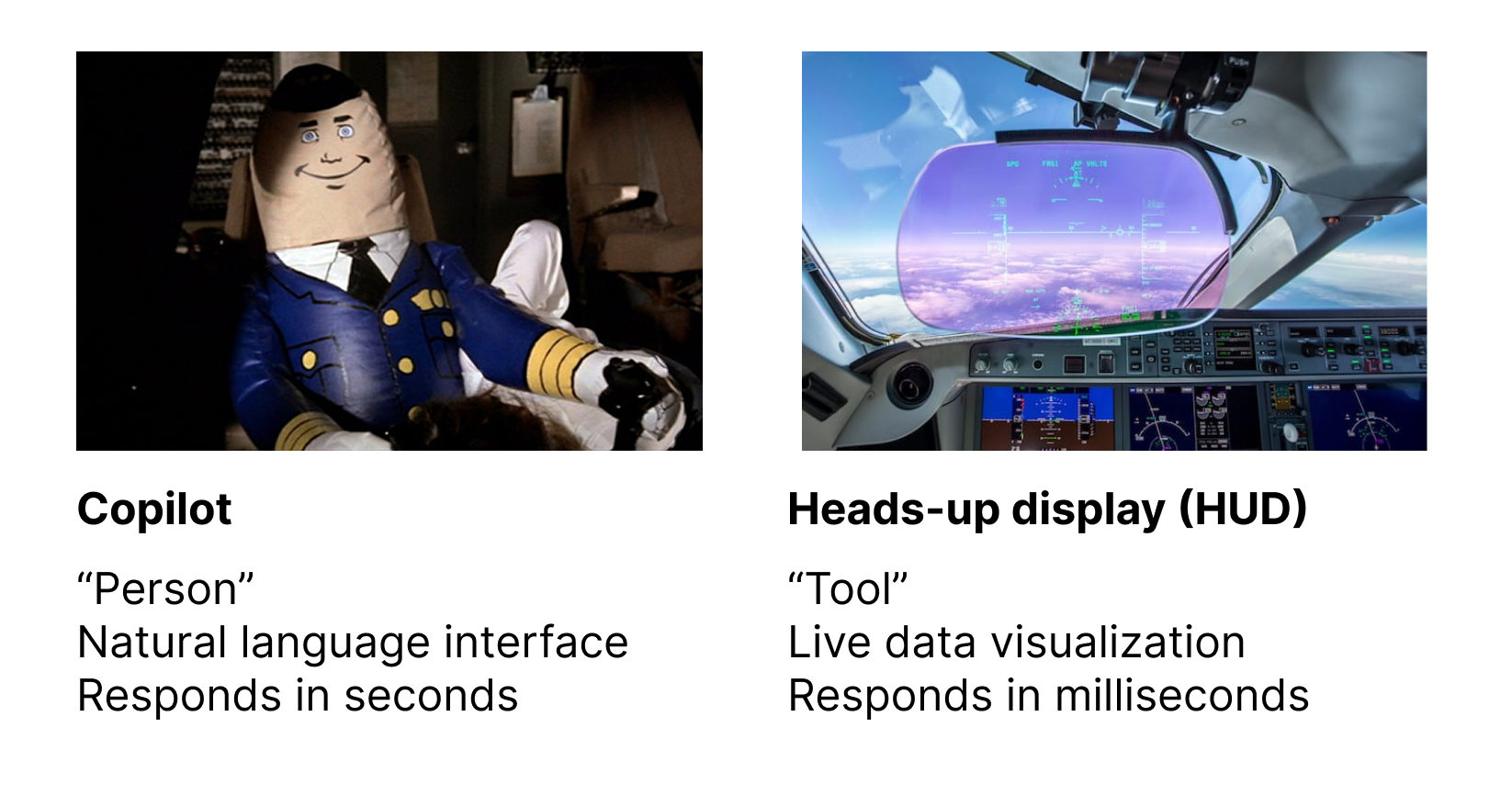
Designing HUDs
OK enough analogies. What might a HUD feel like in modern software design?
One familiar example is spellcheck. Think about it:**spellcheck isn’t designed as a “virtual collaborator” talking to you about your spelling.**It just instantly adds red squigglies when you misspell something! You now have a new sense you didn’t have before. It’s a HUD.
(This example comes from Jeffrey Heer’s excellentAgency plus Automationpaper. We may not consider spellcheck an AI feature today, but it’s still a fuzzy algorithm under the hood.)
 Spellcheck makes you aware of misspelled words without an “assistant” interface.Here’s another personal example from AI coding. Let’s say you want to fix a bug. The obvious “copilot” way is to open an agent chat and ask it to do the fix.
But there’s another approach I’ve found more powerful at times:**use AI to build a custom debugger UI which visualizes the behavior of my program!**In one example, Ibuilt a hacker-themed debug view of a Prolog interpreter.
With the debugger, I have a HUD! I have new senses, I can see how my program runs. The HUD extends beyond the narrow task of fixing the bug. I can ambiently build up my own understanding, spotting new problems and opportunities.
Both the spellchecker and custom debuggers show that automation / “virtual assistant” isn’t the only possible UI. We can instead use tech to build better HUDs that enhance our human senses.
Tradeoffs
I don’t believe HUDs are universally better than copilots! But I do believeanyone serious about designing for AI should consider non-copilot form factors that more directly extend the human mind.
So when should we use one or the other? I think it’s quite tricky to answer that, but we can try to use the airplane analogy for some intuition:
When pilots just want the plane to fly straight and level, they fully delegate that task to an autopilot, which is close to a “virtual copilot”. But if the plane just hit a flock of birds and needs to land in the Hudson, the pilot is going to take manual control, and we better hope they have great instruments that help them understand the situation.
In other words: routine predictable work might make sense to delegate to a virtual copilot / assistant. But when you’re shooting for extraordinary outcomes, perhaps the best bet is to equip human experts with new superpowers.
Further reading
- A nice discussion of one approach to this idea can be found inUsing Artificial Intelligence to Augment Human Intelligenceby Michael Nielsen and Shan Carter.
- A more cryptic take on the same topic:Is chat a good UI for AI? A Socratic dialogue
- A discussion of how the the HUD philosophy intersects with on-demand software creation:Malleable software in the age of LLMs
相似文章
@hwwaanng: https://x.com/hwwaanng/status/2053830423331865077
文章分析了 Anthropic 为何将 Claude Code 桌面应用的新 UI 设计得更简洁冷淡,指出这是为了适配 AI Agent 的视觉盲点,减少认知噪音以提高协同效率,并探讨了人机协作时代审美标准的重构。
@nash_su: 深度好文,这是 Jakob Nielsen(尼尔森诺曼集团创始人、UX 领域泰斗)写的关于 AI 时代用户体验设计的深度长文。 我读完极受启发,改写提炼成了中文版方便大家阅读,原文链接在文章末尾。 文中提到很多思路和概念我都在各种牛逼产品…
Jakob Nielsen’s in-depth article on UX design in the AI age, summarized in Chinese, highlights concepts seen in products but not yet integrated into a single leading solution.
@grapeot: 为什么我们一直在给 AI Agent 做错误的界面? 现在几乎所有的 AI 编程和 Agent 工具,默认界面全是聊天窗口(比如 Cursor、Claude Code)。但从效率来看,这种模仿微信、Slack 的交互,正在严重限制 AI …
文章批判当前AI编程工具普遍使用聊天窗口作为界面,认为这种设计从两端(用户和开发者)限制了AI的自主工作能力,并提出应转向异步、任务驱动的协作模式。
@yibie: 推荐这篇让我头皮发麻的文章。一个开发者回忆起 25 年前 AI 课上的教授说"Lisp 是 AI 的语言",然后他用 100 行 Common Lisp 写了一个完整 agent——8 行递归式的 agent loop,一个唯一工具是 e…
一个开发者用100行Common Lisp构建了一个AI agent,唯一的工具是eval,模型通过递归agent loop执行代码,并通过持久化transcript恢复技能,展示了Lisp作为AI语言的独特优势。
@yibie: 推荐这篇,Hamel Husain——世界上最懂 AI eval 的实践者之一——说了一句话:"这东西很难评估"本身就是一个产品气味。 如果你不给用户提供可检查的中间产物,他们就会重做一遍你的工作来验证输出。那你的产品对他们的价值是什么?…
文章推荐并总结了Hamel Husain的博客,指出“难评估”本身是产品设计缺陷,应优先设计便于用户验证的产品,并通过AI数据分析agent、教案生成器和工伤报告三个案例说明如何通过提供可检查的中间产物来提升产品价值。