handsomestWei/patent-disclosure-skill
Summary
这是一个GitHub项目,提供技能工具用于自动化专利点挖掘和交底书编写,支持发明、实用新型和外观设计专利,并包括专利通俗解读功能。
View Cached Full Text
Cached at: 08/30/26, 03:26 PM
handsomestWei/patent-disclosure-skill
Source: https://github.com/handsomestWei/patent-disclosure-skill
中国专利.skill
专利点挖掘与交底书(发明/实用/外观)编写,通俗解读专利,嗅探政策动向,辅助审查答复。




有设计文档和代码,但专利点还没梳?交底书要框图 + 可改 Word?
定稿后还要多轮补材料、纠错并留下修改追溯?
公开专利晦涩难懂,想快速看懂权要与落地语境?
初衷
专利交底书编写
做了多年核心研发,专利发明人那一栏从没写过我的名字。
代码是自己敲的,方案是自己扛的,轮到交底书却卡在「专利点怎么挖、查新怎么写、框图和 Word 怎么一次交得出去」。本技能把这一环打通:覆盖发明 / 实用新型 / 外观设计,结构图与外观图都能读懂、写进交底;从项目材料梳出可申请的点,查新、脱敏、成文、迭代另存——让真正干活的人,也能把技术贡献写进可交付的交底书里。
专利通俗解读
不止一篇。
公开专利常把阅读门槛抬得很高:权要绕、术语密、落地语境散落在说明书与附图里。本技能把单篇读成通俗笔记与图谱,并入库 Obsidian;依托双链、图谱、插件与 Bases 等生态,陆续解读的专利可以沉淀成只属于自己的私有专利知识库——权要、术语、线索与附图彼此勾连,越读越厚。再叠上 Obsidian CLI 与库内外连接能力,检索、批处理、和外部工具接力都更容易:从单篇通俗笔记,走向可检索、可关联、可继续生长的个人专利情报层,把沉睡在 PDF 里的技术细节重新点亮。库厚了之后,还能在这层之上做专利比对、挖掘与分析——同族对照、技术路线梳理、差异点扫描,把「读懂」推进到「用起来」。
运行效果
专利交底书编写
| 初版生成 首次落盘交付 |
迭代更新 多版本并存 + 对话记录 |
|---|---|

|

|
实用新型 / 外观 · 看图与出图
| 外观线稿 从产品图自动提炼造型轮廓 |
实用新型线稿 从结构图自动生成轮廓与部件序号引出 |
CAD 三维模型投影 从工程模型自动提取等轴测等多视角 |
|---|---|---|

|

|

|
专利通俗解读
| Obsidian 关系图 知识图谱与多色节点 |
解读 Canvas 叙事故事线 · 术语 · 公开线索 |
|---|---|

|

|
功能特性
专利交底书编写
支持 发明、实用新型、外观设计 三种专利类型(未指定时默认发明;材料偏结构/外观时可反问切换)。
| 能力 | 说明 |
|---|---|
| 专利类型 | 发明 / 实用新型 / 外观设计分模板成文;实用与外观先填 Schema,再写 figure_plan.yaml 排序入文图(成文不扫全 assets 临场挑图) |
| 项目扫描 | 按优先级读文档 / 代码;.docx / .pptx 先转 Markdown 再扫;可选扫描 .step/.stp 与原生 CAD(默认不解析,遇 STEP 成文不中断,交底落盘后再问)(project_scan.md) |
| 外观线稿 | 成文前选用或生成产品线稿(已有合格线稿优先,否则图生图 / 文生图);与干净实拍一并写入 Markdown 和 Word(design_lineart_assist.md) |
| 实用结构线稿 | 成文前选用或生成结构线稿,按 structure_schema.parts 写出子 SVG、总图相对引用并叠部件序号(structure_lineart_assist.md / structure_lineart_compose.md) |
| 专利点 | 候选点讨论与融合(按类型:invention|utility_model|design 挖点文件) |
| 查新 | 优先 国知局 · 中国专利公布公告(tools/crawl/cnipa_epub_search.py,--type 对齐类型);异常或无果时降级 WebSearch。著录写入第一章(prior_art_search.md) |
| 交底书成稿 | 脱敏模版;发明用 mermaid 框图;实用/外观按 figure_plan 嵌结构图或视图;定稿可出 .docx |
| 交付命名 | {案件名}_{YYYYMMDDHHmmss}.md 与同名 .docx(disclosure_builder.md §7.3) |
| 自检 / 迭代 | 逻辑与公式自检(不写入正文);合并 / 纠正另存新文件 + 交底书修订对话记录.md |
怎么开口:自然语言即可(专利挖掘、交底书、查新等),或 /交底书、/patent-disclosure-skill;尽量带上项目路径或技术主题,并点明类型(未指定默认发明)。
| 类型 | 典型场景 | 触发示例 |
|---|---|---|
| 发明 | 方法 / 系统 / 算法流程 | 「按发明写交底」「项目路径 …」 |
| 实用新型 | 形状、构造、连接与装配 | 「实用新型」「一种…装置/结构」 |
| 外观设计 | 外形、图案、色彩或其结合 | 「外观设计」「设计说明 / 视图」 |
已有交底上补材料或纠错时,按 merger.md / correction_handler.md 另存新稿(实用/外观改图或主题时同步 figure_plan)。细则见 SKILL.md、prompts/disclosure/intake.md。
专利通俗解读
强烈推荐安装 Obsidian:索引、Canvas 知识图谱、术语网与 callout 配色依赖库内呈现,才能发挥本模式的完整体验。安装与可选社区插件见 docs/obsidian-setup-guide.md。
| 能力 | 说明 |
|---|---|
| 取证解读 | 全文 / PDF 抽取 → 权要树、术语表、特征—说明书—附图对照(patent_plain_reader.md) |
| 叙述故事线 | 一句话总览 + 连贯叙事:把权要与说明书「讲成人话」,降低首次通读成本 |
| 知识图谱 | 单篇 *_图谱.canvas、多篇 _专利关联.canvas、术语双链与关系图配色;入库自动配置 CSS / Bases |
| 公开线索辅助 | 联网检索公开材料(≤3 条);Agent 读 URL 写摘要;L1–L4 旁注与 clues/ 落地,用行业语境辅助理解(非权要 / 说明书证据) |
怎么开口:读专利、专利解读、/读专利、/patent-read,并给出公开号或 PDF 路径。配置库环境变量 PATENT_READER_OBSIDIAN_VAULT 体验更完整;无库时可降级到 outputs/patent_reader/。流程见 tools/patent_reader/README.md、SKILL.md。
政策感知与技能自进化
审查指南、智能审查口径一变,交底写法很容易「还按老习惯」。需要时可以说一声「技能进化 / 政策雷达 / 政策审查动向嗅探」:联网看看国知局等官网近期政策与审查动向,把观点和原文链接整理成参考清单(默认 outputs/evolution/EVOL-*.md;确认沉淀后再拷到 docs/evolution/),帮你判断技能该不该跟、怎么跟。也可 /patent-evolve、/技能进化。默认不开;你点头确认前,不会擅自改交底/解读流程。细则见 SKILL.md「模式 C」与 prompts/evolution/。
审查答复辅助
审查意见一来,往往要翻旧案、对法条、想策略——经验散落在 PDF 和聊天记录里,很难复用。需要时可以说「审查答复 / 案例入库 / /审查答复」:自动完成「历史通知书与答复脱敏写入 Obsidian、打上法条/缺陷等标签以固化经验 → 对新通知书做标签过滤(向量模型可选;启用后叠加本地轻量向量相似度检索,相当于外挂一套属于自己的 RAG 知识库)→ 交大模型起草意见陈述」整条链路。也可把本地审查答复实务书先预读、再蒸馏成 oa/playbooks/ 经验手册(不进案例检索),写答复时按缺陷查阅。向量可跳过,也可中途开启并重建索引;向量不可用时仍靠标签检索继续出草稿。默认不开;产出为草稿,须人审后再递交。细则见 SKILL.md「模式 D」、docs/oa/README.md、tools/oa/README.md。
接入宿主、Python / Node、可选 STEP 等见 INSTALL.md。
示例
索引见 examples/README.md。完整产物落在 outputs/ 或 Obsidian 库。
| 示例 | 类型 | 材料 | 怎么开口 |
|---|---|---|---|
| 批任务调度 | 发明交底 | examples/example_batch_job_scheduler/(扫 knowledge/) |
「按发明写交底,项目路径 …/knowledge/」或 /交底书 |
| 汽车集成式电驱桥 | 实用新型交底 | examples/example_utility_model_ev_powertrain/ |
「实用新型交底,材料在 …/example_utility_model_ev_powertrain/」 |
| 折臂台灯 | 外观设计交底 | examples/example_design_desk_lamp/ |
「外观设计交底,材料在 …/example_design_desk_lamp/」 |
| 公开专利 PDF | 通俗解读 | examples/example_patent_reader/(PDF 本地自备) |
「读专利」+ 公开号或 PDF;/读专利、/patent-read |
| 政策 / 审查动向 | 技能自进化 | 无需本地样例(联网出清单 → outputs/evolution/EVOL-*.md) |
「技能进化 / 政策雷达 / 政策审查动向嗅探:近 12 个月国知局动向,整理观点↔链接,先别改技能」;/patent-evolve、/技能进化 |
| 审查答复样例 | 审查答复 | examples/example_oa_response/(2 历史案 + 1 待答复通知书) |
「审查答复:先入库 cases/,再用 pending/oa_notice_pending.md 出草稿;向量可跳过」;/审查答复、/oa |
支持作者
如果这个 Skill 对您有帮助,可以请我喝杯咖啡☕随缘支持,感谢感谢🙏🙏
| 随缘支持 | Star History |
|---|---|

|
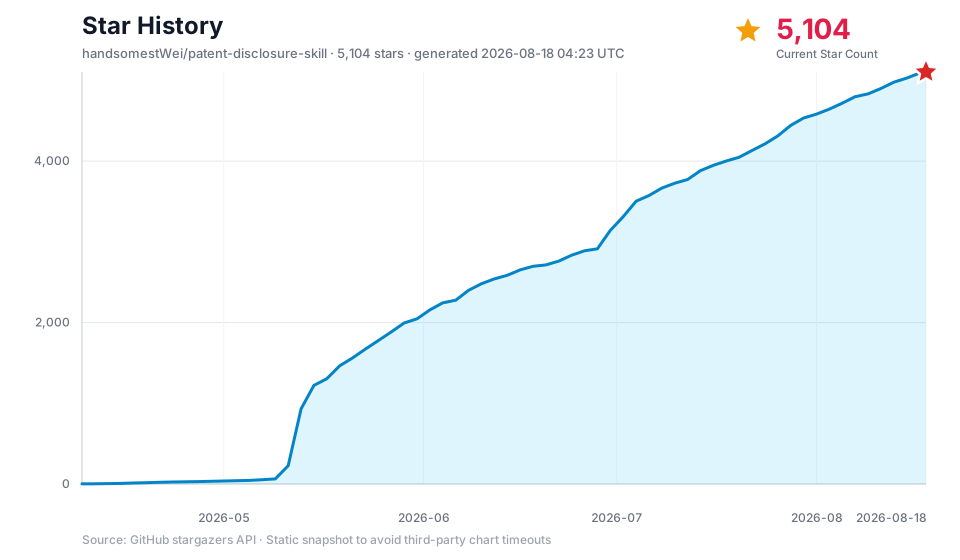
|
参考文档
- 技能入口与 Agent 流程(交底 / 解读 / 进化 / 审查答复)
- 详细安装说明
- 交底书:图示与转换 / 国知局工具
- 专利解读工具
- 审查答复 · 案例 RAG
- Obsidian 安装与可选社区插件(Windows)
- 示例案件与原材料
- 交底书模版细则
MIT License © handsomestWei
Similar Articles
@QingQ77: An AgentSkills skill that automatically generates Chinese patent technical disclosure documents from project documentation, including patent point mining, novelty search, desensitization, and self-check closure. Suitable for development teams with patent needs. https://github.com/handsomestWei/patent-disc…
A patent skill based on AgentSkills that automatically generates Chinese patent technical disclosure documents from project documentation and code, covering patent point mining, novelty search (prioritizing the China National Intellectual Property Administration publication announcement site), desensitization drafting, and self-check closure. Supports iterative revisions, outputting .md and .docx formats.
@GitHub_Daily: If you want to apply for a technology patent, but when writing the disclosure document, you need to draw system block diagrams and flow charts, and also edit Word documents, which is quite troublesome. On GitHub, I saw this Claude Code skill called "China Patent.skill" that runs through the entire process from project documentation to a completed patent disclosure document. Automatically scan project docs and code...
Introduces a Claude Code skill on GitHub called "China Patent.skill" that can automatically scan project documents and code, mine patent points, connect to the China National Intellectual Property Administration (CNIPA) for novelty search and comparison, and generate a Word disclosure document with block diagrams and flow charts, supporting iterative modification.
@frxiaobei: The complete collapse of intellectual property protection. Invention patent generation skill https://github.com/handsomestWei/patent-disclosure-skill… Software copyright generation skill https://github.com/Fokkyp/S…
The article introduces open-source AI agent skills, such as 'patent-disclosure-skill', designed to automate the generation of invention patent disclosures and software copyright applications. It highlights how these tools integrate with agents like Claude Code to streamline patent drafting, prior art search, and document formatting.
@aigclink: Open Source Software Copyright Application Skill: SoftwareCopyright-Skill - automatically generates application materials, saving you hundreds of dollars in agent fees for a software copyright. It lets AI read local projects, from project analysis, business understanding, application form information, operation manual to code materials, automatically generating a full set of software copyright application materials, including operation...
Open Source Software Copyright Application Skill uses AI to automatically generate a full set of software copyright application materials, including operation manuals, code materials, etc., suitable for small teams or individual developers to save on agency fees.
@GitHub_Daily: For independent developers creating software in China, applying for a software copyright is practically a mandatory step. However, the preparation process is truly a hassle, requiring application form fields, user manuals, and code excerpts, all of which must be consistent in format and information. By chance, I discovered the open-source SoftwareCopyright-Skill, which helps us...
SoftwareCopyright-Skill is an open-source tool designed to help independent developers generate a complete set of materials for software copyright applications with a single click (including application forms, user manuals, and code excerpts). It ensures the authenticity and controllability of the documents through local generation and extraction from actual source code.