Show HN: Pulse Local, a Mac budgeting app whose AI models run on your machine

Hacker News Top Products

Summary

Pulse Local is a Mac budgeting app that runs its AI models entirely on-device, keeping financial data and questions private while offering features like plans, targets, rollover, splits, and cash flow. It uses small local models with a double-reading verification approach for money answers and uses a pay-what-you-want one-time pricing model.

Hi HN, I&#x27;m Niz. Pulse Local is a budgeting app for Mac (Apple Silicon, beta) that answers questions about your spending with models that run on your machine. Local mode needs no account. The ledger and your questions stay on the machine, and the app sends no analytics or crash logs.<p>I felt there are not enough consumer apps that run locally with no calls to the outside world that help us manage sensitive corners of our lives. This app in its local variant only downloads a couple of models and occasional updates, it does not send any analytics nor data.<p>Features-wise, Pulse local is a complete budgeting app that offers an assistant built on top of a fine-tuned model and thousands of rules embedded in the code itself. I&#x27;m sharing it for free with options to help me continue experimenting with fine-tuning and expanding along this direction.<p>How it works: you import a CSV from any bank, in any currency. When you ask a question, a tuned Qwen3 0.6B model reads it into a structured query, and code, not the model, does the money math against the ledger. A 4B checker model double-checks each money answer; when the two readings disagree, the app says it is not sure instead of guessing. That change took wrong answers from about one in five to 5 in 494 questions across our last three tests. The write-up covers how we test, the designs that failed, and the limits of the claim: <a href="https:&#x2F;&#x2F;pulseos.finance&#x2F;pulse-local&#x2F;writing&#x2F;agree-or-not-sure" rel="nofollow">https:&#x2F;&#x2F;pulseos.finance&#x2F;pulse-local&#x2F;writing&#x2F;agree-or-not-sur...</a><p>The tuned weights are on Hugging Face (PulseOS&#x2F;pulse-local-qwen3-0.6b).<p>Limitations: the first start downloads about 2.9 GB of models. With the checker on, a money answer takes 12 to 14 seconds (you can turn the checker off). Small models can still misread an open-ended question. The app answers in English. Mac only for now; Windows is next.<p>The app is free. An optional Connected mode (Sync Pass, $29&#x2F;year) syncs US banks through Plaid; transactions pass through our server&#x27;s memory and are not stored.<p>Feedback welcome, especially on wrong answers and on questions it should handle but does not.
Original Article
View Cached Full Text

Cached at: 10/14/26, 12:59 AM

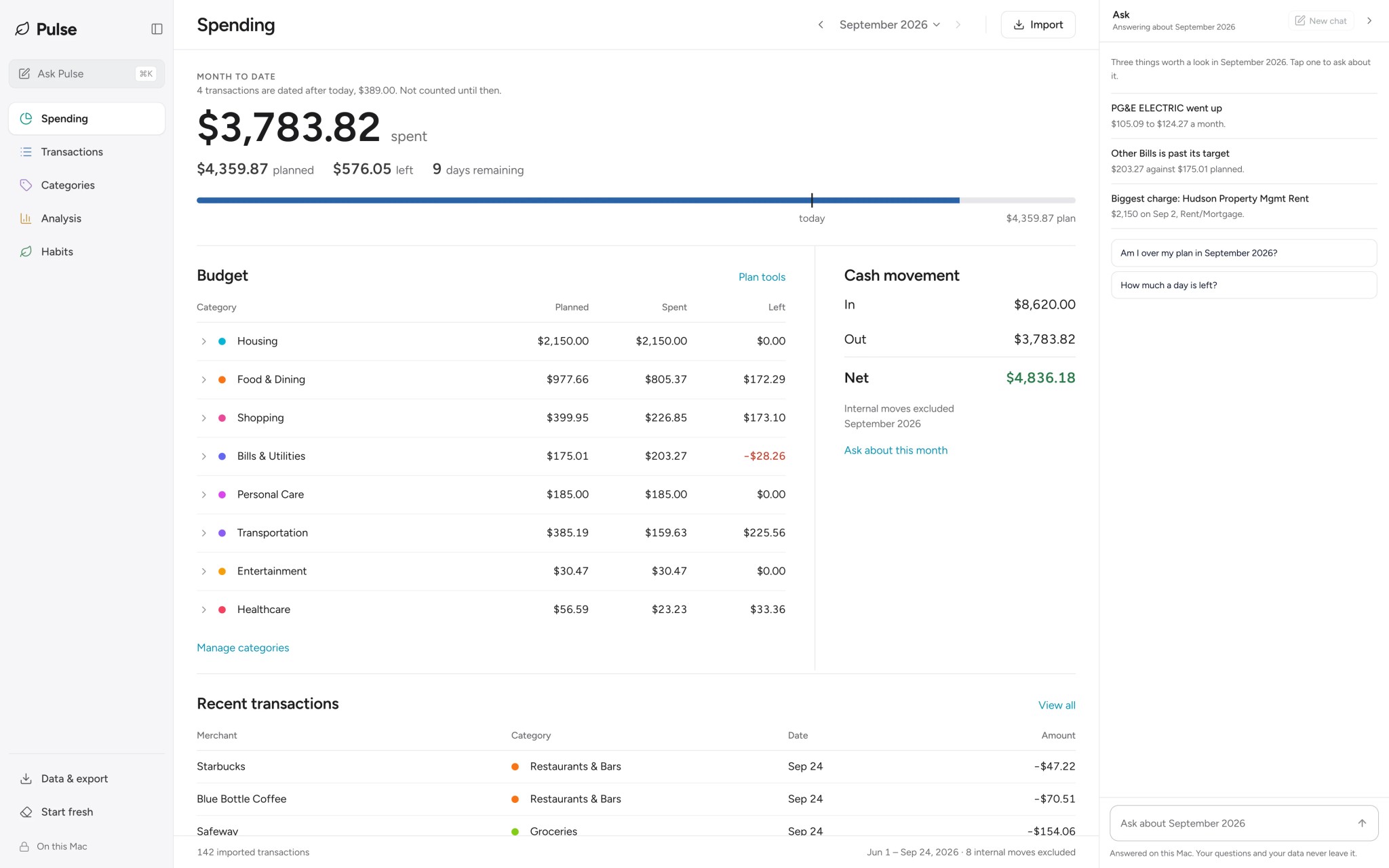
# Pulse Local: budgeting that never leaves your machine Source: [https://pulseos.finance/](https://pulseos.finance/) ## “Local” usually means your data\. Not your question\. Your ledger sits on your disk\. Then you ask something, and the question plus the rows that answer it go to a hosted model\. ## Ask about your money\. Keep the conversation private\. Find out where your money went, compare months, or check what is left in your budget\. Supported spending answers are calculated from your transactions and read twice before a figure is shown\. Check the month and category\.Labels above spending answers show what Pulse included\. Select one to change it\. Keep the conversation going\.Ask “by merchant” for a breakdown, or name another month to compare\. Your decisions stay yours\.Pulse explains your figures and everyday budgeting terms\. What to do about them is up to you\. Know the limits\.Pulse can misunderstand a question\. When its two readings disagree it says it is not sure instead of guessing, and AI answers are labelled\. ## See what you can ask\. Then make it your own\. These are real replies from the app, run on sample transactions\. The follow\-up questions show how to break an amount down or compare it with another month\. AskSeptember 2026 Pick a question on the right\. The replies are real: each one came out of the app, answered against a sample ledger\. 0asked0double\-checked0written by the model0 B sent ## A complete budgeting app\. Not a privacy demo\. Plans and targets, rules, rollover, splits, cash flow, forecast\. It covers the ground the most used budgeting apps cover, and does all of it on your machine\. ![Pulse Local, the Spending screen](https://pulseos.finance/_next/image?url=%2Fimages%2Fpulse-local%2Fspending.webp&w=2048&q=90) Spending\.One figure for the month, and every category against its plan\.Sample data\. The money maths was checked against six months of a real ledger, month by month, and matchedto the cent\. ## Same app\. Any price\. You pick\. We are a small team of ML practitioners and product people\. Once Pulse Local is on your machine it costs us nothing to run, so you can help us keep doing this, or use it for free\. Every feature, either way\. Use it free $0 Every feature, no account, no nagging\. Help us build $20 A thank\-you that pays for the next release\. Keep it going $40 For the people who want this to exist for years\. Your call Any Type the number yourself\. One dollar counts\. Every button ends at the same download; the paid ones come straight back here with it ready\. One payment, not a subscription, and nothing in the app checks which one you chose\. Bank sync is the one thing with a running cost on our side, so it is the one thing with a price of its own: the Sync Pass, $29 a year\. Beta for Mac with Apple Silicon, signed and notarised by Apple, so it opens like any other app and keeps itself up to date\. On Windows?[Tell us](mailto:[email protected]?subject=Pulse%20Local%20beta&body=Which%20machine%20do%20you%20run%3F)and we will write when it is ready\. ### Once it is on your machine ## What you give up\. You import a CSV, from any bank in any currency\. A live feed means a server holding your credential\. One machine\. Your ledger exists nowhere else\. Windows is next\. The app answers in English\. Older Intel Macs are not supported\. Small models, careful answers On open questions they are worse than a frontier model, so code does most of the work\. With the check on, a money answer takes 12 to 14 seconds, and when its two readings differ Pulse says it is not sure\.
Similar Articles

Local

Product Hunt

A new product called Local offers zero-friction local AI capabilities for Mac users, enabling easy on-device AI processing.

Hob

Product Hunt

Hob is a free, open-source desktop AI app for Mac, Windows, and Linux that runs on-device, auto-selects the best local model, and can read/edit files, fill PDFs, chart spreadsheets, and search the web while keeping all data local and working offline.

Localmaxxing (3 minute read)

TLDR AI

The article analyzes the viability of running AI inference locally on a MacBook Pro, comparing a local Qwen 35B model against the cloud-based Claude Opus 4.5. It concludes that local models are 2x faster for routine tasks, making them a practical choice for half of daily workloads despite a slight capability gap.