@Xudong07452910: Anthropic 刚写了一篇很实用的 Claude Code 使用指南。 里面有个细节我之前没有太认真想过: Claude 读过的文件、跑过的测试、终端输出,一旦进入当前 Session,后面每一轮基本都会继续带着它们。 所以一个 Cl…
摘要
Anthropic published a practical guide for Claude Code, emphasizing context management through session commands and discussing token optimization and prompt caching to improve efficiency in AI-assisted coding.
查看缓存全文
缓存时间: 2026/08/16 05:57
Anthropic 刚写了一篇很实用的 Claude Code 使用指南。
里面有个细节我之前没有太认真想过:
Claude 读过的文件、跑过的测试、终端输出,一旦进入当前 Session,后面每一轮基本都会继续带着它们。
所以一个 Claude Code Session 用得越久,问题可能不只是 Token 变多,Context 里也会堆满已经没用的信息。
Anthropic 给的建议其实都围绕这件事:
不同任务直接 /clear;长任务阶段结束用 /compact;文件尽量直接 @;测试和日志少输出废话,特别 noisy 的工作可以丢给 Subagent,让这些中间信息待在另一个 Context 里。
还有一点提到了我经常踩的坑:中途切 model、effort 或 Fast Mode,都可能打断 prompt cache。所以最好在一个 Session 开始前就选好。
现在发现用好 Coding Agent 很大一部分其实是在管理 Context。
给模型更多信息很容易,难的是知道哪些东西该进去,哪些应该及时扔掉。
Maximizing the value of your Claude Code sessions
Source: https://claude.com/blog/maximizing-the-value-of-your-claude-code-sessions
Input and output tokens
A request goes through the GPU in two phases, and they cost different amounts.
First, during prefill, the model reads your request and context: the system prompt, yourCLAUDE\.md, your message, and everything that’s been added to the conversation since (the files Claude has read and the output of the commands it ran). Those are your input tokens.
Then, during decode, it writes output tokens: its thinking, the tool calls it makes, and the text you see. This happens one token at a time; a 200-token response is 200 runs of the model, one after the other. Per token, decode keeps the GPU busy for a lot longer, which is why output is priced at roughly 5x input.
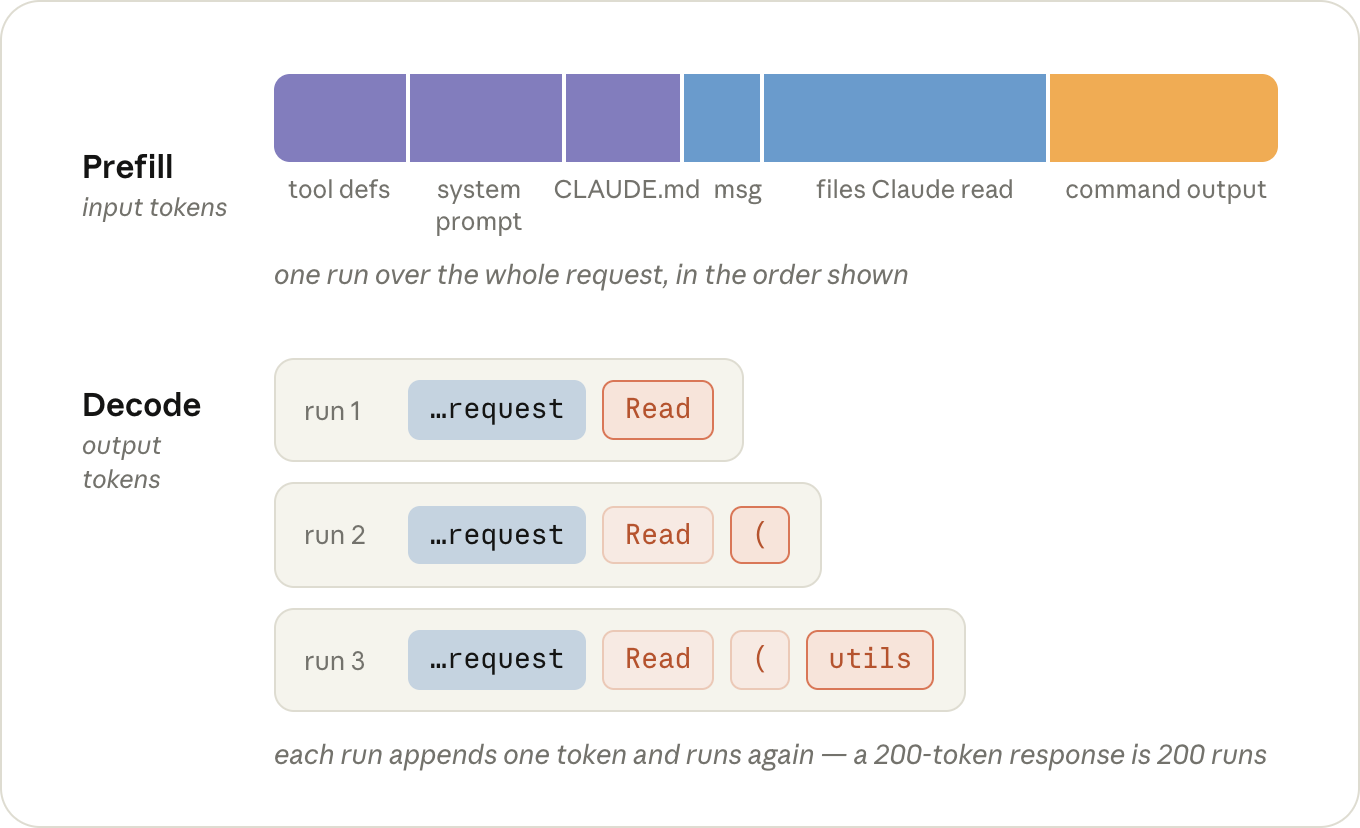
A lot of the output tokens in a session are thinking tokens, and how much thinking the model does per turn is what the effort level controls. Like the model, the level you pick with/effortsticks around as your default for the next session too.
**Tip:**run
/modeland/effortonce in a fresh session to see what you’re actually on. Both remember whatever you picked last time, and you want that decision to be deliberate.
**Tip:**if you already know a session is going to be grunt work,
MAX\_THINKING\_TOKENS=0claude turns thinking off for that one session (except on Fable 5), which is the step below/effortlow.
Prompt caching
If a request starts with exactly the same tokens as a request the server just saw, the state for that shared beginning comes out the same, so the server can keep it around from last time and only prefill whatever comes after it. This is called prompt caching.
Reading from the cache costs 0.1x the input price, because the server loads the state instead of computing it. Writing tokens into the cache costs a bit more than normal input, up to 2x, since the server also has to hold on to the state afterwards. But the write happens once per token, and the 0.1x reads happen on every turn after it.
Claude Code manages the prompt cache on every request, there’s nothing to turn on. However you can break it, so it’s important to know how to avoid these cost spikes.
Say we type “fix the failing test inutils\.test\.ts”. Here’s what Claude Code sends for it:
-
Claude Code assembles the first request out of the system prompt (tool definitions included), your
CLAUDE\.md, and your message, and sends it off (input tokens). Nothing is in the cache yet, so all of it gets prefilled and written into the cache. -
The model can’t fix a test it hasn’t seen, so it thinks for a moment and responds with a Read call for
utils\.test\.ts(output tokens). Claude Code reads the file, appends it to the conversation, and sends the whole thing again (input tokens). This time everything from request 1 is read back out of the cache at a tenth of the price, and the only thing prefilled at full price is what’s new: the Read call and the file. -
Now the model wants the file under test (output). Another Read, another append, and everything goes out again: requests 1 and 2 from the cache, the second file at full price (input).
-
The model responds with an Edit (output). Claude Code applies it, appends the result, and sends everything again. Same story: the Edit and its result are new, everything in front of them is a cache read (input).
-
The model runs
npm test(output). Claude Code appends the test output and sends everything again, with the test output as the only new part (input). -
The tests pass, and the model responds with a short summary (output). No tool call means nothing to append and no request 6, so we’re done.
That’s five requests for one small fix, and every one of them contained the entire conversation up to that point. A typical turn is lopsided: tens of thousands of tokens going in, a few hundred coming out. But only what’s new in that turn gets prefilled at full price.
That’s the whole per-turn bill: cache reads on the history, full input price on whatever’s new, and the output price on the response.
This applies on a subscription too. You don’t see these prices directly, but the same requests are what draw down your limits.
The cache has to match from the very start of the request forward, and requests always go out in the same order: tool definitions, then the system prompt, then the conversation (withCLAUDE\.mdat the front of it).
If anything in that prefix changes, everything behind it gets prefilled again. A tool result appended to the end of the conversation is the ideal case, since nothing is behind it. What throws the cache away is anything that changes the request further towards the front, or changes what the cache is keyed on:
/model: every model has its own cache, so on the next turn the entire conversation gets prefilled again at full price. (This includes opusplan, which switches models every time you go in or out of plan mode.)- **
/effort:**the effort level is part of what the cache is keyed on too, so it’s the same story. It’s why both/modeland/effortask you to confirm when you switch in the middle of a conversation. - Fast mode: also part of the key, and the re-prefill happens at fast mode prices, so if you’re going to turn it on, turn it on at the start. (Turning it off again is free, cache-wise.)
/compact: the conversation gets replaced with a shorter one, so nothing in it matches anymore (the system prompt in front of it survives). Writing the summary itself is cheap as long as the old conversation is still in the cache, so it’s a lot cheaper before a long break than after one.- **Time:**every turn resets the clock, but the cache expires after an hour on a subscription or five minutes on an API key (
ENABLE\_PROMPT\_CACHING\_1H=1makes it an hour). Come back later than that, and the next turn prefills the whole conversation again. Resuming an old session almost always does too: the cache is usually gone by then, and the system prompt gets rebuilt at launch anyway.
None of this means you should never switch models or effort. It means there are cheap moments to do it, the start of a session or right after a/clear, and expensive ones, the middle of a long conversation.
**Tip:**if the last few turns went somewhere you don’t want to keep,
/rewindto just before them instead of running/compact. Rewinding only cuts those turns off the end, so everything before them is still cached and it costs nothing. Compacting rewrites the whole conversation, so it always costs something.
What decides how many tokens a session sends
The main thing to know here is that nothing gets sent just once. Everything that ends up in the conversation, a file Claude read or the output of a command it ran, gets sent again on every turn after it, for the rest of the session.
It’s cached, so each of those re-sends is cheap, but cheap isn’t nothing, and it’s taking up room in the context the model has to think around on every turn too.
That’s really the whole cost model of a session: how many tokens end up in the context, how many turns they stay there, and how many contexts you’re running at the same time.
What ends up in the context
Part of what’s in the context is there before you type anything: the tool definitions, the system prompt,CLAUDE\.md, and whatever else gets loaded at startup.
Tip: run
/contextin a fresh session to see what’s in there before you’ve typed anything. KeepCLAUDE\.mdto specific instructions and move workflow-specific ones into skills, which only get loaded when they’re used. If there’s an MCP server you don’t need in this session, turn it off with/mcp.
Nearly everything else that gets added during the session is tool results: the files Claude reads, and the output of the commands it runs.
How much Claude reads mostly comes down to how much it has to figure out on its own. If you say “the tests are failing”, it first has to find out which tests: a grep or two, a few files opened to see which one is relevant, and all of those results stay in the context long after they’ve stopped being useful.
“Fix the failing test inutils\.test\.ts” skips the searching and costs one Read call for the file, and “Fix the failing test in@utils\.test\.ts” doesn’t cost the Read call either.
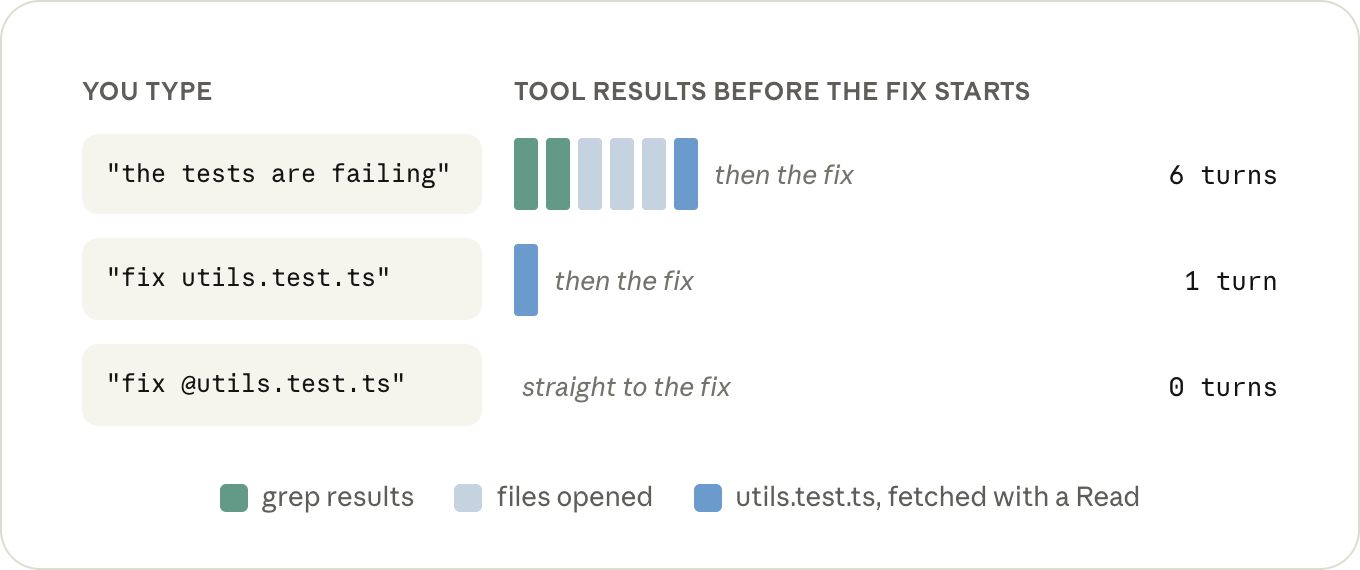
**Tip:**when you’re referring to a file, @-mention it instead of typing the path. Claude Code attaches the file to your message before anything gets sent, so it’s in the very first request and there’s no Read call for it. The file itself takes up the same room in the context either way, so you only need to mention it once per conversation: it stays there, and @-mentioning it again on a later turn generally attaches a second copy.
The other thing that fills up the context is the output of the commands Claude runs. Every time it runs your tests, a build, or a git log, whatever that prints gets appended to the conversation just like a file it read, and stays there for the same number of turns.
Really big outputs are actually fine: after 30,000 characters Claude Code writes the output to a file and only puts a short preview and the path in the conversation (BASH\_MAX\_OUTPUT\_LENGTHif you want to change it).
The problem is everything under that. A test runner that prints 400 passing tests one line at a time comes in under the limit, and those 400 lines are now part of every remaining turn.
Claude will often take care of this for you with flags and tail, and if you’d rather not leave it up to Claude, there’s a small hook in the docs that rewrites noisy commands before they run so only the lines that matter come back.
Tip: put the two or three commands you run all day in
CLAUDE\.md, quiet flags included, the way you’d type them yourself (“run a single test file withnpx vitest run <file\> \-\-reporter=dot"). It’s a small addition, but it saves a turn and a few hundred lines of output in every session after it.
How many turns it stays there
One long session costs more than the same work spread over a few short ones, and by more than you’d think, because turn 40 is also re-reading the 39 turns before it. You want the context in your session to be short and relevant, so don’t carry one task’s context into the next:/clearwhen you start something new, and/compactwhen the earlier part of the same task is done.
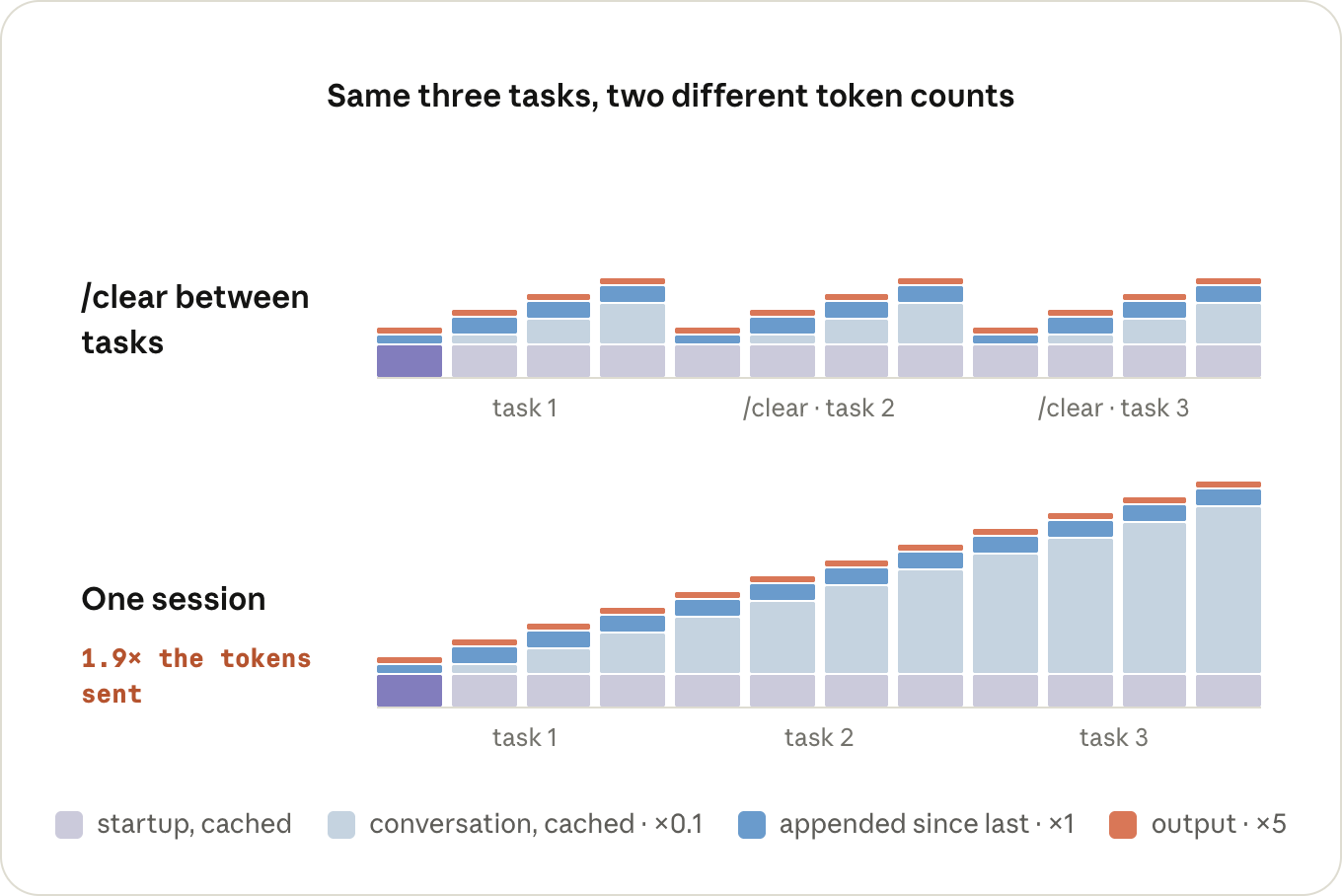
Tip:
/renamebefore you/clearif you’ll want the session back later. When you/compact, tell it what to keep, or put a “Compact instructions” section inCLAUDE\.mdif it’s always the same thing. And if you’re on a 1M model and would rather have the auto-compact safety net where it used to be,/autocompact 200kputs it back (needs Claude Code v2.1.221+).
Keep an eye on turns that happen when you’re not typing, too. A/loopfires as a full turn in the session you set it up in, carrying that whole conversation with it every time, and if it’s been more than an hour since the last turn, it’s a cache miss on top. Start a fresh session in another terminal and run the loop from there.
Subagents
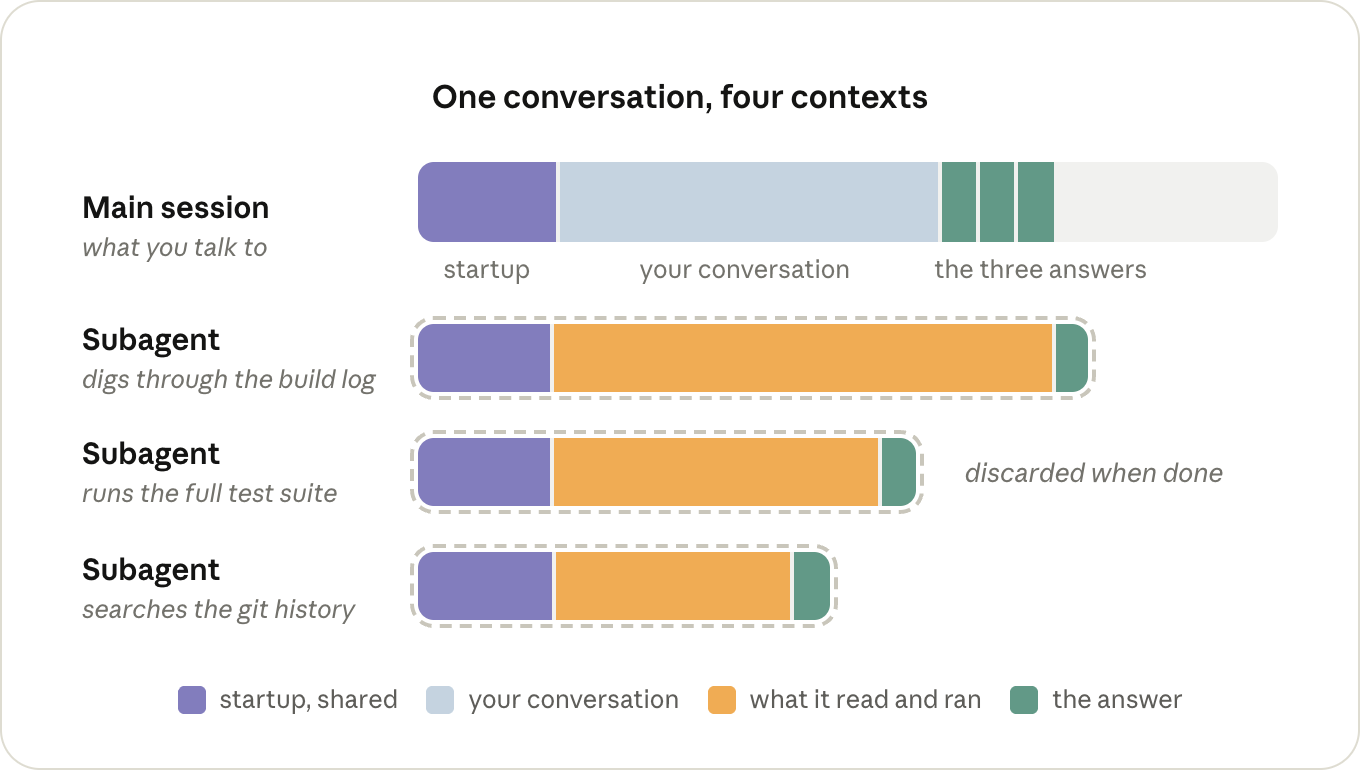
The other way to keep something out of your context is to have it happen in a different one, which is what subagents are for. A subagent gets its own context window, with its own system prompt, the tools, and yourCLAUDE\.md, but not your conversation. It runs its own turns, and the only thing that comes back to the main session is its answer. Everything else is thrown away once it’s done.
The downside of not having your conversation is that a subagent sometimes has to re-read things the main session already had, and it’s paying for its own turns while it does. For a small job it’s just overhead.
It pays off when a job produces a lot of output you don’t need to keep, like going through a log. Claude will often reach for one on its own for that kind of thing, and you can ask for one directly when it doesn’t (“go through this log in a subagent”). Just keep in mind that the main session only gets back what the subagent chose to report.
Tip: if there’s a noisy job you hand off over and over, give it a subagent definition of its own with model: haiku (or sonnet). Otherwise it runs on whatever your main session is running on.
Where to look first
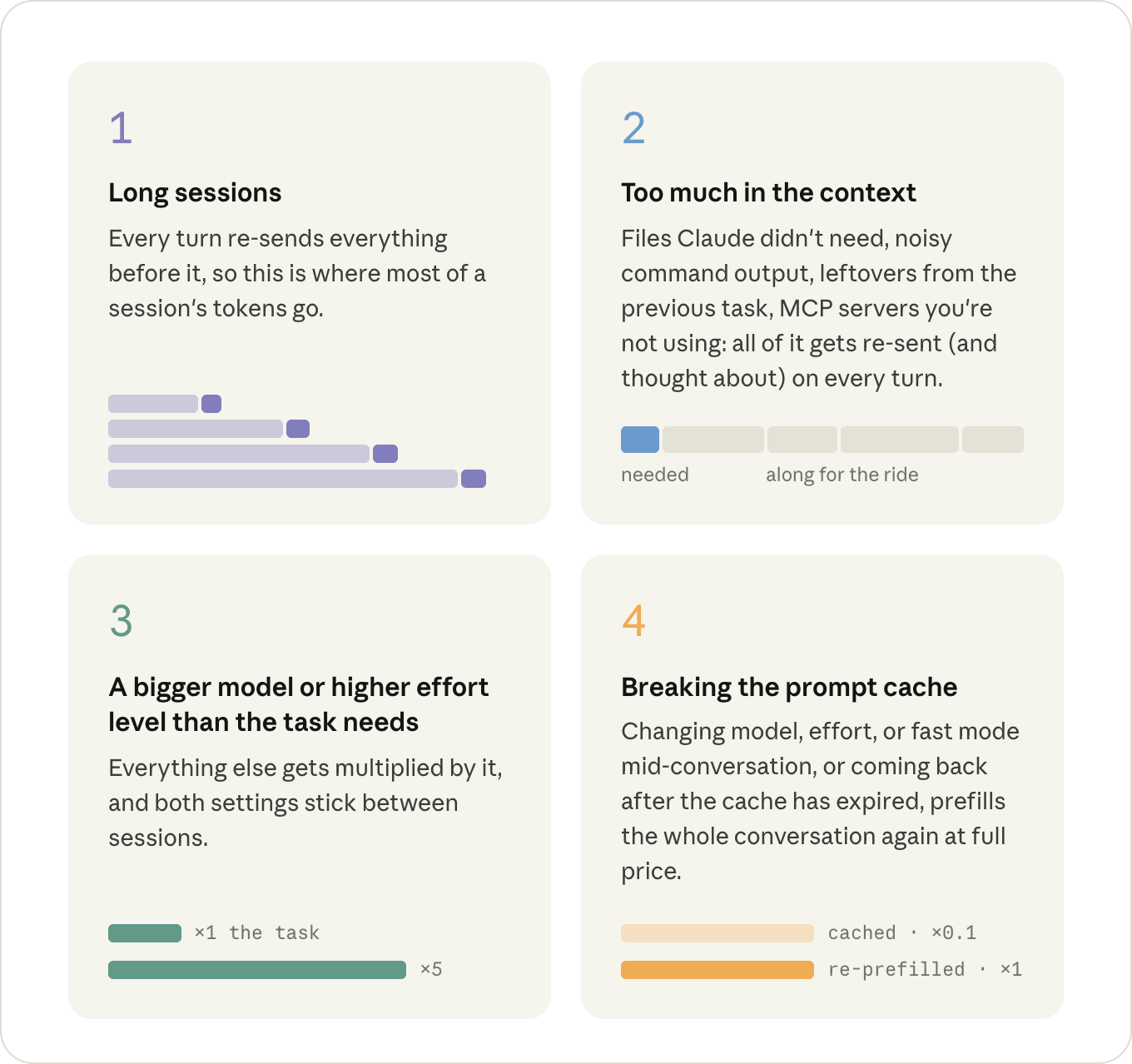
Of everything above, four things are worth keeping an eye on, roughly in order of how much they cost:
相似文章
@howlemont: 这篇 arXiv 的《Dive into Claude Code》,感觉最有用的地方是讲清楚了,其实Claude Code这种系统一旦进入真实环境,工程重点立刻就变的很现实。 Claude Code当然是个 coding agent,会跑…
该文章分析了arXiv上《Dive into Claude Code》论文,讨论了Claude Code这类编码Agent系统在真实环境中的工程实现重点,包括shell执行、文件修改和外部服务调用等功能。
@Xudong07452910: 开源教程推荐:《Claude How-To》—— Claude Code 最完整的进阶学习路径,含图、含模板、含自测 如果你一直是「用到什么查什么」的方式用 Claude Code,这个项目值得花 11-13 小时系统过一遍。 它用 Me…
推荐一个名为《Claude How-To》的开源教程,提供Claude Code的完整进阶学习路径,包含可视化流程图、生产级模板和自测问卷,适合开发者从零到熟练掌握Claude Code。
@seclink: 开发者正从“一次性提示词”转向“智能体循环”模式——即让像 Anthropic 旗下 Claude 这样的 AI 自主设定目标、利用工具执行操作、观察结果并不断迭代,直至任务成功。 Claude Code 的开发者 Boris Chern…
开发者正从一次性提示词转向'智能体循环'模式,让AI自主设定目标、利用工具迭代执行任务。Claude Code的开发者Boris Cherny已彻底放弃传统IDE,转而运行数百个智能体来监控问题和合并PR,甚至仅靠手机完成这些工作。
@thedelost: 这简直是纯金!Anthropic 刚刚分享了 Claude Code 最强技巧之一:同时运行 Sonnet、Haiku 和……
一篇介绍 Anthropic Claude Code「顾问」技巧的帖子:用 Sonnet 写代码、Haiku 并行探索、Opus 作为顾问随时待命,以更少的 token 获得更好的结果,并附上可直接粘贴的配置提示词。
@mylifcc: 想真正理解 Claude Code 是怎么跑起来的,而不是只停留在 prompt 层面? 这个 repo 太硬核了: shareAI-lab/learn-claude-code 「Bash is all you need」—— 从 0 到…
介绍一个从零实现类似 Claude Code 的 agent harness 的开源学习项目,包含 20 节课逐步增加核心机制,并提供可运行代码和文档。