The author re-evaluates the usability of Wayland on Linux in 2026, noting improvements but persistent issues with NVIDIA drivers and 8K monitor support, making it still not ready for their setup.
<p>Wayland is the successor to the X server (X11, Xorg) to implement the graphics
stack on Linux. The <a href="https://en.wikipedia.org/wiki/Wayland_(protocol)">Wayland</a>
project was actually started in 2008, a year before I created the <a href="https://i3wm.org/">i3 tiling
window manager for X11</a> in 2009 — but for the last 18 years
(!), Wayland was never usable on my computers. I don’t want to be stuck on
deprecated software, so I try to start using Wayland each year, and this
articles outlines what keeps me from migrating to Wayland in 2026.</p>
<h2 id="historical-context">Historical context</h2>
<p>For the first few years, Wayland rarely even started on my machines. When I was
lucky enough for something to show up, I could start some toy demo apps in the
demo compositor Weston.</p>
<p>Around 2014, GNOME started supporting Wayland. KDE followed a few years later.
Major applications (like Firefox, Chrome or Emacs) have been slower to adopt
Wayland and needed users to opt into experimental implementations via custom
flags or environment variables, until very recently, or — in some cases, like
<code>geeqie</code> — still as of today.</p>
<p>Unfortunately, the driver support situation remained poor for many years. With
nVidia graphics cards, which <a href="/posts/2017-12-11-dell-up3218k/">are the only cards that support my 8K
monitor</a>, Wayland would either not work at all
or exhibit heavy graphics glitches and crashes.</p>
<p>In the 2020s, more and more distributions announced looking to switch to Wayland
by default or even <a href="https://www.phoronix.com/news/Fedora-40-Eyes-No-X11-Session">drop their X11
sessions</a>, and RHEL
is <a href="https://www.redhat.com/en/blog/rhel-10-plans-wayland-and-xorg-server">winding down their contributions to the X
server</a>.</p>
<p>Modern Linux distributions like <a href="https://asahilinux.org/">Asahi Linux</a> (for
Macs, with their own GPU driver!) clearly consider Wayland their primary desktop
stack, and only support X11 on a best-effort basis.</p>
<p>So the pressure to switch to Wayland is mounting! Is it ready now? What’s
missing?</p>
<h2 id="making-wayland-start">Making Wayland start</h2>
<h3 id="wayland-hardware">Hardware</h3>
<p>I’m testing with my lab PC, which is a slightly upgraded version of <a href="/posts/2022-01-15-high-end-linux-pc/">my 2022
high-end Linux PC</a>.</p>
<p>I describe my setup in more details in <a href="/posts/2020-05-23-desk-setup/">stapelberg uses this: my 2020 desk
setup</a>.</p>
<p>Most importantly for this article, I use a <a href="/posts/2017-12-11-dell-up3218k/">Dell 8K 32"
monitor</a> (resolution: 7680x4320!), which, in my
experience, is only compatible with nVidia graphics cards (I try other cards
sometimes).</p>
<p>Hence, both the lab PC and my main PC contain an nVidia GPU:</p>
<ul>
<li>The lab PC contains a nVidia GeForce RTX 4070 Ti.</li>
<li>The main PC contains a nVidia GeForce RTX 3060 Ti.</li>
</ul>
<p>(In case you’re wondering why I use the older card in my PC: I had a crash once
where I suspected the GPU, so I switched back from the 4070 to my older 3060.)</p>
<h3 id="nvidia-driver-support">nVidia driver support</h3>
<p>For many years, nVidia drivers were entirely unsupported under Wayland.</p>
<p>Apparently, nVidia refused to support the API that Wayland was using, insisting
that their EGLStreams approach was superior. Luckily, with nVidia driver 495
(late 2021), they added support for GBM (Generic Buffer Manager).</p>
<p>But, even with GBM support, while you could now start many Wayland sessions, the
session wouldn’t run smoothly: You would see severe graphics glitches and
artifacts, preventing you from getting any work done.</p>
<p>The solution for the glitches was <em>explicit sync</em> support: because the nVidia
driver does not support <em>implicit sync</em> (like AMD or Intel), Wayland (and
wlroots, and sway) needed to get <a href="https://zamundaaa.github.io/wayland/2024/04/05/explicit-sync.html">explicit sync
support</a>.</p>
<p>Sway 1.11 (June 2025) and wlroots 0.19.0 are the first version with explicit
sync support.</p>
<h3 id="tile">Not working: TILE support for 8K monitor</h3>
<p>With the nVidia driver now working <em>per se</em> with Wayland, unfortunately that’s
still not good enough to use Wayland in my setup: my <a href="/posts/2017-12-11-dell-up3218k/">Dell UP3218K
monitor</a> requires two DisplayPort 1.4
connections with MST (Multi Stream Transport) and <code>TILE</code> support. This
combination worked just fine under X11 for the last 8+ years.</p>
<p>While GNOME successfully configures the monitor with its native resolution of
7680x4320@60, the monitor incorrectly shows up as two separate monitors in sway.</p>
<p>The reason behind this behavior is that <a href="https://gitlab.freedesktop.org/wlroots/wlroots/-/issues/1580">wlroots does not support the <code>TILE</code>
property (issue #1580 from
2019)</a>. Luckily,
in 2023, contributor <code>EBADBEEF</code> sent <a href="https://gitlab.freedesktop.org/wlroots/wlroots/-/merge_requests/4154">draft merge request
!4154</a>,
which adds support for the <code>TILE</code> property.</p>
<p>But, even with the <code>TILE</code> patch, my monitor would not work correctly: The right
half of the monitor would just stay black. The full picture is visible when
taking a screenshot with <code>grim</code>, so it seems like an output issue. I had a few
exchanges about this with <code>EBADBEEF</code> starting in August 2025 (thanks for taking
a look!), but we couldn’t figure out the issue.</p>
<p>A quarter later, I had made good experiences regarding debugging complex issues
with the coding assistant <a href="https://claude.com/product/claude-code">Claude Code</a>
(Opus 4.5 at the time of writing), so I decided to give it another try. Over two
days, I ran a number of tests to narrow down the issue, letting Claude analyze
source code (of sway, wlroots, Xorg, mesa, …) and produce test programs that I
could run manually.</p>
<p>Ultimately, I ended up with a minimal reproducer program (independent of
Wayland) that shows how the <code>SRC_X</code> DRM property does not work on nVidia (but
does work on Intel, for example!): I posted a <a href="https://forums.developer.nvidia.com/t/bug-right-half-right-tile-of-my-8k-monitor-is-black-on-wlroots-based-wayland-compositors/355579">bug report with a video in the
nVidia
forum</a>
and hope an nVidia engineer will take a look!</p>
<p>Crucially, with the bug now identified, I had Claude implement a workaround:
copy the right half of the screen (at <code>SRC_X=3840</code>) to another buffer, and then
display <em>that buffer</em>, but with <code>SRC_X=0</code>.</p>
<p>With <a href="https://gitlab.freedesktop.org/wlroots/wlroots/-/merge_requests/4154#note_3249071">that
patch</a>
applied, for the first time, I can use Sway on my 8K monitor! 🥳</p>
<hr>
<p>By the way, when I mentioned that GNOME successfully configures the native
resolution, that doesn’t mean the monitor is usable with GNOME! While GNOME
supports tiled displays, the updates of individual tiles are not synchronized,
so you see heavy tearing in the middle of the screen, much worse than anything I
have ever observed under X11. GNOME/mutter <a href="https://gitlab.gnome.org/GNOME/mutter/-/merge_requests/4822">merge request
!4822</a> should
hopefully address this.</p>
<h3 id="software-nixos">Software: NixOS</h3>
<p>During 2025, I <a href="/posts/tags/nix/">switched all my computers to NixOS</a>. Its
declarative approach is really nice for doing such tests, because you can
reliably restore your system to an earlier version.</p>
<p>To make a Wayland/sway session available on my NixOS 25.11 installation, I added
the following lines to my NixOS configuration file (<code>configuration.nix</code>):</p>
<div class="highlight"><pre tabindex="0" style="background-color:#f0f0f0;-moz-tab-size:4;-o-tab-size:4;tab-size:4;"><code class="language-nix" data-lang="nix"><span style="display:flex;"><span><span style="color:#60a0b0;font-style:italic"># GDM display manager (can launch both X11/i3 and Wayland/Sway sessions)</span>
</span></span><span style="display:flex;"><span>services<span style="color:#666">.</span>displayManager<span style="color:#666">.</span>gdm<span style="color:#666">.</span>enable <span style="color:#666">=</span> <span style="color:#60add5">true</span>;
</span></span><span style="display:flex;"><span>services<span style="color:#666">.</span>displayManager<span style="color:#666">.</span>gdm<span style="color:#666">.</span>autoSuspend <span style="color:#666">=</span> <span style="color:#60add5">false</span>;
</span></span><span style="display:flex;"><span>
</span></span><span style="display:flex;"><span><span style="color:#60a0b0;font-style:italic"># enable GNOME (for testing)</span>
</span></span><span style="display:flex;"><span>services<span style="color:#666">.</span>desktopManager<span style="color:#666">.</span>gnome<span style="color:#666">.</span>enable <span style="color:#666">=</span> <span style="color:#60add5">true</span>;
</span></span><span style="display:flex;"><span>
</span></span><span style="display:flex;"><span>programs<span style="color:#666">.</span>sway <span style="color:#666">=</span> {
</span></span><span style="display:flex;"><span> enable <span style="color:#666">=</span> <span style="color:#60add5">true</span>;
</span></span><span style="display:flex;"><span> wrapperFeatures<span style="color:#666">.</span>gtk <span style="color:#666">=</span> <span style="color:#60add5">true</span>;
</span></span><span style="display:flex;"><span> extraOptions <span style="color:#666">=</span> [ <span style="color:#4070a0">"--unsupported-gpu"</span> ];
</span></span><span style="display:flex;"><span>};
</span></span></code></pre></div><p>I also added the following Wayland-specific programs to <code>environment.systemPackages</code>:</p>
<div class="highlight"><pre tabindex="0" style="background-color:#f0f0f0;-moz-tab-size:4;-o-tab-size:4;tab-size:4;"><code class="language-nix" data-lang="nix"><span style="display:flex;"><span>environment<span style="color:#666">.</span>systemPackages <span style="color:#666">=</span> <span style="color:#007020;font-weight:bold">with</span> pkgs; [
</span></span><span style="display:flex;"><span> <span style="color:#60a0b0;font-style:italic"># …</span>
</span></span><span style="display:flex;"><span> foot <span style="color:#60a0b0;font-style:italic"># terminal emulator</span>
</span></span><span style="display:flex;"><span> wtype <span style="color:#60a0b0;font-style:italic"># replacement for xdotool type</span>
</span></span><span style="display:flex;"><span> fuzzel <span style="color:#60a0b0;font-style:italic"># fuzzy matching program starter</span>
</span></span><span style="display:flex;"><span> wayland-utils <span style="color:#60a0b0;font-style:italic"># for wayland-info(1)</span>
</span></span><span style="display:flex;"><span> gammastep <span style="color:#60a0b0;font-style:italic"># redshift replacement</span>
</span></span><span style="display:flex;"><span>];
</span></span></code></pre></div><p>Note that activating this configuration kills your running X11 session, if any.</p>
<p>Just to be sure, I rebooted the entire machine after changing the configuration.</p>
<h2 id="results">Experiment results</h2>
<p>With this setup, I spent about one full work day in a Wayland session. Trying to
actually get some work done uncovers issues that might not show in casual
testing. Most of the day was spent trying to fix Wayland issues 😅. The
following sections explain what I have learned/observed.</p>
<h3 id="sway">Desktop: i3 → sway</h3>
<p>Many years ago, when Wayland became more popular, people asked on the i3 issue
tracker if i3 would be ported to Wayland. I said no: How could I port a program
to an environment that doesn’t even run on any of my computers? But also, I knew
that with working a full-time job, I wouldn’t have time to be an early adopter
and shape Wayland development.</p>
<p>This attitude resulted in Drew DeVault starting the
<a href="https://en.wikipedia.org/wiki/Sway_(window_manager)">Sway</a> project around 2016,
which aims to be a Wayland version of i3. I don’t see Sway as
competition. Rather, I thought it was amazing that people liked the i3 project
so much that they would go through the trouble of creating a similar program for
other environments! What a nice compliment! 😊</p>
<p>Sway aims to be compatible with i3 configuration files, and it mostly is.</p>
<p>If you’re curious, here is what I changed from the Sway defaults, mostly moving
key bindings around for the <a href="https://neo-layout.org/">NEO keyboard layout</a> I
use, and configuring <code>input</code>/<code>output</code> blocks that I formerly configured in <a href="https://github.com/stapelberg/configfiles/blob/c896b138b2f50e1badf1ee862678adb820d58473/xsession">my
<code>~/.xsession</code>
file</a>:</p>
<details>
<summary>my changes to the default Sway config</summary>
<div class="highlight"><pre tabindex="0" style="background-color:#f0f0f0;-moz-tab-size:4;-o-tab-size:4;tab-size:4;"><code class="language-diff" data-lang="diff"><span style="display:flex;"><span><span style="color:#a00000">--- /home/michael/src/sway/config.in 2025-09-24 19:08:38.876573260 +0200
</span></span></span><span style="display:flex;"><span><span style="color:#a00000"></span><span style="color:#00a000">+++ /home/michael/.config/sway/config 2025-12-31 15:50:38.616697542 +0100
</span></span></span><span style="display:flex;"><span><span style="color:#00a000"></span><span style="color:#800080;font-weight:bold">@@ -9,19 +9,76 @@
</span></span></span><span style="display:flex;"><span><span style="color:#800080;font-weight:bold"></span> # Logo key. Use Mod1 for Alt.
</span></span><span style="display:flex;"><span> set $mod Mod4
</span></span><span style="display:flex;"><span> # Home row direction keys, like vim
</span></span><span style="display:flex;"><span><span style="color:#a00000">-set $left h
</span></span></span><span style="display:flex;"><span><span style="color:#a00000">-set $down j
</span></span></span><span style="display:flex;"><span><span style="color:#a00000">-set $up k
</span></span></span><span style="display:flex;"><span><span style="color:#a00000">-set $right l
</span></span></span><span style="display:flex;"><span><span style="color:#a00000"></span><span style="color:#00a000">+set $left n
</span></span></span><span style="display:flex;"><span><span style="color:#00a000">+set $down r
</span></span></span><span style="display:flex;"><span><span style="color:#00a000">+set $up t
</span></span></span><span style="display:flex;"><span><span style="color:#00a000">+set $right d
</span></span></span><span style="display:flex;"><span><span style="color:#00a000"></span> # Your preferred terminal emulator
</span></span><span style="display:flex;"><span> set $term foot
</span></span><span style="display:flex;"><span> # Your preferred application launcher
</span></span><span style="display:flex;"><span><span style="color:#a00000">-set $menu wmenu-run
</span></span></span><span style="display:flex;"><span><span style="color:#a00000"></span><span style="color:#00a000">+set $menu fuzzel
</span></span></span><span style="display:flex;"><span><span style="color:#00a000">+
</span></span></span><span style="display:flex;"><span><span style="color:#00a000">+font pango:Bitstream Vera Sans Mono 8
</span></span></span><span style="display:flex;"><span><span style="color:#00a000">+
</span></span></span><span style="display:flex;"><span><span style="color:#00a000">+titlebar_padding 4 2
</span></span></span><span style="display:flex;"><span><span style="color:#00a000">+
</span></span></span><span style="display:flex;"><span><span style="color:#00a000">+# Make Xwayland windows recognizeable:
</span></span></span><span style="display:flex;"><span><span style="color:#00a000">+for_window [shell="xwayland"] title_format "%title [Xwayland]"
</span></span></span><span style="display:flex;"><span><span style="color:#00a000">+
</span></span></span><span style="display:flex;"><span><span style="color:#00a000">+workspace_layout stacking
</span></span></span><span style="display:flex;"><span><span style="color:#00a000">+
</span></span></span><span style="display:flex;"><span><span style="color:#00a000">+# Open two terminal windows side-by-side on new workspaces:
</span></span></span><span style="display:flex;"><span><span style="color:#00a000">+# https://github.com/stapelberg/workspace-populate-for-i3
</span></span></span><span style="display:flex;"><span><span style="color:#00a000">+exec ~/go/bin/workspace-populate-for-i3
</span></span></span><span style="display:flex;"><span><span style="color:#00a000">+
</span></span></span><span style="display:flex;"><span><span style="color:#00a000">+exec gammastep -l 47.31:8.50 -b 0.9
</span></span></span><span style="display:flex;"><span><span style="color:#00a000">+
</span></span></span><span style="display:flex;"><span><span style="color:#00a000">+input * {
</span></span></span><span style="display:flex;"><span><span style="color:#00a000">+ xkb_layout "de"
</span></span></span><span style="display:flex;"><span><span style="color:#00a000">+ xkb_variant "neo"
</span></span></span><span style="display:flex;"><span><span style="color:#00a000">+ repeat_delay 250
</span></span></span><span style="display:flex;"><span><span style="color:#00a000">+ repeat_rate 30
</span></span></span><span style="display:flex;"><span><span style="color:#00a000">+}
</span></span></span><span style="display:flex;"><span><span style="color:#00a000">+
</span></span></span><span style="display:flex;"><span><span style="color:#00a000">+input * {
</span></span></span><span style="display:flex;"><span><span style="color:#00a000">+ accel_profile adaptive
</span></span></span><span style="display:flex;"><span><span style="color:#00a000">+ pointer_accel 0.2
</span></span></span><span style="display:flex;"><span><span style="color:#00a000">+}
</span></span></span><span style="display:flex;"><span><span style="color:#00a000"></span>
</span></span><span style="display:flex;"><span> ### Output configuration
</span></span><span style="display:flex;"><span> #
</span></span><span style="display:flex;"><span><span style="color:#a00000">-# Default wallpaper (more resolutions are available in @datadir@/backgrounds/sway/)
</span></span></span><span style="display:flex;"><span><span style="color:#a00000">-output * bg @datadir@/backgrounds/sway/Sway_Wallpaper_Blue_1920x1080.png fill
</span></span></span><span style="display:flex;"><span><span style="color:#a00000"></span><span style="color:#00a000">+output * bg /dev/null fill #333333
</span></span></span><span style="display:flex;"><span><span style="color:#00a000">+output * scale 3
</span></span></span><span style="display:flex;"><span><span style="color:#00a000"></span> #
</span></span><span style="display:flex;"><span> # Example configuration:
</span></span><span style="display:flex;"><span> #
</span></span><span style="display:flex;"><span><span style="color:#800080;font-weight:bold">@@ -33,14 +90,41 @@
</span></span></span><span style="display:flex;"><span><span style="color:#800080;font-weight:bold"></span> #
</span></span><span style="display:flex;"><span> # Example configuration:
</span></span><span style="display:flex;"><span> #
</span></span><span style="display:flex;"><span><span style="color:#a00000">-# exec swayidle -w \
</span></span></span><span style="display:flex;"><span><span style="color:#a00000">-# timeout 300 'swaylock -f -c 000000' \
</span></span></span><span style="display:flex;"><span><span style="color:#a00000">-# timeout 600 'swaymsg "output * power off"' resume 'swaymsg "output * power on"' \
</span></span></span><span style="display:flex;"><span><span style="color:#a00000">-# before-sleep 'swaylock -f -c 000000'
</span></span></span><span style="display:flex;"><span><span style="color:#a00000"></span><span style="color:#00a000">+exec swayidle -w \
</span></span></span><span style="display:flex;"><span><span style="color:#00a000">+ before-sleep '~/swaylock.sh' \
</span></span></span><span style="display:flex;"><span><span style="color:#00a000">+ lock '~/swaylock.sh'
</span></span></span><span style="display:flex;"><span><span style="color:#00a000"></span> #
</span></span><span style="display:flex;"><span> # This will lock your screen after 300 seconds of inactivity, then turn off
</span></span><span style="display:flex;"><span> # your displays after another 300 seconds, and turn your screens back on when
</span></span><span style="display:flex;"><span> # resumed. It will also lock your screen before your computer goes to sleep.
</span></span><span style="display:flex;"><span><span style="color:#00a000">+bindsym $mod+l exec loginctl lock-session
</span></span></span><span style="display:flex;"><span><span style="color:#00a000">+
</span></span></span><span style="display:flex;"><span><span style="color:#00a000">+ # Notifications
</span></span></span><span style="display:flex;"><span><span style="color:#00a000">+ bindsym $mod+period exec dunstctl close
</span></span></span><span style="display:flex;"><span><span style="color:#00a000"></span>
</span></span><span style="display:flex;"><span> ### Input configuration
</span></span><span style="display:flex;"><span> #
</span></span><span style="display:flex;"><span><span style="color:#800080;font-weight:bold">@@ -63,11 +147,13 @@
</span></span></span><span style="display:flex;"><span><span style="color:#800080;font-weight:bold"></span> # Start a terminal
</span></span><span style="display:flex;"><span> bindsym $mod+Return exec $term
</span></span><span style="display:flex;"><span>
</span></span><span style="display:flex;"><span> # Kill focused window
</span></span><span style="display:flex;"><span><span style="color:#a00000">- bindsym $mod+Shift+q kill
</span></span></span><span style="display:flex;"><span><span style="color:#a00000"></span><span style="color:#00a000">+ bindsym $mod+Shift+x kill
</span></span></span><span style="display:flex;"><span><span style="color:#00a000"></span>
</span></span><span style="display:flex;"><span> # Start your launcher
</span></span><span style="display:flex;"><span><span style="color:#a00000">- bindsym $mod+d exec $menu
</span></span></span><span style="display:flex;"><span><span style="color:#a00000"></span><span style="color:#00a000">+ bindsym $mod+a exec $menu
</span></span></span><span style="display:flex;"><span><span style="color:#00a000"></span>
</span></span><span style="display:flex;"><span> # Drag floating windows by holding down $mod and left mouse button.
</span></span><span style="display:flex;"><span> # Resize them with right mouse button + $mod.
</span></span><span style="display:flex;"><span><span style="color:#800080;font-weight:bold">@@ -142,12 +228,11 @@
</span></span></span><span style="display:flex;"><span><span style="color:#800080;font-weight:bold"></span> bindsym $mod+v splitv
</span></span><span style="display:flex;"><span>
</span></span><span style="display:flex;"><span> # Switch the current container between different layout styles
</span></span><span style="display:flex;"><span><span style="color:#a00000">- bindsym $mod+s layout stacking
</span></span></span><span style="display:flex;"><span><span style="color:#a00000"></span><span style="color:#00a000">+ bindsym $mod+i layout stacking
</span></span></span><span style="display:flex;"><span><span style="color:#00a000"></span> bindsym $mod+w layout tabbed
</span></span><span style="display:flex;"><span><span style="color:#a00000">- bindsym $mod+e layout toggle split
</span></span></span><span style="display:flex;"><span><span style="color:#a00000"></span>
</span></span><span style="display:flex;"><span> # Make the current focus fullscreen
</span></span><span style="display:flex;"><span><span style="color:#a00000">- bindsym $mod+f fullscreen
</span></span></span><span style="display:flex;"><span><span style="color:#a00000"></span><span style="color:#00a000">+ bindsym $mod+e fullscreen
</span></span></span><span style="display:flex;"><span><span style="color:#00a000"></span>
</span></span><span style="display:flex;"><span> # Toggle the current focus between tiling and floating mode
</span></span><span style="display:flex;"><span> bindsym $mod+Shift+space floating toggle
</span></span><span style="display:flex;"><span><span style="color:#800080;font-weight:bold">@@ -156,7 +241,7 @@
</span></span></span><span style="display:flex;"><span><span style="color:#800080;font-weight:bold"></span> bindsym $mod+space focus mode_toggle
</span></span><span style="display:flex;"><span>
</span></span><span style="display:flex;"><span> # Move focus to the parent container
</span></span><span style="display:flex;"><span><span style="color:#a00000">- bindsym $mod+a focus parent
</span></span></span><span style="display:flex;"><span><span style="color:#a00000"></span><span style="color:#00a000">+ bindsym $mod+u focus parent
</span></span></span><span style="display:flex;"><span><span style="color:#00a000"></span> #
</span></span><span style="display:flex;"><span> # Scratchpad:
</span></span><span style="display:flex;"><span> #
</span></span><span style="display:flex;"><span><span style="color:#800080;font-weight:bold">@@ -192,37 +277,25 @@
</span></span></span><span style="display:flex;"><span><span style="color:#800080;font-weight:bold"></span> bindsym Return mode "default"
</span></span><span style="display:flex;"><span> bindsym Escape mode "default"
</span></span><span style="display:flex;"><span> }
</span></span><span style="display:flex;"><span><span style="color:#a00000">-bindsym $mod+r mode "resize"
</span></span></span><span style="display:flex;"><span><span style="color:#a00000"></span><span style="color:#00a000">+#bindsym $mod+r mode "resize"
</span></span></span><span style="display:flex;"><span><span style="color:#00a000"></span>
</span></span><span style="display:flex;"><span> #
</span></span><span style="display:flex;"><span> # Status Bar:
</span></span><span style="display:flex;"><span> #
</span></span><span style="display:flex;"><span> # Read `man 5 sway-bar` for more information about this section.
</span></span><span style="display:flex;"><span> bar {
</span></span><span style="display:flex;"><span><span style="color:#a00000">- position top
</span></span></span><span style="display:flex;"><span><span style="color:#a00000"></span>
</span></span><span style="display:flex;"><span> # When the status_command prints a new line to stdout, swaybar updates.
</span></span><span style="display:flex;"><span> # The default just shows the current date and time.
</span></span><span style="display:flex;"><span><span style="color:#a00000">- status_command while date +'%Y-%m-%d %X'; do sleep 1; done
</span></span></span><span style="display:flex;"><span><span style="color:#a00000"></span><span style="color:#00a000">+ status_command i3status
</span></span></span><span style="display:flex;"><span><span style="color:#00a000"></span> }
</span></span><span style="display:flex;"><span>
</span></span></code></pre></div></details>
<p>I encountered the following issues with Sway:</p>
<ol>
<li>
<p>I don’t know how I can configure the same libinput settings that I had
before. See <a href="xinput-list-props-mx-ergo.txt"><code>xinput-list-props-mx-ergo.txt</code></a>
for what I have on X11. Sway’s available <code>accel_profile</code> settings do not seem
to match what I used before.</p>
</li>
<li>
<p>The mouse cursor / pointer seems laggy, somehow?! It seems to take longer to
react when I move the trackball, and it also seems to move less smoothly
across the screen.</p>
<p><a href="https://github.com/emersion">Simon Ser</a> suspects that this might be because
hardware cursor support might not work with the nVidia drivers currently.</p>
</li>
<li>
<p>No Xwayland scaling: programs started via Xwayland are blurry (by default) or
double-scaled (when setting <code>Xft.dpi: 288</code>). This is a Sway-specific
limitation: <a href="https://pointieststick.com/2022/06/17/this-week-in-kde-non-blurry-xwayland-apps/">KDE fixed this in
2022</a>. From
<a href="https://github.com/swaywm/sway/issues/2966">Sway issue #2966</a>, I can tell
that Sway developers do not seem to like this approach for some reason, but
that’s <em>very unfortunate</em> for my migration: The backwards compatibility
option of running older programs through Xwayland is effectively unavailable
to me.</p>
</li>
<li>
<p>Sometimes, keyboard shortcuts seem to be executed twice! Like, when I focused
the first of five Chrome windows in a stack and moved that window to another
workspace, <em>two windows</em> would be moved instead of one. I also see messages
like this one (not exactly correlated with the double-shortcut problem,
though):</p>
<pre tabindex="0"><code>[ERROR] [wlr] [libinput] event0 - https: kinT (kint36): client bug: event
processing lagging behind by 32ms, your system is too slow
</code></pre><p>…and that seems wrong to me. My <a href="/posts/2025-05-15-my-2025-high-end-linux-pc/">high-end Linux
PC</a> certainly isn’t slow by any
measure.</p>
</li>
</ol>
<h3 id="gtk-font-size">GTK: Font size</h3>
<p>When I first started GTK programs like GIMP or Emacs, I noticed all fonts were
way too large! Apparently, I still had some scaling-related settings that I
needed to reset like so:</p>
<pre tabindex="0"><code>gsettings reset org.gnome.desktop.interface scaling-factor
gsettings reset org.gnome.desktop.interface text-scaling-factor
</code></pre><p>Debugging tip: Display GNOME settings using <code>dconf dump /</code> (stored in
<code>~/.config/dconf</code>).</p>
<h3 id="gtk-backend">GTK: Backend</h3>
<p>Some programs like <code>geeqie</code> apparently need an explicit <code>export GDK_BACKEND=wayland</code> environment variable, otherwise they run in
Xwayland. Weird.</p>
<h3 id="font-rendering">Font rendering</h3>
<p>I also noticed that font rendering is different between X11 and Wayland! The
difference is visible in Chrome browser tab titles and the URL bar, for example:</p>
<a href="https://michael.stapelberg.ch/posts/2026-01-04-wayland-sway-in-2026/2026-01-03-chrome-wayland-x11.png"><img
srcset="https://michael.stapelberg.ch/posts/2026-01-04-wayland-sway-in-2026/2026-01-03-chrome-wayland-x11_hu_9fc3abb5389d56fe.png 2x,https://michael.stapelberg.ch/posts/2026-01-04-wayland-sway-in-2026/2026-01-03-chrome-wayland-x11_hu_e67075ba45299853.png 3x"
src="https://michael.stapelberg.ch/posts/2026-01-04-wayland-sway-in-2026/2026-01-03-chrome-wayland-x11_hu_8822a57b2d4633df.png"
width="600"
height="219"
style="
border: 1px solid #000;
"
loading="lazy"></a>
<p>At first I thought that maybe Wayland defaults to different font-antialiasing
and font-hinting settings, but I tried experimenting with the following settings
(which default to <code>font-antialiasing=grayscale</code> and <code>font-hinting=slight</code>), but
couldn’t get things to render like they did before:</p>
<pre tabindex="0"><code>gsettings set org.gnome.desktop.interface font-antialiasing 'rgba'
gsettings set org.gnome.desktop.interface font-hinting 'full'
</code></pre><p><strong>Update</strong>: Thanks to
<a href="https://fosstodon.org/@whynothugo/115836011150423009">Hugo</a> for pointing out
that under Wayland, GTK3 ignores the <code>~/.config/gtk-3.0/settings.ini</code>
configuration file and uses dconf exclusively! Setting the following dconf
setting makes the font rendering match:</p>
<pre tabindex="0"><code>gsettings set org.gnome.desktop.interface font-name 'Cantarell 11'
</code></pre><h3 id="swaylock">Screen locker: swaylock</h3>
<p>The obvious replacement for <a href="http://i3wm.org/i3lock/"><code>i3lock</code></a> is
<a href="https://github.com/swaywm/swaylock"><code>swaylock</code></a>.</p>
<p>I quickly ran into a difference in architecture between the two programs:</p>
<ul>
<li>
<p>i3lock shows a screen locker window. When you kill i3lock, the screen is
unlocked.</p>
</li>
<li>
<p>When you kill swaylock, you end up in a <em>Red Screen Of Death</em>.</p>
<p>To get out of this state, you need to restart swaylock and unlock. You can
unlock from the command line by sending <code>SIGUSR1</code> to the <code>swaylock</code> process.</p>
</li>
</ul>
<p>This was very surprising to me, but is by (Wayland) design! See <a href="https://github.com/swaywm/sway/issues/7046">Sway issue
#7046</a> for details, and this quote from
the <a href="https://wayland.app/protocols/ext-session-lock-v1"><code>ext-session-lock-v1</code> Wayland protocol</a>:</p>
<blockquote>
<p>“The compositor must stop rendering and provide input to normal
clients. Instead the compositor must blank all outputs with an opaque color
such that their normal content is fully hidden.”</p>
</blockquote>
<p>OK, so when you start <code>swaylock</code> via SSH for testing, remember to always unlock
instead of just cancelling <code>swaylock</code> with Ctrl+C. And hope it never crashes.</p>
<p>I used to start <code>i3lock</code> via a wrapper script, which turns off the monitor
(input wakes it up):</p>
<div class="highlight"><pre tabindex="0" style="background-color:#f0f0f0;-moz-tab-size:4;-o-tab-size:4;tab-size:4;"><code class="language-bash" data-lang="bash"><span style="display:flex;"><span><span style="color:#007020">#!/bin/sh
</span></span></span><span style="display:flex;"><span><span style="color:#007020"></span><span style="color:#60a0b0;font-style:italic"># Turns on DPMS, mutes all output, locks the screen.</span>
</span></span><span style="display:flex;"><span><span style="color:#60a0b0;font-style:italic"># Reverts all settings on unlock, or when killed.</span>
</span></span><span style="display:flex;"><span>
</span></span><span style="display:flex;"><span>revert<span style="color:#666">()</span> <span style="color:#666">{</span>
</span></span><span style="display:flex;"><span> xset dpms <span style="color:#40a070">0</span> <span style="color:#40a070">0</span> <span style="color:#40a070">0</span>
</span></span><span style="display:flex;"><span> pactl set-sink-mute @DEFAULT_SINK@ <span style="color:#40a070">0</span>
</span></span><span style="display:flex;"><span><span style="color:#666">}</span>
</span></span><span style="display:flex;"><span><span style="color:#007020">trap</span> revert SIGHUP SIGINT SIGTERM
</span></span><span style="display:flex;"><span>xset +dpms dpms <span style="color:#40a070">15</span> <span style="color:#40a070">15</span> <span style="color:#40a070">15</span>
</span></span><span style="display:flex;"><span><span style="color:#666">(</span>sleep <span style="color:#40a070">1</span> <span style="color:#666">&&</span> xset dpms force off<span style="color:#666">)</span> &
</span></span><span style="display:flex;"><span>pactl set-sink-mute @DEFAULT_SINK@ <span style="color:#40a070">1</span>
</span></span><span style="display:flex;"><span>i3lock --raw 3840x2160:rgb --image ~/i3lock-wallpaper-3840x2160.rgb -n
</span></span><span style="display:flex;"><span>revert
</span></span></code></pre></div><p>With Wayland, the DPMS behavior has to be implemented differently, with <code>swayidle</code>:</p>
<div class="highlight"><pre tabindex="0" style="background-color:#f0f0f0;-moz-tab-size:4;-o-tab-size:4;tab-size:4;"><code class="language-bash" data-lang="bash"><span style="display:flex;"><span><span style="color:#007020">#!/bin/sh
</span></span></span><span style="display:flex;"><span><span style="color:#007020"></span><span style="color:#60a0b0;font-style:italic"># Turns on DPMS, mutes all output, locks the screen.</span>
</span></span><span style="display:flex;"><span><span style="color:#60a0b0;font-style:italic"># Reverts all settings on unlock, or when killed.</span>
</span></span><span style="display:flex;"><span>
</span></span><span style="display:flex;"><span>swayidle -w <span style="color:#4070a0;font-weight:bold">\
</span></span></span><span style="display:flex;"><span><span style="color:#4070a0;font-weight:bold"></span> timeout <span style="color:#40a070">5</span> <span style="color:#4070a0">'swaymsg "output * dpms off"'</span> <span style="color:#4070a0;font-weight:bold">\
</span></span></span><span style="display:flex;"><span><span style="color:#4070a0;font-weight:bold"></span> resume <span style="color:#4070a0">'swaymsg "output * dpms on"'</span> &
</span></span><span style="display:flex;"><span><span style="color:#bb60d5">swayidle</span><span style="color:#666">=</span><span style="color:#bb60d5">$!</span>
</span></span><span style="display:flex;"><span>
</span></span><span style="display:flex;"><span>revert<span style="color:#666">()</span> <span style="color:#666">{</span>
</span></span><span style="display:flex;"><span> <span style="color:#007020">kill</span> <span style="color:#bb60d5">$swayidle</span>
</span></span><span style="display:flex;"><span> pactl set-sink-mute @DEFAULT_SINK@ <span style="color:#40a070">0</span>
</span></span><span style="display:flex;"><span><span style="color:#666">}</span>
</span></span><span style="display:flex;"><span><span style="color:#007020">trap</span> revert SIGHUP SIGINT SIGTERM
</span></span><span style="display:flex;"><span>
</span></span><span style="display:flex;"><span>pactl set-sink-mute @DEFAULT_SINK@ <span style="color:#40a070">1</span>
</span></span><span style="display:flex;"><span>swaylock --image ~/i3lock-wallpaper-3840x2160.jpg
</span></span><span style="display:flex;"><span>revert
</span></span></code></pre></div><h3 id="i3-ipc">i3 IPC automation</h3>
<p>The i3 window manager can be extended via its <a href="https://i3wm.org/docs/ipc.html">IPC interface (interprocess
communication)</a>.</p>
<p>I use a few small tools that use this interface.</p>
<p>I noticed the following issues when using these tools with Sway:</p>
<ol>
<li>
<p>Tools using the <a href="https://pkg.go.dev/go.i3wm.org/i3/v4"><code>go.i3wm.org/i3/v4</code> Go
package</a> need a <a href="https://github.com/RasmusLindroth/i3keys/blob/99e368e4cbb4f82f4e9461c3fd43054add0c3c37/i3parse/config.go#L67">special socket path
hook
currently</a>. We
should probably include transparent handling in the package to ease the
transition.</p>
</li>
<li>
<p>Tools started with <code>exec</code> from the Sway config unexpectedly keep running even
when you exit Sway (<code>swaymsg exit</code>) and log into a new session!</p>
</li>
<li>
<p>My
<a href="https://github.com/stapelberg/workspace-populate-for-i3">workspace-populate-for-i3</a>
did not work:</p>
<ul>
<li>Sway does not implement i3’s <a href="https://i3wm.org/docs/layout-saving.html">layout
saving/restoring</a> because Drew
decided in 2017 that <a href="https://github.com/swaywm/sway/issues/1005#issuecomment-331526652">the feature is “too complicated and hacky for too
little
benefit”</a>. Too
bad. I have a couple of layouts I liked that I’ll need to replicate
differently.</li>
<li>Sway does not match workspace nodes with <code>[con_id]</code> criteria. There’s
<a href="https://github.com/swaywm/sway/pull/8980">pull request #8980</a> (posted
independently, five days ago) to fix that.</li>
</ul>
</li>
<li>
<p>My <a href="https://github.com/stapelberg/wsmgr-for-i3">wsmgr-for-i3</a> worked
partially:</p>
<ul>
<li>Restoring workspaces (<code>wsmgr restore</code>) worked.</li>
<li>Sway’s <a href="https://i3wm.org/docs/userguide.html#_renaming_workspaces"><code>rename workspace</code>
command</a>
implementation does not seem to pick up workspace numbers from the target
name.</li>
</ul>
</li>
</ol>
<h3 id="foot">Terminal: foot</h3>
<p>On X11, I use the <a href="https://wiki.archlinux.org/title/Rxvt-unicode">rxvt-unicode</a>
(URxvt) terminal emulator. It has a couple of quality-of-life features that I
don’t want to lose, aside from being fast and coming with a minimal look:</p>
<ul>
<li>Backwards search through your scrollback (= command output)</li>
<li>Opening URLs in your scrollback using keyboard shortcuts</li>
<li>Opening a new terminal window in the same working directory</li>
<li>Updating the terminal title from your shell</li>
</ul>
<p>In earlier experiments, I tried Alacritty or Kitty, but wasn’t happy with
either.</p>
<p>Thanks to <a href="https://anarc.at/software/desktop/wayland/#terminal-xterm-foot">anarcat’s blog post “Wayland: i3 to Sway
migration”</a>, I
discovered the <a href="https://codeberg.org/dnkl/foot"><code>foot</code> terminal emulator</a>, which
looks like a really nice option!</p>
<p>I started a <a href="https://github.com/stapelberg/configfiles/commit/7cc2c08dca5dd195ce47166c57deb44e7d68909d"><code>foot.ini</code> config
file</a>
to match my URxvt config, but later I noticed that at least some colors don’t
seem to match (some text lines with green/red background looked different). I’m
not sure why and have not yet looked into it any further.</p>
<p>I noticed the following issues using <code>foot</code>:</p>
<ul>
<li>
<p>Pressing Ctrl+Enter (which I seem to do by mistake quite a bit) results in
escape sequences, whereas URxvt just treats Ctrl+Enter like Enter.</p>
<p>This can be worked around in your shell (Zsh, in my case), see <a href="https://codeberg.org/dnkl/foot/issues/628">foot issue
#628</a> for details.</p>
</li>
<li>
<p>Double-clicking on part of a URL with the mouse selects the URL (as expected),
but without the <code>https:</code> scheme prefix! Annoying when you do want to use the
mouse.</p>
<p>I can hold Ctrl to work around this, which will make <code>foot</code> select everything
under the pointer up to, and until, the next space characters.</p>
</li>
<li>
<p>Starting <a href="https://manpages.debian.org/screen.1"><code>screen(1)</code></a>
in <code>foot</code> results in not having
color support for programs running inside the <code>screen</code> session. Probably a
terminfo-related problem somehow…? I can also reproduce this issue with GNOME
terminal. But with URxvt or <a href="https://en.wikipedia.org/wiki/Xterm">xterm</a>, it
works.</p>
</li>
<li>
<p>Selecting text highlights the text within the line, but not the entire line.
This is different from other terminal emulators I am used to, but I don’t see
an option to change it.</p>
<p>Here’s a screenshot showing <code>foot</code> after triple-clicking on the right of
“kthreadd”:</p>
<a href="https://michael.stapelberg.ch/posts/2026-01-04-wayland-sway-in-2026/foot-triple-long.png"><img
srcset="https://michael.stapelberg.ch/posts/2026-01-04-wayland-sway-in-2026/foot-triple-long_hu_7510c893c9d05252.png 2x,https://michael.stapelberg.ch/posts/2026-01-04-wayland-sway-in-2026/foot-triple-long_hu_ff181a615a3b5243.png 3x"
src="https://michael.stapelberg.ch/posts/2026-01-04-wayland-sway-in-2026/foot-triple-long_hu_ac615569c350b15a.png"
alt="triple-click in foot on a top(1) output line highlights the whole line" title="triple-click in foot on a top(1) output line highlights the whole line"
width="600"
height="188"
style="
border: 1px solid #000;
"
loading="lazy"></a>
<p>But triple-clicking on an echo output line highlights only the contents, not
the whole line:</p>
<a href="https://michael.stapelberg.ch/posts/2026-01-04-wayland-sway-in-2026/foot-triple-short.png"><img
srcset="https://michael.stapelberg.ch/posts/2026-01-04-wayland-sway-in-2026/foot-triple-short_hu_48f0e7085e53631f.png 2x,https://michael.stapelberg.ch/posts/2026-01-04-wayland-sway-in-2026/foot-triple-short_hu_200619f664efe8fd.png 3x"
src="https://michael.stapelberg.ch/posts/2026-01-04-wayland-sway-in-2026/foot-triple-short_hu_d228c42ae1be0723.png"
alt="triple-click in foot on an echo output line highlights only the contents, not the whole line" title="triple-click in foot on an echo output line highlights only the contents, not the whole line"
width="600"
height="188"
style="
border: 1px solid #000;
"
loading="lazy"></a>
</li>
</ul>
<h3 id="emacs">Text editor: Emacs</h3>
<p>I find Emacs’s Wayland support rather disappointing. The standard version of
Emacs only supports X11, so on Sway, it starts in Xwayland. Because Sway does
not support scaling with Xwayland, Emacs shows up blurry (top/background
window):</p>
<a href="https://michael.stapelberg.ch/posts/2026-01-04-wayland-sway-in-2026/emacs-blurry.png"><img
srcset="https://michael.stapelberg.ch/posts/2026-01-04-wayland-sway-in-2026/emacs-blurry_hu_7d0c5381426a6840.png 2x,https://michael.stapelberg.ch/posts/2026-01-04-wayland-sway-in-2026/emacs-blurry_hu_451ca8625cf37945.png 3x"
src="https://michael.stapelberg.ch/posts/2026-01-04-wayland-sway-in-2026/emacs-blurry_hu_1f4eb4e05ba1b280.png"
alt="Emacs being blurry in Xwayland" title="Emacs being blurry in Xwayland"
width="600"
height="178"
style="
border: 1px solid #000;
"
loading="lazy"></a>
<p>Native Wayland support (bottom/foreground window) is only available in the
<code>pgtk</code> Emacs version (<code>emacs-pgtk</code> on NixOS). <code>pgtk</code> used to be a separate
branch, but was merged in Emacs 29 (July 2023). There seem to be issues
with <code>pgtk</code> on X11 (you get a warning when starting Emacs-pgtk on X11), so there
have to be two separate versions for now…</p>
<p>Unfortunately, the <code>pgtk</code> text rendering looks different than native X11 text
rendering! The line height and letter spacing seems different:</p>
<a href="https://michael.stapelberg.ch/posts/2026-01-04-wayland-sway-in-2026/2026-01-01-emacs-pgtk-text.png"><img
srcset="https://michael.stapelberg.ch/posts/2026-01-04-wayland-sway-in-2026/2026-01-01-emacs-pgtk-text_hu_7e85de1866cbc649.png 2x,https://michael.stapelberg.ch/posts/2026-01-04-wayland-sway-in-2026/2026-01-01-emacs-pgtk-text_hu_a6e6e5e89fa8ab95.png 3x"
src="https://michael.stapelberg.ch/posts/2026-01-04-wayland-sway-in-2026/2026-01-01-emacs-pgtk-text_hu_3f7d94e78f26ace1.png"
alt="Different text rendering in Emacs (pgtk vs. X11)" title="Different text rendering in Emacs (pgtk vs. X11)"
width="600"
height="217"
style="
border: 1px solid #000;
"
loading="lazy"></a>
<p>I’m not sure why it’s different! Does anybody know how to make it match the old
behavior?</p>
<p>Aside from the different text rendering, the other major issue for me is input
latency: Emacs-pgtk feels significantly slower (less responsive) than
Emacs. This was reported on Reddit multiple times (<a href="https://www.reddit.com/r/emacs/comments/1k9ihp7/emacs_sluggish_ui_with_pgtk_wayland_4k_fractional/">thread
1</a>,
<a href="https://www.reddit.com/r/emacs/comments/1acdieh/pgtk_emacs_high_input_lag_at_large_frame_sizes_on/">thread
2</a>)
and <a href="https://debbugs.gnu.org/cgi/bugreport.cgi?bug=71591">Emacs bug #71591</a>, but
there doesn’t seem to be any solution.</p>
<p>I’ll also need a solution for running Emacs remotely. Thus far, I use X11
forwarding over SSH (which works fine and with low latency over fiber
connections). I should probably check out waypipe, but have not yet had a
chance.</p>
<h3 id="chrome">Browser: Chrome</h3>
<p>When starting Chrome and checking the <code>chrome://gpu</code> debug page, things look
good:</p>
<a href="https://michael.stapelberg.ch/posts/2026-01-04-wayland-sway-in-2026/chrome-gpu-wayland.png"><img
srcset="https://michael.stapelberg.ch/posts/2026-01-04-wayland-sway-in-2026/chrome-gpu-wayland_hu_c5d62f89e8e4bd7.png 2x,https://michael.stapelberg.ch/posts/2026-01-04-wayland-sway-in-2026/chrome-gpu-wayland_hu_ffe2cb2ff688e13c.png 3x"
src="https://michael.stapelberg.ch/posts/2026-01-04-wayland-sway-in-2026/chrome-gpu-wayland_hu_546fe7df2c265248.png"
alt="chrome://gpu on Sway" title="chrome://gpu on Sway"
width="600"
height="619"
style="
border: 1px solid #000;
"
loading="lazy"></a>
<p>But rather quickly, after moving and resizing browser windows, the GPU process
dies with messages like the following and, for example, WebGL is no longer
hardware accelerated:</p>
<pre tabindex="0"><code>ERROR:ui/ozone/platform/wayland/gpu/gbm_pixmap_wayland.cc:95] Cannot create bo with format=RGBA_8888 and usage=Scanout|Rendering|Texturing
ERROR:ui/gfx/linux/gbm_wrapper.cc:405] Failed to create BO with modifiers: Invalid argument (22)
ERROR:ui/ozone/platform/wayland/gpu/gbm_pixmap_wayland.cc:95] Cannot create bo with format=RGBA_8888 and usage=Texturing
ERROR:gpu/command_buffer/service/shared_image/shared_image_factory.cc:981] CreateSharedImage: could not create backing.
ERROR:gpu/command_buffer/service/shared_image/shared_image_manager.cc:397] SharedImageManager::ProduceSkia: Trying to Produce a Skia representation from a non-existent mailbox.
ERROR:components/viz/service/gl/exit_code.cc:13] Restarting GPU process due to unrecoverable error. Context was lost.
R:gpu/ipc/client/command_buffer_proxy_impl.cc:321] GPU state invalid after WaitForGetOffsetInRange.
ERROR:content/browser/gpu/gpu_process_host.cc:1005] GPU process exited unexpectedly: exit_code=8704
</code></pre><p>Of course, using a browser without hardware acceleration is very frustrating,
especially at high resolutions. Starting Chrome with <code>--disable-gpu-compositing</code>
seems to work around the GPU process exiting, but Chrome still does not feel as
smooth as on X11.</p>
<p>Another big issue for me is that Sway does not open Chrome windows on the
workspace on which I closed them. Support for tracking and restoring the
<code>_NET_WM_DESKTOP</code> EWMH atom was added to i3 in <a href="https://github.com/i3/i3/commit/328035fb7e98630862ae8b43088631f62b807c77">January
2016</a>
and to Chrome in <a href="https://chromium.googlesource.com/chromium/src.git/+/06405c5944436b431f26037fdc93340842c51de5%5E%21/">May
2016</a>
and Firefox in <a href="https://hg-edge.mozilla.org/integration/autoland/rev/323e2a212629">March
2020</a>.</p>
<p>I typically have 5+ workspaces and even more Chrome windows at any given point,
so having to sort through 10+ Chrome windows every day (when I boot my work
computer) is <strong>very annoying</strong>.</p>
<p><a href="https://github.com/emersion">Simon Ser</a> said that this would be addressed with
a new Wayland protocol (<a href="https://gitlab.freedesktop.org/wayland/wayland-protocols/-/merge_requests/18"><code>xdg-session-management</code>, merge request
!18</a>).</p>
<h3 id="screensharing">Screensharing</h3>
<p>I work remotely a lot, so screen sharing is a table-stakes feature for me. I
use screen sharing in my browser almost every day, in different scenarios and
with different requirements.</p>
<p>In X11, I am used to the following experience with Chrome. I click the “Window”
tab and see previews of my windows. When I select the window and confirm, its
contents get shared:</p>
<a href="https://michael.stapelberg.ch/posts/2026-01-04-wayland-sway-in-2026/screenshare-x11.png"><img
srcset="https://michael.stapelberg.ch/posts/2026-01-04-wayland-sway-in-2026/screenshare-x11_hu_128aa894a5a9f6a0.png 2x,https://michael.stapelberg.ch/posts/2026-01-04-wayland-sway-in-2026/screenshare-x11_hu_b26a1a182eda0744.png 3x"
src="https://michael.stapelberg.ch/posts/2026-01-04-wayland-sway-in-2026/screenshare-x11_hu_5eadab053d491b69.png"
alt="screensharing behavior in Chrome (X11)" title="screensharing behavior in Chrome (X11)"
width="600"
height="338"
style="
border: 1px solid #000;
"
loading="lazy"></a>
<p>To get screen sharing to work in Wayland/sway, you need to install
<code>xdg-desktop-portal</code> and <code>xdg-desktop-portal-wlr</code> (the latter is specific to
wlroots, which sway uses).</p>
<p>With these packages set up, this is the behavior I see:</p>
<ul>
<li>I can share a Chrome tab.</li>
<li>I can share the entire monitor.</li>
<li>I <em>cannot</em> share a specific window (the entire monitor shows up as a single
window).</li>
</ul>
<p>This is <a href="https://github.com/emersion/xdg-desktop-portal-wlr/issues/107">a limitation of <code>xdg-desktop-portal-wlr</code> (and
others)</a>, which
should be addressed with the upcoming Sway 1.12 release.</p>
<p>I changed my NixOS configuration to use sway and wlroots from git to try it
out. When I click on the “Window” tab, I see a chooser in which I need to select
a window:</p>
<a href="https://michael.stapelberg.ch/posts/2026-01-04-wayland-sway-in-2026/screenshare-select1-featured.png"><img
srcset="https://michael.stapelberg.ch/posts/2026-01-04-wayland-sway-in-2026/screenshare-select1-featured_hu_6528a3bb6276452b.png 2x,https://michael.stapelberg.ch/posts/2026-01-04-wayland-sway-in-2026/screenshare-select1-featured_hu_df6e12cd6d0a51ab.png 3x"
src="https://michael.stapelberg.ch/posts/2026-01-04-wayland-sway-in-2026/screenshare-select1-featured_hu_4b360882013550cc.png"
alt="screensharing behavior in Sway" title="screensharing behavior in Sway"
width="600"
height="338"
style="
border: 1px solid #000;
"
loading="lazy"></a>
<p>After selecting the window, I see <em>only that window’s contents</em> previewed in
Chrome:</p>
<a href="https://michael.stapelberg.ch/posts/2026-01-04-wayland-sway-in-2026/screenshare-select2.png"><img
srcset="https://michael.stapelberg.ch/posts/2026-01-04-wayland-sway-in-2026/screenshare-select2_hu_319a311d3fbd9aac.png 2x,https://michael.stapelberg.ch/posts/2026-01-04-wayland-sway-in-2026/screenshare-select2_hu_683c5a6911153f97.png 3x"
src="https://michael.stapelberg.ch/posts/2026-01-04-wayland-sway-in-2026/screenshare-select2_hu_a0d8fb229067ea48.png"
alt="screensharing behavior in Sway" title="screensharing behavior in Sway"
width="600"
height="338"
style="
border: 1px solid #000;
"
loading="lazy"></a>
<p>After confirming, I get another chooser and need to select the window
again. Notably, there is no connection between the previewed window and the
chosen window in this second step — if I chose a different window, that’s what
will be shared:</p>
<a href="https://michael.stapelberg.ch/posts/2026-01-04-wayland-sway-in-2026/screenshare-select3.png"><img
srcset="https://michael.stapelberg.ch/posts/2026-01-04-wayland-sway-in-2026/screenshare-select3_hu_481526ad70aa37a6.png 2x,https://michael.stapelberg.ch/posts/2026-01-04-wayland-sway-in-2026/screenshare-select3_hu_f4e29500e188ce3f.png 3x"
src="https://michael.stapelberg.ch/posts/2026-01-04-wayland-sway-in-2026/screenshare-select3_hu_de76f21970bd6130.png"
alt="screensharing behavior in Sway" title="screensharing behavior in Sway"
width="600"
height="338"
style="
border: 1px solid #000;
"
loading="lazy"></a>
<p>Now that window is screenshared (so the feature now works; nice!), but
unfortunately in low resolution, meaning the text is blurry for my co-workers.</p>
<p>I reported this as <a href="https://github.com/emersion/xdg-desktop-portal-wlr/issues/364">xdg-desktop-portal-wlr issue
#364</a> and it
seems like the issue is that the wrong scale factor is applied. The patch
provided in the issue works for me.</p>
<p>But, on a high level, the whole flow seems wrong: I shouldn’t see a chooser when
clicking on Chrome’s “Window” tab. I should see previews of all windows. I
should be able to select the window in Chrome, not with a separate chooser.</p>
<h3 id="scaling-glitches">Scaling Glitches</h3>
<p>I also noticed a very annoying glitch when output scaling is enabled: the
contents of (some!) windows would “jump around” as I was switching between
windows (in a tabbed or stacked container) or between workspaces.</p>
<p>I first noticed this in the <code>foot</code> terminal emulator, where the behavior is as follows:</p>
<ol>
<li>Switch focus to another <code>foot</code> terminal by changing workspaces, or by
switching focus within a stacked or tabbed container.</li>
<li>The new <code>foot</code> terminal shows up with its text contents slightly offset.</li>
<li>Within a few milliseconds, <code>foot</code>’s text jumps to the correct position.</li>
</ol>
<p>I captured the following frame with my iPhone just as the content was moving a
few pixels, shortly after switching focus to this window:</p>
<a href="https://michael.stapelberg.ch/posts/2026-01-04-wayland-sway-in-2026/foot-move.jpg"><img
srcset="https://michael.stapelberg.ch/posts/2026-01-04-wayland-sway-in-2026/foot-move_hu_a4fdc817f2e959e3.jpg 2x,https://michael.stapelberg.ch/posts/2026-01-04-wayland-sway-in-2026/foot-move_hu_4017ffc8ad6950e4.jpg 3x"
src="https://michael.stapelberg.ch/posts/2026-01-04-wayland-sway-in-2026/foot-move_hu_ba49c2e51c18f85f.jpg"
alt="foot content moving around" title="foot content moving around"
width="600"
height="338"
style="
border: 1px solid #000;
"
loading="lazy"></a>
<p>Later, I also noticed that Chrome windows briefly <a href="https://github.com/emersion/xdg-desktop-portal-wlr/issues/364#issuecomment-3702287572">show up blurry after
switching</a>.</p>
<p>My guess is that because Sway sets the scale factor to 1 for invisible windows,
when switching focus you see a scale-1 content buffer until the application
provided its scale-3 content buffer.</p>
<h3 id="notifications-dunst">Notifications: dunst</h3>
<p>dunst supports Wayland natively. I tried dunst 1.13 and did not notice any
issues.</p>
<h3 id="picker-rofi">Picker: rofi</h3>
<p>rofi works on Wayland since v2.0.0 (2025-09-01).</p>
<p>I use rofi with <a href="https://github.com/fdw/rofimoji">rofimoji</a> as my Emoji
picker. For text input, instead of <code>xdotool</code>, <code>wtype</code> seems to work. I didn’t
notice any issues.</p>
<h3 id="screenshots-grim">Screenshots: grim?</h3>
<p>Instead of my usual choice <a href="https://manpages.debian.org/maim.1"><code>maim(1)</code></a>
, I tried <a href="https://manpages.debian.org/grim.1"><code>grim(1)</code></a>
, but unfortunately <code>grim</code>’s <code>-T</code> flag to select the
window to capture is rather cumbersome to use (and captures in 1x scale).</p>
<p>Does anyone have any suggestions for a good alternative?</p>
<h2 id="conclusion">Conclusion</h2>
<p>Finally I made some progress on getting a Wayland session to work in my
environment!</p>
<p>Before giving my verdict on this Wayland/sway experiment, let me explain that my
experience on X11/i3 is really good. I don’t see any tearing or other artifacts
or glitches in my day-to-day computer usage. I don’t use a compositor, so my
input latency is really good: I once measured it to approximately 763 μs in
Emacs on X11 with my custom-built keyboard (plus output latency), see <a href="/posts/2018-04-17-kinx-latency-measurement/">kinX:
latency measurement (2018)</a>.</p>
<p>So from my perspective, switching from this existing, flawlessly working stack
(for me) to Sway only brings downsides. I observe new graphical glitches that I
didn’t have before. The programs I spend most time in (Chrome and Emacs) run
noticeably worse. Because of the different implementations, or because I need to
switch programs entirely, I encounter a ton of new bugs.</p>
<p>For the first time, an on-par Wayland experience seems within reach, but
realistically it will require weeks or even months of work still. In my
experience, debugging sessions quickly take hours as I need to switch graphics
cards and rewire monitors to narrow down bugs. I don’t have the time to
contribute much to fixing these numerous issues unfortunately, so I’ll keep
using X11/i3 for now.</p>
<p>For me, a Wayland/Sway session will be ready as my daily driver when:</p>
<ul>
<li>Sway no longer triggers some key bindings twice some times (“ghost key
presses”)</li>
<li>I no longer see glitches when switching between windows or workspaces in Sway.</li>
<li>Chrome is continuously hardware-accelerated.</li>
<li>Chrome windows are restored to their previous workspace when starting.</li>
<li>Emacs either:
<ul>
<li>Runs via Xwayland and Sway makes scaling work.</li>
<li>Or if its <code>pgtk</code> variant fixes its input latency issues
and can be made to render text the same as before somehow.</li>
</ul>
</li>
</ul>
# Can I finally start using Wayland in 2026?
Source: [https://michael.stapelberg.ch/posts/2026-01-04-wayland-sway-in-2026/](https://michael.stapelberg.ch/posts/2026-01-04-wayland-sway-in-2026/)
Table of contents- [Historical context](https://michael.stapelberg.ch/posts/2026-01-04-wayland-sway-in-2026/#historical-context)
- [Making Wayland start](https://michael.stapelberg.ch/posts/2026-01-04-wayland-sway-in-2026/#making-wayland-start)- [Hardware](https://michael.stapelberg.ch/posts/2026-01-04-wayland-sway-in-2026/#wayland-hardware) - [nVidia driver support](https://michael.stapelberg.ch/posts/2026-01-04-wayland-sway-in-2026/#nvidia-driver-support) - [Not working: TILE support for 8K monitor](https://michael.stapelberg.ch/posts/2026-01-04-wayland-sway-in-2026/#tile) - [Software: NixOS](https://michael.stapelberg.ch/posts/2026-01-04-wayland-sway-in-2026/#software-nixos)
- [Experiment results](https://michael.stapelberg.ch/posts/2026-01-04-wayland-sway-in-2026/#results)- [Desktop: i3 → sway](https://michael.stapelberg.ch/posts/2026-01-04-wayland-sway-in-2026/#sway) - [GTK: Font size](https://michael.stapelberg.ch/posts/2026-01-04-wayland-sway-in-2026/#gtk-font-size) - [GTK: Backend](https://michael.stapelberg.ch/posts/2026-01-04-wayland-sway-in-2026/#gtk-backend) - [Font rendering](https://michael.stapelberg.ch/posts/2026-01-04-wayland-sway-in-2026/#font-rendering) - [Screen locker: swaylock](https://michael.stapelberg.ch/posts/2026-01-04-wayland-sway-in-2026/#swaylock) - [i3 IPC automation](https://michael.stapelberg.ch/posts/2026-01-04-wayland-sway-in-2026/#i3-ipc) - [Terminal: foot](https://michael.stapelberg.ch/posts/2026-01-04-wayland-sway-in-2026/#foot) - [Text editor: Emacs](https://michael.stapelberg.ch/posts/2026-01-04-wayland-sway-in-2026/#emacs) - [Browser: Chrome](https://michael.stapelberg.ch/posts/2026-01-04-wayland-sway-in-2026/#chrome) - [Screensharing](https://michael.stapelberg.ch/posts/2026-01-04-wayland-sway-in-2026/#screensharing) - [Scaling Glitches](https://michael.stapelberg.ch/posts/2026-01-04-wayland-sway-in-2026/#scaling-glitches) - [Notifications: dunst](https://michael.stapelberg.ch/posts/2026-01-04-wayland-sway-in-2026/#notifications-dunst) - [Picker: rofi](https://michael.stapelberg.ch/posts/2026-01-04-wayland-sway-in-2026/#picker-rofi) - [Screenshots: grim?](https://michael.stapelberg.ch/posts/2026-01-04-wayland-sway-in-2026/#screenshots-grim)
- [Conclusion](https://michael.stapelberg.ch/posts/2026-01-04-wayland-sway-in-2026/#conclusion)
Wayland is the successor to the X server \(X11, Xorg\) to implement the graphics stack on Linux\. The[Wayland](https://en.wikipedia.org/wiki/Wayland_(protocol))project was actually started in 2008, a year before I created the[i3 tiling window manager for X11](https://i3wm.org/)in 2009 — but for the last 18 years \(\!\), Wayland was never usable on my computers\. I don’t want to be stuck on deprecated software, so I try to start using Wayland each year, and this articles outlines what keeps me from migrating to Wayland in 2026\.
## Historical context
For the first few years, Wayland rarely even started on my machines\. When I was lucky enough for something to show up, I could start some toy demo apps in the demo compositor Weston\.
Around 2014, GNOME started supporting Wayland\. KDE followed a few years later\. Major applications \(like Firefox, Chrome or Emacs\) have been slower to adopt Wayland and needed users to opt into experimental implementations via custom flags or environment variables, until very recently, or — in some cases, like`geeqie`— still as of today\.
Unfortunately, the driver support situation remained poor for many years\. With nVidia graphics cards, which[are the only cards that support my 8K monitor](https://michael.stapelberg.ch/posts/2017-12-11-dell-up3218k/), Wayland would either not work at all or exhibit heavy graphics glitches and crashes\.
In the 2020s, more and more distributions announced looking to switch to Wayland by default or even[drop their X11 sessions](https://www.phoronix.com/news/Fedora-40-Eyes-No-X11-Session), and RHEL is[winding down their contributions to the X server](https://www.redhat.com/en/blog/rhel-10-plans-wayland-and-xorg-server)\.
Modern Linux distributions like[Asahi Linux](https://asahilinux.org/)\(for Macs, with their own GPU driver\!\) clearly consider Wayland their primary desktop stack, and only support X11 on a best\-effort basis\.
So the pressure to switch to Wayland is mounting\! Is it ready now? What’s missing?
## Making Wayland start
### Hardware
I’m testing with my lab PC, which is a slightly upgraded version of[my 2022 high\-end Linux PC](https://michael.stapelberg.ch/posts/2022-01-15-high-end-linux-pc/)\.
I describe my setup in more details in[stapelberg uses this: my 2020 desk setup](https://michael.stapelberg.ch/posts/2020-05-23-desk-setup/)\.
Most importantly for this article, I use a[Dell 8K 32" monitor](https://michael.stapelberg.ch/posts/2017-12-11-dell-up3218k/)\(resolution: 7680x4320\!\), which, in my experience, is only compatible with nVidia graphics cards \(I try other cards sometimes\)\.
Hence, both the lab PC and my main PC contain an nVidia GPU:
- The lab PC contains a nVidia GeForce RTX 4070 Ti\.
- The main PC contains a nVidia GeForce RTX 3060 Ti\.
\(In case you’re wondering why I use the older card in my PC: I had a crash once where I suspected the GPU, so I switched back from the 4070 to my older 3060\.\)
### nVidia driver support
For many years, nVidia drivers were entirely unsupported under Wayland\.
Apparently, nVidia refused to support the API that Wayland was using, insisting that their EGLStreams approach was superior\. Luckily, with nVidia driver 495 \(late 2021\), they added support for GBM \(Generic Buffer Manager\)\.
But, even with GBM support, while you could now start many Wayland sessions, the session wouldn’t run smoothly: You would see severe graphics glitches and artifacts, preventing you from getting any work done\.
The solution for the glitches was*explicit sync*support: because the nVidia driver does not support*implicit sync*\(like AMD or Intel\), Wayland \(and wlroots, and sway\) needed to get[explicit sync support](https://zamundaaa.github.io/wayland/2024/04/05/explicit-sync.html)\.
Sway 1\.11 \(June 2025\) and wlroots 0\.19\.0 are the first version with explicit sync support\.
### Not working: TILE support for 8K monitor
With the nVidia driver now working*per se*with Wayland, unfortunately that’s still not good enough to use Wayland in my setup: my[Dell UP3218K monitor](https://michael.stapelberg.ch/posts/2017-12-11-dell-up3218k/)requires two DisplayPort 1\.4 connections with MST \(Multi Stream Transport\) and`TILE`support\. This combination worked just fine under X11 for the last 8\+ years\.
While GNOME successfully configures the monitor with its native resolution of 7680x4320@60, the monitor incorrectly shows up as two separate monitors in sway\.
The reason behind this behavior is that[wlroots does not support the`TILE`property \(issue \#1580 from 2019\)](https://gitlab.freedesktop.org/wlroots/wlroots/-/issues/1580)\. Luckily, in 2023, contributor`EBADBEEF`sent[draft merge request \!4154](https://gitlab.freedesktop.org/wlroots/wlroots/-/merge_requests/4154), which adds support for the`TILE`property\.
But, even with the`TILE`patch, my monitor would not work correctly: The right half of the monitor would just stay black\. The full picture is visible when taking a screenshot with`grim`, so it seems like an output issue\. I had a few exchanges about this with`EBADBEEF`starting in August 2025 \(thanks for taking a look\!\), but we couldn’t figure out the issue\.
A quarter later, I had made good experiences regarding debugging complex issues with the coding assistant[Claude Code](https://claude.com/product/claude-code)\(Opus 4\.5 at the time of writing\), so I decided to give it another try\. Over two days, I ran a number of tests to narrow down the issue, letting Claude analyze source code \(of sway, wlroots, Xorg, mesa, …\) and produce test programs that I could run manually\.
Ultimately, I ended up with a minimal reproducer program \(independent of Wayland\) that shows how the`SRC\_X`DRM property does not work on nVidia \(but does work on Intel, for example\!\): I posted a[bug report with a video in the nVidia forum](https://forums.developer.nvidia.com/t/bug-right-half-right-tile-of-my-8k-monitor-is-black-on-wlroots-based-wayland-compositors/355579)and hope an nVidia engineer will take a look\!
Crucially, with the bug now identified, I had Claude implement a workaround: copy the right half of the screen \(at`SRC\_X=3840`\) to another buffer, and then display*that buffer*, but with`SRC\_X=0`\.
With[that patch](https://gitlab.freedesktop.org/wlroots/wlroots/-/merge_requests/4154#note_3249071)applied, for the first time, I can use Sway on my 8K monitor\! 🥳
---
By the way, when I mentioned that GNOME successfully configures the native resolution, that doesn’t mean the monitor is usable with GNOME\! While GNOME supports tiled displays, the updates of individual tiles are not synchronized, so you see heavy tearing in the middle of the screen, much worse than anything I have ever observed under X11\. GNOME/mutter[merge request \!4822](https://gitlab.gnome.org/GNOME/mutter/-/merge_requests/4822)should hopefully address this\.
### Software: NixOS
During 2025, I[switched all my computers to NixOS](https://michael.stapelberg.ch/posts/tags/nix/)\. Its declarative approach is really nice for doing such tests, because you can reliably restore your system to an earlier version\.
To make a Wayland/sway session available on my NixOS 25\.11 installation, I added the following lines to my NixOS configuration file \(`configuration\.nix`\):
```
# GDM display manager (can launch both X11/i3 and Wayland/Sway sessions)
services.displayManager.gdm.enable = true;
services.displayManager.gdm.autoSuspend = false;
# enable GNOME (for testing)
services.desktopManager.gnome.enable = true;
programs.sway = {
enable = true;
wrapperFeatures.gtk = true;
extraOptions = [ "--unsupported-gpu" ];
};
```
I also added the following Wayland\-specific programs to`environment\.systemPackages`:
```
environment.systemPackages = with pkgs; [
# …
foot # terminal emulator
wtype # replacement for xdotool type
fuzzel # fuzzy matching program starter
wayland-utils # for wayland-info(1)
gammastep # redshift replacement
];
```
Note that activating this configuration kills your running X11 session, if any\.
Just to be sure, I rebooted the entire machine after changing the configuration\.
## Experiment results
With this setup, I spent about one full work day in a Wayland session\. Trying to actually get some work done uncovers issues that might not show in casual testing\. Most of the day was spent trying to fix Wayland issues 😅\. The following sections explain what I have learned/observed\.
### Desktop: i3 → sway
Many years ago, when Wayland became more popular, people asked on the i3 issue tracker if i3 would be ported to Wayland\. I said no: How could I port a program to an environment that doesn’t even run on any of my computers? But also, I knew that with working a full\-time job, I wouldn’t have time to be an early adopter and shape Wayland development\.
This attitude resulted in Drew DeVault starting the[Sway](https://en.wikipedia.org/wiki/Sway_(window_manager))project around 2016, which aims to be a Wayland version of i3\. I don’t see Sway as competition\. Rather, I thought it was amazing that people liked the i3 project so much that they would go through the trouble of creating a similar program for other environments\! What a nice compliment\! 😊
Sway aims to be compatible with i3 configuration files, and it mostly is\.
If you’re curious, here is what I changed from the Sway defaults, mostly moving key bindings around for the[NEO keyboard layout](https://neo-layout.org/)I use, and configuring`input`/`output`blocks that I formerly configured in[my`~/\.xsession`file](https://github.com/stapelberg/configfiles/blob/c896b138b2f50e1badf1ee862678adb820d58473/xsession):
my changes to the default Sway config```
--- /home/michael/src/sway/config.in 2025-09-24 19:08:38.876573260 +0200
+++ /home/michael/.config/sway/config 2025-12-31 15:50:38.616697542 +0100
@@ -9,19 +9,76 @@
# Logo key. Use Mod1 for Alt.
set $mod Mod4
# Home row direction keys, like vim
-set $left h
-set $down j
-set $up k
-set $right l
+set $left n
+set $down r
+set $up t
+set $right d
# Your preferred terminal emulator
set $term foot
# Your preferred application launcher
-set $menu wmenu-run
+set $menu fuzzel
+
+font pango:Bitstream Vera Sans Mono 8
+
+titlebar_padding 4 2
+
+# Make Xwayland windows recognizeable:
+for_window [shell="xwayland"] title_format "%title [Xwayland]"
+
+workspace_layout stacking
+
+# Open two terminal windows side-by-side on new workspaces:
+# https://github.com/stapelberg/workspace-populate-for-i3
+exec ~/go/bin/workspace-populate-for-i3
+
+exec gammastep -l 47.31:8.50 -b 0.9
+
+input * {
+ xkb_layout "de"
+ xkb_variant "neo"
+ repeat_delay 250
+ repeat_rate 30
+}
+
+input * {
+ accel_profile adaptive
+ pointer_accel 0.2
+}
### Output configuration
#
-# Default wallpaper (more resolutions are available in @datadir@/backgrounds/sway/)
-output * bg @datadir@/backgrounds/sway/Sway_Wallpaper_Blue_1920x1080.png fill
+output * bg /dev/null fill #333333
+output * scale 3
#
# Example configuration:
#
@@ -33,14 +90,41 @@
#
# Example configuration:
#
-# exec swayidle -w \
-# timeout 300 'swaylock -f -c 000000' \
-# timeout 600 'swaymsg "output * power off"' resume 'swaymsg "output * power on"' \
-# before-sleep 'swaylock -f -c 000000'
+exec swayidle -w \
+ before-sleep '~/swaylock.sh' \
+ lock '~/swaylock.sh'
#
# This will lock your screen after 300 seconds of inactivity, then turn off
# your displays after another 300 seconds, and turn your screens back on when
# resumed. It will also lock your screen before your computer goes to sleep.
+bindsym $mod+l exec loginctl lock-session
+
+ # Notifications
+ bindsym $mod+period exec dunstctl close
### Input configuration
#
@@ -63,11 +147,13 @@
# Start a terminal
bindsym $mod+Return exec $term
# Kill focused window
- bindsym $mod+Shift+q kill
+ bindsym $mod+Shift+x kill
# Start your launcher
- bindsym $mod+d exec $menu
+ bindsym $mod+a exec $menu
# Drag floating windows by holding down $mod and left mouse button.
# Resize them with right mouse button + $mod.
@@ -142,12 +228,11 @@
bindsym $mod+v splitv
# Switch the current container between different layout styles
- bindsym $mod+s layout stacking
+ bindsym $mod+i layout stacking
bindsym $mod+w layout tabbed
- bindsym $mod+e layout toggle split
# Make the current focus fullscreen
- bindsym $mod+f fullscreen
+ bindsym $mod+e fullscreen
# Toggle the current focus between tiling and floating mode
bindsym $mod+Shift+space floating toggle
@@ -156,7 +241,7 @@
bindsym $mod+space focus mode_toggle
# Move focus to the parent container
- bindsym $mod+a focus parent
+ bindsym $mod+u focus parent
#
# Scratchpad:
#
@@ -192,37 +277,25 @@
bindsym Return mode "default"
bindsym Escape mode "default"
}
-bindsym $mod+r mode "resize"
+#bindsym $mod+r mode "resize"
#
# Status Bar:
#
# Read `man 5 sway-bar` for more information about this section.
bar {
- position top
# When the status_command prints a new line to stdout, swaybar updates.
# The default just shows the current date and time.
- status_command while date +'%Y-%m-%d %X'; do sleep 1; done
+ status_command i3status
}
```
I encountered the following issues with Sway:
1. I don’t know how I can configure the same libinput settings that I had before\. See[`xinput\-list\-props\-mx\-ergo\.txt`](https://michael.stapelberg.ch/posts/2026-01-04-wayland-sway-in-2026/xinput-list-props-mx-ergo.txt)for what I have on X11\. Sway’s available`accel\_profile`settings do not seem to match what I used before\.
2. The mouse cursor / pointer seems laggy, somehow?\! It seems to take longer to react when I move the trackball, and it also seems to move less smoothly across the screen\. [Simon Ser](https://github.com/emersion)suspects that this might be because hardware cursor support might not work with the nVidia drivers currently\.
3. No Xwayland scaling: programs started via Xwayland are blurry \(by default\) or double\-scaled \(when setting`Xft\.dpi: 288`\)\. This is a Sway\-specific limitation:[KDE fixed this in 2022](https://pointieststick.com/2022/06/17/this-week-in-kde-non-blurry-xwayland-apps/)\. From[Sway issue \#2966](https://github.com/swaywm/sway/issues/2966), I can tell that Sway developers do not seem to like this approach for some reason, but that’s*very unfortunate*for my migration: The backwards compatibility option of running older programs through Xwayland is effectively unavailable to me\.
4. Sometimes, keyboard shortcuts seem to be executed twice\! Like, when I focused the first of five Chrome windows in a stack and moved that window to another workspace,*two windows*would be moved instead of one\. I also see messages like this one \(not exactly correlated with the double\-shortcut problem, though\): ``` [ERROR] [wlr] [libinput] event0 - https: kinT (kint36): client bug: event processing lagging behind by 32ms, your system is too slow ``` …and that seems wrong to me\. My[high\-end Linux PC](https://michael.stapelberg.ch/posts/2025-05-15-my-2025-high-end-linux-pc/)certainly isn’t slow by any measure\.
### GTK: Font size
When I first started GTK programs like GIMP or Emacs, I noticed all fonts were way too large\! Apparently, I still had some scaling\-related settings that I needed to reset like so:
```
gsettings reset org.gnome.desktop.interface scaling-factor
gsettings reset org.gnome.desktop.interface text-scaling-factor
```
Debugging tip: Display GNOME settings using`dconf dump /`\(stored in`~/\.config/dconf`\)\.
### GTK: Backend
Some programs like`geeqie`apparently need an explicit`export GDK\_BACKEND=wayland`environment variable, otherwise they run in Xwayland\. Weird\.
### Font rendering
I also noticed that font rendering is different between X11 and Wayland\! The difference is visible in Chrome browser tab titles and the URL bar, for example:
[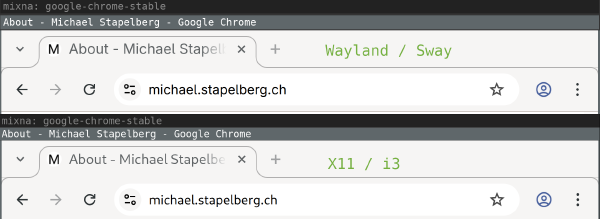](https://michael.stapelberg.ch/posts/2026-01-04-wayland-sway-in-2026/2026-01-03-chrome-wayland-x11.png)
At first I thought that maybe Wayland defaults to different font\-antialiasing and font\-hinting settings, but I tried experimenting with the following settings \(which default to`font\-antialiasing=grayscale`and`font\-hinting=slight`\), but couldn’t get things to render like they did before:
```
gsettings set org.gnome.desktop.interface font-antialiasing 'rgba'
gsettings set org.gnome.desktop.interface font-hinting 'full'
```
**Update**: Thanks to[Hugo](https://fosstodon.org/@whynothugo/115836011150423009)for pointing out that under Wayland, GTK3 ignores the`~/\.config/gtk\-3\.0/settings\.ini`configuration file and uses dconf exclusively\! Setting the following dconf setting makes the font rendering match:
```
gsettings set org.gnome.desktop.interface font-name 'Cantarell 11'
```
### Screen locker: swaylock
The obvious replacement for[`i3lock`](http://i3wm.org/i3lock/)is[`swaylock`](https://github.com/swaywm/swaylock)\.
I quickly ran into a difference in architecture between the two programs:
- i3lock shows a screen locker window\. When you kill i3lock, the screen is unlocked\.
- When you kill swaylock, you end up in a*Red Screen Of Death*\. To get out of this state, you need to restart swaylock and unlock\. You can unlock from the command line by sending`SIGUSR1`to the`swaylock`process\.
This was very surprising to me, but is by \(Wayland\) design\! See[Sway issue \#7046](https://github.com/swaywm/sway/issues/7046)for details, and this quote from the[`ext\-session\-lock\-v1`Wayland protocol](https://wayland.app/protocols/ext-session-lock-v1):
> “The compositor must stop rendering and provide input to normal clients\. Instead the compositor must blank all outputs with an opaque color such that their normal content is fully hidden\.”
OK, so when you start`swaylock`via SSH for testing, remember to always unlock instead of just cancelling`swaylock`with Ctrl\+C\. And hope it never crashes\.
I used to start`i3lock`via a wrapper script, which turns off the monitor \(input wakes it up\):
```
#!/bin/sh
# Turns on DPMS, mutes all output, locks the screen.
# Reverts all settings on unlock, or when killed.
revert() {
xset dpms 0 0 0
pactl set-sink-mute @DEFAULT_SINK@ 0
}
trap revert SIGHUP SIGINT SIGTERM
xset +dpms dpms 15 15 15
(sleep 1 && xset dpms force off) &
pactl set-sink-mute @DEFAULT_SINK@ 1
i3lock --raw 3840x2160:rgb --image ~/i3lock-wallpaper-3840x2160.rgb -n
revert
```
With Wayland, the DPMS behavior has to be implemented differently, with`swayidle`:
```
#!/bin/sh
# Turns on DPMS, mutes all output, locks the screen.
# Reverts all settings on unlock, or when killed.
swayidle -w \
timeout 5 'swaymsg "output * dpms off"' \
resume 'swaymsg "output * dpms on"' &
swayidle=$!
revert() {
kill $swayidle
pactl set-sink-mute @DEFAULT_SINK@ 0
}
trap revert SIGHUP SIGINT SIGTERM
pactl set-sink-mute @DEFAULT_SINK@ 1
swaylock --image ~/i3lock-wallpaper-3840x2160.jpg
revert
```
### i3 IPC automation
The i3 window manager can be extended via its[IPC interface \(interprocess communication\)](https://i3wm.org/docs/ipc.html)\.
I use a few small tools that use this interface\.
I noticed the following issues when using these tools with Sway:
1. Tools using the[`go\.i3wm\.org/i3/v4`Go package](https://pkg.go.dev/go.i3wm.org/i3/v4)need a[special socket path hook currently](https://github.com/RasmusLindroth/i3keys/blob/99e368e4cbb4f82f4e9461c3fd43054add0c3c37/i3parse/config.go#L67)\. We should probably include transparent handling in the package to ease the transition\.
2. Tools started with`exec`from the Sway config unexpectedly keep running even when you exit Sway \(`swaymsg exit`\) and log into a new session\!
3. My[workspace\-populate\-for\-i3](https://github.com/stapelberg/workspace-populate-for-i3)did not work: - Sway does not implement i3’s[layout saving/restoring](https://i3wm.org/docs/layout-saving.html)because Drew decided in 2017 that[the feature is “too complicated and hacky for too little benefit”](https://github.com/swaywm/sway/issues/1005#issuecomment-331526652)\. Too bad\. I have a couple of layouts I liked that I’ll need to replicate differently\. - Sway does not match workspace nodes with`\[con\_id\]`criteria\. There’s[pull request \#8980](https://github.com/swaywm/sway/pull/8980)\(posted independently, five days ago\) to fix that\.
4. My[wsmgr\-for\-i3](https://github.com/stapelberg/wsmgr-for-i3)worked partially: - Restoring workspaces \(`wsmgr restore`\) worked\. - Sway’s[`rename workspace`command](https://i3wm.org/docs/userguide.html#_renaming_workspaces)implementation does not seem to pick up workspace numbers from the target name\.
### Terminal: foot
On X11, I use the[rxvt\-unicode](https://wiki.archlinux.org/title/Rxvt-unicode)\(URxvt\) terminal emulator\. It has a couple of quality\-of\-life features that I don’t want to lose, aside from being fast and coming with a minimal look:
- Backwards search through your scrollback \(= command output\)
- Opening URLs in your scrollback using keyboard shortcuts
- Opening a new terminal window in the same working directory
- Updating the terminal title from your shell
In earlier experiments, I tried Alacritty or Kitty, but wasn’t happy with either\.
Thanks to[anarcat’s blog post “Wayland: i3 to Sway migration”](https://anarc.at/software/desktop/wayland/#terminal-xterm-foot), I discovered the[`foot`terminal emulator](https://codeberg.org/dnkl/foot), which looks like a really nice option\!
I started a[`foot\.ini`config file](https://github.com/stapelberg/configfiles/commit/7cc2c08dca5dd195ce47166c57deb44e7d68909d)to match my URxvt config, but later I noticed that at least some colors don’t seem to match \(some text lines with green/red background looked different\)\. I’m not sure why and have not yet looked into it any further\.
I noticed the following issues using`foot`:
- Pressing Ctrl\+Enter \(which I seem to do by mistake quite a bit\) results in escape sequences, whereas URxvt just treats Ctrl\+Enter like Enter\. This can be worked around in your shell \(Zsh, in my case\), see[foot issue \#628](https://codeberg.org/dnkl/foot/issues/628)for details\.
- Double\-clicking on part of a URL with the mouse selects the URL \(as expected\), but without the`https:`scheme prefix\! Annoying when you do want to use the mouse\. I can hold Ctrl to work around this, which will make`foot`select everything under the pointer up to, and until, the next space characters\.
- Starting[`screen\(1\)`](https://manpages.debian.org/screen.1)in`foot`results in not having color support for programs running inside the`screen`session\. Probably a terminfo\-related problem somehow…? I can also reproduce this issue with GNOME terminal\. But with URxvt or[xterm](https://en.wikipedia.org/wiki/Xterm), it works\.
- Selecting text highlights the text within the line, but not the entire line\. This is different from other terminal emulators I am used to, but I don’t see an option to change it\. Here’s a screenshot showing`foot`after triple\-clicking on the right of “kthreadd”: [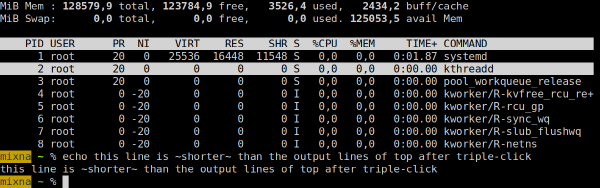](https://michael.stapelberg.ch/posts/2026-01-04-wayland-sway-in-2026/foot-triple-long.png)But triple\-clicking on an echo output line highlights only the contents, not the whole line: [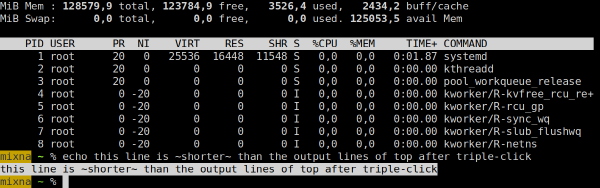](https://michael.stapelberg.ch/posts/2026-01-04-wayland-sway-in-2026/foot-triple-short.png)
### Text editor: Emacs
I find Emacs’s Wayland support rather disappointing\. The standard version of Emacs only supports X11, so on Sway, it starts in Xwayland\. Because Sway does not support scaling with Xwayland, Emacs shows up blurry \(top/background window\):
[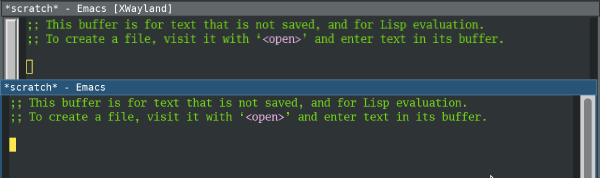](https://michael.stapelberg.ch/posts/2026-01-04-wayland-sway-in-2026/emacs-blurry.png)
Native Wayland support \(bottom/foreground window\) is only available in the`pgtk`Emacs version \(`emacs\-pgtk`on NixOS\)\.`pgtk`used to be a separate branch, but was merged in Emacs 29 \(July 2023\)\. There seem to be issues with`pgtk`on X11 \(you get a warning when starting Emacs\-pgtk on X11\), so there have to be two separate versions for now…
Unfortunately, the`pgtk`text rendering looks different than native X11 text rendering\! The line height and letter spacing seems different:
[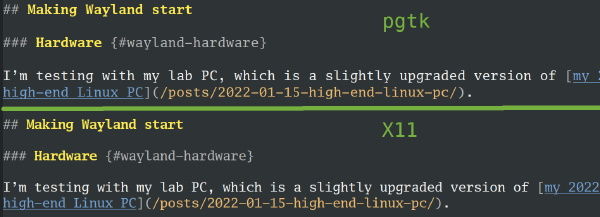](https://michael.stapelberg.ch/posts/2026-01-04-wayland-sway-in-2026/2026-01-01-emacs-pgtk-text.png)
I’m not sure why it’s different\! Does anybody know how to make it match the old behavior?
Aside from the different text rendering, the other major issue for me is input latency: Emacs\-pgtk feels significantly slower \(less responsive\) than Emacs\. This was reported on Reddit multiple times \([thread 1](https://www.reddit.com/r/emacs/comments/1k9ihp7/emacs_sluggish_ui_with_pgtk_wayland_4k_fractional/),[thread 2](https://www.reddit.com/r/emacs/comments/1acdieh/pgtk_emacs_high_input_lag_at_large_frame_sizes_on/)\) and[Emacs bug \#71591](https://debbugs.gnu.org/cgi/bugreport.cgi?bug=71591), but there doesn’t seem to be any solution\.
I’ll also need a solution for running Emacs remotely\. Thus far, I use X11 forwarding over SSH \(which works fine and with low latency over fiber connections\)\. I should probably check out waypipe, but have not yet had a chance\.
### Browser: Chrome
When starting Chrome and checking the`chrome://gpu`debug page, things look good:
[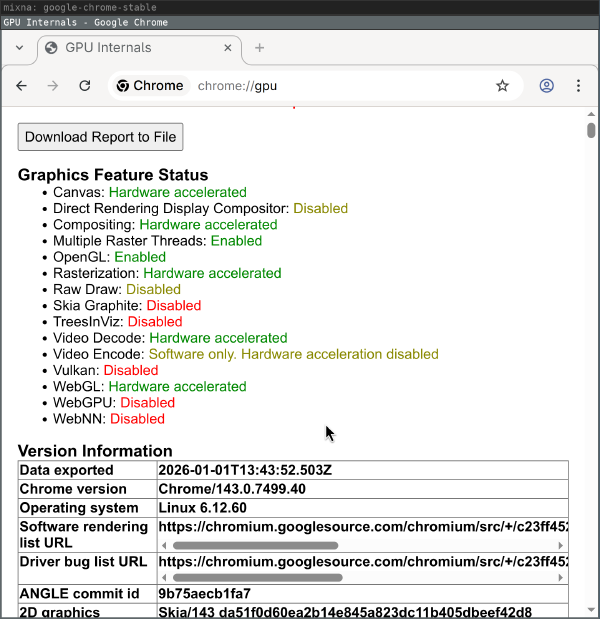](https://michael.stapelberg.ch/posts/2026-01-04-wayland-sway-in-2026/chrome-gpu-wayland.png)
But rather quickly, after moving and resizing browser windows, the GPU process dies with messages like the following and, for example, WebGL is no longer hardware accelerated:
```
ERROR:ui/ozone/platform/wayland/gpu/gbm_pixmap_wayland.cc:95] Cannot create bo with format=RGBA_8888 and usage=Scanout|Rendering|Texturing
ERROR:ui/gfx/linux/gbm_wrapper.cc:405] Failed to create BO with modifiers: Invalid argument (22)
ERROR:ui/ozone/platform/wayland/gpu/gbm_pixmap_wayland.cc:95] Cannot create bo with format=RGBA_8888 and usage=Texturing
ERROR:gpu/command_buffer/service/shared_image/shared_image_factory.cc:981] CreateSharedImage: could not create backing.
ERROR:gpu/command_buffer/service/shared_image/shared_image_manager.cc:397] SharedImageManager::ProduceSkia: Trying to Produce a Skia representation from a non-existent mailbox.
ERROR:components/viz/service/gl/exit_code.cc:13] Restarting GPU process due to unrecoverable error. Context was lost.
R:gpu/ipc/client/command_buffer_proxy_impl.cc:321] GPU state invalid after WaitForGetOffsetInRange.
ERROR:content/browser/gpu/gpu_process_host.cc:1005] GPU process exited unexpectedly: exit_code=8704
```
Of course, using a browser without hardware acceleration is very frustrating, especially at high resolutions\. Starting Chrome with`\-\-disable\-gpu\-compositing`seems to work around the GPU process exiting, but Chrome still does not feel as smooth as on X11\.
Another big issue for me is that Sway does not open Chrome windows on the workspace on which I closed them\. Support for tracking and restoring the`\_NET\_WM\_DESKTOP`EWMH atom was added to i3 in[January 2016](https://github.com/i3/i3/commit/328035fb7e98630862ae8b43088631f62b807c77)and to Chrome in[May 2016](https://chromium.googlesource.com/chromium/src.git/+/06405c5944436b431f26037fdc93340842c51de5%5E%21/)and Firefox in[March 2020](https://hg-edge.mozilla.org/integration/autoland/rev/323e2a212629)\.
I typically have 5\+ workspaces and even more Chrome windows at any given point, so having to sort through 10\+ Chrome windows every day \(when I boot my work computer\) is**very annoying**\.
[Simon Ser](https://github.com/emersion)said that this would be addressed with a new Wayland protocol \([`xdg\-session\-management`, merge request \!18](https://gitlab.freedesktop.org/wayland/wayland-protocols/-/merge_requests/18)\)\.
### Screensharing
I work remotely a lot, so screen sharing is a table\-stakes feature for me\. I use screen sharing in my browser almost every day, in different scenarios and with different requirements\.
In X11, I am used to the following experience with Chrome\. I click the “Window” tab and see previews of my windows\. When I select the window and confirm, its contents get shared:
[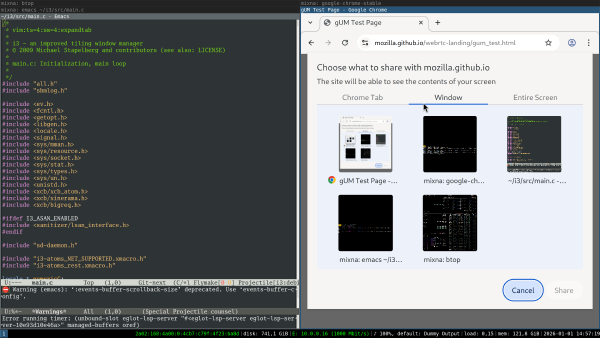](https://michael.stapelberg.ch/posts/2026-01-04-wayland-sway-in-2026/screenshare-x11.png)
To get screen sharing to work in Wayland/sway, you need to install`xdg\-desktop\-portal`and`xdg\-desktop\-portal\-wlr`\(the latter is specific to wlroots, which sway uses\)\.
With these packages set up, this is the behavior I see:
- I can share a Chrome tab\.
- I can share the entire monitor\.
- I*cannot*share a specific window \(the entire monitor shows up as a single window\)\.
This is[a limitation of`xdg\-desktop\-portal\-wlr`\(and others\)](https://github.com/emersion/xdg-desktop-portal-wlr/issues/107), which should be addressed with the upcoming Sway 1\.12 release\.
I changed my NixOS configuration to use sway and wlroots from git to try it out\. When I click on the “Window” tab, I see a chooser in which I need to select a window:
[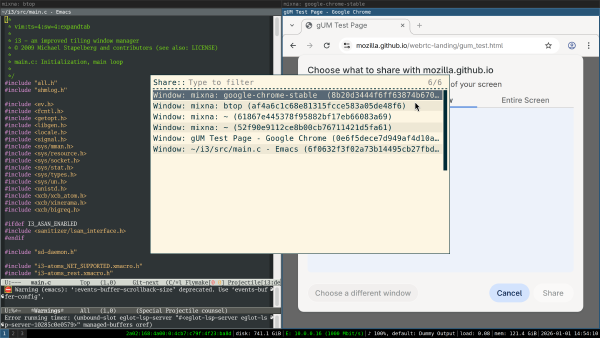](https://michael.stapelberg.ch/posts/2026-01-04-wayland-sway-in-2026/screenshare-select1-featured.png)
After selecting the window, I see*only that window’s contents*previewed in Chrome:
[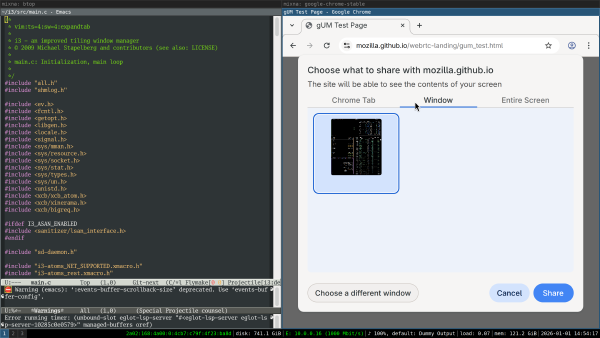](https://michael.stapelberg.ch/posts/2026-01-04-wayland-sway-in-2026/screenshare-select2.png)
After confirming, I get another chooser and need to select the window again\. Notably, there is no connection between the previewed window and the chosen window in this second step — if I chose a different window, that’s what will be shared:
[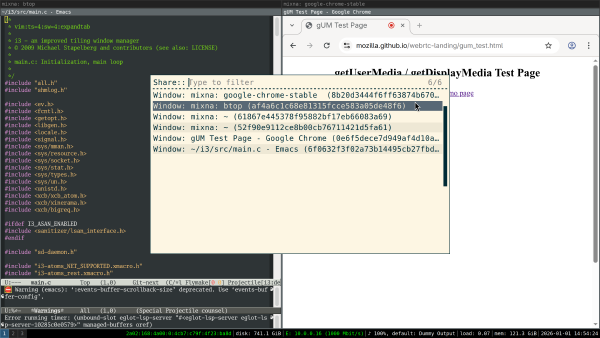](https://michael.stapelberg.ch/posts/2026-01-04-wayland-sway-in-2026/screenshare-select3.png)
Now that window is screenshared \(so the feature now works; nice\!\), but unfortunately in low resolution, meaning the text is blurry for my co\-workers\.
I reported this as[xdg\-desktop\-portal\-wlr issue \#364](https://github.com/emersion/xdg-desktop-portal-wlr/issues/364)and it seems like the issue is that the wrong scale factor is applied\. The patch provided in the issue works for me\.
But, on a high level, the whole flow seems wrong: I shouldn’t see a chooser when clicking on Chrome’s “Window” tab\. I should see previews of all windows\. I should be able to select the window in Chrome, not with a separate chooser\.
### Scaling Glitches
I also noticed a very annoying glitch when output scaling is enabled: the contents of \(some\!\) windows would “jump around” as I was switching between windows \(in a tabbed or stacked container\) or between workspaces\.
I first noticed this in the`foot`terminal emulator, where the behavior is as follows:
1. Switch focus to another`foot`terminal by changing workspaces, or by switching focus within a stacked or tabbed container\.
2. The new`foot`terminal shows up with its text contents slightly offset\.
3. Within a few milliseconds,`foot`’s text jumps to the correct position\.
I captured the following frame with my iPhone just as the content was moving a few pixels, shortly after switching focus to this window:
[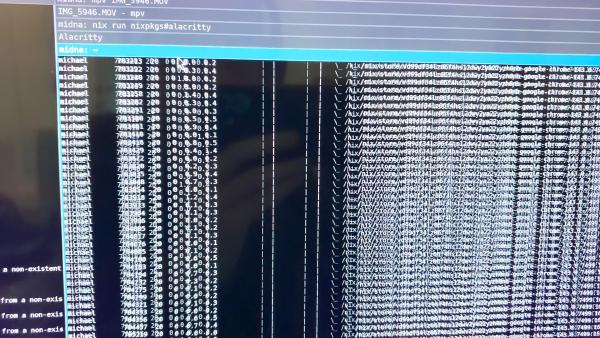](https://michael.stapelberg.ch/posts/2026-01-04-wayland-sway-in-2026/foot-move.jpg)
Later, I also noticed that Chrome windows briefly[show up blurry after switching](https://github.com/emersion/xdg-desktop-portal-wlr/issues/364#issuecomment-3702287572)\.
My guess is that because Sway sets the scale factor to 1 for invisible windows, when switching focus you see a scale\-1 content buffer until the application provided its scale\-3 content buffer\.
### Notifications: dunst
dunst supports Wayland natively\. I tried dunst 1\.13 and did not notice any issues\.
### Picker: rofi
rofi works on Wayland since v2\.0\.0 \(2025\-09\-01\)\.
I use rofi with[rofimoji](https://github.com/fdw/rofimoji)as my Emoji picker\. For text input, instead of`xdotool`,`wtype`seems to work\. I didn’t notice any issues\.
### Screenshots: grim?
Instead of my usual choice[`maim\(1\)`](https://manpages.debian.org/maim.1), I tried[`grim\(1\)`](https://manpages.debian.org/grim.1), but unfortunately`grim`’s`\-T`flag to select the window to capture is rather cumbersome to use \(and captures in 1x scale\)\.
Does anyone have any suggestions for a good alternative?
## Conclusion
Finally I made some progress on getting a Wayland session to work in my environment\!
Before giving my verdict on this Wayland/sway experiment, let me explain that my experience on X11/i3 is really good\. I don’t see any tearing or other artifacts or glitches in my day\-to\-day computer usage\. I don’t use a compositor, so my input latency is really good: I once measured it to approximately 763 μs in Emacs on X11 with my custom\-built keyboard \(plus output latency\), see[kinX: latency measurement \(2018\)](https://michael.stapelberg.ch/posts/2018-04-17-kinx-latency-measurement/)\.
So from my perspective, switching from this existing, flawlessly working stack \(for me\) to Sway only brings downsides\. I observe new graphical glitches that I didn’t have before\. The programs I spend most time in \(Chrome and Emacs\) run noticeably worse\. Because of the different implementations, or because I need to switch programs entirely, I encounter a ton of new bugs\.
For the first time, an on\-par Wayland experience seems within reach, but realistically it will require weeks or even months of work still\. In my experience, debugging sessions quickly take hours as I need to switch graphics cards and rewire monitors to narrow down bugs\. I don’t have the time to contribute much to fixing these numerous issues unfortunately, so I’ll keep using X11/i3 for now\.
For me, a Wayland/Sway session will be ready as my daily driver when:
- Sway no longer triggers some key bindings twice some times \(“ghost key presses”\)
- I no longer see glitches when switching between windows or workspaces in Sway\.
- Chrome is continuously hardware\-accelerated\.
- Chrome windows are restored to their previous workspace when starting\.
- Emacs either:- Runs via Xwayland and Sway makes scaling work\. - Or if its`pgtk`variant fixes its input latency issues and can be made to render text the same as before somehow\.
Did you like this post?[Subscribe to this blog’s RSS feed](https://michael.stapelberg.ch/feed.xml)to not miss any new posts\!
I run a blog since 2005, spreading knowledge and experience for over 20 years\! :\)
A personal account of how the Linux desktop's upcoming Wayland-only future will break accessibility for users relying on input tools like Talon Voice, highlighting the lack of attention to input accessibility compared to output accessibility.
KDE announces that Plasma 6.8 will drop X11 session support, fully transitioning to Wayland after 15 years of development. The change affects only Plasma desktop; XWayland support remains for legacy applications.
Brian Tarricone announces the first preview release of xfwl4, Xfce's Wayland compositor, after six months of work, detailing known missing features and future plans.
A Minecraft mod that implements a fully functional Wayland compositor inside the game, allowing users to run and manage applications within their Minecraft world. Linux only.
wayland.fyi is a minimalist special interest group advocating for simpler Wayland implementations, criticizing the complexity of mainstream libraries like wlroots and promoting lightweight alternatives such as neuswc.