From Hugging Face to Amazon SageMaker Studio in one click
Summary
Hugging Face and Amazon SageMaker AI announce a deep-link integration that lets developers go from a Hugging Face model page directly into SageMaker Studio with one click, pre-loading the model and environment for immediate fine-tuning or deployment.
View Cached Full Text
Cached at: 07/07/26, 10:41 PM
From Hugging Face to Amazon SageMaker Studio in one click
Source: https://huggingface.co/blog/amazon/one-click-to-sagemaker-studio Back to Articles

- What’s new- Deep links from Hugging Face into SageMaker Studio - Pre-configured permissions - GPU quota visibility
- Walkthrough: Deep-linking from Hugging Face to SageMaker Studio- Step 1: Discover and select - Step 2: Sign in - Step 3: Land in Studio - Step 4: Test your endpoint
- Getting started
- Conclusion
Today, we’re excited to announce a deep-link integration betweenHugging FaceandAmazon SageMaker AI. Developers can now go from model discovery to hands-on experimentation in SageMaker Studio with a single selection. Whether you fine-tune a foundation model (FM) fromAmazon SageMaker JumpStartor deploy it to anAmazon SageMaker Inferenceendpoint, you can now land directly inside the relevant SageMaker Studio workflow. Your selected model is pre-loaded, and the environment is fully configured and ready to go.
Previously, getting started on SageMaker Studio after discovering a model on Hugging Face required navigating multiple steps between opening Amazon SageMaker AI in the AWS Console, creating a domain, configuring IAM permissions, and sometimes requesting GPU quota. For developers who want to iterate quickly, this friction slows down the path from inspiration to experimentation. The integration creates a more direct path from discovery to enterprise deployment.
“At Arcee, we build open models so developers and enterprises can actually own what they run: inspect the weights, post-train on their own data, and deploy on their own terms. This integration takes that promise the last mile. Going from an open model on Hugging Face straight into SageMaker Studio in a single click, then fine-tuning or deploying it inside your own AWS environment with nothing to wire up, is the kind of experience open models have been missing. Open weights you own, running in the cloud you control. That is exactly the combination our customers have been asking for.”
— Mark McQuade, Founder and CEO, Arcee AI
With the launch of a one-click Studio landing experience, choosingCustomize on SageMaker AIorDeploy on SageMaker AIon a supported Hugging Face model page takes you directly to the console. SageMaker AI then automatically provisions a new domain with pre-configured permissions in seconds and carries the model context through.
https://huggingface.co/blog/amazon/one-click-to-sagemaker-studio#whats-newWhat’s new
This launch introduces three capabilities that shorten the path from a Hugging Face model to a working SageMaker Studio workflow.
https://huggingface.co/blog/amazon/one-click-to-sagemaker-studio#deep-links-from-hugging-face-into-sagemaker-studioDeep links from Hugging Face into SageMaker Studio
When you browse models on Hugging Face, you’ll now see action buttons alongside supported models that map directly to SageMaker Studio workflows:
- Customize on SageMaker AIopens the Model Customization page in Studio with the selected model pre-loaded, ready to fine-tune.
- Deploy on SageMaker AIopens the Deployment page in Studio with the model pre-configured for endpoint deployment.
Each entry point preserves the context, meaning you don’t need to search for the model again once inside Studio.
https://huggingface.co/blog/amazon/one-click-to-sagemaker-studio#pre-configured-permissionsPre-configured permissions
New Studio environments created through this flow come with permissions already configured for the full range of SageMaker AI capabilities, including model customization, training jobs, notebook experimentation, and endpoint deployment. A new managed policy,AmazonSageMakerModelCustomizationCoreAccess, is created and attached for you. It provides permissions for serverless model customization jobs using supervised fine-tuning (SFT), direct preference optimization (DPO), reinforcement learning with verifiable rewards (RLVR), and reinforcement learning from AI feedback (RLAIF), with supported deployment to SageMaker AI or Amazon Bedrock endpoints. This alleviates the need to manually create and configure AWS Identity and Access Management (IAM) roles and policies before you can start experimenting. For existing Studio environments, actionable messages with direct links to documentation guide you through adding these permissions.
https://huggingface.co/blog/amazon/one-click-to-sagemaker-studio#gpu-quota-visibilityGPU quota visibility
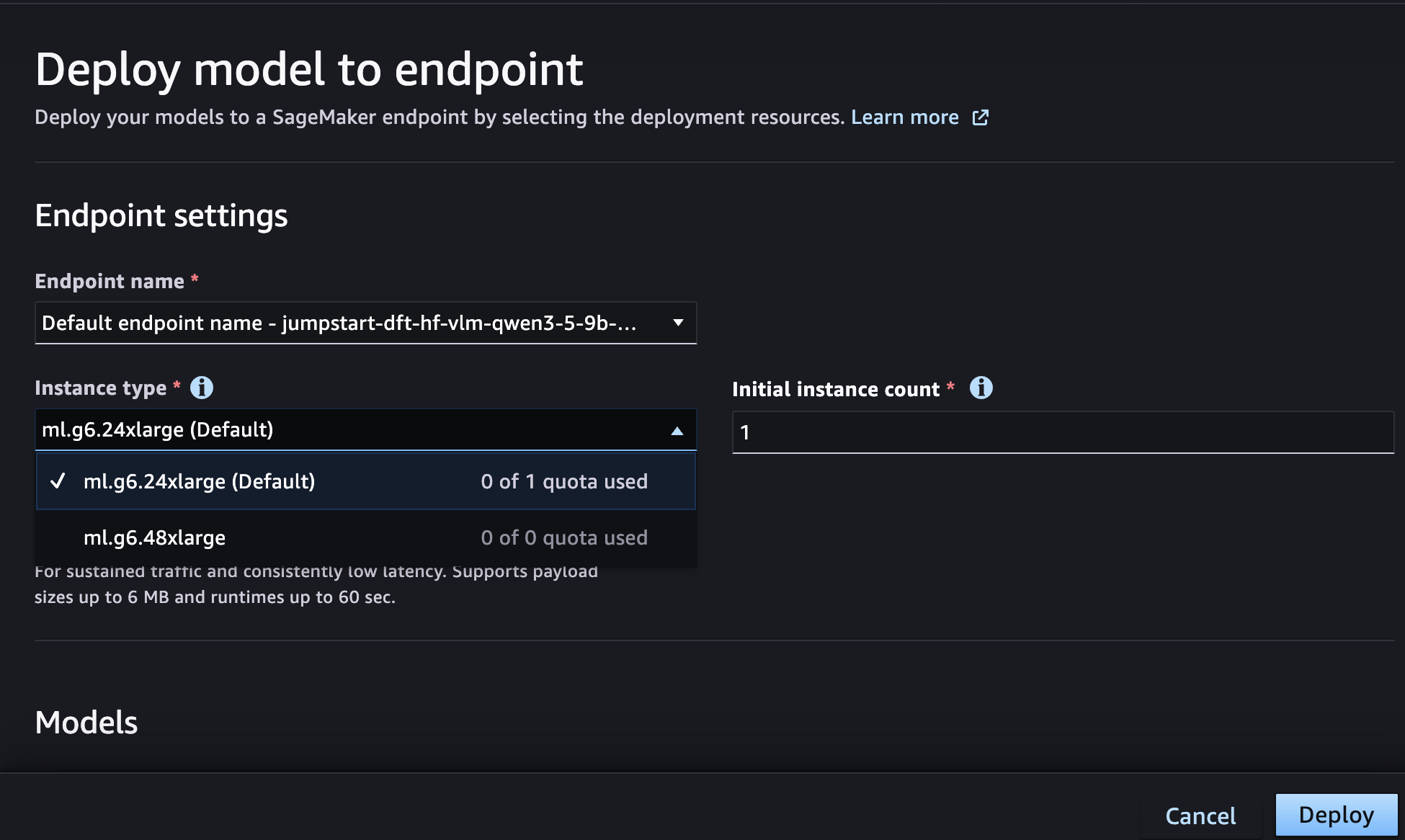
When selecting instance types for deployment or training, the Studio UI now surfaces quota availability directly in the instance selection list. You can immediately see which GPU instance types (G5, G6) are available under your account’s current limits. You don’t need to navigate separately to Service Quotas. If you still need to request a limit increase, you’re redirected directly to the Service Quotas page for the respective instance type.
https://huggingface.co/blog/amazon/one-click-to-sagemaker-studio#walkthrough-deep-linking-from-hugging-face-to-sagemaker-studioWalkthrough: Deep-linking from Hugging Face to SageMaker Studio
Let’s walk through the experience of customizing or deploying a model starting from Hugging Face.
https://huggingface.co/blog/amazon/one-click-to-sagemaker-studio#step-1-discover-and-selectStep 1: Discover and select
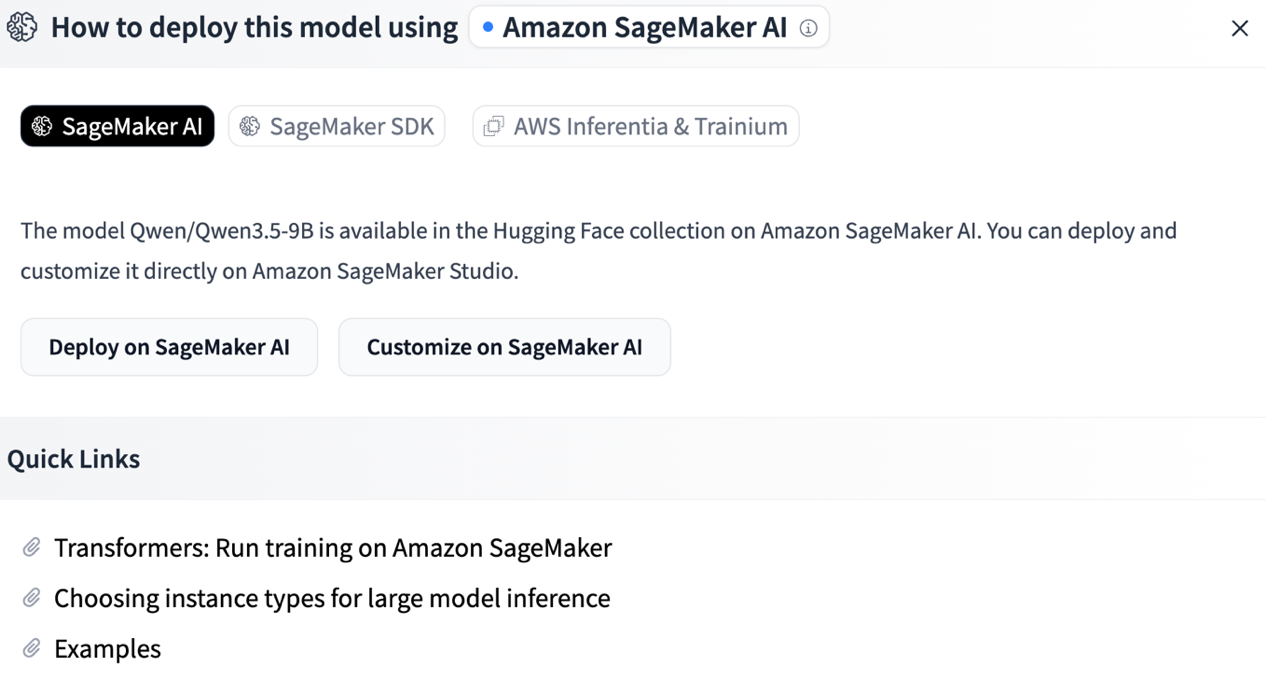
On the Hugging Face model page, click on “Deploy” and select “Amazon SageMaker AI”. If the model is supported, you will see two buttons, “Deploy on SageMaker AI” and “Customize on SageMaker AI”. Then select “Customize on SageMaker AI” for a supported model.
https://huggingface.co/blog/amazon/one-click-to-sagemaker-studio#step-2-sign-inStep 2: Sign in
You’re prompted to sign in to AWS using your existing credentials. If you already have an active console session, this step is skipped automatically. For more information, seeSign in to the AWS Management Console.
https://huggingface.co/blog/amazon/one-click-to-sagemaker-studio#step-3-land-in-studioStep 3: Land in Studio
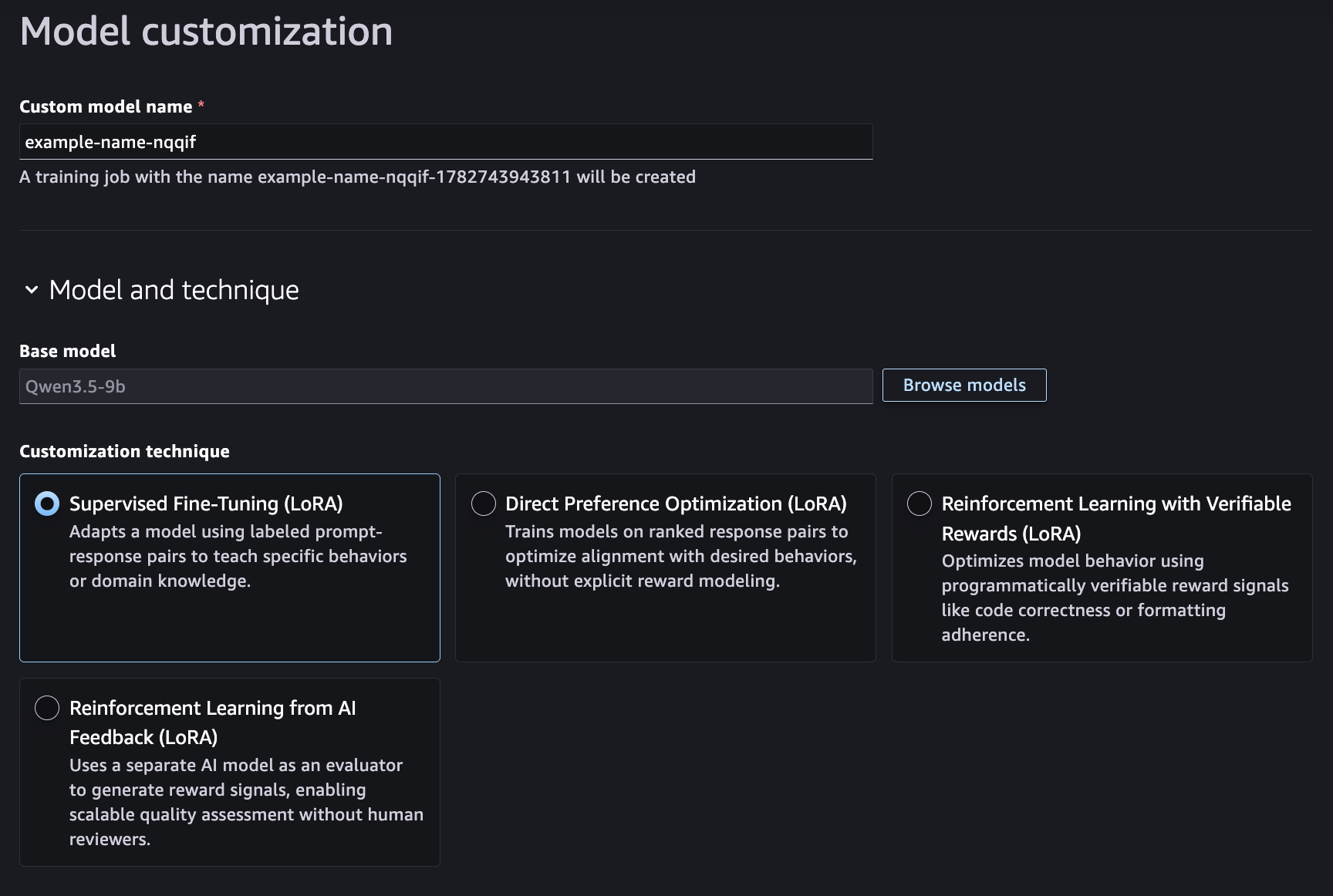
You arrive directly on the Model Customization page inside SageMaker Studio with your model pre-selected. Next, configure your fine-tuning parameters such as training data, hyperparameters, and instance type, then submit the customization job.
Alternatively, selectingDeploy on SageMaker AIopens the endpoint deployment page in Studio with the model pre-configured. Select your instance type (quota visibility included), review the settings, and deploy.
https://huggingface.co/blog/amazon/one-click-to-sagemaker-studio#step-4-test-your-endpointStep 4: Test your endpoint
After you deploy your endpoint, test inference directly from Studio’s endpointtesting interface.
https://huggingface.co/blog/amazon/one-click-to-sagemaker-studio#getting-startedGetting started
You can try this experience today:
- Browse models on Hugging Face.
- Look for theCustomize on SageMaker AIorDeploy on SageMaker AIbuttons on supported models.
- Select and follow the streamlined sign-in flow.
- Start building in a fully configured SageMaker Studio environment.
https://huggingface.co/blog/amazon/one-click-to-sagemaker-studio#conclusionConclusion
The launch of a one-click Studio landing experience minimizes the friction between discovering a model and experimenting with it. By connecting Hugging Face directly to the SageMaker Studio workflows, developers can stay in their flow. There’s no context switching, no manual environment setup, and no permission troubleshooting.
To get started, visit theAmazon SageMaker Studiopage or explore models on Hugging Face and choose Deploy or Customize on SageMaker AI.
Similar Articles
@ClementDelangue: Hugging Face is becoming the platform for agents to use and build AI. Now they can call 1M HF spaces to do everything t…
Hugging Face now lets AI agents invoke 1 million Spaces, turning the hub into a programmable platform where agents can tap any specialized model or app.
Hugging Face Models on Foundry Managed Compute
Microsoft announced Foundry Managed Compute and Hugging Face models on Foundry, a curated catalog of open-weight models from Hugging Face that can be deployed with one click onto Microsoft's managed GPU platform, offering enterprise security, governance, and observability.
Shipping huggingface_hub every week with AI, open tools, and a human in the loop
Hugging Face describes how they built a weekly release pipeline for their huggingface_hub library using AI, open-source tools, and human oversight, enabling faster and more reliable releases.
@haofeiyu44: Can we transform the Hugging Face Hub—with its enormous sea of artifacts—into a self-evolving discovery machine? WE CAN…
Introduces ArtifactLinker, a framework that models HuggingFace as an artifact graph and uses GNNs and LLM agents to automatically discover state-of-the-art models and research insights.
@_avichawla: Hugging Face meets Claude! I built a @huggingface fine-tuning studio that lets you fine-tune any LLM directly from Clau…
A developer released a Hugging Face fine-tuning studio that allows users to fine-tune LLMs directly through Claude, built using the mcp-use SDK.