@github: Go from an empty repo to a live GitHub Pages site on a custom domain, secured with HTTPS, in about 14 minutes, without …
Summary
This article explains how to use GitHub Copilot CLI and a community Namecheap skill to automate DNS configuration for setting up a GitHub Pages site on a custom domain with HTTPS in about 14 minutes.
View Cached Full Text
Cached at: 08/15/26, 09:51 PM
Go from an empty repo to a live GitHub Pages site on a custom domain, secured with HTTPS, in about 14 minutes, without manually editing a single DNS record. ⚡️
GitHub Copilot CLI and a community Namecheap skill automate the setup. 👇 https://t.co/dqPWAQN5jw
How GitHub Copilot enables zero DNS configuration for GitHub Pages
Source: https://github.blog/ai-and-ml/github-copilot/how-github-copilot-enables-zero-dns-configuration-for-github-pages/?utm_source=x-copilot-zero-dns-github-pages-blog&utm_medium=social&utm_campaign=github-app-cli-q1-push Custom domains make a project feel real. But for many developers, DNS, the last mile, is also the most frustrating: A records, CNAME entries, TTLs, and that long wait where you’re never quite sure if the internet is broken or you are.
In this post, I’ll walk through how I took a project from an empty repository to a live website on a custom domain, secured with HTTPS, in about 14 minutes without manually editing a single DNS record. The trick is to letGitHub Copilot CLIdrive the work, with a communityNamecheap skillhandling the DNS automation through the registrar’s API.
Here’s what you’ll learn how to do:
- Publish a site withGitHub Pages
- Register an inexpensive domain
- Enable your registrar’s API and connect it to Copilot CLI
- Point the domain at GitHub Pages and verify it end to end
What you’ll need
- A GitHub account (the free tier works)
- GitHub Copilot CLI, installed and authenticated with GitHub Copilot
- A Namecheap account, for buying the domain and using its API
No prior DNS expertise required. That’s the whole point. Let’s get started. ⤵
Step 1: Publish a site with GitHub Pages
Every deployment needs something to deploy, so start with a home for the site: a new public repository.
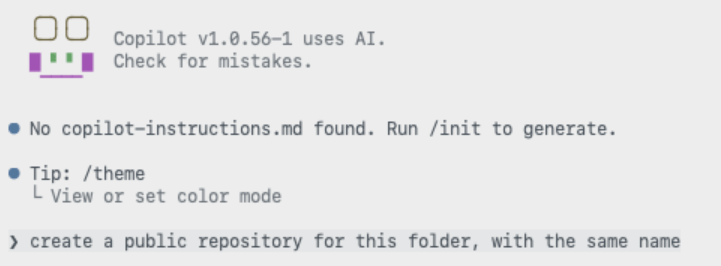
 With the repository in place, you don’t have to hand-write an
index\.html, commit it, and then click through the pages settings yourself. Instead, describe the outcome you want to Copilot CLI and let it create the landing page and enable GitHub Pages for you.
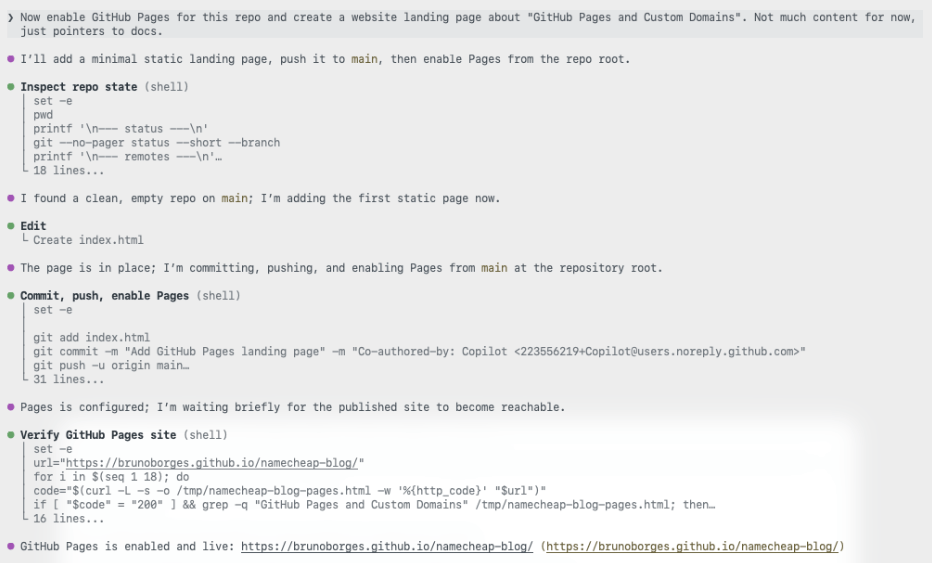 The site is now live on a github.io URL. That’s a solid start. Now let’s give it a proper address.
Step 2: Register an inexpensive domain
You don’t need a premium .com to ship a side project. For this walkthrough I chose one of the cheapest top-level domains available, .click, and searched for an available name.
ghpagesblog.clickwas available, so I moved to checkout.
The total came toUSD $2.00, or aboutCAD $2.46. That’s a low-risk price for trying a custom domain on a side project.
Step 3: Connect the domain to GitHub Pages
This is the step developers tend to dread. Here, an AI assistant does the repetitive work while you stay in control of the decisions.
Enable Namecheap API access
Before Copilot CLI can update your DNS, you need to turn on Namecheap’s API. In your Namecheap account, go toProfile → Tools, scroll toBusiness & Dev Tools, and selectManageunderNamecheap API Access.
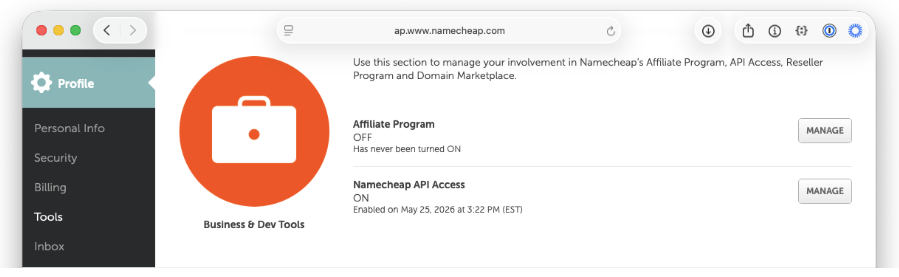 You can also navigate directly to theAPI access settings page(note that this URL may change over time).
On that page, complete three steps:
- Toggle the API toON.
- Add the public IP of the machine that will call the API to the IP allowlist (Namecheap labels this fieldWhitelisted IPs).
- Copy theAPI Keyand store it somewhere safe. You’ll need it shortly.
For more detail on what the API offers, seeNamecheap’s API introduction.
Install the Namecheap skill
Next, give Copilot CLI the ability to talk to Namecheap by installing theNamecheap skill. It’s a single command:
gh skill install github/awesome-copilot namecheap --scope user
The first time you ask Copilot to do something like*“list my Namecheap domains,*it confirms the skill is configured and prompts you for your username.
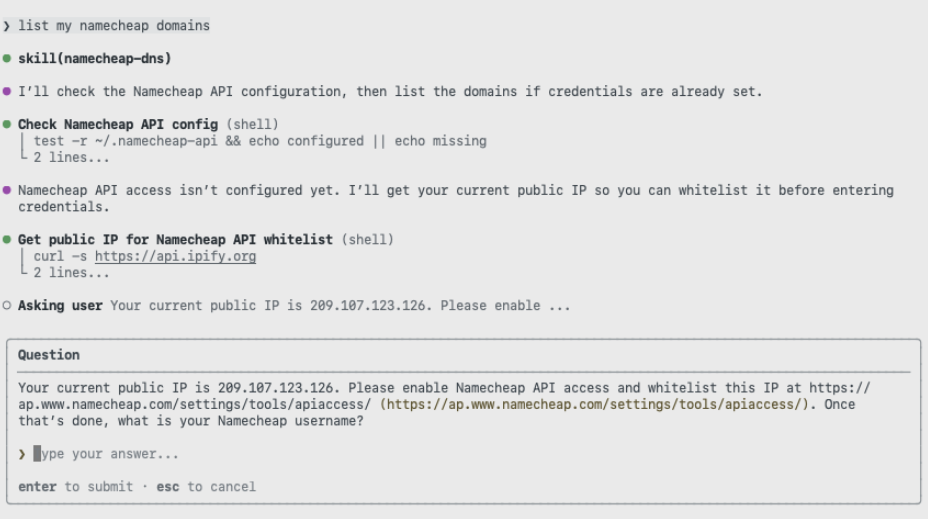 Then it asks for the API key you copied earlier.
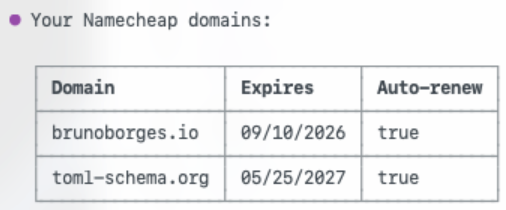
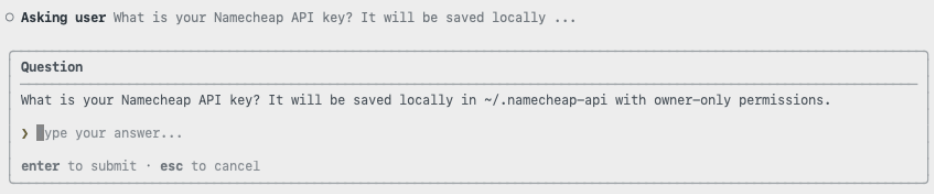 With credentials in place, Copilot returns the list of domains in your account. It’s a quick way to confirm everything is wired up correctly before making any changes.
 ### Point the domain at GitHub Pages
Now connect the domain to the site. Ask Copilot to configure the custom domain using the skill.
 A good automation asks before it acts. The skill pauses to confirm the change before touching any records.
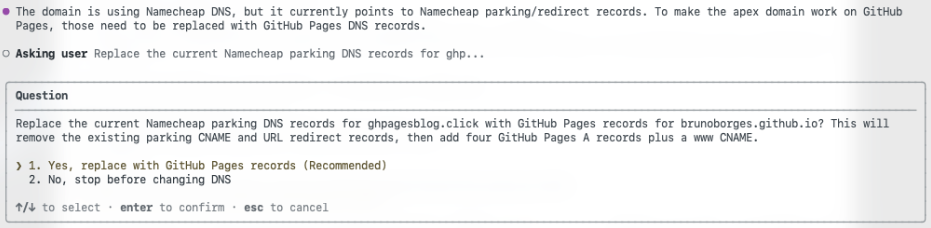 Once you approve, it replaces the existing parking records with the GitHub Pages A records and a CNAME for the WWW subdomain, which is the exact configuration GitHub Pages expects. This matches GitHub’s documented steps forconfiguring a custom domain for your GitHub Pages site.
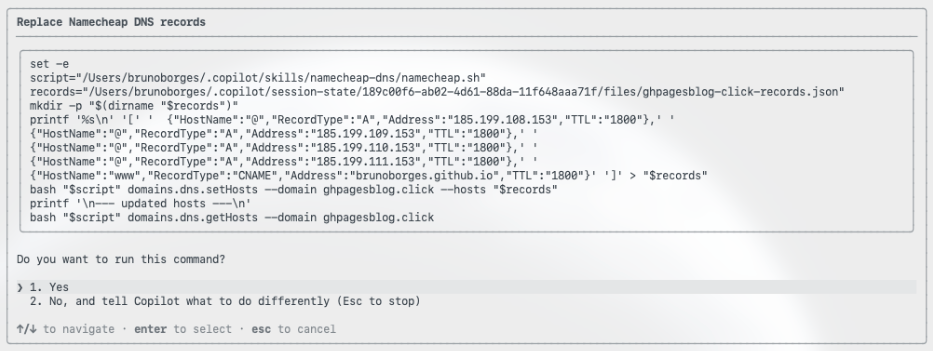 It also handles the repository side, committing a CNAME file that tells GitHub Pages which custom domain the site should answer to.
Step 4: Verify the deployment
Rather than assuming success, Copilot CLI checks its own work. First, it confirms the domain resolves.
 Then it confirms that the site returns a healthy HTTP 200 response.
If you’d like to review every prompt and response, thefull Copilot CLI session is available as a gist.
Now for the timeline. The domain was purchased at11:21:27 a.m. ET.
The site was live on the custom domain, served over HTTPS, at around11:35 a.m. ET. That’s roughly14 minutesfrom owning nothing to a fully deployed site, including API setup, skill installation, DNS configuration, propagation, and verification.
Wrapping up
DNS isn’t hard, exactly, but it’s fiddly, easy to get wrong, and slow to give feedback. By pairing GitHub Pages with GitHub Copilot CLI and the Namecheap skill, the repetitive parts of a custom-domain deployment fade into a short conversation: you make the decisions and approve the changes, and the tooling handles the plumbing.
If you’ve been putting off a custom domain because the DNS step feels like a chore, this workflow removes the friction. To go further, explore theGitHub Pages documentationand the guide toconfiguring a custom domain for your GitHub Pages site, then try it on your next project.
Written by

Related posts
Explore more from GitHub

Docs
Everything you need to master GitHub, all in one place.

GitHub
Build what’s next on GitHub, the place for anyone from anywhere to build anything.

Customer stories
Meet the companies and engineering teams that build with GitHub.

GitHub Universe 2026
Join us October 28-29 in San Francisco or online for GitHub Universe, our flagship developer event uniting people, agents, and the world’s code.
Similar Articles
@github: Custom agents in GitHub Copilot CLI. Define roles, tools, and guardrails in Markdown, then run consistent workflows for…
GitHub introduces custom agents in Copilot CLI, allowing developers to define specialized, reusable workflows in Markdown files for tasks like security audits and release notes.
My domain got abused on Github Pages
A developer discovers that his wildcard DNS configuration allowed anyone to host content on subdomains of his domain via GitHub Pages, highlighting a common security oversight in GitHub's CNAME resolution.
@leereilly: Late to the game, but I finally took the GitHub Copilot app for a spin tonight… wow. In a few prompts & few minutes, I …
@leereilly shares his experience using GitHub Copilot to quickly build a 3D Rubik's Cube visualizer and solver with animations and GitHub contribution graph mode.
@DanWahlin: How do you get started adding your first project in GitHub Copilot App? Let me walk you through the process. It's easy …
Dan Wahlin walks through the process of adding a first project in the GitHub Copilot App, highlighting features along the way.
GitHub Copilot App
GitHub Copilot is an AI-powered code completion tool that assists developers by suggesting code snippets and functions in real-time.