@Jolyne_AI: 写技术文档时我们常用 Markdown,但一遇到复杂排版就力不从心。 我在 GitHub 上偶然发现一个开源工具:Quarkdown。你可以把它理解成“更强的 Markdown”——语法依旧轻量,却把排版、生成和自动化直接拉满。 GitH…
摘要
Quarkdown 是一个基于 Markdown 的增强版排版系统,支持变量和函数、多格式输出、实时预览等强大功能,适用于书籍、论文、演示文稿等场景,安装需 Java 17+。
查看缓存全文
缓存时间: 2026/07/01 20:13
写技术文档时我们常用 Markdown,但一遇到复杂排版就力不从心。
我在 GitHub 上偶然发现一个开源工具:Quarkdown。你可以把它理解成“更强的 Markdown”——语法依旧轻量,却把排版、生成和自动化直接拉满。
GitHub:http://github.com/iamgio/quarkdown…
官网:https://quarkdown.com
亮点功能:
- 可写逻辑:支持函数和变量,让内容按规则动态生成
- 多端输出:HTML、PDF、演示文稿一键导出
- 标准库够强:布局、数学、条件判断等能力开箱即用
- 实时预览 + 快速编译:边写边看,改动立即生效
- 语法更友好:比 LaTeX 更易上手,也更易读
- 面向长文档:章节结构清晰,书籍级排版也能扛住
安装也很省事:Homebrew 或 Scoop 直接搞定;注意需要 Java 17 或更高版本。
iamgio/quarkdown
Source: https://github.com/iamgio/quarkdown



Table of contents
About
Quarkdown is a modern Markdown-based typesetting system designed for versatility. It allows a single project to compile seamlessly into a print-ready book, academic paper, knowledge base, or interactive presentation. All through an incredibly powerful Turing-complete extension of Markdown, ensuring your ideas flow automatically into paper.
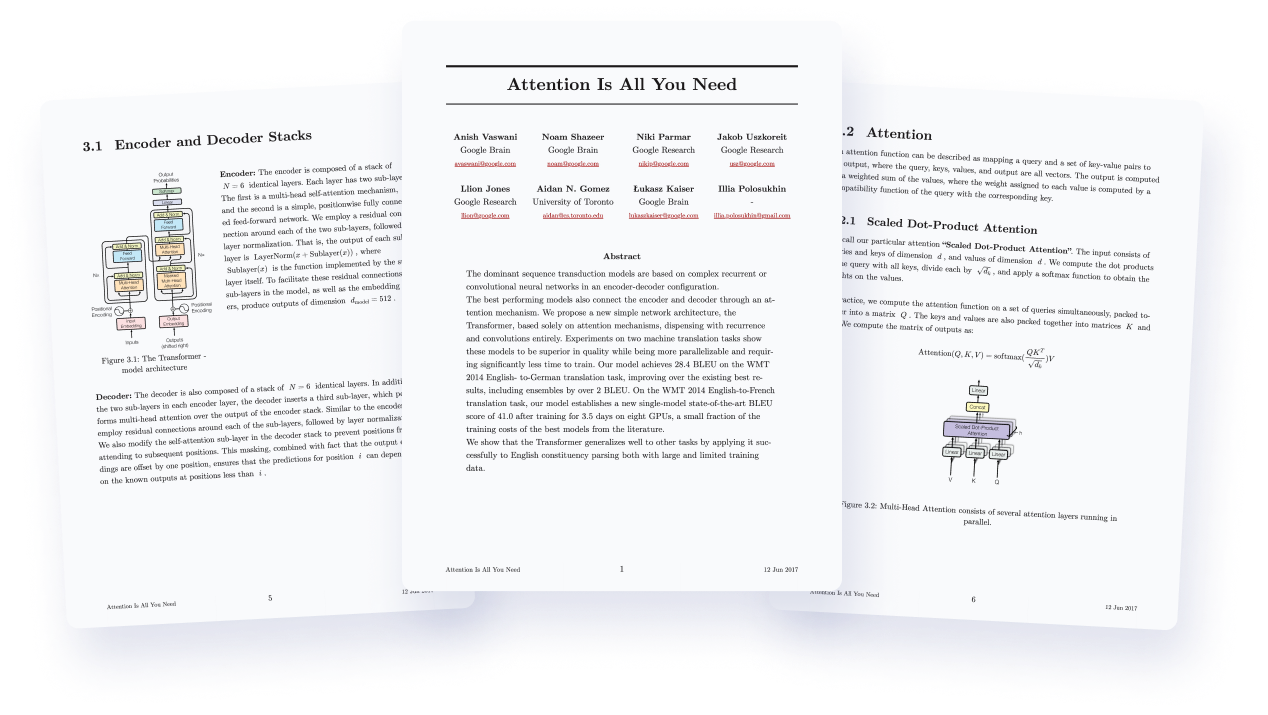
Original credits: Attention Is All You Need
Born as an extension of CommonMark and GFM, the Quarkdown Flavor brings functions to Markdown, along with many other syntax extensions.
This is a function call:
.somefunction {arg1} {arg2}
    Body argument
Possibilities are unlimited thanks to an ever-expanding standard library, which offers layout builders, I/O, math, conditional statements and loops.
Not enough? You can still define your own functions and variables, all within Markdown. You can even create awesome libraries for everyone to use.
.function {greet}
    to from:
    **Hello, .to** from .from!

.greet {world} from:{iamgio}
Result: Hello, world from iamgio!
This out-of-the-box scripting support opens doors to complex and dynamic content that would be otherwise impossible to achieve with vanilla Markdown.
Combined with live preview, :zap: fast compilation speed and a powerful VS Code extension, Quarkdown simply gets the work done, whether it’s an academic paper, book, knowledge base or interactive presentation.
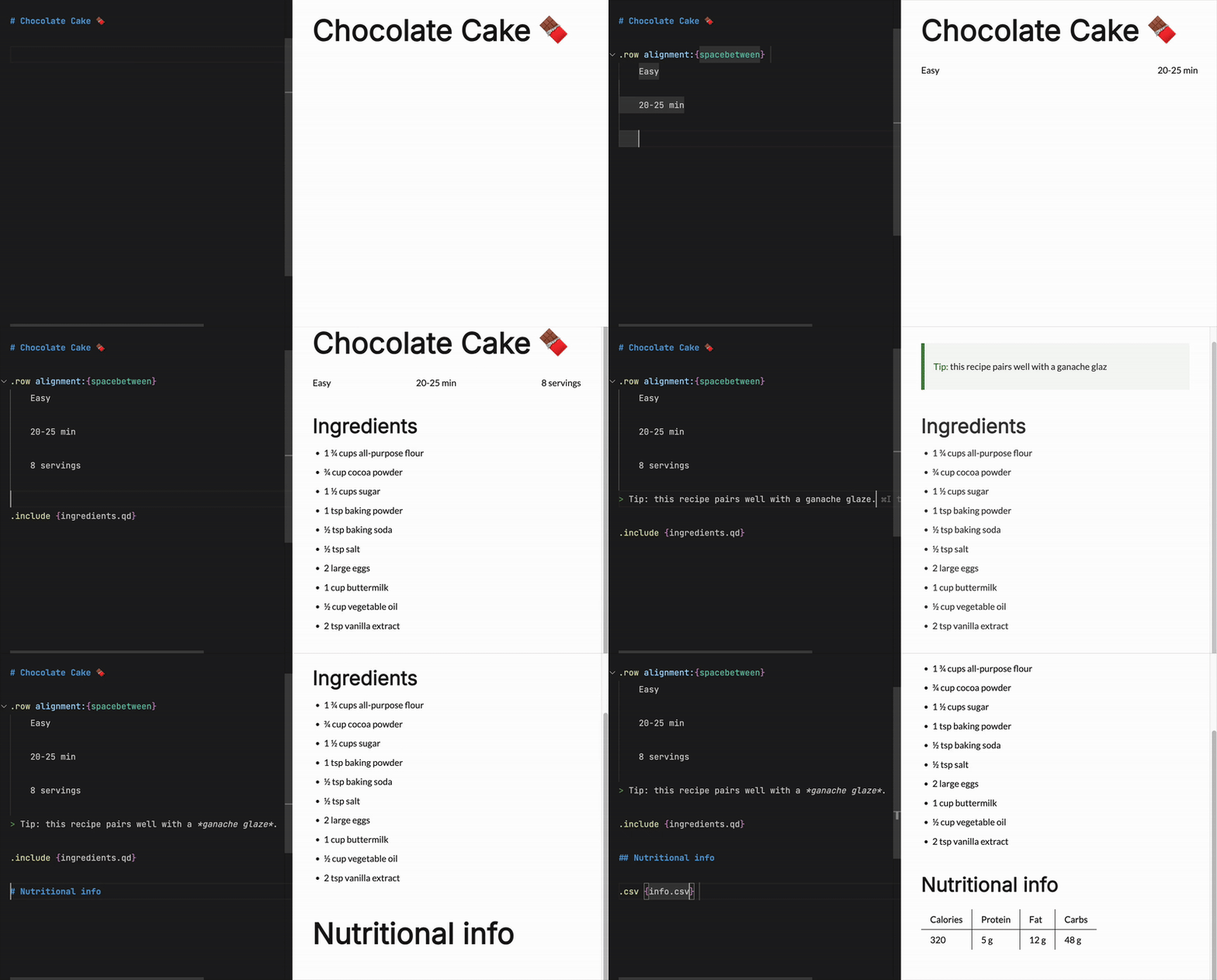
In a nutshell, Quarkdown is…
- Familiar: built on the well-known Markdown syntax, for a flat learning curve
- Elegant: produces output that matches the quality of industry-leading tools
- Agent-friendly: comes with a built-in skill for idiomatic fluency of your coding agents (read the eval)
- Customizable: full control over document layout, aesthetics, and properties
- Secure by default: a restrictive permission system limits access to system resources
- Versatile: a single source compiles to multiple targets
- Reactive: low-latency live previews for rapid iteration. The official wiki (100+ pages) compiles in ~2 seconds
- Reusable: repeated content can be turned into one-line function calls
- Easily deployable: set a CD workflow up in under 3 minutes (example)
Looking for something?
Check out the wiki to get started and learn more about the language and its features!
As simple as you expect…
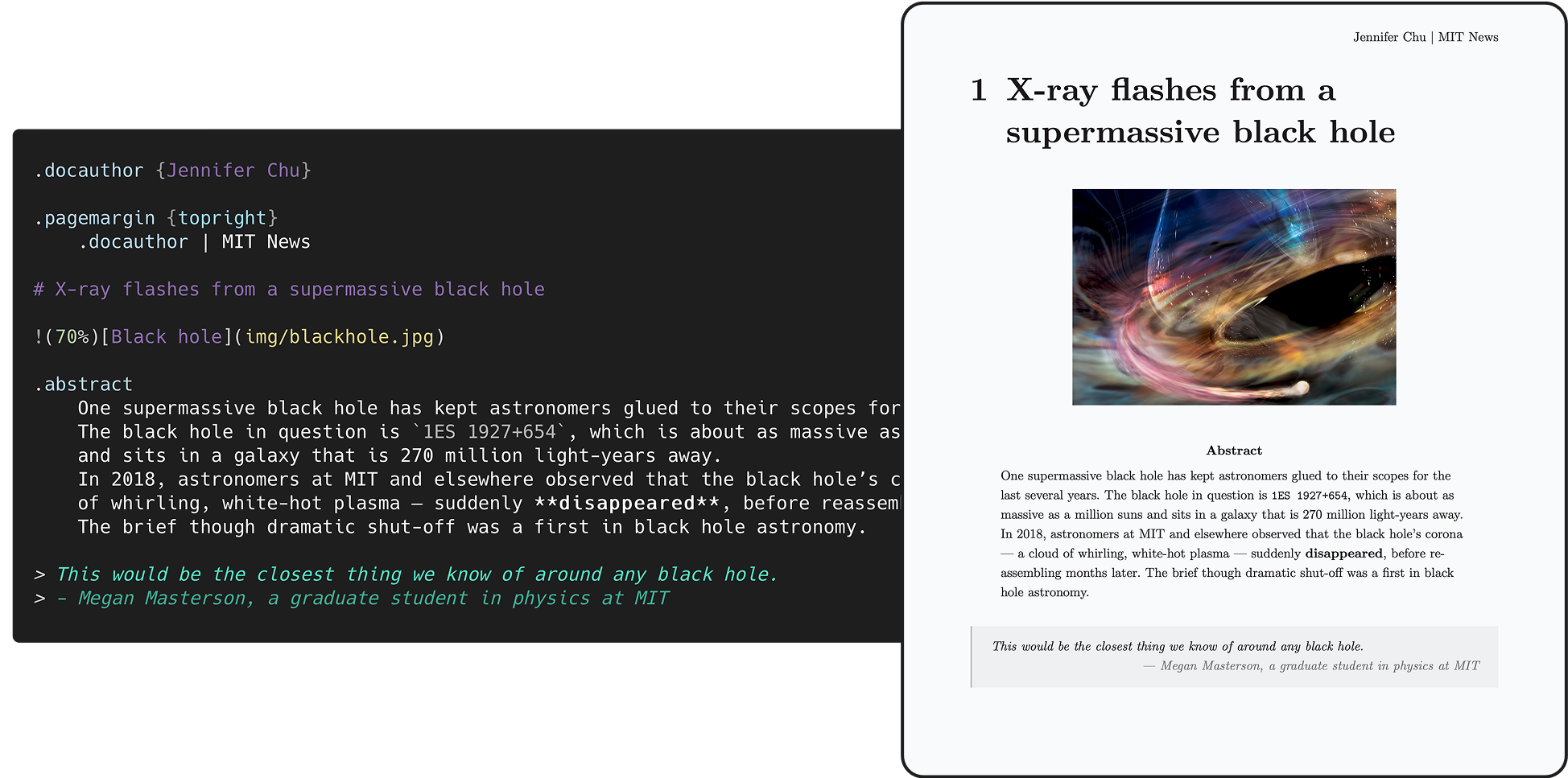
Inspired by: X-ray flashes from a nearby supermassive black hole accelerate mysteriously
...as complex as you need.
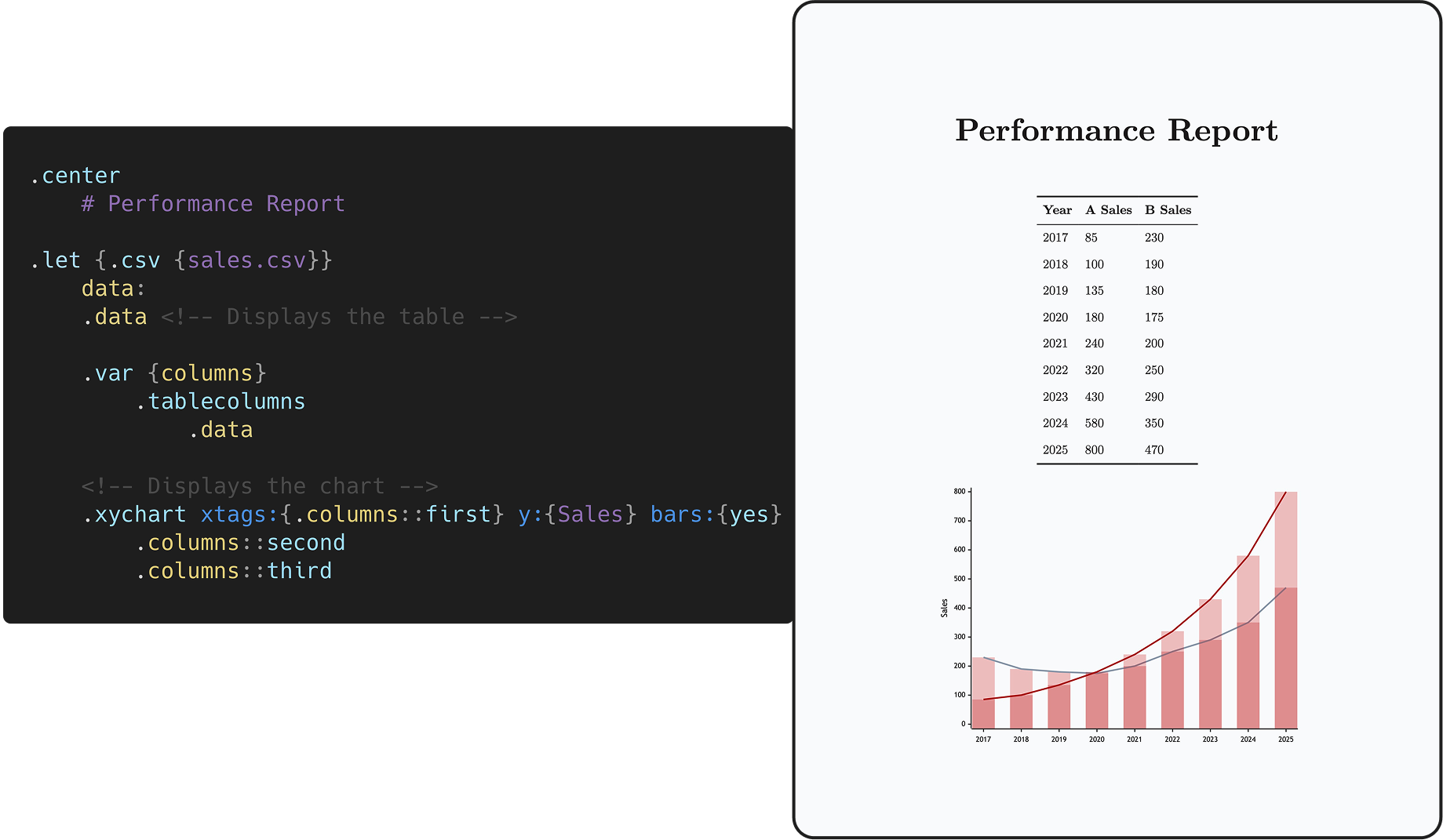
Targets
-
HTML
-
Plain
Continuous flow like Notion/Obsidian, perfect for static websites and knowledge management - check out the author’s personal website. -
Paged via paged.js
Perfect for papers, articles and books - check out the demo document. -
Slides via reveal.js
Perfect for interactive presentations. -
Docs
Perfect for wikis, technical documentation and large knowledge bases - check out Quarkdown’s wiki.
-
-
PDF
- All document types and features supported by HTML are also supported when exporting to PDF.
-
Plain text
The desired document type can be set by calling the .doctype function within the source itself:
.doctype {plain}(default).doctype {paged}.doctype {slides}.doctype {docs}
Comparison
| Quarkdown | LaTeX | Typst | AsciiDoc | MDX | |
|---|---|---|---|---|---|
| Concise and readable | :white_check_mark: | :x: | :white_check_mark: | :white_check_mark: | :white_check_mark: |
| Full document control1 | :white_check_mark: | :white_check_mark: | :white_check_mark: | :x: | :x: |
| Scripting | :white_check_mark: | Partial | :white_check_mark: | :x: | :white_check_mark: |
| Book/article export | :white_check_mark: | :white_check_mark: | :white_check_mark: | :white_check_mark: | Third-party |
| Presentation export | :white_check_mark: | :white_check_mark: | :white_check_mark: | :white_check_mark: | Third-party |
| Static site export | :white_check_mark: | :x: | Experimental | :white_check_mark: | :white_check_mark: |
| Docs/wiki export | :white_check_mark: | :x: | :x: | :white_check_mark: | :white_check_mark: |
| Learning curve | :green_circle: | :red_circle: | :orange_circle: | :green_circle: | :green_circle: |
| Targets | HTML, PDF, TXT | PDF, PostScript | HTML, PDF | HTML, PDF, ePub | HTML |
The ability to customize the properties of the document and of its output artifact through the language itself.
| LaTeX | Quarkdown |
|---|---|
|
|
Getting started
Installation
Install script (Linux/macOS)
curl -fsSL https://raw.githubusercontent.com/quarkdown-labs/get-quarkdown/refs/heads/main/install.sh | sudo env "PATH=$PATH" bash
Root privileges let the script install Quarkdown into /opt/quarkdown and its wrapper script into /usr/local/bin/quarkdown.
If missing, Node.js will be installed automatically using the system’s package manager.
For more installation options, check out get-quarkdown.
Homebrew (Linux/macOS)
brew install quarkdown-labs/quarkdown/quarkdown
Install script (Windows)
irm https://raw.githubusercontent.com/quarkdown-labs/get-quarkdown/refs/heads/main/install.ps1 | iex
Scoop (Windows)
scoop bucket add quarkdown https://github.com/quarkdown-labs/scoop-quarkdown; scoop install quarkdown
GitHub Actions
See setup-quarkdown to easily integrate Quarkdown into your GitHub Actions workflows.
Manual installation
Instructions for manual installation
Download quarkdown.zip from the latest stable release and unzip it,
or build it with gradlew installDist.
Optionally, adding <install_dir>/bin to your PATH allows you easier access Quarkdown.
Requirements:
- (Only for PDF export) Node.js, npm, Puppeteer. See PDF export for details.
Quickstart
New user? You’ll find everything you need in the Quickstart guide to bring your first document to life!
Creating a project
quarkdown create [directory] will launch the prompt-based project wizard, making it quicker than ever
to set up a new Quarkdown project, with all metadata and initial content already present.
Compiling
Running quarkdown c file.qd will compile the given file and save the output to file.
If the project is composed by multiple source files, the target file must be the root one, i.e. the one that includes the other files.
If you would like to familiarize yourself with Quarkdown instead, quarkdown repl lets you play with an interactive REPL mode.
Options
The most commonly used options are:
-
-por--preview: enables automatic content reloading after compiling. -
-wor--watch: recompiles the source every time a file from the source directory is changed.
Combine
-p -wto achieve live preview!
--pdf: produces a PDF file. Learn more in the wiki’s PDF export page.
For the full list of options, check out the CLI options wiki page.
Mock document

Mock, written in Quarkdown, is a comprehensive collection of visual elements offered by the language, making it ideal for exploring and understanding its key features — all while playing and experimenting hands-on with a concrete outcome in the form of pages or slides.
- The document’s source files are available in the
mockdirectory, and can be compiled viaquarkdown c mock/main.qd -p. - The PDF artifacts generated for all possible theme combinations are available and can be viewed in the
generatedrepo.
Contributing
Contributions are welcome! Please check CONTRIBUTING.md to know how contribute via issues or pull requests.
Sponsors
A special thanks to all the sponsors who supported this project!



Concept
The logo resembles the original Markdown icon, with focus on Quarkdown’s completeness, richness of features and customization options, emphasized by the revolving arrow all around the sphere.

What could be mistaken for a planet is actually a quark or, more specifically, a down quark, an elementary particle that is a major constituent of matter: they give life to every complex structure we know of, while also being one of the lightest objects in existence.
This is, indeed, the concept Quarkdown is built upon.
License
By default, Quarkdown and its modules are licensed under GNU GPLv3, except for modules that include their own LICENSE file:
the CLI (quarkdown-cli) and Language Server (quarkdown-lsp) modules and binaries are licensed under GNU AGPLv3.
Footnotes
相似文章
@Chenzeze777: 微软开源了一个 14 万星的文档神器,我整理了它最实用的 5 个场景。 MarkItDown,Python 工具,把 PDF/Word/PPT/Excel/HTML/图片,一键转成干净的 Markdown 文本。 你能用它做什么: · P…
微软开源了 MarkItDown,一个轻量级 Python 工具,可将 PDF、Word、PPT、Excel、HTML 和图片等文件一键转换为干净的结构化 Markdown 文本,方便用于 AI 摘要、数据分析、知识库构建等场景。
@IndieDevHailey: 文档地狱终结者 MarkItDown,一键把所有文件秒变 LLM 完美 Markdown! Microsoft 直接开源 MarkItDown,138k+ Star 霸榜 Trending, 从此告别 PDF 乱码、Word 表格炸裂、P…
Microsoft 开源了 MarkItDown 工具,可将 PDF、Word、Excel、PPT 等文件一键转换为结构完整的 Markdown 格式,便于直接喂给 LLM,目前 GitHub Star 超过 138k。
@KyrieCheungYep: 我做了一个 Skill:ky-markdown-rebuilder 专门把 PDF、PPT、白皮书、方案书、课程资料、长截图这类“视觉文档”,重建成结构可靠的 Markdown,因为 AI 读这些源文件会比较差,Markdown 除了可以…
KyrieCheungYep 发布了一个名为 ky-markdown-rebuilder 的 Skill,专门将 PDF、PPT 等视觉文档重建成结构可靠的 Markdown,以提升 AI 对复杂文档的阅读理解能力。
@QingQ77: 一个 Open WebUI 工具,用 python-docx 把模型产出的 Markdown(含 YAML 头)或 JSON 规范直接生成为原生、可编辑的 Word(.docx)文档。 https://github.com/ianuste…
一个 Open WebUI 工具,使用 python-docx 将模型产出的 Markdown(含 YAML 头)或 JSON 规范直接生成为原生、可编辑的 Word (.docx) 文档,支持多种模板和样式。
@wsl8297: 如果你手里有一堆 PDF、文档、项目资料要喂给 AI,Synthadoc 这个方向很值得看。 GitHub:https://github.com/axoviq-ai/synthadoc… 它把原始资料在摄入时就编译成结构化 wiki,自动…
Synthadoc 是一个开源工具,可将 PDF、文档等项目资料编译为结构化的本地 Markdown wiki,自动建立交叉引用并检测矛盾,适合个人或小团队进行离线知识管理。