Cached at:
07/27/26, 05:40 AM
# Authoritative dnsmasq in a MikroTik container
Source: [https://op-co.de/blog/posts/mikrotik_authoritative_dnsmasq/](https://op-co.de/blog/posts/mikrotik_authoritative_dnsmasq/)
Georg Lukas,2026\-07\-26 19:24
This post is about setting up and configuring a[dnsmasq](https://thekelleys.org.uk/dnsmasq/doc.html)container on a MikroTik RouterOS device to be used as an authoritative DNS server and a forwarding cache at the same time\.
1. [Introduction](https://op-co.de/blog/posts/mikrotik_authoritative_dnsmasq/#index1h2)
2. [MikroTik Containers](https://op-co.de/blog/posts/mikrotik_authoritative_dnsmasq/#index2h2)
3. [Installing a dnsmasq container](https://op-co.de/blog/posts/mikrotik_authoritative_dnsmasq/#index3h2)
4. [Dual\-use dnsmasq](https://op-co.de/blog/posts/mikrotik_authoritative_dnsmasq/#index4h2)
## Introduction
Recently I joined[DN42](https://dn42.eu/Home), a world\-wide overlay network created for experimenting with IP routing and for connecting communities, hack\-spaces, and networking nerds who are not allowed 😜 to break the real Internet\.
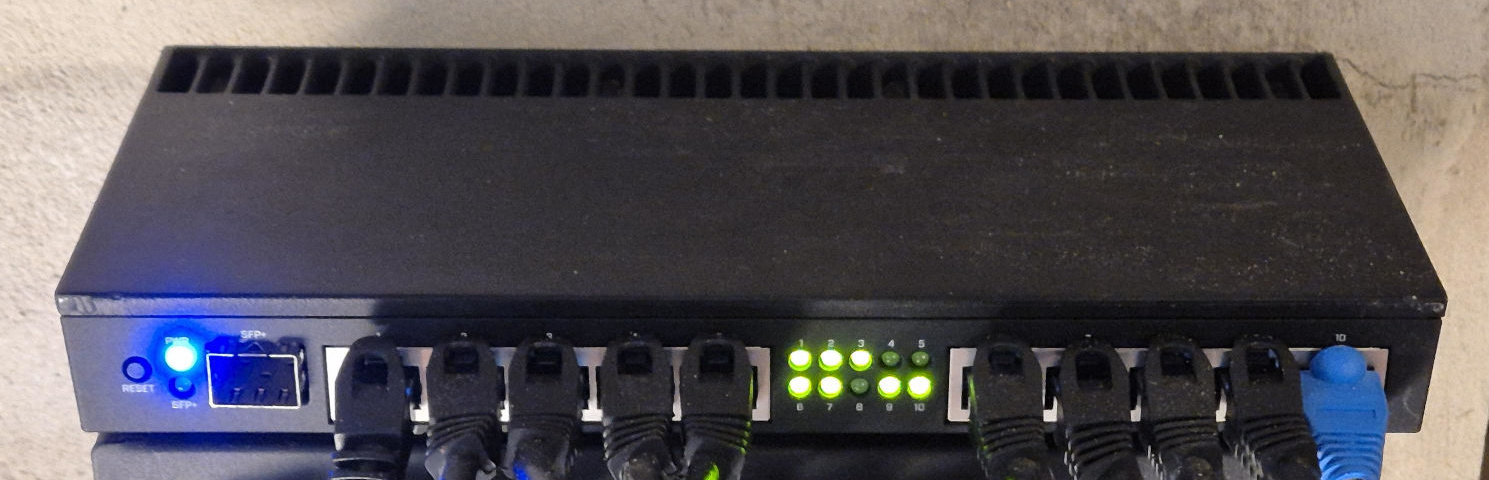
I wanted to play on hard mode, so I configured the DN42 tunnels in a[VRF](https://en.wikipedia.org/wiki/Virtual_routing_and_forwarding)on my home lab switch, a MikroTik RB4011\. And of course I wanted to provide[authoritative DNS](https://en.wikipedia.org/wiki/Name_server#Authoritative_name_server)for my`\.dn42`zone from the same switch\.
MikroTik routers come with a built\-in[DNS](https://manual.mikrotik.com/docs/network-management/dns)service, but it can't act as an authoritative server, and there is a shared DNS cache for all clients, which would leak my home lab to DN42\.
I already run[prosody](https://chaos.social/@ge0rg/116787183072360013)and iperf on my switch, so the "obvious" "solution" was to add another container\.
## MikroTik Containers
MikroTik routers with ARM and ARM64 CPUs support Docker[containers](https://manual.mikrotik.com/docs/containers/)\. The manufacturer**strongly recommends**using external USB / SD card storage to not wear out internal flash\. Ignoring that recommendation might cause the flash in your router to fail and**turn the router into an expensive paperweight**\.
The RB4011 doesn't have USB or SD ports, and[adding NVMe looks complicated](https://www.reddit.com/r/mikrotik/comments/pzqeob/rb4011igs_mpcie_addition_ep_2_the_shortcircuit/)\. It is possible to use the[Storage package](https://manual.mikrotik.com/docs/storage/)to mount remote disks, but I hate circular dependencies between my devices\. Then again,[people reports millions of flash writes](https://forum.mikrotik.com/t/how-many-writes-to-flash-will-kill-it/7308/32), so I'm going to YOLO my containers on the internal 512MB flash, using`/docker`for the images and volumes\.
Nevertheless, if you look for a MikroTik router to run containers, maybe[pick one with ARM64 and a physical storage port](https://forum.mikrotik.com/t/recommend-mikrotik-for-running-container/176689)\.
[Enabling containers requires a walk to the switch](https://manual.mikrotik.com/docs/system-information-and-utilities/device-mode#enabling-device-mode-feature)to ensure physical presence, and will increase your attack surface\. Then we can configure it to fetch from Docker Hub, which gives us access to some[117k ARM images](https://hub.docker.com/search?q=&architecture=arm&sort=updated_at&order=desc):
```
/container config
set registry-url=https://registry-1.docker.io tmpdir=/docker
```
## Installing a`dnsmasq`container
I've settled with the[dockurr/dnsmasq](https://hub.docker.com/r/dockurr/dnsmasq)image based on Alpine which needs around 12MB of flash space\. It accepts`DNS1`to`DNS4`from the environment and allows to bind\-mount`/etc/dnsmasq\.d`for additional config files:
```
/container envs
add key=DNS1 list=ENV_DNSMASQ value=fd42:d42:d42:54::1
add key=DNS2 list=ENV_DNSMASQ value=fd42:d42:d42:53::1
/container mounts
add dst=/etc/dnsmasq.d list=MOUNT_DNSMASQ_DNSMASQD src=/docker/dnsmasq-dnsmasq.d
/container
add remote-image=dockurr/dnsmasq name=dn42-dnsmasq \
envlists=ENV_DNSMASQ mountlists=MOUNT_DNSMASQ_DNSMASQD \
root-dir=/docker/images/dnsmasq interface=veth5 start-on-boot=yes
```
The two upstream servers are taken from the[DN42 anycast DNS](https://dn42.eu/services/dns/Overview#using-the-dns-anycast-service)\.
The`veth5`interface is a virtual interface bridged into my DN42 LAN on a dedicated`dn42`VRF\. I've added two addresses to`veth5`,`::2`for the authoritative DNS, and`::53`for the forwarder\. Initially, I only had one address, but dnsmasq refuses to operate a DNS forwarder on the same IP/interface as an authoritative server\.
```
/inteface bridge
add comment="dn42 bridge with containers" name=dn42-bridge
/ipv6 address
add address=fd16:9939:ecc0::1/64 advertise=no interface=dn42-bridge
/ip vrf
add interfaces=<snip>,dn42-bridge name=dn42
/inteface veth
add address=fd16:9939:ecc0::2/64,fd16:9939:ecc0::53/64 comment="DN42 dnsmasq" \
gateway6=fd16:9939:ecc0::1 name=veth5
/interface bridge port
add bridge=dn42-bridge interface=veth5
```
**Note:**don't add the`veth`to your VRF, or you'll end up with["port is already slave"](https://forum.mikrotik.com/t/adding-container-to-bridge-in-vrf-port-is-already-slave/271841)\!
When you add the container, RouterOS will download and extract the image in the background\. Later you can update it with`/container/update`\- both will show the download progress in the UI:
```
/container update dn42-dnsmasq
/container print
*snip*
# NAME ROOT-DIR INTERFACE CONTAINER-SIZE TAG
;;; downloading layer 0/6 0%/7.7M
3 E dn42-dnsmasq /docker/images/dnsmasq veth5 7.7MiB registry-1.docker.io/dockurr/dnsmasq:latest
*snip*
```
## Dual\-use dnsmasq
dnsmasq strictly separates*authoritative DNS*\(being the main DNS server for a specific domain\) and*forwarding DNS*\(providing DNS responses for whatever a client is asking for\)\. Normally, when you run dnsmasq on a router, you can configure it to be authoritative on the WAN interface and forwarding on the LAN interface\.
If you misconfigure it, it will return`Host not found: 5\(REFUSED\)`for remote domains, and/or will fail to return a`SOA`for your domain\.
When we run it in a container, we could either add two different virtual interfaces, or we set up two different addresses for the two tasks\.
Now, we can create a`ge0rg\.conf`file either directly in the container \(`/container/shell dn42\-dnsmasq`and it helpfully comes with busybox'`vi`\), or on our computer, and scp it to`/docker/dnsmasq\-dnsmasq\.d/ge0rg\.conf`on the RB4011:
```
# Be the authoritative server on the ::2 address
auth-server=ns1.ge0rg.dn42,fd16:9939:ecc0::2
# Serve two zones: ge0rg.dn42 and reverse lookups for the ULA IPv6 range
auth-zone=ge0rg.dn42,fd16:9939:ecc0::/48
# Define the Start of Authority resource record parameters:
# <serial>,<email>,<refresh>,<retry>,<expire>,<min_ttl>
auth-soa=2026072403, ge0rg.ge0rg.dn42, 1200, 120, 1209600, 86400
# Create the actual AAAA and PTR records, one line per host:
# <primary hostname>,<hostnames>,<IPv6>
host-record=gw.ge0rg.dn42,gw,fd16:9939:ecc0::1
host-record=dnsmasq.ge0rg.dn42,dnsmasq,ns1.ge0rg.dn42,fd16:9939:ecc0::2
host-record=lan.gw.ge0rg.dn42,lan.gw,fd16:9939:ecc0:42::1
host-record=wg.gw.ge0rg.dn42,wg.gw,fd16:9939:ecc0:7390::1
```
You need to restart dnsmasq after each change to a config file \(it will only reload`/etc/hosts`on SIGHUP\):
```
/container/restart dn42-dnsmasq
```
DN42 comes with a helper script to verify the correct working of your DNS zone:
```
$ ./validate-my-dns.py GE0RG-MNT
NOTE: ge0rg.dn42 doesn't have any ds-rdata specified
NOTE: 0.c.c.e.9.3.9.9.6.1.d.f.ip6.arpa doesn't have any ds-rdata specified
Summary:
domain name | success | dnssec fail | wrong NS | wrong SOA | NXDOMAIN | REFUSED | SERVFAIL | timeout
----------------------------------|---------|-------------|----------|-----------|----------|---------| -------- | -------
ge0rg.dn42 | 1 | 0 | 0 | 0 | 0 | 0 | 0 | 0
0.c.c.e.9.3.9.9.6.1.d.f.ip6.arpa | 1 | 0 | 0 | 0 | 0 | 0 | 0 | 0
```
The missing`ds\-rdata`is about[DNSSEC](https://en.wikipedia.org/wiki/Domain_Name_System_Security_Extensions)\. If you want to sign your zone, use a "grown\-up" DNS implementation 😉
The final result looks like this, taken from my peer:
```
$ mtr --report darkwing.ge0rg.dn42
Start: 2026-07-24T15:49:32+0200
HOST: peerhost Loss% Snt Last Avg Best Wrst StDev
1.|-- dn42-peerhost.mypeer.dn42 0.0% 10 124.0 82.4 31.8 132.8 36.0
2.|-- gw.ge0rg.dn42 0.0% 10 96.6 100.8 48.8 153.6 34.6
3.|-- darkwing.ge0rg.dn42 0.0% 10 55.3 108.7 55.3 159.5 35.8
```
*[Discuss on Mastodon](https://chaos.social/@ge0rg/116987470397087514)*