Cached at:
08/27/26, 03:52 PM
# 🚨 Breaking 🚨 ChatGPT Now Supports WebMCP
Source: [https://nekuda.substack.com/p/breaking-chatgpt-now-supports-webmcp](https://nekuda.substack.com/p/breaking-chatgpt-now-supports-webmcp)
## TL;DR
- OpenAI announced WebMCP support in the ChatGPT desktop app’s built\-in browser and ChatGPT Sites\.
- When ChatGPT or Codex visits a compatible website, it can use the site’s tools instead of guessing its way through the interface\.
- The user reaching a website may now be an agent acting for a person, or a person and agent browsing together\.
- Exposing tools is only the technical starting point\. Website teams also need to design, test, and understand the complete agent experience\.
🚨You can now create WebMCP tools directly from[WebMCP\.com](https://webmcp.com/)🚨\. Start with a website scan, or build from your codebase with the coding agent you already use\.
Once the tools are ready, you can claim your site in our product[AgentLane](https://app.agentlane.com/), a workspace to manage, test, and improve your WebMCP tools\.
Today, OpenAI[announced](https://x.com/OpenAIDevs/status/2092344959248761263?s=20)that it is adding WebMCP support to the ChatGPT desktop app’s built\-in browser and ChatGPT Sites\.
When ChatGPT or Codex visits a compatible website, it can discover the tools that site exposes and use them to complete the customer’s task\. OpenAI is also marking the launch with a short[WebMCP Challenge](https://openai.com/webmcp-challenge/)supported by Google Chrome, Cloudflare, Shopify, Vercel, Render, and Netlify \(in case you wondered: yes, we are going to participate and build something awesome\)\.
For months, we have been watching websites and web infrastructure prepare for agents\. This announcement connects the other side of that interaction\. ChatGPT and Codex can now use the actions those websites make available\.
[](https://substackcdn.com/image/fetch/$s_!aYo2!,f_auto,q_auto:good,fl_progressive:steep/https%3A%2F%2Fsubstack-post-media.s3.amazonaws.com%2Fpublic%2Fimages%2F0bf64149-6b9c-4ba8-af3c-36194e3f1d75_540x298.jpeg)
Most agents still use websites in roughly the same way people do\. They read the page, open menus, fill in fields, and try to work out which button comes next\. It can work, but it is slow and fragile because the agent is interpreting an interface designed for human eyes\. The ChatGPT desktop products \(Chat / Work / Codex\) have an in\-app browser that can be opened alongside your session\. You can ask ChatGPT to navigate sites, fill in the CRM for you, or do anything in the browser, and it will work in front of your eyes\.
It actually works really well today, except for three issues: 1\) painfully slow, 2\) can make mistakes, 3\) site owners don’t have visibility into this type of behavior, often called co\-browsing\.
[WebMCP](https://github.com/webmachinelearning/webmcp)gives the agent a cleaner route\. A website publishes a structured list of actions, such as searching products, checking availability, updating a cart, booking an appointment, or starting a trial\. This solves the issues we just mentioned \- it is really fast and accurate \(we actually built the first WebMCP benchmark to prove it,[check it out here](https://webmcp.com/benchmark)\)\. Plus, the site owner gets to expose the website in the way they see fit, while getting a lot of data on how agents use it\.
Imagine asking ChatGPT to find a waterproof hiking shoe in size 11 for under $160 and add the best option to your cart\. On a normal website, the agent may need to search, open several product pages, select filters, check variants, and click the right cart button\.
A WebMCP\-enabled store can expose those steps as tools\. ChatGPT can call them directly, while the website keeps control over what each tool does and which actions require confirmation\.
OpenAI says this can happen automatically when ChatGPT or Codex visits a compatible site\. The customer does not need to find and install a separate integration for every website they want their agent to use\.
In May,[we reported Google adding an Agentic Browsing category to Lighthouse](https://nekuda.ai/blog/breaking-google-added-a-new-agentic/), including checks for WebMCP\. In July,[we reported Shopify shipping WebMCP tools across its storefronts](https://nekuda.ai/blog/breaking-shopify-stores-are-getting/)\. Earlier this month,[Cloudflare introduced infrastructure that makes WebMCP easier for websites to deploy](https://nekuda.ai/blog/cloudflare-agents-week-recap-the/)\.
Those launches helped websites publish tools\. OpenAI is now giving those tools a large agent surface that can actually use them\.
That connection is what turns WebMCP from a standard developers discussion into something customers may encounter during an ordinary task\. A merchant can expose catalog and cart tools, a travel site can expose availability and booking tools, and a SaaS product can expose onboarding or account actions\. ChatGPT can use those actions while working inside the website\. What makes this announcement even more powerful is that OpenAI made two other announcements on the same day\.
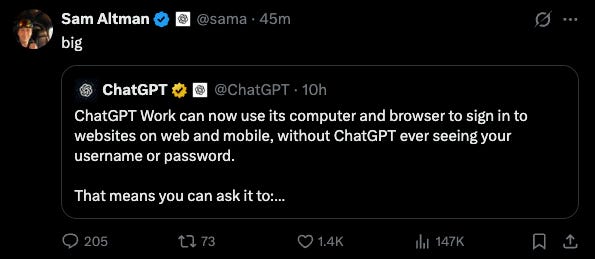
First, ChatGPT Work can now[use the browser to log into services on behalf of users](https://x.com/chatgpt/status/2092366554965107164?s=48), opening up an endless number of tasks \- from booking passport appointments and checking insurance policies to filling forms or doing pretty much anything on the web\. Sam Altman himself reposted the announcement, which shows how significant this is\.
[](https://substackcdn.com/image/fetch/$s_!1B_T!,f_auto,q_auto:good,fl_progressive:steep/https%3A%2F%2Fsubstack-post-media.s3.amazonaws.com%2Fpublic%2Fimages%2Fd3c63d66-3992-4b45-a07e-8ac06e0e7ef2_595x259.png)
Second, OpenAI[expanded its ChatGPT browser extension](https://x.com/jameszmsun/status/2092342861216022826?s=48)to Edge, Brave, Opera, and Vivaldi, allowing ChatGPT to use your everyday browser to complete web tasks\.
What does all of this mean? Agents are coming to the browser across hundreds of new use cases\. And as more agents use the web, the need for websites to become agent\-ready is going to spike\.
There are two different experiences website teams now need to consider to become agent\-ready \-
1. **Headless**: Agent visits the site on the customer’s behalf\. The person tells ChatGPT what they want, and the agent searches, compares, fills in details, or moves the journey forward for them\. The agent becomes the immediate user of the website, even though it is still working for a person\.
1. **Co\-browsing**: The person and the agent use the website together\. The customer can see the page while the agent searches, applies filters, updates a form, or adds something to the cart\. This is co\-browsing, where the human interface and the agent’s tools operate on the same experience\.
These journeys need different product decisions\. An agent acting on behalf of a customer needs clear results, reliable actions, authentication, and safe boundaries\. In co\-browsing, the human also needs to understand what the agent changed, see the current state, approve important actions, and recover when something goes wrong\.
**That is why exposing tools does not automatically create a useful customer journey\.**The tools still need to connect from the original request to a result the customer understands and wants\.
A search tool is not enough if the agent cannot check availability\. A product tool is not enough if it cannot select the correct option\. A cart tool is not enough if the customer cannot see what was added or confirm what happens next\.
For those who want to learn more, we’ve also[written some guidelines](https://webmcp.com/blog/building-user-journeys-with-webmcp)for implementing WebMCP on your site in a way that creates an effective agent journey\.
[Share](https://nekuda.substack.com/p/breaking-chatgpt-now-supports-webmcp?utm_source=substack&utm_medium=email&utm_content=share&action=share)
#### Discussion about this post
### Ready for more?