agegr/pi-web
Summary
pi-web is a local web UI for the pi coding agent, providing session browsing, real-time chat, model configuration, and file preview in a browser workspace.
View Cached Full Text
Cached at: 07/21/26, 12:36 PM
agegr/pi-web
Source: https://github.com/agegr/pi-web
pi-web
Local web UI for the pi coding agent. pi-web reads your local pi session files and gives you a browser workspace for session browsing, real-time chat, model configuration, skill management, and project file preview.
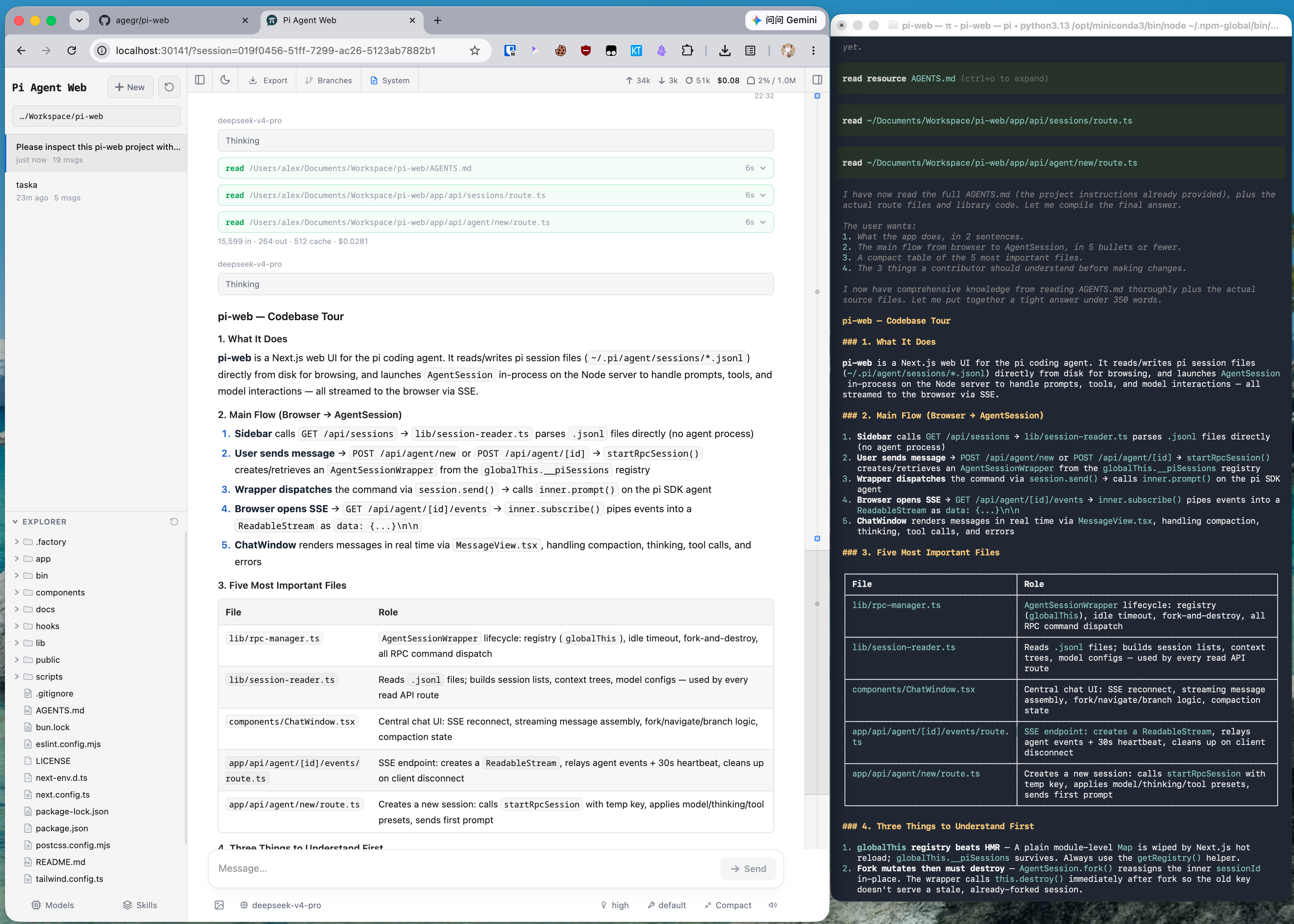
The same pi session in CLI and pi-web: structured tool calls, readable Markdown, session browsing, and cleaner results.
Quick Start
Run without installing:
npx @agegr/pi-web@latest
Or install globally:
npm install -g @agegr/pi-web
pi-web
Then open http://localhost:30141. The CLI will try to open the browser automatically after the server is ready.
Options:
pi-web --port 8080              # custom port
pi-web --hostname 127.0.0.1     # local access only
pi-web -p 8080 -H 127.0.0.1     # combine options
pi-web --no-open                # do not open the browser automatically

PORT=8080 pi-web                # environment variable is also supported
PI_WEB_NO_OPEN=1 pi-web         # useful when running as a background service
Features
- Pick work back up: browse previous pi conversations by project without digging through terminal history or session paths.
- Try different directions safely: continue from an earlier message or fork a session into a separate route.
- Work across branches: switch Git worktrees from the sidebar so new sessions and the Explorer follow the checkout you choose.
- Chat beside the project: browse files on the left and preview source, docs, images, audio, and PDFs on the right while the agent works.
- See session state clearly: context usage, cost, compaction state, and system prompt details are visible from the top bar.
- Configure less from the terminal: manage models, login/API keys, model tests, and skill switches from the web UI.
Notes
- Data directory: pi-web reads
~/.pi/agent/sessionsby default. SetPI_CODING_AGENT_DIRto point at another pi agent directory. - Session files: files are stored as
~/.pi/agent/sessions/<encoded-cwd>/<timestamp>_<uuid>.jsonl. - Model config: the Models panel reads and writes
models.jsonin the pi agent directory. Model lists and defaults come from pi’s config. - File access: file browsing and preview are scoped to the selected project directory and working directories that appear in sessions.
- Git worktrees: see Worktrees in pi-web for when the switcher appears, how new worktrees are created, and what removal does.
- Forks vs in-session branches: Fork creates a new
.jsonlfile. “Edit from here” creates another branch inside the same session file.
Development
npm install
npm run dev
The local dev server runs at http://localhost:30141.
Common checks:
node_modules/.bin/tsc --noEmit
npm run lint
Avoid running next build / npm run build during local development. It writes to .next/ and can interfere with the dev server; leave builds for release work.
Project Structure
app/
  api/
    agent/          # creates/drives AgentSession and exposes SSE events
    auth/           # OAuth and API key management
    cwd/validate/   # custom working directory validation
    default-cwd/    # pi default working directory lookup
    files/          # file listing, reading, preview, and watching
    home/           # current user home directory
    models/         # available models, default model, thinking levels
    models-config/  # read/write models.json and test models
    sessions/       # session reads, rename, delete, context, HTML export
    skills/         # skill listing, search, install, enable/disable
components/
  AppShell.tsx        # main layout, URL state, top panels, file tabs
  SessionSidebar.tsx  # project selector, session tree, Explorer
  ChatWindow.tsx      # messages, SSE, image drag/drop, minimap
  ChatInput.tsx       # input bar, model/tools/thinking/compact/slash controls
  MessageView.tsx     # message, thinking, tool call/result rendering
  ModelsConfig.tsx    # model and auth configuration panel
  SkillsConfig.tsx    # skill management panel
  FileExplorer.tsx    # file tree
  FileViewer.tsx      # source, diff, image, audio, PDF, DOCX preview
lib/
  rpc-manager.ts      # AgentSessionWrapper lifecycle and global registry
  session-reader.ts   # parses .jsonl session files and branch contexts
  normalize.ts        # normalizes toolCall field names
  file-access.ts      # file read safety boundary
  file-paths.ts       # path encoding and relative path helpers
  markdown.ts         # Markdown/Mermaid/KaTeX plugin configuration
  pi-types.ts         # pi-related types
hooks/
  useAgentSession.ts  # session loading, command sending, SSE state machine
  useAudio.ts         # completion sound
  useDragDrop.ts      # image drag/drop
  useTheme.ts         # theme switching
bin/
  pi-web.js           # npm CLI entrypoint
Similar Articles
vastsa/PI-Desktop
PI-Desktop is an open-source local-first desktop workspace for AI coding agents, enabling developers to use various models and manage projects with control over agent actions.
@geekbb: A rather beautiful Pi Coding Agent user interface, directly reads the workspace directory structure of pi harness projects like pi-forge, no extra configuration or database needed, ready to use out of the box. https://github.com/Ellian-Eorwyn/Hep…
Hephaestus is a beautiful desktop GUI for managing local LLM agents across pi harness environments. It reads the workspace directory structure directly without needing extra configuration or a database, providing a centralized interface for agent interaction and monitoring.
can1357/oh-my-pi
Oh My Pi is an open-source coding agent built on Pi, offering a wired-in IDE, support for 40+ providers, built-in tools, and significant performance improvements across models.
injaneity/pi-computer-use
pi-computer-use is an extension for Pi agents that enables them to view and interact with desktop applications on macOS and Windows by clicking, typing, scrolling, and waiting for UI changes.
earendil-works/pi
Pi is an open-source mono repo containing a coding agent CLI, agent runtime, and unified multi-provider LLM API, designed for building interactive coding agents.