@FeitengLi: Led by Fable 5 (just half a day), Codex relay development took a week. #EdgeSpeak is now live. Friends who shared, contact me to receive an invite code https://edgespeak.com/zh
Summary
EdgeSpeak desktop voice transcription tool is now live, featuring the local Lattice-2 voice model. It supports offline audio/video transcription, multiple languages and accents, and provides a local API for developers to integrate.
View Cached Full Text
Cached at: 06/22/26, 01:41 AM
Led by Fable 5 (just half a day) with Codex relay development over a week, #EdgeSpeak officially launched. Friends who share, contact me for an invite code.
https://t.co/HquVtvEK9n https://t.co/stsA7xYV9D
Put Voice AI Models into Your Computer | EdgeSpeak
Source: https://edgespeak.com/ On-Device Speech Engine
EdgeSpeak optimizes and compresses professional speech models for desktop use. Supports meetings, interviews, videos, or new recordings for local transcription; audio, video, and transcripts stay on your device.
Let your computer understand meetings, interviews, and videos itself.
local-transcribe.mov
00:04 Drag in a meeting, interview, video, or start a new recording.
00:12 Lattice-2 transcribes text locally, view as it runs.
00:27 Proofread and export, or pass to other tools.
Dedicated On-Device Large Model
Lattice-2: A Speech Large Model Deeply Optimized for Desktop
Lattice-2 is the local speech model series running on EdgeSpeak. Through compression, inference optimization, and local compute adaptation, it enables regular PCs to process meetings, interviews, videos, and recordings.
On-Device Compression and Inference Adaptation
Tailors speech AI models for desktop operation, reducing wait times — local transcription with no external service dependency.
Flash / Pro Dual Model Synergy
Flash is designed for everyday meetings and video transcription, offering faster responses. Pro targets challenging audio, complex accents, and higher accuracy needs, using slightly more local resources.
Integrated into Developer Workflows
Supports 40+ languages, multiple English accents, and Chinese dialects. The same local engine can be accessed by CLI, agents, and automation via a gateway.
Real Desktop Experience
Lattice-2: Already Running in EdgeSpeak Desktop
Current desktop features: Import audio or video, select the Lattice-2 model, export results. For automation, the speech gateway enables efficient collaboration with agents.
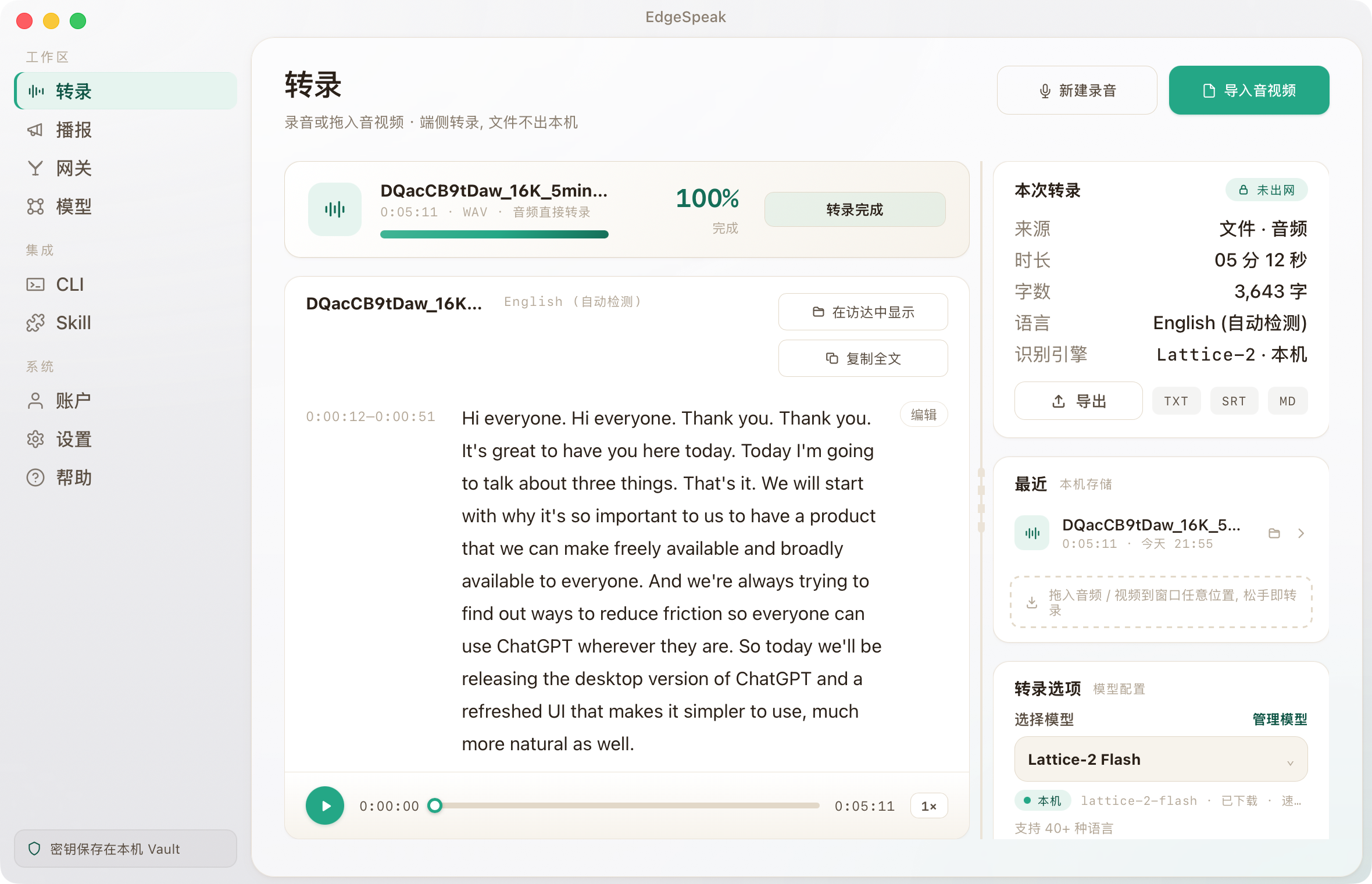
Audio, Video, and Transcripts in One Workspace Playback, timeline, transcripts, export, recent files, and current Lattice model are all together. Fewer tool switches, less context loss. EdgeSpeak desktop transcription main interface showing the main transcription workspace, local Lattice model status, transcript content, playback controls, and recent files.
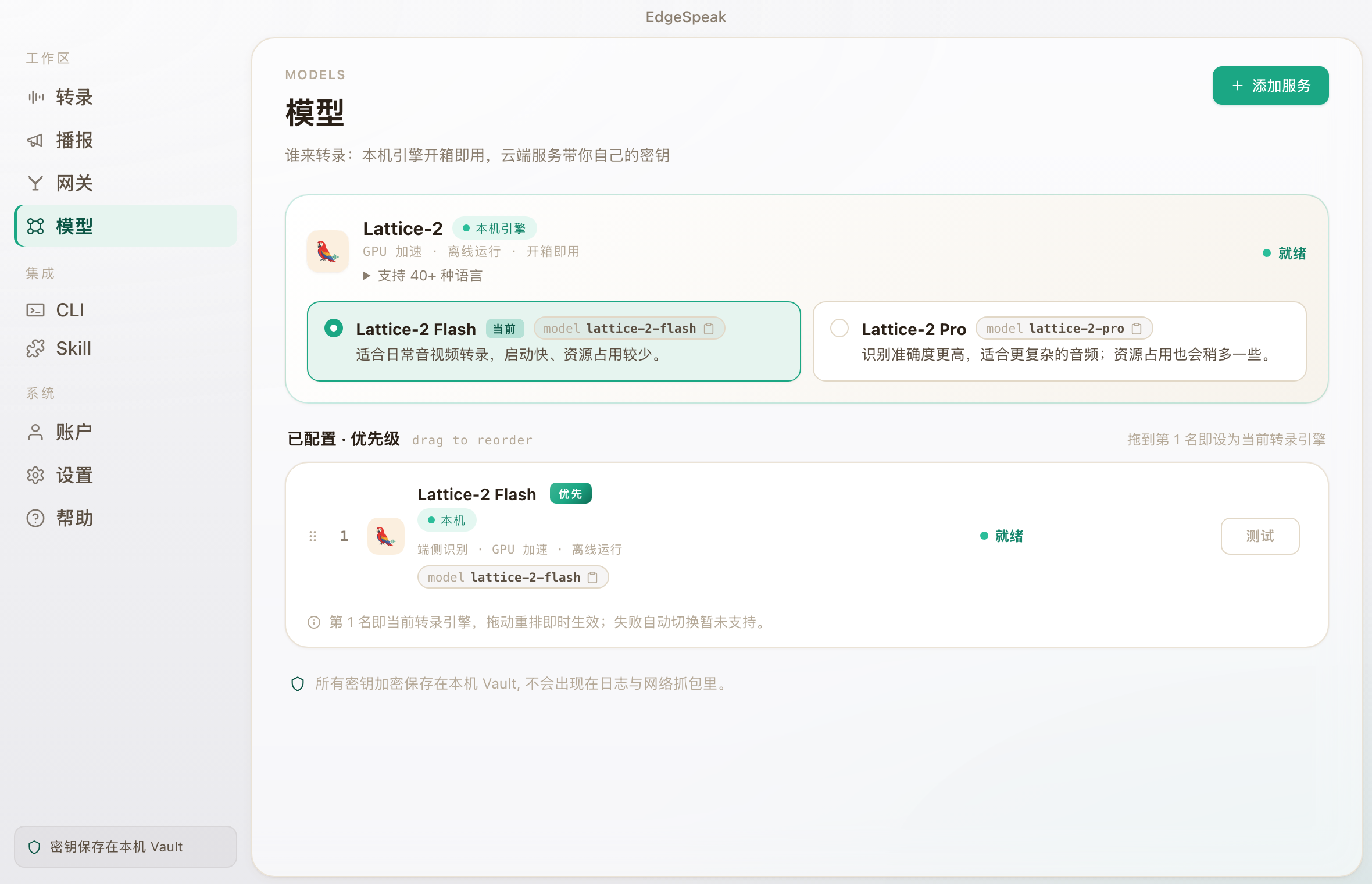
Select Lattice Model by Task Lattice-2 supports 40+ languages, multiple English accents, and Chinese dialects. Flash is fast with good results; Pro is more accurate but uses more local resources. EdgeSpeak desktop model page showing local Lattice-2 Flash and Lattice-2 Pro options.
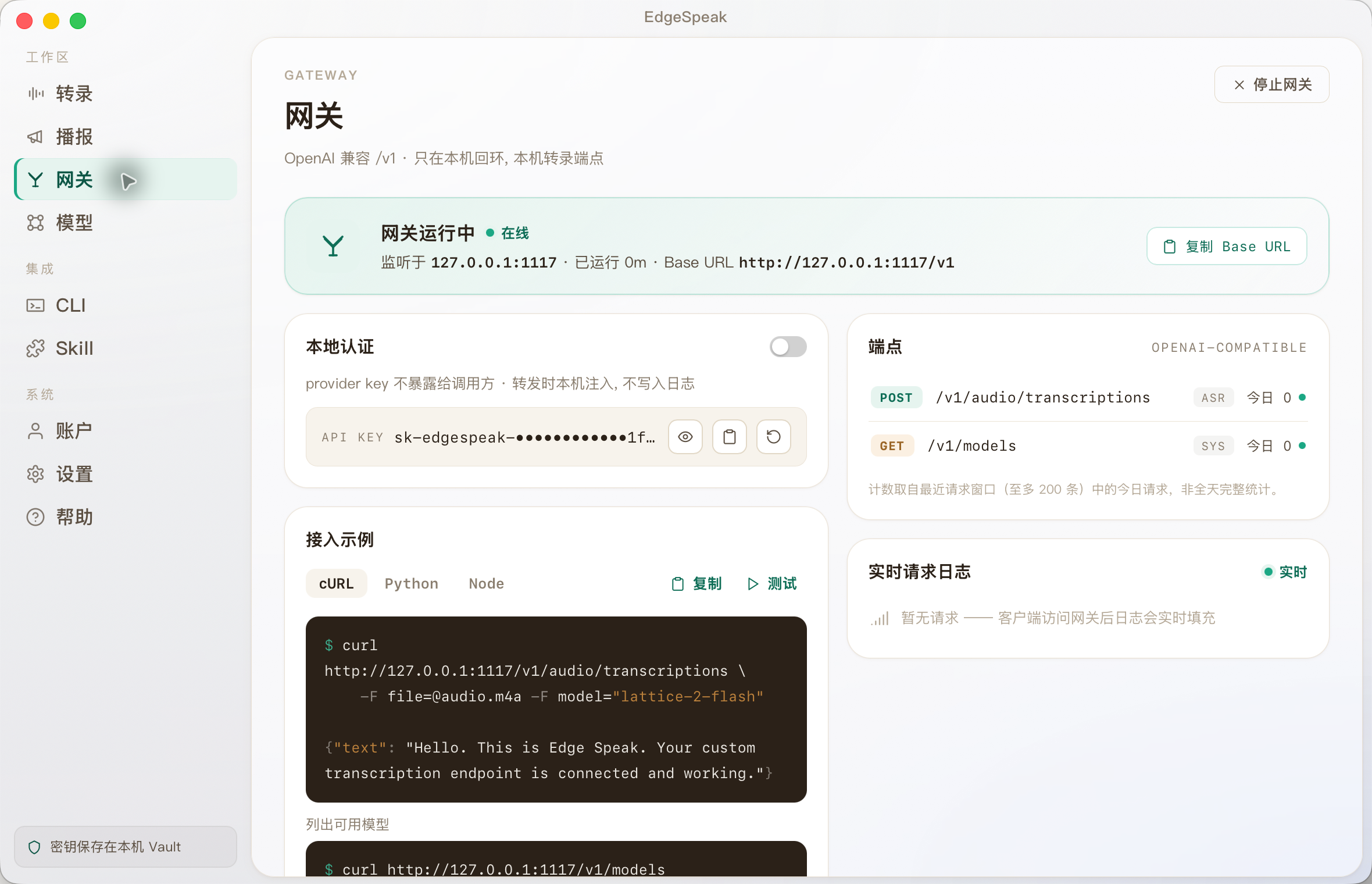
Let Other Tools Use Lattice Too CLI, agents, and automation can send audio to EdgeSpeak and receive completed transcripts from Lattice. EdgeSpeak desktop gateway page showing how other tools on the same computer can use the local speech engine.
Early Bird
Early Bird $29: Put Lattice into Your Workflow
The current version already uses Lattice-2 for local audio/video transcription and connects via the local gateway to CLI, agents, and automation. Lifetime license includes future model and speech capability updates: buy what works now, and grow together as it evolves.
Early Bird Price
Lifetime License
$29 $99 One-time payment
Currently $29, regular price $99.
- Local audio/video transcription available now
- Local gateway and CLI available now
- Future model and speech capability updates
- Up to 4 devices
For more devices or team purchases: [email protected]
Local Speech Gateway
Let Agents and Automation Tools Directly Call Lattice-2 on This Computer
EdgeSpeak wraps Lattice-2 into a local speech API on the same machine. CLI, agents, automation scripts, and tools compatible with the OpenAI transcription API can send audio to the local engine and get transcripts back. It’s not another cloud — it’s a speech gateway inside your computer.
Local OpenAI-Compatible Interface CLI / Agent / Automation Lattice-2 Flash and Pro
edgespeak gateway - 127.0.0.1:1117
curl http://127.0.0.1:1117/v1/audio/transcriptions \ -H "Authorization: Bearer sk-edgespeak-..." \ -F [email protected] \ -F model="lattice-2-flash"
Feiteng (@FeitengLi): Bookmarks exceeded 1,000 — seems Twitter friends have long suffered from inaccurate recognition and unstable timestamps.
Few have nailed: accurate recognition + stable timestamps + speaker labeling.
Maybe I should practice and write a desktop app: ~1GB memory, 40x real-time on M4 (1 minute transcribes 40 minutes of audio).
Desktop App: drag-and-drop transcription, direct mic capture, meeting notes Compatible with OpenAI Audio API, can take over OpenClaw
Similar Articles
@uniswap12: Microsoft open-sourced a voice AI that can transcribe 60 minutes of long audio in one go, handling 4 people speaking simultaneously. VibeVoice, open-sourced by Microsoft, 24.8k stars, I only found out about it today. For converting recordings to text, I've been using Whisper, but it often times out on long meeting recordings and struggles with multi-speaker recognition...
Microsoft open-sourced the VibeVoice speech AI framework, which supports one-shot transcription of 60-minute long audio, multi-speaker diarization and timestamp labeling, and also provides multi-role TTS synthesis capabilities. It is based on Qwen2.5 and comes with a 0.5B lightweight real-time version. It has received 24.8k stars on GitHub.
@iluciddreaming: Google just killed another startup... Google AI Edge Eloquent now supports Mac, a fully local Wispr Flow alternative. Based on the latest Gemma model, supports real-time voice transcription + voice commands to edit text. Free, no subscription, no...
Google AI Edge Eloquent now supports Mac as a fully local Wispr Flow alternative, offering real-time voice transcription and voice command text editing based on the latest Gemma model. Free, no subscription, and fully private locally.
@dotey: https://x.com/dotey/status/2057250417638035555
This article shares usage tips from the Codex official team, including persistent conversation flow, voice input, task intervention and queuing, tool integration, automation, and goal setting, to help users get the most out of Codex, an AI coding agent.
@GitTrend0x: Holy cow, guys! Run voice cloning and cinematic video dubbing locally, supporting 646 languages, fully offline, no API key, no internet needed. ElevenLabs is crushed! https://github.com/debpalash/OmniVoice-Studio… This open-source marvel is insane...
OmniVoice Studio is an open-source desktop app that enables local voice cloning and cinematic video dubbing across 646 languages, fully offline with no API keys, positioning itself as a privacy-focused alternative to ElevenLabs.
@noahduck283: A tool that can download any YouTube video, cleanly remove vocals, transcribe, translate into 100+ languages, clone the original voice, and perform fully automatic dubbing. It takes less than 2 minutes. 100% runs locally. Free. Sews six top open-source models into a web page for "one-click download, vocal removal, transcription, translation, dubbing"...
Voice-Pro is a web tool that integrates six top open-source models (Whisper, Demucs, CosyVoice, F5-TTS, etc.), supporting YouTube video downloading, vocal removal, transcription, translation, voice cloning, and fully automatic dubbing. It takes less than 2 minutes, runs 100% locally, and is free.