Cached at:
08/14/26, 06:30 PM
# LuaCAD
Source: [https://luacad.ad-si.com/](https://luacad.ad-si.com/)
Scriptable CAD with Lua\. Write parametric 2D and 3D models in Lua and export them to 3MF, STL, OBJ, PLY, OFF, AMF, or SCAD, or render them straight to a PNG\.
LuaCAD embeds Lua 5\.4 in a Rust engine that evaluates CSG operations directly \(via[Manifold](https://github.com/elalish/manifold)\) or generates[OpenSCAD](https://www.openscad.org/)code for external rendering\.
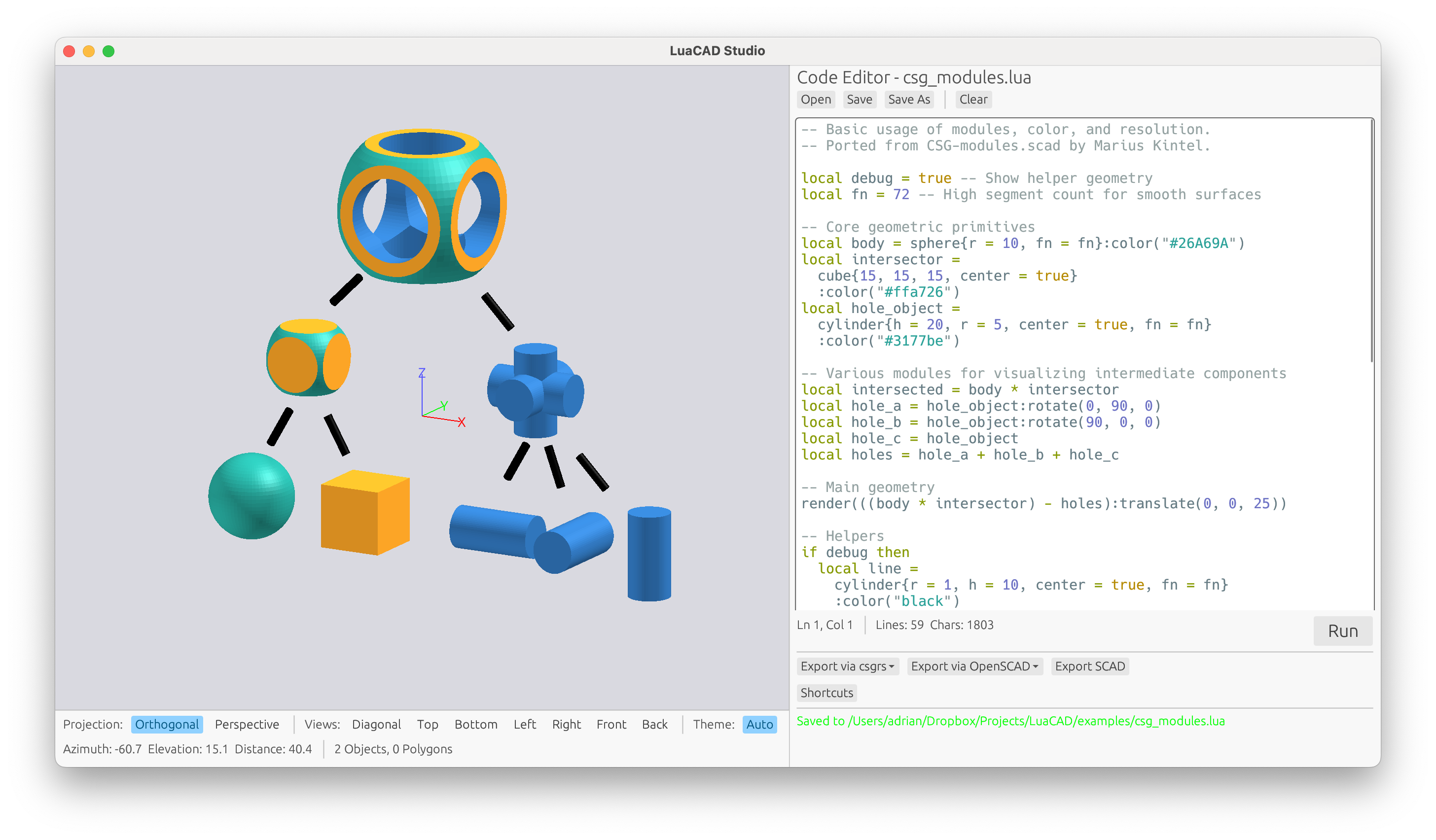## Why Lua?
- Similar syntax as the OpenSCAD language, but better:- More powerful - More consistent - Faster - Easily embeddable
- Operator overloading for natural CSG syntax \(`a \+ b`,`a \- b`,`a \* b`\)
- Already used in other CAD software like[LibreCAD](https://github.com/LibreCAD/LibreCAD_3)and[Autodesk Netfabb](https://help.autodesk.com/view/NETF/2025/ENU/?guid=GUID-93C06838-2623-4573-9BFB-B1EF4628AC4A)
## Example
#### LuaCAD:
```
my_cube = cube { size = { 1, 2, 3 } }
function my_sphere(radius)
return sphere({ r = radius }):translate(5, 0, 0)
end
model = my_cube + my_sphere(2)
render(model)
```
#### Equivalent OpenSCAD:
```
module my_cube() {
cube(size=[1,2,3]);
}
module my_sphere(radius) {
translate([5,0,0]) sphere(r = radius);
}
union() {
my_cube();
my_sphere(2);
}
```
## Getting Started
```
cargo install luacad # CLI for running and converting LuaCAD scripts
cargo install luacad-studio # GUI desktop app with live 3D preview
```
Or from source, which requires[Rust](https://www.rust-lang.org/tools/install):
```
git clone https://github.com/ad-si/LuaCAD.git
cd LuaCAD
make install
```
Both crates vendor their C/C\+\+ dependencies, so no system libraries need to be installed — but a C\+\+ compiler and CMake must be available to build them\.`luacad`builds Manifold and Clipper2;`luacad\-studio`additionally builds[OpenCSG](http://www.opencsg.org/), which needs OpenGL development headers \(on Debian/Ubuntu:`libgl1\-mesa\-dev`,`libx11\-dev`,`libxcb1\-dev`,`libxkbcommon\-dev`,`libxrandr\-dev`,`libwayland\-dev`\)\.
### CLI Usage
```
luacad convert model.lua output.3mf # Convert to 3MF
luacad convert model.lua output.stl # Convert to STL
luacad convert model.lua output.scad # Export as OpenSCAD
luacad watch model.lua output.3mf # Rebuild on file changes
luacad render model.lua preview.png # Render to a PNG image
luacad info model.lua # Print triangle counts and bounding box
luacad lint model.lua # Lint with selene (also takes directories)
luacad run model.lua # Execute (side-effects only)
```
`convert`and`watch`infer the format from the output extension;`\-\-format <fmt\>`overrides it, and`\-\-via\-openscad`hands the export to an installed OpenSCAD binary instead of building the mesh with Manifold\.
## BOSL2
LuaCAD has full support for the[Belfry OpenSCAD Library v2](https://github.com/BelfrySCAD/BOSL2/wiki), reimplemented in LuaCAD itself, so it renders, previews and exports to a mesh without OpenSCAD or BOSL2 installed:
```
bosl.cuboid { {40, 40, 40}, rounding = 2 }
bosl.regular_prism { 5, r = 10, h = 25 }
bosl.spur_gear { circ_pitch = 5, teeth = 20, thickness = 5 }
```
Exporting to`\.scad`still writes the BOSL2 call itself, which keeps the exported file as short as the script that produced it\.
## Text and Imports
`text\(\)`outlines a system font into a sketch and`text3d\(\)`extrudes it in one step, so text becomes real geometry rather than SCAD output:
```
render(text("LuaCAD", { size = 12, halign = "center" }):linear_extrude(2))
```
`import\(\)`reads every mesh format LuaCAD writes and returns a solid you can transform and combine like any primitive; SVG and DXF return a 2D sketch instead, ready to extrude\.
## Supported Export Formats
- **[SCAD](https://en.wikipedia.org/wiki/OpenSCAD)**\- OpenSCAD format
- **[3MF](https://en.wikipedia.org/wiki/3D_Manufacturing_Format)**\- 3D Manufacturing Format
- **[STL](https://en.wikipedia.org/wiki/STL_(file_format))**\- Standard Triangle Language for 3D printing
- **[OBJ](https://en.wikipedia.org/wiki/Wavefront_.obj_file)**\- Wavefront 3D object format
- **[PLY](https://en.wikipedia.org/wiki/PLY_(file_format))**\- Polygon File Format
- **[OFF](https://en.wikipedia.org/wiki/OFF_(file_format))**\- Object File Format
- **[AMF](https://en.wikipedia.org/wiki/Additive_manufacturing_file_format)**\- Additive Manufacturing File Format
Every value your script returns becomes its own 3MF object, so slicers load them as individually movable parts\. Label them with`:name\(…\)`to control how they appear in the object list\. The other formats cannot express separate objects, so they flatten everything into a single mesh\.