@omnigent_ai: You can now shape Omnigent’s look with a guided theme editor. Tune accent, tint, contrast, and sidebar translucency. St…
Summary
Omnigent v0.6.0 launches with a guided theme editor, Slack integration, native desktop apps for Windows and Linux, richer file viewing, and the ability to import chats from Claude Code and Codex.
View Cached Full Text
Cached at: 07/30/26, 03:56 PM
You can now shape Omnigent’s look with a guided theme editor.
Tune accent, tint, contrast, and sidebar translucency. Start from the new Nord palette, or hit the randomize dice to find a look you like.
The file editor follows your theme too, so your palette carries from the session view into the code you’re reading and editing.
Learn more about Omnigent 0.6.0: https://omnigent.ai/releases/0.6.0
#Omnigent #OpenSource #AIAgents
Omnigent v0.6.0
Source: https://omnigent.ai/releases/0.6.0 Released 2026-07-21· 3 min read · Omnigent maintainers
Omnigent 0.6.0 is a major release focused on meeting you wherever you work, from bringing your existing chats in and reading files richly to driving sessions from Slack and a desktop app on every platform. It lands a guided theme editor for making the UI your own, first-class Slack control complete with inline approvals, and native desktop apps that now run on Windows and Linux alongside macOS.
1. Richer file viewing
Reading files inside Omnigent now covers far more than plain source. You get inline PDF preview with review comments, find-in-file across the editor, and rendered previews for markdown and notebooks — so you can review what the agent produced without leaving the session.
The diff viewer adds a “Wrap lines” toggle for long lines, and the file panel stays browsable even when the runner is offline, as long as the host is still connected, so you are never locked out of your files mid-session.
Learn more in theCode viewer and diffs.
2. Custom themes
You can now shape Omnigent’s look with a guided theme editor. Shared accent, tint, and contrast controls plus a sidebar translucency setting let you tune the whole interface, and there is a new Nord palette to start from — or hit the randomize dice to discover a look you like.
The file editor follows your Omnigent theme too, so your chosen palette carries through from the session view into the code you are reading and editing.
Learn more in theAppearance settings.
3. Bring your existing work in
Starting fresh in a new tool usually means leaving your history behind. Now you can import your Claude Code and Codex chats directly withomni import, bringing up to 50 conversations in at once. Imported and new sessions also get automatic first-turn titles, so your list stays readable without any manual naming.
Learn more in theImport existing chats.
4. Navigation bar in transcript
Long transcripts are now easy to move through. A navigation bar in the session transcript lets you jump around your history with a click, so you can find an earlier turn or result without endless scrolling.
5. Slack integration
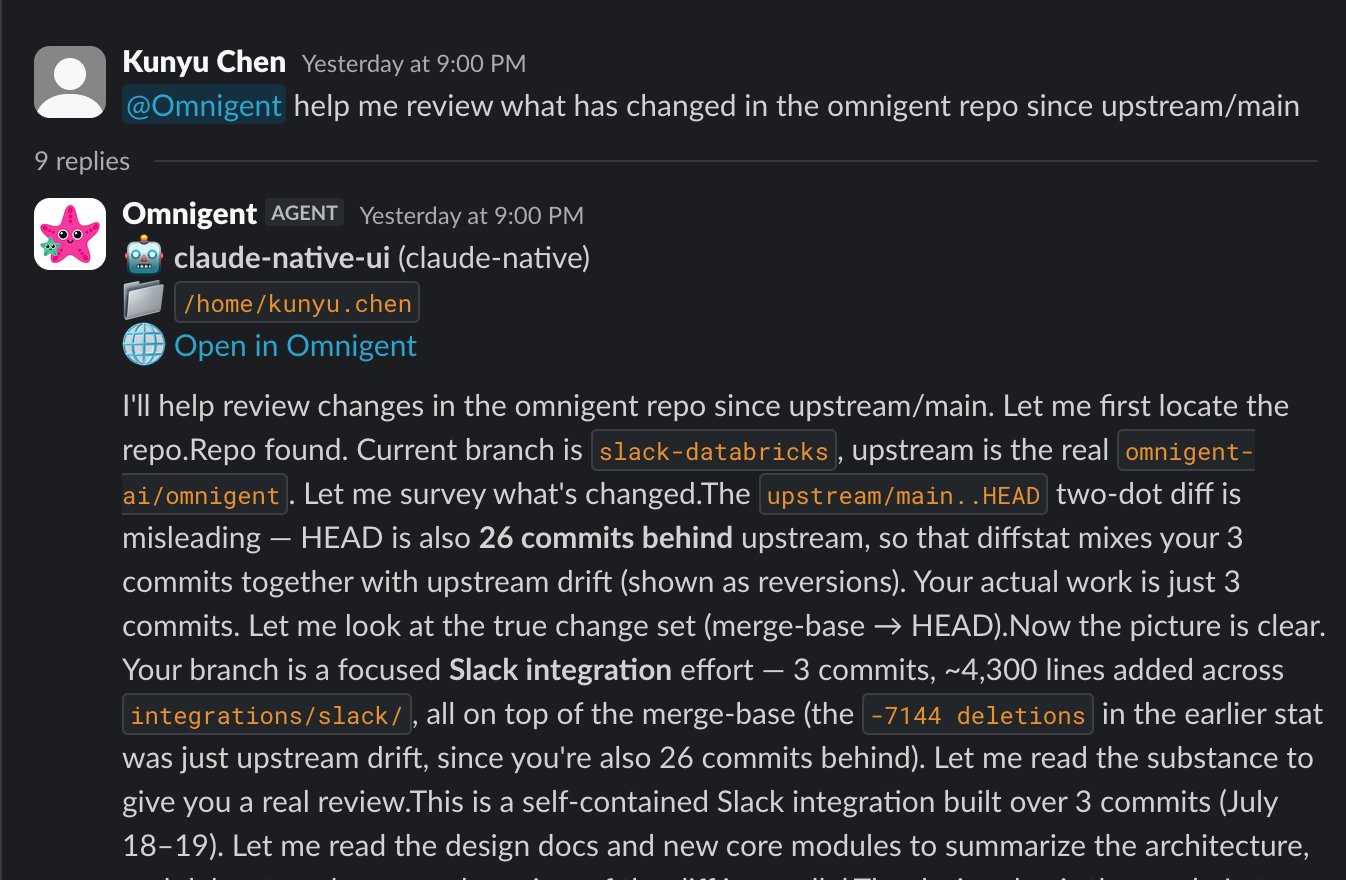
You can now kick off and drive Omnigent sessions straight from Slack. Beyond starting work, you can approve tool calls and answer the agent’s questions inline in the channel, so you can keep a session moving from wherever your team already talks.
Learn more in theSlack.
6. Omnigent desktop app on Windows and Linux
The Omnigent desktop app is no longer macOS-only. Windows and Linux builds are now available, so you can run the native app on your platform of choice. Download the build for your system from the website.
Learn more in theInstall.
Full Changelog:https://github.com/omnigent-ai/omnigent/blob/main/CHANGELOG.md
What’s Next
Install or upgrade Omnigent:
uv tool install --python 3.12 omnigent # or: pip install "omnigent"
Similar Articles
Google updates its Gemini app to take on ChatGPT and Claude
Google announces major updates to its Gemini app at Google I/O, including a Daily Brief feature, redesigned Neural Expressive interface, a personal AI agent called Gemini Spark, and integration of the new Gemini Omni video model to compete with ChatGPT and Claude.
AI News: A Huge Week for AI Apps (Anthropic, OpenAI, Google)
OpenAI’s new Codex desktop app combines code generation, browser automation and persistent agents into a single IDE, while Anthropic upgraded Claude Code with parallel sessions and Google launched desktop apps, Chrome slash commands and an expressive TTS model.
@folo_is: TGIFolo desktop 𝐯𝟏.𝟗.𝟎 and mobile 𝐯𝟎.𝟓.𝟒 are rolling out! Highlights: Stronger AI summaries with Kimi More reli…
TGIFolo releases version 1.9.0 for desktop and 0.5.4 for mobile, featuring enhanced AI summaries powered by Kimi, improved scroll mark-read with batching and retries, and cleaner Obsidian handling.
@nickgomez: Introducing @OpenKnowledge, the best markdown IDE for humans and agents. Open source. Local and private. LLM-wiki ready…
Introducing OpenKnowledge, an open-source, local and private markdown IDE for humans and AI agents, compatible with Claude, Codex, and other agents.
@antigravity: Introducing Antigravity 2.0, a new standalone desktop application that delivers fully on that original glimpse of a tru…
Antigravity 2.0 is a new standalone desktop application rebuilt with multi-agent teams, scheduled tasks, native voice, and one-click integration with Google products.