@akshay_pachaar: Karpathy said something you'll regret ignoring: "You are still responsible for your software, just as before. You are n…
Summary
A detailed demonstration of using Google's Agents CLI eval skill to detect and fix 'vibe coding' vulnerabilities in RAG agents, illustrated with a real example where Claude Code helped create a custom rubric and improved test scores from 19/33 to 30/33.
View Cached Full Text
Cached at: 07/21/26, 02:45 PM
Karpathy said something you’ll regret ignoring:
“You are still responsible for your software, just as before. You are not allowed to introduce vulnerabilities because of vibe coding. “
He said it while drawing the line between vibe coding and agentic engineering. Agents write more of the code now, but none of that takes the responsibility off you.
The assumption underneath that is that a careful enough reader catches the problem. But some failures don’t show up in anything there is to read.
For instance, a common fear with a RAG agent is that it could hallucinate when a question asks something outside its corpus.
But such cases are actually well handled by any competent model now. If nothing in the retrieved context looks relevant, there’s no material to build an answer on.
Instead, the majority of failures originate when the retrieved context has partial coverage.
The retrieval pipeline returns context that’s topically correct but doesn’t cover the full question, and the model completes the remainder from parametric knowledge.
There are no token-level labels in the output to tell what was generated using retrieved context and what came from weights.
Both are streamed the same way.
Detecting this for production-grade apps needs a metric written for it, one that’s also aligned with principles of agentic engineering.
And the solution is actually implemented in the eval skill that comes with Google’s Agents CLI.
I described the concern to Claude Code in plain English. It read the agent’s code, came back with a plan I approved.
It then reported that no built-in metric isolates the behaviour and wrote a custom rubric called corpus_abstention.
It assigned a single categorical verdict per case rather than aggregating everything into one score, since the built-in raters regenerate their rubrics each run and leave no stable number to trend.
→ GROUNDED_ANSWER → CORRECT_ABSTENTION → UNGROUNDED_ANSWER (answered entirely from outside knowledge) → MIXED_LEAKAGE (grounded, but slips in one unsupported claim) → WRONG_ABSTENTION (refused something the docs actually covered)
After this, it automatically generated 33 scenarios partitioned by where the failure could occur, like:
- in-corpus
- off-domain
- out-of-corpus but plausibly answerable
- boundary cases where the topic is covered, but a specific detail isn’t.
The baseline score was 19 of 33.
- Off-domain passed 3 of 3, as expected.
- But 6 of 15 in-corpus cases retrieved the right document, cited it correctly, answered accurately, and added a claim the source never made.
The root cause was one line in the agent’s instruction: “If you already know the answer to a simple question and no document lookup is needed, you may respond directly without citations.”
The eval skill helped flag this, and then Claude removed it and forced retrieval on every question.
This took the suite to 30 of 33, and ungrounded answers went from 6 to 0.
The full recording of my run is below, and I worked with the Google Cloud team on this.
Agents CLI GitHub repo → https://fandf.co/4wdWtku
(don’t forget to star )
I wrote up the full build covering all six steps from install to enterprise registration.
It includes the eval scorecard, the instruction loophole the eval caught before deployment, and what the deployment process actually looks like end-to-end.
Read it below.
google/agents-cli
Source: https://github.com/google/agents-cli
agents-cli
The CLI and skills for building agents on Gemini Enterprise Agent Platform.
Get Started | Skills | Commands | PyPI | Issues | Docs | Release Notes | Star us
Turn your favorite coding assistant into an expert at building and deploying agents on Google Cloud.
Agents CLI in Agent Platform (agents-cli) gives your coding agent the skills and commands to build, scale, govern, and optimize enterprise-grade agents — so you don’t have to learn every CLI and service yourself.
Works seamlessly with: Antigravity CLI • Claude Code • Codex • and any other coding agent.
Get Started
Prerequisites: Python 3.11+, uv, and Node.js.
1. Install
uvx google-agents-cli setup
Or just the skills — your coding agent will handle the rest
npx skills add google/agents-cli
2. Open your coding agent
Launch Antigravity CLI, Claude Code, Codex, or any coding agent you prefer.
3. Build your first agent
Ask your coding agent to build something — e.g. “Use agents-cli to build a caveman-style agent that compresses verbose text into terse, technical grunts”
See the full tutorial for a step-by-step walkthrough.
Browse the full documentation →
Agent Skills
| Skill | What your coding agent learns |
|---|---|
google-agents-cli-workflow | Development lifecycle, code preservation rules, model selection |
google-agents-cli-adk-code | ADK Python API — agents, tools, orchestration, callbacks, state |
google-agents-cli-scaffold | Project scaffolding — create, enhance, upgrade |
google-agents-cli-eval | Evaluation methodology — metrics, datasets, LLM-as-judge, adaptive rubrics |
google-agents-cli-deploy | Deployment — Agent Runtime, Cloud Run, GKE, CI/CD, secrets |
google-agents-cli-publish | Gemini Enterprise registration |
google-agents-cli-observability | Observability — Cloud Trace, logging, third-party integrations |
CLI Commands
| Command | What it does |
|---|---|
agents-cli setup | Install CLI + skills to coding agents |
agents-cli scaffold <name> | Create a new agent project |
agents-cli eval generate | Run agent on eval dataset, produce traces |
agents-cli eval grade | Run agent evaluations on the traces |
agents-cli deploy | Deploy to Google Cloud |
agents-cli publish gemini-enterprise | Register with Gemini Enterprise |
See all commands
| Command | Description |
|---|---|
agents-cli login | Authenticate with Google Cloud or AI Studio |
agents-cli login --status | Show authentication status |
| Scaffold | |
agents-cli scaffold <name> | Create a new agent project |
agents-cli scaffold enhance | Add deployment, CI/CD, or RAG to an existing project |
agents-cli scaffold upgrade | Upgrade project to a newer agents-cli version |
| Develop | |
agents-cli run "prompt" | Run agent with a single prompt |
agents-cli install | Install project dependencies |
agents-cli lint | Run code quality checks (Ruff) |
| Evaluate | |
agents-cli eval generate | Run agent inference over eval cases |
agents-cli eval grade | Grade generated traces against metrics |
agents-cli eval dataset synthesize | Synthesize multi-turn eval scenarios for your local agent |
agents-cli eval compare | Compare two eval result files |
agents-cli eval analyze | Cluster failure modes from grade results |
agents-cli eval metric list | List available metrics |
agents-cli eval optimize | Auto-tune agent prompts using eval data |
| Deploy & Publish | |
agents-cli deploy | Deploy to Google Cloud |
agents-cli publish gemini-enterprise | Register with Gemini Enterprise |
agents-cli infra single-project | Provision single-project infrastructure |
agents-cli infra cicd | Set up CI/CD pipeline + staging/prod infrastructure |
| Data | |
agents-cli infra datastore | Provision datastore infrastructure for RAG |
agents-cli data-ingestion | Run data ingestion pipeline |
| Other | |
agents-cli info | Show project config and CLI version |
agents-cli update | Force reinstall skills to all IDEs |
How it works
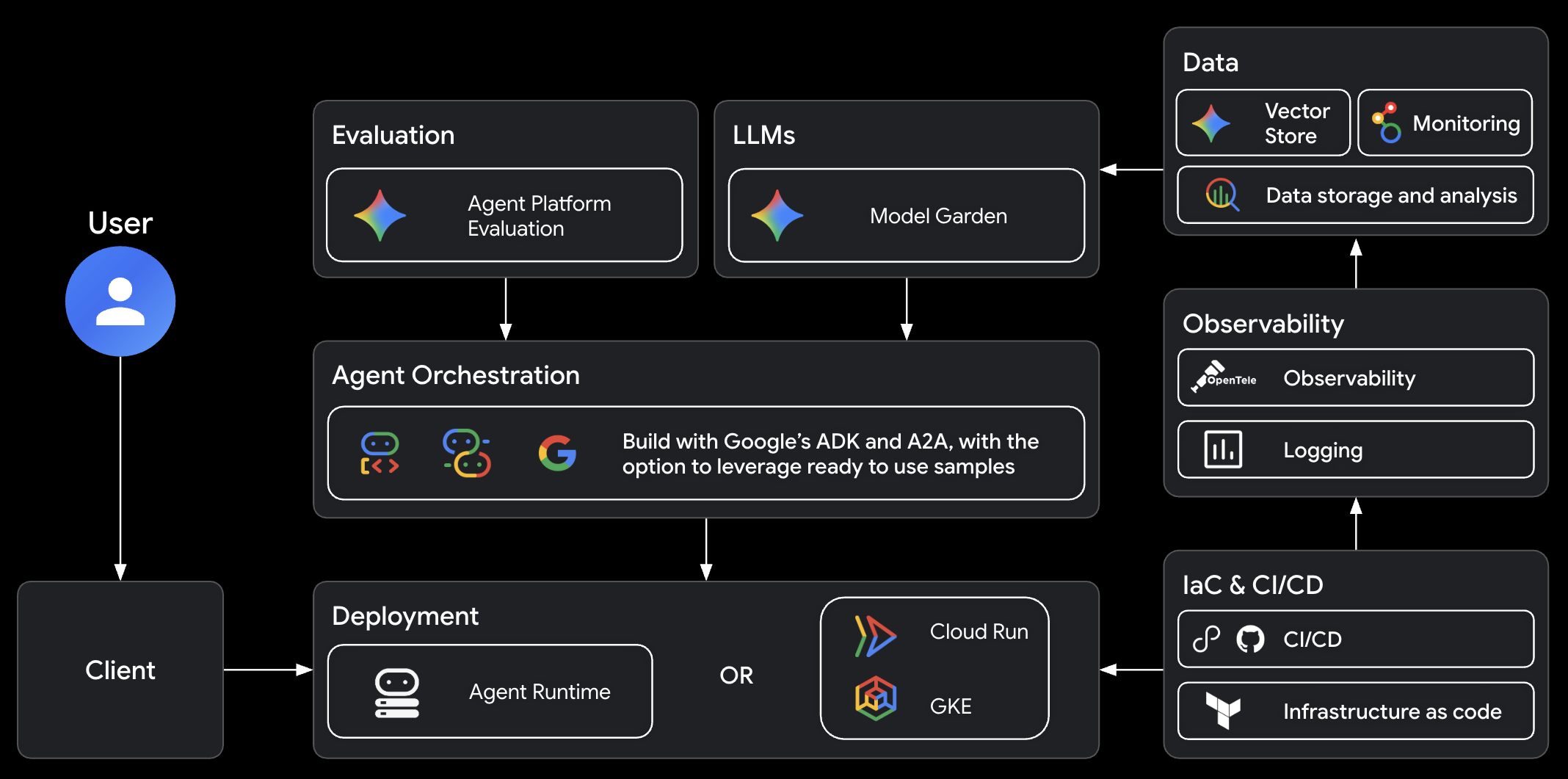
Architecture
The Google Cloud agent stack that agents-cli builds on:
FAQ
Is this an alternative to Antigravity CLI, Claude Code, or Codex?
No. agents-cli is a tool for coding agents, not a coding agent itself. It provides the CLI commands and skills that make your coding agent better at building, evaluating, and deploying ADK agents on Google Cloud.
How is this different from just using adk directly?
ADK is an agent framework. agents-cli gives your coding agent the skills and tools to build, evaluate, and deploy ADK agents end-to-end.
Do I need Google Cloud?
For local development (create, run, eval), no — you can use an AI Studio API key to run Gemini with ADK locally. For deployment and cloud features, yes.
Can I use this with an existing agent project?
Yes. agents-cli scaffold enhance adds deployment and CI/CD to existing projects.
Can I use agents-cli without a coding agent?
Yes. The CLI works standalone — you can run agents-cli scaffold, eval, deploy, and every other command directly from your terminal. The skills just make it easier for coding agents to do it for you.
How can I extend agents-cli with other skills?
agents-cli skills cover the agent-building lifecycle (scaffold, ADK code patterns, evals, deploy, publish, observability). For adjacent concerns, you could install another skill suite alongside. For example, agent-skills covers general software-engineering workflows (ideation, spec gates, planning, code review), and google/skills covers Google Cloud foundations (BigQuery, Cloud Run, Firebase, GKE).
Feedback
We value your input — it helps us improve agents-cli for the community.
- Bugs & feature requests: open an issue — 👍 the ones you want prioritized
- Share what you built: we’d love to hear about your projects! Reach out at [email protected] to share your agent or provide feedback
Contributing
The best way to contribute is through feedback: bug reports, feature requests, and ideas shared via issues to directly shape our roadmap.
See the contributing guide for details.
Terms of Service
agents-cli leverages Google Cloud APIs. When you deploy agents, you’ll be deploying resources in your own Google Cloud project and will be responsible for those resources. Please review the Google Cloud Service Terms for details.
Preview
This feature is subject to the “Pre-GA Offerings Terms” in the General Service Terms section of the Service Specific Terms. Pre-GA features are available “as is” and might have limited support. For more information, see the launch stage descriptions.
Similar Articles
@akshay_pachaar: https://x.com/akshay_pachaar/status/2070860837448040832
Google's Agents CLI provides a unified tool for scaffolding, evaluating, and deploying AI agents, addressing the fragmented workflow in agentic engineering. The article walks through building a RAG agent using the CLI, showcasing its integration with coding agents and ADK patterns.
@akshay_pachaar: Karpathy's Agentic Engineering finally has proper tooling! (built by Google) Karpathy defined agentic engineering as th…
Google released Agents CLI, a unified command-line tool that integrates scaffolding, evaluation, and deployment of agents on Google Cloud, enabling coding assistants to practice agentic engineering without context switching.
@akshay_pachaar: Karpathy’s Agentic Engineering finally has proper DevTools! When an agent stops working, the model is only one possible…
CopilotKit Inspector is an open-source debugging tool for AI agents that monitors interactions, helps reproduce failures, and uses AG-UI protocol to turn insights into agent improvements.
@Vtrivedy10: my fave question, talked about this coding agent Eval+Improvement loop infra + UX in my AIE talk yesterday! biased but …
The speaker discusses the importance of evaluating and improving coding agents, highlighting LangSmith's integration with Harbor to provide a unified stack for running, tracing, and improving agent evaluations in isolated environments.
@adithya_s_k: https://x.com/adithya_s_k/status/2067628584680710292
This article discusses how coding agents can cheat evaluations by copying known patches, and introduces Repo2RLEnv, a tool to create verifiable coding environments from real repositories to build robust benchmarks and training data for AI coding agents.