jj_tui is a fast, intuitive terminal user interface for the Jujutsu version control system, focusing on performance and interactive features like real-time graph previews.
# elidowling.com/jj_tui
Source: [https://tangled.org/elidowling.com/jj_tui](https://tangled.org/elidowling.com/jj_tui)
## Jujutsu TUI[\#](https://tangled.org/elidowling.com/jj_tui#jujutsu-tui)
[](https://github.com/faldor20/jj_tui/actions/workflows/build-nix.yml)
A TUI for the Jujutsu version control system Our focus here is on:
- **Performance**: jj\_tui should start fast and never slow you down, it should feel extremely snappy to browse your commits and files
- **Intuitive**: Keybindings should be easily memorizable and quick to commit to muscle memory without uneeded popups
- **Interactivity**: jj\_tui completely re\-implements jj's renderer so we can show realtime previews of the graph while you figure out how your rebase should look \( Use`r`ebase`p`review to try it out\!\)
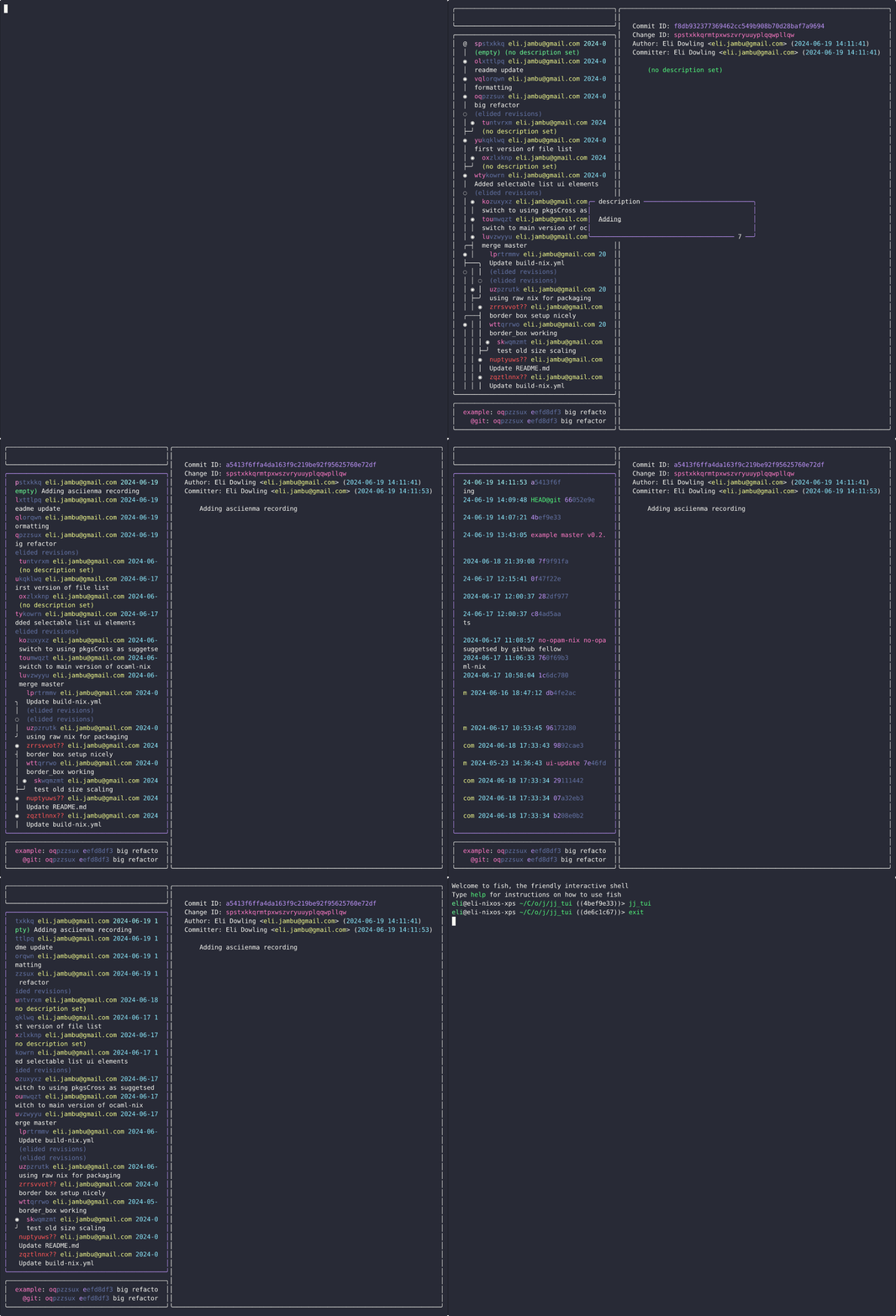
Press`?`to show the help\. \(commands are different between graph and files view\)\.`Arrows`or`hjkl`to navigate windows/items`Space`to select/deselect revisions \(multi\-select in graph view\)`Enter`to widen the diff and scroll through it
## Key features[\#](https://tangled.org/elidowling.com/jj_tui#key-features)
### Normal jj operations[\#](https://tangled.org/elidowling.com/jj_tui#normal-jj-operations)
- `c`ommiting
- `r`ebasing
- `g`it pushing and pulling
- Adding, moving and deleting`b`ookmarks
- `s`quashing and`s`plitting commits
- `space`can be used to select multiple commits for copying, rebasing etc, starting a`n`ew commit on top of etc
### Creating commits from the file view:[\#](https://tangled.org/elidowling.com/jj_tui#creating-commits-from-the-file-view)
- `space`can be used to select files to`c`ommit seperately or`m`ove to different commit
- Files and be sent to`N`ext or`P`revious commits
### filtering by revsets[\#](https://tangled.org/elidowling.com/jj_tui#filtering-by-revsets)
- `f`ilter by any revest you like
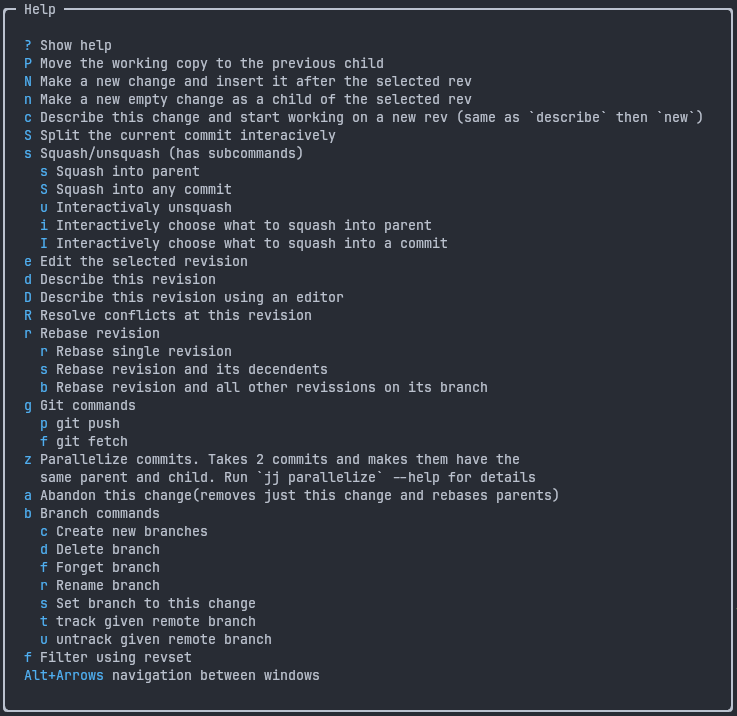
List of graph commands:
## Installing[\#](https://tangled.org/elidowling.com/jj_tui#installing)
`linux`: Grab the latest release\. It's statically linked and should work on any linux machine\.`mac`: Grab a prebuild\. Let me know if you have any issues as I can't test on a mac\.
To open a shell with jj\_tui on nix:`nix shell github:faldor20/jj\_tui`
## Dependencies[\#](https://tangled.org/elidowling.com/jj_tui#dependencies)
The jujutsu CLI \(minimum version 0\.30\.0\) I haven't tested on windows or Mac\. I believe it won't work outside Unix so Windows users will currently have to use wsl\.
## Config file:[\#](https://tangled.org/elidowling.com/jj_tui#config-file)
You can make a`config\.yaml`config file in the following directories to customize key inputs`linux`: $XDG\_CONFIG\_HOME/jj\_tui/`macos`: ~/Library/preferences/jj\_tui/ See`\./jj\_tui/lib/key\_map\.ml`for a spec for the keymap and`\./jj\_tui/lib/config\.ml`for the config The keymap config lets you fully customize all the commands and their sub menus as well as remap the arrow keys\.
Eg:
```
key_map:
remap:
h: "left"
j: "down"
k: "up"
l: "right"
graph:
#Simple mapping from key to command_id
p: prev
#Command sub menu
s:
title: "Squash"
sub:
# sub menu command
s: "squash_into_parent"
# If the terminal is smaller than this width, the UI will change to a single pane view
single_pane_width_threshold: 110
# Sets the limit to how many commits are ever rendered in jj_tui. Usefull for not slowing down too much when viewing 'all()' revest.
max_commits: 100
```
For a full list of commands ids see[`jj\_tui/bin/graph\_commands\.ml`](https://tangled.org/elidowling.com/jj_tui/tree/main/jj_tui/bin/graph_commands.ml)and[`jj\_tui/bin/file\_commands\.ml`](https://tangled.org/elidowling.com/jj_tui/tree/main/jj_tui/bin/file_commands.ml)
## logs:[\#](https://tangled.org/elidowling.com/jj_tui#logs)
`linux`: $XDG\_STATE\_HOME/jj\_tui/`macos`: ~/Library/logs/jj\_tui/
## Dev[\#](https://tangled.org/elidowling.com/jj_tui#dev)
Can be built with nix`nix build`or open a nix shell with`nix develop`NOTE: if you are using the nix dev shell and would like to build with dune use`dune build \-\-pkg disabled`to build using the deps provided by nix Can also be built directly with Dune package management via`dune build`\.
Jujutsu (jj) version control system has released v0.42.0. Jujutsu is an open-source VCS that uses Git as a storage backend while providing a more ergonomic interface with features inspired by Mercurial, Sapling, and Darcs.
Jujutsu (jj) v0.41.0 is released, introducing updates to the experimental version control system designed for improved usability and conflict handling.