@amiaoapp: 你电脑里装一堆 Navicat / DBeaver / DataGrip,真的已经过时了。 最近我试了一个新工具:DBX,看起来很“轻”,但行为很“狂”。 15MB 直接打包 50+ 数据库支持 还顺手把 AI 助手塞进去了 最离谱的点是…
摘要
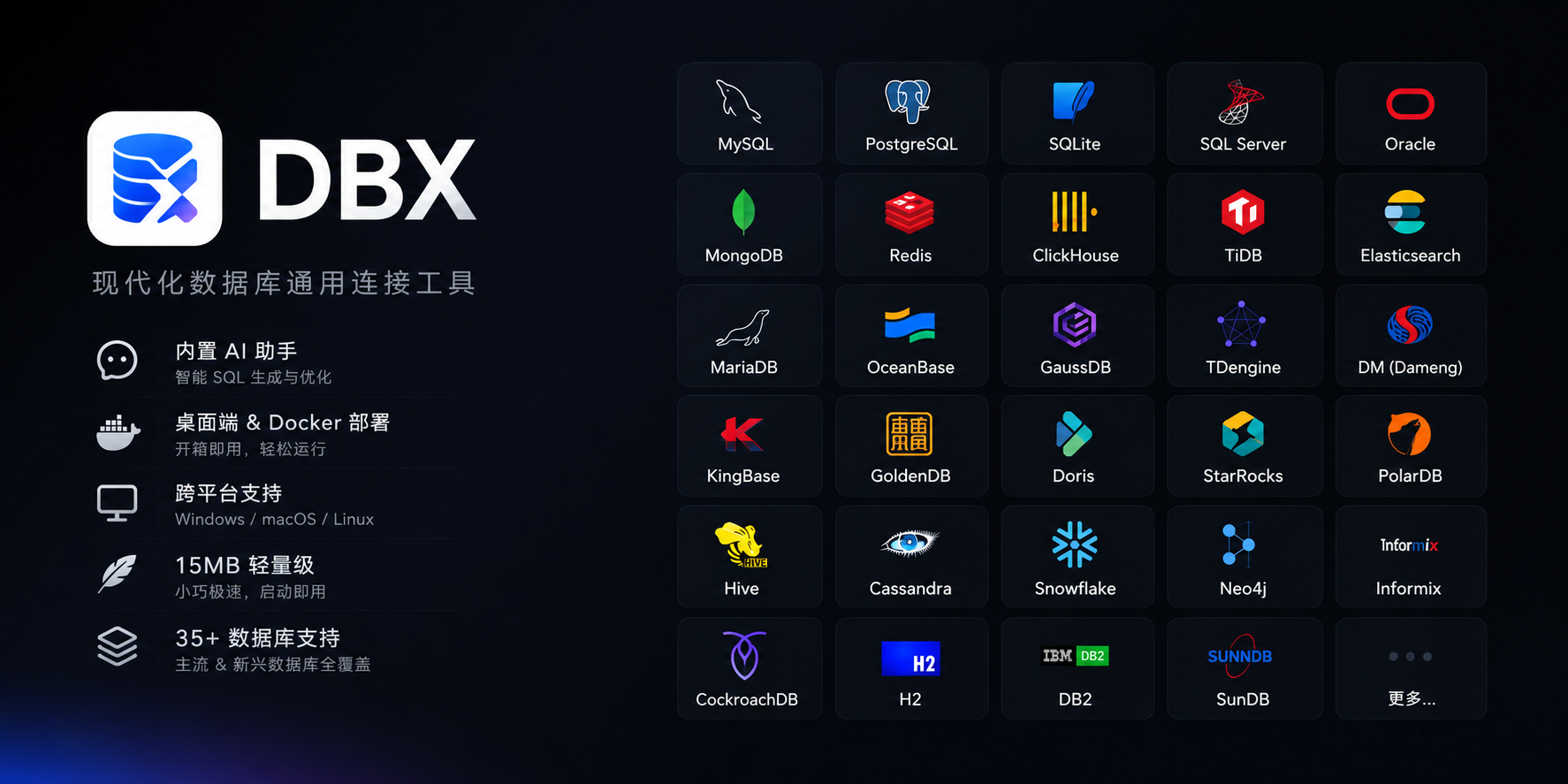
DBX 是一款轻量级(15MB)的数据库管理工具,支持 50+ 数据库,内置 AI 助手,可替代 Navicat、DBeaver、DataGrip 等多个客户端,并支持 Docker 自托管和跨平台。
查看缓存全文
缓存时间: 2026/06/30 07:37
你电脑里装一堆 Navicat / DBeaver / DataGrip,真的已经过时了。
最近我试了一个新工具:DBX,看起来很“轻”,但行为很“狂”。
15MB 直接打包 50+ 数据库支持 还顺手把 AI 助手塞进去了
最离谱的点是这个:
以前你的工作流是:MySQL 一个客户端, PostgreSQL 一个客户端,Redis 再一个,MongoDB 再一个,ClickHouse 再一个 而DBX 的逻辑很简单粗暴:“为什么不能一个软件全干了?”于是它做了 MySQL / PG / SQLite Redis / MongoDB ClickHouse / SQL Server DuckDB 等等 并且内置 AI(直接帮你写/查 SQL),支持 Docker 自托管,三端通吃:Win / Mac / Linux,体积只有某些客户端插件的零头 一句话总结:它不是在优化数据库管理工具,而是在“砍掉一整堆工具”。
如果一个工具真的能覆盖 80% 数据库场景—— 你还会坚持用“专业单一客户端”吗?
链接: GitHub:https://github.com/t8y2/dbx 官网:https://dbxio.com/cn #源码 #数据库 #开发工具 #程序员 #效率工具
t8y2/dbx
Source: https://github.com/t8y2/dbx








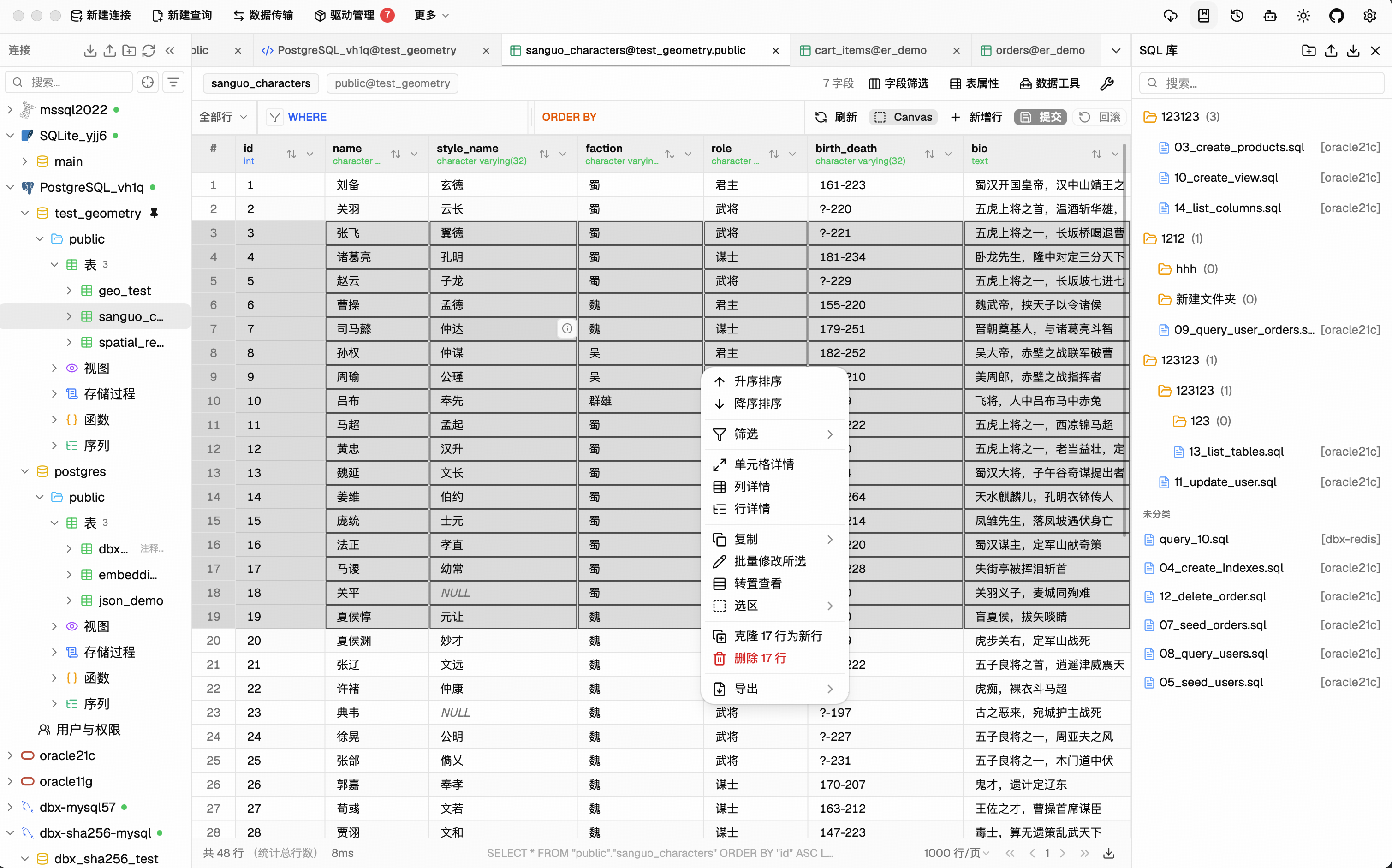
Why DBX?
🪶 15 MB, zero runtime bloatNo Java JRE. No Python venv. No bundled Chromium. DBX ships as a single small binary — download, install, connect. DBeaver needs Java; TablePlus is macOS-only. DBX runs everywhere with nothing extra. |
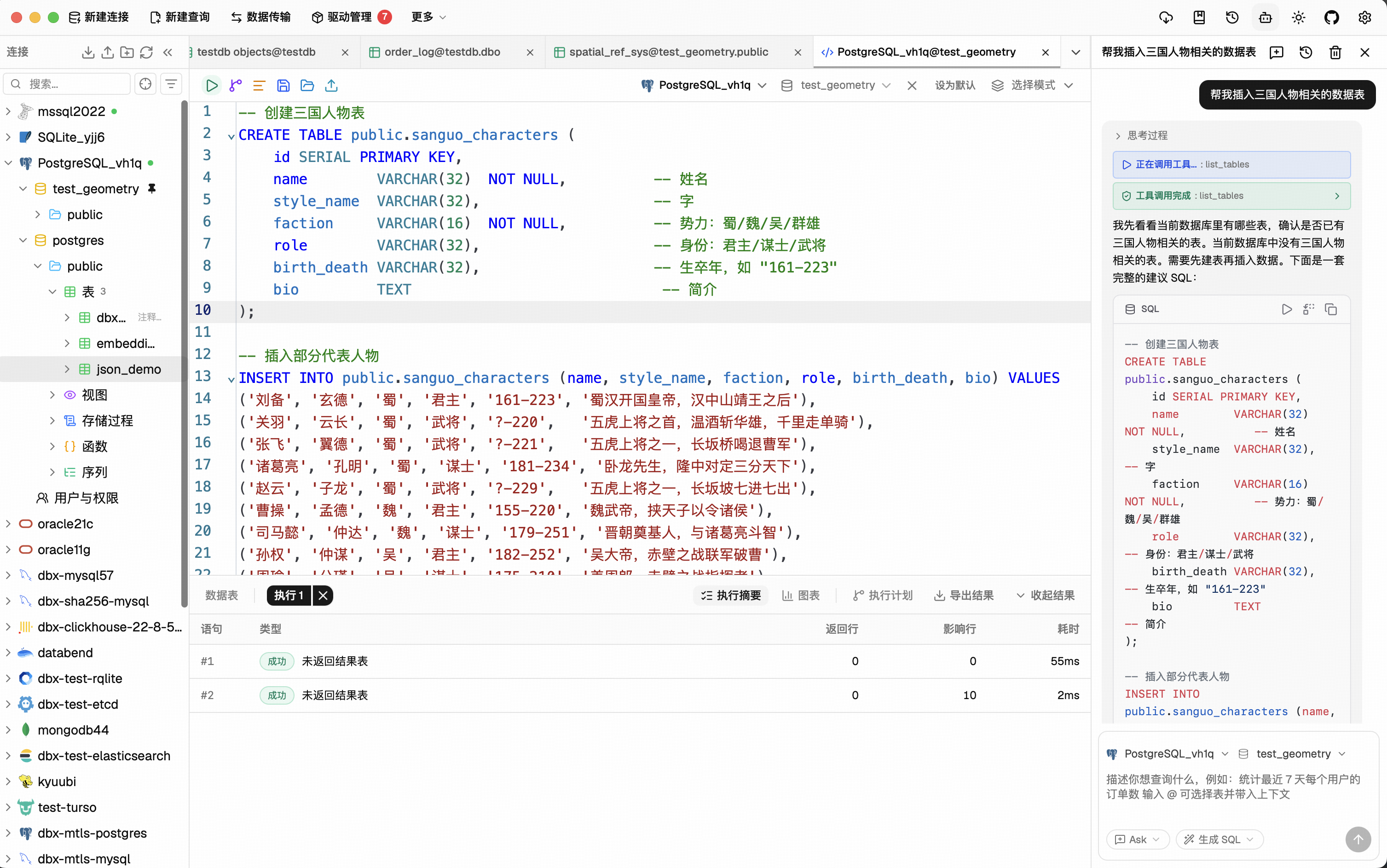
🤖 AI that lives in your editorHighlight a table, describe what you want, get SQL back — no copy-paste between tools. Works with Claude, OpenAI, or local models via Ollama. Built-in safety checks review AI-generated SQL before it runs. |
🔌 MCP: your databases, AI-readyDBX speaks the Model Context Protocol. Claude Code, Cursor, Windsurf, and other AI coding agents can query your databases through connections you already set up. One config, everywhere. |
🌐 Desktop + Docker + WebNative app on macOS, Windows, and Linux. Self-host via Docker for team access. Web version for browser-only environments. Same feature set. Same connections. |
Features
60+ Databases, One Tool
MySQL, PostgreSQL, SQLite, Redis, MongoDB, DuckDB, ClickHouse, SQL Server, Oracle, Elasticsearch, Qdrant, Milvus, Weaviate, MariaDB, TiDB, OceanBase, openGauss, GaussDB, KWDB, KingBase, Vastbase, GoldenDB, Doris, SelectDB, StarRocks, Manticore Search, Redshift, DM, TDengine, XuguDB, CockroachDB, Access, HighGo, and more. Agent/JDBC-oriented profiles extend DBX to H2, Snowflake, Trino, PrestoSQL, Hive, DB2, Informix, Neo4j, Cassandra, BigQuery, Kylin, SunDB, and custom JDBC connections. New native and agent-driven drivers also cover Databricks, SAP HANA, Teradata, Vertica, Firebird, Exasol, YashanDB, GBase 8a/8s, Databend, RQLite, Turso, InfluxDB, QuestDB, IoTDB, etcd, ZooKeeper, Nacos, IRIS, and more. Message queue admin is also available for Pulsar, Kafka, and RocketMQ. All in a single ~15 MB app. No bundled Chromium.
Query Editor
CodeMirror 6 with SQL syntax highlighting, metadata-aware autocomplete, Cmd+Enter execution, selected SQL execution, SQL formatting, diagnostics, and 9 editor themes. Persistent query history, saved SQL snippets, tab restore, and SQL file execution keep repeat work close at hand.
AI SQL Assistant
Describe what you want in plain language — get SQL back. DBX can explain queries, optimize SQL, fix errors, and run AI-generated SQL through built-in safety checks. Works with Claude, OpenAI, local models, or any OpenAI-compatible endpoint.
Data Grid
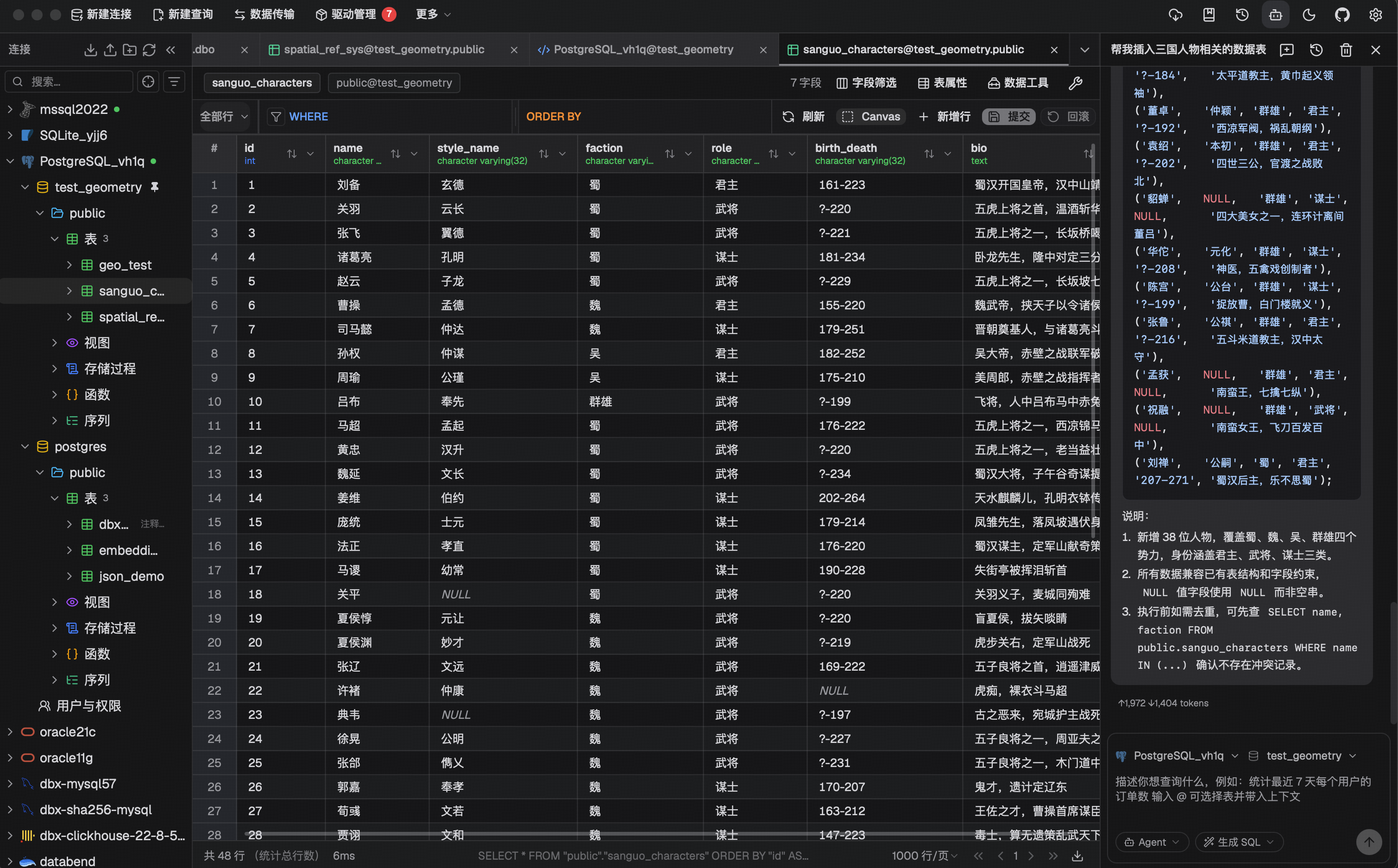
Virtual-scrolled table that handles large result sets. Inline editing, SQL preview before save, WHERE / ORDER BY controls, DataGrip-style filters, LIKE / NOT LIKE context filters, sorting, full-text search, pagination, column resize, auto-fit, row numbers, zebra stripes, and full cell details. Export or copy as CSV, JSON, Markdown, XLSX, or INSERT statements.
Schema Tools
- Schema browser — databases, schemas, tables, columns, indexes, foreign keys, triggers, with sidebar search & pin
- Object browser — grouped procedures, functions, views, and source editing where supported
- Table structure editor — reviewable column and index changes for supported engines
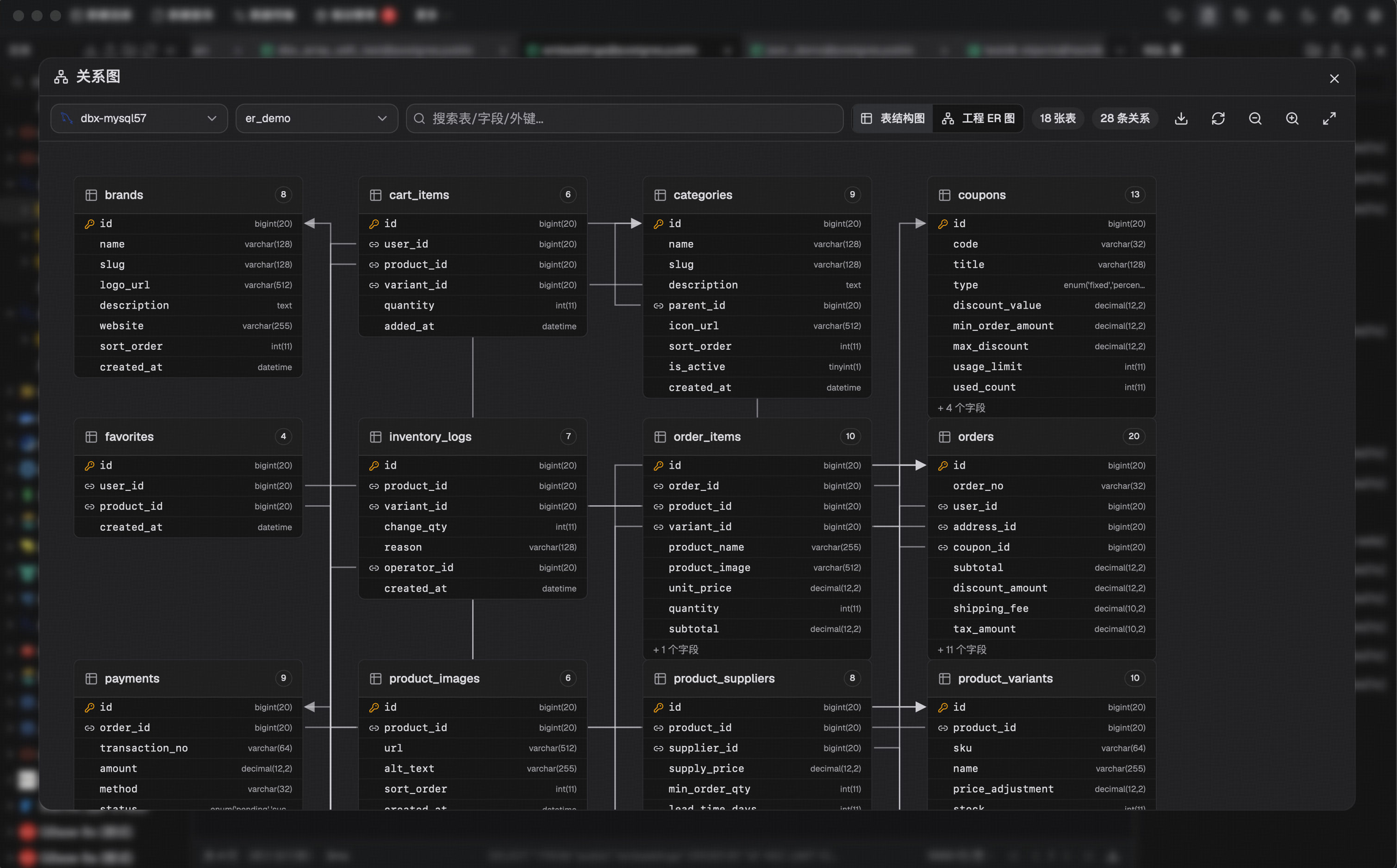
- ER diagram — visualize table relationships
- Schema diff — compare structures across connections
- Explain plan — visual query execution plan
- Field lineage — column-level lineage analysis
- Database search — find objects across large schemas
Data Operations
- Table import — CSV, Excel
- Data transfer — migrate between databases
- Database export — full database dump
- Data compare — compare table data and review synchronization output
- SQL file execution — run
.sqlfiles directly - File preview — drag & drop Parquet, CSV, JSON to preview instantly (powered by DuckDB)
- Connection import — bring connection profiles from DBeaver or Navicat
Specialized Browsers
- Redis — key pattern search, batch key operations, command runner, TTL editing, and all data types (String, Hash, List, Set, ZSet, Stream)
- MongoDB — document CRUD with pagination, Atlas & replica set URL connection
Safety & Connectivity
SSH tunnel (key & password) · database and AI proxy settings · auto-reconnect on connection loss · confirmation dialogs for destructive operations · encrypted config export/import · color-coded connections · driver store and optional JDBC plugin
Polished UI
Dark mode with native title bar sync · 9 editor themes · English, 简体中文 & Español · layout preferences · built-in auto-update
AI Agent Integration (MCP)
DBX provides an MCP server that lets AI coding agents query your databases using connections already configured in DBX.
npx @dbx-app/mcp-server
Add to your .mcp.json:
{
  "mcpServers": {
    "dbx": { "command": "npx", "args": ["-y", "@dbx-app/mcp-server"] }
  }
}
Works with Claude Code, Cursor, Windsurf, and any MCP-compatible agent. Supports listing connections, browsing tables, executing SQL, and opening tables directly in DBX’s UI.
DBX also provides a dedicated CLI package for terminal, script, and Codex workflows:
npm install -g @dbx-app/cli
# or via Homebrew
brew tap t8y2/dbx && brew install dbx-cli
dbx connections list --json
dbx query local "select 1" --json
See the MCP server README and CLI README for details.
Install
Download the latest release from the Releases page.
Homebrew (macOS):
brew install --cask dbx
Scoop (Windows):
scoop bucket add dbx https://github.com/t8y2/scoop-bucket
scoop install dbx
WinGet (Windows):
winget install t8y2.dbx
Self-Hosted (Docker)
DBX provides a web version that can be deployed via Docker.
docker run -d --name dbx -p 4224:4224 -v dbx-data:/app/data t8y2/dbx
Or with Docker Compose. A ready-to-use example lives at deploy/docker-compose.yml:
services:
  dbx:
    image: t8y2/dbx
    ports:
      - "4224:4224"
    volumes:
      - dbx-data:/app/data
    restart: unless-stopped

volumes:
  dbx-data:
Open http://localhost:4224 in your browser. Multi-arch images (amd64 / arm64) are available.
To publish DBX under a reverse-proxy context path such as /dbx, set the
runtime base path and proxy the same prefix to the container:
environment:
  - DBX_PUBLIC_BASE_PATH=/dbx
When building the frontend yourself with an absolute asset base, set
VITE_DBX_BASE_PATH=/dbx/ before pnpm build.
Getting Started
Prerequisites
System Dependencies
macOS:
No additional dependencies required.
Linux (Ubuntu/Debian):
sudo apt-get install -y libwebkit2gtk-4.1-dev libgtk-3-dev libappindicator3-dev librsvg2-dev patchelf libssl-dev
Windows:
No additional dependencies required.
Development
make
make installs root dependencies when needed and starts the local Tauri desktop development environment.
DuckDB compilation takes a while. If you’re not working on DuckDB features, skip it to speed up local builds:
# Fast checks (skip DuckDB)
make cargo-check-fast
make cargo-test-fast

# Tauri dev without DuckDB
make dev-fast
The
--no-default-featuresflag only affects local development. Release builds (pnpm tauri build) always include DuckDB.
Web version:
make dev-web       # frontend
make dev-backend   # backend
Documentation site:
make docs
The official DBX documentation site lives in docs/. If you want to improve the website content or documentation pages, edit the files under docs/ and run make docs to preview the site locally.
JDBC agent driver development projects live in agents/:
cd agents
./gradlew test
Build artifacts from agents/drivers/<db-type>/build/libs/ are picked up by local driver install flows when available.
Build
make package
The installer will be in src-tauri/target/release/bundle/.
Tech Stack
| Layer | Technology |
|---|---|
| Framework | Tauri 2 |
| Frontend | Vue 3 + TypeScript |
| UI | shadcn-vue + Tailwind CSS |
| Editor | CodeMirror 6 |
| Backend | Rust + sqlx / tiberius / redis-rs / mongodb |
Community




FAQ
Is DBX free?
Yes. DBX is open source under Apache-2.0. All features are free.Does DBX phone home?
No. DBX does not collect telemetry. The auto-update feature checks GitHub Releases for new versions — you can disable it in settings.Can I use DBX without an internet connection?
Yes. The desktop app works fully offline. For air-gapped driver installs, download offline driver packages from the [Offline Drivers page](https://dbxio.com/en/drivers) on an internet-connected machine, transfer them to the offline machine, then import them in DBX from Settings > Driver Manager. AI features need network access to the model endpoint (or a local model via Ollama).How is DBX different from DBeaver / TablePlus / Beekeeper Studio?
DBX is 15 MB with no runtime dependencies (no Java, no Python). It includes AI and MCP natively — not as plugins. It supports 60+ databases across desktop, Docker, and web from a single codebase.What databases are supported?
MySQL, PostgreSQL, SQLite, Redis, MongoDB, DuckDB, ClickHouse, SQL Server, Oracle, Elasticsearch, Qdrant, Milvus, Weaviate, MariaDB, TiDB, OceanBase, openGauss, GaussDB, KWDB, KingBase, Vastbase, GoldenDB, Doris, SelectDB, StarRocks, Manticore Search, Redshift, DM, TDengine, XuguDB, CockroachDB, Access, HighGo, and more. Agent/JDBC-oriented profiles extend support to H2, Snowflake, Trino, PrestoSQL, Hive, DB2, Informix, Neo4j, Cassandra, BigQuery, Kylin, SunDB, Databricks, SAP HANA, Teradata, Vertica, Firebird, Exasol, YashanDB, GBase 8a/8s, Databend, RQLite, Turso, InfluxDB, QuestDB, IoTDB, etcd, ZooKeeper, Nacos, IRIS, and custom JDBC connections. Message queue admin (Pulsar, Kafka, RocketMQ) is also supported.How do I report a bug or request a feature?
Open an issue on GitHub Issues.Contributors
Star History
License
相似文章
@CycleDecoded: Navicat 和 DBeaver 真的可以考虑卸载了,国内团队做出的这个 AI 数据库神器简直在乱杀。 OtterMind / Chat2DB 是一个在 GitHub 上爆火的 AI 驱动型多数据库客户端,斩获了 2.7 万+ Star…
Chat2DB 是 OtterMind 推出的开源 AI 驱动多数据库客户端,支持 30+ 种数据库,能通过自然语言生成、解释和优化 SQL。其在 GitHub 上已获 2.7 万+ Star。
@Huahuazo: 搞数据库的兄弟们,注意了——以后真不用再装一桌面的客户端了。 挖到一个宝藏工具 DBX,一个客户端直接打通所有主流数据库: ① MySQL、PostgreSQL、SQLite ② Redis、MongoDB、ClickHouse ③ 连国…
DBX 是一款轻量级多数据库客户端,支持 MySQL、PostgreSQL、Redis、MongoDB 等 60+ 数据库,安装包仅 15MB,内置 AI 助手可自然语言生成 SQL。
@XAMTO_AI: MySQL、PostgreSQL、Oracle、SQL Server、ClickHouse、MongoDB、Redis,三十多种数据库一个客户端全连上了。 还能用自然语言生成SQL、解释SQL、帮你优化SQL,模型用自己的就行。 Chat…
Chat2DB 是一款支持三十多种数据库的客户端,能用自然语言生成、解释和优化SQL,支持全平台并附带开源CLI。
@VincentLogic: 接手别人的项目最痛苦的事:打开数据库,几百张表,没有文档,没有注释,表名还是拼音缩写。 ChartDB 解决这个问题。跑一条 SQL 就能把整个数据库结构导出来,自动生成 ER 关系图,哪张表跟哪张表关联、外键怎么连的,一眼看清。 不需要…
ChartDB 是一个开源免费的工具,通过运行一条 SQL 即可导出整个数据库结构并自动生成 ER 关系图,支持多种数据库,并内置 AI 自然语言查询功能,帮助开发者快速理解数据库表关系。
@sunmer575399: 刷到一个神仙开源项目cline,65.6k star,写代码效率确实能提不少 一个引擎同时给SDK、CLI、VS Code和JetBrains全家桶用,你在编辑器里点两下,它自己读代码、建文件、跑命令,改完还等你点头才动手。 终端里跑全自…
介绍开源AI编码代理工具Cline,支持SDK、CLI、VS Code和JetBrains全家桶,可在IDE和终端中自动读代码、建文件、跑命令,并支持看板并行多agent和CI/CD集成。