Cached at:
05/21/26, 10:19 PM
# Announcing Web Serial Support in Firefox – Mozilla Hacks - the Web developer blog
Source: [https://hacks.mozilla.org/2026/05/web-serial-support-in-firefox/](https://hacks.mozilla.org/2026/05/web-serial-support-in-firefox/)
## Support for Web Serial in Firefox 151 for Desktop
Firefox can now connect directly to microcontrollers, development boards, 3D printers, power meters, and other serial\-connected hardware from the web\. Starting in Firefox 151 for Desktop, support for the Web Serial API allows web applications to communicate with compatible devices without requiring native software\.
Web Serial compatible devices are popular among hobbyists, hardware hackers, educators, makers, and developers with use cases ranging from home automation to hardware prototyping and 3D printing\. Web Serial support makes Firefox more useful for these kinds of projects\.
One of the organizations that has demonstrated the value of Web Serial is[Adafruit](https://www.adafruit.com/), a leader in open\-source hardware and[STEM](https://en.wikipedia.org/wiki/Science,_technology,_engineering,_and_mathematics)education\. They’ve made it quick and easy to install[CircuitPython](https://circuitpython.org/)on their devices by delivering firmware over Web Serial\. Then it’s straightforward to run Python programs on the device\. Name your file`code\.py`and, for most devices, the code can be installed by dragging\-and\-dropping the file onto the USB device\. Your Python programs can interoperate with a web page over Web Serial using simple text\-based I/O\.
To install CircuitPython firmware with Firefox, we recommend using the[Adafruit Web Serial Tool](https://adafruit.github.io/Adafruit_WebSerial_ESPTool/)and not the`OPEN INSTALLER`method on the CircuitPython site\.
[Here’s an example](https://github.com/hafta/circuitpython-webserial-example/tree/main)using an Adafruit ESP32\-S2 based board where messages sent from web code can be directly displayed on the device over Web Serial\.
We’ve collaborated with Adafruit to test Firefox’s implementation against real hardware workflows commonly used by this community\. The result: Firefox is a more practical browser for programming and interacting with hardware directly using web technology\.
As an example of how you can combine Web Serial with electronics, Mozilla engineer Alex Franchuk created an amazingly fun and functional device that melds electronics and web editing\. Check out the[Page Playground](https://adafruit-playground.com/u/afranchuk/pages/page-playground-using-webserial-in-firefox)\.
The list of serial compatible devices includes Espressif ESP\-based boards such as the popular ESP32 chips, Raspberry Pi Picos, 3D printers, LEGO devices, and many more\. There are many tools for running your own code on these small affordable microcontroller boards, and with Web Serial it’s easier than ever to connect them to a computer and interact through a web\-based user interface\.
## What is Web Serial?
Web Serial is a web API that allows a website to read and write to serial devices using JavaScript\. See the[MDN documentation](https://developer.mozilla.org/en-US/docs/Web/API/Web_Serial_API)for the details\. While modern computers don’t typically include serial ports, serial devices connected to a USB port or paired via Bluetooth can advertise themselves as serial\-capable devices so they appear as serial ports in the operating system\.
The Web Serial API lets developers use the web platform to communicate with these devices\. For example, websites can control devices or deliver firmware without requiring native applications or installers\.
Mozilla’s own Florian Quèze,[who has experimented with many projects to measure power consumption](https://www.youtube.com/watch?v=Ly7ve5ftRnU),[demonstrated](https://serial.combien-consomme.fr/)how Web Serial could be used to read power data from an off\-the\-shelf USB power meter and display it in Firefox\. Florian’s code can also export the data into the Firefox Profiler, making it easy to visualize and share power data\. Here’s the[page](https://serial.combien-consomme.fr/)and[GitHub repo](https://github.com/fqueze/webserial-power-profiling)\. The screenshots below show the page in action and the[data in the Firefox Profiler](https://share.firefox.dev/4uGxHsg)after recording the power usage of a light with three brightness modes\.
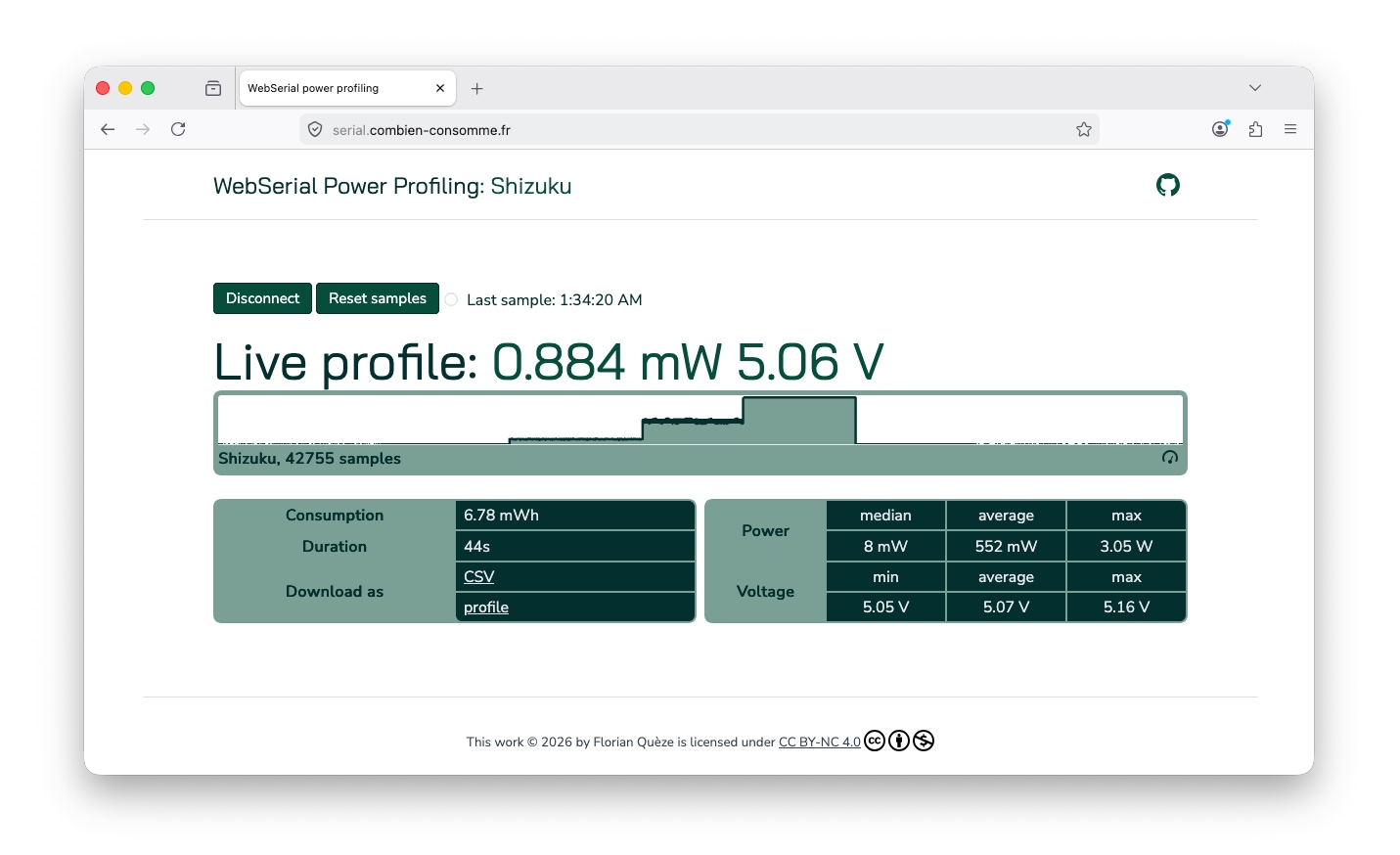
A screenshot of Florian’s site showing a power recording of a light with three brightness modes\.The power meter used in the pictured power tests was the[AVHzY C3 USB](https://store.avhzy.com/index.php?route=product/product&product_id=53)\. The[Joy\-IT TC66C](https://joy-it.net/en/products/JT-TC66C)and YZXStudio USB ZY1280 were also successfully tested\.
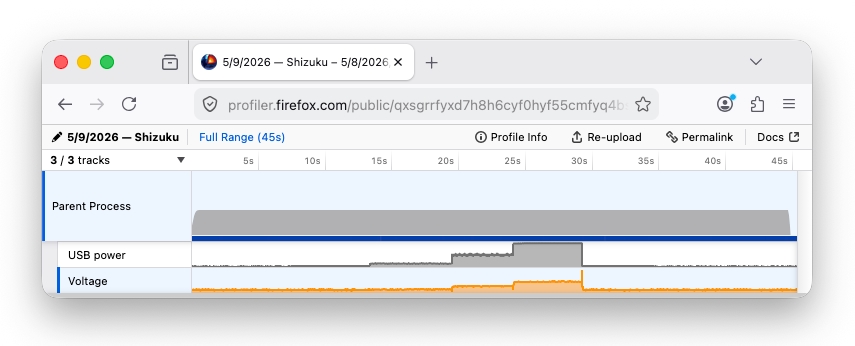
A screenshot of the Firefox Profiler displaying the imported power recording from Florian’s site\.
[Home Assistant](https://www.home-assistant.io/)is another example\. It’s a popular \(and growing\) open source project for home automation\. The[ESPHome](https://esphome.io/)project offers Home Assistant\-compatible firmware for affordable ESP32 and similar devices which can be installed and configured over Web Serial in just a few clicks\.
## Security and Privacy
There are clear security and privacy concerns with allowing the web platform to read and write to hardware devices\. Most importantly, with Web Serial, websites do not have visibility or access to serial ports until the user explicitly allows it\.
Ports are allowed on a per\-site and per\-port basis\. The Web Serial API requires websites to call`navigator\.serial\.requestPort\(\)`, which lets the user choose which port to allow access to, or disallow all access entirely\. This means websites do not receive a list of connected devices and there is no useful fingerprinting information outside of the port the user selects\.
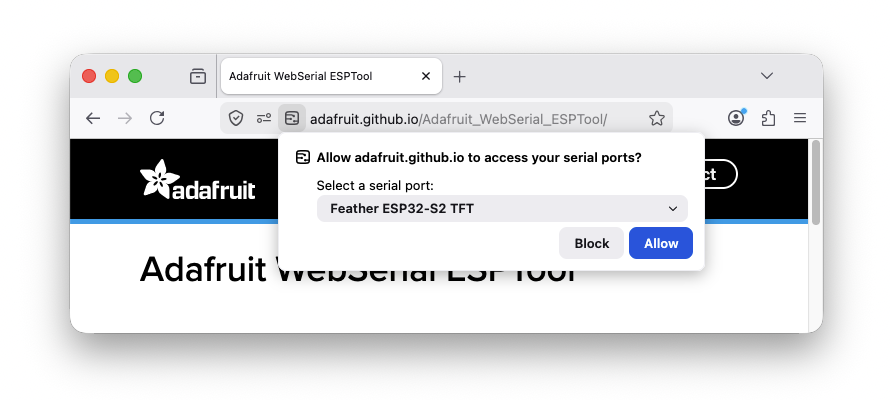
A screenshot of the Web Serial port selection prompt in Firefox\.
To help users understand when and why a site requests access to a serial port, Firefox uses add\-on gating which we introduced with our[Web MIDI API](https://developer.mozilla.org/en-US/docs/Web/API/Web_MIDI_API)implementation\. Compared to other web permission prompts, this gives the user a more detailed explanation of what they’re allowing\. The add\-on gating prompts appear before the port selection prompt the first time a site requests port access\.
For organizations using Firefox Enterprise Policies, Web Serial is disabled by default\. Administrators can explicitly allow or disallow Web Serial functionality across their organization using the[`DefaultSerialGuardSetting`](https://firefox-admin-docs.mozilla.org/reference/policies/defaultserialguardsetting/)policy setting\.
## Standardization
While Web Serial still resides in the Web Incubator Community Group \(WICG\), we’re optimistic there’s a path to standardization given its scope and long\-running incubation\. We are pursuing standardizing the Web Serial API in the WHATWG in a[new Workstream proposal](https://github.com/whatwg/sg/pull/264)and are excited to work with ecosystem partners and standards bodies to help shape access to peripherals on the web\.
## Feedback
If you already have a Web Serial workflow with a device you can test on, give Firefox a try\. We’d love to hear what you’re building and which workflows matter most to you\.[Mozilla Connect](https://connect.mozilla.org/)is a great place to share projects, ask questions, and give feedback\.
For technical issues, browse to[support\.mozilla\.org](http://support.mozilla.org/)or file a bug[here](https://bugzilla.mozilla.org/enter_bug.cgi?product=Core&component=DOM%3A+Device+Interfaces)\.
[More articles by Haik Aftandilian…](https://hacks.mozilla.org/author/haftandilianmozilla-com/)
[More articles by Greg Stoll…](https://hacks.mozilla.org/author/gstollmozilla-com/)