Volkswagen blocks Home Assistant by requiring client assertion
Summary
Volkswagen has blocked the Home Assistant Volkswagen Connect integration by requiring client assertion, breaking the custom component's functionality. The component's repository shows installation instructions but the change affects its use.
View Cached Full Text
Cached at: 05/29/26, 10:17 AM
robinostlund/homeassistant-volkswagencarnet
Source: https://github.com/robinostlund/homeassistant-volkswagencarnet







Volkswagen Connect - An Home Assistant custom component to interact with the VW Connect service. (EU ONLY)
Support the Project

Description
Welcome to the Volkswagen Connect custom component for Home Assistant, allowing you to interact with the Volkswagen Connect service and your car.
This component supports Volkswagen Connect vehicles such as the Passat, Golf, e-Golf, Tiguan, ID series, and more. An active VW online subscription connected to your car is required. New electric vehicles, including the ID series, are also supported.
Most of the features available in the official “Volkswagen Connect” app are accessible through this integration.
Note: So far, this component has only been reported to work successfully with cars sold in the EU. Contributions to support vehicles outside the EU, such as in the US, are welcome. Currently, we do not have access to non-EU VW Connect accounts to verify functionality.
Installation
Install with HACS (recommended)

Or, search for Volkswagen Connect in HACS and install it under the Integrations category.
- Restart Home Assistant.
- In the Home Assistant UI, go to Settings → Integrations, click + Add Integration, and search for Volkswagen Connect.
HACS will track updates automatically, making it easy to upgrade this component to the latest version.
Manual Installation
More Details
- Download the
volkswagencarnet.zipfile from the latest published release. - Extract the contents of
custom_componentsinto the<config directory>/custom_componentsfolder of your Home Assistant installation. - Restart Home Assistant.
- In the Home Assistant UI, go to Settings → Integrations, click + Add Integration, and search for Volkswagen Connect.
Note that only the packaged releases (zip file) have the dependencies configured so that Home Assistant can find them automatically, but if you use the source code or git branch, you need to manually install the correct versions of all dependencies also using something like pip install -r requirements.txt.
Configuration
- Restart Home Assistant
- Add and configure the component via the UI: Configuration > Integrations > search for “Volkswagen Connect” and follow the wizard to configure (use your Volkswagen Connect credentials)
- All available features of your car should be added automatically after you have selected the VIN
Configuration flow settings
- Name your car - Enter a custom name, defaults to VIN (Optional)
- Username/Password - Volkswagen Connect (Required)
- Region - The country where the car was sold (Required)
- Mutable - If enabled you can interact with the car, if disabled only data from the car will be presented (Optional)
- S-PIN - Required for some specific options such as lock/unlock (Optional)
- Distance unit conversion - Select if you wish to use “Scandinavian mile (mil)” or Imperial Miles (mi) instead of km (Optional, default is km)
- Sensors update interval (min) - Set how often data is fetched from your vehicle (default: 5 minutes, range: 0-60). Lower values provide more frequent updates but use more API calls. Set to 0 to disable automatic updates (manual refresh only). You can also adjust this per vehicle after setup using the “Scan Interval” number entity.
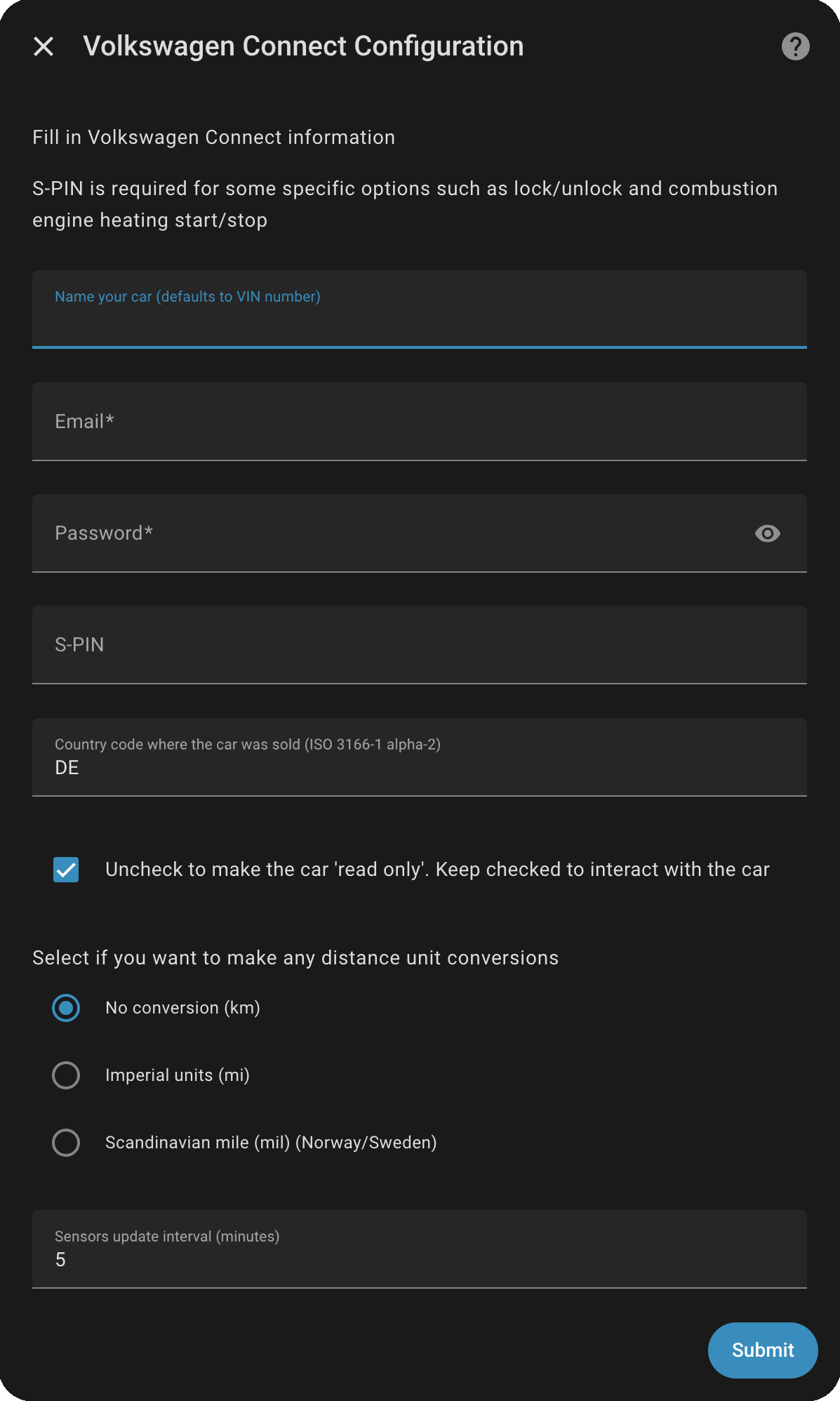
Note: The Volkswagen API has a connection limit of 480 calls per day (approximately one call every 3 minutes). The default update interval of 5 minutes in this integration will use 288 calls per day, leaving only 192 calls available for other applications, such as the official VW app — which may not be sufficient. If you plan to use the VW app alongside this integration, it is recommended to increase the update interval to 10 minutes. You can adjust this by going to the integration in Home Assistant, selecting Configure, and then modifying the Sensors update interval (minutes).
Having Issues with This Component?
Before creating an issue, please ensure that the VW Connect service works properly for your account via a web browser. Check not only login but also that the service interacts with your car correctly, including sensor updates and location tracking.
This component relies entirely on the VW Connect service — if their service is experiencing issues, this integration will not function. It is only as reliable as the VW Connect platform itself.
Enable debug logging
Check out this Wiki page: https://github.com/robinostlund/homeassistant-volkswagencarnet/wiki/Enabling-Debug-Logging-in-Home-Assistant
Acknowledgements
A heartfelt thank you to all contributors - your code, feedback, testing, and support are what keep this project moving forward.
Every contribution, big or small, is truly appreciated! ❤️
Similar Articles
Volkswagen started blocking GrapheneOS users
Volkswagen has begun blocking users of the privacy-focused GrapheneOS from accessing its app, as reported on the GrapheneOS discussion forum.
I never authorized an integration that scans my secrets
A Home Assistant user reports an unauthorized integration that appears to scan their secrets, highlighting privacy and consent concerns in the smart-home platform's ecosystem.
Honda Civics and the Evil Valet
A security researcher reveals that Honda Civic headunits accept unsigned updates using the publicly-known AOSP test key, enabling an 'evil valet' attack with physical USB access. Tools like ota-builder and apk-rebuilder are released to facilitate further reverse engineering.
Weekly Update 512: IoT Lockout Fail
Troy Hunt shares a personal anecdote about being locked out of his house due to dead batteries in an IoT door lock, highlighting the dangers of relying on smart home technology without manual backup.
@kentcdodds: MCP
Wes Bos demonstrates using MCP with Tesla's Grok Bot update to control home assistant devices like Meross garage door controllers directly from the car.