Cached at:
11/19/26, 08:59 AM
# 15 million web servers on one VM - smoltcp, DPDK, AF_XDP
Source: [https://kapteko.com/15-million-webservers/](https://kapteko.com/15-million-webservers/)
Nov 18, 2026Put a web server online and everyone starts trying to hack it\. Why? A basic rule of economics\. Short supply, big demand \- there aren’t enough web servers for everyone\. Let’s run a web server for every human on the planet, all 8 billion of them\. I couldn’t get funding, so we’re bootstrapping\. The goal is to run 15 million web servers on one VM with 10GB of RAM and 1 CPU core\. If we succeed, I’ll find some RAM from old microwaves around the house and we’ll scale it up so everyone can have their own web server\. Demand will drop to zero and cybersecurity will be solved once and for all\.
## Web server
Instead of vibe coding it all, let’s use an ancient technique called`learning`\. First of all, what is a web server? There are a few essential syscalls\.
1. `listen`\- syscall, asks kernel to listen for connections on a socket
2. `accept`\- syscall, accepts a connection on a socket
3. `recv`\- receives data from a socket
4. `send`\- sends data
5. `close`\- closes
What is a syscall? A function that is executed by the OS kernel\. Whatever fancy language or library you use for HTTP, it all comes down to those syscalls \(well, yes, but actually no\)\. Let’s use C to make it all explicit\. We start listening, then read from the socket in a loop and always reply with`OK`\.
```
int main(void)
{
// We use port 0 which makes OS return any available port
int server = socket(AF_INET, SOCK_STREAM, 0);
if (listen(server, 128) < 0)
return 1;
const char reply[] = "HTTP/1.0 200 OK\r\nContent-Length: 2\r\n\r\nOK";
for (int client; (client = accept(server, NULL, NULL)) >= 0;) {
if (recv(client, NULL, 4096, MSG_TRUNC) > 0)
send(client, reply, sizeof reply - 1, MSG_NOSIGNAL);
close(client);
}
}
```
It couldn’t be simpler: listen on a socket, accept a connection, read the data, send a reply, close the client connection, and repeat\. It gives us around 65k RPS\. Now that we’ve learned everything, let’s finish the article and call it a day:
```
$ for i in $(seq 1 15_000_000); do echo $i; ./server &; done
...
...
28232
program exited with error 1
```
Hm, why did`listen`fail? Ah, we’ve run out of ports\! We’re using`port=0`, so the kernel picks an available port from`ip\_local\_port\_range`\.
```
$ sysctl net.ipv4.ip_local_port_range
net.ipv4.ip_local_port_range = 32768 60999
```
Why are so many ports skipped? Historically, port`0`was created for outbound connections\. When you call`connect\('example\.com', 80\)`, Linux connects to the remote server \(the sending part\) and then allocates a random port on the host from`ip\_local\_port\_range`to receive data \(the receiving part\)\. There are a few reasons the default range is small\.
- Port`0`is special\. You cannot listen on it \(actually, you can \-[https://acid\.vegas/blog/the\-port\-that\-does\-not\-exist/](https://acid.vegas/blog/the-port-that-does-not-exist/)\)\.
- Ports`1\-1024`require root\.
- Ports`1024\-32768`are skipped to keep dynamically allocated ports from conflicting with existing apps\. You don’t want to call`connect\('example\.com'\)`and end up allocating port`3306`to receive incoming data\.`mysql cannot start because you have example\.com open in your Firefox`would make for a confusing UX\.
- Ports`60999 \- 65535`are excluded for historical reasons dating back to IP Masquerading\.
Nothing prevents us from overriding the range and using`1\-65535`, but that’s still a bit short of 15 million\. A UDP server and a TCP server can use the same port, so we can double that to 128k\. We could run a proxy in front to forward requests to the right process \(virtual hosting, yay\), but these are all ancient techniques \- in the AI era, whenever you have a software problem, you just throw money at the hardware\. Let’s simply connect`15M/32k=450`new network cards to the server\.

The 65k limit comes from the TCP standard\. A port is a`u16`, so even if we hack the kernel with`find '\*\.c' \-exec sed \-i 's/u16/u32/' \\;`to support bigger port numbers, normal clients still wouldn’t be able to connect\. Each listening server is identified by a`\(protocol, IP, port\)`tuple\. That explains how we can use the same port for UDP and TCP\. It also means we can use a bunch of different IPs for our web servers\. If we connect 450 network cards to the server, we’ll get 450 unique IP addresses and be able to listen on 15 million unique addresses\!
**UPD\.**I’ve heard from readers that the network card is the ONLY hardware component that didn’t get 100 times more expensive in the last year\. Can’t we avoid ruining that too and solve this in software?
Let’s use a beautiful technology called`AnyIP`, which lets us listen on a whole subnet\. Many VPS and dedicated server providers routinely give you a whole TCPv6 subnet\. We can simply run`sudo ip \-6 route add local 2001:db8:1234:5678::/64 dev lo`to get 18 quintillion addresses \(plus or minus one\) to listen on\. You can do the same for IPv4 \- acquiring a subnet with 15M addresses would cost around $250 million, so adjust the command for your environment\. We’ll change our server to pick the nth IP from our range:
```
// Read IP index from CLI, shift base IP by it
int i = read_cli_param(argv[1]);
const uint32_t base_ip = 0x0a400001; // ex. 10.64.0.1
addr.sin_addr.s_addr = htonl(first_ip + i); // shift, ex. 10.64.0.2
```
And now we can finally finish the article\.
```
$ for i in $(seq 1 15_000_000); do echo $i; ./server $i &; done
...
...
Out of memory
```
Hm, one server consumes 1\.5MB of RAM, so running that many would take… 20TB of RAM, which is a few bytes more than our 10GB budget\.
## Runtime
By pure coincidence \(what are the odds?\), I explained in[Running 10 million Codex CLIs on one server \- LFI processes](https://kapteko.com/running-10-million-codex-clis-on-one-server-lfi-processes)why running millions of processes creates too much overhead\. The answer is to run them all in one process inside a custom runtime, much as V8 can run millions of guests in a single process\. In[Userland Linux scheduler in Rust](https://kapteko.com/userland-linux-scheduler-in-rust), I showed how to build a specialised userland scheduler and switch between tasks with the absolute minimum amount of RAM per task\.
> TLDR: We’re using[LFI](https://www.scs.stanford.edu/~zyedidia/docs/papers/lfi.pdf)for sandboxing\. It gives us memory isolation and replaces all syscalls with calls to our host handler, which lets us implement I/O however we like\. To schedule multiple guests, we load them all into our main process’s memory and make the CPU constantly switch between guests \- we become our own micro OS\.
Since we need to save every byte and CPU cycle we can, we’re doomed to build another specialised runtime\. Let’s get started\. How much is 10GB divided by 15M, exactly?
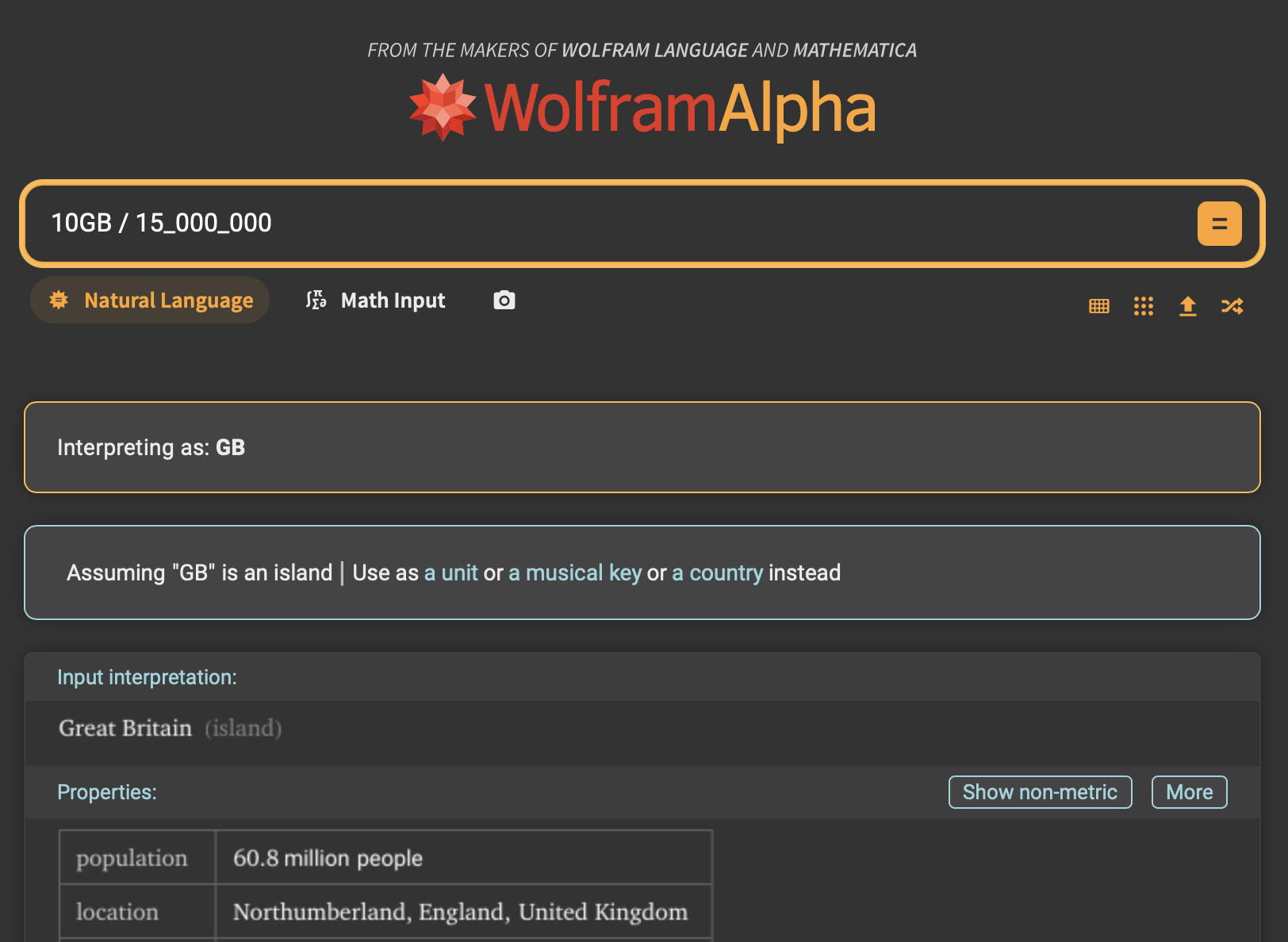
Ten Great Britains divided by 15 million gives around half of kilo britain\. Not much\. If we run all our guests in our runtime, our custom scheduler needs to switch between them\. What’s the absolute minimum state we need to preserve for each guest? We can ignore server initialisation and assume switches only happen within the main loop\. Let’s take another look at the loop\.
```
for (int client; (client = accept(server, NULL, NULL)) >= 0;) {
if (recv(client, NULL, 4096, MSG_TRUNC) > 0)
send(client, reply, sizeof reply - 1, MSG_NOSIGNAL);
close(client);
}
```
This code has only two state variables,`server`and`client`\. Both are simple file descriptors\. If our scheduler had to suspend a guest at any syscall point in this loop, we’d need to save the following state:
```
struct Context {
pc: u64, // Instruction address to return to
fd_server: i32, // server file descriptor
fd_client: i32, // client file descriptor
}
```
We only need 16 bytes per guest, so to run 15M guests in our runtime and be able to suspend them and switch between them, we would need 220MB of RAM\. We’re playing it safe here \- we don’t need the full`u64`or`i32`, and with bit packing, we could probably get down to 8 bytes per guest\. What else do we need?
```
$ codex "How much TCP connection takes?"
Idle connection takes zero, while active connection consumes around 5kb
```
Here’s what we get if we assume that only 1M of connections are active at any given moment\.
- 14M idle connections \- 0 bytes
- Scheduling state for 15M guests \- 220MB
- 1M active connections at 5kb each = 5GB
Only half of our RAM budget, yay\! I don’t often exceed my own expectations\. Let’s validate it:
```
int main(void) {
// Run 14M of idle connections - just listen and do nothing
// SHOULD CONSUMER ZERO MEMORY!
for (int i = 0; i < 14_000_000; i++) {
int server = socket(AF_INET, SOCK_STREAM, 0);
listen(server, 1)
}
}
```
```
$ ./run_15m_idle_servers
Out Of Memory
$ dmesg | tail -n 1
'SHOULD CONSUMER ZERO MEMORY' - what are you, stupid?
```
Looks like the kernel still has some leftover comments from Linus\. I’m not stupid, but I have to admit I was below average here\. While an LLM is a significant boost for learning, it’s too easy to accept its answers without thinking critically and feel ashamed later on\. But hey, embarrassment is a cost of entry \- let’s dive into networking in the kernel\.
## Networking in the kernel
Remember when I said that our simple server uses only 5 syscalls? I missed one that was right in front of me\. Let me highlight it:
```
int main(void)
{
for (int i = 0; i < 10_000_000; ++i) {
socket(AF_INET, SOCK_STREAM, 0);
}
}
```
That code will OOM in a 10GB VM\. The`socket`syscall allocates around 3300 bytes, whether the socket is active, listening, or doing nothing\. Linux was clearly written at a time when RAM was big and cheap, sigh\. Let’s ask AI where all the memory goes:
Struct`sizeof`Description`struct tcp\_sock`2240BTCP state, queues, timers, sequence numbers, congestion control, retransmit and delivery bookkeeping`struct socket\_alloc`768BA 128\-byte`struct socket`with an embedded wait queue, plus a 608\-byte sockfs inode and padding`struct file`184BOpen\-file operations, flags, credentials, reference count, and the pointer back to the socket`struct dentry`192BThe sockfs pseudo\-name, inode pointer, and VFS lookup and lifetime bookkeepingTotal3384BPotato\-potato, TLDR, the kernel uses that memory for many things\. I was hoping to see some`buffer: \[u8; 3300\]`, but it doesn’t look like we can optimise much without rewriting half the kernel\. It’s Sunday and I have few tokens left, so we’ll have to think instead \- how can we bypass the kernel?
What are our options? Engineering wisdom tells us that if we can’t solve a task, we’re working at the wrong level of abstraction\. Hm… level, level, layer\. Wait a minute\! We started with HTTP and went level down to TCP/IP\. That reminds me of something\! Mom\! Mom\! Where are all my university books? I NEED THEM NOW\!
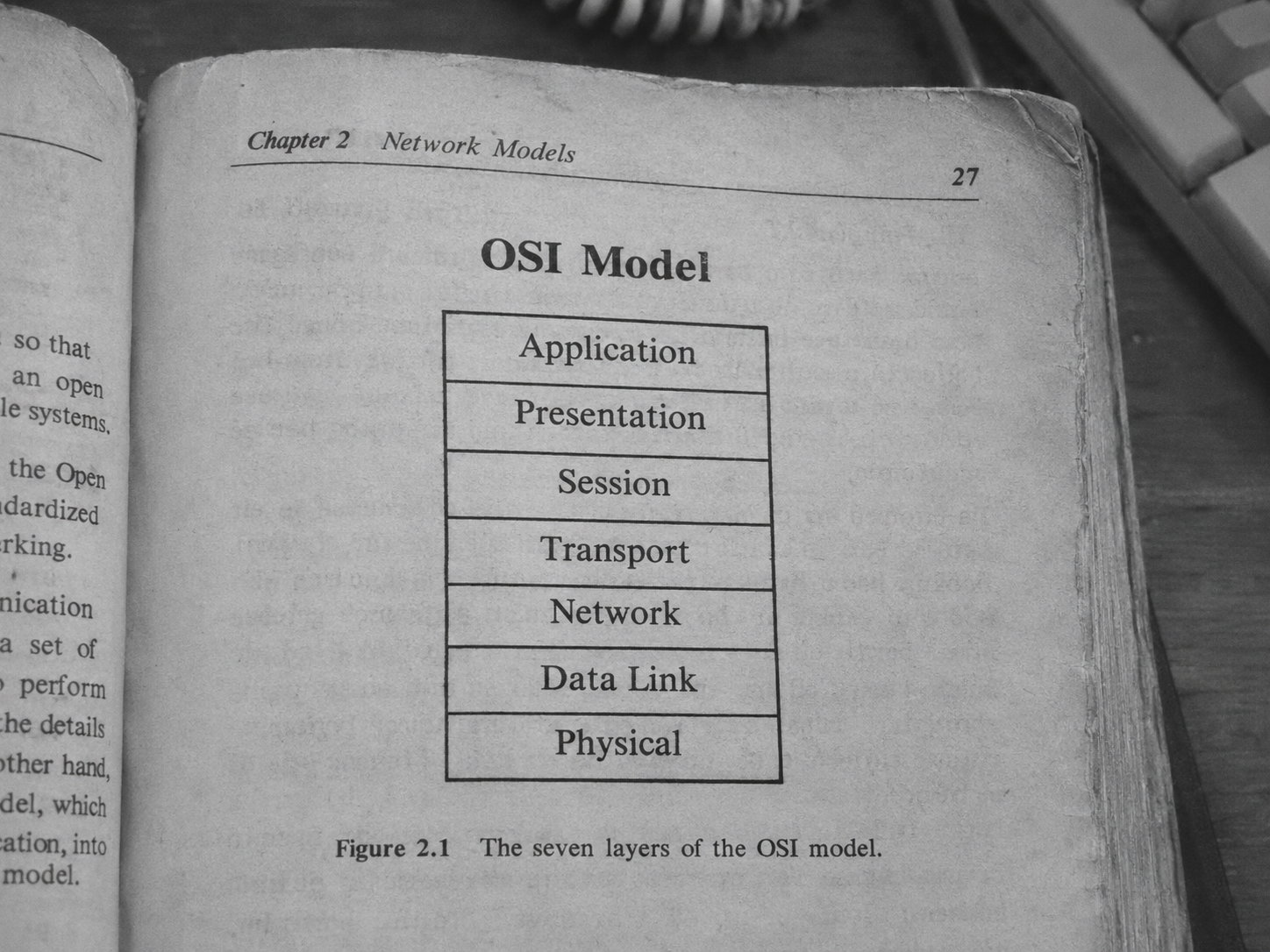
The OSI model is… um… something I studied at university\. Yeah, that’s a good definition\. We started with our app and HTTP at the`application`layer, then went down to TCP/IP at the`transport`layer\. There are three more layers below that\. Can we go lower to get full control and solve our RAM problem? Oh yes, that’s exactly what operating at the`network`and`data link`layers lets us do\. What about going to the lowest?

Clear\.
Each layer wraps the data from the layer above it\.
**HTTP**Application · L7**TCP**Transport · L4**IP**Network · L3**Ethernet**Data link · L2**Physical**L1**GET /****Payload****Payload****Payload****Src port**50123**Dst port**80**Seq**1001**ACK**7001**Flags**ACK**Src IP**192\.0\.2\.10**Dst IP**198\.51\.100\.20**TTL**64**Protocol**6 \(TCP\)**Dst MAC**02:00:00:00:00:fe**Src MAC**02:00:00:00:00:01**EtherType**0x0800 \(IPv4\)**FCS**CRCTCP/IP is stateful, but everything below is stateless\. None of the lower layers know or care about the payload, so nothing prevents us from sending new IP packets or even Ethernet frames with our own handcrafted binary data\. We just need to reimplement the TCP and IP stack ourselves\. Are there any examples? Embedded folks have solved this millions of times\. The most extreme case is Adam Dunkels’s[Miniweb](https://dunkels.com/adam/miniweb/)\- it combines a custom TCP/IP implementation and an HTTP server that together need only 28 bytes \(B\-Y\-T\-E\-S\) to work\.
There are plenty of less extreme, more mature implementations, though:
- [gVisor](https://github.com/google/gvisor)essentially reimplements the whole OS, including the network stack
- [Seastar](https://github.com/scylladb/seastar)is a whole runtime with its own network stack from the amazing team behind ScyllaDB
- [lwIP](https://github.com/lwip-tcpip/lwip)is a popular C implementation of TCP/IP
- [F\-Stack](https://github.com/F-Stack/f-stack)uses FreeBSD’s TCP/IP stack
Go, C\+\+, and C are nice languages \(well, kinda\), but they’re nowhere near as nice as our beloved Rust\. So we’ll take[smoltcp](https://github.com/smoltcp-rs/smoltcp), which is purely amazing:
```
>smoltcp is a standalone, event-driven TCP/IP stack that is designed for
>bare-metal, real-time systems. smoltcp does not need heap allocation at all
```
So,`cargo add smoltcp`and call it a day? Not so fast\.`smoltcp`is essentially a smart parser and can’t do I/O\. How does it communicate with your network card? There are 3 ways:
- `TUN`is a virtual network interface that the kernel provides\. It operates at the IP layer
- `TAP`is another kernel feature that operates one layer down, at the Ethernet layer
- `DPDK`lets you communicate directly with the network card using Ethernet frames, completely bypassing the kernel
`smoltcp`is kind enough to provide the first two options out of the box, and they’re easy to use\.
```
fn main() -> std::io::Result<()> {
let (mut device, config) = match std::env::args().nth(1).as_deref() {
Some("tun") => (
TunTapInterface::new("smoltun", Medium::Ip)?,
Config::new(HardwareAddress::Ip),
),
Some("tap") => (
TunTapInterface::new("smoltap", Medium::Ethernet)?,
Config::new(EthernetAddress([0x02, 0, 0, 0, 0, 2]).into()),
),
_ => panic!("pass tun or tap"),
};
let mut iface = Interface::new(config, &mut device, Instant::now());
iface.update_ip_addrs(|addrs| {
addrs.push(IpCidr::new(IpAddress::v4(192, 0, 2, 2), 24)).unwrap();
});
let mut sockets = SocketSet::new(Vec::new());
// Main network loop
loop {
let now = Instant::now();
iface.poll(now, &mut device, &mut sockets);
wait(device.as_raw_fd(), iface.poll_delay(now, &sockets))?;
}
}
```
But what about the third option,`DPDK`? When you care about latency A LOT, every syscall is a bloody wound\. The syscall itself might take 500ns, and copying data from the kernel to userspace might take another 1000ns, depending on the buffer size\. That sounds tiny, but for perspective: it’s common for high\-frequency trading firms to saturate 400Gbs network interfaces\. That means processing up to 600 million packets per second, or roughly 1\.7ns per packet\.
`DPDK`lets your program communicate directly with the hardware network card using Ethernet frames, bypassing the entire kernel network stack\. You read from and write to a memory\-mapped buffer without syscalls: when you want to send data \- you simply write it to the buffer and you’re done; when you want to read what you’ve received \- it’s already there\.
There’s another, less obvious advantage \- what happens when a new packet arrives at your network device? An interrupt fires, the CPU core stops executing your app, switches to the kernel, processes the interrupt, and then goes back to your app\. Now imagine A LOT of incoming packets, so many that your app gets interrupted all the time\. It has a beautiful name,`livelock`, and I guess debugging it in production is its own level of hell\.`DPDK`lets you avoid all that, but there’s a cost\.
`DPDK`works by running a busy loop that takes up an entire CPU core\. It constantly moves data between memory and the network device in both directions, kinda like that:
```
loop {
send_from_app_memory_to_network();
receive_from_network_to_app_memory();
}
```
There’s another, less obvious nuance\.`DPDK`requires exclusive access to the network device because it uses a driver that operates at the hardware level \- two drivers can’t work with the same device at the same time\. Once you enable the`DPDK`driver for your network interface… it disappears from the OS\. Yep, nothing in`ifconfig`, if you enable it over SSH, you’ll lose SSH access too\. I can imagine a lot of funny stories coming out of that\.
Actually, there’s a fourth option now \- Linux now has an`AF\_XDP`subsystem that does something similar\. It lets you bypass the kernel network stack and uses the same idea of memory\-mapped buffers to get zero\-copy I/O in your app\. The kernel still owns the device and interrupts still happen as usual\. When a new packet arrives, the kernel runs a simple eBPF filter that decides whether to send it directly to the userspace buffer, bypassing the network stack, or process it normally\. That means SSH still works\.`AF\_XDP`supports an alternative mode,`SO\_PREFER\_BUSY\_POLL`, which is even closer to`DPDK`: you get a busy loop with no interrupts at the cost of a CPU core\.`DPDK`still beats it because it bypasses the kernel completely, but`AF\_XDP`is very close \(and simply easier to manage\)\.
To support`DPDK`and`AF\_XDP`in`smoltcp`, we only need to implement the[Device trait](https://docs.rs/smoltcp/latest/smoltcp/phy/trait.Device.html)with 3 methods if we want full control\. Alternatively, we can use the existing crates[rust\-dpdk\-net](https://github.com/youyuanwu/rust-dpdk-net)for DPDK and[xsk\-rs](https://github.com/DouglasGray/xsk-rs)for`AF\_XDP`to help us\.
Now the final flow is:
1. The runtime loads 15M web server guests into its memory
2. The runtime scheduler starts executing guests one by one
3. Guest syscalls are intercepted by the runtime and replaced by the`smoltcp`network stack and its adapters
4. All 15M guests start listening, each on its own address
5. The scheduler polls for incoming data from`smoltcp`adapters, wakes up a guest, makes it process the data, and switches to the next
And now we can finally finish the article\. The kernel network stack uses up all the RAM at around 2\.5M web servers, and RPS drops as we run more servers\. With`smoltcp`, RAM usage grows slower \- 620 bytes per idle server and around a kilobyte for an active one, we got to 16M of servers\. DPDK is clearly the beast in this benchmark, with`AF\_XDP`just behind it:
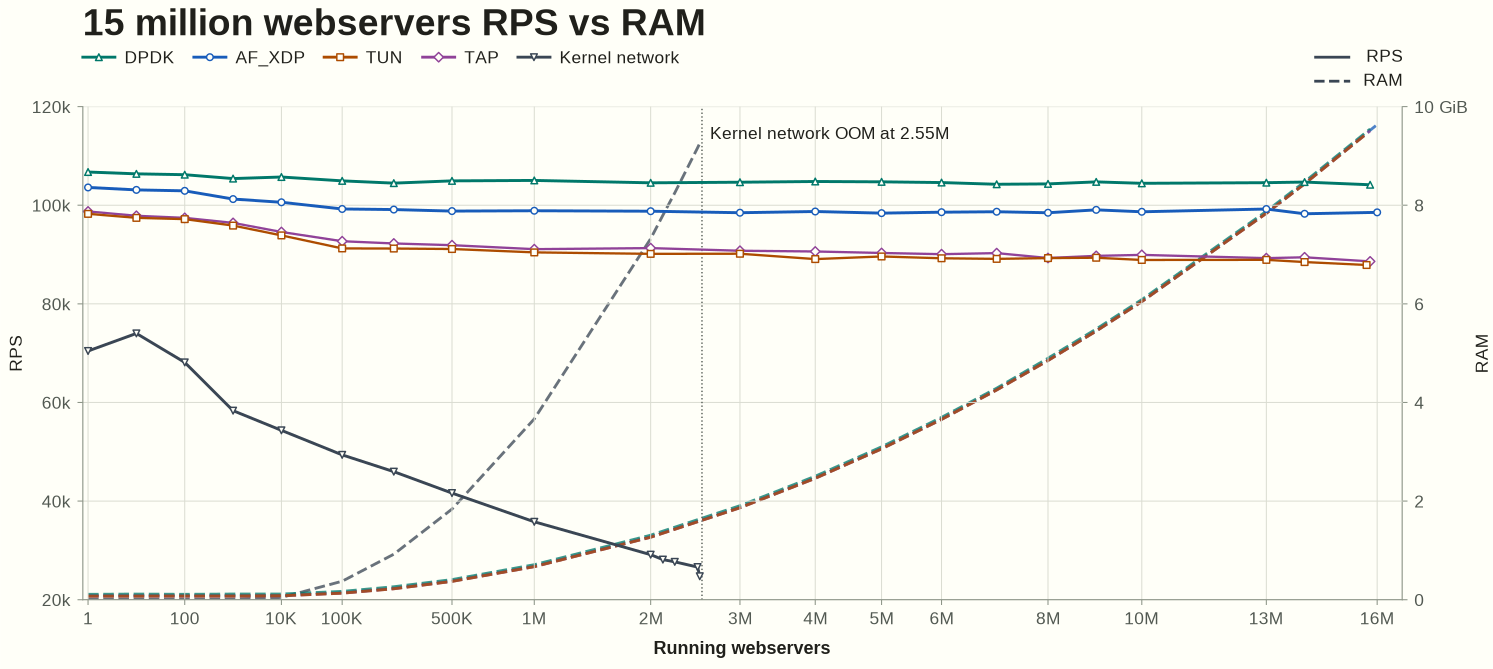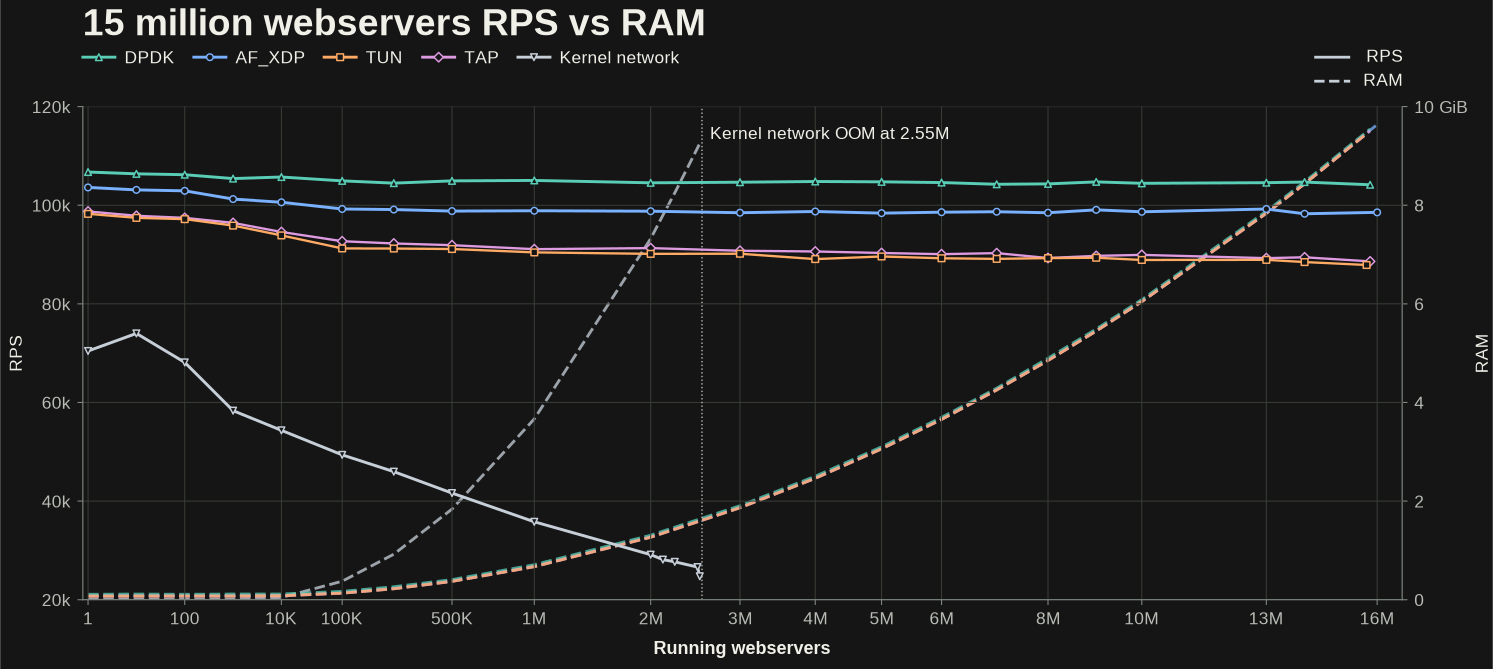Why is this so exciting? It means that by moving the network stack to userland, you can get full control on RAM usage and improve performance\. And with custom runtime, you can simply run guests faster\.
`Simply`is a bit of a stretch \- building a proof of concept is easy\. Building a compatible Linux runtime and reimplementing all the syscalls with 100% POSIX compatibility take a bit more thought\. And another article\.
## References
- [https://github\.com/artemyarulin/AI10M/tree/main/poc/ten\-million\-webservers](https://github.com/artemyarulin/AI10M/tree/main/poc/ten-million-webservers)source
- [https://medium\.com/beyond\-localhost/how\-we\-handle\-15M\-websocket\-connections\-on\-a\-single\-server\-8917c3952f59](https://medium.com/beyond-localhost/how-we-handle-15M-websocket-connections-on-a-single-server-8917c3952f59)great overview of DPDK
- [https://doc\.dpdk\.org/guides/index\.html](https://doc.dpdk.org/guides/index.html)DPDK main documentation site
- [https://docs\.kernel\.org/networking/af\_xdp\.html](https://docs.kernel.org/networking/af_xdp.html)AF\_XDP overview
[← All articles](https://kapteko.com/)