soxoj/maigret
Summary
Maigret is an open-source tool that collects a dossier on a person by username only, checking accounts on thousands of sites and gathering available information. It supports 3000+ sites and can be used via command line or Python library.
View Cached Full Text
Cached at: 06/10/26, 12:11 PM
soxoj/maigret
Source: https://github.com/soxoj/maigret
Maigret






Maigret collects a dossier on a person by username only, checking for accounts on a huge number of sites and gathering all the available information from web pages. No API keys required. AI profiling (demo).
Sponsors
|
|
RapidProxy provides high-performance residential proxies for Twitter scraping, Selenium automation, and web data extraction. 90M+ IPs • Smart rotation • Anti-block • Non-expiring traffic Special Offer: Try it free — Plans from $0.65/GB. Use code RAPID10 for 10% off.
|

|
VaultProxies — The proxy network ops teams reach for when they're tired of getting throttled, flagged, or guessed. Enterprise-grade rotation • High uptime • Throttle-resistant routing Special Offer: Plans from $1/GB — as low as $0.50/GB. Use code 50OFF for 50% off.
|
Contents
In one minute
Ensure you have Python 3.10 or higher.
pip install maigret
maigret YOUR_USERNAME
No install? Try the community Telegram bot or a Cloud Shell.
Want a web UI? See how to launch it.
See also: Quick start.
Main features
- Supports 3,000+ sites (see full list). A default run checks the 500 highest-ranked sites by traffic; pass
-ato scan everything, or--tagsto narrow by category/country. - Embeddable in Python projects — import
maigretand run searches programmatically (see library usage). - Extracts all available information about the account owner from profile pages and site APIs, including links to other accounts.
- Performs recursive search using discovered usernames and other IDs.
- Allows filtering by tags (site categories, countries).
- Detects and partially bypasses blocks, censorship, and CAPTCHA.
- Fetches an auto-updated site database from GitHub each run (once per 24 hours), and falls back to the built-in database if offline.
- Works with Tor and I2P websites; able to check domains.
- Ships with a web interface for browsing results as a graph and downloading reports in every format from a single page.
- Optional AI analysis mode (
--ai) that turns raw findings into a short investigation summary using an OpenAI-compatible API.
For the complete feature list, see the features documentation.
Used by
Professional OSINT and social-media analysis tools built on Maigret:
Demo
Video

Reports
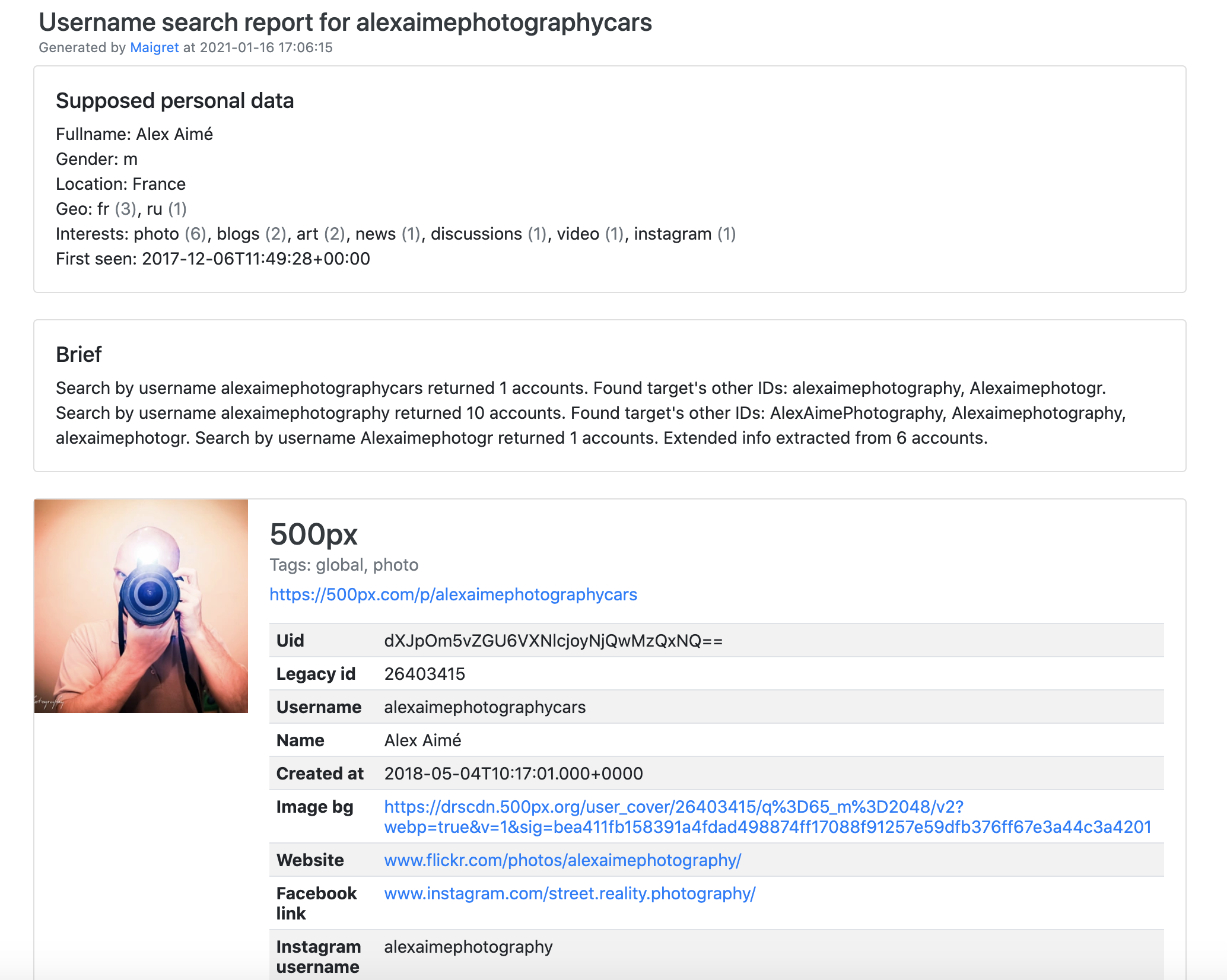
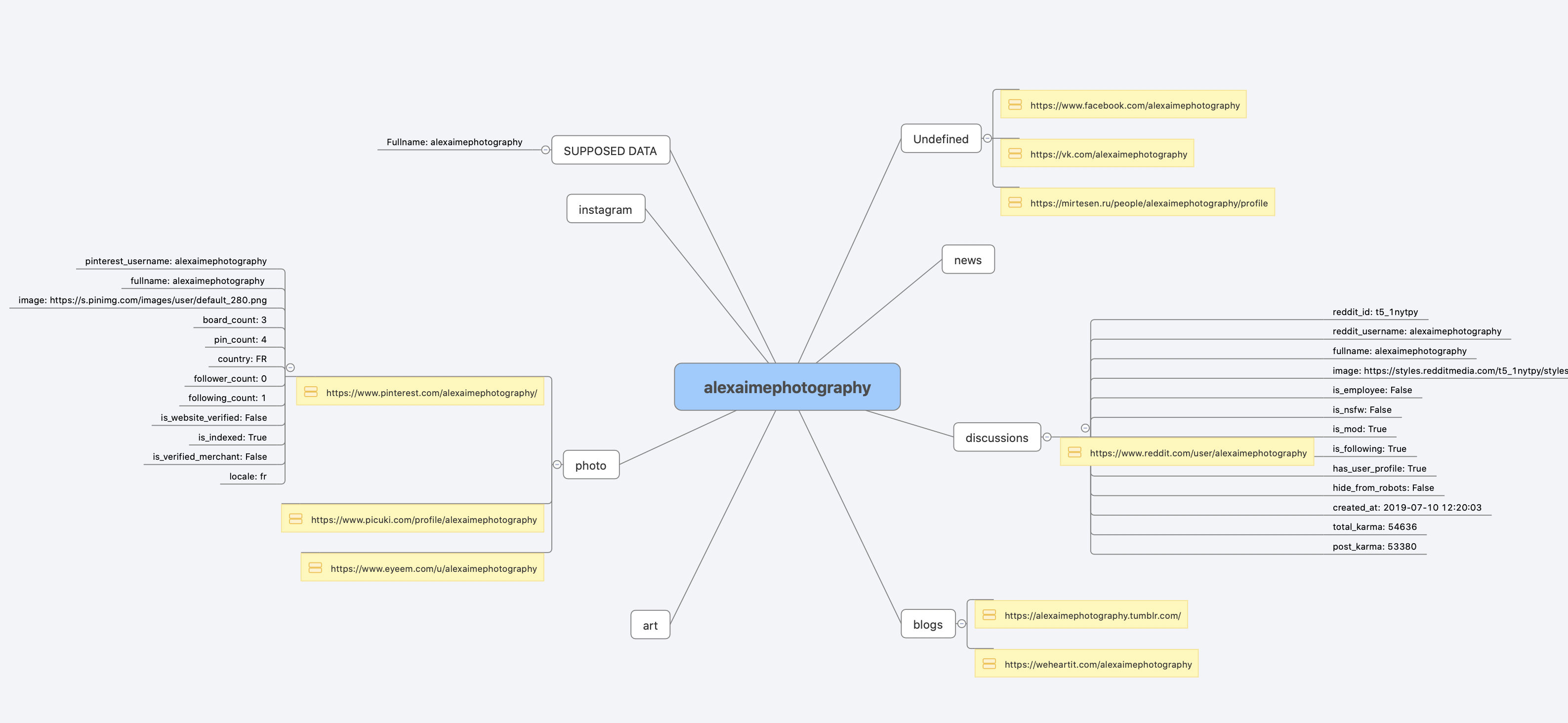
Installation
Already ran the In one minute steps? You’re set. Below are alternative methods.
Don’t want to install anything? Use the community Telegram bot.
Windows
Download maigret_standalone.exe from Releases. You can launch it two ways:
- Double-click it — Maigret will ask for a username, run a default search, and wait at the end so the report links stay visible.
- Run it from a terminal — open Command Prompt (press
Win+R, typecmd, hit Enter) or PowerShell to pass extra options:
cd %USERPROFILE%\Downloads
maigret_standalone.exe USERNAME
maigret_standalone.exe USERNAME --html       :: also save an HTML report
maigret_standalone.exe --help                :: list all options
Video guide: https://youtu.be/qIgwTZOmMmM.
Cloud Shells
Run Maigret in the browser via cloud shells or Jupyter notebooks:



Local installation (pip)
# install from pypi
pip3 install maigret

# usage
maigret username
From source
# or clone and install manually
git clone https://github.com/soxoj/maigret && cd maigret

# build and install
pip3 install .

# usage
maigret username
Docker
Two image variants are published:
soxoj/maigret:latest— CLI mode (default)soxoj/maigret:web— auto-launches the web interface
# official image (CLI)
docker pull soxoj/maigret

# CLI usage
docker run -v /mydir:/app/reports soxoj/maigret:latest username --html

# Web UI (open http://localhost:5000)
docker run -p 5000:5000 soxoj/maigret:web

# Web UI on a custom port
docker run -e PORT=8080 -p 8080:8080 soxoj/maigret:web

# manual build
docker build -t maigret .                  # CLI image (default target)
docker build --target web -t maigret-web . # Web UI image
Troubleshooting
Build errors? See the troubleshooting guide.
PDF reports (--pdf) are an optional extra — install with pip install 'maigret[pdf]'. They need system-level graphics libraries on Linux/macOS; see the PDF reports section for per-OS install steps.
Usage
Examples
# make HTML, PDF, and Xmind8 reports
maigret user --html
maigret user --pdf
maigret user --xmind #Output not compatible with xmind 2022+

# machine-readable exports
maigret user --json ndjson   # newline-delimited JSON (also: --json simple)
maigret user --csv
maigret user --txt
maigret user --graph         # interactive D3 graph (HTML)

# search on sites marked with tags photo & dating
maigret user --tags photo,dating

# search on sites marked with tag us
maigret user --tags us

# highlight sites whose page also mentions specific keywords
maigret user --keywords python rust
# keyword-matched sites are shown with "[++]" in bright green

# search for three usernames on all available sites
maigret user1 user2 user3 -a

# AI-assisted investigation summary (needs OPENAI_API_KEY)
maigret user --ai
Run maigret --help for all options. Docs: CLI options, more examples. Running into 403s or timeouts? See TROUBLESHOOTING.md.
Web interface
Maigret has a built-in web UI with a results graph and downloadable reports.
Web Interface Screenshots
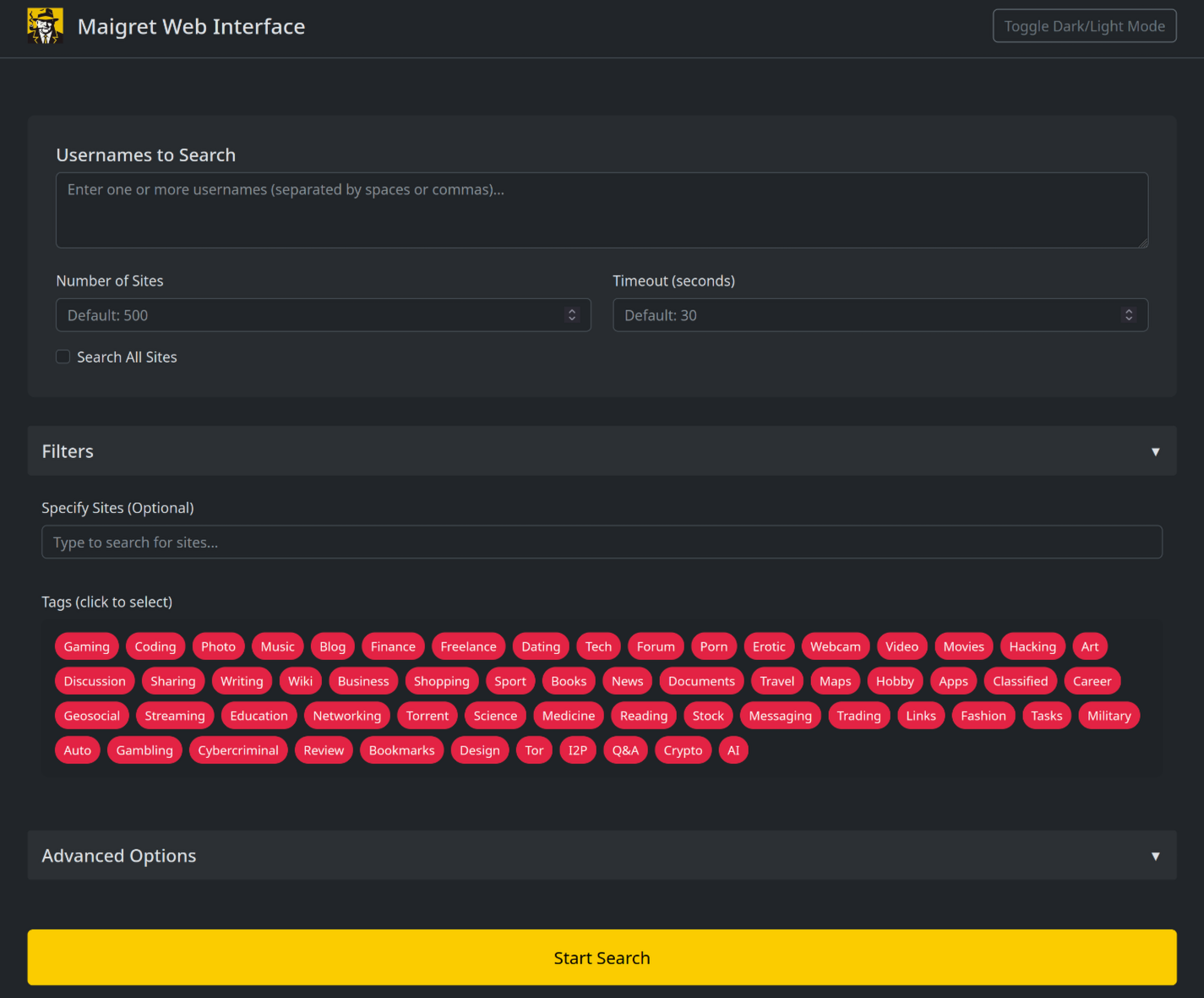
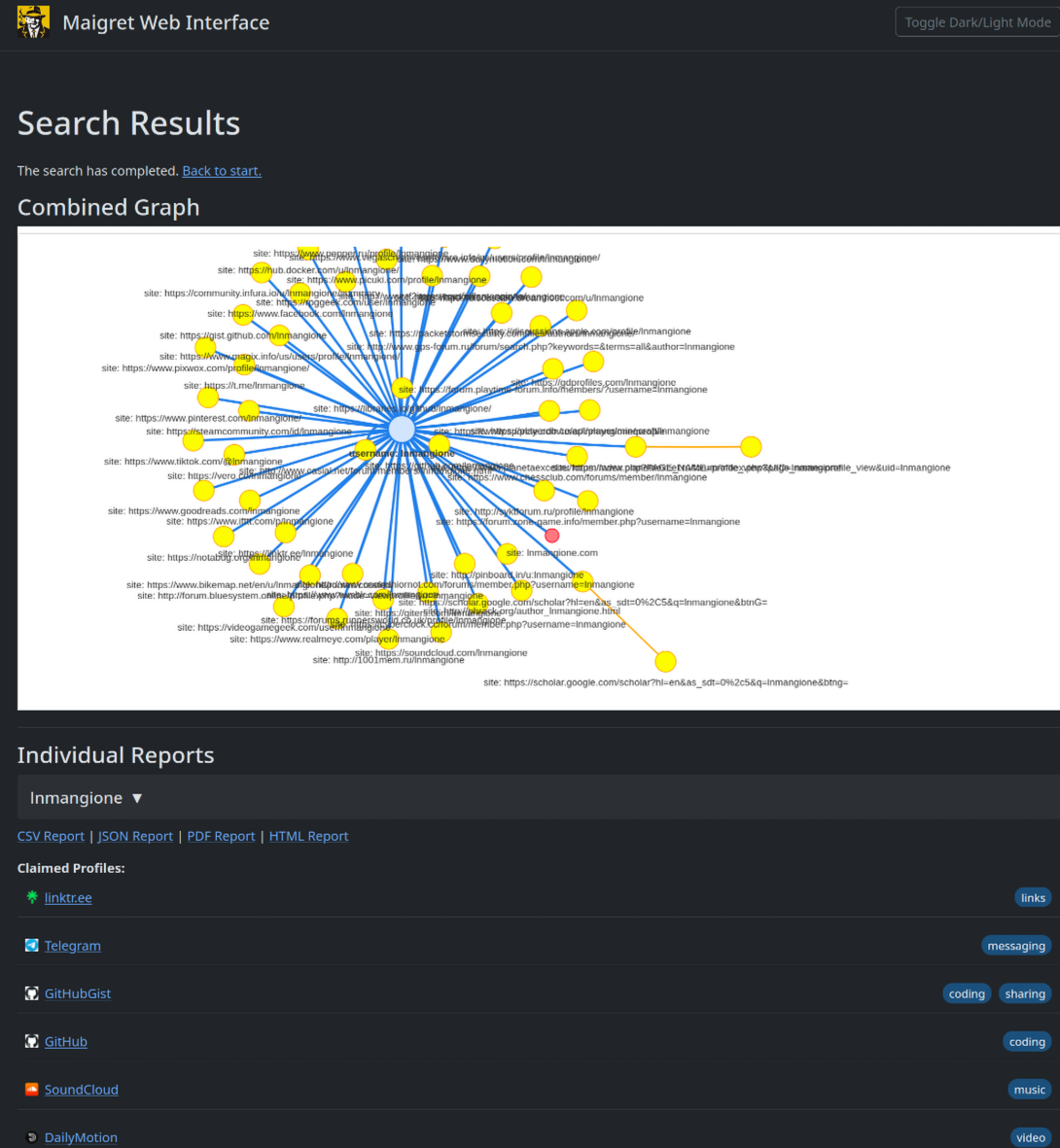
maigret --web 5000
Open http://127.0.0.1:5000, enter a username, and view results.
Python library
Maigret can be embedded in your own Python projects. The CLI is a thin wrapper around an async function you can call directly — build custom pipelines, feed results into your own tooling, or run it inside a larger OSINT workflow.
See the full library usage guide for a working example, async patterns, and how to filter sites by tag.
Useful CLI flags
--parse URL— parse a profile page, extract IDs/usernames, and use them to kick off a recursive search.--permute— generate likely username variants from two or more inputs (e.g.john doe→johndoe,j.doe, …) and search for all of them.--self-check [--auto-disable]— verifyusernameClaimed/usernameUnclaimedpairs against live sites for maintainers auditing the database.--ai/--ai-model— run the AI analysis over the search results and stream a short investigation summary to the terminal.
AI analysis

--ai collects the search results, builds an internal Markdown report, and sends it to an OpenAI-compatible chat completion endpoint to produce a short, neutral investigation summary (likely real name, location, occupation, interests, languages, confidence, follow-up leads). Per-site progress is suppressed and the model’s output is streamed to stdout.
export OPENAI_API_KEY=sk-...
maigret user --ai

# pick a different model
maigret user --ai --ai-model gpt-4o-mini
The key can also be set as openai_api_key in settings.json. The endpoint defaults to https://api.openai.com/v1, but openai_api_base_url in settings.json can point to any OpenAI-compatible API (Azure OpenAI, OpenRouter, a local server, …). See the settings docs for the full list of options.
Tor / I2P / proxies
Maigret can route checks through a proxy, Tor, or I2P — useful for .onion / .i2p sites and for bypassing WAFs that block datacenter IPs.
# any HTTP/SOCKS proxy
maigret user --proxy socks5://127.0.0.1:1080

# Tor (default gateway socks5://127.0.0.1:9050)
maigret user --tor-proxy socks5://127.0.0.1:9050

# I2P (default gateway http://127.0.0.1:4444)
maigret user --i2p-proxy http://127.0.0.1:4444
Start your Tor / I2P daemon before running the command — Maigret does not manage these gateways.
Cloudflare bypass
Experimental. The Cloudflare webgate is under active development; the configuration schema, CLI behaviour, and the set of routed sites may change without backwards-compatibility guarantees.
A subset of sites in the database require a real browser to solve a JavaScript challenge. Maigret can offload these checks to a local FlareSolverr instance:
docker run -d -p 8191:8191 --name flaresolverr ghcr.io/flaresolverr/flaresolverr:latest
maigret --cloudflare-bypass <username>
The bypass is opt-in (--cloudflare-bypass or cloudflare_bypass.enabled in settings.json) and only fires for sites whose protection field matches. See the feature docs for backend options and configuration.
Contributing
Add or fix new sites surgically in data.json (no json.load/json.dump), then run ./utils/update_site_data.py to regenerate sites.md and the database metadata, and open a pull request. For more details, see the CONTRIBUTING guide and development docs. Release history: CHANGELOG.md.
Commercial Use
The open-source Maigret is MIT-licensed and free for commercial use without restriction — but site checks break over time and need active maintenance.
For serious commercial use — with a daily-updated site database or a username-check API — reach out: 📧 [email protected]
- Private site database — 5 000+ sites, updated daily (separate from the public open-source database)
- Username check API — integrate Maigret into your product
About
Disclaimer
For educational and lawful purposes only. You are responsible for complying with all applicable laws (GDPR, CCPA, etc.) in your jurisdiction. The authors bear no responsibility for misuse.
Feedback
Open an issue · GitHub Discussions · Telegram
SOWEL classification
OSINT techniques used:
- SOTL-2.2. Search For Accounts On Other Platforms
- SOTL-6.1. Check Logins Reuse To Find Another Account
- SOTL-6.2. Check Nicknames Reuse To Find Another Account
License
MIT © Maigret
Similar Articles
@IndieDevHailey: Holy cow! Drop a username, Maigret scours 3000+ sites and digs up everything! The ultimate OSINT weapon! Just found another true black tech tool—Maigret (31.4k stars)! Enter any username, it automatically scans 3000+ sites and instantly produces a complete profile! Zero API, zero setup…
Introduce the open-source OSINT tool Maigret, which can automatically scan over 3,000 websites by entering a username, generate a complete person profile, and support AI summaries. Suitable for legitimate investigation use.
@HowToPrompt__: Someone open-sourced a tool that takes any username or email and finds every account linked to it across 600+ social ne…
An open-source CLI tool scans 600+ social networks to find accounts linked to a username or email, then uses AI profiling to generate a behavioral report in PDF/CSV format.
@XAMTO_AI: Damn, just discovered a site-recon tool called Web-Check, and it's completely free! Just drop any URL in, and it strips the target site down to the bone—unsettlingly like doxxing: DNS records all laid out, server architecture exposed, frameworks, CMS, plugins—nothing stays hidden, open ports, historical snapshots…
Web-Check is a free, open-source website reconnaissance tool. Enter a URL and it extracts DNS records, server architecture, frameworks, CMS, open ports, subdomains, and more—ideal for developers and security researchers.
@denziideng: Even beginners can play! Local 'Relationship Detective' tool connects websites, emails, accounts into one graph. Imagine: you just enter a domain (or email, phone), and it automatically digs out all related info — subdomains, owner, social accounts, data leaks... then uses a stunning...
Flowsint is an open-source OSINT graph exploration tool that runs locally, automatically mining related information from inputs like domains and emails and generating relationship graphs. It supports one-click Docker deployment, focuses on privacy and ease of use. The latest version has been updated, and the community is growing.
I automated opt-outs for 500 data broker sites (open source)
An open-source macOS tool that automates opting out from 500+ data broker sites, with CAPTCHA solving and monthly scheduling.