@heynavtoor: 10 GitHub repos that quietly run my daily life and save me $2,000 a year in 2026. Bookmark this list. 1. Paperless-ngx …
Summary
A curated list of 10 open-source GitHub repos that replace paid services like Adobe Scan, Notion, Dropbox, and more, claiming to save $2,000/year.
View Cached Full Text
Cached at: 05/24/26, 08:36 PM
10 GitHub repos that quietly run my daily life and save me $2,000 a year in 2026.
Bookmark this list.
-
Paperless-ngx Every receipt, invoice, contract, and tax document scanned, OCR’d, and tagged automatically. The most-cited “non-negotiable” self-hosted tool of 2026. Replaces Adobe Scan + Evernote at $15/month. Repo → https://github.com/paperless-ngx/paperless-ngx…
-
Karakeep Saves every link, screenshot, article, and PDF I’ll ever want again. AI auto-tags everything. Mozilla just killed Pocket. This took its place. Replaces Raindrop Pro + Pocket at $15/month. Repo → https://github.com/karakeep-app/karakeep…
-
Vaultwarden Every password I’ll ever need, on every device, encrypted. Replaces 1Password Family at $10/month. Repo → https://github.com/dani-garcia/vaultwarden…
-
Anytype My notes, tasks, knowledge base, all local, all encrypted. Notion is $10 billion. Anytype is mine. Replaces Notion Plus + Roam at $20/month. Repo → https://github.com/anyproto/anytype-ts…
-
AdGuard Home Blocks ads on every device on my home network. Phones, TVs, tablets, laptops. Replaces NextDNS Premium at $20/month. Repo → https://github.com/AdguardTeam/AdGuardHome…
-
Syncthing Syncs files across every device I own, peer-to-peer. No cloud, no subscription, no Dropbox account. Replaces Dropbox 2TB at $15/month. Repo → https://github.com/syncthing/syncthing…
-
Home Assistant Lights, doors, thermostat, security cameras — all on one dashboard. Replaces SmartThings Pro + Alexa Plus at $25/month. Repo → https://github.com/home-assistant/core…
-
Audiobookshelf Audiobooks and podcasts on every device. Beautiful apps. Mine forever. Replaces Audible + premium podcasts at $30/month. Repo → https://github.com/advplyr/audiobookshelf…
-
Stirling-PDF Every PDF operation in one place. Merge, split, OCR, compress, sign, redact. Replaces Adobe Acrobat Pro at $20/month. Repo → https://github.com/Stirling-Tools/Stirling-PDF…
-
Bitwarden Send Encrypted file sharing with expiration timers. Replaces WeTransfer Pro + Dropbox Transfer at $20/month. Repo → https://github.com/bitwarden/server…
Save this. Share it with the person in your life still paying $190 a month for what’s been free this whole time.
100% free. 100% open source.
paperless-ngx/paperless-ngx
Source: https://github.com/paperless-ngx/paperless-ngx





Paperless-ngx
Paperless-ngx is a document management system that transforms your physical documents into a searchable online archive so you can keep, well, less paper.
Paperless-ngx is the official successor to the original Paperless & Paperless-ng projects and is designed to distribute the responsibility of advancing and supporting the project among a team of people. Consider joining us!
Thanks to the generous folks at DigitalOcean, a demo is available at demo.paperless-ngx.com using login demo / demo. Note: demo content is reset frequently and confidential information should not be uploaded.
This project is supported by:

Features
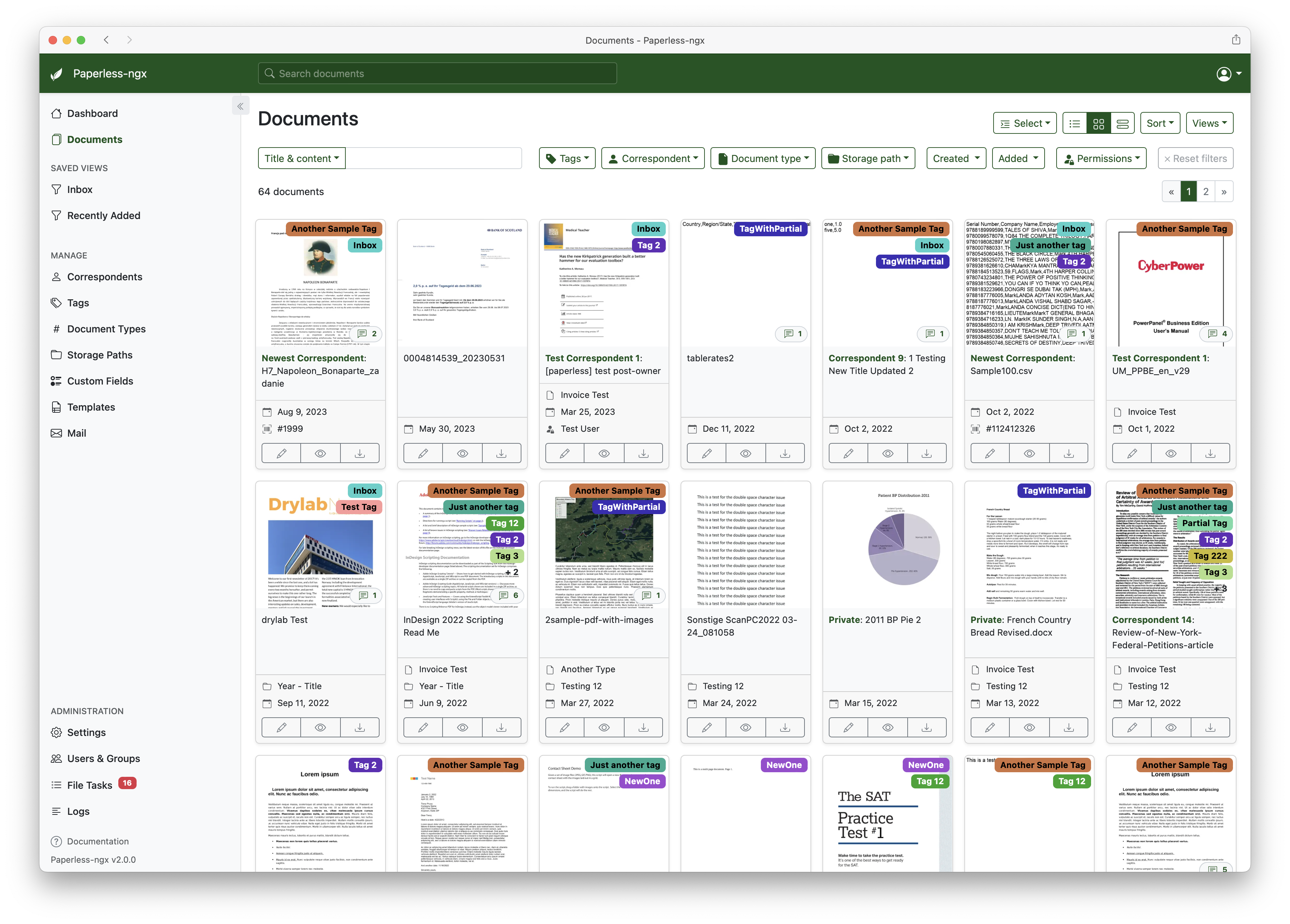
A full list of features and screenshots are available in the documentation.
Getting started
The easiest way to deploy paperless is docker compose. The files in the /docker/compose directory are configured to pull the image from the GitHub container registry.
If you’d like to jump right in, you can configure a docker compose environment with our install script:
bash -c "$(curl -L https://raw.githubusercontent.com/paperless-ngx/paperless-ngx/main/install-paperless-ngx.sh)"
More details and step-by-step guides for alternative installation methods can be found in the documentation.
Migrating from Paperless-ng is easy, just drop in the new docker image! See the documentation on migrating for more details.
Documentation
The documentation for Paperless-ngx is available at https://docs.paperless-ngx.com.
Contributing
If you feel like contributing to the project, please do! Bug fixes, enhancements, visual fixes etc. are always welcome. If you want to implement something big: Please start a discussion about that! The documentation has some basic information on how to get started.
Community Support
People interested in continuing the work on paperless-ngx are encouraged to reach out here on github and in the Matrix Room. If you would like to contribute to the project on an ongoing basis there are multiple teams (frontend, ci/cd, etc) that could use your help so please reach out!
Translation
Paperless-ngx is available in many languages that are coordinated on Crowdin. If you want to help out by translating paperless-ngx into your language, please head over to https://crowdin.com/project/paperless-ngx, and thank you! More details can be found in CONTRIBUTING.md.
Feature Requests
Feature requests can be submitted via GitHub Discussions, you can search for existing ideas, add your own and vote for the ones you care about.
Bugs
For bugs please open an issue or start a discussion if you have questions.
Related Projects
Please see the wiki for a user-maintained list of related projects and software that is compatible with Paperless-ngx.
Important Note
Document scanners are typically used to scan sensitive documents like your social insurance number, tax records, invoices, etc. Paperless-ngx should never be run on an untrusted host because information is stored in clear text without encryption. No guarantees are made regarding security (but we do try!) and you use the app at your own risk. The safest way to run Paperless-ngx is on a local server in your own home with backups in place.
Similar Articles
@heynavtoor: Here are 10 GitHub repos that quietly print money while you sleep. 1. Cal. com Open-source Calendly. Fork it, white-lab…
A curated list of 10 open-source GitHub repos that can be used to build profitable SaaS businesses, including Calendly alternative Cal.com, analytics tool Plausible, and automation platform n8n, with advice to fork and white-label them for recurring revenue.
@Fluyeporlaweb: 10 GitHub Repositories So Powerful I Can't Believe They're Still FREE [save this, buddy] 1. Maybe It was a personal fin…
A tweet curates 10 powerful open-source GitHub repositories that serve as free alternatives to popular paid software, covering finance, AI, customer support, document signing, business intelligence, automation, and more.
@DeRonin_: life when you discovered these Github repositories and strated saving $855/mo on paid AI tools
A tweet highlights discovering open-source GitHub repositories that replace paid AI tools and save $855 per month.
@heynavtoor: 10 GitHub repos that automate real work while you sleep in 2026. Bookmark this list. 1. OpenHands Autonomous coding age…
A curated list of 10 open-source GitHub repos that automate development and real-world tasks in 2026, featuring popular tools like OpenHands, CrewAI, and n8n.
@DivyanshT91162: 10 GitHub repos so good they probably shouldn't be free. 1. OmniRoute One endpoint. 231 AI providers. 50+ free-tier pro…
A tweet curating 10 free open-source GitHub repositories, including AI gateway OmniRoute, OfficeCLI, system prompt leaks, OpenCut, AI job search, Meetily, Vibe-Trading, Strix, Superpower, and Firecrawl, covering AI, productivity, and security use cases.