Adobe announced a new Color Mode in Premiere Pro, optimized with NVIDIA GPU acceleration for 32-bit color grading, showcased at NAB 2026.
<div id="bsf_rt_marker"></div><p><span style="font-weight: 400;">The </span><a target="_blank" href="https://www.nvidia.com/en-us/events/nab/"><span style="font-weight: 400;">NAB Show 2026 trade show</span></a><span style="font-weight: 400;">, running April 18-22 in Las Vegas, is set to showcase a wave of new features and optimizations for top video editing applications. Bringing together over 60,000 content professionals from across the broadcast and media and entertainment industries, the event highlights how video editors, livestreamers and professional creators are exploring new tools, accelerated by </span><a target="_blank" href="https://www.nvidia.com/en-us/technologies/rtx/"><span style="font-weight: 400;">NVIDIA RTX</span></a><span style="font-weight: 400;"> technology, to enhance and streamline their creative workflows.</span></p>
<p><span style="font-weight: 400;">At the show, Adobe is announcing a new Adobe Premiere Color Mode in beta. </span></p>
<p><span style="font-weight: 400;">Designed to function as a dedicated grading environment nested directly within Premiere, it offers a clean, responsive interface that lets editors stay in their creative flow rather than relying on external tools for color correction. Tapping into GPU acceleration on NVIDIA GeForce RTX- and NVIDIA RTX PRO-equipped systems, this streamlined workflow, operating in 32-bit color depth for the first time, delivers significantly faster performance and quality.</span></p>
<p><span style="font-weight: 400;">NVIDIA also launched a new update to </span><a target="_blank" href="https://www.nvidia.com/en-us/software/nvidia-app/g-assist/"><span style="font-weight: 400;">NVIDIA Project G-Assist</span></a><span style="font-weight: 400;"> — an experimental AI assistant that helps tune, control and optimize GeForce RTX systems. </span></p>
<h2><b>Color Meets Compute</b></h2>
<p><span style="font-weight: 400;">Premiere’s Color Mode is a new clean, responsive interface within Adobe Premiere that enables editors to do color grading on native videos. Every element is designed to guide editors through the grading process without distractions. A large program monitor anchors the experience, providing immediate visual feedback as adjustments are made to enable faster decision-making and more precise control.</span></p>
<p><span style="font-weight: 400;">A clip grid view allows editors to visualize progression across shots in a sequence. This makes it easier to maintain consistency across scenes and ensure a cohesive look throughout a project. </span></p>
<p><span style="font-weight: 400;">Controls are organized into focused modules, each tailored to a specific aspect of color grading. Multiple modules can be active simultaneously, giving editors flexibility while maintaining clarity. Each control features a unique heads-up display (HUD), providing contextual guidance without cluttering the interface.</span></p>
<p><span style="font-weight: 400;">Color grading is one of the most computationally intensive tasks in post-production. Every adjustment — bidirectional controls, multi-zone tonal shaping and stacked color operations — runs on NVIDIA GPUs, accelerating playback, iteration and visual feedback.</span></p>
<p><span style="font-weight: 400;">Editors can work with up to six luminance adjustment zones, moving beyond traditional highlights, midtones and shadows models. This allows for more nuanced tonal control and finer adjustments across the image. </span></p>
<p><span style="font-weight: 400;">Visual scopes are context-aware, dynamically adapting based on the selected tool. HUD overlays provide visual cues directly within the scopes, helping editors understand how their adjustments affect the image without needing to interpret complex visual scopes and graphs.</span></p>
<p><span style="font-weight: 400;">The entire system now operates in 32-bit color depth precision, delivering maximum color fidelity and preventing unwanted clipping. Editors retain full control, with the ability to clip colors intentionally when needed for creative effect. Color styles can also be applied flexibly, at the sequence, clip, reel or custom group level, making it easier to manage looks across complex projects.</span></p>
<p><span style="font-weight: 400;">Download the </span><a target="_blank" href="https://www.adobe.com/products/premiere/campaign/pricing.html?sdid=SYBNLTYL&mv=search&mv2=paidsearch&ef_id=Cj0KCQjws83OBhD4ARIsACblj19yyhxANqzUgnYW2DOCc0zN_bGPAU8_vEQJXJcdmj6SJJStbezgZEgaAvwQEALw_wcB:G:s&s_kwcid=AL!3085!3!700626653693!e!!g!!adobe%20premiere!1712852043!83993219448&mv=search&gad_source=1&gad_campaignid=1712852043&gbraid=0AAAAAD5r4AzuOqYOtXJ3DYPgL3P-QeEap&gclid=Cj0KCQjws83OBhD4ARIsACblj19yyhxANqzUgnYW2DOCc0zN_bGPAU8_vEQJXJcdmj6SJJStbezgZEgaAvwQEALw_wcB"><span style="font-weight: 400;">Adobe Premiere</span></a><span style="font-weight: 400;"> (beta) to get started with Color Mode. </span></p>
<h2><b>Project G-Assist: Enhanced Recommendations and Controls </b></h2>
<p><span style="font-weight: 400;">The NVIDIA Project G-Assist on-device AI assistant helps users get the most out of their hardware. Today’s update adds an advanced detection system for gaming settings, as well as an enhanced knowledge system, enabling G-Assist to deliver higher accuracy when providing advice or adjusting settings for esports and AAA gaming.</span></p>
<p><span style="font-weight: 400;">The assistant can also now control more settings across systems. It can configure advanced RTX features from the NVIDIA App, including NVIDIA DLSS Overrides, Smooth Motion, RTX HDR, Digital Vibrance and encoder settings.</span></p>
<p><span style="font-weight: 400;">Download Project G-Assist v0.2.1 from the </span><a target="_blank" href="https://www.nvidia.com/en-eu/software/nvidia-app/"><span style="font-weight: 400;">NVIDIA App</span></a><span style="font-weight: 400;">.</span></p>
<h2><b>#ICYMI: The Latest Updates for RTX AI PCs</b></h2>
<p><span style="font-weight: 400;"><img src="https://s.w.org/images/core/emoji/17.0.2/72x72/1f4f9.png" alt="📹" class="wp-smiley" style="height: 1em; max-height: 1em;" /> Learn how visual effects shop </span><a target="_blank" href="https://www.youtube.com/watch?v=3Ploi723hg4"><span style="font-weight: 400;">Corridor Crew’s</span></a><span style="font-weight: 400;"> Niko Pueringer built his own </span><a target="_blank" href="https://github.com/nikopueringer/CorridorKey"><span style="font-weight: 400;">green screen key tool,</span></a><span style="font-weight: 400;"> powered by NVIDIA RTX GPUs, at NAB. Stop by the Puget Systems booth on Monday, April 20, at 1 p.m. PT for a special presentation, or tune in on </span><a target="_blank" href="https://www.youtube.com/@NVIDIA-Studio"><span style="font-weight: 400;">NVIDIA Studio’s YouTube channel</span></a><span style="font-weight: 400;"> on Tuesday, April 21, at 12 p.m. PT to watch the full session.</span></p>
<p><span style="font-weight: 400;"><img src="https://s.w.org/images/core/emoji/17.0.2/72x72/1f5bc.png" alt="🖼" class="wp-smiley" style="height: 1em; max-height: 1em;" /> Also at NAB, join NVIDIA’s Sabour Amirazodi for a special presentation at the ASUS booth on Tuesday, April 21, at 11 a.m. PT. Amirazodi will showcase how guiding generative AI can produce creative outputs like storyboards or entire movie trailers — based on a single image input. </span></p>
<p><span style="font-weight: 400;"><img src="https://s.w.org/images/core/emoji/17.0.2/72x72/1f4fd.png" alt="📽" class="wp-smiley" style="height: 1em; max-height: 1em;" /> Check out content creator </span><a target="_blank" href="https://www.youtube.com/@GavinHerman"><span style="font-weight: 400;">Gavin Herman’s</span></a><span style="font-weight: 400;"> Studio Session, “How to Edit Professional Talking Head Videos in DaVinci Resolve,” on the </span><a target="_blank" href="https://youtu.be/-LYs3h2RyeU?si=4vJLDP9ROv8IvDkt"><span style="font-weight: 400;">NVIDIA Studio YouTube channel</span></a><span style="font-weight: 400;">. Generative workflow specialists can watch this </span><a target="_blank" href="https://www.nvidia.com/en-us/on-demand/session/gtc26-dlit81948/"><span style="font-weight: 400;">two-hour, instructor-led workshop</span></a><span style="font-weight: 400;"> on how to use NVIDIA GPU acceleration for ComfyUI.</span></p>
<p><span style="font-weight: 400;"><img src="https://s.w.org/images/core/emoji/17.0.2/72x72/1f99e.png" alt="🦞" class="wp-smiley" style="height: 1em; max-height: 1em;" /> LM Studio is now an official OpenClaw provider. OpenClaw can now run local models through LM Studio on NVIDIA GPUs, unlocking faster on-device performance.</span></p>
<p><span style="font-weight: 400;"><img src="https://s.w.org/images/core/emoji/17.0.2/72x72/1f9a5.png" alt="🦥" class="wp-smiley" style="height: 1em; max-height: 1em;" /> Unsloth and NVIDIA have teamed up to eliminate hidden bottlenecks that slow down fine-tuning on NVIDIA GPUs, improving fine-tuning performance by 15%. </span></p>
<p><span style="font-weight: 400;"><img src="https://s.w.org/images/core/emoji/17.0.2/72x72/2728.png" alt="✨" class="wp-smiley" style="height: 1em; max-height: 1em;" /> Google’s Gemma 4 family of omni-capable models are built for local AI across a wide range of devices. Google and NVIDIA have optimized Gemma 4 for NVIDIA GPUs, enabling efficient performance on NVIDIA RTX-powered PCs and workstations, NVIDIA DGX Spark personal AI supercomputers and NVIDIA Jetson Orin Nano edge AI modules.</span></p>
<p><span style="font-weight: 400;"><img src="https://s.w.org/images/core/emoji/17.0.2/72x72/1f4fd.png" alt="📽" class="wp-smiley" style="height: 1em; max-height: 1em;" /> Check out this </span><a target="_blank" href="https://www.youtube.com/watch?v=RPGaakGQ6bg"><span style="font-weight: 400;">NVIDIA GTC session</span></a><span style="font-weight: 400;"> on how developers can build, run and optimize AI agents locally on NVIDIA GPUs, covering everything from quantization to backends like Ollama and applications like OpenClaw and ComfyUI.</span></p>
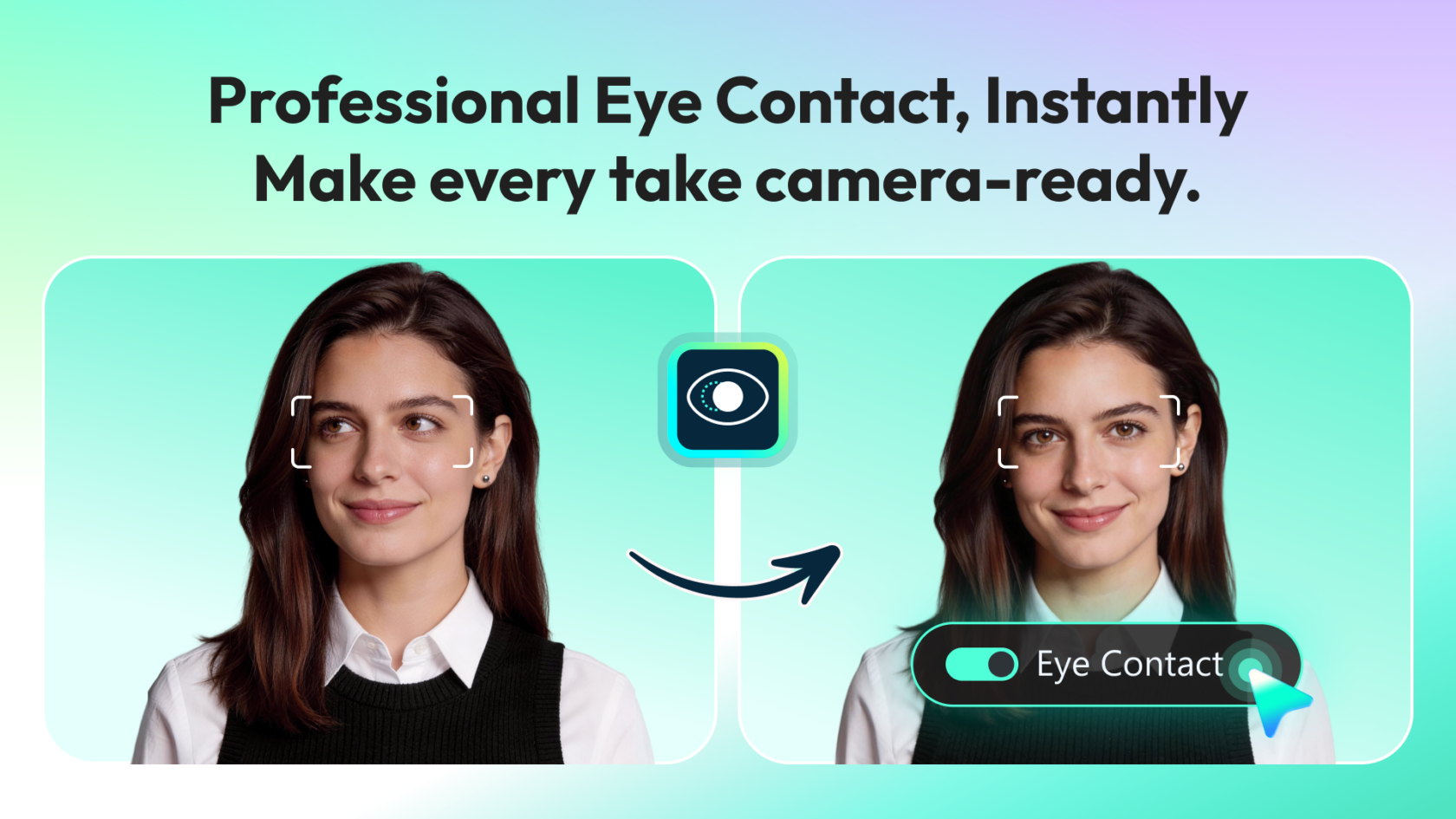
<p><span style="font-weight: 400;"><img src="https://s.w.org/images/core/emoji/17.0.2/72x72/1f440.png" alt="👀" class="wp-smiley" style="height: 1em; max-height: 1em;" /> Wondershare Filmora has added a new feature for Eye Contact Correction based on the NVIDIA Broadcast Eye Contact feature. This feature runs on the cloud on NVIDIA GPUs, designed to refine the gaze of subjects in post production for a more natural, confident and camera-ready look, delivering polished, professional videos in seconds. </span></p>
<figure id="attachment_92306" aria-describedby="caption-attachment-92306" style="width: 1200px" class="wp-caption aligncenter"><a href="https://blogs.nvidia.com/wp-content/uploads/2026/04/Filmora.png"><img loading="lazy" decoding="async" class="size-large wp-image-92306" src="https://blogs.nvidia.com/wp-content/uploads/2026/04/Filmora-1680x945.png" alt="" width="1200" height="675" srcset="https://blogs.nvidia.com/wp-content/uploads/2026/04/Filmora-1680x945.png 1680w, https://blogs.nvidia.com/wp-content/uploads/2026/04/Filmora-960x540.png 960w, https://blogs.nvidia.com/wp-content/uploads/2026/04/Filmora-1280x720.png 1280w, https://blogs.nvidia.com/wp-content/uploads/2026/04/Filmora-1536x864.png 1536w, https://blogs.nvidia.com/wp-content/uploads/2026/04/Filmora-1290x725.png 1290w, https://blogs.nvidia.com/wp-content/uploads/2026/04/Filmora-630x354.png 630w, https://blogs.nvidia.com/wp-content/uploads/2026/04/Filmora-300x169.png 300w, https://blogs.nvidia.com/wp-content/uploads/2026/04/Filmora-400x225.png 400w, https://blogs.nvidia.com/wp-content/uploads/2026/04/Filmora.png 1920w" sizes="auto, (max-width: 1200px) 100vw, 1200px" /></a><figcaption id="caption-attachment-92306" class="wp-caption-text"><em>Filmora’s AI Eye Contact Correction feature powered in the cloud by NVIDIA GPUs.</em></figcaption></figure>
<p><i><span style="font-weight: 400;">Plug in to NVIDIA AI PC on </span></i><a target="_blank" href="https://www.facebook.com/NVIDIA.AI.PC/"><i><span style="font-weight: 400;">Facebook</span></i></a><i><span style="font-weight: 400;">, </span></i><a target="_blank" href="https://www.instagram.com/nvidia.ai.pc/"><i><span style="font-weight: 400;">Instagram</span></i></a><i><span style="font-weight: 400;">, </span></i><a target="_blank" href="https://www.tiktok.com/@nvidia_ai_pc"><i><span style="font-weight: 400;">TikTok</span></i></a><i><span style="font-weight: 400;"> and </span></i><a target="_blank" href="https://x.com/NVIDIA_AI_PC"><i><span style="font-weight: 400;">X</span></i></a><i><span style="font-weight: 400;"> — and stay informed by subscribing to the </span></i><a target="_blank" href="https://www.nvidia.com/en-us/ai-on-rtx/?modal=subscribe-ai"><i><span style="font-weight: 400;">RTX AI PC newsletter</span></i></a><i><span style="font-weight: 400;">.</span></i></p>
<p><i><span style="font-weight: 400;">Follow NVIDIA Workstation on </span></i><a target="_blank" href="https://www.linkedin.com/showcase/3761136/"><i><span style="font-weight: 400;">LinkedIn</span></i></a><i><span style="font-weight: 400;"> and </span></i><a target="_blank" href="https://x.com/NVIDIAworkstatn"><i><span style="font-weight: 400;">X</span></i></a><i><span style="font-weight: 400;">. </span></i></p>
# New Adobe Premiere Color Grading Mode Accelerated on NVIDIA GPUs
Source: [https://blogs.nvidia.com/blog/rtx-ai-garage-nab-adobe-premiere-color-mode/](https://blogs.nvidia.com/blog/rtx-ai-garage-nab-adobe-premiere-color-mode/)
The[NAB Show 2026 trade show](https://www.nvidia.com/en-us/events/nab/), running April 18\-22 in Las Vegas, is set to showcase a wave of new features and optimizations for top video editing applications\. Bringing together over 60,000 content professionals from across the broadcast and media and entertainment industries, the event highlights how video editors, livestreamers and professional creators are exploring new tools, accelerated by[NVIDIA RTX](https://www.nvidia.com/en-us/technologies/rtx/)technology, to enhance and streamline their creative workflows\.
At the show, Adobe is announcing a new Adobe Premiere Color Mode in beta\.
Designed to function as a dedicated grading environment nested directly within Premiere, it offers a clean, responsive interface that lets editors stay in their creative flow rather than relying on external tools for color correction\. Tapping into GPU acceleration on NVIDIA GeForce RTX\- and NVIDIA RTX PRO\-equipped systems, this streamlined workflow, operating in 32\-bit color depth for the first time, delivers significantly faster performance and quality\.
NVIDIA also launched a new update to[NVIDIA Project G\-Assist](https://www.nvidia.com/en-us/software/nvidia-app/g-assist/)— an experimental AI assistant that helps tune, control and optimize GeForce RTX systems\.
## **Color Meets Compute**
Premiere’s Color Mode is a new clean, responsive interface within Adobe Premiere that enables editors to do color grading on native videos\. Every element is designed to guide editors through the grading process without distractions\. A large program monitor anchors the experience, providing immediate visual feedback as adjustments are made to enable faster decision\-making and more precise control\.
A clip grid view allows editors to visualize progression across shots in a sequence\. This makes it easier to maintain consistency across scenes and ensure a cohesive look throughout a project\.
Controls are organized into focused modules, each tailored to a specific aspect of color grading\. Multiple modules can be active simultaneously, giving editors flexibility while maintaining clarity\. Each control features a unique heads\-up display \(HUD\), providing contextual guidance without cluttering the interface\.
Color grading is one of the most computationally intensive tasks in post\-production\. Every adjustment — bidirectional controls, multi\-zone tonal shaping and stacked color operations — runs on NVIDIA GPUs, accelerating playback, iteration and visual feedback\.
Editors can work with up to six luminance adjustment zones, moving beyond traditional highlights, midtones and shadows models\. This allows for more nuanced tonal control and finer adjustments across the image\.
Visual scopes are context\-aware, dynamically adapting based on the selected tool\. HUD overlays provide visual cues directly within the scopes, helping editors understand how their adjustments affect the image without needing to interpret complex visual scopes and graphs\.
The entire system now operates in 32\-bit color depth precision, delivering maximum color fidelity and preventing unwanted clipping\. Editors retain full control, with the ability to clip colors intentionally when needed for creative effect\. Color styles can also be applied flexibly, at the sequence, clip, reel or custom group level, making it easier to manage looks across complex projects\.
Download the[Adobe Premiere](https://www.adobe.com/products/premiere/campaign/pricing.html?sdid=SYBNLTYL&mv=search&mv2=paidsearch&ef_id=Cj0KCQjws83OBhD4ARIsACblj19yyhxANqzUgnYW2DOCc0zN_bGPAU8_vEQJXJcdmj6SJJStbezgZEgaAvwQEALw_wcB:G:s&s_kwcid=AL!3085!3!700626653693!e!!g!!adobe%20premiere!1712852043!83993219448&mv=search&gad_source=1&gad_campaignid=1712852043&gbraid=0AAAAAD5r4AzuOqYOtXJ3DYPgL3P-QeEap&gclid=Cj0KCQjws83OBhD4ARIsACblj19yyhxANqzUgnYW2DOCc0zN_bGPAU8_vEQJXJcdmj6SJJStbezgZEgaAvwQEALw_wcB)\(beta\) to get started with Color Mode\.
## **Project G\-Assist: Enhanced Recommendations and Controls**
The NVIDIA Project G\-Assist on\-device AI assistant helps users get the most out of their hardware\. Today’s update adds an advanced detection system for gaming settings, as well as an enhanced knowledge system, enabling G\-Assist to deliver higher accuracy when providing advice or adjusting settings for esports and AAA gaming\.
The assistant can also now control more settings across systems\. It can configure advanced RTX features from the NVIDIA App, including NVIDIA DLSS Overrides, Smooth Motion, RTX HDR, Digital Vibrance and encoder settings\.
Download Project G\-Assist v0\.2\.1 from the[NVIDIA App](https://www.nvidia.com/en-eu/software/nvidia-app/)\.
## **\#ICYMI: The Latest Updates for RTX AI PCs**
📹 Learn how visual effects shop[Corridor Crew’s](https://www.youtube.com/watch?v=3Ploi723hg4)Niko Pueringer built his own[green screen key tool,](https://github.com/nikopueringer/CorridorKey)powered by NVIDIA RTX GPUs, at NAB\. Stop by the Puget Systems booth on Monday, April 20, at 1 p\.m\. PT for a special presentation, or tune in on[NVIDIA Studio’s YouTube channel](https://www.youtube.com/@NVIDIA-Studio)on Tuesday, April 21, at 12 p\.m\. PT to watch the full session\.
🖼️ Also at NAB, join NVIDIA’s Sabour Amirazodi for a special presentation at the ASUS booth on Tuesday, April 21, at 11 a\.m\. PT\. Amirazodi will showcase how guiding generative AI can produce creative outputs like storyboards or entire movie trailers — based on a single image input\.
📽️ Check out content creator[Gavin Herman’s](https://www.youtube.com/@GavinHerman)Studio Session, “How to Edit Professional Talking Head Videos in DaVinci Resolve,” on the[NVIDIA Studio YouTube channel](https://youtu.be/-LYs3h2RyeU?si=4vJLDP9ROv8IvDkt)\. Generative workflow specialists can watch this[two\-hour, instructor\-led workshop](https://www.nvidia.com/en-us/on-demand/session/gtc26-dlit81948/)on how to use NVIDIA GPU acceleration for ComfyUI\.
🦞 LM Studio is now an official OpenClaw provider\. OpenClaw can now run local models through LM Studio on NVIDIA GPUs, unlocking faster on\-device performance\.
🦥 Unsloth and NVIDIA have teamed up to eliminate hidden bottlenecks that slow down fine\-tuning on NVIDIA GPUs, improving fine\-tuning performance by 15%\.
✨ Google’s Gemma 4 family of omni\-capable models are built for local AI across a wide range of devices\. Google and NVIDIA have optimized Gemma 4 for NVIDIA GPUs, enabling efficient performance on NVIDIA RTX\-powered PCs and workstations, NVIDIA DGX Spark personal AI supercomputers and NVIDIA Jetson Orin Nano edge AI modules\.
📽️ Check out this[NVIDIA GTC session](https://www.youtube.com/watch?v=RPGaakGQ6bg)on how developers can build, run and optimize AI agents locally on NVIDIA GPUs, covering everything from quantization to backends like Ollama and applications like OpenClaw and ComfyUI\.
👀 Wondershare Filmora has added a new feature for Eye Contact Correction based on the NVIDIA Broadcast Eye Contact feature\. This feature runs on the cloud on NVIDIA GPUs, designed to refine the gaze of subjects in post production for a more natural, confident and camera\-ready look, delivering polished, professional videos in seconds\.
[](https://blogs.nvidia.com/wp-content/uploads/2026/04/Filmora.png)*Filmora’s AI Eye Contact Correction feature powered in the cloud by NVIDIA GPUs\.**Plug in to NVIDIA AI PC on*[*Facebook*](https://www.facebook.com/NVIDIA.AI.PC/)*,*[*Instagram*](https://www.instagram.com/nvidia.ai.pc/)*,*[*TikTok*](https://www.tiktok.com/@nvidia_ai_pc)*and*[*X*](https://x.com/NVIDIA_AI_PC)*— and stay informed by subscribing to the*[*RTX AI PC newsletter*](https://www.nvidia.com/en-us/ai-on-rtx/?modal=subscribe-ai)*\.*
*Follow NVIDIA Workstation on*[*LinkedIn*](https://www.linkedin.com/showcase/3761136/)*and*[*X*](https://x.com/NVIDIAworkstatn)*\.*
NVIDIA Research introduces SANA-Video 2.0, a hybrid video diffusion transformer that generates high-quality 720p video on a single GPU, achieving up to 120× speedup over Wan 2.2-14B via hybrid linear-softmax attention and block attention residuals.
PowerColor has released the Radeon AI PRO R9600D, a single-slot, passively cooled workstation GPU featuring 32GB of GDDR6 memory and a 12V-2x6 power connector.
DaVinci Resolve 21 introduces a new Photo page with Hollywood color tools, AI-powered media search, speech generation, face age transformation, and more, enhancing both video and still photography workflows.
Adobe has launched AI assistants in public beta for Photoshop, Premiere, Illustrator, InDesign, and Frame.io, allowing users to automate tasks via natural language prompts.
Discusses using NVFP4 4-bit floating point weights for maximum performance, achieved via in-house quantization from FP8 using NVIDIA ModelOpt, highlighting the data format's dual scale factors for high dynamic range.