Cached at:
11/22/26, 12:20 AM
# Windows has two settings that bring your work back after a restart, and both are off by default
Source: [https://www.makeuseof.com/windows-can-bring-your-work-back-after-restart/](https://www.makeuseof.com/windows-can-bring-your-work-back-after-restart/)
[](https://www.makeuseof.com/author/isaac-akinleye/)
PublishedOct 27, 2026, 11:45 AM EDT
Isaac is a tech enthusiast with over five years of writing experience\. His experience spans across productivity tools, Windows and Android systems, open source tools, and everything that make everyday life a little more interesting\.
He holds a Bachelors degree in English cum laude\.
When he is not working, he loves to spend time with his cats, playing soccer, or connecting with nature\.
I'd[turned off every startup app](https://www.makeuseof.com/windows-11-disable-startup-programs/), yet Windows could still reopen the apps I'd been using before a restart\. I found this out after enabling a setting that was off by default on my PC\. A second setting brought back my File Explorer windows too\.
Together, they let Windows restore much of my interrupted workspace without making me open the same apps every time I start my PC\.
## Windows can reopen your apps on its own
### Mine was off until I switched it on
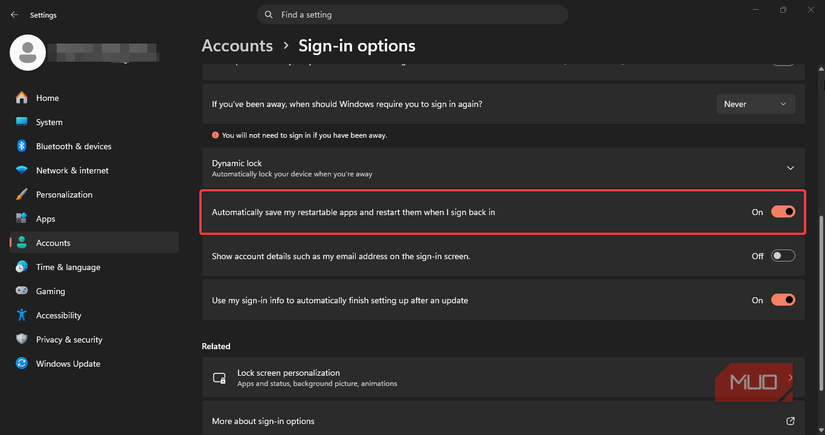
My restarts are never planned\. A PC that's been slowing down forces some, a few low\-memory crashes forced others, and updates add their own\.[Setting active hours](https://www.makeuseof.com/active-hours-windows-11/)only changes when an update restarts you, not what you come back to\. Each time, the apps, tabs, and folder I was using are gone\.
The first setting is**Automatically save my restartable apps and restart them when I sign back in**\. It does most of the work\. You’ll find it in**Settings \-\> Accounts \-\> Sign\-in options**, under**Additional settings**\. It was off on my PC, so I had to toggle it on\.
It's different from startup apps in Task Manager\. That only opens the same list on every boot, whether you used them or not\. This setting reopens what you actually had open before the restart\.
I turned it on, opened Notepad with two tabs and some unsaved text, plus Firefox, Word, Settings, and two File Explorer windows, and restarted\. Notepad was back before the desktop finished loading, with both tabs and my text exactly where I'd been typing\. Firefox, Word, and Settings followed\.
Windows doesn’t reopen every app in its exact spot\. Settings came back on its home page, not the Sign\-in options page I’d been on\. That's a small price to pay compared with opening everything manually; even Workspaces doesn't do that much\.
## It brought my browser tabs back on its own
This is what sold me\. I keep the session restore setting off in Firefox, Chrome, and Brave, on purpose\. I use[Rewind to restore whatever I’m working on](https://www.makeuseof.com/switched-from-powertoys-to-free-tool-that-remembers-what-i-was-doing/), and I switch between editing and writing a lot\. If a browser reopened old tabs on its own, I’d have to clear them out before restoring the session I want, and the tabs would pile up\.
I want a clean slate every time I open a browser\. None of them is in my startup apps either, and if I open any of them by hand, I get one empty tab\.
After the restart, Firefox came back with the tabs restored the way I left them, even before my internet connection was back, with no error page\. In my later tests with both settings on, Chrome and Brave did the same\. The Windows setting was the only thing I'd changed, and it was the only reason those tabs returned\.
To me, that's the right behavior for a restore feature\. On a normal day, I get a fresh browser\. When Windows restarts and interrupts me, I get my session back\.
## Folders need their own setting
### My snapped windows returned to where I'd left them
File Explorer didn't come back with the first setting, so I turned to the second option:**Restore previous folder windows at logon**\. To find it, open**File Explorer**, select the**three\-dot menu \-\> Options \-\> View**tab\. It was off on my PC, too\. I switched the restartable apps setting off to test the folder option on its own\. Then I opened Downloads, Videos, and Documents in three windows, arranged them with[Windows 11 Snap Layouts](http://makeuseof.com/windows-11-snap-layouts/)\.
All three came back with the restart, in the same layout, each in the exact folder I’d been in\. I didn't have to navigate through any folder paths again, and nothing else reopened\. So this setting does one job, and it does it cleanly\.
The two settings are separate on my PC\.[Microsoft’s release notes](https://support.microsoft.com/en-us/servicing/os/windows-11/2025/01/january-29-2025-kb5050092-os-builds-22621-4830-and-22631-4830-preview)for Windows 11 22H2 and 23H2 say turning on the apps setting automatically switches on some File Explorer settings, and they describe a gradual rollout\. On my 25H2 build, the folder box stayed unchecked after I turned the apps toggle on, and Explorer stayed closed until I ticked it myself\. If you want both, switch on both\.
## It won't bring everything back, and that's fine
### Seven of nine came back
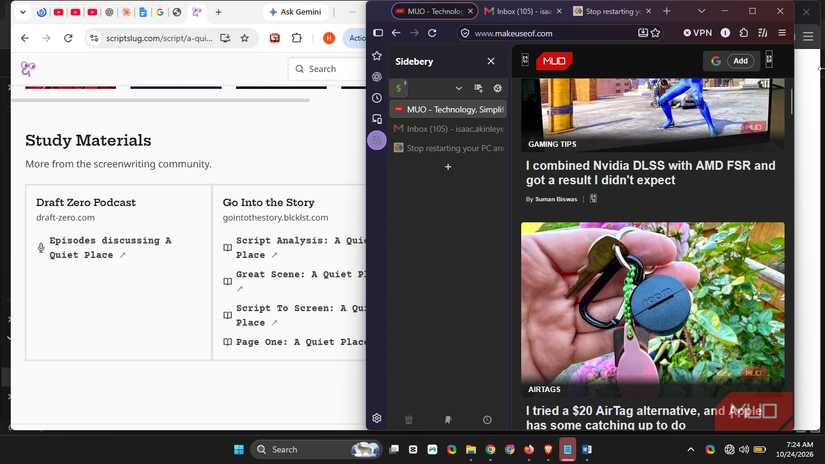
The fair complaint is that it doesn't bring everything back\. With both settings on, I had nine apps open: Chrome with eight or nine tabs, Brave, Firefox, Word, Notepad, Paint, File Explorer, VLC, and CapCut with a file open\.
Seven came back where I left them, including the browser tabs\. VLC and CapCut never opened\. I felt the CapCut exception because I do my edits there, so I still had to relaunch and find my files again\.
These settings don’t guarantee that every app will return or resume exactly where it stopped\. But I'll still take that every time\. Without the settings, a restart leaves me with an empty desktop and nine apps to reopen from memory\. With them, I open two apps manually\.
## Turn them on before the next restart
If your PC regularly needs a restart, for whatever reason, enable both settings before the next one\.
When the next update asks for a restart, let it\. Mine brought back the same apps as a routine restart\. Whatever stays closed is your list to open by hand\.