@1jehuang: I run 20 coding agents in parallel as my everyday workflow. Today, I’m launching Jcode. It’s an open-source agent 20x m…
Summary
1jehuang launched Jcode, an open-source terminal coding agent written in Rust that claims 20x better memory efficiency than Claude Code, allowing dozens of agents to run in parallel.
View Cached Full Text
Cached at: 08/11/26, 11:50 AM
I run 20 coding agents in parallel as my everyday workflow.
Today, I’m launching Jcode. It’s an open-source agent 20x more memory-efficient than Claude Code, so you can run 20x more agents at once.
Try it today: https://t.co/Vwg0NhNA3h https://t.co/LQ6Tet60ul
jcode - open-source AI coding agent for the terminal
Source: https://jcode.sh/ An open source terminal coding agent, written in Rust.
curl -fsSL https://jcode.sh/install | bash
All builds·Docs·Pricing·GitHub
 GitHub stargazer historyShow commit historyHide commit history
 GitHub commit historyBacked byCombinator
Mission
Jcode is built on three bets.
- **Parallelism is the biggest lever on coding productivity.**You should never wait while coding. Every moment an agent is working is a moment you could be handing out the next task: spin up another session instead of watching this one finish, and your throughput becomes as many tasks as you can give out. Jcode makes it possible to run dozens of agents in parallel, and a dozen agents is a dozen times the output of one.
- **The harness matters as much as the model.**The same model produces very different results depending on what surrounds it: the tools it can reach, the context it sees, the memory it keeps, and the feedback loops that catch its mistakes. Model progress arrives on its own schedule. Harness progress is ours to make, and it compounds with every model release.
- **Dev tools must be open source.**A coding agent reads your code, edits your files, and runs commands on your machine. A tool with that much reach has to be inspectable, and it has to be modifiable: the best dev tools have always been the ones their users could open up and change, and your agent’s source should be yours to customize. Jcode is MIT licensed, and everything we measure and learn is published.
read moreread less
Resource efficiency
The bottleneck to massive parallelism is resource efficiency. Spawn dozens of agents and RAM consumption balloons, unfeasible on most consumer machines: when each agent takes hundreds of megabytes, you run a handful and queue your work behind them. Jcode fixed that. We optimize to the bone so spawning another agent is a non-decision and running dozens of sessions is actually possible, with none of it traded for speed. Every number below is sampled from real launches of real agents on the same machine.
Memory per additional session
Extra proportional memory (PSS) each additional client adds once one is already running. Ten jcode sessions cost about 100 MB, less than half of one Claude Code.
ToolExtra PSSGraphComparisonjcode~10.4 MB~10.4 MBbaselineClaude Code~212.7 MB~212.7 MB20.5× more RAMShow the full comparisonHide the full comparison### Memory per additional session, all tools
ToolExtra PSSGraphComparisonjcode (local embedding off)~9.9 MB~9.9 MBbaselinejcode~10.4 MB~10.4 MB1.1× more RAMCodex CLI~21.6 MB~21.6 MB2.2× more RAMpi~76.5 MB~76.5 MB7.7× more RAMAntigravity CLI~86.4 MB~86.4 MB8.7× more RAMCursor Agent~157.5 MB~157.5 MB15.9× more RAMGitHub Copilot CLI~158.1 MB~158.1 MB16.0× more RAMClaude Code~212.7 MB~212.7 MB21.5× more RAMOpenCode~318.4 MB~318.4 MB32.2× more RAM### Time to first input
How long until you can actually type: time until typed probe text appears on the rendered screen, 10 interactive PTY launches each. Antigravity uses its internal input-ready log marker because its sign-in screen suppresses probe echo.
ToolTimeGraphComparisonjcode48.7 ms48.7 msbaselineAntigravity CLI383.7 ms383.7 ms7.9× slowerpi596.4 ms596.4 ms12.2× slowerCodex CLI905.8 ms905.8 ms18.6× slowerOpenCode1047.9 ms1047.9 ms21.5× slowerGitHub Copilot CLI1583.4 ms1583.4 ms32.5× slowerCursor Agent1978.7 ms1978.7 ms40.6× slowerClaude Code3512.8 ms3512.8 ms72.2× slower### Time to first frame
How long until anything renders, same 10 interactive PTY launches.
ToolTimeGraphComparisonjcode14.0 ms14.0 msbaselineAntigravity CLI383.5 ms383.5 ms27.4× slowerpi590.7 ms590.7 ms42.2× slowerCodex CLI882.8 ms882.8 ms63.1× slowerOpenCode1035.9 ms1035.9 ms74.0× slowerGitHub Copilot CLI1518.6 ms1518.6 ms108.5× slowerCursor Agent1949.7 ms1949.7 ms139.3× slowerClaude Code3436.9 ms3436.9 ms245.5× slowerWatch the performance demojcode performance demonstrationWatch the swarm session20 agents in parallel
Intelligence
optimization task
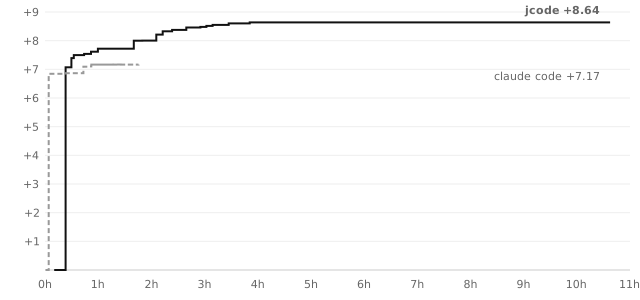 float-print score over time, jcode vs Claude Code, Opus 4.8 high thinkingRunning the standard evals against these harnesses showed us how poorly they represent what agents can actually do. Existing benchmarks face a forced choice. Public benchmarks leak their solutions into training corpora, so scores measure memorization and misrepresent capability. Private benchmarks resist that, but they demand trust in a hidden test set, offer less transparency, and are hard to get access to. Beyond that choice, they share two structural flaws. They impose timeouts, so an agent is penalized for allocating more time to a problem, exactly the long-horizon behavior we want agents to develop. And they score on a coarse, discrete boundary: the gap between two very different models can show up as a single task completion. A model that solves 70% of a bench may sit next to a remaining 30% that demands a far higher capability level, and that entire delta is invisible between the discrete tasks. So we designed a new class of benchmarks with a spec:
- uncontaminatable by construction: there is no answer to memorize, so everything can be public
- hard to saturate by construction: scored on optimization depth, so the ceiling stays open past the frontier
- deterministic by construction: same submission, same score, always
- quantifiable by construction: the metric falls out of the task definition, no rubric, no judge
- continuous by construction: an analog score axis instead of pass/fail, so capability differences show up as score differences at every level, and time is recorded rather than capped
- cheat-resistant by construction: we provide a good reference implementation as the starting point, so web searching for ready-made solutions is only cheating at lower capability levels. At the frontier, there are no implementations left to copy that aren’t useful recombinations
This design is immediately trustable because everything is public. Training on a previous model’s transcript may even help a little, but it doesn’t score better unless the model has genuinely generalized from it: replaying a transcript only matches the old score, and beating it requires optimizing past what was memorized, which is the capability the benchmark measures in the first place.
jcode bench v1 provides three tasks that follow this spec: float-print, json-unescape, and utf16-transcode. We chose these tasks because they grade in seconds and are pure coding on real world functions that are useful and genuinely benefit from optimization: a tight loop the agent can climb, on work that actually ships in libraries. The tasks are also chosen so the implementation cannot be overfit to the test suite: correctness is verified over the entire input space, not a sample. Compare measuring grep’s speed by timing it on the Linux repo, where an implementation can be overfit to the Linux repo specifically. Above, we plot the score of the agent over time, from a single user prompt. Note that time is 1:1 correlated with cost and token utilization, because tool call time is negligible in these tasks. Both runs used Opus 4.8 with high thinking, identical prompts, launched concurrently, each stopping on its own judgment. On float-print both passed the full 2³² correctness gate; jcode finished at +8.64 (398x speedup) versus Claude Code’s +7.17 (144x).
read moreread less
The uncontaminatable benchmark design·jcode bench
harness-agnostic frontier model results·full results and agent transcripts
DeepSWE v1.1 harness comparison
The harness comparison is fully matched: the same 113 DeepSWE v1.1 tasks, GPT-5.6 Sol, xhigh reasoning effort, untimed natural completion, and k=1. Only the harness changes. The current result is an exact tie: on the 112 mutually scored tasks Jcode won 11 tasks that Codex failed and Codex won 10 that Jcode failed.
RankHarnessScore barScore
01Jcode75 / 11366.4%
01Codex CLI75 / 11366.4%
Every task, with audited per-task outcomes from both runs
DataCurve DeepSWE v1.1 reference
DataCurve also publishes every mini-SWE-agent rollout. Their official GPT-5.6 Sol results use the revised v1.1 grader and four whole-benchmark runs, so they are useful context but are not ranked against the v1 k=1 harness results above.
EffortHarnessScore barPass rate
MAXmini-SWE-agent327 / 450 attempts · k=472.7%
HIGHmini-SWE-agent313 / 451 attempts · k=469.4%
Official 95% run-to-run intervals: max ±2.8 points; high ±1.4 points.DataCurve leaderboard·derived per-task data and provenance
Terminal-Bench 2.1
89 terminal tasks, claude-opus-4-8, run through the Harbor harness on Modal. Our best cell is medium effort at 77.8% (k=2), against Claude Code’s published 78.9%. Medium beats xhigh while costing less per trial and finishing tasks 30% sooner, so more thinking stops paying for itself past medium on this benchmark. We also read and classified 28 failing xhigh trials: 22 real misses, 3 infra flakes, 3 borderline thresholds, and 0 grader disputes.
Every run, with accuracy against cost and per-task transcripts
Confidence stepping
per-trial confidence, assignment to completion, and pass rates before and after confidence stepping, Terminal-Bench 2.1, Opus 4.8Jcode’s todo tool asks the agent to rate its confidence in each task item, both when the item is assigned and when it’s marked done. Tracing those scores across our Terminal-Bench runs showed a clear pattern: confidence is always high after, but sometimes low before, and failures rarely come from tasks the agent was confident about at assignment. The low scores at assignment are real signal, and the jump to 100 at the end is not. So when we see a large spike in confidence, we force the agent to go back and check its work instead of accepting the claim. Ideally, confidence rises incrementally as validation happens during implementation, with each passing test earning a step up. Above, both harnesses on Terminal-Bench 2.1: each line is one trial, from confidence at assignment to confidence at completion. The extra checking pays: trials that finish in time pass more often (92% vs 88%), and even trials cut off by the benchmark’s 15 minute limit are more likely to already contain correct work (47% vs 42%).
read moreread less
the full confidence study·every trial transcript
Hill-climbable goals
How hill-climbable did the model think the work was?
n = 2,012goal-score submissions
555
160
570
1775
378
1180
382
29085
2888
75490
8592
194
67595
696
297
1798
109100
hill_climbability score →
91.29mean
90median
**18.0%**below the gate
55–100observed range
Hill-climbability scores submitted through Jcode’s todo tool across all persisted transcripts through July 12, 2026: 2,012 ratings from 1,973 todo calls across 815 sessions. Repeated updates to the same goal are counted separately. Scores not displayed received no submissions.Agents are at their most capable when they have a metric to hill-climb. This is likely because reinforcement learning trains models to optimize against reward signals, so measurable feedback helps agents keep improving over longer time horizons, and those additional productive iterations lead to better results. Most users never take full advantage of this. Jcode does this for the user when applicable. Every agent goal receives a hill-climbability rating from 0 to 100, based on how quantifiable and iterable its progress really is. A high score is not credible without a stated objective to climb toward. When a goal scores low, the harness pushes back: reframe the goal into a verifiable objective and build the harness that measures it. Without this, an open-ended task leaves the agent with nothing to iterate against, no signal it can use to make its next attempt better than its last.
read moreread less
See the hill-climbability implementation·Download the aggregate data
Auto-poke
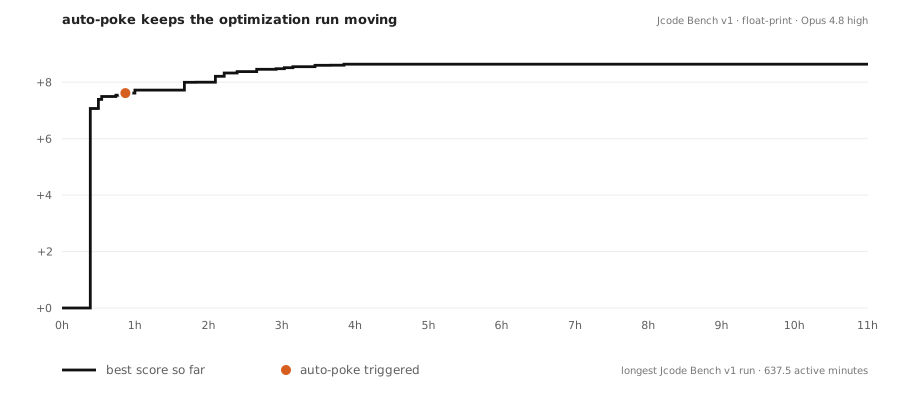 The longest Jcode Bench v1 run, with its harness continuation plotted on the score curve: float-print, 637.5 active minutes, Jcode with Opus 4.8 high.Persistence is the other half of intelligence: most agent failures are not wrong answers but early exits. Models love to declare victory. Jcode checks the todo list first. When a turn ends with incomplete todos, the harness pokes the model back to work automatically. Pokes are smart about failure too: transient network errors are retried, while non-retryable errors stop the loop instead of burning tokens. The same mechanism drives headless runs, so `jcode run` keeps iterating on a task across turns until the work is actually finished.
read moreread less
See the persistence implementation·Read the full run transcript
Optimizations
The same discipline is applied to everything between you and the model: every token, every cache hit, and every background process is engineered so the model spends its capacity on your problem instead of on overhead.
Append-only context engineering keeps the model’s KV cache hot turn after turn.
The single biggest lever on latency and cost is the prompt cache: providers charge a fraction for tokens the model has already seen, and reading them back is far faster than recomputing attention from scratch. Jcode is built so that cache almost never breaks. The prompt prefix is stable and the conversation is strictly append-only, so the longest possible shared prefix survives between turns instead of being silently invalidated. Things that would normally bust the cache are kept out of the prefix: tool schemas come from a fixed on-disk cache, MCP tools are advertised up front so a late connection never rewrites earlier turns, and dynamic context like memory recalls and system reminders are placed where they do the least damage. The result is consistently high cache-hit rates, lower bills, and noticeably snappier turns, especially on long sessions where naive agents pay to re-read the whole history every time.
read moreread less
MCP tools are ready the moment a session starts, with no prompt-cache miss.
Most agents make you wait: they block startup while every MCP server handshakes, or they connect lazily and then quietly invalidate the model’s prompt cache the first time a tool shows up, costing you a full re-read of the conversation. Jcode does neither. On startup it advertises every configured MCP tool instantly from an on-disk schema cache, so the model sees the complete tool list in its very first request and the prompt cache stays warm. The actual server connections happen in the background, connect-on-first-call: if the model reaches for an MCP tool before its server has finished connecting, that single call transparently waits for the handshake, while everything else stays non-blocking. The result is that you can start typing and the agent can start working the instant a session spawns, MCP tools included, with no startup delay and no cache penalty. This works the same across the interactive TUI, the server, and headless `jcode run`.
read moreread less
Long-running work keeps going while the agent keeps thinking.
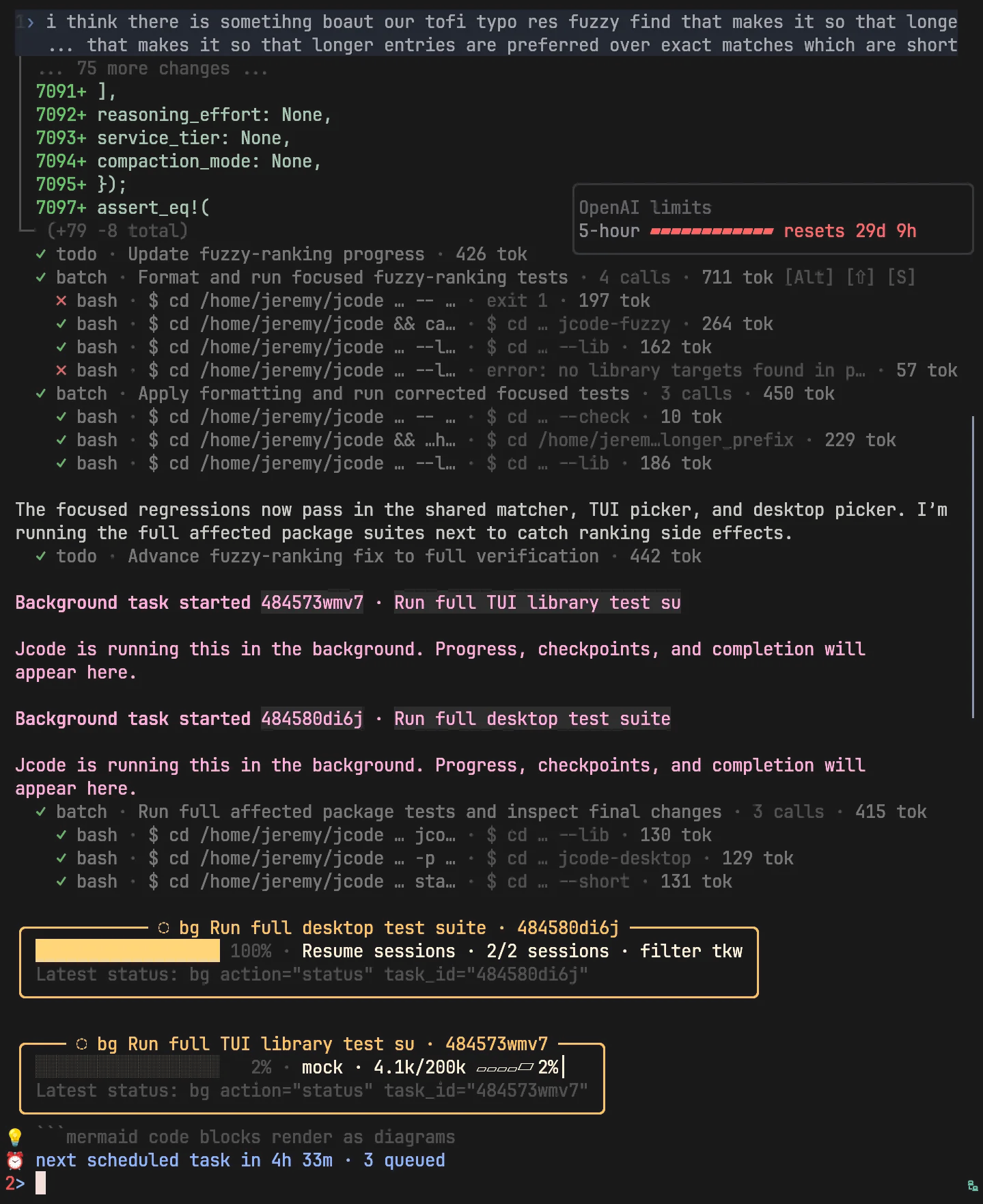 Background task progress stays visible while the agent worksAsk an agent to watch a build or a test run and it usually writes a polling script: sleep 500, check once, give up. Jcode has background tools instead. Start any command with run_in_background and it becomes a task the agent can list, tail, inspect, cancel, or wait on. The wait action blocks until the task finishes or hits its next progress checkpoint, so the agent wakes on events rather than burning turns on sleep loops. A foreground command that outruns its timeout is never killed: jcode adopts it into the background, and the task survives even a reload of the agent’s own binary. Jcode parses task output for progress and renders each task as a live card in the TUI: percent, counts like 6/10 tests, byte ratios, and ETA, read from structured JCODE_PROGRESS lines or inferred from ordinary output. An agent can run a dozen tasks at once and let the server wake it when one needs attention.
read moreread less
Screenshots
Pushing the frontier is pointless if the tool is unpleasant to use. Jcode is also just a good everyday dev tool, with an interface built for real terminal work.
A terminal interface built for rich agent work.
Jcode keeps the speed and focus of a TUI while rendering the things coding work actually needs: generated images, structured edits, math, links, diagrams, side panels, and live session states. Select any screenshot to view it at full resolution.
A good built in memory system.
Watch the memory demojcode memory demonstrationJcode embeds each turn and response as a semantic vector. Every turn queries a graph of memories to efficiently find related entries via cosine similarity. The embedding hits are fed into the conversation, or optionally a memory sideagent verifies the memories are relevant and does more retrieval work before injecting them. This results in a human-like memory system: the agent automatically recalls information relevant to the conversation without actively calling memory tools or burning tokens.
read moreread less
Open source and customizability
Jcode is MIT licensed, open source, and open research. Everything we build and everything we measure is published, benchmark transcripts and failures included. A tool this close to your work should be one you can read, audit, and reshape.
Self dev mode
Jcode is inventing a new form of customizability. One that doesn’t limit you to what a plugin or extension can do. Tell your jcode agent to enter self dev mode, and it will start modifying its own source code. Jcode is optimized to iterate on itself. There is significant infrastructure around self development, which allows it to edit, build, and test its own source code, then reload its own binary and continue work in your (potentially many) sessions, fully automatically.
read moreread less
System prompt.
This is the normal-session system prompt compiled into Jcode, fetched live from the master branch. It measured 671 tokens with OpenAI’so200k\_basetokenizer at revision 8def6862. Your static system prompt may include additional prompts from self-dev mode, AGENTS.md, or CLAUDE.md.
live from master · 671 tokens at 8def6862
Fetching the current base prompt from GitHub…
The prompt gets out of the model’s way.
Jcode’s base instructions shrank as frontier models improved.
**73%**shorter since v0.1
Jcode base system prompt token length by releaseToken length falls from 2,476 tokens in version 0.1 to 659 base tokens in version 0.44.2,476v0.1Feb 121,020v0.11Apr 30711v0.32Jun 28716v0.35Jul 4660v0.42Jul 10659v0.44Jul 11 Base tokens · o200k_base · tagged releasesv0.1 was OpenAI-specific; v0.11+ is shared. Normal sessions add 12 Mermaid tokens (671 total).Revision history·method
Core prompt size across open-source coding agents.
Prompt architecture is a choice, not a leaderboard. Some harnesses keep the system role tiny and move procedure into user messages or tool schemas. Others put the operating manual in the core prompt. These are the default, publicly identifiable core instructions from pinned source revisions.
HarnessCore tokensGraphMeasured scopeJcode671normal coreSWE-agent15system role onlyGoose90no extensionsContinue138agent modeCline713default templateAider1,149edit-block modeOpenCode1,766provider fallbackClaude Code≈2,300leaked v2.1.88 default coreCodex CLI4,365default base instructionsRoo Codedynamicnot chartedmode, environment, and section assemblyOpenHandsdynamicnot chartedruntime agent-server compositionMeasured July 11, 2026 witho200k\_base. Tool schemas, repository instructions, skills, memory, runtime context, and task messages are excluded. Claude Code is reconstructed from its leaked v2.1.88 source and rounds to 2,300 core tokens. A source comment describes broader prompt-cache invalidation as busting roughly 20,000 tokens; that cached prefix is not charted because tool schemas are excluded for every harness. SWE-agent places most procedure in its user template. Aider varies by edit mode. Dynamic rows are included for projects that do not expose one canonical static prompt asset.Reproduce the measurement.
Changelog
Release highlights, with commit messages filling the gap until the next release notes are ready. The full history lives onGitHub releases.
Release highlights.
- highlightACP clients now receive richer protocol support and can use the full expected tool surface
- highlightThe desktop app now offers a visible new-session action and consistent hover feedback
curl -fsSL https://jcode.sh/install | bash
Similar Articles
1jehuang/jcode
jcode is an open-source coding agent harness designed for multi-session workflows with low resource usage, offering CLI installation and performance improvements over existing agents like Claude Code and Cursor Agent.
@PrajwalTomar_: STOP. Before you add another AI agent, read this. People are now running 20 coding agents in parallel. TWENTY. And tool…
The tweet argues that running too many AI coding agents in parallel degrades codebases and advocates a structured setup with a few specialized agents. It also quotes the launch of Jcode, an open-source agent claiming 20x memory efficiency.
@jasonzhou1993: I gave my coding agent a map across 3 of my repos: - Reduce ~50% token - a grep hook so every grep call has much richer…
Jason Zhou shares a technique to give coding agents a map across repos, reducing token usage by ~50% and enabling richer grep and call chain tracing. He also releases a Claude Code plugin marketplace called AI Builder Club Skills for setting up codebase harness and compounding agent loops.
@liambraus: CLAUDE CODE TAKES 3.4 SECONDS TO START UP. THIS ONE DOES IT IN 14 MILLISECONDS. A single developer just built their own…
A single developer built a code agent harness in Rust that starts up 245 times faster than Claude Code (14 ms vs 3.4 s) and uses up to 20x less RAM, achieving 10.4k stars on GitHub.
I rebuilt the Claude Code-style terminal workflow as a hackable multi-provider coding agent
A developer releases a hackable, multi-provider coding agent that replicates the Claude Code terminal workflow, allowing users to integrate various AI models.