Cached at:
07/14/26, 08:20 PM
# How I use HTMX with Go - Alex Edwards
Source: [https://www.alexedwards.net/blog/how-i-use-htmx-with-go](https://www.alexedwards.net/blog/how-i-use-htmx-with-go)
When I want to add sprinkles of interactivity to a web application, I'm a big fan of using[HTMX](https://htmx.org/)\. I like that it makes it easy to give interactions a smooth app\-like feel, I like that it minimizes the amount of JavaScript that I have to write, and I like that it allows me to keep the consistency and safety of server\-side HTML rendering with Go's`html/template`package\.
In this post I'm going to run through how I typically use HTMX in conjunction with Go\. Although I'm going to talk a bit about how HTMX works, the main focus is going to be on the Go side of things\. Specifically:
- The patterns I use for structuring HTML templates and sending back partial and full\-page HTML responses to HTMX
- Managing redirects and errors when using HTMX
- The standard HTMX configuration settings that I use, and why
To illustrate these things, we'll run through the build of a small application that ultimately implements a filter on a list of users like this:
## Project setup
If you'd like to follow along, go ahead and run the following commands to create a skeleton structure for the project:
`$ go mod init example\.com/htmx $ mkdir \-p assets/static/css assets/static/img assets/static/js assets/html/partials assets/html/pages cmd/web $ touch assets/efs\.go assets/html/base\.tmpl assets/html/partials/images\.tmpl assets/html/pages/home\.tmpl cmd/web/main\.go cmd/web/handlers\.go cmd/web/html\.go`That should give you a file tree which looks like this:
`\. ├── assets │ ├── efs\.go │ ├── html │ │ ├── base\.tmpl │ │ ├── pages │ │ │ └── home\.tmpl │ │ └── partials │ │ └── images\.tmpl │ └── static │ ├── css │ ├── img │ └── js ├── cmd │ └── web │ ├── handlers\.go │ ├── html\.go │ └── main\.go └── go\.mod`## Installing HTMX
There are a few[different ways to install HTMX](https://htmx.org/docs/#installing), and you*could*load it from a CDN or install it using NPM, but I almost always[download a copy](https://www.jsdelivr.com/package/npm/htmx.org?tab=files)and serve it as a static file from my web application\. It's simple and avoids the[downsides of using a CDN](https://blog.wesleyac.com/posts/why-not-javascript-cdn)\.
For the purpose of this demo project, we'll also download[Bamboo](https://www.jsdelivr.com/package/npm/bamboo.css)\(a classless CSS framework\) and an image of a gopher from[github\.com/egonelbre/gophers](https://github.com/egonelbre/gophers/)\. Go ahead and run the following commands to download all three things into the`assets/static`folder:
`$ wget \-P assets/static/js https://cdn\.jsdelivr\.net/npm/\[email protected\]/dist/htmx\.min\.js $ wget \-P assets/static/css https://cdn\.jsdelivr\.net/npm/\[email protected\]/dist/bamboo\.min\.css $ wget \-O assets/static/img/gopher\.png https://raw\.githubusercontent\.com/egonelbre/gophers/refs/heads/master/sketch/misc/standing\-left\.png`The contents of`assets/static`should now look like this:
`assets/static ├── css │ └── bamboo\.min\.css ├── img │ └── gopher\.png └── js └── htmx\.min\.js`## The HTML templates
OK, now that the project skeleton and our static assets are in place, let's get to the main thrust of this post and talk about HTML templates\.
My starting point in almost all projects is an`assets/html`directory which has a folder structure like this:
`assets/html ├── base\.tmpl ├── pages │ └── home\.tmpl └── partials └── images\.tmpl`Under this structure:
- The`assets/html/base\.tmpl`file contains the common HTML 'layout' markup for all web pages\.
- The files in the`assets/html/pages`directory contain the page\-specific content for individual web pages\.
- The files in the`assets/html/partials`directory contain reusable chunks of HTML markup that can be used in different places\.
If you're following along, go ahead and add the following markup to the`base\.tmpl`file:
File: assets/html/base\.tmpl`\{\{define "base"\}\} <\!doctype html\> <html lang='en'\> <head\> <meta charset='utf\-8'\> <title\>\{\{template "page:title" \.\}\}</title\> <meta name="viewport" content="width=device\-width, initial\-scale=1"\> <link rel="stylesheet" href="/static/css/bamboo\.min\.css"\> <script defer src="/static/js/htmx\.min\.js"\></script\> </head\> <body\> <h1\><a href="/"\>Example website</a\></h1\> <main\> \{\{template "page:content" \.\}\} </main\> </body\> </html\> \{\{end\}\}`There are a few things to point out about this:
- In the`<head\>`section we import the Bamboo CSS file and the HTMX JavaScript file\. Note that when importing HTMX we use the`defer`attribute\. This means that HTMX will be fetched by the browser in parallel as it is parsing the web page HTML, but the script won't be executed until the HTML is fully parsed and the DOM is built\. There's an excellent blog post which describes how defer works and why it's the right choice[here](https://flaviocopes.com/javascript-async-defer/)\.
- When writing HTML templates, I like to give all of my templates explicit names by surrounding the markup in`\{\{define\}\}\.\.\.\{\{end\}\}`actions — even if \(like in this case\) a file only contains one template and it's not strictly necessary\. YMMV, but I prefer the consistency and clarity of being able to always refer to templates by defined names from my Go code, rather than using a mixture of defined names and filenames\.
- Within the template, we use actions like`\{\{template "page:title" \.\}\}`to inject the appropriate page\-specific content in the right place\.
Talking of which, let's now add the page\-specific content for the homepage to the`assets/html/pages/home\.tmpl`file:
File: assets/html/pages/home\.tmpl`\{\{define "page:title"\}\}Home\{\{end\}\} \{\{define "page:content"\}\} <button hx\-get="/gopher" hx\-swap="outerHTML"\> Wanna see a cute gopher? </button\> \{\{end\}\}`In this page we have a`<button\>`with two HTMX attributes:`hx\-get="/gopher"`and`hx\-swap="outerHTML"`\. These mean that when this button is clicked, HTMX will intercept the click, send a`GET /gopher`request to our application, and then replace the button in the DOM with whatever HTML our application sends back\.
Lastly, let's add a template to the`assets/html/partials/images\.tmpl`containing some HTML for displaying our downloaded gopher image, like so:
File: assets/html/partials/images\.tmpl`\{\{define "partial:image:gopher"\}\} <img alt="Gopher" src="/static/img/gopher\.png" width="\{\{\.\}\}"\> \{\{end\}\}`Note that we're using`width="\{\{\.\}\}"`in this markup, so that we can pass a dynamic value for the image width to the template\.
## Embedding the assets
Since file embedding was introduced in Go 1\.16, I normally embed HTML files and static assets into a Go binary rather than reading them from disk at runtime\.
Let's update the`assets/efs\.go`file to embed the contents of the`assets/html`and`assets/static`directories, and make them available in two global variables called`HTMLFiles`and`StaticFiles`respectively\. Like so:
File: assets/efs\.go`package assets import \( "embed" "io/fs" \) //go:embed "html" "static" var files embed\.FS var \( HTMLFiles = sub\(files, "html"\) StaticFiles = sub\(files, "static"\) \) func sub\(f embed\.FS, dir string\) fs\.FS \{ sub, err := fs\.Sub\(f, dir\) if err \!= nil \{ panic\(err\) \} return sub \}`In this code, the`//go:embed "html" "static"`directive embeds the contents of the`assets/html`and`assets/static`directories into the`files`variable, which is an`embed\.FS`rooted in the`assets`directory\.
I've then used a small`sub\(\)`function to create two sub\-filesystems with their roots in the`html`and`static`directories, and assigned them to the`HTMLFiles`and`StaticFiles`variables respectively\. Doing this has two benefits:
- It provides a clear separation between the static and HTML files when we are using them from our Go code\. Code that is intended to only work with our static files won't have unnecessary access to our HTML files, and vice\-versa\.
- Code using the`HTMLFiles`and`StaticFiles`filesystems doesn't need to include the`html/`or`static/`path prefix when opening files\.
## HTML template rendering
For rendering the HTML templates in an HTTP response, I've found that a nice pattern is to create a`htmlRenderer`type which a\) parses a set of shared templates at startup; b\) has a`render\(\)`method that clones and extends the shared template set, before executing a specific named template and sending it as an HTTP response\.
Go ahead and create the`htmlRenderer`type in the`cmd/web/html\.go`file like so:
File: cmd/web/html\.go`package main import \( "bytes" "html/template" "io/fs" "net/http" "time" \) type htmlRenderer struct \{ templateFS fs\.FS sharedTemplates \*template\.Template \} // The newHTMLRenderer function creates a new htmlRenderer containing a shared // set of parsed templates with support for any custom template functions\. func newHTMLRenderer\(templateFS fs\.FS, sharedTemplateFiles \.\.\.string\) \(\*htmlRenderer, error\) \{ funcs := template\.FuncMap\{ "now": time\.Now, // Other custom template functions go here\.\.\. \} sharedTemplates, err := template\.New\(""\)\.Funcs\(funcs\)\.ParseFS\(templateFS, sharedTemplateFiles\.\.\.\) if err \!= nil \{ return nil, err \} r := &htmlRenderer\{ templateFS: templateFS, sharedTemplates: sharedTemplates, \} return r, nil \} // The render method clones the shared template set, optionally parses additional // templates, executes the named template with the supplied data, and writes the // response\. func \(h \*htmlRenderer\) render\(w http\.ResponseWriter, status int, data any, templateName string, additionalTemplateFiles \.\.\.string\) error \{ ts, err := h\.sharedTemplates\.Clone\(\) if err \!= nil \{ return err \} if len\(additionalTemplateFiles\) \> 0 \{ ts, err = ts\.ParseFS\(h\.templateFS, additionalTemplateFiles\.\.\.\) if err \!= nil \{ return err \} \} buf := new\(bytes\.Buffer\) err = ts\.ExecuteTemplate\(buf, templateName, data\) if err \!= nil \{ return err \} w\.WriteHeader\(status\) buf\.WriteTo\(w\) return nil \}`And then in the`cmd/web/main\.go`file, let's create a basic web application like so:
File: cmd/web/main\.go`package main import \( "log/slog" "net/http" "os" "example\.com/htmx/assets" \) // The application struct holds the dependencies needed for our handlers, // including a htmlRenderer type\. type application struct \{ logger \*slog\.Logger html \*htmlRenderer \} func main\(\) \{ logger := slog\.New\(slog\.NewTextHandler\(os\.Stdout, nil\)\) // Initialize a new htmlRenderer, parsing the base template and all partial // templates from assets/html into the shared template set\. htmlRenderer, err := newHTMLRenderer\(assets\.HTMLFiles, "base\.tmpl", "partials/\*\.tmpl"\) if err \!= nil \{ logger\.Error\(err\.Error\(\)\) os\.Exit\(1\) \} // Include the htmlRenderer in the application struct\. app := &application\{ logger: logger, html: htmlRenderer, \} // Create a file server that serves the files from assets/static\. fileserver := http\.FileServerFS\(assets\.StaticFiles\) // Register the application routes\. mux := http\.NewServeMux\(\) mux\.Handle\("GET /static/", http\.StripPrefix\("/static", fileserver\)\) mux\.HandleFunc\("GET /\{$\}", app\.home\) // Start the HTTP server\. logger\.Info\("starting server", "port", 5051\) err = http\.ListenAndServe\(":5051", mux\) if err \!= nil \{ logger\.Error\(err\.Error\(\)\) os\.Exit\(1\) \} \}`The important and relevant thing for this post is the initialization call to`newHTMLRenderer\(\)`\. In this call we pass in the glob paths`"base\.tmpl"`and`"partials/\*\.tmpl"`, which means that*the base template and all templates in the`partials`directory will be available in the shared template set*\.
And with that in place, we can then write the code for the`home`handler in`cmd/web/handlers\.go`like so:
File: cmd/web/handlers\.go`package main import \( "net/http" \) func \(app \*application\) home\(w http\.ResponseWriter, r \*http\.Request\) \{ err := app\.html\.render\(w, 200, nil, "base", "pages/home\.tmpl"\) if err \!= nil \{ app\.logger\.Error\(err\.Error\(\)\) http\.Error\(w, http\.StatusText\(500\), 500\) \} \}`When we call`render\(\)`in the code above, we are effectively saying*append the templates in`pages/home\.tmpl`to the shared template set, and then render the`base`template along with a`200 OK`status*\.
At this point, you should be able to successfully run the application:
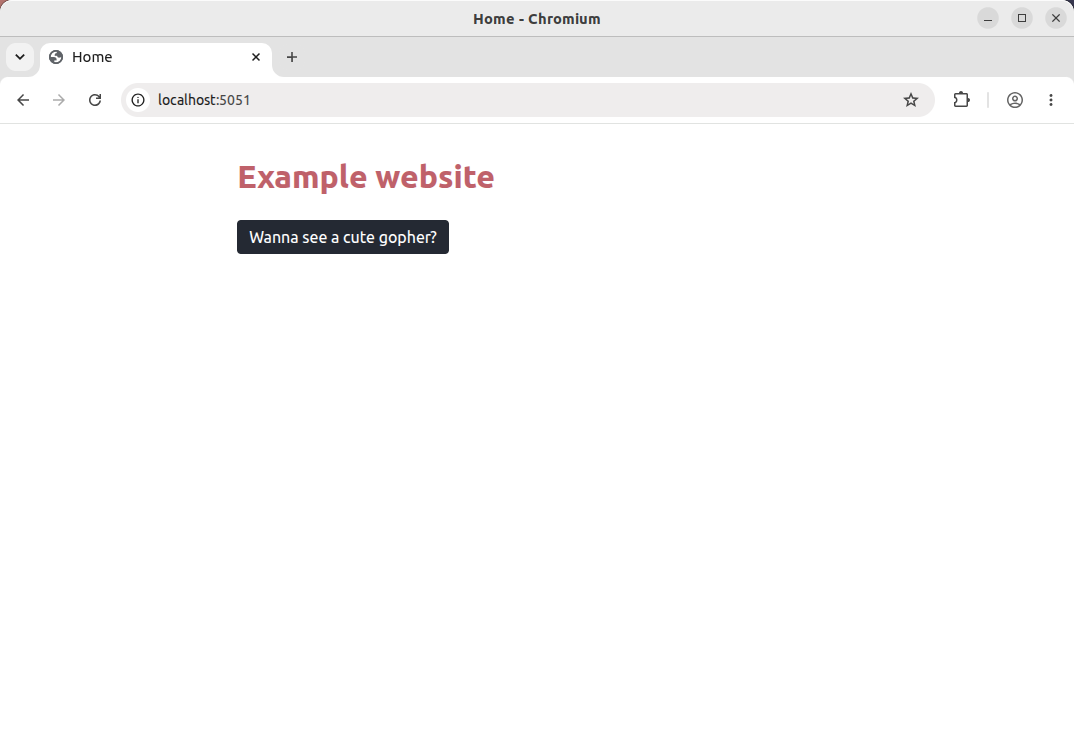
`$ go run \./\.\.\. time=2026\-06\-27T21:05:01\.668\+02:00 level=INFO msg="starting server" port=5051`And if you visit`http://localhost:5051`in your browser, you should see the homepage displayed like so:
## Rendering partials
While you're on this homepage, if you open developer tools and then click the*"Wanna see a cute gopher?"*button, you'll see that it sends a`GET /gopher`request that 404s\. Let's fix this so that our application includes a`GET /gopher`route, which returns the contents of the`partial:image:gopher`template\.
First add the new route like so:
File: cmd/web/main\.go`package main \.\. func main\(\) \{ \.\.\. mux := http\.NewServeMux\(\) mux\.Handle\("GET /static/", http\.StripPrefix\("/static", fileserver\)\) mux\.HandleFunc\("GET /\{$\}", app\.home\) mux\.HandleFunc\("GET /gopher", app\.gopher\) \.\.\. \}`And then in`cmd/web/handlers\.go`create a new`gopher\(\)`handler, which renders the`partial:image:gopher`template with a width of 100px\.
File: cmd/web/handlers\.go`package main \.\.\. func \(app \*application\) gopher\(w http\.ResponseWriter, r \*http\.Request\) \{ width := 100 err := app\.html\.render\(w, http\.StatusOK, width, "partial:image:gopher"\) if err \!= nil \{ app\.logger\.Error\(err\.Error\(\)\) http\.Error\(w, http\.StatusText\(500\), 500\) \} \}`Because we've set up our`htmlRenderer`type so that the shared template set already includes all partials, it's sufficient for us to call`render\(\)`like this without passing in any additional file paths\.
If you re\-run the application now and click the button, you should see that it gets swapped out for a gopher image like so:
So, it's taken a while to get here, but the pattern that we now have in place is neat and has some nice benefits\.
- Our templates \(and static assets\) are embedded into the Go binary, which makes for easy distribution and deployment\.
- We can use the same`htmlRenderer\.render\(\)`function to send either complete HTML pages or specific partials to the client, which makes it easy to send back partial responses when they are needed by HTMX\.
- We can keep the HTML markup nice and DRY by using the base template and partials\. The partials can be inserted in the base template, page\-specific content, or even in other partials\.
## A more complex example
That was very basic in terms of interactivity, so let's do something a bit more realistic and create a 'user search' page that mimics the[active search example](https://htmx.org/examples/active-search/)from the HTMX website\.
To make this work, we'll create two new routes in our application:
- A`GET /users`route which returns a full HTML page containing a table of all user details\.
- A`GET /users/search`route which returns an HTML partial containing table rows only for users whose names or emails match a specific search value\.
Now that we've got all the groundwork in place, it should be pretty quick to do\.
Let's first add an`assets/html/pages/users\.tmpl`file with the page\-specific HTML content:
`$ touch assets/html/pages/users\.tmpl`File: assets/html/pages/users\.tmpl`\{\{define "page:title"\}\}Users\{\{end\}\} \{\{define "page:content"\}\} <input type="search" name="query" placeholder="Begin Typing To Search Users\.\.\." hx\-get="/users/search" hx\-trigger="input changed delay:500ms, keyup\[key=='Enter'\]" hx\-target="\#search\-results" hx\-push\-url="true"\> <table\> <thead\> <tr\> <th\>Name</th\> <th\>Email</th\> <th\> </th\> </tr\> </thead\> <tbody id="search\-results"\> \{\{template "users:rows" \.\}\} </tbody\> </table\> \{\{end\}\} <\!\-\- Fragments for the users page \-\-\> \{\{define "users:rows"\}\} \{\{range \.\}\} <tr\> <td\>\{\{ \.Name \}\}</td\> <td\>\{\{ \.Email \}\}</td\> <td\> \{\{if \.IsGopher\}\} \{\{template "partial:image:gopher" 24\}\} \{\{end\}\} </td\> </tr\> \{\{end\}\} \{\{end\}\}`There are a couple of interesting things here\.
The first is the HTMX attributes on the`<input\>`control\. We've configured this so that when a user types into the input, after a delay of 500ms \(or immediately if they press Enter\), HTMX will send a request containing the search term as a query string like`GET /users/search?query=foo`\. When a response is received, HTMX will then swap the response into the inner HTML of the`<tbody id="search\-results"\>`element\. For demonstration purposes in this project, we're also using the`hx\-push\-url="true"`attribute, which will result in the browser URL bar being updated and a new entry added to the browser history each time HTMX makes a request\.
I've also structured the file so that the table rows are rendered in their own`users:rows`template, rather than as part of the`page:content`template\. We'll use this in the`GET /users/search`to render just the matching user table rows for HTMX to swap in\.
Then let's set up the two new routes in`main\.go`:
File: cmd/web/main\.go`package main \.\. func main\(\) \{ \.\.\. mux := http\.NewServeMux\(\) mux\.Handle\("GET /static/", http\.StripPrefix\("/static", fileserver\)\) mux\.HandleFunc\("GET /\{$\}", app\.home\) mux\.HandleFunc\("GET /gopher", app\.gopher\) mux\.HandleFunc\("GET /users", app\.listUsers\) mux\.HandleFunc\("GET /users/search", app\.searchUsers\) \.\.\. \}`And lastly let's go to the`handlers\.go`file and create a hardcoded list of user details, along with the two new handlers`listUsers`and`searchUsers`, like so:
File: cmd/web/handlers\.go`package main import \( "net/http" "strings" \) \.\.\. // Define a user type\. The fields need to be exported so that we can reference // them in our HTML templates\. type user struct \{ Name string Email string IsGopher bool \} // Create a hardcoded list of users\. var users = \[\]user\{ \{"Alice Madsen", "\[email protected\]", true\}, \{"Theo Thatcher", "\[email protected\]", true\}, \{"Maxwell Albright", "\[email protected\]", false\}, \{"Ruby Thompson", "\[email protected\]", false\}, \{"Leona Rowan", "\[email protected\]", false\}, \{"Alicia Lennox", "\[email protected\]", true\}, \{"Ruben Mason", "\[email protected\]", false\}, \{"Leo Reynolds", "\[email protected\]", false\}, \{"Max Lester", "\[email protected\]", true\}, \{"Theodore Allister", "\[email protected\]", false\}, \} func \(app \*application\) listUsers\(w http\.ResponseWriter, r \*http\.Request\) \{ // Render a full HTML page containing the content from "pages/users\.tmpl" // and all user details\. err := app\.html\.render\(w, 200, users, "base", "pages/users\.tmpl"\) if err \!= nil \{ app\.logger\.Error\(err\.Error\(\)\) http\.Error\(w, http\.StatusText\(500\), 500\) \} \} func \(app \*application\) searchUsers\(w http\.ResponseWriter, r \*http\.Request\) \{ // Filter down the list of users to find ones that match the query\. query := r\.FormValue\("query"\) var matches \[\]user if query == "" \{ matches = users \} else \{ for \_, u := range users \{ if strings\.Contains\(u\.Name, query\) \|\| strings\.Contains\(u\.Email, query\) \{ matches = append\(matches, u\) \} \} \} // Render just the "users:rows" template from the "pages/users\.tmpl" file // with the matching user details\. err := app\.html\.render\(w, 200, matches, "users:rows", "pages/users\.tmpl"\) if err \!= nil \{ app\.logger\.Error\(err\.Error\(\)\) http\.Error\(w, http\.StatusText\(500\), 500\) \} \}`When it comes to template rendering, in both of these new handlers we are adding the templates from the`pages/users\.tmpl`file to the shared template set, but in`listUsers`we execute the`base`template and in`searchUsers`we execute just the`users:rows`template\.
So with just a little bit of thought to how we structured the markup and defined the templates in the`pages/users\.tmpl`file, it's straightforward for us to send back either a complete HTML document or the appropriate partial HTML fragment for HTMX to do its thing\.
If you want, try this out by visiting`http://localhost:5051/users`and you should see the list being filtered as you type\.
## Checking if a request is coming from HTMX
This all works well, but what if someone visits a link like`http://localhost:5051/users/search?query=leo`directly? Or shares a link to it? Anyone visiting this directly would only see the partial HTML response in their browser, similar to this:
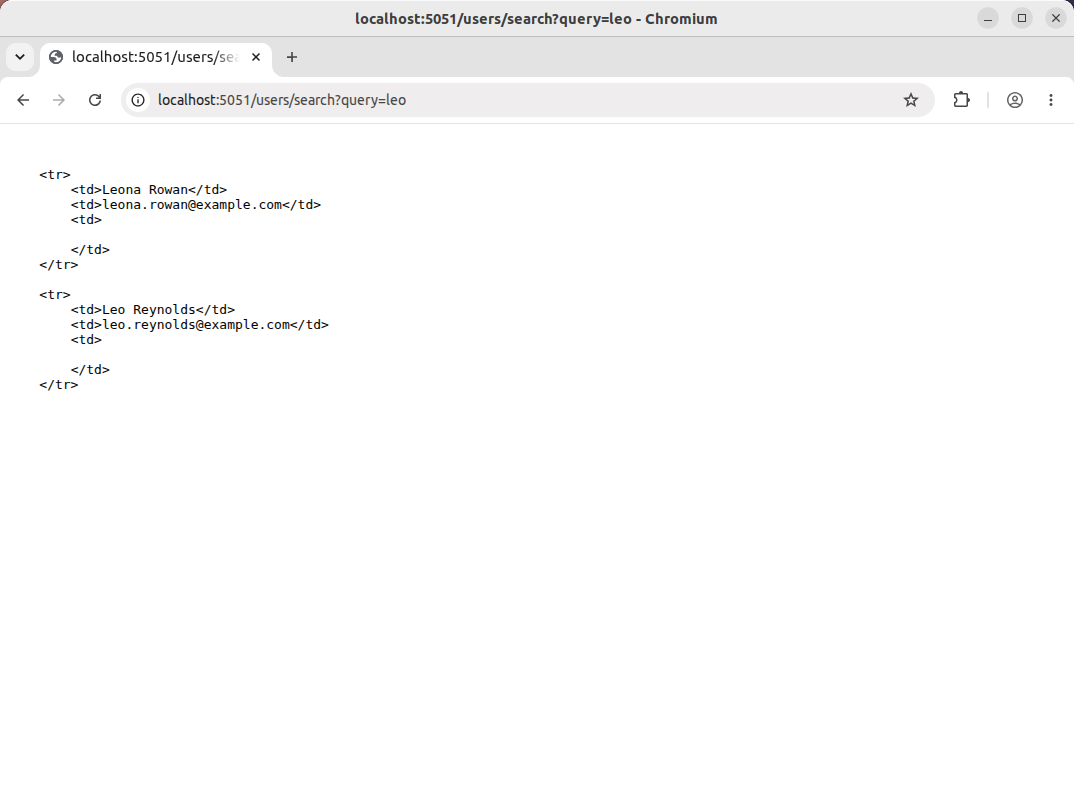
This obviously isn't ideal\. A much better approach would be to change the response that our`searchUsers`handler sends, depending on whether the request is coming from HTMX or not\. Specifically:
- If the request is coming from HTMX, we should return an HTML partial that it can swap into the table, just like we already are\.
- If the request is not coming from HTMX, we should return a full HTML page that contains the matching user details\.
As you may already know if you've used HTMX before, requests that come from HTMX always include an[`HX\-Request: true`](https://htmx.org/reference/#request_headers)header\. So all we need to do is check for the presence of that in the request, and send back the appropriate response\. To help with this, I normally create a little`isHTMXRequest\(\)`function and use it like so:
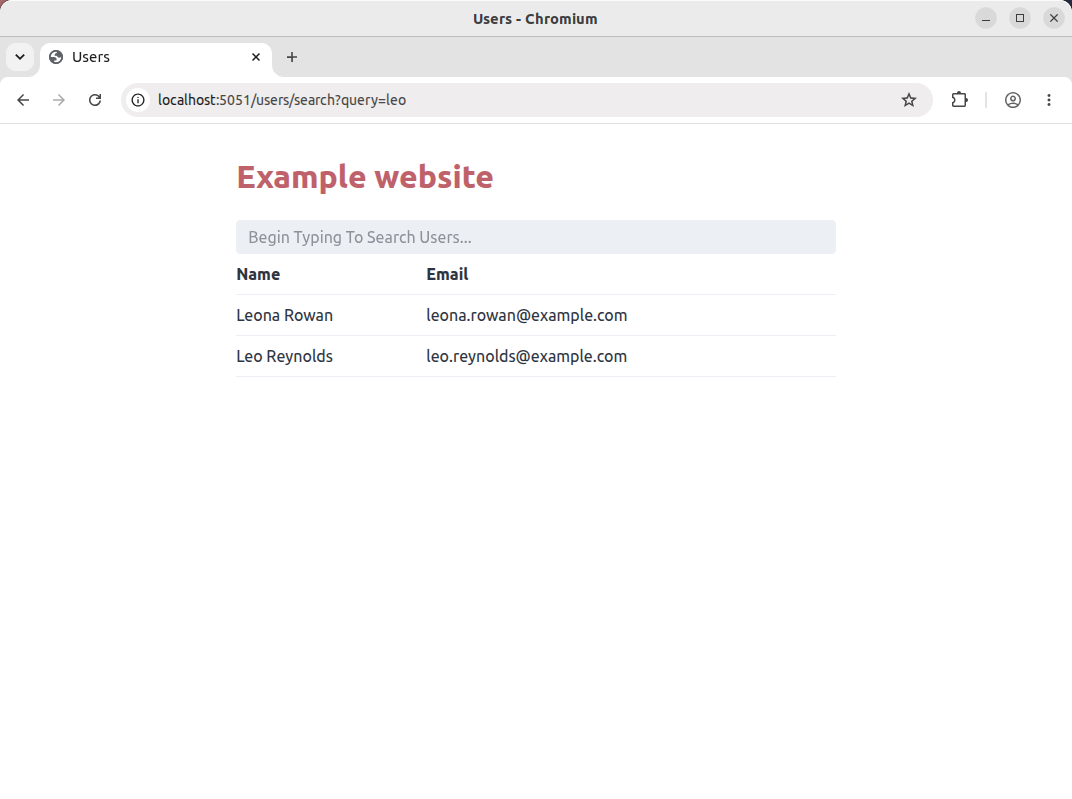
File: cmd/web/handlers\.go`package main \.\.\. func isHTMXRequest\(r \*http\.Request\) bool \{ return r\.Header\.Get\("HX\-Request"\) == "true" \} func \(app \*application\) searchUsers\(w http\.ResponseWriter, r \*http\.Request\) \{ query := r\.FormValue\("query"\) var matches \[\]user if query == "" \{ matches = users \} else \{ for \_, u := range users \{ if strings\.Contains\(u\.Name, query\) \|\| strings\.Contains\(u\.Email, query\) \{ matches = append\(matches, u\) \} \} \} // Render the base template by default\. template := "base" // But if the request is coming from HTMX, render the users:rows template instead\. if isHTMXRequest\(r\) \{ template = "users:rows" \} err := app\.html\.render\(w, 200, matches, template, "pages/users\.tmpl"\) if err \!= nil \{ app\.logger\.Error\(err\.Error\(\)\) http\.Error\(w, http\.StatusText\(500\), 500\) \} \}`If you restart the application and visit`http://localhost:5051/users/search?query=leo`again now, you should see a full HTML page containing only the matching user records\.
But there are a couple more things we need to do to finish this up\.
Because we're sending back different responses from`searchUsers`based on the value of the`HX\-Request`header, we should also set a`Vary: HX\-Request`on the response to tell any caches between our server and the client that responses may be different based on the value of this header\.
We*could*set the`Vary: HX\-Request`header in`searchUsers`, but I think it's easier to just always set it on all responses in the`render\(\)`function\. It does mean that we'll be setting the`Vary`header on all responses — including those from our`home`handler and`listUsers`— which isn't strictly necessary and a little bit wasteful\. But I think it's worth it to avoid having to remember setting the`Vary`header correctly in individual handlers, and the risk of bugs that forgetting it may cause\.
File: cmd/web/html\.go`func \(h \*htmlRenderer\) render\(w http\.ResponseWriter, status int, data any, templateName string, additionalFiles \.\.\.string\) error \{ \.\.\. w\.Header\(\)\.Add\("Vary", "HX\-Request"\) w\.WriteHeader\(status\) buf\.WriteTo\(w\) return nil \}`## Back\-button behavior
Lastly, we need to consider back\-button behavior\.
Whenever HTMX adds an entry to the browser history \(which it will do when you use the`hx\-push\-url`or`hx\-boost`attributes\), it caches the HTML for the complete page in the browser's local storage\. When the user clicks the back button, this complete cached HTML page will be reshown to them\.
By default the HTMX cache stores up to 10 pages\. If there is a cache miss \(i\.e\. the user navigates back far enough that there is no longer a matching page in the cache\), HTMX will resend the request to the server to refetch the content for that URL\.
The problem is that this request will include the`HX\-Request: true`header, and our application will send back a partial HTML response rather than the complete HTML page that it needs to redisplay to the user\.
To deal with this scenario, there is an`historyRestoreAsHxRequest`setting which controls whether HTMX will include the`HX\-Request: true`header when it's sending a request because of a cache miss\. The documentation advises:
> This should always be disabled when using HX\-Request header to optionally return partial responses\.
So let's go ahead and configure HTMX so that the`historyRestoreAsHxRequest`setting is`false`\.
There are a couple of ways you can configure HTMX settings, but I generally like to set them in a`meta`tag in the`base\.tmpl`file like so:
File: assets/html/base\.tmpl`\{\{define "base"\}\} <\!doctype html\> <html lang='en'\> <head\> <meta charset='utf\-8'\> <title\>\{\{template "page:title" \.\}\}</title\> <meta name="viewport" content="width=device\-width, initial\-scale=1"\> <meta name="htmx\-config" content='\{ "historyRestoreAsHxRequest": false \}' \> <link rel="stylesheet" href="/static/css/bamboo\.min\.css"\> <script defer src="/static/js/htmx\.min\.js"\></script\> </head\> <body\> <h1\><a href="/"\>Example website</a\></h1\> <main\> \{\{template "page:content" \.\}\} </main\> </body\> </html\> \{\{end\}\}`Now that this is set, if there is a cache miss when using the back button, HTMX will send a request to our application*without*the`HX\-Request: true`header, and our application will send back the complete HTML page to reshow to the user\.
## Managing redirects
Using HTMX in your application normally reduces the need for`3xx`redirects\. For example, when submitting a form you can often send back an HTML partial with a success message that can be swapped into the page, rather than using the standard Post/Redirect/Get pattern and redirecting to a confirmation page\.
But still, there may be times that you want to redirect to a completely new page after a form submission coming from HTMX\. A common example would be redirecting to a profile page after a successful login\.
Unfortunately, to achieve this you can't just send a regular`3xx`response\. The crux of the problem is that that browsers will automatically intercept and follow`3xx`responses before HTMX has access to them — so HTMX never gets to see the`3xx`response, only the*final*response after any redirects\. It doesn't know that a redirect happened behind the scenes, and will just swap in the returned content like normal\.
Instead, if you want something that behaves more like a regular redirect, you need to send a`2xx`response along with the`HX\-Redirect`header\.
For example, when you include the response header`HX\-Redirect: /foo/bar`, it will make HTMX tell the browser to navigate to`/foo/bar`, triggering a full\-page reload\. Importantly the`HX\-Request: true`header*will not*be included in the request to`/foo/bar`\.
But you also need to handle the situation where the original request might not be coming from HTMX — especially if you are using progressive enhancement so that your application still works if JavaScript is disabled or HTMX doesn't load correctly\. In that case, it's important to fallback to sending a regular`3xx`response from your Go handler, rather than the`2xx`response and`HX\-Redirect`header\.
Putting this together, I normally create a`redirect\(\)`helper which leverages the`isHTMXRequest\(\)`function we made earlier and looks like this:
`func redirect\(w http\.ResponseWriter, r \*http\.Request, url string, code int\) \{ if isHTMXRequest\(r\) \{ w\.Header\(\)\.Set\("HX\-Redirect", url\) w\.WriteHeader\(http\.StatusNoContent\) return \} http\.Redirect\(w, r, url, code\) \}`And, for example, in the scenario of wanting to redirect to a`/profile`page after a successful login, I use it in my Go handlers like this:
`redirect\(w, r, "/profile", http\.StatusSeeOther\)`As I mentioned above, using`HX\-Redirect`will trigger a full\-page reload\. But there is another option — the`HX\-Location`header — which makes HTMX mimic the behavior of a redirect*without a full\-page reload*\. It essentially makes HTMX fetch the HTML for the provided URL, swap it into the HTML body, and add a new entry to the browser history\. Importantly, when fetching the HTML the`HX\-Request: true`header*is*used\.
At first glance, using`HX\-Location`might seem preferable because it doesn't make a full\-page reload, which gives your application a smoother more SPA\-like experience\. But it's a problem if the route that you are redirecting to uses the`HX\-Request: true`header to conditionally send HTML partials\. The handler has no way of telling whether the request is coming from HTMX following a`HX\-Location`redirect \(in which case it should send a full\-page response\) or from a 'normal' HTMX request \(in which case it should return a partial\)\.
Unfortunately, unlike history restore requests, HTMX doesn't provide a setting to disable the`HX\-Request: true`header when redirecting\.
So, most of the time I think it's easier and safer to use`HX\-Redirect`and accept the downside of a full\-page reload\.
But\.\.\. if you are careful and structure your application so that the routes you redirect to*only*ever return full HTML pages, you may want to change the`redirect\(\)`helper to use`HX\-Location`instead like so:
`func redirect\(w http\.ResponseWriter, r \*http\.Request, url string, code int\) \{ if isHTMXRequest\(r\) \{ w\.Header\(\)\.Set\("HX\-Location", url\) w\.WriteHeader\(http\.StatusNoContent\) return \} http\.Redirect\(w, r, url, code\) \}`## Managing errors
If our demo application returns a`4xx`or`5xx`response, by default HTMX will*not*swap in the response\. Instead it leaves the DOM as\-is, and logs an error message in the console\.
If you'd like to see this in action, go ahead and change the`gopher`handler to render a`"partial:image:missing"`template \(which doesn't exist\)\. This should cause our application to error and send a`500`status code and a plaintext`"Internal Server Error"`response to the client\.
File: cmd/web/handlers\.go`func \(app \*application\) gopher\(w http\.ResponseWriter, r \*http\.Request\) \{ err := app\.html\.render\(w, http\.StatusOK, 100, "partial:image:missing"\) if err \!= nil \{ app\.logger\.Error\(err\.Error\(\)\) http\.Error\(w, http\.StatusText\(500\), 500\) \} \}`If you run the application and click the*"Wanna see a cute gopher?"*button, now nothing on the screen will change, but in your developer tools network tab you'll see the`500`response and a record of the problem in the console, like so:
In most cases, this isn't ideal\. If an application is sending back an error message, I normally want the user to actually see this message rather than having the operation fail silently for them \(or at least, silently unless they have developer tools open 😉\)\.
And also in most cases, I want to display any error message from a`4xx`or`5xx`response as full\-page HTML \(in the same way that it would be shown if we weren't using HTMX\) by swapping it into the`<body\>`element rather than swapping it into the regular HTMX target\.
The only exception to this is the`422 Unprocessable Content`status, which I typically use when sending back a form with validation errors in it\. In this case, I want HTMX to swap the returned content into the target element as normal\.
Luckily, you can use the HTMX[`responseHandling`](https://htmx.org/docs/#response-handling)setting to configure different behavior for different responses codes\. I normally configure this so that:
- For`204 No Content`responses, no action is taken and no changes are made to the DOM\.
- For`422 Unprocessable Content`responses, HTMX swaps the response content into the target as normal\.
- For all other`4xx`and`5xx`responses, HTMX swaps the returned content into the`<body\>`element\.
- For any other response, HTMX swaps the response content into the target as normal\.
And just like before, I normally configure this via the HTMX configuration`meta`tag like so:
File: assets/html/base\.tmpl`\{\{define "base"\}\} <\!doctype html\> <html lang='en'\> <head\> <meta charset='utf\-8'\> <title\>\{\{template "page:title" \.\}\}</title\> <meta name="viewport" content="width=device\-width, initial\-scale=1"\> <meta name="htmx\-config" content='\{ "historyRestoreAsHxRequest": false, "responseHandling":\[ \{"code":"204", "swap": false\}, \{"code":"422", "swap": true\}, \{"code":"\[45\]\.\.", "swap": true, "target": "body"\}, \{"code":"\.\.\.", "swap": true\} \] \}' \> <link rel="stylesheet" href="/static/css/bamboo\.min\.css"\> <script defer src="/static/js/htmx\.min\.js"\></script\> </head\> <body\> <h1\><a href="/"\>Example website</a\></h1\> <main\> \{\{template "page:content" \.\}\} </main\> </body\> </html\> \{\{end\}\}`With that change made, if you restart the application and click the button again, you should now see the "Internal Server Error" message shown as a full\-page response, like so:
## Current browser URL
Because HTMX makes AJAX requests and swaps in responses without changing the browser URL \(unless you use the`hx\-boost`,`hx\-push\-url`or`hx\-replace\-url`attributes\), the request URL that we see in our Go handlers when accessing`r\.URL`may be different to the one that the user is seeing in their browser\.
Occasionally, there are times when I want to know in my Go handler exactly what URL the user is currently seeing in their browser\. Fortunately, HTMX sends this information with each request in the`HX\-Current\-URL`header\.
Usually I make another little function to help with this, which parses the`HX\-Current\-URL`value and returns it as a`url\.URL`, falling back to returning`r\.URL`if no`HX\-Current\-URL`header is present\. Like so:
`func browserURL\(r \*http\.Request\) \(\*url\.URL, error\) \{ cu := r\.Header\.Get\("HX\-Current\-URL"\) if cu \!= "" \{ return url\.Parse\(cu\) \} return r\.URL, nil \}`## Additional HTMX configuration
Lastly, there are a few other HTMX configuration settings that I normally change from the default values\.
- I tend to disable the HTMX cache completely by setting`historyCacheSize`to`0`\. Caching pages in local storage is a[source of bugs and security issues](https://htmx.org/essays/the-fetchening/#no-locally-cached-history), so I think it's simpler and better to just disable it completely\. If you do this, no pages will be cached in local storage, and when the user clicks the back button HTMX will send a request to the server to refetch the HTML\. It's worth noting that caching in local storage will also be disabled by default in future versions of HTMX for the same reasons\.
- I prefer to disable HTMX[attribute inheritance](https://htmx.org/docs/#inheritance)by setting`disableInheritance`to`true`\. I think it's clearer and lowers the risk of bugs or unintended behavior when HTMX attributes are always declared explicitly\. Again, it's worth noting that attribute inheritance will also be disabled by default in future versions of HTMX\.
- I also disable HTMX[indicator styles](https://htmx.org/docs/#indicators)by setting`includeIndicatorStyles`to`false`\. For consistency, I prefer not to have HTMX injecting styles, and would rather define any indicator styles alongside my other CSS rules\.
- By default there is no timeout on HTMX requests, and they will wait as long as necessary for the server to respond\. It's project\-specific, and depends on how I'm handling timeouts and deadlines in my Go application, but sometimes I may also use the`timeout`setting to set a default timeout \(in milliseconds\) on the HTMX end\.
All in all, the starting point for my HTMX configuration settings normally looks like this:
`<meta name="htmx\-config" content='\{ "includeIndicatorStyles": false, "historyCacheSize": 0, "historyRestoreAsHxRequest": false, "responseHandling":\[ \{"code":"204", "swap": false\}, \{"code":"422", "swap": true\}, \{"code":"\[45\]\.\.", "swap": true, "target": "body"\}, \{"code":"\.\.\.", "swap": true\} \], "timeout": 5000 \}' \>`## Page\-specific layouts
Let's finish up this post with a final note about HTML templates in larger applications\.
For some applications, having a base template along with page\-specific templates might not be enough\. You might also want 'layout' templates that sit between the base template and your page\-specific content — for example, you might want to use a layout template for your admin\-area pages that is different to the rest of your regular application pages\.
The patterns that we've talked about in this post can be extended fairly easily to accommodate this\.
For example, you can change the base template to insert a`"layout"`template in the`body`element instead of the page\-specific content directly:
`\{\{define "base"\}\} <\!doctype html\> <html lang='en'\> <head\> <meta charset='utf\-8'\> <title\>\{\{template "page:title" \.\}\}</title\> \.\.\. </head\> <body\> \{\{template "layout" \.\}\} </body\> </html\> \{\{end\}\}`Then you could create an`assets/html/layouts/admin\.tmpl`file containing the common 'layout' markup for the admin pages:
`\{\{define "layout"\}\} <h1\><a href="/"\>Admin area</a\></h1\> <nav\> <a href="/admin/users"\>Users</a\> <a href="/admin/orders"\>Orders</a\> </nav\> <main\> \{\{template "page:content" \.\}\} </main\> \{\{end\}\}`And then you can specify which layout template you want to use in your Go handlers as part of the call to`render\(\)`\. Like so:
`func \(app \*application\) adminOrders\(w http\.ResponseWriter, r \*http\.Request\) \{ err := app\.html\.render\(w, 200, nil, "base", "layouts/admin\.tmpl", "pages/admin\-orders\.tmpl"\) if err \!= nil \{ app\.logger\.Error\(err\.Error\(\)\) http\.Error\(w, http\.StatusText\(500\), 500\) \} \}`