@wulujia: I unilaterally declare that my colleague's Slax Reader is already my favorite read-later tool. Just tried it, and it's super smooth for highlighting, commenting on, and sharing URLs. Let me share a link for everyone to see:
Summary
The user enthusiastically recommends their colleague's Slax Reader as a read-later tool, emphasizing its smooth highlighting, commenting, and sharing features, along with a detailed note on using AI to assist business writing.
View Cached Full Text
Cached at: 06/23/26, 08:14 PM
I unilaterally declare that my colleague’s Slax Reader is now my favorite read-it-later tool. Just tried it—the URL highlighting, commenting, and sharing are incredibly smooth. Let me share a link for everyone to check out: https://t.co/E139E9xibe
EP.19 Experiment Recap: How I Built a Skill to “Replicate High-Quality Commercial Copy” — Luca Wu’s Reading Notes
Source: https://r.slax.com/b/d2c5ea66-98e3-4cae-acf4-046401bec42f Recently, a company approached us for collaboration. I deployed Manus to do a background check on their founder. The more I read, the more I felt he was unconventional—anti-cliché yet consistently building success. Worth sharing publicly as part of their business PR strategy.
Around the same time, news broke about Apple’s upcoming leadership change, and the rush to dig into the successor became a media frenzy for headlines, driving massive traffic.
Because of these two events, I specifically met with a media friend who specializes in writing business articles. They encouraged me: first, leverage AI to output interesting business content I’ve researched on my own, rather than wasting attention and marginal traffic; second, use this to feed my curiosity, avoid becoming a boring old-timer, and continuously absorb fresh nutrients from the business world.
I thought, why not? With AI, I could produce “decent routine commercial copy” and offset the low frequency of my usual “slow drafts”—those deep, handcrafted insights from my own exploration and research.
These routine commercial pieces would go into the public account’s traffic pool; there’s always an audience for them.
So I got to work and actually pulled it off. This article is a complete record.
Zero: What Made That Apple Article So Good
Let’s start with that Apple article. The one that impressed me most was from Chaping X.PIN: “After 15 Years Leading Apple, Cook Decides to Hand It Over to a Pure STEM Guy” (https://mp.weixin.qq.com/s/Qlg73GCNFQCzxYY5GH0otw).
At first glance, its structure looks like a standard profile: background intro, news event, career history, future outlook. But dig deeper, and you’ll find unique writing techniques.
For example, the most powerful paragraph comes after Ternus appears:
Butterfly keyboard, Touch Bar — Ternus was involved → 2021 MacBook Pro: he canceled Touch Bar and brought back ports → Outside comment: “This is the first time in nearly a decade Apple seems to be listening to users.”
This is a complete “did wrong first, then corrected” story. Same person, same product line, first involved then fixed. Very much in line with the hero’s journey.
Analyzing the original article manually would be inefficient.
So I saved the article as HTML, fed it to Claude Code (a public account link would be blocked by anti-scraping), and asked Claude Code to analyze what made it great.
Claude Code gave some interesting insights. For instance, the article had a notable structure: circular opening and ending.
The opening quotes Jobs’ words to Cook: “Never ask what I would do. Do what you think is right.” The ending lands on a detail: Cook participated in a coding education event at Zhejiang University in Hangzhou. A hearing-impaired student asked a question via sign language, and Cook took several times longer to listen and respond than a normal question. These two details seem unrelated, but the article’s last line ties them together: “They both spend time on things that aren’t particularly profitable, but are important to some people.” This isn’t elevation—it’s echo. Readers will look back and realize: that opening quote wasn’t random; it points to a transfer of values.
After seeing what made the article excellent, we move to “decompile” it (reverse-engineer the process to reproduce similar results) and extract the author’s talent.
To systematize this, I asked Claude Code to do two things:
- Step One: Based on the original article, deduce the preliminary research needed and what materials to prepare as raw writing fodder.
- Step Two: Based on the above research results, figure out how to feed it to AI for writing.
One: Step One — Preliminary Material Preparation for a Business Profile
The Apple article felt substantive because it had enough first-hand material: Ternus’s Penn grad project, Cook’s accessibility philanthropy, the history of the butterfly keyboard. This information isn’t ready-made; you need to dig for it.
I iterated several times with AI on this preliminary research step.
Initially, AI’s output was too focused on the specific “Apple CEO” case. Slowly, it generalized into a template, and I ended up with a prompt I’m quite happy with (especially the “horizontal-vertical analysis” method). Here it is directly:
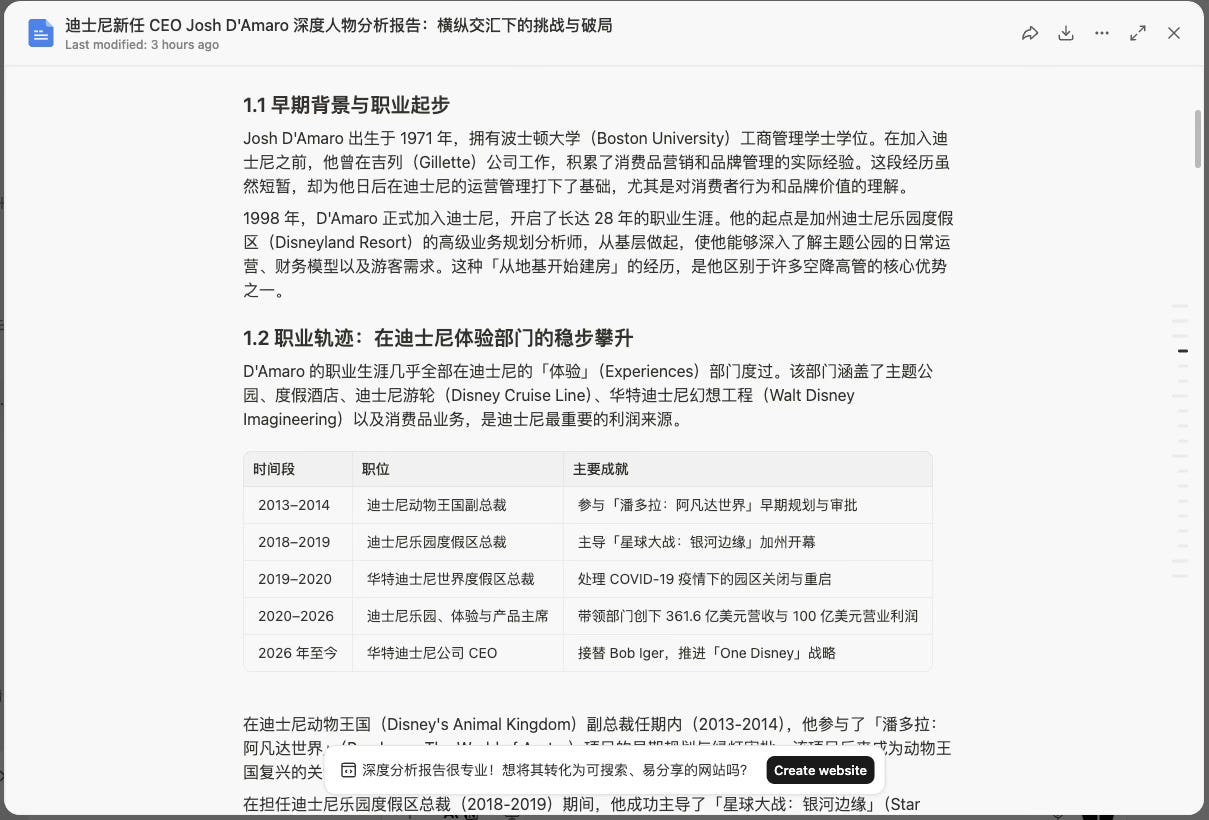
Using this approach, I ran it in Manus to research Disney’s new CEO Josh D’Amaro, and the results were decent:
Two: Step Two — Reverse-Engineering the Writing Process
I asked Claude Code to extract the structural template of the Apple article. Then, I just needed to feed the research document obtained from Manus into this prompt to get a decent article.
No more talk — here’s the final version of the prompt:
Three: Iterative Testing and Optimization
The above is the final result. But the process involved multiple rounds of refinement. For example, these problems arose:
Problem 1: Unable to find suitable contrast narratives.
In the Apple article, Ternus’s “did wrong first, then corrected” is natural—the butterfly keyboard and Touch Bar were his work, and later he personally corrected them. But in Disney’s case, Josh D’Amaro’s resume was too clean. He spent 28 years in theme parks, climbing up without any notable “stains.”
AI strained to write a contrast using “D’Amaro led the pandemic-era layoff restructuring,” which lacked power—he was the one taking over a mess, not creating one.
The “Three Conditions for Contrast Narrative” in the prompt naturally weren’t met for the Disney case. But AI didn’t realize it and mechanically applied the template.
Problem 2: The ending felt floating.
The Apple article’s ending was a detailed interaction between Cook and a hearing-impaired student—grounded. For D’Amaro, AI wrote about “streaming profitability pressure, AI technology impact”—these are big words, not anchored in the “person.”
The prompt said “land on something that is important to certain people,” but AI didn’t offer specific alternatives.
Problem 3: The “contrast moment” marker in the research prompt was not emphasized enough.
The initial research prompt included “contrast moment” as a sub-item under “horizontal-vertical intersection,” not highlighted as “core.” As a result, Manus’s report barely touched on it.
This showed a structure problem—important information wasn’t placed prominently.
After identifying these issues, I directed AI to optimize. It gave some modifications, such as:
Modification 1: Added an “alternative plan” clause in the writing prompt.
When the contrast narrative can’t find a “did wrong first, then corrected” case, allow downgrading to three alternatives:
- Alternative A: Gap between promise and reality
- Alternative B: Contrast between two capabilities
- Alternative C: Friction between personal belief and organizational reality
Modification 2: Added a “downgrade plan” in the ending prompt.
When you can’t find material about something early in the career that wasn’t profitable but important, allow using “a quote this person actually said, re-contextualized at the end.”
Opening is a promise; ending is fulfillment or correction.
Modification 3: Isolated the “contrast moment” in the research prompt, moved it to the second step (horizontal scan), and added priority tags.
This is important. The order of information in the prompt affects AI’s attention distribution. The “contrast moment” should be a core research output, not a footnote.
Modification 4: Added a self-check list.
After each draft, AI should check each item:
- Does the opening have a core quote and no background introduction?
- Is there a contrast narrative satisfying “same person, did wrong first then corrected, carried by specific product”?
- If no contrast found, is the alternative used coherently?
- Does the ending talk about “something important to certain people,” not trends?
- Is there a circular opening and ending, with the ending expressed differently, not a simple repeat?
This list later directly became the “Writing Self-Check List” in the Skill (to be mentioned later).
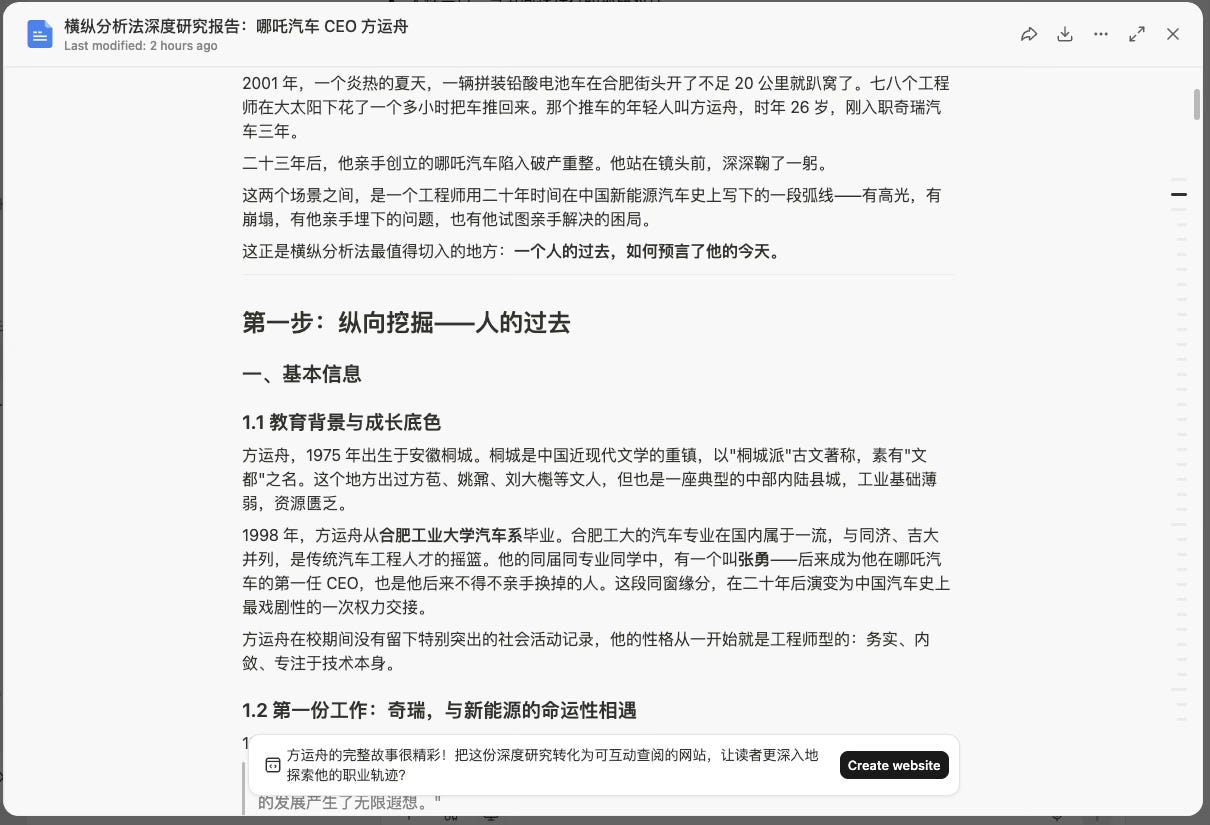
After the improved prompt, I tested a new case: Fang Yunzhou, CEO of Neta Auto.
This time, Manus’s research report came back, and using the improved prompt, the writing felt much smoother.
Fang Yunzhou’s case naturally satisfied the contrast narrative conditions—his early involvement in Neta models had a round of controversy, and later he personally led product iterations. This formed a clear “participated first, then corrected” thread.
The ending landing was also easier to find. Early in his career as an engineer, he did a public good project: designing a photovoltaic power system for mountain schools. This detail echoed Neta Auto’s positioning of “making technology accessible to ordinary people.”
After writing, I realized: this case was better suited than Disney to demonstrate the prompt’s effect. It naturally met the three conditions, no downgrade needed.
But that’s not the point. The point is: I now have a reusable workflow.
Six: Encapsulation — From Prompt to Skill
After testing the Neta Auto article, I decided to encapsulate this workflow into a Skill.
The reason was simple: the workflow worked, but it wasn’t smooth enough. Each time I had to manually send an email, wait for Manus feedback, paste the report, and invoke the writing prompt—could these steps be chained into a semi-automated process?
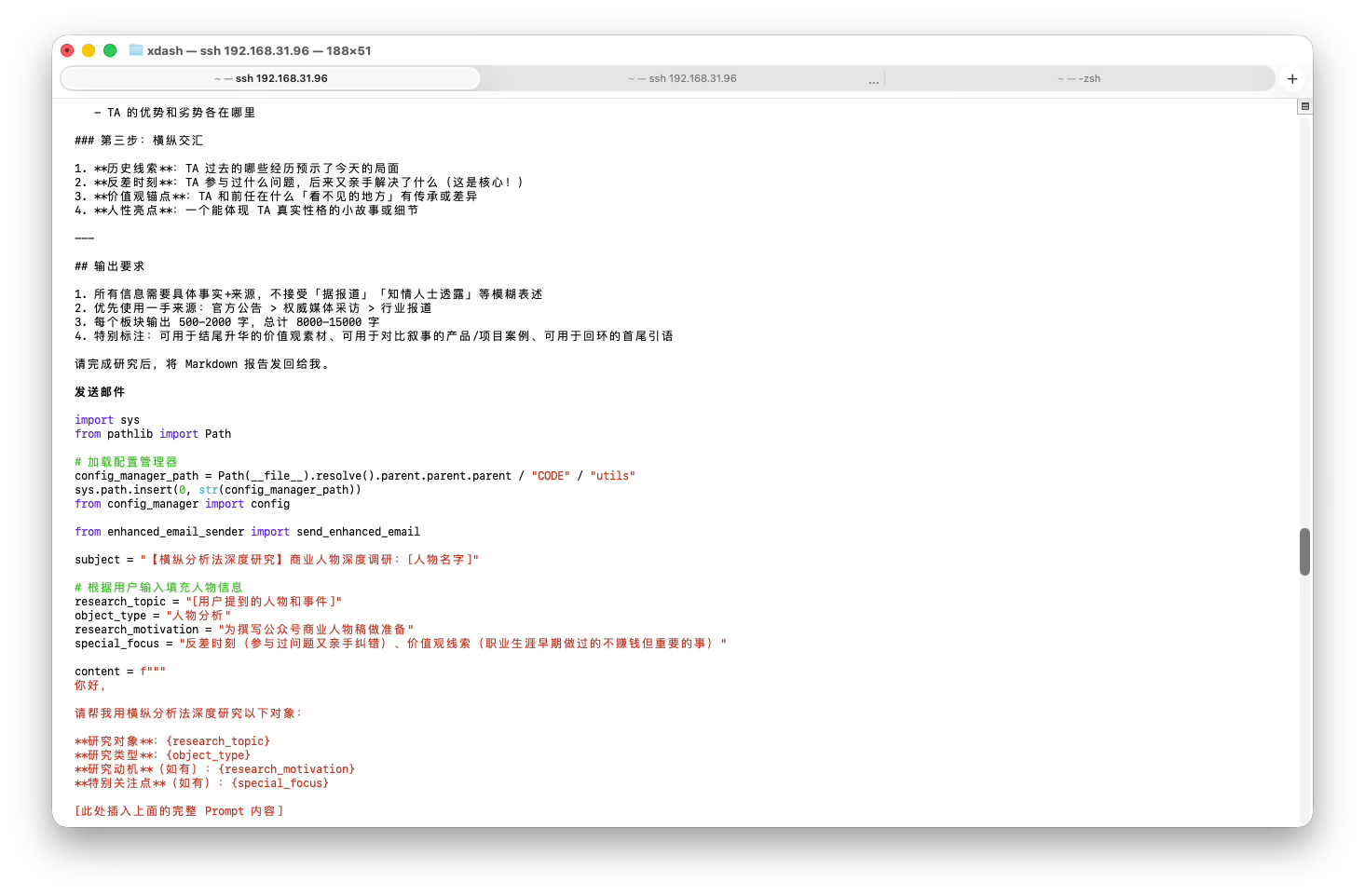
I threw this encapsulation request directly to Claude Code and asked it to turn this into a Skill.
The final Skill file structure it gave me:
/xuanti_to_gongzhonghao_business_person
│
├── Branch A: User specifies a person/event
│ → Generate Manus Prompt → Send email → Wait for result
│
└── Branch B: User provides a research report
→ Write (structure Prompt) → Polish (writing skill)
The two-branch design was necessary. Research and writing are independent tasks with different inputs and outputs. Users can choose to only do research (wait for report) or directly provide a report for writing.
This isn’t laziness—it’s natural segmentation of the workflow.
Manus handles research; I handle writing. That’s a reasonable division of labor. A Skill that tries to automate everything ends up heavy. Keeping human involvement makes the tool more flexible.
The Skill file ultimately contained:
- Function positioning: Specifically for business profiles, with built-in contrast narrative filtering, circular opening/ending design, values-based ending landing
- Branch judgment rules: Detect whether user input is “specify a person” or “provide a report”
- Complete prompts for both branches: Branch A sends email; Branch B writes
- Writing self-check list: 11 items, checked one by one
- Polishing process: Invoke writing skill for word-level mimicry polishing
For the step of invoking Manus to send the prompt for preliminary research, this uses Manus’s official “Mail Manus” feature. You can find it in the website’s “Settings” and configure your email (e.g., [email protected]).
This way, you just send an email to your configured address, which sends a new prompt task to Manus.
I won’t share the final Skill content. Reasons:
- It’s not a simple prompt; it contains a lot of code (dependent on my local environment) and external project resources, so sharing wouldn’t be usable for you.
- No need to copy it. With the first two steps as foundation, generating this Skill is something Claude Code can handle on its own.
Here’s a screenshot:
Seven: Methodology Reflection — What This Skill Taught Me
Writing this, let me recap the general flow:
Analyze Apple article
↓
Extract "contrast narrative" structure
↓
Generalize into two prompts (research + writing)
↓
Test Disney case → Find issues
↓
Improve prompts (alternatives + downgrade + self-check list)
↓
Test Neta Auto case → Validate results
↓
Encapsulate into Skill
The process of creating this Skill made me rethink something: What is “reusable experience”?
Most people accumulate experience by collecting. When they see a good article, they comment on it, maybe save a note or a template. But those notes and templates sit there, rarely reused.
A few people accumulate experience by abstracting. From a single practice, they extract “what is the essence of this,” and then turn that “essence” into a tool.
What’s the difference?
Collecting is flat; abstracting is three-dimensional. Collecting is “I’ve seen good”; abstracting is “I know how to reproduce good.”
The journey from Apple article to two prompts to the Skill followed the abstraction path. I didn’t just save the “Apple article” and feed it to AI for direct mimicry each time. Instead, I solved more fundamental questions:
- “What is the underlying structure supporting this article?”
- “If the material changes, what elements must remain?”
- “Which elements are optional and need downgrading based on context?”
The answers to these three questions formed the skeleton of the Skill.
Hope this is helpful.
I’ll continue to refine this single Skill, making the drafts carry more of my unique style and thinking. And beyond “business person profiles,” I’ll create more Skills to produce articles.
Of course, any article like this that I publish must be something I’ve reviewed/curated, manually edited, and that genuinely has value to feed the public. But this is just a volume-oriented writing method. Truly deep, insightful, and experience-rich pieces (like this one) still rely heavily on manual handcrafting. Those will stay in my VIP circle—I can’t bear to release them publicly for free, haha.
Similar Articles
@JiweiYuan: Recently built a Mac-native AI reading tool called OakReader. While reading PDF papers/eBooks or browsing the web, when you're confused, just press a button to open the sidebar, select a passage of text, and you can discuss it with your favorite AI model without ever having to switch to ChatGPT / Claude / …
OakReader is a Mac-native AI reading tool that supports reading PDF papers/eBooks and web pages. It comes with built-in sidebar AI chat, note-taking, translation, browser, and reference management features, and can be configured with multiple AI models.
@grgerwcwetwet: Recommending an open-source project: qiaomu-anything-to-notebooklm. Someone built a hardcore tool with Claude, and after seeing it, I just want to say: Knowledge management folks should definitely bookmark this. You can throw in any content—WeChat public accounts, YouTube, podcasts, PDFs, Word, Excel…
Recommending an open-source project qiaomu-anything-to-notebooklm, based on Claude to automatically organize multi-source content (WeChat public accounts, YouTube, PDFs, etc.) and generate podcasts, PPTs, mind maps, all through natural language operations.
@amiaoapp: Tired of slogging through foreign literature and tech blogs? Every time you copy a PDF paragraph into a web translator, you get gibberish line breaks and messy formatting. Have to manually delete spaces and newlines line by line? Infuriatingly slow. Ditch this archaic copy-paste nightmare and send it to the shredder! Recommend a Git…
Recommend an open-source real-time translation tool, CopyTranslator. It supports cross-platform, automatically handles line-break garbled text from PDF copying, enabling copy-to-translate and boosting foreign literature reading efficiency.
@kevinma_dev_zh: This article has recently gone viral, shared by many influencers, with over 4 million impressions. Strongly recommend reading it. Using the SentiaRead browser extension to read English is so comfortable. You can gain knowledge and build vocabulary.
Recommends a popular article with over 4 million impressions, and suggests using the SentiaRead browser extension to read English to gain knowledge and build vocabulary.
@vista8: Last night I casually tested Knowly developed by the @Ethan_Yang_AI team. Tried interpreting YouTube videos and arXiv papers – the results were stunning. Except for a rather limited free quota and slightly slow vector processing. In terms of both product interaction and interpretation quality, it's no less impressive than NotebookLM. With a Chrome extension that has only a few users but has already been selected by Google as a featured pick, its strength is evident. Official site in comments https://t.co/62NkT3pO4G
Introduces Knowly AI tool, capable of interpreting YouTube videos and arXiv papers with impressive results. Interaction and interpretation quality rival NotebookLM. Comes with a Chrome extension already featured by Google. Drawbacks: limited free quota and slightly slow vector processing.