@PierceZhang34: SSH隧道实用指南 尽管每天都使用 SSH 隧道,但总是要花点时间才能想起正确的命令 应该是本地隧道还是远程隧道?需要哪些参数? 端口号是本地端口:远程端口,还是反过来? 这个作者通过一系列实验,制作了一份可视化速查表 传送门 http:…
摘要
This tutorial provides a visual cheat sheet and practical labs for SSH local and remote port forwarding, covering common use cases like accessing private databases and exposing local servers.
查看缓存全文
缓存时间: 2026/06/26 14:13
SSH隧道实用指南
尽管每天都使用 SSH 隧道,但总是要花点时间才能想起正确的命令
应该是本地隧道还是远程隧道?需要哪些参数?
端口号是本地端口:远程端口,还是反过来?
这个作者通过一系列实验,制作了一份可视化速查表
传送门 👉 https://t.co/hyVC4GiiXH https://t.co/YIWEuXA9tc
A Practical Guide to SSH Tunnels: Local and Remote Port Forwarding | iximiuz Labs
Source: https://labs.iximiuz.com/tutorials/ssh-tunnels SSH isyet another exampleof an ancient technology that is still in wide use today. It may very well be that learning a couple of SSH tricks is more profitable in the long run than mastering a dozen Cloud Native tools or AI agent frameworks destined to become deprecated next quarter.
One of my favorite parts of this technology is SSH Tunnels. With nothing but standard tools and often using just a single command, you can achieve the following:
- Access internal VPC endpoints through a public-facing EC2 instance.
- Open a
localhostport of a remote development VM in the local browser. - Expose any local server from a home/private network to the outside world.
- Tunnel your browser’s debugging port to a remote sandboxed coding agent.
And more 😍
But despite the fact that I use SSH Tunnels daily, it always takes me a while to recall the right command. Should it be a Local or a Remote tunnel? What are the flags? Is it alocal_port:remote_portor the other way around? So, I decided to finally wrap my head around it, and it resulted in a series of labs and a visual cheat sheet.
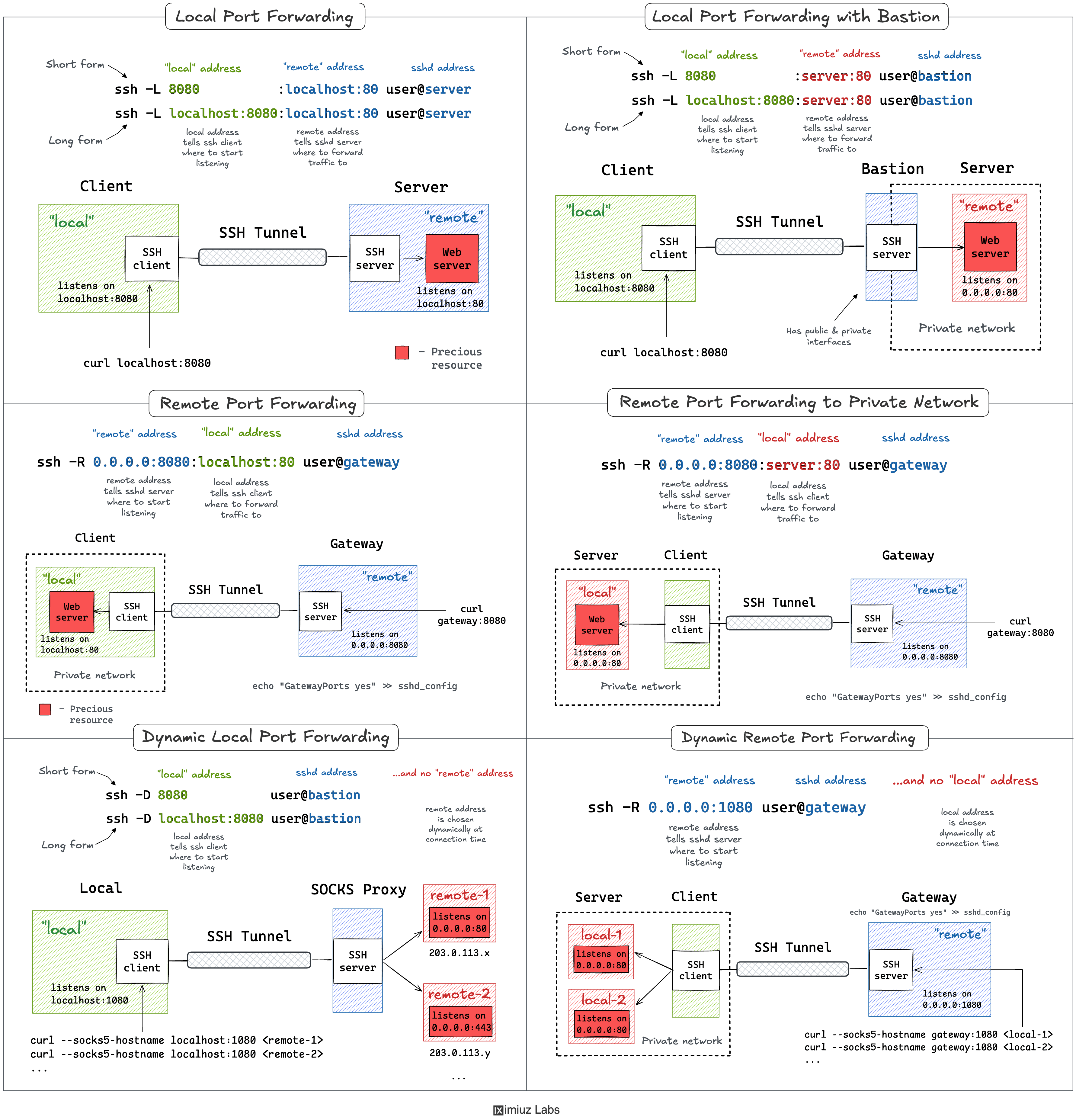
The labs in this tutorial run on an attached playground with four hosts wired into three networks:
internal- a device on thehomenetwork192\.168\.0\.0/24(a homelab box, a NAS, a printer). Not reachable from thepublicnetwork.local- your workstation. Sits on both thehome192\.168\.0\.0/24and thepublic203\.0\.113\.0/24networks.remote- a public-facing bastion / gateway on thepublic203\.0\.113\.0/24network, also connected to a privatevpc172\.16\.0\.0/24.private- an internal-only service (a database, an OpenSearch cluster) on thevpc172\.16\.0\.0/24. Not reachable from thepublicnetwork.
You cansshfromlocaltoremoteby hostname or IP address - thelocalhost key is already trusted on theremotemachine:
ssh remote
ssh 203.0.113.30
Local Port Forwarding
Starting from the one that I use the most. Oftentimes, there might be a service listening onlocalhostor a private interface of a remote machine that I can only SSH to via its public IP. And I desperately need to access this port from my local machine. A few typical examples:
- Accessing a private remote database (MySQL, Postgres, Redis, etc) from your laptop using your favorite UI tool.
- Using your browser to access a web application exposed only to a private network.
- Accessing a container’s port from your laptop without publishing it on the server’s public interface.
All of the above use cases can be solved with a singlesshcommand:
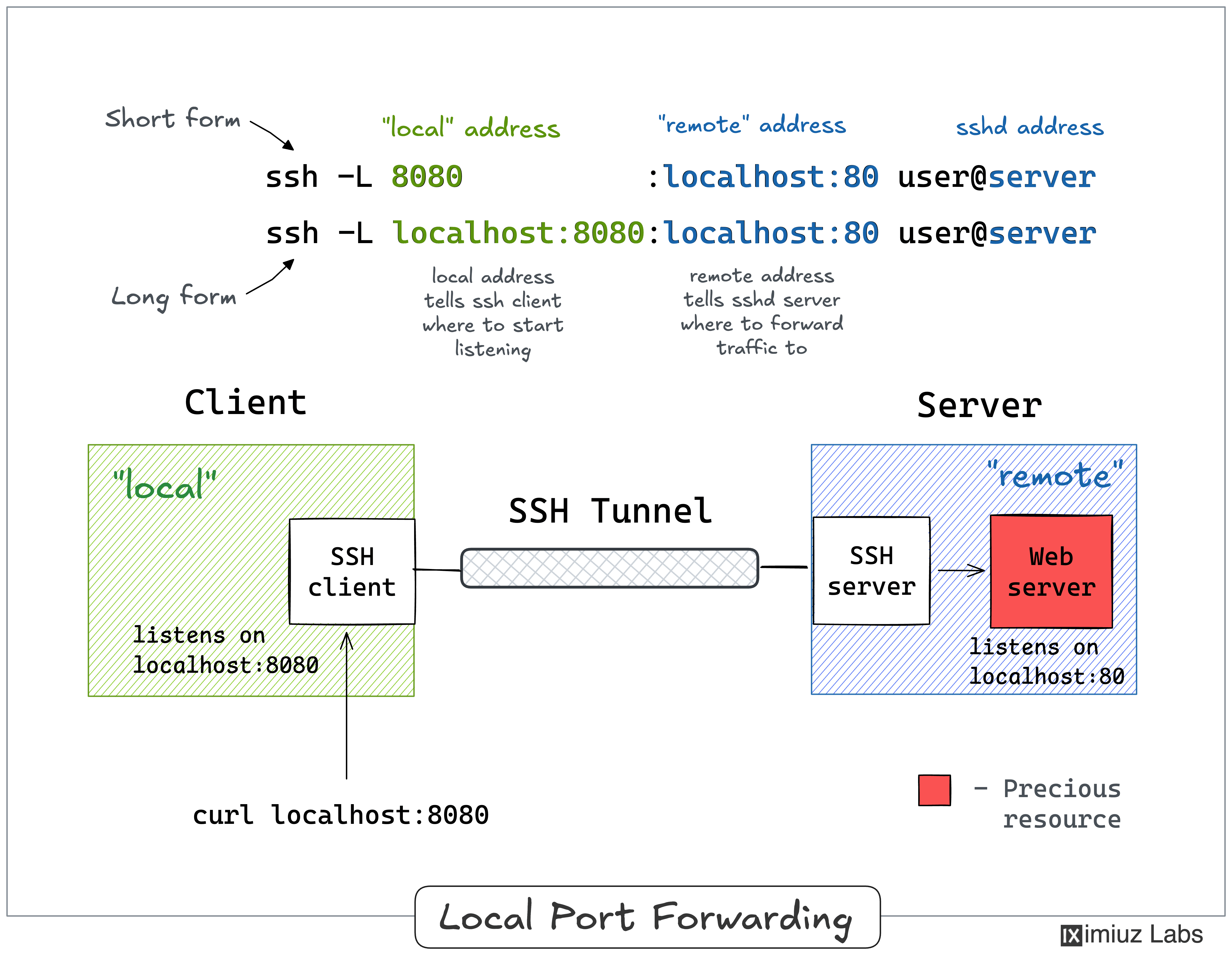
ssh -L [local_addr:]local_port:remote_addr:remote_port [user@]sshd_addr
The\-Lflag indicates we’re starting alocal port forwarding. What it actually means is:
- On your local machine, the SSH client will start listening on
local\_port(likely, onlocalhost, butit depends-check theGatewayPortssetting). - Any traffic to this port will be forwarded to
remote\_addr:remote\_port, reached from the remote machine you SSH-ed to.
Here is what it looks like on a diagram:
**Pro Tip:**Usessh \-f \-N \-Lto run the port-forwarding session in the background.
Lab 1: Using SSH Tunnels for Local Port Forwarding 👨🔬This lab reproduces the setup from the diagram above. Theremotehost runs a web server bound to127\.0\.0\.1:80, and we want to reach it from thelocalworkstation.
Because the service is bound to the loopback interface, it cannot be reached over the network. From thelocalhost, try to hit theremotehost’s public address:
curl 203.0.113.30:80 # remote.public
curl: (7) Failed to connect to 203.0.113.30 port 80 after 0 ms: Could not connect to server
But from the inside of theremotehost, the very same service works just fine:
Hello from the remote host (localhost-only service).
**And here is the trick:**back on thelocalhost, bind the remote’slocalhost:80to the local’slocalhost:8080using local port forwarding:
ssh -f -N -L 8080:localhost:80 203.0.113.30
Now you can access the web service on a local port of your workstation:
Hello from the remote host (localhost-only service).
A slightly more verbose (but more explicit and flexible) way to achieve the same goal:
ssh -f -N -L localhost:8080:localhost:80 203.0.113.30
#            local          remote       via
Local Port Forwarding with a Bastion Host
It might not be obvious at first, but thessh \-Lcommand allows forwarding a local port to a remote port onany machine, not only on the SSH server itself. Notice how theremote\_addrandsshd\_addrmay or may not have the same value:
ssh -L [local_addr:]local_port:remote_addr:remote_port [user@]sshd_addr
A remote SSH server used to access private destinations is usually called abastion or jump host. This is how I visualize this scenario in my head:
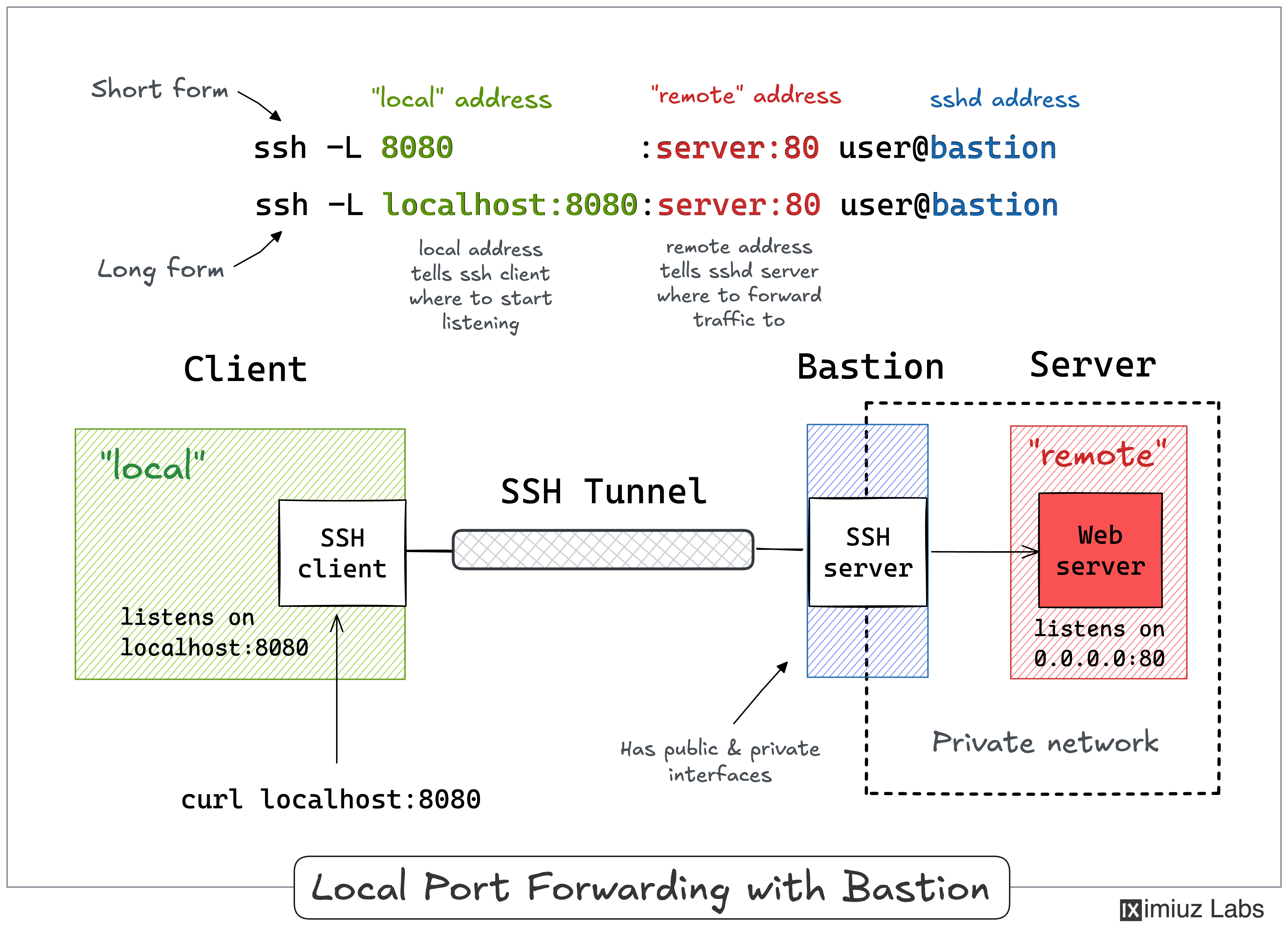
I often use the above trick to call endpoints that are accessible from thebastion hostbut not from my laptop (e.g., using an EC2 instance with private and public interfaces to connect to an OpenSearch cluster or any other service deployed fully within a VPC).
Lab 2: Local Port Forwarding with a Bastion Host 👨🔬This lab reproduces the setup from the diagram above. The remote target service runs on theprivatehost inside an improvised VPC network (172\.16\.0\.40:80), and the formerremotehost acts as our public-facing bastion (jump host) that can reach it.
Thelocalworkstation has no route into the VPC, so it cannot talk to theprivatehost directly. From thelocalhost:
curl --connect-timeout 3 172.16.0.40:80 # private.vpc
curl: (28) Connection timed out after 3002 milliseconds
Theremotebastion, on the other hand, is connected to the VPC and can reach theprivatehost. So, we forward a local port through the bastion straight to the private service. From thelocalhost:
ssh -f -N -L 8081:172.16.0.40:80 203.0.113.30
Checking that it works - still on thelocalhost:
Hello from the private VPC host (172.16.0.40).
**Notice that the forwarding target (172\.16\.0\.40) and the SSH server (203\.0\.113\.30) are different machines.**The bastion accepts the connection and opens the second hop to the private host on our behalf.
A slightly more verbose (but more explicit and flexible) way to achieve the same goal:
ssh -f -N -L localhost:8081:172.16.0.40:80 203.0.113.30
#            local          remote         via
Remote Port Forwarding
Another popular (but rather inverse) scenario is when you want to momentarily expose a local service to the outside world. Of course, for that, you’ll need apublic-facing ingress gateway server. And the good news is that any public-facing server with an SSH daemon on it can be used as such a gateway:
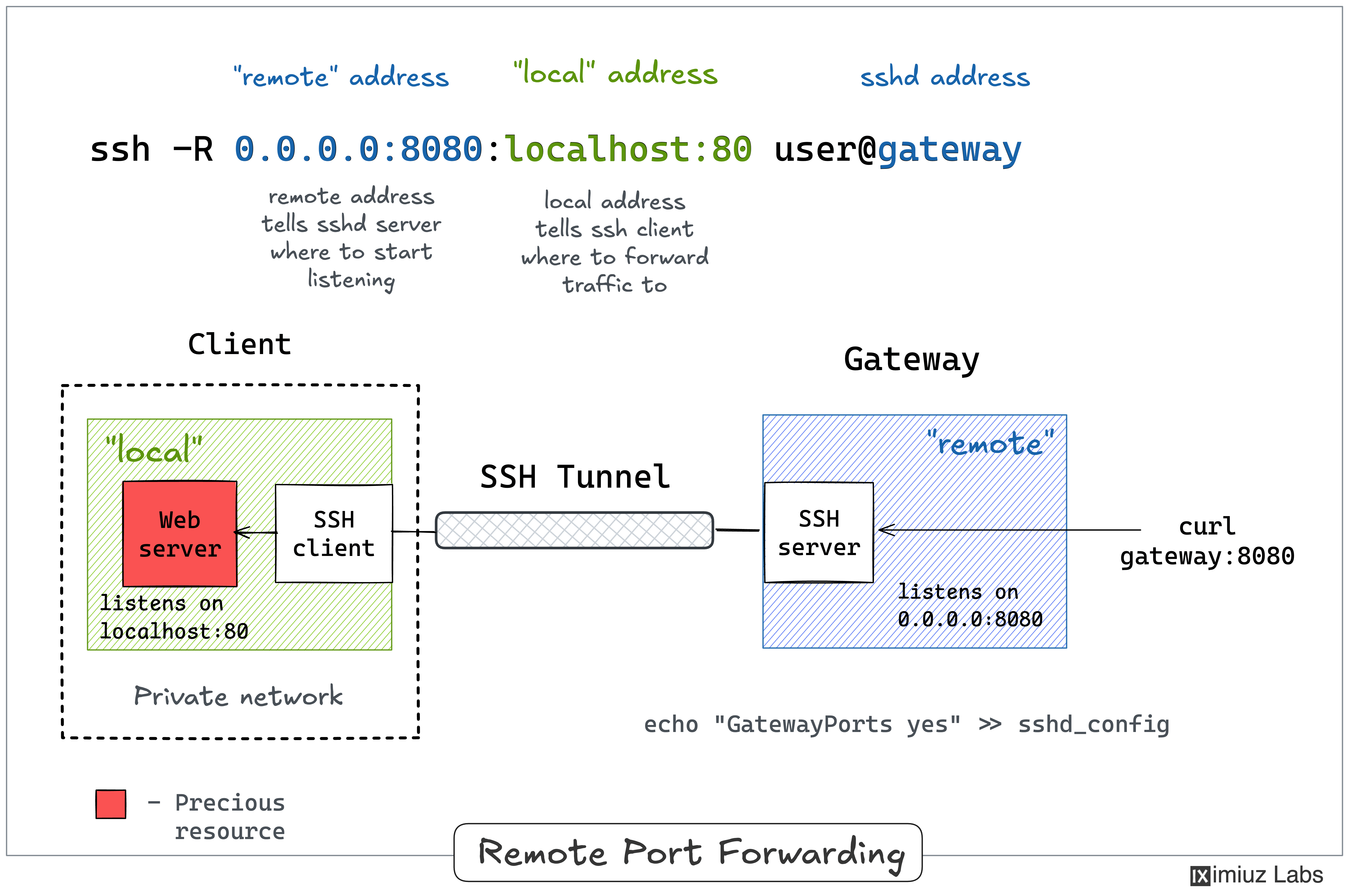
ssh -R [remote_addr:]remote_port:local_addr:local_port [user@]gateway_addr
The above command looks no more complicated than itsssh \-Lcounterpart. But there is a pitfall...
**By default, the above SSH tunnel will allow using only the gateway’s localhost as the remote address.**In other words, your local port will become accessible only from inside the gateway server itself, which is most likely not what you actually need. For instance, I typically want to use the gateway’s public address as the remote address to expose my local services to the public Internet. For that, the SSH server needs to be configured with theGatewayPorts yessetting.
Here is what remote port forwarding can be used for:
- Exposing a dev service from your laptop to the public Internet for a quick demo.
- Exposing your homelab to the public Internet (for arbitrary purposes).
- Tunneling your local browser’s debugging port to a remote and/or sandboxed coding agent.
Here is how the remote port forwarding can be visualized:
**Pro Tip:**Usessh \-f \-N \-Rto run the port-forwarding session in the background.
Lab 3: Using SSH Tunnels for Remote Port Forwarding 👨🔬This lab reproduces the setup from the diagram above. Thelocalworkstation runs a web server bound to127\.0\.0\.1:80, and we want to expose it to the outside through the public-facingremotegateway.
The service is bound to the loopback interface, so right now nobody but thelocalmachine itself can reach it. Try accessing it from theremotemachine:
curl --connect-timeout 3 203.0.113.20:80 # local.public
curl: (7) Failed to connect to 203.0.113.20 port 80 after 0 ms: Could not connect to server
We want to expose it through theremotegateway and consume it from theprivatehost. Theremotegateway already hasGatewayPorts yesin itssshd\_config, so we can ask it to listen on all of its interfaces (0\.0\.0\.0) and forward the traffic back to us.However, thelocalmachine has to establish the tunnel first.
From thelocalhost, start the remote port forwarding:
ssh -f -N -R 0.0.0.0:8080:localhost:80 203.0.113.30
#            remote       local        via
Now the local web service is published on the gateway’s interfaces. Let’s confirm it from athirdmachine - theprivatehost, which can reach theremotegateway over the VPC:
curl 172.16.0.30:8080 # remote.vpc
Hello from your local workstation (localhost-only service).
Remote Port Forwarding to a Home or Private Network
Similar to local port forwarding, remote port forwarding has its ownbastion or jump hostmode. But this time, the machine with the SSH client (e.g., your dev laptop) plays the role of the jump host. In particular, it allows exposing ports of a home (or private) network reachable from your laptop to the outside world through a remote SSH server acting as an ingress gateway:
ssh -R [remote_addr:]remote_port:local_addr:local_port [user@]gateway_addr
Looks almost identical to the simple remote SSH tunnel, but thelocal\_addr:local\_portpair becomes the address of a device in the home network. Here is how it can be depicted on a diagram:
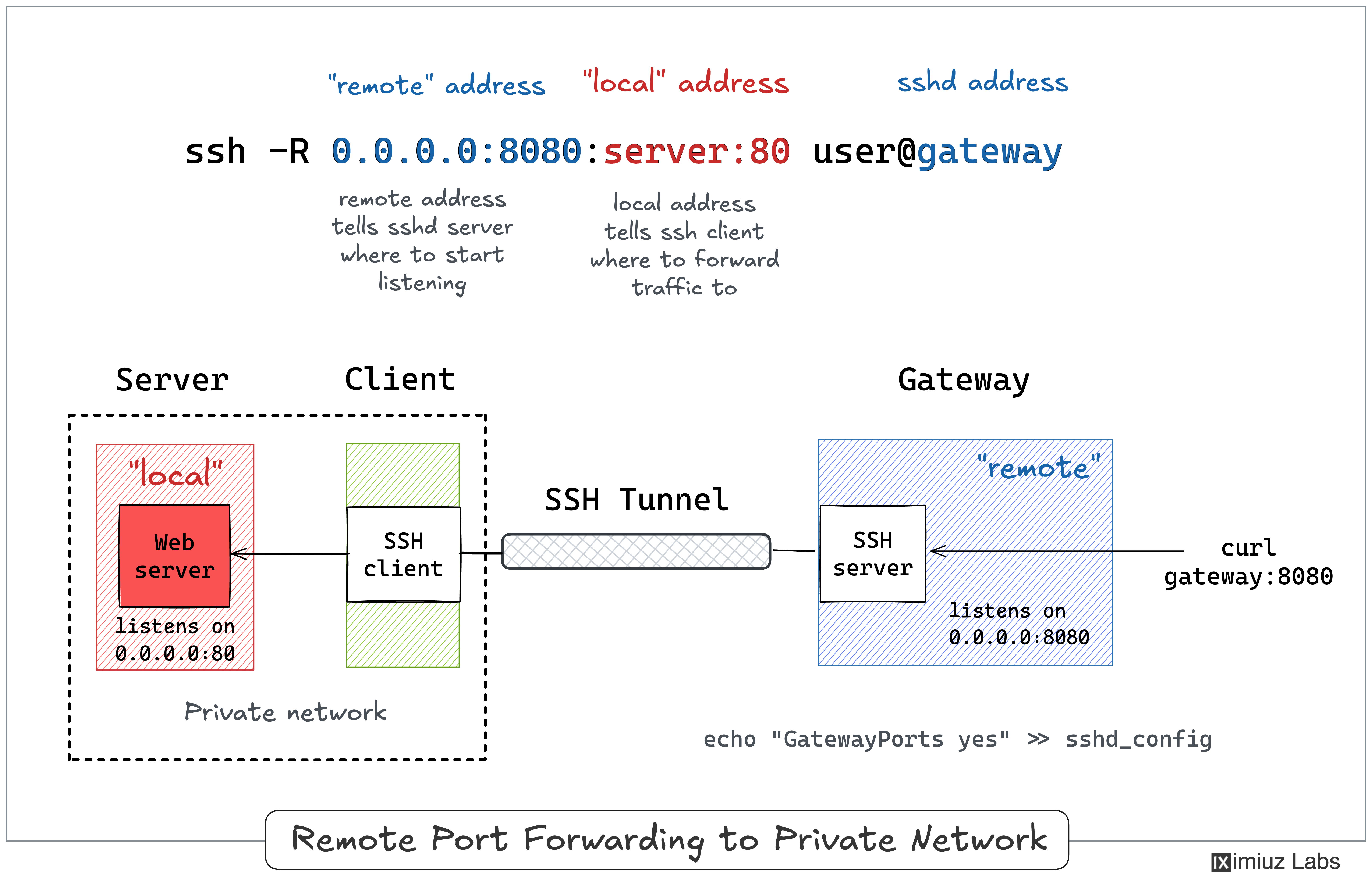
I typically use my laptop as a thin client and the actual development happens on a remote server. Sometimes, such a remote server can reside in my home network and have no or restricted Internet access (for extra isolation). This is when I may want to rely on remote port forwarding to expose a service from a home server to the public Internet, using my laptop that can access both the internal dev server and the remote SSH server (ingress gateway) as a jump host.
Lab 4: Remote Port Forwarding from a Home/Private Network 👨🔬This lab reproduces the setup from the diagram above. The service we want to expose runs on theinternalhost inside an isolated home network (192\.168\.0\.10:80). Ourlocalworkstation can reach the home network and also has SSH access to the public-facingremotegateway, so it plays the role of a jump host.
Thelocalhost can reach theinternalservice over the home network. From thelocalhost:
curl 192.168.0.10:80 # internal.home
Hello from the internal home-network host (192.168.0.10).
From the outside, though, theinternaldevice is invisible. Try accessing it from theremotehost:
curl --connect-timeout 3 192.168.0.10:80 # internal.home
curl: (28) Connection timed out after 3001 milliseconds
Theremotehost has no route into the home network, so the request simply times out.
Now, from thelocalhost,start the remote port forwarding from theremotegateway to theinternaldevice. The forwarding target (192\.168\.0\.10) is resolved by the SSH client, i.e., from thelocalhost’s point of view:
ssh -f -N -R 0.0.0.0:8081:192.168.0.10:80 203.0.113.30
#            remote       local           via
Finally, validate that the home-network service became accessible on the gateway - from theprivatehost, which reaches the gateway over the VPC:
curl 172.16.0.30:8081 # remote.vpc
Hello from the internal home-network host (192.168.0.10).
Dynamic Local Port Forwarding
This forwarding mode is less transparent for the clients, but it is also significantly more flexible than regular local port forwarding. Instead of wiring a local port to a single remote destination (likessh \-Ldoes),dynamic (local) port forwardingturns the SSH client into a localSOCKS proxy. Any application that can speak SOCKS can then send traffic through it, choosing the actual destination host and portper connection- they will be sent over to the SSH server, which will resolve the destination and establish the connection:
ssh -D [local_addr:]local_port [user@]sshd_addr
When the\-Dflag is used, the SSH client on your machine starts a SOCKS proxy listening onlocal\_port(onlocalhostby default). Each connection made through the proxy is forwarded to whatever address the SOCKS client asks for, reached from thesshd\_addrmachine.
In other words, it’s likessh \-L, but you don’t have to specify a singleremote\_addr:remote\_portupfront, because the SOCKS protocol allows specifying the destination at the beginning of each connection (via a few extra bytes sent right before the payload). One (local) proxied port gives you access toeveryhost and port reachable from the (remote) SSH server.
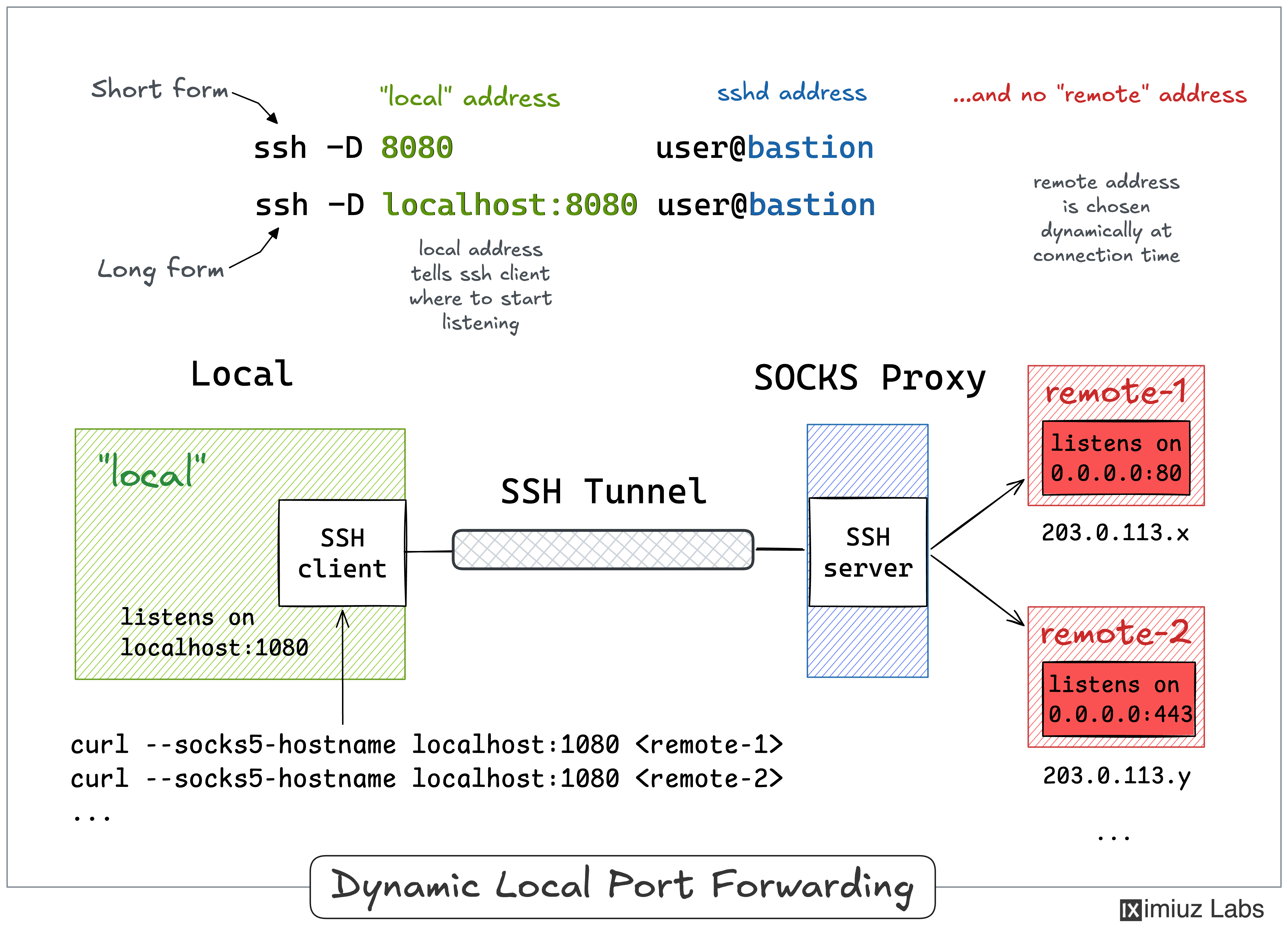
Here is what dynamic port forwarding can be used for:
- Calling APIs in a private network through a bastion, without a separate tunnel per service.
- Browsing internal web apps in a remote network via a single jump host.
- Reaching a fleet of VPC endpoints from your laptop through one EC2 instance.
**Pro Tip:**Usessh \-f \-N \-Dto run the SOCKS proxy in the background.
Lab 5: Using SSH Tunnels for Dynamic Port Forwarding 👨🔬This is the bastion scenario from Lab 2 again, except this time we won’t pin the tunnel to a single destination.
First, let’s make sure we cannot reach theprivatedestination from thelocalmachine:
curl --connect-timeout 3 172.16.0.40:80 # private.vpc
curl: (28) Connection timed out after 3002 milliseconds
Now, on thelocalhost, start a SOCKS proxy through theremotehost:
ssh -f -N -D 1080 203.0.113.30 # remote.public
If you pointcurlat the proxy to reach theprivateVPC service, the request will come through:
curl --socks5-hostname localhost:1080 172.16.0.40:80
#                      via            private.vpc
Hello from the private VPC host (172.16.0.40).
Note that unlike withssh \-L, the client - curl in this case - must be able to speak SOCKS (see the\-\-socks5\-hostnameflag).
The same SOCKS proxy reachesanyhost theremotemachine can - including asecondVPC host - without setting up a separate tunnel, try reaching theprivate\-2machine:
curl --socks5-hostname localhost:1080 172.16.0.50:80
#                      via            private-2.vpc
Hello from the second private VPC host (172.16.0.50).
Withssh \-L, reaching both private hosts would have meant two separate tunnels (one perremote\_addr:remote\_port). A singlessh \-Dproxy covers the whole network behind the bastion.
Dynamic Remote Port Forwarding
Just likessh \-Lhas a dynamic sibling inssh \-D, thessh \-Rcommand has its own dynamic mode. If you drop the fixed destination from\-Rand pass only a port, OpenSSH turns theSSH serveritself into a SOCKS proxy. It’s the exact mirror of\-D: this time the proxy lives on the gateway, and every connection made through it is tunneled back to thesshclient and resolved fromitspoint of view:
ssh -R [bind_address:]port [user@]gateway_addr
The\-Rflagwith no destination means:
- On the remote gateway, the SSH server starts a SOCKS proxy listening on
port(on the gateway’slocalhostby default, or on all interfaces withGatewayPorts yes). - Each connection made through the proxy is tunneled back to the
sshclient and forwarded to whatever address the SOCKS client asks for, reached from the client’s side.
It’s like a regularssh \-R, but you don’t have to choose a singlelocal\_addr:local\_portupfront. One proxy on the gateway exposeseveryhost and port reachable from thesshclient - for example, an entire home network.
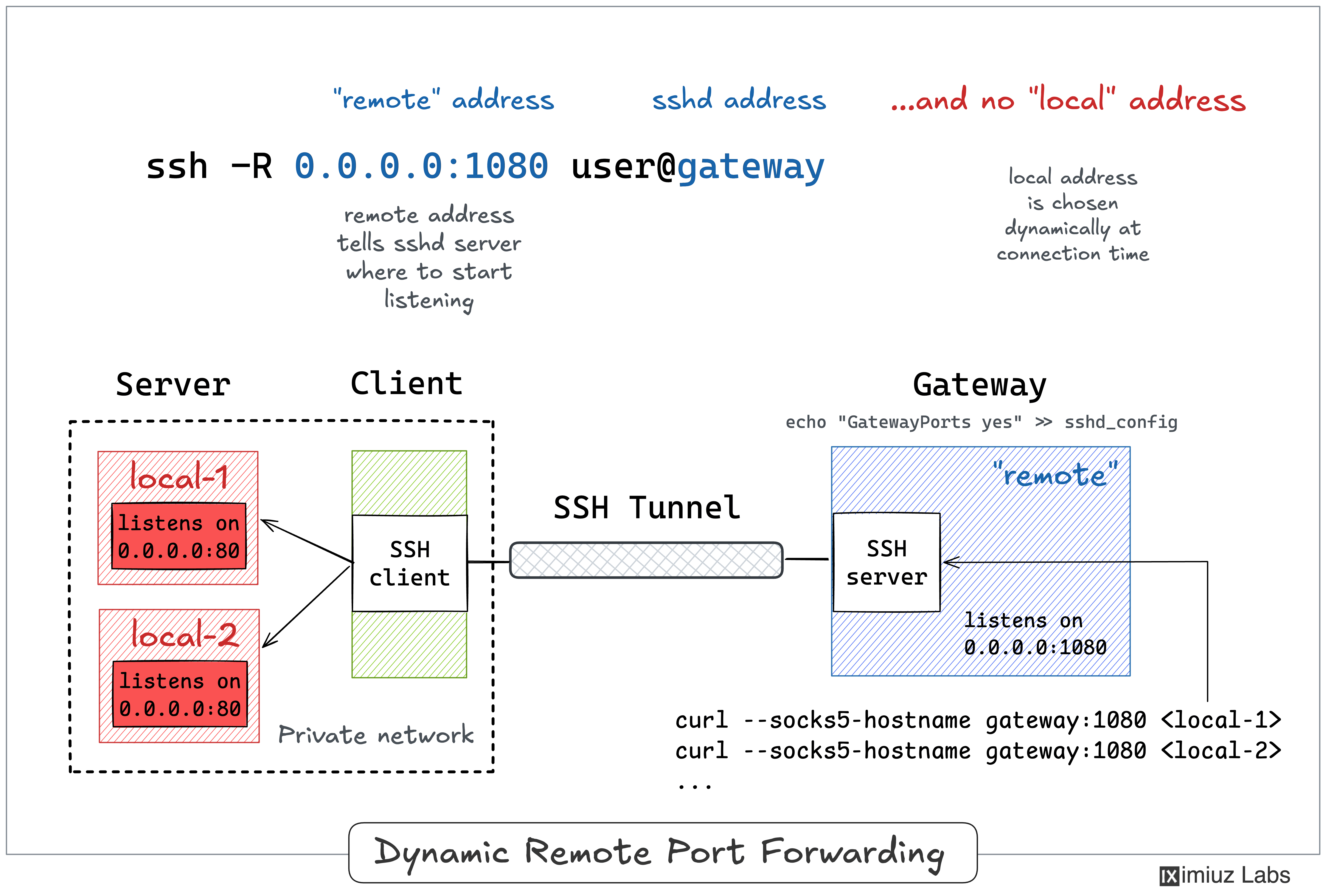
Remote dynamic forwarding requires OpenSSH 7.6 or newer on the client. As with a regularssh \-R, binding the proxy to a non-loopback address on the gateway needsGatewayPorts yesin itssshd\_config.
**Pro Tip:**Usessh \-f \-N \-Rto run the SOCKS proxy in the background.
Lab 6: Using SSH Tunnels for Remote Dynamic Port Forwarding 👨🔬This is the home-network scenario from Lab 4 again - we want to expose devices that onlylocalcan reach through the public-facingremotegateway - except this time a single proxy covers all of them.
First, let’s make sure we cannot reach theinternalhost from theprivatemachine:
curl 192.168.0.10:80 # internal.home
curl: (7) Failed to connect to 192.168.0.10 port 80 after 0 ms: Could not connect to server
Now, from thelocalhost, turn theremotegateway into a SOCKS proxy, and establish a tunnel with it:
ssh -f -N -R 0.0.0.0:1080 203.0.113.30 # remote.public
To recheck the connectivity, from theprivatehost again, use the gateway’s proxy to reach theinternalhome device:
curl --socks5-hostname 172.16.0.30:1080 192.168.0.10:80
#                      via              internal.home
Hello from the internal home-network host (192.168.0.10).
The same proxy reaches anything thesshclient (local) can - including its own loopback service:
curl --socks5-hostname 172.16.0.30:1080 127.0.0.1:80
#                      via              local's localhost
Hello from your local workstation (localhost-only service).
Summarizing
Here is a quick recap and a couple of mnemonics to help you memorize the SSH tunneling commands:
- Local port forwarding(
ssh \-L) makes a remote service available on a local port. - Remote port forwarding(
ssh \-R) makes a local service available on a remote port. - Dynamic local port forwarding(
ssh \-D) turns the localsshclient into a SOCKS proxy. - Dynamic remote port forwarding(
ssh \-Rwith no destination) turns thesshdserver into a SOCKS proxy. - Local port forwarding (
ssh \-L) implies it’s thesshclient that starts listening on a new port. - Remote port forwarding (
ssh \-R) implies it’s thesshdserver that starts listening on an extra port. - The wordlocalcan mean either theSSH client machineor an internal host accessible from it.
- The wordremotecan mean either the**SSH server machine (sshd)**or any host accessible from it.
- The mnemonics aressh**-Ll**ocal:remoteandssh**-R**r**emote:localand it’s always the left-hand side that opens a new port.
Hope the above materials helped you a bit with becoming a master of SSH Tunnels 🧙
Practice
Reinforce your learning by solving these practical challenges:
Resources
- SSH Tunneling Explainedby networking gurus from Teleport.
- SSH Tunneling: Examples, Command, Server Configby SSH Academy.
相似文章
SSH 隧道实用指南:本地和远程端口转发
一份实用教程,通过图表和实验讲解 SSH 本地和远程端口转发,用于安全访问内部网络服务。
@iximiuz: https://x.com/iximiuz/status/2069036148077293614
SSH本地和远程端口转发的可视化指南,解释如何通过SSH隧道访问私有服务以及暴露本地端口,包含实用示例和配置技巧。
@ai_suxiaole: 终端里最不缺的就是数字 真正缺的是一眼就能看懂趋势 GitHub 上有个 chartli 小工具,可以直接把命令行输出的数据渲染成图表 不管是服务器监控、日志分析还是脚本统计,只需要一条命令,就能生成 ASCII 折线图、柱状图、热力图、…
介绍一个名为 chartli 的命令行工具,可以将命令行输出的数字数据直接渲染成 ASCII 图表(折线图、柱状图、热力图等),支持管道输入、文件读取和多种图表类型,适合服务器监控、日志分析等场景。
@FakeMaidenMaker: the-book-of-secret-knowledge:工程师的秘籍合集 每次想找一个顺手的命令行工具或技巧,都得重新 Google 一堆,找到了又记不住,下次还得再找。 最近发现一个超好用的资源库,把日常折腾命令行会用到的 CLI 工…
介绍 GitHub 上的 the-book-of-secret-knowledge 仓库,收集了大量 CLI 工具、cheatsheet、运维技巧和安全资源,适合工程师日常查阅。
@FradSer: 分享一个这两天折腾下来,价值 $73.76 的网络优化 prompt: # 角色 你是一名远程网络维护助手。现在有一位"现场配合人"(下称"对方")坐在路由器旁、具备登录路由器后台的条件。你的工作是:先取得路由器的 SSH 访问权限,然后…
分享一个价值$73.76的网络优化Prompt,详细指导AI助手通过SSH远程诊断和优化家庭或企业网络问题,强调最小打扰、分层排查和可量化验证。