Cached at:
08/09/26, 02:41 AM
# DREI: WYSIWYG Emacs for HTML
Source: [https://speechcode.com/blog/drei](https://speechcode.com/blog/drei)
When editing text,[WYSIWYG](https://en.wikipedia.org/wiki/WYSIWYG), or What You See Is What You Get, is the way to go — if you can get it\. When I started this blog, I used Scheme code to represent the text of each blog post, like this:
> ``` ((p) "When editing text, " (a href "https://en.wikipedia.org/wiki/WYSIWYG") "WYSIWYG" ", or What You See Is What You Get, is the way to go — if you can get it. When I started this blog, I used Scheme code to represent the text of each blog post, like this:") ... ```
As you can imagine, that was a tedious way to edit text\.So I switched to[GNU Emacs](https://en.wikipedia.org/wiki/GNU_Emacs)'s[Org mode](https://en.wikipedia.org/wiki/Org-mode), and wrote a home\-grown wrapper around[Pandoc](https://pandoc.org/)to convert the Org file to HTML and do some custom rewriting, e\.g\. to add the standard header and metadata\.
Org mode is powerful, like Markdown, but it is impoverished in many ways\. Some things that can be expressed in HTML can't be expressed in Org mode without resorting to editing HTML directly, which defeats the purpose\. So I switched to editing HTML manually, and wrote an Emacs minor mode that hid the markup during normal editing, showing only the text\. That was still no fun to use\. Like the other approaches, it meant editing the posts in a form that didn't look at all like the final product\. None of my CSS formatting was rendered\.
I finally decided to invest the time to make something better\.I've written DREI[1](https://speechcode.com/blog/drei#footnote1), which stands for "DREI Rich Emacs Implementation\." It's a[Tauri](https://tauri.app/)app[2](https://speechcode.com/blog/drei#footnote2)that implements a strong subset of the Emacs text\-editing commands, but also includes commands like Blockquote, Heading, and Link for adding HTML elements\. All of the editing commands are written in Javascript\.
So far, I've implemented:
- forward and backward deletion and motion by character, line, word, sentence, paragraph, and buffer
- marking regions
- copy and paste
- transposition of characters and words
- capitalization, downcasing, and upcasing by word
- wrapping regions in`<a\>`,`<blockquote\>`,`<code\>`, and`<span\>`
- adding ordered and unordered lists
- saving to a filesystem or a web server
The two big features that are missing are incremental search and undo\.
There is much more to do, but it's already powerful and much nicer to use than the other tools I've used for editing HTML\.
For now, unlike other versions of Emacs, DREI only edits one page at a time\. One can specify the input file using the`\-\-file`command\-line argument, or one can use`\-\-url`to specify a URL from which the page will be read\. The other required argument,`\-\-selector`, specifies a CSS selector that designates what part of the page should be editable\. The whole page is displayed, but only that part can be changed\. For example, to edit the entire contents of a page read from a file:
`drei \-\-selector body \-\-file /tmp/index\.html`
Hitting`C\-x C\-s`will save the edited file to`/tmp/index\.html`\.
On the other hand, to read a page from a web server and write it back to that web server, only allowing edits to what is inside the HTML element whose ID is`contents`:
`drei \-\-selector '\#contents' \-\-url https://example\.com/index\.html`
This will read the page using the specified URL using HTTP GET, and will write it back using HTTP PUT\. However, there's a twist\. The GET reads the entire page, but DREI only PUTs the edited part of the page, e\.g\. the`\#contents`in this example\. The idea behind this is that the server can pre\-process the page before feeding it to DREI, and can post\-process it after updates\. When I edit my own blog posts, the file on disk contains just a bare minimum HTML document\. When DREI requests it, the server expands it with all the standard metadata, a header, and a footer, then delivers it to DREI\. When DREI saves a new version, the server receives just the edited part of the page, and wraps that in the original bare\-minimum HTML\. That way, the server takes care of boilerplate, I see the page exactly as it would appear on my web site, and the stored file contains nothing but the core page\. Here are the server's GET and PUT handlers[3](https://speechcode.com/blog/drei#footnote3):
```
(define-route ((request get public) ("blog" (? name)) ())
(let ((post (find (lambda (bp) (eq? (string->symbol name) (bp/symbol bp)))
blog-posts)))
(if post
(basic-html (write-blog-post post))
(signal-page-not-found not-found-response-code))))
(define (replace-body source new-contents)
(define body? (element-with-tag? 'body))
(axml-rewrite source
(lambda (element)
(and (body? element)
`(((body) ,@new-contents))))))
(define-route ((request put public) ("blog" (? name)) ())
(let* ((new-contents (parse-axml (read-request-content request)))
(symbol (string->symbol name))
(post (find (lambda (bp) (eq? symbol (bp/symbol bp))) blog-posts))
(source (replace-body (blog-source post) new-contents)))
(update-blog-source post source)
(make-http-response no-content-response-code '() (lambda () unspecific))))
```
It's alpha software, and DREI's limitations force me to go back and forth between it and GNU Emacs, but I'm already much happier editing this way\. Being able to see what a blog post will look like as I write it is so much better than the[punched\-card](https://en.wikipedia.org/wiki/Punched_card)feeling I get from using a compiled approach to text generation\.
I wrote this blog post using DREI\.
You can find it[on Github](https://github.com/arthurgleckler/drei)\.
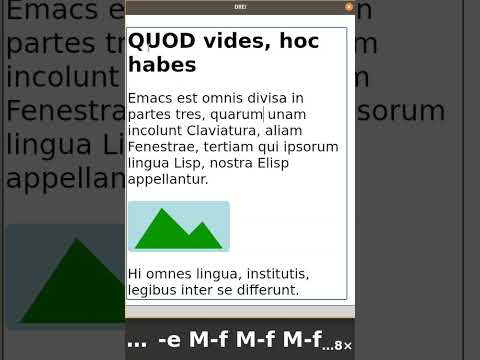
Here's a demo of DREI in action:
[](https://www.youtube.com/watch?v=fii6Lf8-z5U)
## Footnotes
1\. I chose the name "DREI" in homage to two implementations of Emacs from the[MIT Lisp Machine](https://en.wikipedia.org/wiki/Lisp_machine):[EINE](https://en.wikipedia.org/wiki/EINE_and_ZWEI), which stood for "EINE Is Not Emacs," and ZWEI, which stood for "ZWEI Was EINE Initially\." \(In German, one is "eine," two is "zwei," and three is "drei\."\) Perhaps it's presumptuous of me to use this name for my tiny subset of Emacs, but it has been forty years since there was another Emacs in this line, so it's probably okay\.
2\. There is WebKit support in GNU Emacs, so it should be able to render CSS and HTML, but I haven't been able to make those work well, so I'm sticking with DREI for now\.
3\. The web server is my Shuttle web server, proxied by Caddy\. I plan to publish it some day\. The blog\-editing code never runs on a public web server\.